BCGA1115Bluetooth 2.0+EDR Module
Apple Inc.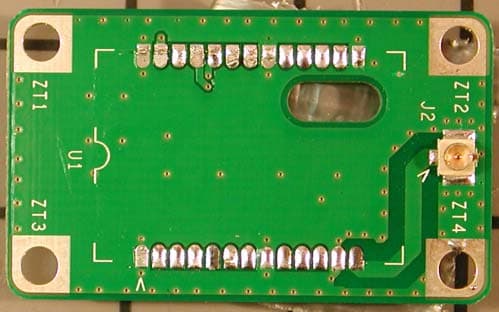
Click to zoom
Application Details
- Equipment Class
- DSS - Part 15 Spread Spectrum Transmitter
- Date of Grant
- Apr 26, 2005
- Application Purpose
- Original Equipment
- Date of Application
- Apr 26, 2005
- Equipment Note
- Bluetooth 2.0+EDR Module
- Frequency Range
- 2402.00000000 - 2480.00000000
- Company
- Apple Inc.
- Country
- United States
Documents & Files
Document Text
Text extracted from the exhibit documents filed with the FCC. Open a document above to read the original.
Users Manual
1 1 Apple Bluetooth 2.0+EDR Bluetooth 2.0+EDR (Enhanced Data Rate) Welcome to the world of Bluetooth. Your computer includes Apple Bluetooth 2.0+EDR technology that eliminates the need for many cables that traditionally connect devices together. Bluetooth enabled devices, such as computers, mobile phones, and handheld devices (PDAs), can connect to each other wirelessly at distances up to 10 meters (33 feet). This document provides information on how to • pair your Macintosh with a Bluetooth-enabled mobile phone and connect to the Internet • exchange files between Bluetooth-enabled devices Pairing Your Computer With a Bluetooth Enabled Mobile Phone Before you can connect to the Internet using your Bluetooth enabled mobile phone, you need to pair your computer with the phone. Make sure your phone is on and ready to accept a pair. This is often called “discoverable” mode. 1 Open System Preferences and click Bluetooth. 2 Click the Devices tab, and then click Setup New Device. 3 Follow the onscreen instructions. Note: To access the Internet, you must have a Bluetooth enabled mobile phone and subscribe to data services from a wireless operator. Unless you subscribe to “always on” data services (such as GPRS), you will also need an account with an Internet service provider (ISP) to access the Internet. Check with your providers for more information. 2 DraftVersion Connecting to the Internet 1 Open Internet Connect, located in the Applications folder. 2 Choose Bluetooth Modem Adapter from the Configuration pop-up menu, then click Connect. Exchanging Files Between Bluetooth-Enabled Devices You can use the Bluetooth File Exchange application to exchange files between one or more Bluetooth enabled devices. You can also use Bluetooth File Exchange to browse remote devices. Make sure the devices you want to exchange files with are in discoverable mode. 1 Open Bluetooth File Exchange, located in Applications/Utilities. 2 Select the files you want to send and click Send. 3 Select a device from the Device list and click Send. If the device you want to send the file to is not listed, click Search to find Bluetooth enabled devices in range. 4 If you are asked for a passkey, enter one and click Respond. If the device receiving the files is prompted for a passkey, enter the same passkey on the receiving device and click Respond. 5 If the receiving device is prompted that it is receiving a file, click Accept to receive the file. Depending on the options selected, you may be asked if you want to open the file. For more information on Bluetooth, choose Bluetooth Help from the Help menu, or go to www.apple.com/bluetooth. Communications Regulation Information FCC Declaration of Conformity This device complies with part 15 of the FCC rules. Operation is subject to the following two conditions: (1) This device may not cause harmful interference, and (2) this device must accept any interference received, including interference that may cause undesired operation. See instructions if interference to radio or television reception is suspected. Radio and Television Interference The equipment described in this manual generates, uses, and can radiate radio-frequency energy. If it is not installed and used properly—that is, in strict accordance with Apple’s instructions—it may cause interference with radio and television reception. This equipment has been tested and found to comply with the limits for a Class B digital device in accordance with the specifications in Part 15 of FCC rules. These specifications are designed to provide reasonable protection against such interference in a residential installation. However, there is no guarantee that interference will not occur in a particular installation. You can determine whether your computer system is causing interference by turning it off. If the interference stops, it was probably caused by the computer or one of the peripheral devices. If your computer system does cause interference to radio or television reception, try to correct the interference by using one or more of the following measures: • Turn the television or radio antenna until the interference stops. • Move the computer to one side or the other of the television or radio. • Move the computer farther away from the television or radio. • Plug the computer into an outlet that is on a different circuit from the television or radio. (That is, make certain the computer and the television or radio are on circuits controlled by different circuit breakers or fuses.) If necessary, consult an Apple-authorized service provider or Apple. See the service and support information that came with your Apple product. Or, consult an experienced radio/television technician for additional suggestions. Important: Changes or modifications to this product not authorized by Apple Computer, Inc., could void the FCC Certification and negate your authority to operate the product. This product was tested for FCC compliance under conditions that included the use of Apple peripheral devices and Apple shielded cables and connectors between system components. It is important that you use Apple peripheral devices and shielded cables and connectors between system components to reduce the possibility of causing interference to radios, television sets, and other electronic devices. You can obtain Apple peripheral devices and the proper shielded cables and connectors through an Apple-authorized dealer. For non-Apple peripheral devices, contact the manufacturer or dealer for assistance. Responsible party (contact for FCC matters only): Apple Computer, Inc., Product Compliance, 1 Infinite Loop M/S 26-A, Cupertino, CA 95014-2084, 408-974-2000. FCC Wireless Compliance The antenna used with this transmitter must not be colocated or operated in conjunction with any other antenna or transmitter subject to the conditions of the FCC Grant. Industry Canada Statement This Class B device meets all requirements of the Canadian interference-causing equipment …
Text truncated - open the document above for the full version.
ID Label/Location Info
PROPOSED FCC ID LABEL AND LOCATION APPLE COMPUTER INC. This device complies with Part 15 of the FCC Rules. Operation is subject to the following two conditions: (1) this device may not cause harmful interference, and (2) this device must accept any interference received, including interference that may cause undesired operation. FCC ID: BCGA1115 FCC ID LABEL LOCATION EUT PROPOSED FCC ID LABEL FOR HOST DEVICE APPLE COMPUTER INC. This device contains FCC ID: BCGA1115
Parts List/Tune Up Info
Antenna Model NumberAntenna ConnectorMaximum Gain (dBi) A1067u.fl+2.4 613-5956u.fl-2.6 Apple Bluetooth Module Apple File No. 2040C EUT: Model A1115 IC: 579C-A1115 Max Gain AntennadBiWeightHighWidthDeep A10672.42.23 Grams30.2 mm8.4 mm8.4mm Antenna Model A1067 -30 -25 -20 -15 -10 -5 0 5 0 5 10 15 20 25 30 35 40 45 50 55 60 65 70 75 80 85 90 95 100 105 110 115 120 125 130 135 140 145 150 155 160 165 170 175 180 185 190 195 200 205 210 215 220 225 230 235 240 245 250 255 260 265 270 275 280 285 290 295 300 305 310 315 320 325 330 335 340 345 350 355 2.40 GHz 2.44 GHz 2.48 GHz Top View Antenna Antenna Model A1067 External Antenna Patterns 2.40 GHz2.44 GHz2.48 GHz 0-10.03835-11.96459-11.50357 5-9.581989-9.073917-7.824733 10-10.56911-9.153512-6.713154 15-8.97483-12.24115-8.855391 20-7.0126-12.26909-12.3047 25-8.070571-6.109953-7.655806 30-5.98765-3.219242-3.099052 35-4.442096-4.817008-1.382272 400.068991-5.702644-1.130784 451.312484-1.892037-0.727012 501.8944010.678379-0.389715 552.4073611.492170.235784 600.3512630.2493521.348399 65-0.957357-1.761153-2.001771 701.0298460.619867-1.87875 75-0.6875451.3239810.11924 80-4.21222-0.517146-1.25682 85-4.426505-1.828809-5.423966 90-5.335782-3.921887-3.162481 95-7.970073-8.24368-3.909829 100-7.468774-5.460427-4.632046 105-9.210662-6.214457-3.92628 110-8.69893-22.43459-6.887175 115-5.864391-6.397224-11.63765 120-7.020487-2.879235-6.965231 125-12.84016-4.020503-5.811191 130-15.12087-7.201662-8.193522 135-11.33686-9.134813-12.9073 140-12.75895-10.31507-24.79316 145-17.89182-10.17635-15.69919 150-19.14675-8.902322-13.36676 155-17.95664-9.734718-12.676 160-23.9593-15.71826-14.09567 165-21.2269-20.87837-17.50182 170-17.41839-14.52719-20.96475 175-15.0544-14.41536-27.55443 180-13.7949-19.38175-21.18683 185-13.19544-25.34015-12.34466 190-13.71149-15.31614-9.875537 195-12.33462-12.32299-10.88894 200-10.45525-11.01351-10.65839 205-9.666121-10.35955-7.783642 210-9.989364-10.19938-7.586488 215-10.97002-10.25099-9.265891 220-12.16197-10.65322-7.44247 225-10.90546-8.497857-5.794559 230-7.597901-5.418791-5.447239 235-6.397491-4.999994-5.473012 240-7.283841-5.653408-5.895178 245-6.725956-5.199237-5.200245 250-5.934934-5.075652-5.045162 255-6.059343-5.594752-6.222062 260-4.968338-5.59208-5.783324 265-4.513696-5.458217-5.144912 270-5.905113-4.668907-5.878783 275-5.840154-3.993609-5.006478 280-5.311859-4.724874-3.686656 285-6.142645-3.850901-3.169656 290-6.205733-2.551008-2.664163 295-5.031802-2.724442-2.596477 300-4.153899-3.285694-2.498547 305-3.934139-3.379647-1.797635 310-4.042771-3.88967-1.520907 315-4.197103-4.230342-2.055883 320-4.241681-4.280611-3.057732 325-4.650069-4.918765-3.609169 330-5.180167-5.247031-3.884972 335-6.029757-4.508855-3.807353 340-7.616574-4.519939-3.819561 345-9.187682-6.148097-4.13117 350-12.66112-9.523358-5.643975 355-13.41011-14.13005-10.14502 Max2.4073611.492171.348399 Form No: CCSUC4005C (03-2003) PAGE NO : 1 OF 5 Apple Antenna 613-5956 Preliminary Apple Antenna Model 613-5956 -25 -20 -15 -10 -5 0 0 5 10 15 20 25 30 35 40 45 50 55 60 65 70 75 80 85 90 95 100 105 110 115 120 125 130 135 140 145 150 155 160 165 170 175 180 185 190 195 200 205 210 215 220 225 230 235 240 245 250 255 260 265 270 275 280 285 290 295 300 305 310 315 320 325 330 335 340 345 350 355 2.40 GHz 2.44 GHz 2.48 GHz Apple Antenna Model 613-5956 AVE-5.6 MAX-4.6-2.6-2.8 2.40 GHz2.44 GHz2.48 GHz 0-6.7014164-4.90515286-4.93892392 5-6.86408897-4.82798288-4.76859386 10-7.08590703-5.20456064-4.63254419 15-7.36810278-5.87312788-4.61275242 20-7.29146863-6.80368928-4.78497275 25-6.89485507-7.58035176-5.09664709 30-6.45121064-7.43202148-5.20980649 35-6.02774887-6.51879192-5.09137624 40-6.08157986-5.49404215-4.96080562 45-6.58582089-4.75516055-4.83804379 50-7.21581475-4.35394675-4.918796 55-7.77618152-4.34943561-5.00384803 60-7.97756725-4.72643105-5.23859244 65-8.15744504-5.47194108-5.53648372 70-8.24313227-6.54263969-5.936715 75-8.22909162-7.5378898-6.23469969 80-8.32006926-8.11547761-6.38410771 85-8.00878107-7.58262785-5.99466225 90-7.33364896-6.52408457-5.26284483 95-6.68086684-5.34692796-4.52725921 100-6.39759877-4.74010767-4.0615366 105-6.46625887-4.62779201-4.07464984 110-6.79862702-4.85727347-4.4051611 115-7.22463071-5.17040177-4.9472354 120-7.72762482-5.44406701-5.49012016 125-8.11027345-5.69492196-5.88317387 130-8.63192622-5.8892856-6.18680467 135-9.08767451-6.05097239-6.34399191 140-9.07841696-5.9515274-6.29673708 145-9.47445833-5.88425322-6.14053116 150-9.7012145-5.99595513-5.84291876 155-9.78797282-5.93022772-5.4468539 160-9.22187337-5.53772454-4.84694753 165-8.56618173-5.03965943-4.18028628 170-7.84017431-4.48491581-3.86736644 175-7.31349581-4.21116956-3.87332989 180-7.02887351-4.1171992-4.23417647 185-6.92912215-4.25829451-4.79073089 190-6.66973236-4.44504588-5.04984011 195-6.52696511-4.54534515-4.94245209 200-6.21764298-4.38276175-4.51478901 205-5.8904938-4.16172948-3.81919029 210-5.51827576-3.7526712-3.28635852 215-5.25709424-3.5077901-2.95729493 220-4.93286844-3.43736411-2.83626321 225-4.72063928-3.43607085-2.89200022 230-4.59824089-3.48151278-3.08858956 235-4.75532267-3.5751081-3.32909237 240-5.28945072-3.76993002-3.80833009 245-6.22061934-4.06315992-4.42327874 250-7.47093291-4.4796335-4.89174896 255-8.81622669-4.95876721-4.87483112 260-9.31516641-5.25315526-4.65055992 265-8.86637619-5.32854586-4.09960944 270-8.01941083-5.02992181-3.87416542 275-7.33652603-4.87673139-3.67386201 280-7.09076689-4.64928625-3.79618806 285-7.18174281-4.56316593-4.03926863 290-7.3115456-4.25030957-4.20122208 295-7.19140106-3.77258641-4.09188063 300-6.70850756-3.24080977-3.80713768 305-6.36531802-2.80447502-3.57912935 310-5.97744839-2.6442398-3.46140064 315-5.9090337-2.6981607-3.58882104 320-6.13377421-3.12958957-3.92775699 325-6.41429086-3.80583166-4.18002769 330-6.84446998-4.56948031-4.60140047 335-7.04925919-5.22271732-4.99514024 340-7.24088196-5.5861334-5.3371083 345-7.15186625-5.84545191-5.38950186 350-6.95483793-5.61882285-5.24943314 355-6.79356395-5.21259226-4.87215561
Test Report
TABLE OF CONTENTS 1 Test Report Summary 3 2 EUT Description 4 3 Test Methodology 5 4 Facilities and Accreditation 5 5 Calibration and Uncertainty 6 6 Setup of Equipment Under Test 8 7 Applicable Limits and Test Results 13 7.1 99% Bandwidth and 20 dB Bandwidth 13 7.2 Hopping Frequency Separation 20 7.3 Number of Hopping Channels 21 7.4 Average Time of Occupancy 27 7.5 Output Power 30 7.6 Average Power 31 7.7 Power Spectral Density 32 7.8 Conducted Spurious Emissions 36 7.9 Radiated Emissions 42 7.10 AC Power Line 68 Apple Bluetooth Module Apple File No. 2040 EUT: Model A1115 FCC ID: BCGA1115 Page 2 of 70 1 Test Report Summary SpecificationTest or RequirementResultComment N/A – For reporting purposes only 99% Bandwidth and 20 dB BandwidthN/ASection 7.1 CFR 15.247(a)(1)Hopping Frequency SeparationPassSection 7.2 CFR 15.247(a)(1)(iii)Number of Hopping ChannelsPassSection 7.3 CFR 15.247(b)(1)(iii)Average Time of OccupancyPassSection 7.4 CFR 15.247(b)(1) CFR 15.247(b)(4) Output PowerPassSection 7.5 N/A – For reporting purposes only Average PowerN/ASection 7.6 CFR 15.247(d) CFR 15.247(f) Peak Power Spectral DensityPassSection 7.7 CFR 15.247(c)Conducted Spurious EmissionsPassSection 7.8 CFR 15.205(a) CFR 15.209(a) Radiated EmissionsPassSection 7.9 CFR 15.207(a)AC Power Line Conducted EmissionsPassSection 7.10 Apple Bluetooth Module Apple File No. 2040 EUT: Model A1115 FCC ID: BCGA1115 Page 3 of 70 2 EUT Description The Apple Bluetooth Module, model number A1115, operates in the 2.4 GHz unlicensed Industrial, Scientific and Medical band and uses Frequency Hopping Spread Spectrum. This device uses the CSR BC417143B BlueCore4 External which is a single chip radio and baseband IC for Bluetooth 2.0+EDR including enhanced data rates (EDR) to 3 Mbps. Technical Information on the Apple Bluetooth Module is provided in the table below. Apple Bluetooth Module Information ProductTransceiver Trade NameApple Bluetooth Module Model NumberA1115 Power Supply3.3V DC Power Supply Frequency Range2402-2480 MHz Modulation TechniqueFHSS Emission Designator866KF1D Output Power5.7 dBm Apple Bluetooth Module Antenna Information Antenna Model NumberMaximum Gain (dBi) A1067+2.4 613-5956-2.6 Apple Bluetooth Module Apple File No. 2040 EUT: Model A1115 FCC ID: BCGA1115 Page 4 of 70 3 Test Methodology The tests documented in this report were performed in accordance with ANSI C63.4-2003 and FCC CFR 47 Part 2 and Part 15c. 4 Facilities and Accreditation 4.1 Facilities and Equipment The ac power line and RF conducted emissions measurements were performed at the Apple Computer, Inc. facility located at 20650 Valley Green Drive, Cupertino, California 95014. The radiated emissions measurements were performed at the Apple Computer, Inc. Evelyn 1, 10 meter semi-anechoic chamber located at 123 East Evelyn Ave., Mountain View, California 94041. Both of these facilities are constructed in conformance with the requirements of ANSI C63.4 and CISPR Publication 22. All Receiving equipment conforms to CISPR Publication 16-1, “Radio Interference Measuring Apparatus and Measurement Methods.” 4.2 Laboratory Accreditation The test facilities at Apple Computer, Inc. used to perform radiated and conducted emissions measurements are accredited by National Voluntary Laboratory Accreditation Program to perform Electromagnetic Interference tests according to FCC Part 15 and CISPR 22. The Apple Computer, Inc. NVLAP Lab Code is 200071-0 and is effective through September 30, 2005. The Apple Computer, Inc. Evelyn 1 10 meter Semi-anechoic chamber is currently listed with the FCC. The FCC Registration Number is 90450 and is effective through Jan 5, 2007. No part of this report may be used is a claim or endorsement by NVLAP or any agency of the US Government. Apple Bluetooth Module Apple File No. 2040 EUT: Model A1115 FCC ID: BCGA1115 Page 5 of 70 5 Calibration and Uncertainty 5.1 Measurement Instrument Calibration The measurement instruments utilized to perform the tests documented in this report have been calibrated in accordance with the manufacturer’s recommendations and are traceable to national standards. 5.2 Measurement Uncertainty The Apple measurement uncertainty policy, available upon request under Apple File Number EMC20, ensures uncertainty has been calculated using the proper procedure. Apple will use this measurement uncertainty knowledge in determining the pass / fail criteria from the test data. The measurement uncertainty has been determined to be the following: Conducted Emissions = +/- 2.3 dB Radiated Emissions = +/- 4.1 dB Apple Bluetooth Module Apple File No. 2040 EUT: Model A1115 FCC ID: BCGA1115 Page 6 of 70 5.3 Test Equipment The following test equipment was used. DescriptionManufacturerModel No.Identification No. Last Cal Next Cal Spectrum AnalyzerR&S ESIB 40100105Oct 2004Oct 2005 Spectrum AnalyzerR&S ESCI1166.5950.03July 2004July 2005 Spectrum AnalyzerHP 4403BMY41140805May 2004May 2005 ReceiverR & SESCS 301102.4500.30Jan 2005Jan 2006 AntennaSunol JB1A122302-1Jan 2005Jan 2006 AntennaSunol JB1A122302-2Jan 2005Jan 2006 AmplifierAmplifier ResearchARAmp 16Nov 2004Nov 2005 AmplifierAmplifier ResearchARAmp 17Nov 2004Nov 2005 AmplifierHP84493008A00713March, 2004March 2005 Horn AntennaEMCO 311734197March 2004March 2009 Horn AntennaEMCO3160-09011269-0041264Sept 2001Sept 2006 Power MeterBoonton4532165201May 2004May 2005 Power Meter SensorBoonton573183890May 2004May 2005 Apple Bluetooth Module Apple File No. 2040 EUT: Model A1115 FCC ID: BCGA1115 Page 7 of 70 6 Setup of Equipment Under Test EUT Support Equipment Peripheral Support Equipment DescriptionManufacturerModelSerial NumberFCC ID Desktop ComputerAppleG5SG85013NWSPA7DoC 4 GB USB iPodAppleA1051JQ437FPBPFWDoC 4 GB Firewire iPodAppleA1051JQ437GJBPFWDoC 17” CINEMA DisplayAppleA10812A430351PKKDoC 20 GB iPodAppleA1059JQ436JMXP59DoC Headphones/MicAndy-MayAM-333N/AN/A Display AC adapterAppleA1096Eh429k2vqukDoC USB KeyboardAppleA1048KY44003MGQL3BDoC USB MouseAppleA31VJ302009EN38ADoC Airport Expre…
Text truncated - open the document above for the full version.
Test Setup Photos
Apple Bluetooth Module Apple File No. 2040 EUT: Model A1115FCC ID: BCGA1115 Radiated Emissions below 1 GHz - Module installed in G5 Tower Apple Bluetooth Module Apple File No. 2040 EUT: Model A1115FCC ID: BCGA1115 Radiated Emissions with Module outside of enclosure Radiated Emissions Test Setup Zoom in on Module Apple Bluetooth Module Apple File No. 2040 EUT: Model A1115FCC ID: BCGA1115 Radiated Emissions Above 1 GHz Module outside of enclosure Module inside of G5 Enclosure Apple Bluetooth Module Apple File No. 2040 EUT: Model A1115FCC ID: BCGA1115 AC Power Line Conducted Emissions
Contact Information
Applicant
Abhishek Rala(Regulatory Compliance Manager)
Test Firm
Apple Computer, Inc.Robert Steinfeld
Technical Specifications
| # | Rule Parts | Frequency Range | Power Output |
|---|---|---|---|
| 1 | 15C | 2.40 GHz - 2.48 GHz | 3.70 mW |
Other Applications from Apple Inc.
BCG-E9204A
Sep 09, 2026Smartphone
Equipment Class
6VL - 15E 6 GHZ Very Low Power DeviceBCGA3277
Sep 09, 2026Magnetic Charging Cable
Equipment Class
DCD - Part 15 Low Power Transmitter Below 1705 kHzBCGA3641
Sep 09, 2026Magnetic Charger
Equipment Class
DCD - Part 15 Low Power Transmitter Below 1705 kHzBCGA3669
Sep 09, 2026Magnetic Charger
Equipment Class
DCD - Part 15 Low Power Transmitter Below 1705 kHzBCG-E9193A
Sep 09, 2026Smartphone
Equipment Class
PCE - PCS Licensed Transmitter held to ear