BCGA1221Bluetooth Headset
Apple Inc.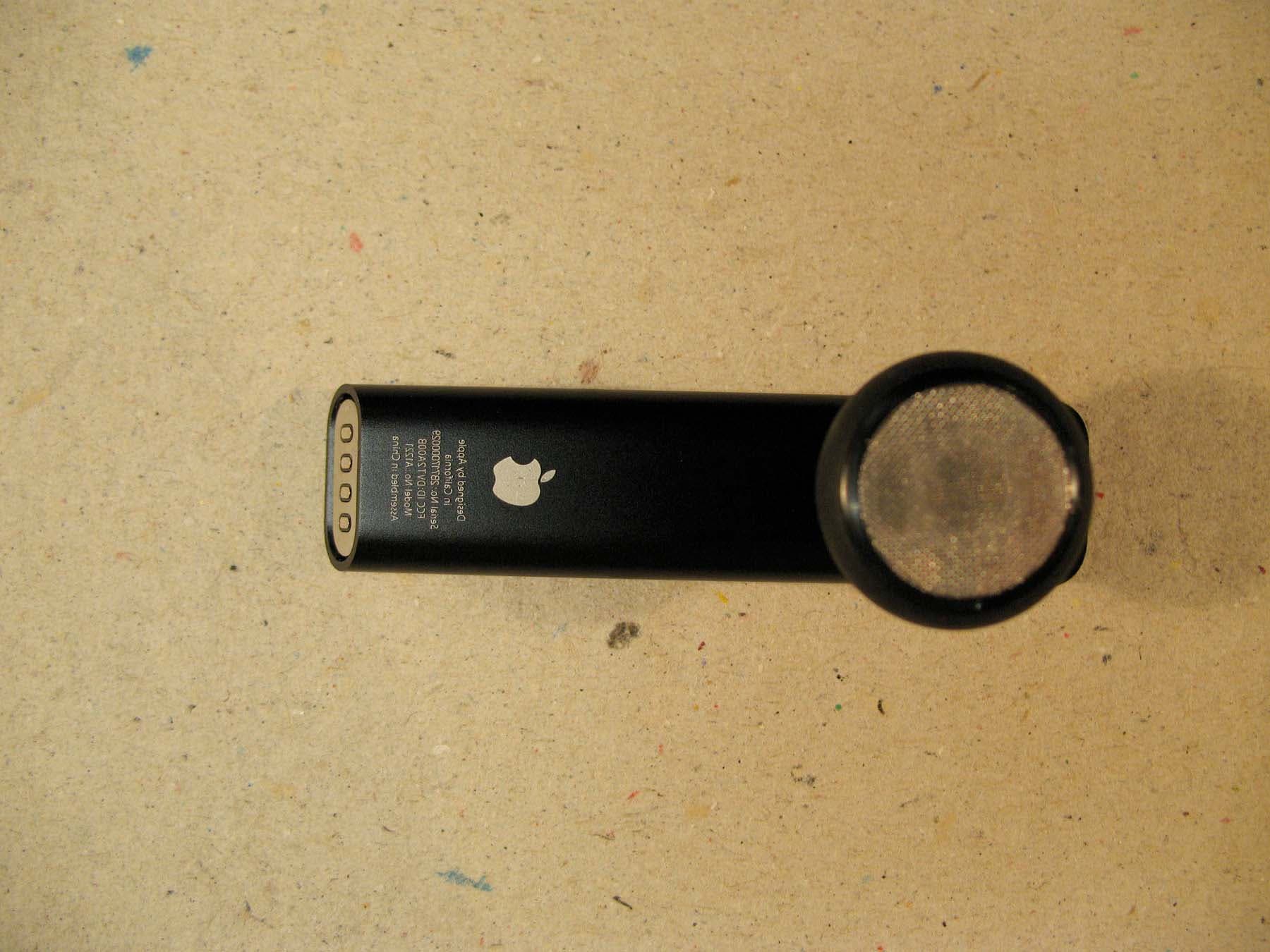
Click to zoom
Application Details
- Equipment Class
- DSS - Part 15 Spread Spectrum Transmitter
- Date of Grant
- Jun 14, 2007
- Application Purpose
- Original Equipment
- Date of Application
- Jun 14, 2007
- Equipment Note
- Bluetooth Headset
- Frequency Range
- 2402.00000000 - 2480.00000000
- Company
- Apple Inc.
- Country
- United States
Documents & Files
Document Text
Text extracted from the exhibit documents filed with the FCC. Open a document above to read the original.
Users Manual
iPhone Bluetooth Headset User’s Guide 3 Congratulations on your new iPhone Bluetooth ® Headset. Use the headset to talk hands-free on your iPhone. Follow these instructions to get started. Pair the Headset with iPhone 1 Connect the included iPhone Dual Dock to a USB 2.0 port on your computer (not on the keyboard). 2 Connect iPhone and the headset to the dock. The headset pairs with iPhone automatically. The fi rst time you connect the headset, let it charge for about an hour until the status light on the headset turns from amber to green. 3 Remove iPhone and the headset from the dock. Then press the button on the top of the headset so that calls will be routed through the headset. 4 You can also pair the headset with iPhone and charge the headset using the included iPhone Travel Cable. Connect the cable to your computer, then connect the headset and iPhone to the cable. 5 Make or Answer a Call 1 Place the headset in either ear with the microphone pointed towards your mouth. Note: Placing the included foam pad over the speaker may provide a more comfortable fi t. 2 Make a call on iPhone, or press the button on top of the headset to answer an incoming call. If you answer an incoming call by tapping the iPhone touchscreen, audio is routed through iPhone. 3 When you fi nish, press the button to end the call. Adjust the Volume m Use the volume buttons on the side of iPhone. WARNING: For important safety information about avoiding hearing loss, see page 13. 6 What Else You Can Do ToDo this Answer incoming callPress button. End current callPress button. Decline incoming callPress button for about one second, until you hear a beep. Switch to incoming or on-hold call and put current call on hold Press button. Switch to incoming or on-hold call and end current call Press button for about one second, until you hear a beep. Check whether headset is turned on Press button. If headset is on, status light blinks green and headset beeps. Turn headset onPress and hold button for about three seconds, until you see the status light blink green or hear four rising tones. Turn headset o∂ Press and hold button for about four seconds, until you see the status light blink amber or hear four falling tones. 7 Switch from the Headset to iPhone To stop using the headset and hear calls through iPhone instead, you can either: m Turn the headset o∂ . You can turn it on at any time to use it with iPhone again. m During a call, tap Audio Source on iPhone and choose iPhone or Speaker (for speakerphone). Reconnect the Headset to iPhone You can tell that calls will be routed through the headset if the Bluetooth icon (◊) in the iPhone status bar is blue or white (depending on which application you’re using). If the headset gets disconnected from iPhone, two low beeps sound from the headset. You can tell that the headset is disconnected from iPhone if the Bluetooth icon in the status bar is gray or isn’t present. To route calls through the headset: m Press the button to reinitiate a connection. m If that doesn’t work, make sure the headset is turned on, charged, and in range of iPhone (within about 30 feet). m If that doesn’t work, on iPhone make sure Bluetooth is turned on. From the Home screen, choose Settings > General > Bluetooth and turn Bluetooth on. m If that doesn’t work, pair the headset with iPhone again. See page 3. 8 Charge the Headset When the headset doesn’t have much charge left, a long beep sounds every ten seconds. To charge the headset: 1 Connect the included cable or dock to your computer. Or connect it to the Apple USB Power Adapter that comes with iPhone and connect the adapter to a standard power outlet. 2 Connect the headset to the cable or dock. A fully depleted headset recharges in about an hour and a half. Status light amber = Charging Status light green = Completely charged 3 Remove the headset from the dock. Press the button to connect the headset to iPhone, so that calls are routed through the headset. To see how much charge is left: m Connect iPhone and the headset to the dock or cable. The iPhone screen shows the headset’s battery level. The headset contains an internal, non-user-replaceable battery. Rechargeable batteries have a limited number of charge cycles and eventually will wear out. Battery life and number of charge cycles vary by use and settings. For more information, go to www.apple.com/batteries. For more information about disposal of the headset, see page 17. WARNING: For important safety information about charging the headset, see page 13. 9 Use the Headset with Another Phone or Device You can use the headset with some other Bluetooth devices, such as another phone. And you can pair the headset to iPhone manually, if you don’t have the cable or dock handy. You can also pair the headset with some Bluetooth enabled computers and talk to friends using an audio- enabled instant messaging application like iChat. To set the headset to be discoverable, so the other device can sense it: 1 Turn the headset o∂ . 2 Press and hold the headset button for about eight seconds, until you hear the startup tones and then fi ve quick high beeps. The headset remains discoverable for about fi ve minutes. The status light blinks green for as long as the headset is discoverable. To pair the headset with another phone or pair it with iPhone manually: 1 On the phone, turn Bluetooth on and set the phone to search for other Bluetooth devices. On iPhone, you do this by choosing Settings > General > Bluetooth and turning Bluetooth on. 2 Set the headset to be discoverable (see above). 3 On the phone, choose iPhone Bluetooth Headset and enter the PIN code 0000. See the instructions that came with your phone for more information about pairing it with Bluetooth devices. 10 To pair the headset with a Bluetooth enabled Mac using Mac OS X version 10.4.9 or later: 1 Open System Preferences and click Bluetooth. 2 Click Devices and click Set Up New Device. Then choose Headset. 3 Set the headset to be discoverable. 4 Fo…
Text truncated - open the document above for the full version.
Cover Letter(s)
47173 Benicia Street, Fremont CA 94538 Tel: 510-771-1000, Fax: 510-661-0888 Federal Communication Commissions 7435 Oakland Mills Road Columbia MD 21046 Subject: Request FCC to replace previous submitted user manual Ref: Applicant: Apple Computer Corp. FCC ID: BCGA1221 Grant date: 06/15/2007 To Whom It May Concern: CCS-TCB issued the grant on June 15, 2007, the test report uploaded contains test setup phot which is one of items as listed in the short term confidentiality letter. CCS-TCB is requesting FCC to delete the following files from database: Exhibit Type: Test Report, Type: PDF; File Size:1167559; Description: Test Report Exhibit Type : Test Report, Type PDF, File Size:1267441, Description : Test Report The correct test report without setup photo has been uploaded to FCC on June 26. The applicant statement which acknowledges the test report with setup photo has been available for public viewing has been uploaded to FCC as well. Best Regards Mike Kuo / V.P. Compliance Certification Services July 24, 2007
External Photos
FCC ID: BCGA1221 Exetrior Photo 1Showing speakerLeft end charging connections FCC ID: BCGA1221 Exterior Photo 2Left side view FCC ID: BCGA1221 Exterior Photo 3Right side view FCC ID: BCGA1221 Exterior Photo 4Back view with button on the t op end
ID Label/Location Info
FCC ID: BCGA1221 Other Label Text Apple Bluetooth Headset Label Drawing FCC ID Location
Internal Photos
FCC ID: BCGA1221 Interior Photo 1 Top View Earbud Flex FCC ID: BCGA1221 Interior Photo 2 Bottom View Earbud Flex FCC ID: BCGA1221 Interior Photo 3 Top View Tube Flex & Battery FCC ID: BCGA1221 Interior Photo 4 Bottom View Tube Flex FCC ID: BCGA1221 Interior Photo 5 Earbud Flex in unit with speaker shown on the side SPEAKER
Test Report
FCC CFR47 PART 15 SUBPART C CERTIFICATION TEST REPORT FOR BLUETOOTH HEADSET MODEL NUMBER: A1221 FCC ID: BCGA1221 REPORT NUMBER: 07U11077-1B ISSUE DATE: JUNE 14, 2007 Prepared for APPLE COMPUTER INC. 1 INFINITE LOOP CUPERTINO, CA. 95014, USA Prepared by COMPLIANCE CERTIFICATION SERVICES 47173 BENICIA STREET FREMONT, CA 94538, U.S.A. TEL: (510) 771-1000 FAX: (510) 661-0888 REPORT NO: 07U11077-1B DATE: JUNE 14, 2007 EUT: BLUETOOTH HEADSET FCC ID: BCGA1221 Page 2 of 95 COMPLIANCE CERTIFICATION SERVICES DOCUMENT NO: CCSUP4031A 47173 BENICIA STREET, FREMONT, CA 94538, USA TEL: (510) 771-1000 FAX: (510) 661-0888 This report shall not be reproduced except in full, without the written approval of CCS. Revision History Rev. Issue Date Revisions Revised By -- 06/11/07 Initial Issue T. Chan B 06/14/07 Removed MPE Section T. Chan REPORT NO: 07U11077-1B DATE: JUNE 14, 2007 EUT: BLUETOOTH HEADSET FCC ID: BCGA1221 Page 3 of 95 COMPLIANCE CERTIFICATION SERVICES DOCUMENT NO: CCSUP4031A 47173 BENICIA STREET, FREMONT, CA 94538, USA TEL: (510) 771-1000 FAX: (510) 661-0888 This report shall not be reproduced except in full, without the written approval of CCS. TABLE OF CONTENTS 1. ATTESTATION OF TEST RESULTS............................................................................................. 4 2. TEST METHODOLOGY .................................................................................................................. 5 3. FACILITIES AND ACCREDITATION .......................................................................................... 5 4. CALIBRATION AND UNCERTAINTY.......................................................................................... 5 4.1. MEASURING INSTRUMENT CALIBRATION ............................................................................. 5 4.2. MEASUREMENT UNCERTAINTY ............................................................................................... 5 5. EQUIPMENT UNDER TEST............................................................................................................6 5.1. DESCRIPTION OF EUT ..............................................................................................................6 5.2. MAXIMUM OUTPUT POWER .................................................................................................... 6 5.3. DESCRIPTION OF AVAILABLE ANTENNAS ............................................................................. 7 5.4. SOFTWARE AND FIRMWARE .................................................................................................... 7 5.5. WORST-CASE CONFIGURATION AND MODE......................................................................... 7 5.6. DESCRIPTION OF TEST SETUP ................................................................................................ 8 6. TEST AND MEASUREMENT EQUIPMENT .............................................................................. 11 7. LIMITS AND RESULTS ................................................................................................................. 12 7.1. ANTENNA PORT CHANNEL TESTS ......................................................................................... 12 7.1.1. 20 dB BANDWIDTH ......................................................................................................... 12 7.1.2. HOPPING FREQUENCY SEPARATION......................................................................... 19 7.1.3. NUMBER OF HOPPING CHANNELS ............................................................................. 22 7.1.4. AVERAGE TIME OF OCCUPANCY ............................................................................... 31 7.1.5. PEAK OUTPUT POWER .................................................................................................. 44 7.1.6. AVERAGE POWER........................................................................................................... 52 7.1.7. CONDUCTED SPURIOUS EMISSIONS.......................................................................... 53 7.2. RADIATED EMISSIONS.............................................................................................................70 7.2.1. TRANSMITTER RADIATED SPURIOUS EMISSIONS ................................................. 70 7.2.2. TRANSMITTER RADIATED EMISSIONS ABOVE 1 GHZ .......................................... 73 7.2.3. WORST-CASE RADIATED EMISSIONS BELOW 1 GHz ............................................. 90 8. SETUP PHOTOS .............................................................................................................................. 92 REPORT NO: 07U11077-1B DATE: JUNE 14, 2007 EUT: BLUETOOTH HEADSET FCC ID: BCGA1221 Page 4 of 95 COMPLIANCE CERTIFICATION SERVICES DOCUMENT NO: CCSUP4031A 47173 BENICIA STREET, FREMONT, CA 94538, USA TEL: (510) 771-1000 FAX: (510) 661-0888 This report shall not be reproduced except in full, without the written approval of CCS. 1. ATTESTATION OF TEST RESULTS COMPANY NAME: APPLE COMPUTER INC. 1 INFINITE LOOP CUPERTINO, CA 95014, USA EUT DESCRIPTION: BLUETOOTH HEADSET MODEL: A1221 SERIAL NUMBER: 2B7180000CC DATE TESTED: MAY 24 TO JUNE 04, 2007 APPLICABLE STANDARDS STANDARD TEST RESULTS FCC PART 15 SUBPART C NO NON-COMPLIANCE NOTED Compliance Certification Services, Inc. tested the above equipment in accordance with the requirements set forth in the above standards. The test results show that the equipment tested is capable of demonstrating compliance with the requirements as documented in this report. Note: The results documented in this report apply only to the tested sample, under the conditions and modes of operation as described herein. This document may not be altered or revised in any way unless done so by Compliance Certification Services and all revisions are duly noted in the revisions section. Any alteration of this document not carried out by Compliance Certification Services will constitute fraud and shall nullify the document. No part of this rep…
Text truncated - open the document above for the full version.
Test Setup Photos
REPORT NO: 07U11077-1 DATE: JUNE 11, 2007 EUT: BLUETOOTH HEADSET FCC ID: BCGA1221 Page 95 of 98 COMPLIANCE CERTIFICATION SERVICES DOCUMENT NO: CCSUP4031A 47173 BENICIA STREET, FREMONT, CA 94538, USA TEL: (510) 771-1000 FAX: (510) 661-0888 This report shall not be reproduced except in full, without the written approval of CCS. 8. SETUP PHOTOS ANTENNA PORT CONDUCTED RF MEASUREMENT SETUP ANTENNA PORT CONDUCTED PHOTO REPORT NO: 07U11077-1 DATE: JUNE 11, 2007 EUT: BLUETOOTH HEADSET FCC ID: BCGA1221 Page 96 of 98 COMPLIANCE CERTIFICATION SERVICES DOCUMENT NO: CCSUP4031A 47173 BENICIA STREET, FREMONT, CA 94538, USA TEL: (510) 771-1000 FAX: (510) 661-0888 This report shall not be reproduced except in full, without the written approval of CCS. RADIATED RF MEASUREMENT SETUP FOR PORTABLE CONFIGURATION X-AXIS FRONT PHOTO REPORT NO: 07U11077-1 DATE: JUNE 11, 2007 EUT: BLUETOOTH HEADSET FCC ID: BCGA1221 Page 97 of 98 COMPLIANCE CERTIFICATION SERVICES DOCUMENT NO: CCSUP4031A 47173 BENICIA STREET, FREMONT, CA 94538, USA TEL: (510) 771-1000 FAX: (510) 661-0888 This report shall not be reproduced except in full, without the written approval of CCS. Y-AXIS FRONT PHOTO REPORT NO: 07U11077-1 DATE: JUNE 11, 2007 EUT: BLUETOOTH HEADSET FCC ID: BCGA1221 Page 98 of 98 COMPLIANCE CERTIFICATION SERVICES DOCUMENT NO: CCSUP4031A 47173 BENICIA STREET, FREMONT, CA 94538, USA TEL: (510) 771-1000 FAX: (510) 661-0888 This report shall not be reproduced except in full, without the written approval of CCS. END OF REPORT Z-AXIS FRONT PHOTO
Contact Information
Applicant
Abhishek Rala(Regulatory Compliance Manager)
Test Firm
Compliance Certification ServicesBarbara Judge
Technical Specifications
| # | Rule Parts | Frequency Range | Power Output |
|---|---|---|---|
| 1 | 15C | 2.40 GHz - 2.48 GHz | 1.38 mW |
Other Applications from Apple Inc.
BCG-E9204A
Sep 09, 2026Smartphone
Equipment Class
6VL - 15E 6 GHZ Very Low Power DeviceBCGA3277
Sep 09, 2026Magnetic Charging Cable
Equipment Class
DCD - Part 15 Low Power Transmitter Below 1705 kHzBCGA3641
Sep 09, 2026Magnetic Charger
Equipment Class
DCD - Part 15 Low Power Transmitter Below 1705 kHzBCGA3669
Sep 09, 2026Magnetic Charger
Equipment Class
DCD - Part 15 Low Power Transmitter Below 1705 kHzBCG-E9193A
Sep 09, 2026Smartphone
Equipment Class
PCE - PCS Licensed Transmitter held to ear