BCGA12542x3 Access Point w/ 802.11 a/b/g/n Card
Apple Inc.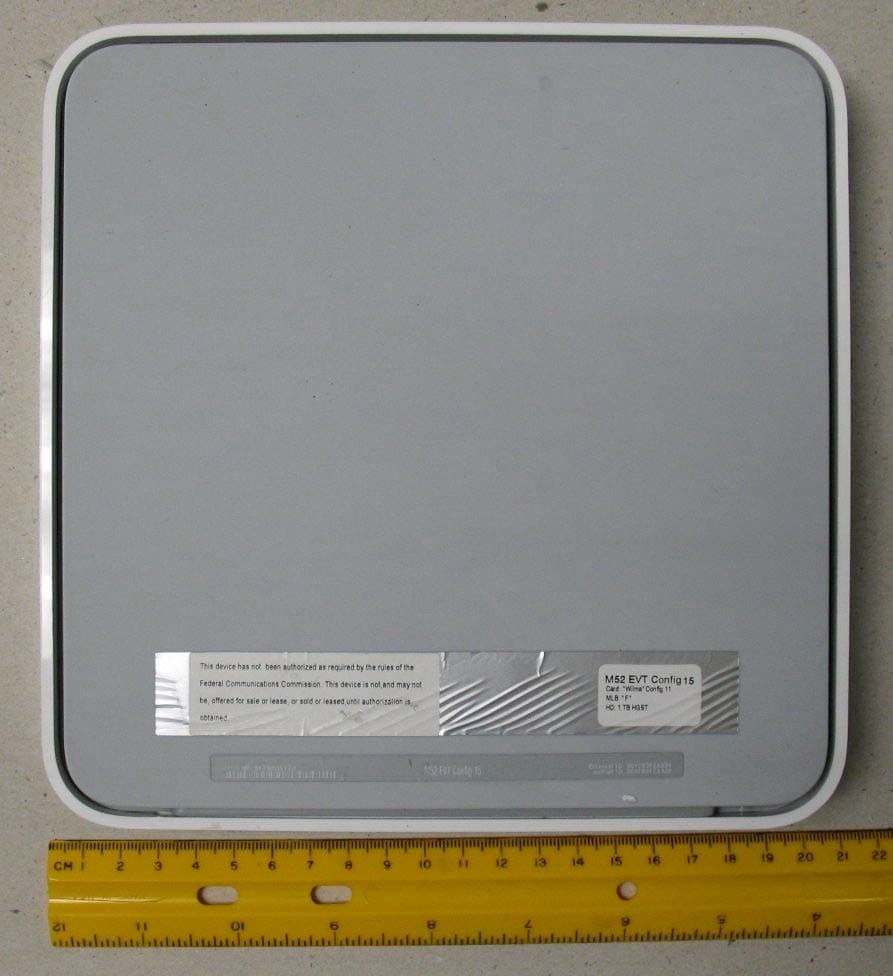
Click to zoom
Application Details
- Equipment Class
- DTS - Digital Transmission System
- Date of Grant
- Jan 14, 2008
- Application Purpose
- Original Equipment
- Date of Application
- Jan 14, 2008
- Equipment Note
- 2x3 Access Point w/ 802.11 a/b/g/n Card
- Frequency Range
- 5755.00000000 - 5795.00000000
- Company
- Apple Inc.
- Country
- United States
Documents & Files
Document Text
Text extracted from the exhibit documents filed with the FCC. Open a document above to read the original.
Users Manual
AirPort Extreme Setup Guide 2 Contents 4Chapter 1: Getting Started 5 About AirPort Extreme 6 About the AirPort Software 7 What You Need to Get Started 10 AirPort Extreme Status Light 11Chapter 2: AirPort Extreme Networks 12 Using AirPort Extreme with Your Broadband Internet Service 14 Using AirPort Extreme to Share a USB Printer 16 Using AirPort Extreme to Share USB Hard Disks 18 Using AirPort Extreme with Your AirPort Network 20Chapter 3: Setting Up AirPort Extreme 21 Using AirPort Utility 22 Creating a New Wireless Network 22 Configuring and Sharing Internet Access 24 Allowing Wireless Clients Access to Your Network 25 Setting Advanced Options Contents 3 26Chapter 4: Tips and Troubleshooting 26 You Can’t Connect to the Internet 26 You Forgot Your Network or Base Station Password 27 Your AirPort Extreme Isn’t Responding 28 Your AirPort Extreme Status Light Flashes Amber 29 Your Printer Isn’t Responding 30 Updating AirPort Software 30 AirPort Extreme Placement Considerations 31 Items That Can Cause Interference with AirPort 32Chapter 5: Learning More, Service, and Support 34Appendix: AirPort Extreme Specifications and Safety Guidelines 4 1 1 Getting Started Congratulations on purchasing AirPort Extreme. Read this guide to get started. AirPort Extreme is based on an Institute of Electrical and Electronics Engineers (IEEE) draft 802.11n specification and provides better performance and greater range than previous IEEE 802.11 standards. AirPort Extreme is compatible with computers using 802.11b, and 802.11g, as well as computers using the 802.11a and 802.11n wireless standards. With AirPort Extreme, you can:  Create a wireless network in your home, and then connect to the Internet and share the connection with multiple computers simultaneously. An entire family or office can be connected to the Internet at the same time.  Connect AirPort Extreme to your Ethernet network. Wireless-equipped Macintosh computers, Windows XP, or Windows Vista computers can then have access to an entire network without being connected by a cable.  Connect a supported USB printer to your AirPort Extreme. All of the compatible computers on the AirPort network, both wireless and wired, can print to it. Chapter 1 Getting Started 5  Connect a USB hard disk to your AirPort Extreme. All of the compatible computers on the AirPort network, both wireless and wired, can access the information on the hard disk.  Connect a USB hub to your AirPort Extreme, and then connect multiple USB devices, such as printers or hard disks. All of the computers on the network have access to those devices. Important: Install AirPort Utility 5.2 from the CD that came with your AirPort Extreme 802.11n Base Station and use it to set up your base station. Previous versions of the AirPort Setup Assistant and AirPort Admin Utility are not compatible with this base station. About AirPort Extreme AirPort Extreme has five ports, located on the back:  One 10/100/1000Base-T Gigabit Ethernet Wide Area Network (WAN) port (< ) for connecting a DSL or cable modem, or for connecting to an existing Ethernet network  Three 10/100/1000Base-T Gigabit Ethernet Local Area Network (LAN) ports (G ) for connecting Ethernet devices, such as printers or computers, or for connecting to an existing Ethernet network 6Chapter 1 Getting Started  One USB port (d ) for connecting a compatible USB printer, hard disk, or hub for connecting several devices Next to the ports is a reset button, which is used for troubleshooting your AirPort Extreme. The status light on the front of AirPort Extreme shows the current status. About the AirPort Software AirPort Extreme works with the AirPort software included on the AirPort Extreme CD. Install the AirPort Utility software that came on the CD and follow the instructions on the following pages to set up your AirPort Extreme and your AirPort wireless network. Status lightInternet WAN port AC adapter Power portUSB port Ethernet portsReset button Security slot Chapter 1 Getting Started 7 Note: You must use AirPort Utility to set up this base station. The AirPort Extreme 802.11n Base Station is not compatible with previous versions of AirPort software. What You Need to Get Started To use AirPort Extreme you need a wireless-enabled computer that is compliant with the IEEE 802.11a, 802.11b, or 802.11g standards, or with an IEEE 802.11n draft specification. To set up AirPort Extreme, your computer must meet the requirements listed below. To set up AirPort Extreme using a Macintosh, you need the following:  A Macintosh computer with an AirPort or AirPort Extreme Card installed to set it up wirelessly, or a Macintosh computer connected to AirPort Extreme with an Ethernet cable to set it up using Ethernet AirPort Utility AirPort Utility helps you set up your AirPort Extreme to create a wireless network, connect to the Internet, and share compatible USB printers and hard disks. You can also connect your AirPort Extreme to your existing AirPort Extreme or AirPort Extreme wireless network to extend the range of your network using a Wireless Distribution System (WDS). Use AirPort Utility to quickly and easily set up your AirPort Extreme and your wireless network. AirPort Utility is also an advanced tool for setting up and managing AirPort Extreme and AirPort Express Base Stations. Use AirPort Utility to manually adjust network, routing, and security settings and other advanced options. Z AirPort status menu in the menu bar Use the AirPort status menu to switch quickly between AirPort networks, monitor the signal quality of the current network, create a computer-to-computer network, and turn AirPort on and off. The status menu is available on computers using Mac OS X. 8Chapter 1 Getting Started  Mac OS X v10.4 or later  AirPort Utility 5.2 or later To set up AirPort Extreme using a Windows PC, you need the following:  A Windows PC with 300 MHz or higher processor speed and a compatible 802.11 wireless card  Windows XP Home or Professional…
Text truncated - open the document above for the full version.
Cover Letter(s)
1 Chris Harvey From: Claire Hoque [[email protected]] Sent: Friday, January 11, 2008 2:50 PM To: Chris Harvey Subject: partial answer: APPLE COMPUTER, FCC ID: BCGA1254, Assessment NO.: AN08T7490, Notice#1 Attachments: AP3 model 631-0546.xls; AP1 model 631-0515.xls; AP2 model 631-0545.xls AP3 model 31-0546.xls (154 KB AP1 model 31-0515.xls (108 KB AP2 model 31-0545.xls (219 KB Hi Chris, Since it is an urgent application(client requests to get grant by Jan.15), so I decide to provide partial answer first. 1. The test setup photos are still in the Test Report even though these have been included in the Short term Confidentiality request. The Test Setup Photo exhibit only included the RF Conducted test setup. Please re-issue the test report without the photos and re-issue the test setup photos to include all test setup photos. <answer>revised report and revised setup photos are all saved in AN08T7490 folder. 2. Please revise the Internal EUT Photos to also show the general construction, including the antennas, antenna cables and placement. <answer>we are working on it. 3. The antenna graphical exhibits were supplied in 3 separate Excel files, each with multiple tabs. The Excel program gives an error message indicating that 'data may have been lost.' Please create appropriate PDF files from your correct files and submit the antenna information in pdf file(s). Also, the Confidentiality Request Letter specifies an 'Antenna Specification' exhibit, which was not provided. Please submit these exhibits. <answer>I attached antenna files here, pls let me know if you could read them or not. If not, I will provide PDF files, pls inform me. And these three antenna exhibits are considered 'Antenna Specification' in confi. letter. 4. Please submit a detailed description of the 2x3 MIMO operation (i.e. is this a Spatial Multiplexed device, does it have cyclic diversity, are the antenna elements driven incoherently, etc.). Is this transmitter capable of operating on multiple channels simultaneously? <answer>we will do that. 5. The manual indicates that this device can operate in the 5.15-5.25GHz band (see page 37), but the application does not include this, or any of the UNII bands. Please confirm if this device is capable of any of the UNII bands. If not, please remove that reference in the manual. <answer>I just got final UNII report this morning, and I uploaded UNII application AN08T7496. 6. The FCC classifies devices that have computer ports, such as USB, as Computer Peripherals. FCC 15.101 indicates that Computer Peripheral devices can be approved by Declaration of Conformity (FCC DoC logo would be placed on the label) or Certification. This Transmitter application does not have an associated Certification application submitted, and the label does not contain the FCC logo. Please confirm which approval route was/is used for the Computer Peripheral portion of this device and provide the evidence of such approval. <answer>we will get answer from client. Thanks, 2 Claire Hoque Compliance Certification Services 47173 Benicia Street Fremont, CA 94538, USA Tel: (510) 771-1123 Fax: (510) 661-0888 -----Original Message----- From: Chris Harvey Sent: Friday, January 11, 2008 11:14 AM To: Claire Hoque Cc: Chris Harvey; Mike Kuo Subject: APPLE COMPUTER, FCC ID: BCGA1254, Assessment NO.: AN08T7490, Notice#1 Dear Claire Hoque, You are listed as the Technical Contact for the above referenced TCB application. The following item(s) need(s) to be resolved before the review can be continued: 1. The test setup photos are still in the Test Report even though these have been included in the Short term Confidentiality request. The Test Setup Photo exhibit only included the RF Conducted test setup. Please re-issue the test report without the photos and re-issue the test setup photos to include all test setup photos. 2. Please revise the Internal EUT Photos to also show the general construction, including the antennas, antenna cables and placement. 3. The antenna graphical exhibits were supplied in 3 separate Excel files, each with multiple tabs. The Excel program gives an error message indicating that 'data may have been lost.' Please create appropriate PDF files from your correct files and submit the antenna information in pdf file(s). Also, the Confidentiality Request Letter specifies an 'Antenna Specification' exhibit, which was not provided. Please submit these exhibits. 4. Please submit a detailed description of the 2x3 MIMO operation (i.e. is this a Spatial Multiplexed device, does it have cyclic diversity, are the antenna elements driven incoherently, etc.). Is this transmitter capable of operating on multiple channels simultaneously? 5. The manual indicates that this device can operate in the 5.15-5.25GHz band (see page 37), but the application does not include this, or any of the UNII bands. Please confirm if this device is capable of any of the UNII bands. If not, please remove that reference in the manual. 6. The FCC classifies devices that have computer ports, such as USB, as Computer Peripherals. FCC 15.101 indicates that Computer Peripheral devices can be approved by Declaration of Conformity (FCC DoC logo would be placed on the label) or Certification. This Transmitter application does not have an associated Certification application submitted, and the label does not contain the FCC logo. Please confirm which approval route was/is used for the Computer Peripheral portion of this device and provide the evidence of such approval. The items indicated above must be submitted before processing can continue on the above referenced application. Failure to provide the requested information within 30 days of the original e-mail date may result in application dismissal and forfeiture of the filing fee. Also, please note that partial responses increase processing time and should not be submitted. Any questions about the content of this correspondence should be directed to the e-mail address listed below the name of …
Text truncated - open the document above for the full version.
Cover Letter(s)
Chris Harvey From: Claire Hoque [[email protected]] Sent: Monday, January 14, 2008 2:40 PM To: [email protected] Subject: answer: APPLE COMPUTER, FCC ID: BCGA1254, Assessment NO.: AN08T7490, Notice#1 Attachments: antenna location and cable photos.pdf; additional internal photos.pdf; AP2.pdf; AP3.pdf; AP1.pdf; Addition to theory of oper.pdf 1/14/2008 Hi Chris, Since your schedule is very busy tomorrow, so I will try to complete answer here. 1. The test setup photos are still in the Test Report even though these have been included in the Short term Confidentiality request. The Test Setup Photo exhibit only included the RF Conducted test setup. Please re-issue the test report without the photos and re-issue the test setup photos to include all test setup photos. <answer>revised report and revised setup photos are all saved in AN08T7490 folder. 2. Please revise the Internal EUT Photos to also show the general construction, including the antennas, antenna cables and placement. <answer>additional photos are attached. Pls keep "antenna location and cable photo" as part of antenna spec. and keep it to be long-term confidential. <<antenna location and cable photos.pdf>> <<additional internal photos.pdf>> 3. The antenna graphical exhibits were supplied in 3 separate Excel files, each with multiple tabs. The Excel program gives an error message indicating that 'data may have been lost.' Please create appropriate PDF files from your correct files and submit the antenna information in pdf file(s). Also, the Confidentiality Request Letter specifies an 'Antenna Specification' exhibit, which was not provided. Please submit these exhibits. <answer>PDF antenna spec. files are attached. And these three antenna exhibits are considered 'Antenna Specification' in confi. letter. <<AP2.pdf>> <<AP3.pdf>> <<AP1.pdf>> 4. Please submit a detailed description of the 2x3 MIMO operation (i.e. is this a Spatial Multiplexed device, does it have cyclic diversity, are the antenna elements driven incoherently, etc.). Is this transmitter capable of operating on multiple channels simultaneously? <answer>additional operation description is attached. <<Addition to theory of oper.pdf>> 5. The manual indicates that this device can operate in the 5.15-5.25GHz band (see page 37), but the application does not include this, or any of the UNII bands. Please confirm if this device is capable of any of the UNII bands. If not, please remove that reference in the manual. <answer> I uploaded UNII application AN08T7496. 6. The FCC classifies devices that have computer ports, such as USB, as Computer Peripherals. FCC 15.101 indicates that Computer Peripheral devices can be approved by Declaration of Conformity (FCC DoC logo would be placed on the label) or Certification. This Transmitter application does not have an associated Certification application submitted, and the label does not contain the FCC logo. Please confirm which approval route was/is used for the Computer Peripheral portion of this device and provide the evidence of such approval. <answer>A part 15 B application will be filed today, we are working on the report. Thanks, Claire -----Original Message----- From: Chris Harvey [mailto:[email protected]] Sent: Friday, January 11, 2008 12:51 PM To: Claire Hoque Subject: RE: partial answer: APPLE COMPUTER, FCC ID: BCGA1254, Assessment NO.: AN08T7490, Notice#1 Thanks Claire. I still get the file error on the Excel spreadsheets. Please make PDF's. Thanks, Chris -----Original Message----- From: Claire Hoque [mailto:[email protected]] Sent: Friday, January 11, 2008 2:50 PM To: Chris Harvey Subject: partial answer: APPLE COMPUTER, FCC ID: BCGA1254, Assessment NO.: AN08T7490, Notice#1 Hi Chris, Since it is an urgent application(client requests to get grant by Jan.15), so I decide to provide partial answer first. 1. The test setup photos are still in the Test Report even though these have been included in the Short term Confidentiality request. The Test Setup Photo exhibit only included the RF Conducted test setup. Please re-issue the test report without the photos and re-issue the test setup photos to include all test setup photos. <answer>revised report and revised setup photos are all saved in AN08T7490 folder. 2. Please revise the Internal EUT Photos to also show the general construction, including the antennas, antenna cables and placement. <answer>we are working on it. 3. The antenna graphical exhibits were supplied in 3 separate Excel files, each with multiple tabs. The Excel program gives an error message indicating that 'data may have been lost.' Please create appropriate PDF 1/14/2008 files from your correct files and submit the antenna information in pdf file(s). Also, the Confidentiality Request Letter specifies an 'Antenna Specification' exhibit, which was not provided. Please submit these exhibits. <answer>I attached antenna files here, pls let me know if you could read them or not. If not, I will provide PDF files, pls inform me. And these three antenna exhibits are considered 'Antenna Specification' in confi. letter. 4. Please submit a detailed description of the 2x3 MIMO operation (i.e. is this a Spatial Multiplexed device, does it have cyclic diversity, are the antenna elements driven incoherently, etc.). Is this transmitter capable of operating on multiple channels simultaneously? <answer>we will do that. 5. The manual indicates that this device can operate in the 5.15-5.25GHz band (see page 37), but the application does not include this, or any of the UNII bands. Please confirm if this device is capable of any of the UNII bands. If not, please remove that reference in the manual. <answer>I just got final UNII report this morning, and I uploaded UNII application AN08T7496. 6. The FCC classifies devices that have computer ports, such as USB, as Computer Peripherals. FCC 15.101 indicates that Computer Peripheral devices can be approved by Declaration of Conformity (FCC DoC logo would be placed on the label) or Ce…
Text truncated - open the document above for the full version.
External Photos
Top Side Bottom Side Left Side Right Side Front Side Rear Side
Internal Photos
Enclosure with shield cover installed Enclosure with Shield Cover Removed Enclosure with Hard Drive and Power Supply Removed Enclosure with MLB Removed
Internal Photos
Enclosure with Antenna bracket installed Antennas Antenna Bracket with Antenna cable assembly and First Antenna Antenna Bracket with Second Antenna Antenna Bracket with Third Antenna
Internal Photos
MB-85 Top Side with Shield MB-85 Top Side without Shield MB-85 Bottom Side
Internal Photos
MLB Top Side MLB Bottom Side with Shield and MB-85 Card MLB Bottom with Shield and MB-85 Card Removed
Test Report
FCC CFR47 PART 15 SUBPART C INDUSTRY CANADA RSS-210 ISSUE 7 CERTIFICATION TEST REPORT FOR 2X3 ACCESS POINT W/ 802.11 a/b/g/n CARD MODEL NUMBER: A1254 FCC ID: BCGA1254 IC: 579C-A1254 REPORT NUMBER: 07U11257-9 ISSUE DATE: OCTOBER 25, 2007 Prepared for APPLE, INC. 1 INFINITE LOOP CUPERTINO, CA 95014, USA Prepared by COMPLIANCE CERTIFICATION SERVICES 47173 BENICIA STREET FREMONT, CA 94538, U.S.A. TEL: (510) 771-1000 FAX: (510) 661-0888 REPORT NO: 07U11257-9 DATE: OCTOBER 25, 2007 FCC ID: BCGA1254 IC: 579C-A1254 Page 2 of 111 COMPLIANCE CERTIFICATION SERVICES FORM NO: CCSUP4031A 47173 BENICIA STREET, FREMONT, CA 94538, USA TEL: (510) 771-1000 FAX: (510) 661-0888 This report shall not be reproduced except in full, without the written approval of CCS. Revision History Rev. Issue Date Revisions Revised By -- 10/25/07 Initial Issue Hsin Fu Shih REPORT NO: 07U11257-9 DATE: OCTOBER 25, 2007 FCC ID: BCGA1254 IC: 579C-A1254 Page 3 of 111 COMPLIANCE CERTIFICATION SERVICES FORM NO: CCSUP4031A 47173 BENICIA STREET, FREMONT, CA 94538, USA TEL: (510) 771-1000 FAX: (510) 661-0888 This report shall not be reproduced except in full, without the written approval of CCS. TABLE OF CONTENTS 1. ATTESTATION OF TEST RESULTS................................................................................ 5 2. TEST METHODOLOGY.................................................................................................... 6 3. FACILITIES AND ACCREDITATION ................................................................................ 6 4. CALIBRATION AND UNCERTAINTY ............................................................................... 6 4.1. MEASURING INSTRUMENT CALIBRATION ................................................................ 6 4.2. MEASUREMENT UNCERTAINTY ................................................................................. 6 5. EQUIPMENT UNDER TEST ............................................................................................. 7 5.1. DESCRIPTION OF EUT ................................................................................................. 7 5.2. MAXIMUM OUTPUT POWER ........................................................................................ 7 5.3. DESCRIPTION OF AVAILABLE ANTENNAS ................................................................ 7 5.4. SOFTWARE AND FIRMWARE ...................................................................................... 7 5.5. WORST-CASE CONFIGURATION AND MODE............................................................ 8 5.6. DESCRIPTION OF TEST SETUP .................................................................................. 9 6. TEST AND MEASUREMENT EQUIPMENT ................................................................... 11 7. ANTENNA PORT TEST RESULTS ................................................................................ 12 7.1. 802.11 b/g/n MODE IN THE 2.4 GHz BAND ................................................................ 12 7.1.1. 6 dB BANDWIDTH ................................................................................................ 12 7.1.2. 99% BANDWIDTH ................................................................................................ 17 7.1.3. OUTPUT POWER ................................................................................................. 22 7.1.4. POWER SPECTRAL DENSITY ............................................................................ 29 7.1.5. CONDUCTED SPURIOUS EMISSIONS............................................................... 32 7.2. 802.11a MODE IN THE 5.8 GHz BAND ....................................................................... 45 7.2.1. 6 dB BANDWIDTH ................................................................................................ 45 7.2.2. 99% BANDWIDTH ................................................................................................ 49 7.2.3. OUTPUT POWER ................................................................................................. 53 7.2.4. AVERAGE POWER .............................................................................................. 58 7.2.5. POWER SPECTRAL DENSITY ............................................................................ 59 7.2.6. CONDUCTED SPURIOUS EMISSIONS............................................................... 62 8. RADIATED TEST RESULTS .......................................................................................... 71 8.1. TRANSMITTER ABOVE 1 GHz ................................................................................... 72 8.1.1. TRANSMITTER ABOVE 1 GHz FOR 2.4 GHz 802.11b MODE............................ 72 8.1.2. TRANSMITTER ABOVE 1 GHz FOR 2.4 GHz 802.11g MODE............................ 77 8.1.3. TRANSMITTER ABOVE 1 GHz FOR 2.4 GHz 802.11g H20 MODE .................... 82 8.1.4. TRANSMITTER ABOVE 1 GHz FOR 2.4 GHz 802.11g H40 MODE .................... 87 8.1.5. TRANSMITTER ABOVE 1 GHz FOR 5.8GHz 802.11a MODE............................. 92 8.1.6. TRANSMITTER ABOVE 1 GHz FOR 5.8GHz 802.11n H20 MODE ..................... 93 8.1.7. TRANSMITTER ABOVE 1 GHz FOR 5.8GHz 802.11n H40 MODE ..................... 94 8.2. RECEIVER ABOVE 1 GHz........................................................................................... 95 8.2.1. RECEIVER ABOVE 1 GHz FOR 2.4 GHz 802.11n H20 BAND ............................ 95 8.2.2. RECEIVER ABOVE 1 GHz FOR 2.4 GHz 802.11n H40 BAND ............................ 96 8.2.3. RECEIVER ABOVE 1 GHz FOR 5.8 GHz 802.11n H20 BAND ............................ 97 8.2.4. RECEIVER ABOVE 1 GHz FOR 5.8 GHz 802.11n H40 BAND ............................ 98 8.3. WORST-CASE BELOW 1 GHz .................................................................................... 99 REPORT NO: 07U11257-9 DATE: OCTOBER 25, 2007 FCC ID: BCGA1254 IC: 579C-A1254 Page 4 of 111 COMPLIANCE CERTIFICATION SERVICES FORM NO: CCSUP4031A 47173 BENICIA STREET, FREMONT, CA 94538, USA TEL: (5…
Text truncated - open the document above for the full version.
Test Setup Photos
REPORT NO: 07U11257-9 DATE: OCTOBER 25, 2007 FCC ID: BCGA1254 IC: 579C-A1254 Page 109 of 111 COMPLIANCE CERTIFICATION SERVICES FORM NO: CCSUP4031A 47173 BENICIA STREET, FREMONT, CA 94538, USA TEL: (510) 771-1000 FAX: (510) 661-0888 This report shall not be reproduced except in full, without the written approval of CCS. 10. SETUP PHOTOS ANTENNA PORT CONDUCTED RF MEASUREMENT SETUP ANTENNA PORT CONDUCTED PHOTO REPORT NO: 07U11257-9 DATE: OCTOBER 25, 2007 FCC ID: BCGA1254 IC: 579C-A1254 Page 110 of 111 COMPLIANCE CERTIFICATION SERVICES FORM NO: CCSUP4031A 47173 BENICIA STREET, FREMONT, CA 94538, USA TEL: (510) 771-1000 FAX: (510) 661-0888 This report shall not be reproduced except in full, without the written approval of CCS. RADIATED RF MEASUREMENT SETUP RADIATED FRONT PHOTO RADIATED BACK PHOTO REPORT NO: 07U11257-9 DATE: OCTOBER 25, 2007 FCC ID: BCGA1254 IC: 579C-A1254 Page 111 of 111 COMPLIANCE CERTIFICATION SERVICES FORM NO: CCSUP4031A 47173 BENICIA STREET, FREMONT, CA 94538, USA TEL: (510) 771-1000 FAX: (510) 661-0888 This report shall not be reproduced except in full, without the written approval of CCS. POWERLINE CONDUCTED EMISSIONS MEASUREMENT SETUP END OF REPORT LINE CONDUCTED FRONT PHOTO LINE CONDUCTED BACK PHOTO
Contact Information
Applicant
Abhishek Rala(Regulatory Compliance Manager)
Test Firm
Compliance Certification ServicesBarbara Judge
Technical Specifications
| # | Rule Parts | Frequency Range | Power Output |
|---|---|---|---|
| 6 | 15C | 5.75 GHz - 5.79 GHz | 309.00 mW |
Other Applications from Apple Inc.
BCG-E9204A
Sep 09, 2026Smartphone
Equipment Class
6VL - 15E 6 GHZ Very Low Power DeviceBCGA3277
Sep 09, 2026Magnetic Charging Cable
Equipment Class
DCD - Part 15 Low Power Transmitter Below 1705 kHzBCGA3641
Sep 09, 2026Magnetic Charger
Equipment Class
DCD - Part 15 Low Power Transmitter Below 1705 kHzBCGA3669
Sep 09, 2026Magnetic Charger
Equipment Class
DCD - Part 15 Low Power Transmitter Below 1705 kHzBCG-E9193A
Sep 09, 2026Smartphone
Equipment Class
PCE - PCS Licensed Transmitter held to ear