BEJ55LD650HUALCD TV 55LD650H-UA
LG Electronics USA, Inc.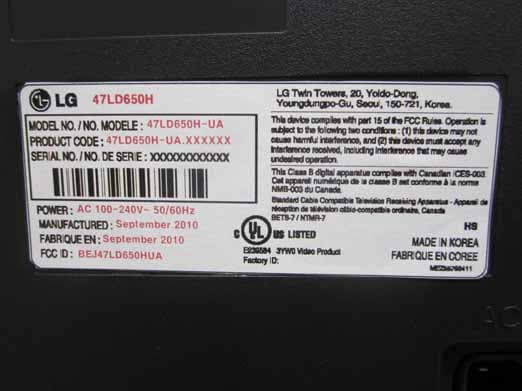
Click to zoom
Application Details
- Equipment Class
- JBP - Part 15 Class B Computing Device Peripheral
- Date of Grant
- Sep 14, 2010
- Application Purpose
- Original Equipment
- Date of Application
- Sep 14, 2010
- Equipment Note
- LCD TV 55LD650H-UA
- Company
- LG Electronics USA, Inc.
- Country
- United States
Documents & Files
Document Text
Text extracted from the exhibit documents filed with the FCC. Open a document above to read the original.
Users Manual
SOUND & LANGUAGE CONTROL 75 Each time you press the SAP button, Mono , Stereo , or SAP appear in turn. Return to TV viewing. 1 SAP 2 STEREO/SAP BROADCAST SETUP For Analog only: This TV can receive MTS stereo programs and any SAP (Secondary Audio Program) that accom- panies the stereo program if the station transmits an additional sound signal. Mono sound is automatically used if the broadcast is only in Mono. If other languages are available on the digital signal,select them with the SAP button. RETURN MONOSAPSTEREO SOUND & LANGUAGE CONTROL 76 SOUND &LANGUAGE CONTROL AUDIO LANGUAGE Other languages may be available if a digital signal is provided by the broadcasting station. This feature operates only in DTV mode. Enter Move OPTION Enter Move OPTION Menu Language: English Audio Language: English Caption: Off Set ID: 1 Demo Mode: Off Data Broadcasting Menu Language: English Audio Language: English Caption: Off Set ID: 1 Demo Mode: Off Data Broadcasting English Spanish French Select OPTION . Select Audio Language . Select your desired language. 1 MENU 3 2 ENTER ENTER 4 RETURN Return to the previous menu. MENU Return to TV viewing. SOUND & LANGUAGE CONTROL 77 ON-SCREEN MENUS LANGUAGE SELECTION The menus can be shown on the screen in the selected language. Enter Move OPTION Enter Move OPTION Menu Language: English Audio Language: English Caption: Off Set ID: 1 Demo Mode: Off Data Broadcasting Menu Language: English Audio Language: English Caption: Off Set ID: 1 Demo Mode: Off Data Broadcasting English Español Français Select OPTION . Select Menu Language . Select your desired language. From this point on, the on-screen menus will be shown in the selected language. 1 MENU 3 2 ENTER ENTER 4 RETURN Return to the previous menu. MENU Return to TV viewing. SOUND & LANGUAGE CONTROL 78 SOUND &LANGUAGE CONTROL CAPTION MODE Captions are provided to help the hearing impaired watch TV. Select a caption mode for displaying captioning information if provided on a program. Analog caption displays information at any position on the screen and is usually the program's dialog. Caption/Text, if provided by the broadcaster, would be available for both digital and analog channels on the Antenna/Cable. This TV is programmed to memorize the caption/text mode which was last set when you turned the power off. This function is only available when Caption Mode is set On . Select OPTION . Select Caption . Select On . 1 MENU 3 2 ENTER ENTER Select CC1 - 4 or Text1 - 4 . 4 Analog Broadcasting System Captions ■ When selecting Off , Sub-menus for Analog, DTV, and Digital Option become disabled. ■ CAPTION The term for the words that scroll across the bottom of the TV screen; usually the audio portion of the pro- gram provided for the hearing impaired. ■ TEXT The term for the words that appear in a large black frame and almost cover the entire screen; usually messages provid- ed by the broadcaster. 5 RETURN Return to the previous menu. MENU Return to TV viewing. Enter Move OPTION Enter Move OPTION Menu Language: English Audio Language: English Caption: Off Set ID: 1 Demo Mode: Off Data Broadcasting Menu Language: English Audio Language: English Caption: CC1 Set ID: 1 Demo Mode: Off Data Broadcasting Mode CC1 Close Digital Option F On G SOUND & LANGUAGE CONTROL 79 Digital Broadcasting System Captions Choose the language you want the DTV/CADTV Captions to appear in. Other Languages can be chosen for digital sources only if they are included on the program. This function in only available when CaptionMode is set On. Select OPTION . Select Caption . Select On . 1 MENU 3 2 ENTER ENTER Select CC1 - 4 , Text1 - 4 , or Service1 - 6 . 4 5 RETURN Return to the previous menu. MENU Return to TV viewing. Enter Move OPTION Enter Move OPTION Menu Language: English Audio Language: English Caption: Off Set ID: 1 Demo Mode: Off Data Broadcasting Menu Language: English Audio Language: English Caption: CC1 Set ID: 1 Demo Mode: Off Data Broadcasting Mode CC1 Close Digital Option F On G SOUND & LANGUAGE CONTROL 80 SOUND &LANGUAGE CONTROL Customize the DTV captions that appear on your screen. This function in only available when CaptionMode is set On. Caption Option Select OPTION . Select Caption . Select On . 1 MENU 3 2 ENTER ENTER Select Custom . 5 ENTER Customize the Size , Font , etc., to your preference. A preview icon is provided at the bottom of the screen, use it to see the caption language. 6 Select Digital Option . 4 ■ Size : Set the word size. ■ Font : Select a typeface for the text. ■ Text Color : Choose a color for the text. ■ Text Opacity : Specify the opacity for the text color. ■ Bg (Background) Color : Select a background color. ■ Bg (Background) Opacity : Select the opacity for the background color. ■ Edge Type : Select an edge type. ■ Edge Color : Select a color for the edges. 7 RETURN Return to the previous menu. MENU Return to TV viewing. Size A Standard Font Font 1 Text Color White Text Opacity Solid Edge Type None Edge Color Black Bg Color Black Bg Opacity Solid Close F Custom G Enter Move OPTION Enter Move OPTION Menu Language: English Audio Language: English Caption: Off Set ID: 1 Demo Mode: Off Data Broadcasting Menu Language: English Audio Language: English Caption: Off Set ID: 1 Demo Mode: Off Data Broadcasting Mode CC1 Close Digital Option On TIME SETTING 81 TIME SETTING CLOCK SETTING Auto Clock Setup The time is set automatically from a digital channel signal. The digital channel signal includes information for the current time provided by the broadcasting station. Set the clock manually if the current time is set incorrectly by the auto clock function. Enter Move TIME Enter Move TIME Clock Off Time: Off On Time: Off Sleep Timer: Off Clock Off Time: Off On Time: Off Sleep Timer: Off Month Date 21 Year 2009 Hour 10 AM 02 Minute 10 Time Zone Eastern Daylight Saving Auto Close F Auto G Select TIME . Select Clock . Select Auto . 1 MENU 3 2 ENTER ENTER Select your viewing area time zone : Eastern , Central , Mountain , Paci…
Text truncated - open the document above for the full version.
Users Manual
OWNER’S MANUAL LCD TV Please read this manual carefully before operating your set and retain it for future reference. P/NO : SAC34134301 (1006-REV01) www.lg.com 32LG710H 37LG710H 42LG710H 32LD650H 37LD650H 42LD650H 47LD650H 55LD650H 2 WARNING / CAUTION WARNING / CAUTION To prevent fire or shock hazards, do not expose this product to rain or moisture. FCC NOTICE Class B digital device This equipment has been tested and found to comply with the limits for a Class B digital device, pursuant to Part 15 of the FCC Rules. These limits are designed to provide reasonable protection against harmful interference in a residential installation. This equipment generates, uses and can radiate radio frequency energy and, if not installed and used in accordance with the instructions, may cause harmful interference to radio communications. However, there is no guarantee that interference will not occur in a particular installation. If this equipment does cause harmful interference to radio or television reception, which can be determined by turning the equipment off and on, the user is encouraged to try to correct the interference by one or more of the following measures: - Reorient or relocate the receiving antenna. - Increase the separation between the equipment and receiver. - Connect the equipment to an outlet on a circuit different from that to which the receiver is connected. - Consult the dealer or an experienced radio/TV technician for help. This device complies with part 15 of the FCC Rules. Operation is subject to the following two condi- tions: (1) This device may not cause (harmful) interference, and (2) this device must accept any interference received, including interference that may cause undesired operation (of the device). Any changes or modifications in construction of this device which are not expressly approved by the party responsible for compliance could void the user’s authority to operate the equipment. CAUTION Do not attempt to modify this product in any way without written authorization from LG Electronics. Unauthorized modification could void the user’s authority to operate this product WARNING RISK OF ELECTRIC SHOCK DO NOT OPEN The lightning flash with arrowhead symbol, within an equilateral triangle, is intended to alert the user to the presence of uninsulated “dangerous voltage” within the product’s enclosure that may be of sufficient magnitude to constitute a risk of electric shock to persons. The exclamation point within an equilateral triangle is intended to alert the user to the presence of important operating and maintenance (servicing) instructions in the literature accompanying the appliance. TO REDUCE THE RISK OF ELECTRIC SHOCK DO NOT REMOVE COVER (OR BACK). NO USER SERVICEABLE PARTS INSIDE. REFER TO QUALIFIED SERVICE PERSONNEL. WARNING/CAUTION TO REDUCE THE RISK OF FIRE AND ELECTRIC SHOCK, DO NOT EXPOSE THIS PRODUCT TO RAIN OR MOISTURE. NOTE TO CABLE/TV INSTALLER This reminder is provided to call the CATV system installer’s attention to Article 820-40 of the National Electric Code (U.S.A.). The code provides guidelines for proper grounding and, in particular, specifies that the cable ground shall be connected to the grounding system of the building, as close to the point of the cable entry as practical. 3 SAFETY INSTRUCTIONS Read these instructions. Keep these instructions. Heed all warnings. Follow all instructions. Do not use this apparatus near water. Clean only with a dry cloth. Do not block any ventilation openings. Install in accordance with the manufacturer’s instructions. Do not install near any heat sources such as radiators, heat registers, stoves, or other apparatus (including amplifiers)that produce heat. Do not defeat the safety purpose of the polarized or grounding-type plug. A polarized plug has two blades with one wider than the other. A grounding type plug has two blades and a third grounding prong, The wide blade or the third prong are provided for your safety. If the provided plug does not fit into your outlet, consult an electrician for replacement of the obsolete outlet. Protect the power cord from being walked on or pinched particularly at plugs, convenience receptacles, and the point where they exit from the apparatus. Only use attachments/accessories specified by the manufacturer. Use only with the cart, stand, tripod, bracket, or table specified by the manufacturer, or sold with the apparatus. When a cart is used, use caution when moving the cart/apparatus combination to avoid injury from tip-over. Unplug this apparatus during lighting storms or when unused for long periods of time. Refer all servicing to qualified service personnel. Servicing is required when the apparatus has been damaged in any way, such as power-supply cord or plug is damaged, liquid has been spilled or objects have fallen into the apparatus, the apparatus has been exposed to rain or moisture, does not operate normally, or has been dropped. IMPORTANT SAFETY INSTRUCTIONS 1 2 3 4 5 7 8 6 9 10 4 Never touch this apparatus or antenna during a thunder or lighting storm. When mounting a TV on the wall, make sure not to install the TV by the hanging power and signal cables on the back of the TV. Do not allow an impact shock or any objects to fall into the product, and do not drop onto the screen with something. CAUTION concerning the Power Cord : It is recommend that appliances be placed upon a dedicated circuit; that is, a single outlet circuit which powers only that appliance and has no additional outlets or branch circuits. Check the specification page of this owner's manual to be certain. Do not connect too many appliances to the same AC power outlet as this could result in fire or elec- tric shock. Do not overload wall outlets. Overloaded wall out- lets, loose or damaged wall outlets, extension cords, frayed power cords, or damaged or cracked wire insulation are dangerous. Any of these conditions could result in electric shock or fire. Periodically examine the cord of your…
Text truncated - open the document above for the full version.
Cover Letter(s)
LG Electronics USA. 1000 Sylvan Avenue Englewood Cliffs, New Jersey, United States Date: August 27, 2010 Compliance Certification Services Certification Division 47173 Benicia Street Fremont, CA 94538, USA To whom it may concern: I, the undersigned, hereby authorize Mr. Harvey Sung of Digital EMC Co., Ltd., to act on our behalf in all manners relating to application for equipment authorization, including signing of all documents relating to these matters. Any and all acts carried out by Mr. Harvey Sung of Digital EMC Co., Ltd. on our behalf shall have the same effect as acts of our own. In authorizing Digital EMC Co., Ltd. as our agent, we still recognize that we are responsible to: a) comply with the relevant provisions of the certification program; b) make all necessary arrangements for the conduct of the evaluation, including provision for examining documentation and access to all areas, records (including internal audit reports) and personnel for the purposes of evaluation (e.g. testing, inspection, assessment, surveillance, reassessment) and resolution of complaints; c) make claims regarding certification only in respect of the scope for which certification has been granted; d) do not use our product certification in such a manner as to bring the Certification Division into disrepute and not make any statement regarding our product certification which the Certification Division may consider misleading or unauthorized; e) upon suspension or cancellation of certification, discontinue use of all advertising matter that contains any reference thereto and return any certification documents as required by the Certification Division; f) use certification only to indicate the products are certified as being in conformity with specified standards; g) endeavor to ensure that no certificate or report nor any part thereof is used in a misleading manner; h) ensure that any reference to our product certification in communication media such as documents, brochures or advertising, complies with the requirements of the Certification Division; i) keep a record of all complaints made known to the us relating to the product’s compliance with requirements of the relevant standard and to make these records available to the Certification Division when requested; j) take appropriate action with respect to such complaints and any deficiencies found in products or services that affect compliance with the requirements for certification; k) document the actions taken. This authorization is valid until further written notice from the applicant. Sincerely Yours, Jae Cheon Lee) General Manager REMARK: 1. This authorization letter will be sent along with your application when filing with the Certification Division. 2. Please follow the format and type it on company letterhead and send original to us. 3. Authorized signature must be in agreement with grantee code contact in FCC database.
Cover Letter(s)
LG Electronics USA. 1000 Sylvan Avenue Englewood Cliffs, New Jersey, United States Date: August 27, 2010 Compliance Certification Services Certification Division 47173 Benicia Street Fremont, CA 94538, USA LETTER OF AUTHORIZATION To whom it may concern: We, the undersigned, hereby authorize Harvey Sung of DIGITAL EMC Co., Ltd., to act on our behalf in all manners relating to application for equipment authorization for FCC ID: BEJ47LD650HUA including signing of all documents relating to these matters. Any and all acts carried out by DIGITAL EMC Co., Ltd., on our behalf shall have the same affect as acts of our own. This authorization is valid until further written notice from LG Electronics USA. Sincerely, Jae Cheon Lee) General Manager
Cover Letter(s)
LG Electronics USA. 1000 Sylvan Avenue Englewood Cliffs, New Jersey, United States Date: August 27, 2010 Compliance Certification Services Certification Division 47173 Benicia Street Fremont, CA 94538, USA RE: Request of Confidentiality for FCCID: BEJ47LD650HUA To Whom It may Concern: Pursuant to Sections 0.457 and 0.459 of the Commission`s Rules(CFR 47), and Section 552 (b) (4) of the Freedom of Information Act, LG Electronics USA. hereby requests confidentiality and treatment of certain information accompanying this application. The materials contain trade secrets and proprietary information not customarily released to the public. The public disclosure of these matters might be harmful to the Applicant and provide unjustified benefits to its competitors. We are also hereby request Short-Term Confidentiality for 180 days after the grant as outlined in Public Notice DA 04-1705. This provision will give LG Electronics USA. temporary confidentiality of commercially sensitive information prior to product release. The requested permanent and Short-Term Confidential exhibits are listed as follows: PERMANENT & SHORT-TERM CONFIDENTIAL LIST Exhibit Description File name PERMANENT 1 Block Diagram Block Diagram_BEJ47LD650HUA.pdf 2 External Photos Ext Photo_BEJ47LD650HUA.pdf 3 Internal Photos Int Photo_BEJ47LD650HUA.pdf 4 Test-Setup Photos Test Photo_BEJ47LD650HUA.pdf SHORT-TERM 5 Users Manual User Manual_BEJ47LD650HUA.pdf The Applicant understands that pursuant to Rule 0.457, disclosure of this application and all accompanying documentations, where applicable, will not be public before the date of the Grant for this application. Sincerely, Jae Cheon Lee General Manager
Cover Letter(s)
LG Electronics USA. 1000 Sylvan Avenue Englewood Cliffs, New Jersey, United States Date: August 27, 2010 Compliance Certification Services Certification Division 47173 Benicia Street Fremont, CA 94538, USA LETTER OF AUTHORIZATION To whom it may concern: We, the undersigned, hereby authorize Harvey Sung of DIGITAL EMC Co., Ltd., to act on our behalf in all manners relating to application for equipment authorization for FCC ID: BEJ55LD650HUA including signing of all documents relating to these matters. Any and all acts carried out by DIGITAL EMC Co., Ltd., on our behalf shall have the same affect as acts of our own. This authorization is valid until further written notice from LG Electronics USA. Sincerely, Jae Cheon Lee) General Manager
Cover Letter(s)
LG Electronics USA. 1000 Sylvan Avenue Englewood Cliffs, New Jersey, United States Date: August 27, 2010 Compliance Certification Services Certification Division 47173 Benicia Street Fremont, CA 94538, USA RE: Request of Confidentiality for FCCID: BEJ55LD650HUA To Whom It may Concern: Pursuant to Sections 0.457 and 0.459 of the Commission`s Rules(CFR 47), and Section 552 (b) (4) of the Freedom of Information Act, LG Electronics USA. hereby requests confidentiality and treatment of certain information accompanying this application. The materials contain trade secrets and proprietary information not customarily released to the public. The public disclosure of these matters might be harmful to the Applicant and provide unjustified benefits to its competitors. We are also hereby request Short-Term Confidentiality for 180 days after the grant as outlined in Public Notice DA 04-1705. This provision will give LG Electronics USA. temporary confidentiality of commercially sensitive information prior to product release. The requested permanent and Short-Term Confidential exhibits are listed as follows: PERMANENT & SHORT-TERM CONFIDENTIAL LIST Exhibit Description File name PERMANENT 1 Block Diagram Block Diagram_BEJ55LD650HUA.pdf 2 External Photos Ext Photo_BEJ55LD650HUA.pdf 3 Internal Photos Int Photo_BEJ55LD650HUA.pdf 4 Test-Setup Photos Test Photo_BEJ55LD650HUA.pdf SHORT-TERM 5 Users Manual User Manual_BEJ55LD650HUA.pdf The Applicant understands that pursuant to Rule 0.457, disclosure of this application and all accompanying documentations, where applicable, will not be public before the date of the Grant for this application. Sincerely, Jae Cheon Lee General Manager
External Photos
FCC ID: BEJ47LD650HUA Copyright © 2010, DIGITAL EMC Co., Ltd. View 1 FRONT REAR Label Location FCC ID: BEJ47LD650HUA Copyright © 2010, DIGITAL EMC Co., Ltd. View 2 REAR PORT 1 SIDE PORT FCC ID: BEJ47LD650HUA Copyright © 2010, DIGITAL EMC Co., Ltd. View 3 LABEL
External Photos
FCC ID: BEJ55LD650HUA Copyright © 2010, DIGITAL EMC Co., Ltd. View 1 FRONT REAR Label Location FCC ID: BEJ55LD650HUA Copyright © 2010, DIGITAL EMC Co., Ltd. View 2 REAR PORT 1 SIDE PORT FCC ID: BEJ55LD650HUA Copyright © 2010, DIGITAL EMC Co., Ltd. View 3 LABEL
ID Label/Location Info
FCC ID: BEJ47LD650HUA Copyright © 2010, DIGITAL EMC Co., Ltd. View 1 REAR LABEL Label Location
ID Label/Location Info
FCC ID: BEJ55LD650HUA Copyright © 2010, DIGITAL EMC Co., Ltd. View 1 REAR LABEL Label Location
Internal Photos
FCC ID: BEJ47LD650HUA Copyright © 2010, DIGITAL EMC Co., Ltd. View 1 < Inside EUT > FCC ID: BEJ47LD650HUA Copyright © 2010, DIGITAL EMC Co., Ltd. View 2 < LCD Front > FCC ID: BEJ47LD650HUA Copyright © 2010, DIGITAL EMC Co., Ltd. View 3 < LCD Rear > FCC ID: BEJ47LD650HUA Copyright © 2010, DIGITAL EMC Co., Ltd. View 4 < LCD Label > FCC ID: BEJ47LD650HUA Copyright © 2010, DIGITAL EMC Co., Ltd. View 5 < IR Board Front > FCC ID: BEJ47LD650HUA Copyright © 2010, DIGITAL EMC Co., Ltd. View 6 < IR Board Rear > FCC ID: BEJ47LD650HUA Copyright © 2010, DIGITAL EMC Co., Ltd. View 7 < IR Board Label > FCC ID: BEJ47LD650HUA Copyright © 2010, DIGITAL EMC Co., Ltd. View 8 < Switch Board Front > FCC ID: BEJ47LD650HUA Copyright © 2010, DIGITAL EMC Co., Ltd. View 9 < Switch Board Rear > FCC ID: BEJ47LD650HUA Copyright © 2010, DIGITAL EMC Co., Ltd. View 10 < Switch Board Label > FCC ID: BEJ47LD650HUA Copyright © 2010, DIGITAL EMC Co., Ltd. View 11 < Main Board Front > FCC ID: BEJ47LD650HUA Copyright © 2010, DIGITAL EMC Co., Ltd. View 12 < Main Board Rear > FCC ID: BEJ47LD650HUA Copyright © 2010, DIGITAL EMC Co., Ltd. View 13 < Main Board Label > FCC ID: BEJ47LD650HUA Copyright © 2010, DIGITAL EMC Co., Ltd. View 14 < Power Board Front > FCC ID: BEJ47LD650HUA Copyright © 2010, DIGITAL EMC Co., Ltd. View 15 < Power Board Rear > FCC ID: BEJ47LD650HUA Copyright © 2010, DIGITAL EMC Co., Ltd. View 16 < Power Board Label >
Internal Photos
FCC ID: BEJ55LD650HUA Copyright © 2010, DIGITAL EMC Co., Ltd. View 1 < Inside EUT > FCC ID: BEJ55LD650HUA Copyright © 2010, DIGITAL EMC Co., Ltd. View 2 < LCD Front > FCC ID: BEJ55LD650HUA Copyright © 2010, DIGITAL EMC Co., Ltd. View 3 < LCD Rear > FCC ID: BEJ55LD650HUA Copyright © 2010, DIGITAL EMC Co., Ltd. View 4 < LCD Label > FCC ID: BEJ55LD650HUA Copyright © 2010, DIGITAL EMC Co., Ltd. View 5 < IR Board Front > FCC ID: BEJ55LD650HUA Copyright © 2010, DIGITAL EMC Co., Ltd. View 6 < IR Board Rear > FCC ID: BEJ55LD650HUA Copyright © 2010, DIGITAL EMC Co., Ltd. View 7 < IR Board Label > FCC ID: BEJ55LD650HUA Copyright © 2010, DIGITAL EMC Co., Ltd. View 8 < Switch Board Front > FCC ID: BEJ55LD650HUA Copyright © 2010, DIGITAL EMC Co., Ltd. View 9 < Switch Board Rear > FCC ID: BEJ55LD650HUA Copyright © 2010, DIGITAL EMC Co., Ltd. View 10 < Switch Board Label > FCC ID: BEJ55LD650HUA Copyright © 2010, DIGITAL EMC Co., Ltd. View 11 < Main Board Front > FCC ID: BEJ55LD650HUA Copyright © 2010, DIGITAL EMC Co., Ltd. View 12 < Main Board Rear > FCC ID: BEJ55LD650HUA Copyright © 2010, DIGITAL EMC Co., Ltd. View 13 < Main Board Label > FCC ID: BEJ55LD650HUA Copyright © 2010, DIGITAL EMC Co., Ltd. View 14 < Power Board Front > FCC ID: BEJ55LD650HUA Copyright © 2010, DIGITAL EMC Co., Ltd. View 15 < Power Board Rear > FCC ID: BEJ55LD650HUA Copyright © 2010, DIGITAL EMC Co., Ltd. View 16 < Power Board Label >
Test Report
DEMC#DREFCC1009-0828(1008-00779) TRF-EM-003(00)081218 Copyright c 2010, DIGITAL EMC CO., LTD. Page 2 of 35 CONTENTS 1. General Remarks........................................................................................................................ 3 2. Test Laboratory........................................................................................................................... 3 3. General Information of EUT....................................................................................................... 4 3.1 Product Information............................................................................................................... 4 4. Test Summary............................................................................................................................. 5 4.1 Summary of tests .................................................................................................................. 5 5. Test Set-up and operation mode............................................................................................... 6 5.1 Principle of Configuration Selection ...................................................................................... 6 5.2 Test Operation Mode ............................................................................................................. 6 5.3 Support Equipment Used ......................................................................................................7 6. Test Results : Emission.............................................................................................................. 8 6.1 Conducted Emission ............................................................................................................. 8 6.2 Radiated Emission .............................................................................................................. 16 DEMC#DREFCC1009-0828(1008-00779) TRF-EM-003(00)081218 Copyright c 2010, DIGITAL EMC CO., LTD. Page 3 of 35 1. General Remarks This Report describes the emission characteristics of the tested product. If the product will be used with additional equipment other than those mentioned in this report or if the tested product will be used against the manufacture's specifications, the compliance with the relevant standards for the system has to be ensured. 2. Test Laboratory Digital EMC Co., Ltd. has been accredited / filed / authorized by the agencies listed in the following table; Certificate Nation Agency Code Mark Accreditation Korea KOLAS 393 ISO/IEC 17025 USA FCC 101842 Test Facility list & NSA Data Site Filing Japan VCCI C-1427 R-1364, R-3385 T-1442 Test Facility list & NSA Data Korea KCC KR0034 Test Facility list & NSA Data Certification Germany TUV ROK0826C ISO/IEC 17025 Quality control in the testing laboratory is implemented as per ISO/IEC 17025 which is the “General requirements for the competents of calibration and testing laboratory”. DIGITAL EMC CO., LTD. Address: 683-3, Yubang-Dong, Yongin-Si, Kyunggi-Do, Korea. 449-080 http://www.digitalemc.com Tel: +82-31-321-2664 Fax: +82-31-321-1664 DEMC#DREFCC1009-0828(1008-00779) TRF-EM-003(00)081218 Copyright c 2010, DIGITAL EMC CO., LTD. Page 4 of 35 3. General Information of EUT 3.1 Product Information Equipment under Test LCD TV Monitor Model No. 55LD650H-UA Serial No NONE Type of Sample Tested Pre-Production Rating Power Supply AC100-240V, 50/60Hz High Frequency 667MHz,1920*1080(HDMI,D sub max resolution) Supplied Power for Test AC120V, 60Hz Applicant LG Electronics Inc. 19-1, Cheongho-ri, Jinwi-myeon, Pyeongtaek-si, Gyeonggi-do, Korea Manufacturer LG Electronics Inc. 19-1, Cheongho-ri, Jinwi-myeon, Pyeongtaek-si, Gyeonggi-do, Korea Factory LG Electronics Reynosa, Inc. LG Electronics USA, Inc_Reynosa 9801 South Cage Blvd. Suite 3F Pharr, TX. 78577 Date of Receipt of Sample 2010-08-26 < Product Specifications > DEMC#DREFCC1009-0828(1008-00779) TRF-EM-003(00)081218 Copyright c 2010, DIGITAL EMC CO., LTD. Page 5 of 35 4. Test Summary 4.1 Summary of tests The applied standards to evaluate the compliance of requirements is 47CFR Part 15, Subpart B and the measurement procedures specified in ANSI C63.4 are performed. Test Items Applied Standards Status Emission Conducted Emission FCC Part 15 Subpart B C Radiated Emission FCC Part 15 Subpart B C Note 1: C=Conform NC=Not Conform NT=Not Tested NA=Not Applicable DEMC#DREFCC1009-0828(1008-00779) TRF-EM-003(00)081218 Copyright c 2010, DIGITAL EMC CO., LTD. Page 6 of 35 5. Test Set-up and operation mode 5.1 Principle of Configuration Selection Emission : The equipment under test (EUT) was configured to measure its highest possible radiation level. The test modes were adapted accordingly in reference to the instructions for use. 5.2 Test Operation Mode - DSUB mode : Resolution 1920*1080 MAX, “H” character scroll - HDMI mode : Resolution 1920*1080 MAX, “H” character scroll - USB mode : USB file play EUT is the following operational conditions apply: a) Set the contrast control to maximum. b) Set the brightness control to maximum or at raster extinction if raster extinction occurs at less thanmaximum brightness. c) For color monitors, use white letters on a black background to represent all colors. d) Select the worse case of positive or negative video if both alternatives are available. e) Set character size and number of characters per line so that the typical maximum number of charac-ters per screen is displayed. f) For a monitor that has no graphics capabilities, regardless of the video card used, a pattern consistingof random text shall be displayed. For a monitor with graphics capability, even though another videocard may be needed to accomplish a graphic display, a screen pattern consisting of lines of scrollingH’s should be displayed. For a monitor that has no text capabilities, use a typical display. That pat-tern should be used for the remainder of the tests. DEMC#DREFCC1009-0828(1008-00779) TRF-EM-003(00)081218 Copyright c 2010, DIGITA…
Text truncated - open the document above for the full version.
Test Setup Photos
FCC ID: BEJ47LD650HUA Copyright © 2010, DIGITAL EMC Co., Ltd. View 1 FCC ID: BEJ47LD650HUA Copyright © 2010, DIGITAL EMC Co., Ltd. View 2
Test Setup Photos
FCC ID: BEJ55LD650HUA Copyright © 2010, DIGITAL EMC Co., Ltd. View 1 FCC ID: BEJ55LD650HUA Copyright © 2010, DIGITAL EMC Co., Ltd. View 2
Contact Information
Applicant
David Kim(Team leader, LGEUS NA Policy & Regulatory Affairs)
Test Firm
Dt&C Co., Ltd.Lee Sang-Wook
Technical Specifications
| # | Rule Parts | Frequency Range | Power Output |
|---|---|---|---|
| 1 | 15B | - | - |
Other Applications from LG Electronics USA, Inc.

BEJTFHOBINI1F1
Jan 08, 2025Telematics
Equipment Class
DTS - Digital Transmission SystemBEJNT-16Z90TS
Oct 02, 2024Notebook Computer
Equipment Class
DSS - Part 15 Spread Spectrum TransmitterBEJSP-PEW8
Sep 26, 2024Stylus Pen
Equipment Class
DCD - Part 15 Low Power Transmitter Below 1705 kHzBEJ-RSMV2
Sep 24, 2024RF Module
Equipment Class
FDS - Part 15 Field Disturbance SensorBEJTFBMEIBN3EU
Sep 24, 2024Telematics
Equipment Class
NII - Unlicensed National Information Infrastructure TX