BEJ55LN5790UILED TV Monitor
LG Electronics USA, Inc.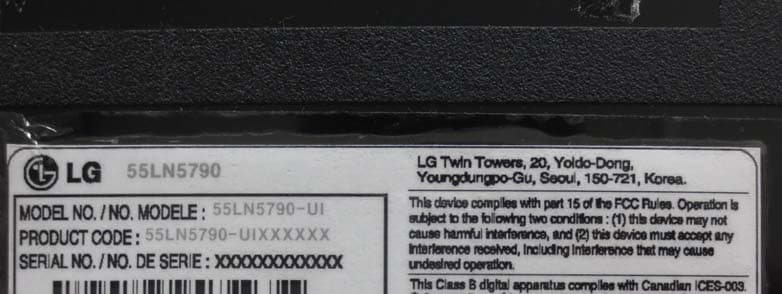
Click to zoom
Application Details
- Equipment Class
- JBP - Part 15 Class B Computing Device Peripheral
- Date of Grant
- Mar 05, 2013
- Application Purpose
- Original Equipment
- Date of Application
- Mar 05, 2013
- Equipment Note
- LED TV Monitor
- Company
- LG Electronics USA, Inc.
- Country
- United States
Documents & Files
Document Text
Text extracted from the exhibit documents filed with the FCC. Open a document above to read the original.
Users Manual
ENGLISH 22 MAKING CONNECTIONS Composite Connection Transmits analog video and audio signals from an external device to the TV. Connect the external device and the TV with the composite cable as shown in the following illustration. yy Check to ensure the cables are matched with the corresponding color connection. NOTE PC-AUDIO IN COMPONENT IN / AV IN PB PR VIDEO/Y L/MONO AUDIOOR PC-AUDIO IN VIDEO/ Y L/MONO AUDIO R VIDEO MONO () AUDIOLR VCR / DVD / Blu-Ray / HD Cable Box (*Not Provided) YELLOW WHITE RED YELLOW WHITE RED ENGLISH 23 MAKING CONNECTIONS Connecting to a PC yy It is recommended to use an HDMI connection for the best image quality. yy Depending on the graphics card, DOS mode video may not work if a HDMI to DVI Cable is in use. yy In PC mode, there may be noise associated with the resolution, vertical pattern, contrast or brightness. If noise is present, change the PC output to another resolution, change the refresh rate to another rate or adjust the brightness and contrast on the PICTURE menu until the picture is clear. yy The synchronization input form for Horizontal and Vertical frequencies is separate. yy Depending on the graphics card, some resolution settings may not allow the image to be positioned on the screen properly. yy If you are using DVI out from a PC, you have to connect analog audio separately. Refer to the instructions on the next page. yy When using the HDMI/DVI cable, Single link is only supported. NOTE HDMI Connection DVI or HDMI Connection Choose method A or B to make connection. Method A: HDMI Connection HDMI IN 1 (ARC) IN 3 (MHL) IN 2 IN 1 (ARC) IN 3 (MHL) IN 2 AUDIO OUT DVI OUT PC-AUDIO IN COMPONENT IN / AV IN PB PR VIDEO/ Y L/MONO AUDIO R (*Not Provided) PC Choose any HDMI input port to connect. It does not matter which port you use. ENGLISH 24 MAKING CONNECTIONS Method B: DVI to HDMI Connection HDMI IN 1 (ARC) IN 3 (MHL) IN 2 IN 1 (ARC) IN 3 (MHL) IN 2 AUDIO OUT DVI OUT PC-AUDIO IN COMPONENT IN / AV IN PB PR VIDEO/ Y L/MONO AUDIO R PC (*Not Provided) WHITERED (*Not Provided) Choose any HDMI input port to connect. It does not matter which port you use. ENGLISH 25 MAKING CONNECTIONS Connecting to an Audio System You may use an optional external audio system instead of the built-in speaker. Digital Optical Audio Connection Transmits a digital audio signal from the TV to an external device. Connect the external device and the TV with the optical audio cable as shown in the following illustration. yy Do not look into the optical output port. Looking at the laser beam may damage your vision. yy Audio with ACP (Audio Copy Protection) function may block digital audio output. NOTE OPTICAL DIGITAL AUDIO OUT OPTICAL AUDIO IN Digital Audio System (*Not Provided) ENGLISH 26 MAKING CONNECTIONS Connecting to a Sound Bar You may use a Sound Bar instead of the built-in speaker. yy If you use a Sound Bar instead of the built-in speaker, set the TV speaker to off in the user menu. NOTE Digital Optical Audio Connection Transmits a digital audio signal from the TV to a Sound Bar. Connect the Sound Bar and the TV with an optical audio cable as shown in the following illustration. For LN5790 series OPTICAL DIGITAL AUDIO OUT OPTICAL AUDIO IN Sound Bar ENGLISH 27 MAKING CONNECTIONS Connecting Headphones You listen to the sound using headphones. yy AUDIO menu options are disabled when headphones are connected. yy When changing AV MODE with headphones connected, the change is applied to video but not to audio. yy Optical Digital Audio Out is not available when headphones are connected. yy Headphone impedance: 16 Ω yy Max audio output: 10 mW to 15 mW yy Headphone jack size: 0.35 cm (0.13 inches) NOTE (*Not Provided) H/P OUT Headphone Connecting a USB Drive Connect a USB storage device such as a USB flash thumbdrive, external hard drive, or a USB memory card reader to the TV and access the Smart Share menu to use various multimedia files. yy Some USB Hubs may not work. If a USB device connected using a USB Hub is not detected, connect it to the USB port on the TV directly. NOTE USB IN 1 USB IN 2 USB IN 3 USB USB Hub (*Not Provided) Choose any USB input port to connect. It does not matter which port you use. ENGLISH 28 REMOTE CONTROL REMOTE CONTROL The descriptions in this manual are based on the buttons on the remote control. Please read this manual carefully and use the TV correctly. To install batteries, open the battery cover, replace batteries (1.5 V AAA) matching the and ends to the label inside the compartment, and close the battery cover. To remove the batteries, perform the installation actions in reverse. yy Do not mix old and new batteries, as this may damage the remote control. CAUTION This remote uses infrared light. When in use, it should be pointed in the direction of the TV’s remote sensor. For LN5700, LN570B, LN5790 series 123 456 78 0 9 MY APPS TV SMART CH VOL P A G E RATIOINPUT FAV MUTE LIST FLASHBK EXIT BACK OK Q.MENU INFO AV MODE SETTINGS (POWER) Turns the TV on or off. (U ser Guide) Sees user-guide. RATIO Resizes an image. INPUT Rotates through inputs. Also switches the TV on from standby. TV Returns to the last TV channel. Number button Enters numbers. LIST Accesses the saved channel list. - (Dash ) Inserts a dash between numbers such as 2-1 and 2-2. FLASHBK Tunes to the last channel viewed. VOL Adjusts the volume level. FAV Accesses your favorite channel list. SETTINGS Accesses the main menu. MUTE Mutes all sounds. CH Scrolls through the saved channels. PAGE Moves to the previous or next screen. ENGLISH 29 REMOTE CONTROL 123 456 78 0 9 MY APPS TV SMART CH VOL P A G E RATIOINPUT FAV MUTE LIST FLASHBK EXIT BACK OK Q.MENU INFO AV MODE SETTINGS INFO Shows information on the current program. SMART Accesses the Smart Home menu. MY APPS Shows the list of Apps. Q.MENU Accesses the quick menu. Navigation buttons (up/down/left/right) Scrolls through menus or options. OK ꔉ Selects menus or options and confirms your input. ꕣ BACK Returns to the previous level. AV MODE Sel…
Text truncated - open the document above for the full version.
Cover Letter(s)
LG Electronics USA. 1000 Sylvan Avenue Englewood Cliffs, New Jersey, United States Date: Mar, 5 , 2013 C o m p lian ce C er tif icatio n Ser v ices C er tif icatio n Div is io n 4 7 1 7 3 B en icia Stre et Fre m o n t, C A 9 4 5 3 8 , USA LETTER OF A U THORIZATION To whom it may concern: We, the undersigned, hereby authorize Harvey Sung of DIGITAL EMC Co., Ltd., to act on our behalf in all manners relating to application for equipment authorization for FCC ID: BEJ55LN5790UI including signing of all documents relating to these matters . Any and all ac ts carried out by DIGITAL EMC Co., Ltd., on our behalf shall hav e the same affect as acts of our own. This authorization is valid until further written notice from LG Electronics USA. Sincerely, Jacob Cho Director, Product Regulatory Compliance
Cover Letter(s)
LG Electronics USA. 1000 Sylvan Avenue Englewood Cliffs, New Jersey, United States Date: Mar, 5, 2013 Co mpliance Certification Ser vices Certification Division 4717 3 Benicia Street Fremont, CA 94538, USA RE: Request of Confidentiality for FCCID: BEJ55LN5790UI To Whom It may Concern: Pursuant to Sections 0.457 and 0.459 of the Commission`s Rules(CFR 47), and Section 552 (b) (4) of the Freedom of Information Act, LG Electronics USA. hereby requests confidentiality and treatment of certain information accompanying this application. The materials contain trade secrets and proprietary information not customarily released to the public. The public disclosure of these matters might be harmful to the Applicant and provide unjustified benefits to its competitors. We are also hereby request Short-Term Confidentiality for 180 days after the grant as outlined in Public Notice DA 04-1705. This provision will give LG Electronics USA. temporary confidentiality of commercially sensitive information prior to product release. The requested permanent and Short-Term Confidential exhibits are listed as follows: PERMANENT & SHORT-TERM CONFIDENTIAL LIST Exhibit Description File name PERMANENT 1 Block Diagram 55LN5790-UI Block Diagram.pdf SHORT-TERM 2 External Photos 55LN5790-UI_E xt Photo.pdf 3 Internal Photos 55LN5790-UI_I nt Photo.pdf 4 Test-Setup Photos 55LN5790-UI_T est Photo.pdf 5 Users Manual 55LN5790-UI_User Manual.pdf The Applicant understands that pursuant to Rule 0.457, disclosure of this application and all accompanying documentations, where applicable, will not be public before the date of the Grant for this application. Sincerely, Jacob Cho Director, Product Regulatory Compliance
Cover Letter(s)
LG Electronics USA. 1000 Sylvan Avenue Englewood Cliffs, New Jersey, United States Date: Mar 5, 2013 Co mpliance Certification S e rvices Certification Division 47173 Benicia Street Fremont, CA 94538, USA To whom it may concern: I, the undersigned, hereby authorize Mr. Harvey Sung of Digital EMC Co., Ltd., to act on our behalf in all manners relating to application for equipment authorization, including signing of all documents relating to these matters. Any and all acts carried out by Mr. Harvey Sung of Digital EMC Co., Ltd. on our behalf shall have the same effect as acts of our own. In authorizing Digital EMC Co., Ltd. as our agent, we still recognize that we are responsible to: a) comply with the relevant provisions of the certification program; b) make all necessary arrangements for the conduct of the evaluation, including provision for examining documentation and access to all areas, records (including internal audit reports) and personnel for the purposes of evaluation (e.g. testing, inspection, assessment, surveillance, reassessment) and resolution of complaints; c) make claims regarding certification only in respect of the scope for which certification has been granted; d) do not use our product certification in such a manner as to bring the Certification Division into disrepute and not make any statement regarding our product certification which the Certification Division may consider misleading or unauthorized; e) upon suspension or cancellation of certification, discontinue use of all advertising matter that contains any reference thereto and return any certification documents as required by the Certification Division; f) use certification only to indicate the products are certified as being in conformity with specified standards; g) endeavor to ensure that no certificate or report nor any part thereof is used in a misleading manner; h) ensure that any reference to our product certification in communication media such as documents, brochures or advertising, complies with the requirements of the Certification Division; i) keep a record of all compl aints made known to the us relating to the product’s compliance with requirements of the relevant standard and to make these records available to the Certification Division when requested; j) take appropriate action with respect to such compl aints and any deficiencies found in products or services that affect compliance with the requirements for certification; k) document the actions taken. This authorization is valid until further written notice from the applicant. Sincerely Yours, Jacob Cho Director, Product Regulatory Compliance REMARK: 1. This authorization letter will be sent along with your application when filing with the Certification Division. 2. Please follow the format and type it on company letterhead and send original to us. 3. Authorized signature must be in agreement with grantee code contact in FCC database.
External Photos
FCC ID: BEJ55LN5790UI Copyright © 2013, DIGITAL EMC Co., Ltd. View 1 FRONT REAR Label Location FCC ID: BEJ55LN5790UI Copyright © 2013, DIGITAL EMC Co., Ltd. View 2 LABEL REAR PORT FCC ID: BEJ55LN5790UI Copyright © 2013, DIGITAL EMC Co., Ltd. View 3 SIDE PORT
ID Label/Location Info
FCC ID: BEJ55LN5790UI Copyright © 2013, DIGITAL EMC Co., Ltd. View 1 REAR LABEL Label Location Product Label
Contact Information
Applicant
David Kim(Team leader, LGEUS NA Policy & Regulatory Affairs)
Test Firm
Dt&C Co., Ltd.Lee Sang-Wook
Technical Specifications
| # | Rule Parts | Frequency Range | Power Output |
|---|---|---|---|
| 1 | 15B | - | - |
Other Applications from LG Electronics USA, Inc.

BEJTFHOBINI1F1
Jan 08, 2025Telematics
Equipment Class
DTS - Digital Transmission SystemBEJNT-16Z90TS
Oct 02, 2024Notebook Computer
Equipment Class
DSS - Part 15 Spread Spectrum TransmitterBEJSP-PEW8
Sep 26, 2024Stylus Pen
Equipment Class
DCD - Part 15 Low Power Transmitter Below 1705 kHzBEJ-RSMV2
Sep 24, 2024RF Module
Equipment Class
FDS - Part 15 Field Disturbance SensorBEJTFBMEIBN3EU
Sep 24, 2024Telematics
Equipment Class
NII - Unlicensed National Information Infrastructure TX