BEJFB910G19" CRT Color Monitor
LG Electronics USA, Inc.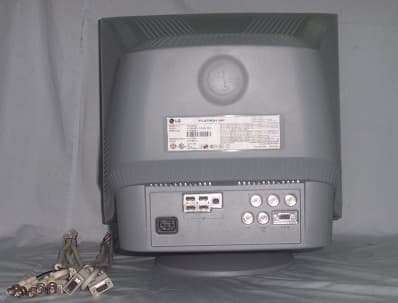
Click to zoom
Application Details
- Equipment Class
- JBP - Part 15 Class B Computing Device Peripheral
- Date of Grant
- Jul 21, 2002
- Application Purpose
- Original Equipment
- Date of Application
- Jul 21, 2002
- Equipment Note
- 19" CRT Color Monitor
- Company
- LG Electronics USA, Inc.
- Country
- United States
Documents & Files
Document Text
Text extracted from the exhibit documents filed with the FCC. Open a document above to read the original.
Users Manual
APPENDIX G : FCC ID : BEJFB910G USER’S MANUAL P/NO : 3828TUL~(020 6 -Rev00 ) Printed in Korea Please read this manual carefully before operating your set.Retain it for future reference.Record model number and serial number of the set.See the label attached on the back cover and quote thisinformation to your dealer when you require service. http://www.lge.com Color Monitor F900P User’s GuideBenutzerhandbuchManuel d’utilisationGuida UtenteGuia del UsuarioManual do preprietárioHandleiding A1 This unit has been engineered and manufactured to ensure your personal safety, however improper use may result in potential eletrical shock or fire hazards. In order to allow the proper operation of all safeguards incorporated in this monitor, observe the following basic rules for its installation, use, and servicing. On Safety Use only the power cord supplied with the unit. In case you use another power cord, make sure that it is certified by the applicable national standards if not being provided by the supplier. If the power cable is faulty in any way, please contact the manufacturer or the nearest authorized repair service provider for a replacement. The power supply cord is used as the main disconnect device. Ensure that the socket-outlet is easily accessible after installation. Operate the monitor only from a power source indicated in the specifications of this manual or listed on the monitor. If you are not sure what type of power supply you have in your home, consult with your dealer. Overloaded AC outlets and extension cords are dangerous. So are frayed power cords and broken plugs. They may result in a shock or fire hazard. Call your service technician for replacement. Do not Open the Monitor. There are no user serviceable components inside. There are Dangerous High Voltages inside, even when the power is OFF. Contact your dealer if the monitor is not operating properly. To Avoid Personal Injury : Do not place the monitor on a sloping shelf unless properly secured. Use only a stand recommended by the manufacturer. Do not try to roll a stand with small casters across thresholds or deep pile carpets. To Prevent Fire or Hazards: Always turn the monitor OFF if you leave the room for more than a short period of time. Never leave the monitor ON when leaving the house. Keep children from dropping or pushing objects into the monitor's cabinet openings. Some internal parts carry hazardous voltages. Do not add accessories that have not been designed for this monitor. During a lightning storm or when the monitor is to be left unattended for an extended period of time, unplug it from the wall outlet. Do not bring magnetic devices such as magnets or motors near the picture tube. Important Precautions A2 Important Precautions On Installation Do not allow anything to rest upon or roll over the power cord, and do not place the monitor where the power cord is subject to damage. Do not use this monitor near water such as near a bathtub, washbowl, kitchen sink, laundry tub, in a wet basement, or near a swimming pool. Monitors are provided with ventilation openings in the cabinet to allow the release of heat generated during operation. If these openings are blocked, built-up heat can cause failures which may result in a fire hazard. Therefore, NEVER: Block the bottom ventilation slots by placing the monitor on a bed, sofa, rug, etc. Place the monitor in a built-in enclosure unless proper ventilation is provided. Cover the openings with cloth or other material. Place the monitor near or over a radiator or heat source. On Cleaning Unplug the monitor before cleaning the face of the monitor screen. Use a slightly damp (not wet) cloth. Do not use an aerosol directly on the monitor screen because overspray may cause electrical shock. On Repacking Do not throw away the carton and packing materials. They make an ideal container in which to transport the unit. When shipping the unit to another location, repack it in its original material. A3A3 Connecting the Monitor Latch Before setting up the monitor, ensure that the power is turned off to the monitor, computer system, and other attached devices. Carefully set the monitor face-down with the underside facing you. Connecting the Tilt/Swivel stand 1.Align the hooks on the tilt/swivel stand with the matching slots in the base of the monitor. 2. Insert the hooks into slots. 3. Slide the tilt/swivel stand toward the front of the monitor until the latches click into the locked position. NOTE This illustration depicts the general model of connection. Your monitor may differ from the items shown in the picture. Hook Slot Hook A4 Connecting the Monitor Using the Computer 1.Connect the signal cable. When mated, tighten the thumbscrews to secure the connection. 2.Connect the power cord into a properly power outlet that is easily accessible and close to the monitor. Mac adapter For Apple Macintosh use, a separate plug adapter is needed to change the 15 pin high density (3 row) D-sub VGA connector on the supplied cable to a 15 pin 2 row connector. Wall-outlet type * NOTE This is a simplified representation of the rear view. This rear view represents a general model; your monitor may differ from the view as shown. PC-outlet type* PC MAC Power Cord Signal Cable Attached Type * Detached Type * * Varies according to model. A5 Control Panel Functions Front Panel Controls Buttons Use these buttons to choose or adjust items in the on screen display. MENU (or OSD) Button Use this button to enter or exit the on screen display. This Indicator lights up green when the monitor operates normally. If the monitor is in DPM (Energy Saving) mode, this indicator color changes to amber. Power (DPMS) Indicator Use this button to turn the monitor on or off. Power Button Use this button to enter a selection in the on screen display. SELECT (or SET) Button The Contrast and Brightness functions are also available in the On Screen Display (OSD) menu. ControlDirect Access Function ControlFunction Button Button…
Text truncated - open the document above for the full version.
Cover Letter(s)
Attn.: Reviewing Engineer Federal Communications Commission 7435 Oakland Mills Road Columbia, MD 21046 RE: CONFIDENTIALITY REQUEST FOR 19” Color CRT Monitor FCC ID: BEJFB910G MODEL #: FB910G Gentlemen This letter serves as an official request for confidentiality under FCC Rule Section 0.459. We have requested that the schematic diagrams, block diagrams required to be submitted with this application be withheld from public review. These documents contain detailed system and equipment description and related information about the product which LG Electronics Inc. considers to be proprietary, confidential, and a custom design and, otherwise, would not release to the general public. Since this design is a basis from which future technological products will evolve, LG Electronics Inc. feels that this information would be of benefit to its competitors, and that the disclosure of the information in these documents would give our competitors an unfair advantage in the market. Please contact me if there is any information you may need. Sincerely, Kyeom Soon Kim July 19, 2002 LG Electronics Inc./General Manager LG Electronics Inc.
Cover Letter(s)
Attn.: Reviewing Engineer Federal Communications Commission 7435 Oakland Mills Road Columbia, MD 21046 RE: LETTER OF AGENT AUTHORIZATION Dear Sir: We, the undersigned, hereby authorize MET laboratories Inc., to act on our behalf in all matters relating to applications for equipment authorization, including the signing of all documents relating to these matters. We also hereby certify that no party to the application authorized hereunder is subject to a denial of benefits, including FCC benefits, pursuant to Section 5301 of the Anti-Drug Abuse Act of 1988, 21 U.S.C. 853(a). This agreement expires one year from the current date. Sincerely, Kyeom Soon Kim July 19, 2002 LG Electronics Inc. /General Manager LG Electronics Inc.
External Photos
FCC ID : BEJFB910G APPENDIX F 1. External View 2. Internal View 3. PCB View 3-1. Main Board 3-2. Video Board 3-3. Interface Board 3-4. Control Board EUT Photographs FCC ID : BEJFB910G 1. External View [ Front ] [ Back ]
ID Label/Location Info
APPENDIX B : FCC ID : BEJFB910G Labelling Requirements ID Label Location
Internal Photos
FCC ID : BEJFB910G 2. Internal View FCC ID : BEJFB910G 2. Internal View FCC ID : BEJFB910G 3-1. Main Board FCC ID : BEJFB910G 3-2. Video Board FCC ID : BEJFB910G 3-3. Interface Board FCC ID : BEJFB910G 3-4. Control Board
Test Report
1/13 Report No.: 00431-4521-F2196 LG Electronics Inc. Q & R Center, 36, Munlae-dong, 6-ga, Youngdungpo-gu, Seoul, Korea Tel:+82-2-2630-3077~9, Fax:+82-2-2635-5543 LG Electronics Inc. Quality & Reliability Center 36, Munlae-dong, 6-ga, Youngdungpo-gu, Seoul 150-096, Korea Tel: + 82 2 2630 3077~9, Fax: +82 2 2635 5543 CERTIFICATION OF COMPLIANCE Date of Issue: July 19, 2002 Test Report No: 00431-4521-F2196 Applicant: LG Electronics Inc. Regulation: FCC Part 15 Class B / Canada Standard ICES-003 Class B Test procedure: ANSI C63.4-1992 / Canada Standard ICES-003 Equipment Class: Unintentional Radiators – Digital device EUT Type: 19” Color CRT Monitor Trade Name(s): Model No.: LG FB910G This device has been verified to comply with the applicable requirements in the FCC Part 15 / Canada Standard ICES-003 and was tested in accordance with the measurement procedures specified in ANSI C63.4-1992 / Canada Standard ICES-003. I assume full responsibility for the completeness of these measurements and vouch for the qualifications of all persons taking them. Kyeom-Soon Kim / General Manager Quality and Reliability Center LG Electronics Inc. 2/13 Report No.: 00431-4521-F2196 LG Electronics Inc. Q & R Center, 36, Munlae-dong, 6-ga, Youngdungpo-gu, Seoul, Korea Tel:+82-2-2630-3077~9, Fax:+82-2-2635-5543 REPORT FOR A DIGITAL DEVICE Scope - Measurement and determination of electromagnetic emissions (EME) of radio frequency devices including intentional and/or unintentional radiators for compliance with the technical rules and regulations of the Federal Communications Commission. U.S. Responsible Party: Address: LG Electronics USA Inc. 6133 North River Road, Suite 1100 (Riverway Plasza) Rosemont, IL 60018, USA Contact Person: P. H. Byun, General Manager Telephone No.: (847) 692-4630 EXT.329 Manufacturer: LG Electronics Inc. DID Division Address: 642 Jinpyoung-dong Kumi-City Kyoungsangbuk-do, 730-360, Korea FCC ID No.: BEJFB910G EUT Class: Unintentional Radiators - Digital device EUT Type: 19” Color CRT Monitor Trade Name: LG Model No.: FB910G Rule Part: FCC Part 15 Class B / Canada Standard ICES-003 Class B Test Procedure: ANSI C63.4-1992 / Canada Standard ICES-003 Date of Test: July 16 ~ 18, 2002 Date of Receipt of EUT: July 11, 2002 Date of Issue: July 19, 2002 Test Report No.: 00431-4521-F2196 Test Result: Positive Quality and Reliability Center authorizes the above-named applicant to reproduce this report provided it is reproduced in its entirety. Quality and Reliability Center reports apply only to the specific samples tested under stated test conditions. It is the manufacturer’s responsibility to assure that additional production unit of this model are manufactured with identical electrical and mechanical components. This report is the confidential property of the client. As a mutual protection to our clients, the public and ourselves, extracts from the test report shall not be reproduced except in full without our written approval. This report must not be used by the client to claim product endorsement by NVLAP or any agency of the U.S. Government. The Quality and Reliability Center was accredited by National Voluntary Laboratory Accreditation Program for the specific scope of accreditation under Lab Code: 200040-0. Tested by: Reviewed by : S. H. Ji / Senior Research Engineer Quality and Reliability Center LG Electronics Inc. D. H. Lee / Research Engineer Quality and Reliability Center LG Electronics Inc. 3/13 Report No.: 00431-4521-F2196 LG Electronics Inc. Q & R Center, 36, Munlae-dong, 6-ga, Youngdungpo-gu, Seoul, Korea Tel:+82-2-2630-3077~9, Fax:+82-2-2635-5543 CONTENTS Page 1. GENERAL INFORMATION ..................................................................................................................... 4G 1.1 D ESCRIPTIONS OF EQUIPMENT UNDER TEST (EUT)................................................................................... 4G 1.2 R EGULATIONS APPLIED TO EUT ............................................................................................................... 4G 1.3 M EASUREMENT PROCEDURE.................................................................................................................... 4G 1.4 M EASUREMENT PLACE............................................................................................................................. 4G 2. GENERAL TEST CONDITIONS .............................................................................................................. 5G 2.1 O PERATING CONDITIONS OF EUT ............................................................................................................. 5G 2.2 S TABILIZATION OF EUT OPERATING......................................................................................................... 5G 2.3 T EMPERATURE AND HUMIDITY................................................................................................................. 5G 3. TEST SITE ................................................................................................................................................... 5G 3.1 S EMI-ANECHOIC CHAMBER....................................................................................................................... 5G 3.2 A SHIELDED ENCLOSURE.......................................................................................................................... 5G 4. CALIBRATIONS OF MEASURING INSTRUMENTS .......................................................................... 5G 5. DESCRIPTION OF TEST CONDITION .................................................................................................. 6G 5.1 P OWER LINE CONDUCTED EMISSION MEASUREMENTS............................................................................... 6G 5.2 R ADIATED EMISSIONS MEASUREMENTS.................................................................................................... 7G 6. MEASURING INSTRUMENTS AND SET-UP .............................................…
Text truncated - open the document above for the full version.
Test Report
FCC ID : BEJFB910G APPENDIX A : Test Graph 1. Radiated Emission 1-1. D-sub Type 1-2. BNC Type 2. Conducted Emissions 2-1. D-sub Type 2-2. BNC Type FCC ID : BEJFB910G 1. Radiated Emissions 1-1. D-sub Type FCC ID : BEJFB910G 1-2. BNC Type FCC ID : BEJFB910G 2. Conducted Emissions 2-1. D-sub Type FCC ID : BEJFB910G 2-2. BNC Type
Test Setup Photos
FCC ID : BEJFB910G APPENDIX E : 1. Radiated Emission 2. Conducted Emission Test Set-up Photographs FCC ID : BEJFB910G 1. Radiated Emission FCC ID : BEJFB910G 2. Conducted Emission
Contact Information
Applicant
David Kim(Team leader, LGEUS NA Policy & Regulatory Affairs)
Test Firm
LG Electronics Inc.K. Kim
Technical Specifications
| # | Rule Parts | Frequency Range | Power Output |
|---|---|---|---|
| 1 | 15B | - | - |
Other Applications from LG Electronics USA, Inc.

BEJTFHOBINI1F1
Jan 08, 2025Telematics
Equipment Class
DTS - Digital Transmission SystemBEJNT-16Z90TS
Oct 02, 2024Notebook Computer
Equipment Class
DSS - Part 15 Spread Spectrum TransmitterBEJSP-PEW8
Sep 26, 2024Stylus Pen
Equipment Class
DCD - Part 15 Low Power Transmitter Below 1705 kHzBEJ-RSMV2
Sep 24, 2024RF Module
Equipment Class
FDS - Part 15 Field Disturbance SensorBEJTFBMEIBN3EU
Sep 24, 2024Telematics
Equipment Class
NII - Unlicensed National Information Infrastructure TX