BEJGW382FCellular/PCS GSM/EDGE/WCDMA Phone with Bluetooth
LG Electronics USA, Inc.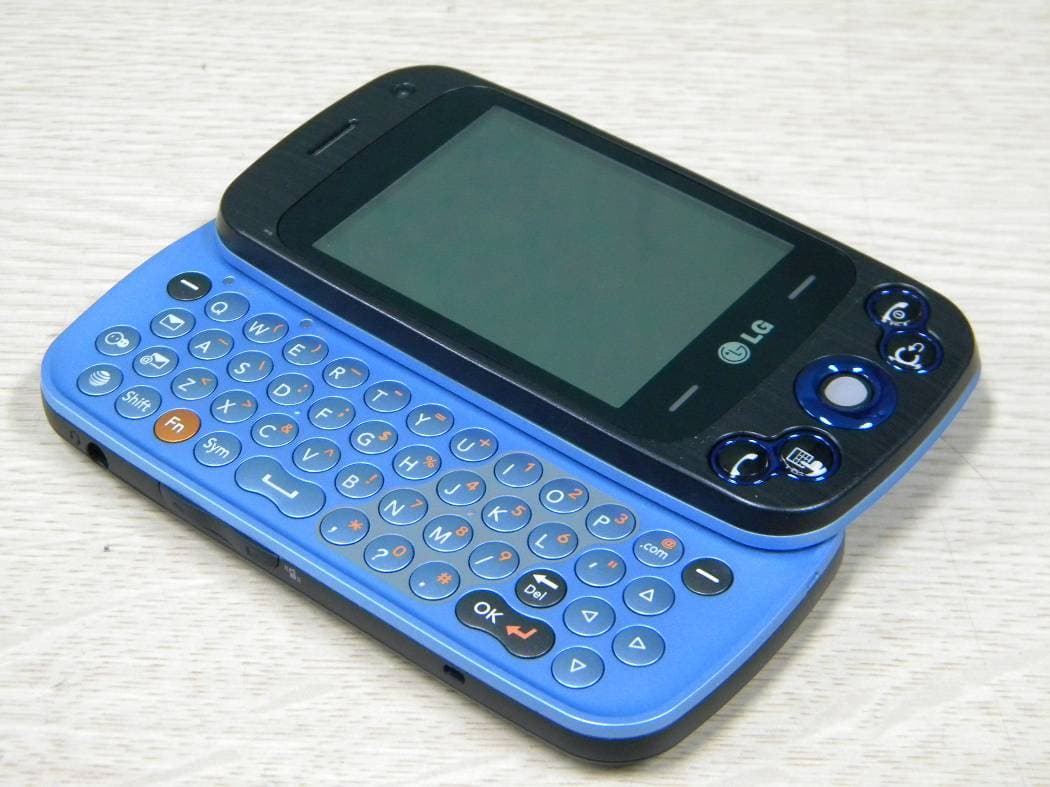
Click to zoom
Application Details
- Equipment Class
- JBP - Part 15 Class B Computing Device Peripheral
- Date of Grant
- Mar 30, 2010
- Application Purpose
- Original Equipment
- Date of Application
- Mar 30, 2010
- Equipment Note
- Cellular/PCS GSM/EDGE/WCDMA Phone with Bluetooth
- Company
- LG Electronics USA, Inc.
- Country
- United States
Documents & Files
Document Text
Text extracted from the exhibit documents filed with the FCC. Open a document above to read the original.
Users Manual
Part 15.21 statement " Change or Modifications that are not expressly approved by the manufacturer could void the user's authority to operate the equipment. “ Part 15.105 statement This equipment has been tested and found to comply with the limits for a class B digital device, pursuant to Part 15 of the FCC Rules. These limits are designed to provide reasonable protection against harmful interference in a residential installation. This equipment generates uses and can radiate radio frequency energy and, if not installed and used in accordance with the instructions, may cause harmful interference to radio communications. However, there is no guarantee that interference will not occur in a particular installation. If this equipment does cause harmful interference or television reception, which can be determined by turning the equipment off and on, the user is encouraged to try to correct the interference by one or more of the following measures: - Reorient or relocate the receiving antenna. - Increase the separation between the equipment and receiver. - Connect the equipment into an outlet on a circuit different from that to which the receiver is connected. - Consult the dealer or an experienced radio/TV technician for help. Part 15 Class B Compliance This device and its accessories comply with part15 of FCC rules. Operation is subject to the following two conditions: (1) This device & its accessories may not cause harmful interference. (2) This device & its accessories must accept any interference received, including interference that may cause undesired operation. Body-worn Operation This device has been tested for typical body-worn operations with the distance of 0.79inches (2.0cm) from the user’s body. To comply with FCC RF exposure requirements, a minimum separation distance of 0.79inches(2.0cm) must be maintained from the user's body. Additionally, Belt clips, holsters & other body-worn accessories may not contain metallic components. Some of the contents in this manual may differ from your phone depending on the software of the phone or your service provider. This handset is not recommended for blind disability person due to touch screen keypad. GW382f User Guide LG | User Guide14 Your Phone Phone Components Main LCD Multi-tasking key SEND key Press this key in standby mode to quickly access the most recent, missed, dialed and received calls. microSD™ memory card socket Side volume keys • When on the Standby screen: Allows you to set the Ringtone and Touchtone volume. Hold the Down key to toggle the Vibration Mode On and Off. • During a call: Allows you to change the Earpiece volume. • When playing background music: Allows you to change the music volume. Charger/USB Port Earpiece Lets you hear the caller and automated prompts. END / Power Ends or rejects a call. Turns the phone on/off. Press once to return to the standby screen. Lock / Unlock key Camera key Press to start the Camera function. Press and hold to start the Video record function. 15 Slide Open View Mobile Email VideoCall Key Text Msg Contact list Caps Press to change between Upper Case and Lower Case. Fn Press to input symbols and numbers on Qwerty key pad. Space Press to create a space between words. Sym Press to open the menu with Symbol entry options. Del Deletes digits and letters. Press to input “@”. Press to input “.com”. Press to move to the next row. Left Down Right Up BigPond Home Key LG | User Guide16 Rear View Battery cover External camera lens microSD™ memory card socket Battery Flash SIM card socket Your Phone 17 Getting Started Installing the SIM Card and Battery 1 Remove the battery cover Press the battery cover release latch. The battery cover should lift off easily. 2 Remove the battery Lever the bottom edge of the battery and remove it carefully from the battery compartment. WARNING: Do not remove the battery when the phone is switched on, as this may damage the phone. LG | User Guide18 3 Install the SIM card Slide the SIM card into the SIM card holder. Make sure that the gold contact area on the card is facing downward. To remove the SIM card, pull it gently in the opposite direction. 4 Install the battery Insert the top of the battery first into the top edge of the battery compartment. Ensure that the battery contacts align with the terminals on the phone. Press the bottom of the battery down until it clips into place. Getting Started 19 5 Charging your phone Lift the charger port cover on the top side of your GW382f. Insert the charger connector to the phone (‘B’ side of the connector has to be facing up when connecting to the phone) and then plug into the wall socket. Your GW382f will need to be charged until a message reading “Battery full. Please unplug charger to save energy.” appears on the screen. Important! You should insert the battery before charging. WARNING: Use of unauthorized accessories could damage your phone and void your warranty. LG | User Guide20 Installing a Memory Card You can expand the memory available on your phone by using a microSD™ memory card. The GW382f will support up to a 16 GB microSD™ memory card. TIP! A memory card is an optional accessory. 1 Lift the memory card cover and insert a microSD™ card with the gold contact area facing downwards. Close the memory card cover so that it clicks shut. Note: If your memory card has existing content it will automatically be filed in the correct folder. For example, videos will be accessible from the Videos folder. If your memory card has protected content (i.e. content such as songs or graphics with Digital Rights Management copywriting loaded from another device), it will not work. You will need to reformat the memory card prior to using it with this device. Getting Started 21 On-Screen Icons The table below describes various display indicators or icons that appear on the phone's display screen. ICONDESCRIPTION Multitasking Network signal strength (number of bars will vary) No network signal Battery empty New text message New e…
Text truncated - open the document above for the full version.
Users Manual
61 Service Message You can set the Service option to determine whether or not you will receive service messages. Info. Service Info. Service messages are text messages delivered by the network to your handset. They provide general information such as weather reports, traffic news, tax, pharmacies, and stock prices. When you receive an info. service message you will see a popup message show you that or the info. service message is directly displayed. • Receive: You can set the reception status. • Topics: To create a new topic, select Topics and touch New Topic from the screen. If you want to edit the topic, touch the topic and edit it. • Languages: This option lets you select the prefered languages. Info. service message will be displayed in the selected languages. LG | User Guide62 Yellow Touch and , then touch . Unleash the power of Yellow local search on your mobile phone. Find a business, get maps and directions, and save your favorites: our mobile app gives you what you need, whenever and wherever you need it. • Search for local businesses. • View ratings and call businesses. • Save businesses for future access. • Get maps and view step-by-step directions. 63 BigPond BigPond This menu shows how to access the Internet by launching the WAP browser. Note: Check the availability of WAP services, pricing and tariffs with your network operator and/or the service provider whose service you wish to use. Service providers will also give you instructions on how to use their services. Please contact your service provider to open an Internet account. To launch the browser in Standby mode, touch the Quick key then choose the tab . Touch . Once connected, the homepage is displayed. To exit the browser at any time, press the key. Menus for the Browser You can surf the Internet using either the touch screen or the qwertykey pads. Using the WAP Browser Menu Using the Browser Tool Bar Bookmark Zoom Refresh/Stop Back Forward • Back : Moves to the previous page. • Forward : Moves to the next page. • Refresh/Stop : Loads the current page again. When a page is loading, press to stop loading the current page. • Bookmarks : Takes you to your Bookmark menu. Holding down this key will add the current page to your saved Bookmarks. • Zoom : Displays the Zoom bar to Zoom in and out while browsing. LG | User Guide64 Once you are connected to the Internet, the following menu options are available as buttons or through the Options menu : Note: If you are browsing the Internet in Landscape mode, you can access the Options Menu by tapping any part of the browser screen that does not contain a link. • Home: Moves to the initial homepage. • Windows: Create, manage or view different browser windows. This allows you to access multiple web pages simultaneously. • EnterURL: Connects to the specific URL after editing. • Bookmarks: You can add or save the current page to Bookmark or view the list saved under Bookmark. • View Full Screen/View Normal Screen: Hold your phone horizontally and you can view full screen, If you hold the phone vertically, you can view normal screen. • Search Text: You can search the text what you want to find. • Recent Pages: You can manage the list of the Internet pages you visited. • Settings: Allows you to set options such as Full Screen View, Cache, Cookie and other Browser Settings. • Help: Help for browser menu and options • Exit: Exit browser BigPond 65 This Menu contains WAP links to useful Telstra services. 1. BigPond 2. FOXTEL 3. Yellow 4. Music 5. Call 1234 6. Whereis 7. Scan Code 8. Sensis Search 9. My Email 10 My Sync 11. Downloads 12. My Account My Place LG | User Guide66 Music Music Player To launch Music Player while in Standby mode, touch the Quick key , touch tab and then touch . • All Songs: You can view all the songs in your music library. • Playlists: You can make your own playlists. • Artists: Shows the list of artists of all the songs in your music library, and shows all the songs by a chosen artist. • Albums: Shows the list of albums of all the songs in your music library, and shows all the songs on a chosen album. • Genres: Shows the list of genres of all the songs in your music library, and shows all songs of a specific genre. • Shuffle songs: You can view all the songs in your music library with shuffle. Note: Copyrights of music files may be protected by copyright and intellectual property laws. Please ensure that you adhere to the applicable Terms of Use of materials laws prior to downloading or copying files. 67 Playing Music To listen to music in your phone or the external memory, follow these quick easy steps: 1 From the Standby screen, touch then open the Multimedia tab by touching . 2 Then touch . 3 Select Music Player to view your options. You can select from All Songs, Playlists, Artists, Albums, Genres and Shuffle songs to select your Music. The Now Playing menu will be only available when music is playing. LG | User Guide68 • Touch the song you wish to play. • While playing, touch to pause the selected song. Touch to adjust the volume. Touch and to skip to the next song or previous song. • Touch to Minimize the music player and access other phone functions while music is playing. Note: Files under 300kb may not be displayed in this function and may be categorized as Ringtones. Adding Music To Your Handset Music files can be added to your handset by using one or more of the following methods: • Download music and ringtones over the Telstra network directly to your device via the Shop Music link in the Telstra Music Folder or the Ringtones link in the Telstra MEdia Mall folder. • From your existing digital media collection on your PC via Windows Media® Player and/or Windows Explorer. • From your PC using other music subscription services, such as Napster or eMusic. Music 69 Purchasing and downloading Music directly to your Device 1 Touch then touch . 2 Touch . 3 Select Bigpond Music. 4 Navigate the Bigpond Music page to download today’s hottest music, ringtones an…
Text truncated - open the document above for the full version.
Cover Letter(s)
Date: March 22, 2010 Federal Communications Commission 7435 Oakland Mills Road Columbia MD 21046 c.c. Compliance Certification Services Certification Division 47173 Benicia Street Fremont, CA 94538, USA To whom it may concern: I, the undersigned, hereby authorize Lab Manager Jim. Kim and of SGS Testing Korea Co., Ltd and hereafter referred to as SGS Testing Korea, to act on our behalf in all manners relating to application for equipment authorization, including signing of all documents relating to these matters. Any and all acts carried out by Lab Manager Jim. Kim of SGS Testing Korea Co., Ltd on our behalf shall have the same effect as acts of our own. I, the undersigned, hereby certify that we are not subject to a denial of federal benefits, that includes FCC benefits, pursuant to Section 5301 of the Anti-Drug Abuse Act of 1988, 21 U.S.C. 853(a). In authorizing SGS Testing Korea as our agent, we still recognize that we are responsible to: a) comply with the relevant provisions of the certification program; b) make all necessary arrangements for the conduct of the evaluation, including provision for examining documentation and access to all areas, records (including internal audit reports) and personnel for the purposes of evaluation (e.g. testing, inspection, assessment, surveillance, reassessment) and resolution of complaints; c) make claims regarding certification only in respect of the scope for which certification has been granted; d) do not use our product certification in such a manner as to bring the Certification Division into disrepute and not make any statement regarding our product certification which the Certification Division may consider misleading or unauthorized; e) upon suspension or cancellation of certification, discontinue use of all advertising matter that contains any reference thereto and return any certification documents as required by the Certification Division; f) use certification only to indicate the products are certified as being in conformity with specified standards; g) endeavor to ensure that no certificate or report nor any part thereof is used in a misleading manner; h) ensure that any reference to our product certification in communication media such as documents, brochures or advertising, complies with the requirements of the Certification Division; i) keep a record of all complaints made known to the us relating to the product’s compliance with requirements of the relevant standard and to make these records available to the Certification Division when requested; j) take appropriate action with respect to such complaints and any deficiencies found in products or services that affect compliance with the requirements for certification; k) document the actions taken. This authorization is valid until further written notice from the applicant. Sincerely Yours, Jae Cheon(J.C.) Lee General Manager LG Electronics USA
Cover Letter(s)
LG Electronics USA 1000 Sylvan Avenue Englewood Cliffs, NJ 07632 Date:March 23, 2010 Federal Communications Commission Authorization and Evaluation Division 7435 Oakland Mills Road, Columbia, MD 21046 RE: Request of Confidentiality for FCC ID: BEJGW382F Equipment Class: JBP: Part 15 Class B Computing Device Peripheral To Whom It May Concern: Pursuant to Sections 0.457 and 0.459 of the Commission’s Rules (CFR 47), and Section 552 (b) (4) of the Freedom of Information Act, LG Electronics USA hereby requests confidentiality and treatment of certain information accompanying this application. The materials contain trade secrets and proprietary information not customarily released to the public. The public disclosure of these matters might be harmful to the Applicant and provide unjustified benefits to its competitors. We are also hereby request Short-Term Confidentiality for 180 days after the grant as outlined in Public Notice DA 04-1705. This provision will give LG Electronics USA temporary confidentiality of commercially sensitive information prior to product release. The requested Permanent and Temporary Confidential exhibits are listed as follows: PERMANENT AND SHORT-TERM CONFIDENTIAL LIST Exhibit Description 1 Block Diagram PERMANENT 2 Operational Descriptions 3 External Photos 4 Internal Photos 5 Test-Setup Photos SHORT-TERM 6 User’s Manual The Applicant understands that pursuant to Rule 0.457, disclosure of this application and all accompanying documentations, where applicable, will not be made public before the date of the Grant for this application. Sincerely, Jae Cheon(J.C.) Lee General Manager LG Electronics USA LG Electronics USA 1000 Sylvan Avenue Englewood Cliffs, NJ 07632
External Photos
Test Report No. : F690501/RF-EMG003197 Page : 10 of 16 3. Photographs of EUT Front View Rear View
ID Label/Location Info
Model No: GW382f FCC ID : BEJGW382F S/N : Made in Korea LG Electronics Inc. LGE
Internal Photos
Test Report No. : F690501/RF-EMG003197 Page : 11 of 16 Top View of Main Board Bottom View of Main Board Test Report No. : F690501/RF-EMG003197 Page : 12 of 16 Top View of LCD Panel Bottom View of LCD Panel Test Report No. : F690501/RF-EMG003197 Page : 13 of 16 Battery Top View of Key Board Test Report No. : F690501/RF-EMG003197 Page : 14 of 16 Bottom View of Key Board Antenna Test Report No. : F690501/RF-EMG003197 Page : 15 of 16 LCD FPCB Inside
Test Report
Test Report No. : F690501/RF-EMG003197-1 Page : 2 of 18 Contents 1. General Information...................................................................................................3 1.1 Client Information................................................................................................3 1.2 Test Laboratory...................................................................................................3 1.3 General Information of E.U.T. .............................................................................3 1.4 Operating Modes and Conditions........................................................................3 1.5 Peripheral Equipments........................................................................................3 1.6 Cable List ............................................................................................................4 1.7 System Configurations ........................................................................................4 1.8 Test System Layout ............................................................................................4 1.9 Applicable Standards for Testing ........................................................................5 1.10 Summary of Test Results..................................................................................5 2. Emission Test............................................................................................................6 2.1 Test Results ........................................................................................................6 2.2 Test Equipments .................................................................................................6 2.3 Test Site..............................................................................................................6 2.4 Conducted Emission Test Data...........................................................................6 2.5 Radiated Emission Test Data..............................................................................8 2.6 Modifications.......................................................................................................8 2.7 Photograph of Conducted Emission....................................................................9 2.8 Photographs of Radiated Emission (Below 1GHz)............................................10 2.9 Photographs of Radiated Emission (Above 1GHz) ...........................................11 3. Photographs of EUT ................................................................................................12 Appendix A : Conducted Emission ..............................................................................18 Test Report No. : F690501/RF-EMG003197-1 Page : 3 of 18 1. General Information 1.1 Client Information Applicant : LG Electronics Inc. Address of Applicant : 60-39, Gasan-dong, Gumchon-gu, Seoul, 153-023, Korea Manufacturer : LG Electronics Inc. Address of Manufacturer : 60-39, Gasan-dong, Gumchon-gu, Seoul, 153-023, Korea 1.2 Test Laboratory Name and Address : SGS Testing Korea Co., Ltd. 18-34, Sanbon-dong, Gunpo, Gyeonggi-do, Korea 435-041 1.3 General Information of E.U.T. Product Name : Cellular/PCS GSM/EDGE/WCDMA Phone with Bluetooth Model Name : GW382f Serial No. : N/A Highest Internal Frequency : Max.207 MHz 1.4 Operating Modes and Conditions Operating mode Operating condition USB Mode USB Data Communication 1.5 Peripheral Equipments Description Model Serial No.Manufacturer Notebook Computer PCG-3AHP 28272287 7000053 Sony Corporation Micro SD Card Mobile Ultra 2GBN/A SanDisk LCD Monitor CR22KS N843H1K P902165L Samsung Electronics USB Keyboard KU-0459 76914020 03981 Microsoft USB MOUSE Wheel mouse optical 0447 Microsoft Corporation Test Report No. : F690501/RF-EMG003197-1 Page : 4 of 18 1.6 Cable List Start END Cable Spec. Name I/O Port Name I/O PortLength Shield USB Notebook Computer USB 1.2 Shielded Cellular/PCS GSM/EDGE/ WCDMA Phone with Bluetooth MicroSD Micro SD Card - - - DC IN AC AdapterDC OUT1.8 Unshielded RGB LCD Monitor RGB 1.8 Shielded USB USB Keyboard - 1.7 Shielded Notebook Computer USB USB Mouse- 1.8 Shielded AC Adapter AC IN AC Source- 1.0 Unshielded 1.7 System Configurations 1.8 Test System Layout Description Model Serial No. Manufacturer Antenna N/A N/A N/A Battery LGIP-340N DC091014 LG Key Board SPEY0065401 N/A N/A LCD FPCB SPCY8236201_A N/A N/A LCD Panel IM2400BNEA_V01 YN01230317 LG INNOTEK Main Board SPFY0225401 N/A N/A AC Adapter Notebook Computer Cellular/PCS GSM/EDGE/WCDMA Phone with Bluetooth Micro SD Card LCD Monitor USB Mouse USB Keyboard Test Report No. : F690501/RF-EMG003197-1 Page : 5 of 18 1.9 Applicable Standards for Testing 1.10 Summary of Test Results Test Item Standards Results Conducted Emission FCC Part 15 : 2009 Subpart B ANSI C63.4 : 2003 CISPR 22 : 2006 Complied Radiated Emission FCC Part 15 : 2009 Subpart B ANSI C63.4 : 2003 CISPR 22 : 2006 Complied Standards Status Deviation FCC Part 15 : 2009 Subpart B ANSI C63.4 : 2003 CISPR 22 : 2006 Applicable No Deviation Test Report No. : F690501/RF-EMG003197-1 Page : 6 of 18 EMISSION 2. Emission Test 2.1 Test Results Test Items Standards Test Results Conducted Emission FCC Part 15 : 2009 Subpart B ANSI C63.4 : 2003 CISPR 22 : 2006 Complied Radiated Emission FCC Part 15 : 2009 Subpart B ANSI C63.4 : 2003 CISPR 22 : 2006 Complied 2.2 Test Equipments Equipment Model Manufacturer Last Cal. Date Two-Line V-Network ENV216 R&S 2010.01.06 Test Receiver ESHS10 R&S 2009.07.13 LISN L3-25 R&S 2009.07.02 Test Receiver ESU26 R&S 2009.04.21 Amplifier 8447F HP 2009.07.02 Bi-Log Antenna VULB9163 SCHWARZBECK MESS- ELEKTRONIK 2009.07.22 Preamplifier 8449B Agilent 2009.04.01 Horn Antenna HF906 R&S 2009.10.08 Note : Only the calibration period of Antennas is 2 years but the period of every equipment is 1 year. 2.3 Test Site Conducted Emission: Shield Room in Gunpo Laboratory Radiated Emission: 3m Semi-Anechoic chamber in Gunpo Laboratory 2.4 Conducted Emission Test…
Text truncated - open the document above for the full version.
Test Setup Photos
Test Report No. : F690501/RF-EMG003197-1 Page : 9 of 18 2.7 Photograph of Conducted Emission Test Report No. : F690501/RF-EMG003197-1 Page : 10 of 18 2.8 Photographs of Radiated Emission (Below 1GHz) Test Report No. : F690501/RF-EMG003197-1 Page : 11 of 18 2.9 Photographs of Radiated Emission (Above 1GHz) Test Report No. : F690501/RF-EMG003197-1 Page : 12 of 18 3. Photographs of EUT Front View Rear View Test Report No. : F690501/RF-EMG003197-1 Page : 13 of 18 Top View of Main Board Bottom View of Main Board Test Report No. : F690501/RF-EMG003197-1 Page : 14 of 18 Top View of LCD Panel Bottom View of LCD Panel Test Report No. : F690501/RF-EMG003197-1 Page : 15 of 18 Battery Top View of Key Board Test Report No. : F690501/RF-EMG003197-1 Page : 16 of 18 Bottom View of Key Board Antenna Test Report No. : F690501/RF-EMG003197-1 Page : 17 of 18 LCD FPCB Inside
Contact Information
Applicant
David Kim(Team leader, LGEUS NA Policy & Regulatory Affairs)
Test Firm
SGS KOREA CO., Ltd.Jackie Jeon
Technical Specifications
| # | Rule Parts | Frequency Range | Power Output |
|---|---|---|---|
| 1 | 15B | - | - |
Other Applications from LG Electronics USA, Inc.

BEJTFHOBINI1F1
Jan 08, 2025Telematics
Equipment Class
DTS - Digital Transmission SystemBEJNT-16Z90TS
Oct 02, 2024Notebook Computer
Equipment Class
DSS - Part 15 Spread Spectrum TransmitterBEJSP-PEW8
Sep 26, 2024Stylus Pen
Equipment Class
DCD - Part 15 Low Power Transmitter Below 1705 kHzBEJ-RSMV2
Sep 24, 2024RF Module
Equipment Class
FDS - Part 15 Field Disturbance SensorBEJTFBMEIBN3EU
Sep 24, 2024Telematics
Equipment Class
NII - Unlicensed National Information Infrastructure TX