BEJKE260GSM Camera Slide Phone with Bluetooth
LG Electronics USA, Inc.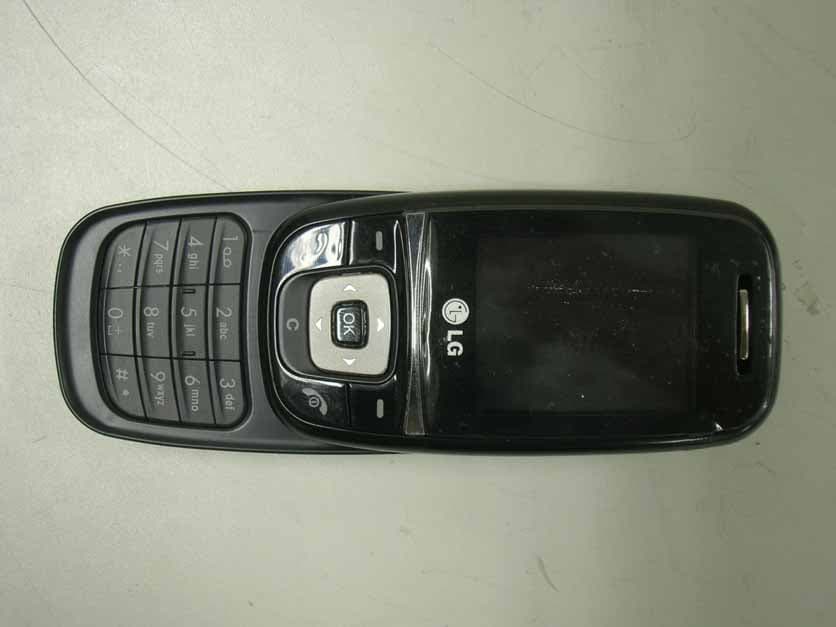
Click to zoom
Application Details
- Equipment Class
- JBP - Part 15 Class B Computing Device Peripheral
- Date of Grant
- Sep 09, 2006
- Application Purpose
- Original Equipment
- Date of Application
- Sep 07, 2006
- Equipment Note
- GSM Camera Slide Phone with Bluetooth
- Company
- LG Electronics USA, Inc.
- Country
- United States
Documents & Files
Document Text
Text extracted from the exhibit documents filed with the FCC. Open a document above to read the original.
Users Manual
KE260 User Guide - ENGLISH Disposal of your old appliance1. When this crossed-out wheeled bin symbol is attached to a product it means the product is covered by the European Directive 2002/96/EC. 2. All electrical and electronic products should be disposed of separately from the municipal waste stream via designated collection facilities appointed by the government or the localauthorities. 3. The correct disposal of your old appliance will help prevent potential negative consequences for the environment and human health. 4. For more detailed information about disposal of your old appliance, please contact your city office, waste disposal service or the shop where you purchased the product. Table of Contents Table of Contents 2 Introduction 5 Guidelines for safe andefficient use 6 KE260 features 1 1 Parts of the phone Display information 15 On-Screen IconsHomescreen 16Getting started 17 Installing the SIM card and thehandset batteryCharging the battery 18 Disconnecting the adapter 19Turning your phone on and off 20 Access codes Barring password 22 General functions 23 Address book 28 In-call menuMultiparty or conference calls 30 Menu Tree 32 Selecting functions andoptions 35 Call history 36 All callsMissed callsDialled callsInbox 37 Call length Call costs 38 Data information Data timeData volumeAddress book 39 InboxContactAdd a contactCaller groups 40 Speed diallingOwn number 41 My bussiness cardSettingsDefault memoryView optionsCopy all/Move allClear contacts 42 Service dial number Table of Contents 3 Settings 43 Date & TimeSet dateDate formatSet timeTime formatDisplayWallpaperStandby textBacklight time 44 BrightnessNetwork nameLanguageConnectivityBluetoothSync service 46 Network selection 47 GPRS attachNetwork profile USB connection mode Calling 48 Call divert Answer modeSend my number 49 Call waitingMinute minderAuto redialSend DTMFSecurity 50 PIN code requestHandset lockAuto key lock timeCall barringFixed dial number (FDN) 51 Change codes 52 Memory status 52 Reset default Camera 53 CameraVideo camera 54 Messaging 55 Create new messageTextPicture 56 Email 57 Inbox 58 Drafts 59 Mailbox 60 OutboxSent 61 Voice mailInfo messageRead 62 Topics Table of Contents Table of Contents 4 Templates 62 TextPicture 63 SettingsText messagePicture message 64 Email 66 Voicemail numberService messageInfo messageOrange World 67 One click to your new Orange WorldHow to create your ownOrange WorldHow to find your way usingOrange World 68 Orange music 69 Music playerMP3 player 70 Music composer 71 Compose melodyMy melodySettings 72 Media album 73 VideosImagesSounds 74 OthersExternal memoryCalendar 75 CalendarMemo 76 Games & apps 77 Games & appsProfiles 79Changing the profileCustomising profiles - PersonaliseCustomising profiles - Rename 80More 81 Alarm clockCalculatorTip calculator 82 Stop watchUnit converter 83 Voice recorderWorld time 84 Q&A 85 Accessories 88Technical Data 89 Congratulations on your purchase of the advancedand compact KE260 mobile phone, designed tooperate with the latest digital mobile communicationtechnology. Introduction Introduction 5 This user’s guide contains important information on the use and operation of thisphone. Please read all the information carefullyfor optimal performance and to prevent anydamage to or misuse of the phone. Anychanges or modifications not expresslyapproved in this user’s guide could void yourwarranty for this equipment. not comply with FCC RF exposure limits and shouldbe avoided.BVehicle Mounted ExternalAntenna (optional, if available.)A minimum separation distance of 7.9 inches (20)must be maintained between the user/bystander andthe vehicle mounted external antenna to satisfy FCCRF exposure requirements.For more information about RF exposure, please visitthe FCC website at www.fcc.govFCC Part 15 Class B ComplianceThis device and its accessories comply with part 15of FCC rules. Operation is subject to the followingtwo conditions: (1) This device and its accessoriesmay not cause harmful interference, and (2) thisdevice and its accessories must accept anyinterference received, including interference thatcause undesired operation. Product care and maintenance• Do not disassemble this unit. Take it to a qualified service technician when repair work is required. • Keep away from electrical appliances such as a TV's, radios or personal computers. • The unit should be kept away from heat sources such as radiators or cookers. • Never place your phone in a microwave oven as it will cause battery to explode. • Do not drop.• Do not subject this unit to mechanical vibration or shock. • The coating of the phone may be damaged if covered with wrap or vinyl wrapper. • Do not use harsh chemicals (such as alcohol, benzene, thinners, etc.) or detergents to clean yourphone. There is a risk of this causing a fire. Warning! Only use batteries, chargers and accessories approved for use with this particular phonemodel. The use of any other types may invalidate anyapproval or warranty applying to the phone, and maybe dangerous. Guidelines for safe and efficient use 7 • Do not subject this unit to excessive smoke or dust.• Do not keep the phone next to credit cards or transport tickets; it can affect the information onthe magnetic strips. • Do not tap the screen with a sharp object as it may damage the phone. • Do not expose the phone to liquid or moisture.• Use accessories, such as earphones and headsets, with caution. Ensure that cables are tucked awaysafely and do not touch the antenna unnecessarily. • Please remove the data cable before powering on the handset. Efficient phone operationTo enjoy optimum performance with minimum powerconsumption please:• Do not hold the antenna when the phone is in use. If you hold it, it can affect call quality, it may alsocause the phone to operate at a higher power levelthan needed and shorten talk and standby times. Electronic devicesAll mobile phones may get interference, which couldaffect performance.• Do not use your mobile phone near medi…
Text truncated - open the document above for the full version.
Cover Letter(s)
American Telecommunications Certification Body Inc. 6731 Whittier Ave, McLean, VA 22101 September 6, 2006 RE: LG Electronics FCC ID: BEJKE260 I have a few comments on this Application. Depending on your responses, kindly understand there may be additional comments. 1.) The Bluetooth block diagram is missing a frequency for the oscillator. Please provide. 2.) Please confirm if a Part 15B Grant as a Computer Peripheral is requested for this device in addition to Part 24 Licensed and Part 15C Unlicensed radios. 3.) FYI: In the future, could you kindly place the SAR reports in the RF Exposure folder at the FCC website? 4.) Please review Page 50 of the SAR report. Unless I am mistaken, the highest body-worn SAR should be .178W/kg and not .134W/kg as listed in the Manual and also on the SAR summary sheet in the SAR report. Your comments please? William H. Graff President and Director of Engineering mailto: [email protected] The items indicated above must be submitted before processing can continue on the above referenced application. Failure to provide the requested information may result in application termination. Correspondence should be considered part of the permanent submission and may be viewed from the Internet after a Grant of Equipment Authorization is issued. Please do not respond to this correspondence using the email reply button. In order for your response to be processed expeditiously, you must submit your documents through the AmericanTCB.com website. Also, please note that partial responses increase processing time and should not be submitted. Any questions about the content of this correspondence should be directed to the sender.
Cover Letter(s)
September 7. 2006 Federal Communication Commission Equipment Authorization Branch 7435 Oakland Mills Road Columbia, MID 21046 In re : LG Electronics Inc. FCC ID: BEJKE260 POWER OF ATTORNEY To whom it may concern: We the undersigned LG Electronics Inc.hereby authorize ESTECH Co.,Ltd. (EST)of Korea to act on our behalf in all matters relating to all processes required in the FCC Part 24&15BC approval and any communication needed with the national authority. Any and all acts carried out by EST on our behalf shall have the same effects as acts of our own. If you have any questions regarding the authorization, please don ’t hesitate to contact us. Sincerely yours, E.S.Park Chief esearch Engineer Mobile Handset Lab LG Electronics Inc. Tel : 82-2-2033-3850 Fax : 82-2-2033-3855 [email protected] 459-9, Kasan-dong, Kemchun-ku Seoul 153-023, Korea LG Electronics Inc. LGE
ID Label/Location Info
Model No : KE260 FCC ID : BEJKE260 SN : Made In Korea
Test Report
Test Report for FCC Company name Address Telephone Product name Model No. Serial No. Test date Testing location Standard □ Class A ■ Class B Test resultN/A □ Class A ■ Class B Test resultOK Tested by Reviewed by Abbreviation * Note - This test report is not permitted to copy partly without our permission - This test result is dependent on only equipment to be used - This test result based on a single evaluation of one sample of the above mentioned Report Number : ESTF150607-005 , Web : www. estech. co. kr Page 1 of 11 Report NumberESTF150607-005 Manufacturer Country of origin Applicant Product 7-Jul-06 GSM Phone with Bluetooth KE260 NONE LG Electronics Inc. KOREA Date of issue ESTECH. Co., Ltd. 97-1 Hoiuk-Ri Majang-Myon, Icheon-city, KyungKi-Do, Korea Test item ■ Conducted Emission ■ Radiated Emission FCC PART 15 2006 , ANSI C 63.4 2003 2006-05-30 ~2006-07-04 OK, Pass = Passed, Fail = Failed, N/A = not applicable LG Electronics Inc. 459-9, Kasan-dong, Keumchun-ku, Seoul 153-023, Korea 82-2-2033-3847 Measurement facility registration number Engineer J.H.Kim Manager Engineer J.M.Yang 94696 (Signature) (Signature) 3 4 5 6 8 8 8 9 10 10 10 11 Report Number : ESTF150607-005 , Web : www. estech. co. kr Page 2 of 11 5. Measurement of radiated emission ............................................................... 5.1 Measurement e quipment ........................................................................... Contents 1. Laboratory Information ................................................................................. 2. Description of EUT ....................................................................................... 3. Test Standards ............................................................................................. 4. Measurement condition ................................................................................. 5.2 Environmental conditions ........................................................................ 5.3 Test data ............................................................................................. ... 6. Measurement of conducted emission ............................................................ 6.1 Measurement e quipment ........................................................................... 6.2 Environmental conditions ........................................................................... 6.3 Test data ................................................................................................ 1. Laboratory Information 1.1 General 1.2 Test Lab. Corporation Name : ESTECH Co. Ltd Head Office : Rm 1015, World Venture Center II, 426-5, Gasan-dong, Geumcheon-gu, Seoul, Kor e (Safety & Telecom. Test Lab) EMC Test Lab : 58-1 Osan-Ri, GaNam-Myon, YeoJoo-Gun, KyungKi-Do, Korea 97-1 Hoiuk-Ri Majang-Myon, Icheon-city, KyungKi-Do, Korea 1.3 Official Qualification(s) MIC : Granted Accreditation from Ministry of Information & Communication for EMC, Safety and Telecommunication KOLAS : Accredited Lab By Korea Laboratory Accreditation Schema base on CENELEC requirements FCC : Filed Laboratory at Federal Communications Commission VCCI : Granted Accreditation from Voluntary Control Council for Interference from ITE This EUT (Equipment Under Test) has been shown to be capable of compliance with the applicable technical standards and is tested in accordance with the measurement procedures as indicated in this report. ESTECH Lab attests to accuracy of test data. All measurement reported herein were performed by ESTECH Co., Ltd. ESTECH Lab assume full responsibility for the completeness of these measurements and vouch for the qualifications of all persons taking them. Report Number : ESTF150607-005 , Web : www. estech. co. kr Page 3 of 11 2. Description of EUT 2.1 Summary of Equipment Under Test NONE: Model Number : KE260 Serial Number : Manufacturer : Country of origin : Rating : Receipt Date : 16-May-06 Report Number : ESTF150607-005 , Web : www. estech. co. kr Page 4 of 11 GSM Phone with Bluetooth NONE LG Electronics Inc. KOREA INPUT:AC100~240V , 50/60Hz 200mA Output:DC 5V,1000mA 3. Test Standards Test Standard : FCC PART 15 (2006) Test Method : ANSI C 63.4 (2003) This standard sets forth uniform methods of measurement of radio-frequency (RF) signals and noise emitted from both unintentional and intentional emitters of RF energy in the frequency range 9 kHz to 40 GHz. Methods for the measurement of radiated and AC power-line conducted radio noise are covered and may be applied to any such equipment unless otherwise specified by individual equipment requirements. These methods cover measurement of certain decides that deliberately radiate energy, such as intentional emitters, but does not cover licensed transmitters. This standard is not intended for certification/approval of avionic equipment or for industrial, scientific, and medical (ISM) equipment These method apply to the measurement of individual units or systems comprised of multiple units This Standard sets out the regulations under which an intentional, unintentional, or incidental radiator may be operated without an individual license. It also contains the technical specifications, administrative requirements and other conditions relating to the marketing of Part 15 devices. Report Number : ESTF150607-005 , Web : www. estech. co. kr Page 5 of 11 4. Measurement Condition 4.1 EUT Operation. 4.2 Configuration and Peripherals * The EUT was in the following operation mode during all testing * The operational conditions of the EUT was determined by the manufacturer according to the typical use of the EUT with respect to the expected hightest level of emission. Report Number : ESTF150607-005 , Web : www. estech. co. kr Page 6 of 11 4.3 EUT and Support equipment Equipment Name Remark (FCC ID) GSM Phone with Bluetooth EUT Headset- NOTE PC- PRINTER MOUSE ADAPTER 4.4 Cable Connecting NameI/O portI/O portLength Shielded GSM Phone with Bluetooth USBUSB1Y GSM Phone with Bluetooth Headset-2N…
Text truncated - open the document above for the full version.
Test Setup Photos
1.5 SAR Test Setup Photographs [ Left Hand -Touch Position Slide IN] [ Right Hand -Touch Position Slide IN] [ Left Hand -Tlit Position Slide IN] [ Right Hand -Tilt Position Slide IN] 1.5 SAR Test Setup Photographs [ Left Hand -Touch Position Slide UP] [ Right Hand -Touch Position Slide UP] [ Left Hand -Tlit Position Slide UP] [ Right Hand -Tilt Position Slide UP] [ Flat - Body Side Configuration (Without Holster) Slide IN] [ Flat - Body Side Configuration (Without Holster) Slide UP]
Contact Information
Applicant
David Kim(Team leader, LGEUS NA Policy & Regulatory Affairs)
Technical Contact
EstechJay Kim
[email protected]+82 2 867 3201
Room 1015, World Venture Center II · Seoul · South Korea
Test Firm
ESTECH Co., Ltd.Yang Jinmo
Technical Specifications
| # | Rule Parts | Frequency Range | Power Output |
|---|---|---|---|
| 1 | 15B | - | - |
Other Applications from LG Electronics USA, Inc.

BEJTFHOBINI1F1
Jan 08, 2025Telematics
Equipment Class
DTS - Digital Transmission SystemBEJNT-16Z90TS
Oct 02, 2024Notebook Computer
Equipment Class
DSS - Part 15 Spread Spectrum TransmitterBEJSP-PEW8
Sep 26, 2024Stylus Pen
Equipment Class
DCD - Part 15 Low Power Transmitter Below 1705 kHzBEJ-RSMV2
Sep 24, 2024RF Module
Equipment Class
FDS - Part 15 Field Disturbance SensorBEJTFBMEIBN3EU
Sep 24, 2024Telematics
Equipment Class
NII - Unlicensed National Information Infrastructure TX