BEJL01CPCS GSM Phone
LG Electronics USA, Inc.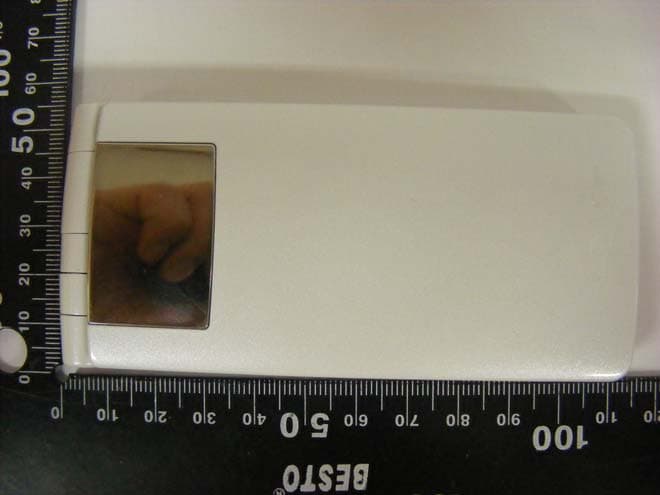
Click to zoom
Application Details
- Equipment Class
- JBP - Part 15 Class B Computing Device Peripheral
- Date of Grant
- Aug 01, 2010
- Application Purpose
- Original Equipment
- Date of Application
- Aug 01, 2010
- Equipment Note
- PCS GSM Phone
- Company
- LG Electronics USA, Inc.
- Country
- United States
Documents & Files
Document Text
Text extracted from the exhibit documents filed with the FCC. Open a document above to read the original.
Users Manual
INSTRUCTION MANUAL ’10.XX L-01C Part 15.21 statement " Change or Modifications that are not expressly approved by the manufacturer could void the user's authority to operate the equipment. “ Part 15.105 statement This equipment has been tested and found to comply with the limits for a class B digital device, pursuant to Part 15 of the FCC Rules. These limits are designed to provide reasonable protection against harmful interference in a residential installation. This equipment generates uses and can radiate radio frequency energy and, if not installed and used in accordance with the instructions, may cause harmful interference to radio communications. However, there is no guarantee that interference will not occur in a particular installation. If this equipment does cause harmful interference or television reception, which can be determined by turning the equipment off and on, the user is encouraged to try to correct the interference by one or more of the following measures: - Reorient or relocate the receiving antenna. - Increase the separation between the equipment and receiver. - Connect the equipment into an outlet on a circuit different from that to which the receiver is connected. - Consult the dealer or an experienced radio/TV technician for help. Part 15 Class B Compliance This device and its accessories comply with part15 of FCC rules. Operation is subject to the following two conditions: (1) This device & its accessories may not cause harmful interference. (2) This device & its accessories must accept any interference received, including interference that may cause undesired operation. Body-worn Operation This device has been tested for typical body-worn operations with the distance of 0.79inches (2.0cm) from the user’s body. To comply with FCC RF exposure requirements, a minimum separation distance of 0.79inches(2.0cm) must be maintained from the user's body. Additionally, Belt clips, holsters & other body-worn accessories may not contain metallic components. Introduction P2 FOMA Terminal What You Can Do with L-01C Part Names and Functions Precautions Handling Precautions Basic Operation P18 Before Using Screen Explanation Character Entry Sound/Screen Setting Lock/Security Connect P36 Call Telephone Mail Phonebook Search P50 i-mode/Full Browser i-Channel Enjoy P54 Camera Music i-αppli i-motion More Convenient P62 Osaifu-Keitai Convenient Tools Data Management Others P70 Support Appendix Index Contents Introduction The FOMA terminal uses radio waves, therefore, it may not function in locations where radio waves cannot reach, such as in tunnels, underground, or in buildings; outside the building where radio waves are weak or out of FOMA service area. Even when you are in an upper fl oor of a tall building and nothing blocks your view outside, your FOMA terminal may not be able to receive or transmit signals. Also, even when radio waves are strong with three antenna bars displayed, and you are not moving, communication may still be interrupted. Be considerate of other people around you in public or where it is especially crowded or quiet. The FOMA terminal uses radio waves to communicate, therefore, there is a possibility that calls may be intercepted by third parties. The W-CDMA and GSM/ GPRS systems automatically encode signals for all calls so even if third parties should intercept calls with the receiver, they will hear only noise. The FOMA terminal sends and receives voice communication as encoded digital data. When you are operating the FOMA terminal while moving, sometimes you may encounter weaker radio waves and the transmitted digital data may not be correctly decoded resulting in sound distortions. It is recommended that you save important data on a microSD card. If you use a PC, use DOCOMO keitai datalink to send and save data such as Phonebook entries, mail messages, Schedule events, etc. to the PC. When you use SSL for a secure connection, you agree that you are responsible for any actions you take. DOCOMO and the certifi ers listed below do not guarantee the safety of SSL for any activities of customers while using SSL, and are not liable for any damages incurred through using SSL. Certifi ers: VeriSign Japan K.K., Cybertrust Japan Co., Ltd., GlobalSign K.K., RSA Security Japan Ltd., SECOM Trust Systems Co., Ltd. The FOMA terminal supports FOMA Plus-Area and FOMA HIGH-SPEED Area. The FOMA terminal can be used only via the FOMA network provided by DOCOMO and DOCOMO's roaming area. It is recommended that you make a backup of user- defi ned data (Phonebook entries, Schedule events, text memos, Record messages, voice memos, or moving picture memos) saved in the FOMA terminal by keeping the separate record or note of those data, etc. and storing them at a separate location. DOCOMO is not responsible for lost data due to failure, repair, or replacement of the model of your FOMA terminal. FOMA Terminal Introduction Guide (Japanese only)P21 Guide pre-installed in the FOMA terminal allows you to look for operating instructions of a desired function. When you cannot refer to this manual, you can search functions with Guide quickly. Stand-by display X 7(for over 1 second) International roamingP41 Your FOMA terminal, phone number, and mail address that are used in Japan are available overseas (supporting 3G and GSM areas). i-Channel (Japanese only)P53 You can receive graphic information such as news or weather forecasts. Also, you can obtain rich content created with Flash by selecting your favorite channels from the Channel list. *This service is a fee-based service that requires subscription. Full browserP51 You can browse web pages incompatible with i-mode on the FOMA terminal in the same way as on a PC. Camera functionsP54 You can capture still images (with auto focus) and moving pictures using the camera with approx. 3.1 Mega effective pixels (approx. 3.1 Mega recorded pixels). Osaifu-KeitaiP62 You can download i-αppli that supports Osaifu- Keitai to deposit electronic mon…
Text truncated - open the document above for the full version.
Users Manual
Basic Operation Kisekae Tool can also be set using the following steps. Stand-by display X M X I[Kisekae] X move the cursor to "i-mode"/"Preinstalled" X C[Open] To reset the setting, press M [Menu] on the Kisekae Tool list screen X "Reset screen display / sound setting" X enter the Terminal security code. Information Changing Illumination when Receiving Stand-by display X M X "Settings" X "Display" X "Lighting LED" X Move the cursor to "Lighting LED" X C[ON] "Incoming voice call"/"Incoming video call"/"New mail" X Select an illumination pattern I[Done] Checking Missed Calls or New Mails with Lighting Stand-by display X M X "Settings" X "Display" X "Lighting LED" X Move the cursor to "Lighting LED" X C[ON] Move the cursor to "Missed call" or "Unread message" X C[ON] I[Done] The illumination for "Missed call" lights or blinks in Aqua color for approximately six hours at approximately fi ve second interval. The illumination for "Unread message" lights or blinks in Green color for approximately six hours at approximately fi ve second interval. Information Saving Power Consumption Set the backlight brightness of the display to the lowest power saving level, and set the backlight to be turned off when 10 seconds elapsed after the last operation. Stand-by display X M X "Settings" X "Other" X "eco mode" X "ON"/"OFF" Alternatively, press 5 for over 1 second in Stand-by to set/cancel the eco mode. Information Basic Operation Lock/Security Various Security Codes Cautions on security codes Avoid setting security codes using your birthday, part of your phone number, your address or room number, "1111" or "1234" that can be easily guessed by others. Be sure to write down the set security codes and store them in a separate location. Do not reveal your security codes to others. DOCOMO is not responsible for damage caused by misuse of your security codes by others. If you forget your security codes, you need to bring your identifi cation document (driver's license, etc.), the FOMA terminal, and UIM to the docomo Shop. For details, contact "General Inquiries" at the back of this manual. PUK code is written in the application form (copy for subscriber) given at the time of contract. If you have subscribed at a place other than the docomo Shop, bring your identifi cation document (driver's license, etc.) and UIM to the docomo Shop or contact "General Inquiries" at the back of this manual. Terminal security code (Default: 0000) You can change the Terminal security code by yourself. Stand-by display X M X "Settings" X "Lock/Security" X "Change security code" Network security code (At the time of contract: any number) The Network security code is a 4-digit number to be used for your identifi cation at an acceptance of order at the docomo Shop, docomo Information Center, or " (user support)", or for accessing network services. You can change the code by yourself. If you have "docomo ID and Password" for "My docomo", a total support site for a PC, you can change the Network security code from a PC. From i-mode, you can change it by accessing " iMenu" X " (user support)" X ") (settings (check/change/ use))" X " (Change Network security code)". For "My docomo" and " (user support)", see the back side of the back cover of this manual (Japanese only). Basic Operation i-mode password (At the time of contract: 0000) The "i-mode password" is a 4-digit number required to register/remove contents in My Menu, and subscribe to/cancel the message service or fee-based i-mode services. (Some other information service providers may set individual passwords.) You can change the password by yourself. From i-mode, you can change it by accessing "iMenu" X "English" X "Options" X "Change i-mode Password". PIN1 code/PIN2 code (At the time of contract: 0000) You can set PIN1 and PIN2 codes to the UIM. PIN1 code is a 4- to 8-digit number to be entered to identify the user every time UIM is inserted into the FOMA terminal or the terminal power is turned on in order to prevent unauthorized use by third party. PIN2 code is a 4- to 8-digit number used to reset accumulated call charges, etc. You can change them by yourself. To change PIN1 code, set "PIN1 code request" to "ON" beforehand. Stand-by display X M X "Settings" X "Lock/Security" X "PIN code" X Enter the Terminal security code X "Change PIN1 code"/"Change PIN2 code" PUK code (PIN unblock code) PUK code is an 8-digit number used to unblock PIN1 code or PIN2 code. You cannot change it by yourself. If you failed to enter PUK code10 times in a row, UIM is locked. Enter PIN1 code Enter PIN2 code Enter PUK code (PIN unblock code) Set new PIN1/PIN2 code Contact the docomo Shop. Failed 10 times in a row OK Failed 3 times in a row Basic Operation Various Lock Functions Lock functionDescription Lock allLocks the FOMA terminal to prevent operations by others. 1 Stand-by display X M X "Settings" X "Lock/Security" X "Lock" X "Lock all" X Enter the Terminal security code X "Yes" b To cancel Lock all While Lock all is set, press M[Unlock] or press any dial key X enter the Terminal security code. If failed to enter the correct Terminal security code fi ve times in a row, the power automatically turns off. When Lock all is set, IC card lock is also set simultaneously. Emergency numbers (110, 119, 118) can be called during Lock all. (Only when UIM is inserted) While Lock all is set, press I[Emergency] X select an emergency number X C[OK]. Lock functionDescription Omakase Lock Locks your personal data such as Phonebook and IC card functions of Osaifu-Keitai by calling DOCOMO when you lost the FOMA terminal. Setting/Canceling Omakase Lock 0120-524-360* Available 24 hours a day (open all year round) (Japanese only) * Unavailable from part of IP phones. Can be set/canceled from the My docomo site (Japanese only) using a PC. For details on Omakase Lock, see "Mobile Phone User's Guide [i-mode] FOMA version". Call/Mail lock Disables outgoing calls, address entries with dial keys, incoming calls or display…
Text truncated - open the document above for the full version.
Cover Letter(s)
Date: March 22, 2010 Federal Communications Commission 7435 Oakland Mills Road Columbia MD 21046 c.c. Compliance Certification Services Certification Division 47173 Benicia Street Fremont, CA 94538, USA To whom it may concern: I, the undersigned, hereby authorize Lab Manager Jim. Kim and of SGS Testing Korea Co., Ltd and hereafter referred to as SGS Testing Korea, to act on our behalf in all manners relating to application for equipment authorization, including signing of all documents relating to these matters. Any and all acts carried out by Lab Manager Jim. Kim of SGS Testing Korea Co., Ltd on our behalf shall have the same effect as acts of our own. I, the undersigned, hereby certify that we are not subject to a denial of federal benefits, that includes FCC benefits, pursuant to Section 5301 of the Anti-Drug Abuse Act of 1988, 21 U.S.C. 853(a). In authorizing SGS Testing Korea as our agent, we still recognize that we are responsible to: a) comply with the relevant provisions of the certification program; b) make all necessary arrangements for the conduct of the evaluation, including provision for examining documentation and access to all areas, records (including internal audit reports) and personnel for the purposes of evaluation (e.g. testing, inspection, assessment, surveillance, reassessment) and resolution of complaints; c) make claims regarding certification only in respect of the scope for which certification has been granted; d) do not use our product certification in such a manner as to bring the Certification Division into disrepute and not make any statement regarding our product certification which the Certification Division may consider misleading or unauthorized; e) upon suspension or cancellation of certification, discontinue use of all advertising matter that contains any reference thereto and return any certification documents as required by the Certification Division; f) use certification only to indicate the products are certified as being in conformity with specified standards; g) endeavor to ensure that no certificate or report nor any part thereof is used in a misleading manner; h) ensure that any reference to our product certification in communication media such as documents, brochures or advertising, complies with the requirements of the Certification Division; i) keep a record of all complaints made known to the us relating to the product’s compliance with requirements of the relevant standard and to make these records available to the Certification Division when requested; j) take appropriate action with respect to such complaints and any deficiencies found in products or services that affect compliance with the requirements for certification; k) document the actions taken. This authorization is valid until further written notice from the applicant. Sincerely Yours, Jae Cheon(J.C.) Lee General Manager LG Electronics USA
Cover Letter(s)
LG Electronics USA 1000 Sylvan Avenue Englewood Cliffs, NJ 07632 Date: July 27, 2010 Fede ral Communications Commission Authorization and Evaluation Division 7435 Oakl and Mills Road, Columbia, MD 21046 RE: Request of Confidentiality for FCC ID: BEJL01C Equipment Class: J BP: Part 15 Class B Computing Device Peripheral To Whom It May Concern: Pursua nt to Sections 0.457 and 0.459 of the Commission’s Rules (CFR 47), and Section 552 (b) (4) of the Freedom of Information Act, LG Electronics USA hereby requests confidentiality and treatment of certain information accompanying this application. The materials contain trade secrets and proprietary information not customarily released to the public. The public disclosure of these matters might be harmful to the Applicant and provide unjustified benefits to its competitors. We are also hereby request Short-Term Confidentiality for 180 days after the grant as outlined in Public Notice DA 04-1705. This provision will give LG Electronics USA temporary confidentiality of commercially sensitive information prior to product release. The requested Permanent and Temporary Confidential exhibits are listed as follows: PERMANENT AND SHORT-TERM CONFIDENTIAL LIST Exhibit Description 1 Block Diagram PERMANENT 2 Operational Descriptions 3 External Photos 4 Internal Photos 5 Test-Setup Photos SHORT-TERM 6 User’s Manual The Applicant understands that pursuant to Rule 0.457, disclosure of this application and all accompanying documentations, where applicable, will not be made public before the date of the Grant for this application. Sincerely, Jae Cheon(J.C.) Lee General Manager LG Electronics USA LG Electronics USA 1000 Sylvan Avenue Englewood Cliffs, NJ 07632
External Photos
Model : L-01C External photos of EUT Model : L-01C Front view of EUT Rear view of EUT Model : L-01C Side view of EUT Model : L-01C Folder open of EUT
ID Label/Location Info
Model No: L-01C FCC ID : BEJL01C S/N : Made in Korea LG Electronics Inc. LGE
Internal Photos
Model : L-01C Internal photos of EUT Model : L-01C Top view of main board Bottom view of main board Model : L-01C Top view of LCD Panel Bottom view of LCD Panel Model : L-01C Top view of Camera module Bottom view of Camera module
Test Report
Test Report No. : F690501/RF-EMY005965 Page : 2 of 10 Contents 1. General Information...................................................................................................3 1.1 Client Information................................................................................................3 1.2 Test Laboratory...................................................................................................3 1.3 General Information of E.U.T. .............................................................................3 1.4 Operating Modes and Conditions........................................................................3 1.5 Peripheral Equipments........................................................................................3 1.6 Cable List ............................................................................................................4 1.7 System Configurations ........................................................................................4 1.8 Test System Layout ............................................................................................5 1.9 Applicable Standards for Testing ........................................................................5 1.10 Summary of Test Results..................................................................................5 2. Emission Test............................................................................................................6 2.1 Test Results ........................................................................................................6 2.2 Test Equipments .................................................................................................6 2.3 Test Site..............................................................................................................6 2.4 Conducted Emission Test Data...........................................................................6 2.5 Radiated Emission Test Data..............................................................................8 2.6 Modifications.......................................................................................................8 Appendix A : Mains Terminal Continuous Disturbance Voltage Test Data ....................9 Appendix B : Mains Terminal Continuous Disturbance Voltage Test Data ..................10 Test Report No. : F690501/RF-EMY005965 Page : 3 of 10 1. General Information 1.1 Client Information Applicant : LG Electronics Inc. Address of Applicant : 60-39, Gasan-dong, Gumchon-gu, Seoul, 153-023, Korea Manufacturer : LG Electronics Inc. Address of Manufacturer : 60-39, Gasan-dong, Gumchon-gu, Seoul, 153-023, Korea 1.2 Test Laboratory Name and Address : SGS Testing Korea Co., Ltd. 705, Dongchun-Dong, Yongin-City, Gyeonggi-Do, Korea 449-840 18-34, Sanbon-dong, Gunpo, Gyeonggi-do, Korea 435-041 1.3 General Information of E.U.T. Product Name : PCS GSM Phone Model Name : L-01C Serial No. : None Test Voltage : AC 120V, 60Hz(Notebook Computer) 1.4 Operating Modes and Conditions Operating mode Operating condition USB Mode USB Data Communication Note: EUT was exercised through Software(Dell Program) during testing. 1.5 Peripheral Equipments Description Model Serial No. Manufacturer USB MOUSE Basic Optical Mouse v2.0 - Microsoft Corporation USB KEYBOARD Comfort Curve Keyboard 2000 - Microsoft Corporation LCD Monitor CR22KS N843H1NP701598NSamsung Notebook Computer PCG-3AEP 282722857000775 Sony Corporation Micro SD Card 1.0 GB - SanDisk Note: Peripherals are DoC. Test Report No. : F690501/RF-EMY005965 Page : 4 of 10 1.6 Cable List Start END Cable Spec. Name I/O Port Name I/O Port Length Shield USB Notebook computer USB 0.5 Shielded EUT Micro SD Micro SD card- - - DC OUT Notebook computer DC IN 1.8 Unshielded AC Adapter AC IN Power source - 1.0 Unshielded USB EUT USB 0.5 Shielded USB USB keyboardUSB 1.5 Shielded USB USB mouse USB 1.8 Shielded RGB LCD Monitor RGB 1.8 Shielded Notebook computer DC IN AC Adapter DC OUT 1.8 Unshielded RGB EUT RGB 1.8 Shielded LCD Monitor AC IN Power source - 1.0 Unshielded 1.7 System Configurations Description Model Serial No. Manufacturer Main board L-01C_MAIN_REV.B_1 SPFY0235101_(3)- SUB board L-01C_RF_SUB SPCY0242701_C - LCD L-01C_F_FOLDER SPCY0244701_D - Battery L07 SBPL0098203 AACDC100309 LG Electronics Test Report No. : F690501/RF-EMY005965 Page : 5 of 10 1.8 Test System Layout 1.9 Applicable Standards for Testing 1.10 Summary of Test Results Test Item Standards Results Conducted Emission FCC Part 15 : 2009, Subpart B ANSI C63.4 : 2003 CISPR 22 : 2006 Complied Radiated Emission FCC Part 15 : 2009, Subpart B ANSI C63.4 : 2003 CISPR 22 : 2006 Complied Standards Status Deviation FCC Part 15 : 2009, Subpart B ANSI C63.4 : 2003 CISPR 22 : 2006 Applicable No Deviation Power source AC Adapter PCS GSM Phone (EUT) Micro SD card LCD Monitor Notebook computer USB mouse USB keyboard Test Report No. : F690501/RF-EMY005965 Page : 6 of 10 EMISSION 2. Emission Test 2.1 Test Results Test Items Standards Test Results Conducted Emission FCC Part 15 : 2009, Subpart B ANSI C63.4 : 2003 CISPR 22 : 2006 Complied Radiated Emission FCC Part 15 : 2009, Subpart B ANSI C63.4 : 2003 CISPR 22 : 2006 Complied 2.2 Test Equipments Equipment Model Manufacturer Last Cal. Date Test Receiver ESS ROHDE&SCHWARZ 2010.07.08 LISN ENV216 ROHDE&SCHWARZ 2010.02.02 LISN ESH3-Z5 ROHDE&SCHWARZ 2010.05.10 Shielded Room - DAEIL EMC - Test Receiver ESU26 Rohde & Schwarz 2010.04.08 Bilog Antenna VULB9163 SCHWARZBECK MESS- ELEKTRONIK 2009.07.22 Horn Antenna HF906 Rohde & Schwarz 2009.10.08 Preamplifier 8449B Agilent 2010.03.31 RF Amplifier 8447F HEWLETT PACKARD 2010.07.05 Note : Only the calibration period of Antennas is 2 years but the period of every equipment is 1 year. 2.3 Test Site Conducted Emission: Shield Room in Yongin Laboratory Radiated Emission: 3m Semi-Anechoic chamber in Gunpo Laboratory 2.4 Conducted Emission Test Data The initial preliminary exploratory scans were performed using a …
Text truncated - open the document above for the full version.
Test Setup Photos
CE Front CE Rear RE Front RE Rear RE Front(GHz) RE Rear(GHz)
Contact Information
Applicant
David Kim(Team leader, LGEUS NA Policy & Regulatory Affairs)
Test Firm
SGS Korea Co., Ltd.Forest Lee
Technical Specifications
| # | Rule Parts | Frequency Range | Power Output |
|---|---|---|---|
| 1 | 15B | - | - |
Other Applications from LG Electronics USA, Inc.

BEJTFHOBINI1F1
Jan 08, 2025Telematics
Equipment Class
DTS - Digital Transmission SystemBEJNT-16Z90TS
Oct 02, 2024Notebook Computer
Equipment Class
DSS - Part 15 Spread Spectrum TransmitterBEJSP-PEW8
Sep 26, 2024Stylus Pen
Equipment Class
DCD - Part 15 Low Power Transmitter Below 1705 kHzBEJ-RSMV2
Sep 24, 2024RF Module
Equipment Class
FDS - Part 15 Field Disturbance SensorBEJTFBMEIBN3EU
Sep 24, 2024Telematics
Equipment Class
NII - Unlicensed National Information Infrastructure TX