BEJL601IGSM Camera Phone
LG Electronics USA, Inc.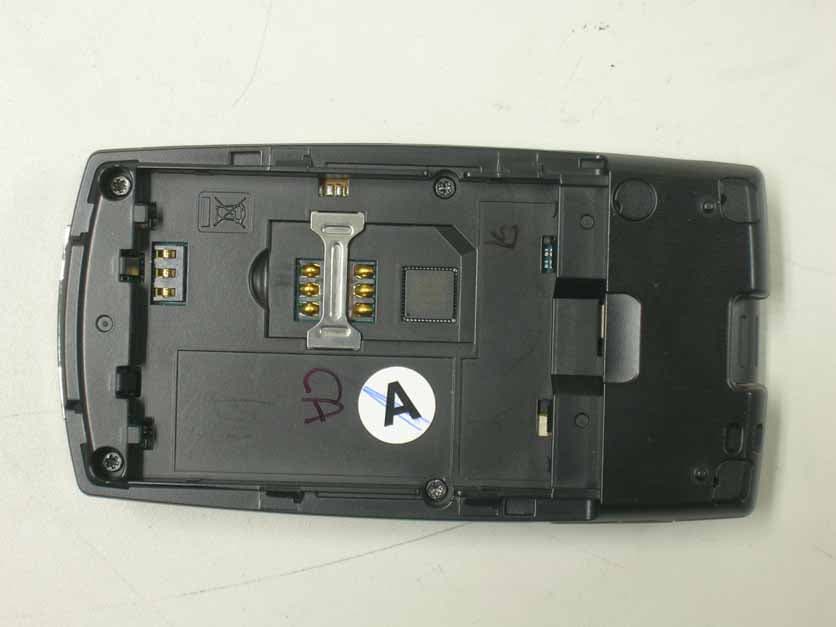
Click to zoom
Application Details
- Equipment Class
- JBP - Part 15 Class B Computing Device Peripheral
- Date of Grant
- Jul 30, 2006
- Application Purpose
- Original Equipment
- Date of Application
- Jul 29, 2006
- Equipment Note
- GSM Camera Phone
- Company
- LG Electronics USA, Inc.
- Country
- United States
Documents & Files
Document Text
Text extracted from the exhibit documents filed with the FCC. Open a document above to read the original.
Users Manual
DoCoMo W-CDMA, GSM/GPRS system Thank you for purchasing the “FOMA L601i”.Before or during use of the FOMA L601i, make sure that you read this manual and the separate manuals such as for the battery pa ck thoroughly so that you can use the FOMA L601i correctly. If you feel any inconvenience in reading the manual, contact the DoCoM o Information Center listed on the back page of this manual.The FOMA L601i is designed to be your close partner. Treat it carefully at all times to ensure long-term performance. Before using your FOMA phone Because the FOMA phones use radio waves, they cannot be used in places where radio waves do not reach, such as inside tunnels,underground, or in buildings; or the outside where radio waves are weak or out of the FOMA service area. They may not be used i n the high-rise buildings even when the antennas are unobstructed. You may also experience interruption of calls even when using with out moving while the radio waves are strong enough for the three antennas to appear on the display. Use the FOMA phone carefully to avoid disturbing other people when in public, or in crowded or quiet places.Since the FOMA phones use radio waves as the medium of telecommunication, calls may be tapped by the third party. However, the W- CDMA and GSM/GPRS systems automatically support tapping prevention, so your conversation will be incomprehensible to the third party. The FOMA phones change your voice into digital signals and send them to the other party. In places where the radio waves are we ak, the digital signals may not be converted correctly, and in such a case, the voice heard may sound different from the actual origina l voice. It is recommended that you make separate notes of the information stored in the FOMA phone and keep such notes in a safe place.DoCoMo cannot be held responsible in any way for the loss of data stored in the phone.The user hereby agrees that the user shall be solely responsible for the result of the use of SSL. Neither DoCoMo nor the certi fier as listed herein makes any representation and warranty as for the security in the use of SSL. In the event that the user shall sustain da mage or loss due to the use of SSL, neither DoCoMo nor the certifier shall be responsible for any such damage or loss. Certifier: VeriSign Japan K.K. Betrusted Japan Co., Ltd. GeoTrust Japan, inc. This FOMA phone can be used only via the FOMA network or Roaming service area by DoCoMo. For those who use the FOMA phone for the first time If this is the first time for you to use the FOMA phone, read this manual in the order as described below. Then you will get ac quainted with the outline of preparing and operating procedures for using your FOMA phone.1. Attach and then charge the battery pack. > P37, P39 2. Turn the power to the FOMA phone ON, initialize, and confirm your phone number. > P43 3. Check the buttons on the FOMA phone for their roles. > P28 4. Confirm the meanings of icons that appear on the display. > P31 5. Learn how to operate the menus. > P34 6. Get well acquainted how to make and receive calls. > P46, P52 Note that “FOMA L601i” is referred to as “FOMA phone” in this manual. The functions which use a miniSD memory card are described in this manual; however, you need to obtain a miniSD memorycard separately to make these functions available. See page 166 for the miniSD memory card. It is prohibited to copy all or part of this manual without permission.The instructions contained in this manual may be changed without notice. 1 How to Read/Refer to This Manual The search methods and page structure of this manual are described here. Screen displays and illustrationsdescribed in this manual are for reference. The actual ones might differ. How to Refer to This Manual By the following search methods, you can find pages where your desired functions and explanations are described: Tabs on Cover ] Cover Search from the tabs printed on the cover. ] See the next page for more details. Index ] P306 Search from keywords when you know the names of functions or services.Contents ] P4 Search from the contents that categorize functions.Features ] P6 Search from Features when you want to use specific functions of FOMA L601i such as new functions and usefulfunctions.Menu List ] P224 Search from list for menus of FOMA L601i.Quick Manual ] P316 Quick Manual gives you a clear, brief description about fundamental functions. You can take it with you when yougo outing. How to Read/Refer to This Manual a Overseas UseSee “Overseas use” (P213) for how to use your FOMA phone outside Japan. 2 How to Read/Refer to This Manual a From the Tabs on the Cover Search for the functions and explanations in the order of the Cover > First page of Chapter > Description page. a From the Index Search from the index when you know the names of functions or services. Contents / Precautions Confirming before use Making Calls / Receiving Calls Making / iving Video-phone Calls Phonebook Sound / Display Settings Safety settings Multimedia (Camera) i-mode Mail i-appli Data box Adjusting the Ring Volume ....................68Adjusting the Effect Tone Volume .........68Selecting a Ring Tone ............................68Selecting a Effect Tone ..........................69Setting a Vibrator ...................................70Activating the Manner Mode .................70Setting the Ringing Operation forIncoming Mail .........................................71Setting the Ringing Time........................72Setting Sub Display................................73Setting Fonts of Dial Characters ...........74Setting Menu Display .............................75Setting Backlight ....................................75Setting Color Scheme ............................75 Sound / Display 1 Ring volume2 Effect tone volume3 Select ringtone4 Select effect tone5 Vibration settings6 Manner settings7 Mail ring duration Select Sound On the Stand-by display, C [Menu] ] or “Sound” To display the Sound menu 1 Main display2 Sub displa…
Text truncated - open the document above for the full version.
Users Manual
260 Appendix Appendix Kuten digit 1 to 3 Kuten digit 4 Kuten digit 4 Kuten digit 4 Kuten digit 1 to 3 Kuten digit 1 to 3 261 Appendix Next Page Appendix Kuten digit 1 to 3 Kuten digit 4 Kuten digit 4 Kuten digit 4 Kuten digit 1 to 3 Kuten digit 1 to 3 262 Appendix Appendix Kuten digit 1 to 3 Kuten digit 4 Kuten digit 4 Kuten digit 4 Kuten digit 1 to 3 Kuten digit 1 to 3 263 Appendix Next Page Appendix Kuten digit 1 to 3 Kuten digit 4 Kuten digit 4 Kuten digit 4 Kuten digit 1 to 3 Kuten digit 1 to 3 264 Appendix Appendix Kuten digit 1 to 3 Kuten digit 4 Kuten digit 4 Kuten digit 4 Kuten digit 1 to 3 Kuten digit 1 to 3 265 Appendix Appendix Kuten digit 1 to 3 Kuten digit 4 Kuten digit 4 Kuten digit 4 Kuten digit 1 to 3 Kuten digit 1 to 3 266 Appendix Appendix Kuten digit 1 to 3 Kuten digit 4 Kuten digit 4 Kuten digit 4 Kuten digit 1 to 3 Kuten digit 1 to 3 267 Appendix Appendix List of city in World time Country name City name Country name Country name Ireland Dublin India New Delhi Beijing Afghanistan Kabul Taiwan Taipei Thailand Bangkok Iran Tehran Russia Moscow Indonesia Jakarta Hong Kong United of states ofAmerica Anchorage Egypt Cairo DenmarkRepublic of China Copenhagen Guam Australia Canberra Germany Berlin Seattle Sydney Japan Tokyo Chicago Austria Vienna New Zealand Auckland Dallas Holland Amsterdam Hungary Budapest Detroit Canada Montreal Bangladesh Dhaka Denver Republic of Korea Seoul Philippines Manila New York Greece Athens Finland Helsinki Honolulu Kuwait Kuwait Brazil Rio de Janeiro Boston Saudi Arabia Jedda France Paris Los Angeles Singapore Singapore Viet Nam Hanoi Washington D.C. Sweden Stockholm Venezuela Caracas Arab Emirates Abu Dhabi Spain Madrid AzoresBrussels EnglandItaly Buenos Aires Sri Lanka Colombo PortugalBelgium Lisbon London ThailandCzecho Taipei Mexico Mexico City Rome Prague Lebanon Beirut Aregentina 268 Appendix Appendix Multiaccess Combination Patterns You can simultaneously use a voice call and packet transmission (i-mode, i-mode mail, etc.) as well as SMS with the multiaccess ing function on the FOMA phone. The available combinations of operations for the multiaccessing function are shown below:O : Available x : Not available – : The combination is functionally not possible. 1: If you have signed up for Call Waiting Service, you can make another voice call with the current voice call put on hold.2: If you have signed up for “Voice Mail” or “Call Forwarding Service”, and you have not yet activated either service, you can answer another incoming call after ending the current transmission. 3: You can check the missed call after ending a call.4: You cannot use this menu during communicating i-appli.5: The message will be stored in i-mode center with a mark on upper of screen.6: You cannot receive message on downloading.7: You can receive SMS after ending current transmission.8: You cannot activate i-appli which needs data communication during transmitting by packet.9: If i-appli runs without connecting the network, the packet transmission can be activated.10: You can activate i-appli if you call from site of i-mode.11: You can send i-mode mail or i-appli if you compose the mail from the submenus of i-mode browser. You can insert the displayed site or URL into the body of mail. Video-phone During a callDuring a Video-phone callWhile using i-appliDuring i-modeDuring a packet transmission with PC connection Transmission added Current Transmission Voice call i-mode i-appli i-mode mail Packet transmission SMS Outgoing Incoming Outgoing Incoming Sending Receiving Send Receive Sending 269 Appendix Appendix Multitask Combination Patterns You can run multiple functions simultaneously and usethem switching displays with the Multitask function. Using Multitask 1. While running each function, N 1: “Own number” function is not included.2: If you switch i-mode/ i-appli, the play is ended, and then is displayed. 3: “Schedule” function is not included.4: “Custom menu”, “Infrared”, “Calculator”, “miniSD memory card” are not included. 2. Select ] C ] Select from the following new functions ] C Call The Phone Number entry display appears. > P46 Mail The Mail menu appears. > P127 i-mode The i-mode menu appears. > P109 i-appli The Software List display appears. > P147 Search phonebook The Phonebook Search display appears. > P60 • Although Search phonebook is normal application, it can be always activated until system memory is available. You can confirm the functions running. You can switch functions by selecting the icon. Select Search phonebook Phonebook DoCoMo IchiroDoCoMo SaburoDoCoMo JiroDoCoMo Taro ȹ Ȝȥ Description Icon Description Icon Setting the setting menu Description Icon Voice call function runningMail function runningi-mode functionrunning Scheduler functionrunning Calculator functionrunning Description Icon Tool function running 4 Setting the soundfunction Setting the display menu Multimedia functionrunning i-appli function running ( 2 ) Data box functionrunningPhonebook function 1 running Station functionrunning 3 Setting the network/Displaying the historyof recent calls Own number isdisplayed 270 Appendix Appendix Melody The Melody Folder List display appears. > P164 Camera-mode The Still Image Finder display appears. > P102 Scheduler The Monthly Schedule display appears. > P183 Calculator The Calculator display appears. > P175 Own number Own number is displayed. > P65 • A few functions are not selected depending on activating the task. > P271 Information • To bring up the Task Menu display from Stand-by display, press and hold N for at least one second. • When you activate multitask function, the submenus can be used. • It may be a few cases that you cannot use “Search phonebook” depending on the memory status of FOMAhandset. Ending the task/ Going back to previous task1. Q / P • You can go back previous menu.• You can end current task at the same time. 271 Appendix Appendix Combination of Functions You may not be able to select some items on the Task Menu disp…
Text truncated - open the document above for the full version.
Cover Letter(s)
July 20. 2006 Federal Communication Commission Equipment Authorization Branch 7435 Oakland Mills Road Columbia, MID 21046 In re : LG Electronics Inc. FCC ID: BEJL601I POWER OF ATTORNEY To whom it may concern: We the undersigned LG Electronics Inc.hereby authorize ESTECH Co.,Ltd. (EST)of Korea to act on our behalf in all matters relating to all processes required in the FCC Part 24 approval and any communication needed with the national authority. Any and all acts carried out by EST on our behalf shall have the same effects as acts of our own. If you have any questions regarding the authorization, please don ’t hesitate to contact us. Sincerely yours, E.S.Park Chief esearch Engineer Mobile Handset Lab LG Electronics Inc. Tel : 82-2-2033-3850 Fax : 82-2-2033-3855 [email protected] 459-9, Kasan-dong, Kemchun-ku Seoul 153-023, Korea LG Electronics Inc. LGE
Cover Letter(s)
June 26, 2006 Federal Communication Commission Equipment Authorization Branch 7435 Oakland Mills Road Columbia, MID 21046 In re : LG Electronics Inc.. FCC ID: BEJL601I Tri Band GSM Phone Part24 Certification Request for Confidentiality Gentlemen: In accordance with 0.459 of CFR 47, LG Electronics, Inc. hereby requests confidentiality of the Block Diagram, Schematic Diagrams, Operational Description, Technical Specification, Parts List, and Tune-Up Procedure for the above-referenced certification application. These documents contain detailed system and equipment description and related information about the product which LG Electronics Inc. Considers to be proprietary, confidential, and a custom design and, otherwise, would not release to the general public. Since this design is a basis from which future technological products will evolve, LG Electronics Inc. considers this information to be of benefit to its competitors, such that the disclosure of the information in these documents would give competitors an unfair advantage in the market. Sincerely, E.S.Park Chief Research Engineer CDMA Handset Lab LG Electronics Inc. Tel : 82- 2-2033-1110 Fax : 82- 2-2033-1222 [email protected] 60-39, Kasan-dong,Kemchun-ku Seoul 153-801, Korea LG Electronics Inc. LGE
Cover Letter(s)
June 26, 2006 Federal Communications Commission Authorization and Evaluation Div. Equipment Authorization Branch 7435 Oakland Mills Road Columbia, MD 21046 In re: LG Electronics Inc. FCC ID: BEJL601I Request for Short-Term Confidentiality To Whom It May Concern: In accordance with 0.457 and 0.459 of CFR 47, LG Electronics Inc. requests short-term confidentiality for the test setup photos, external photos, internal photos, and user’s manual of the attached test report. These documents contain detailed system and equipment descriptions and related information about the product, which LG Electronics Inc. considers to be proprietary, confidential, and a custom design and otherwise, would not release to the general public. Since this design is a basis from which future technological products will evolve, LG Electronics feels that this information would be of benefit to its competitors, and that the disclosure of the information in these documents would give our competitors an unfair advantage in the market. Sincerely, E.S.Park Chief Research Engineer CDMA Handset Lab LG Electronics Inc. LG Electronics Inc. LGE Tel : 82-2-2033-1110 Fax : 82-2-2033-1222 [email protected] 60-39, Kasan-dong, Kemchun-ku Seoul 153-801, Korea
Cover Letter(s)
American Telecommunications Certification Body Inc. 6731 Whittier Ave, McLean, VA 22101 July 25, 2006 RE: LG Electronics FCC ID: BEJL601I I have a few comments on this Application. Depending on your responses, kindly understand there may be additional comments. 1.) Page 297 of the Users manual indicates that this device can connect to a computer via a USB cable. Will Part 15B Certification or DofC apply? If Part 15B Certification, kindly provide a Part 15B Certification report and Test Setup photos. If FCC DofC authorization procedure is used, then you are reminded that the FCC logo must appear on the Label. William H. Graff President and Director of Engineering mailto: [email protected] The items indicated above must be submitted before processing can continue on the above referenced application. Failure to provide the requested information may result in application termination. Correspondence should be considered part of the permanent submission and may be viewed from the Internet after a Grant of Equipment Authorization is issued. Please do not respond to this correspondence using the email reply button. In order for your response to be processed expeditiously, you must submit your documents through the AmericanTCB.com website. Also, please note that partial responses increase processing time and should not be submitted. Any questions about the content of this correspondence should be directed to the sender.
ID Label/Location Info
Model No : L601i FCC ID : BEJL601I This device complies with Part 15 of the FCC Rules. Operation is subject to the condition that this device does not cause harmful interference. Made In Korea
Test Report
Test Report for FCC Company name Address Telephone Product name Model No. Serial No. Test date Testing location Standard □ Class A ■ Class B Test resultN/A □ Class A ■ Class B Test resultOK Tested by Reviewed by Abbreviation * Note - This test report is not permitted to copy partly without our permission - This test result is dependent on only equipment to be used - This test result based on a single evaluation of one sample of the above mentioned Report Number : ESTF150607-014 , Web : www. estech. co. kr Page 1 of 11 Report NumberESTF150607-014 Manufacturer Country of origin Applicant Product 29-Jul-06 GSM Phone L601i NONE LG Electronics Inc. KOREA Date of issue ESTECH. Co., Ltd. 97-1 Hoiuk-Ri Majang-Myon, Icheon-city, KyungKi-Do, Korea Test item ■ Conducted Emission ■ Radiated Emission FCC PART 15 2006 , ANSI C 63.4 2003 2006-07-28 OK, Pass = Passed, Fail = Failed, N/A = not applicable LG Electronics Inc. 459-9, Kasan-dong, Keumchun-ku, Seoul 153-023, Korea 82-2-2033-3847 Measurement facility registration number Engineer J.H.Kim Manager Engineer J.M.Yang 94696 (Signature) (Signature) 3 4 5 6 8 8 8 9 10 10 10 11 Report Number : ESTF150607-014 , Web : www. estech. co. kr Page 2 of 11 5. Measurement of radiated emission ............................................................... 5.1 Measurement e quipment ........................................................................... Contents 1. Laboratory Information ................................................................................. 2. Description of EUT ....................................................................................... 3. Test Standards ............................................................................................. 4. Measurement condition ................................................................................. 5.2 Environmental conditions ........................................................................ 5.3 Test data ............................................................................................. ... 6. Measurement of conducted emission ............................................................ 6.1 Measurement e quipment ........................................................................... 6.2 Environmental conditions ........................................................................... 6.3 Test data ................................................................................................ 1. Laboratory Information 1.1 General 1.2 Test Lab. Corporation Name : ESTECH Co. Ltd Head Office : Rm 1015, World Venture Center II, 426-5, Gasan-dong, Geumcheon-gu, Seoul, Kor e (Safety & Telecom. Test Lab) EMC Test Lab : 58-1 Osan-Ri, GaNam-Myon, YeoJoo-Gun, KyungKi-Do, Korea 97-1 Hoiuk-Ri Majang-Myon, Icheon-city, KyungKi-Do, Korea 1.3 Official Qualification(s) MIC : Granted Accreditation from Ministry of Information & Communication for EMC, Safety and Telecommunication KOLAS : Accredited Lab By Korea Laboratory Accreditation Schema base on CENELEC requirements FCC : Filed Laboratory at Federal Communications Commission VCCI : Granted Accreditation from Voluntary Control Council for Interference from ITE This EUT (Equipment Under Test) has been shown to be capable of compliance with the applicable technical standards and is tested in accordance with the measurement procedures as indicated in this report. ESTECH Lab attests to accuracy of test data. All measurement reported herein were performed by ESTECH Co., Ltd. ESTECH Lab assume full responsibility for the completeness of these measurements and vouch for the qualifications of all persons taking them. Report Number : ESTF150607-014 , Web : www. estech. co. kr Page 3 of 11 2. Description of EUT 2.1 Summary of Equipment Under Test NONE: Model Number : L601i Serial Number : Manufacturer : Country of origin : Rating : Receipt Date : 7-Jul-06 Report Number : ESTF150607-014 , Web : www. estech. co. kr Page 4 of 11 GSM Phone NONE LG Electronics Inc. KOREA INPUT:AC100~240V , 50/60Hz 0.2A Output:DC 5.4V,0.7mA 3. Test Standards Test Standard : FCC PART 15 (2006) Test Method : ANSI C 63.4 (2003) This standard sets forth uniform methods of measurement of radio-frequency (RF) signals and noise emitted from both unintentional and intentional emitters of RF energy in the frequency range 9 kHz to 40 GHz. Methods for the measurement of radiated and AC power-line conducted radio noise are covered and may be applied to any such equipment unless otherwise specified by individual equipment requirements. These methods cover measurement of certain decides that deliberately radiate energy, such as intentional emitters, but does not cover licensed transmitters. This standard is not intended for certification/approval of avionic equipment or for industrial, scientific, and medical (ISM) equipment These method apply to the measurement of individual units or systems comprised of multiple units This Standard sets out the regulations under which an intentional, unintentional, or incidental radiator may be operated without an individual license. It also contains the technical specifications, administrative requirements and other conditions relating to the marketing of Part 15 devices. Report Number : ESTF150607-014 , Web : www. estech. co. kr Page 5 of 11 4. Measurement Condition 4.1 EUT Operation. 4.2 Configuration and Peripherals * The EUT was in the following operation mode during all testing * The operational conditions of the EUT was determined by the manufacturer according to the typical use of the EUT with respect to the expected hightest level of emission. Report Number : ESTF150607-014 , Web : www. estech. co. kr Page 6 of 11 4.3 EUT and Support equipment Equipment Name Remark (FCC ID) GSM Phone EUT NOTE PC- ADAPTER MOUSE PRINTER 4.4 Cable Connecting NameI/O portI/O portLength Shielded GSM PhoneUSBUSB1.0Y Note PcParallelParallel1.5Y Note PcUSBUSB1.5Y Note PcPower-1.5N PPIIL35748823888 Dell Asia Pacific Sdn. Note Pc LQ-…
Text truncated - open the document above for the full version.
Contact Information
Applicant
David Kim(Team leader, LGEUS NA Policy & Regulatory Affairs)
Technical Contact
ESTechJay Kim
[email protected]+82 2 867 3201
Room 1015, World Venture Center II · Seoul · South Korea
Test Firm
ESTECH Co., Ltd.Yang Jinmo
Technical Specifications
| # | Rule Parts | Frequency Range | Power Output |
|---|---|---|---|
| 1 | 15B | - | - |
Other Applications from LG Electronics USA, Inc.

BEJTFHOBINI1F1
Jan 08, 2025Telematics
Equipment Class
DTS - Digital Transmission SystemBEJNT-16Z90TS
Oct 02, 2024Notebook Computer
Equipment Class
DSS - Part 15 Spread Spectrum TransmitterBEJSP-PEW8
Sep 26, 2024Stylus Pen
Equipment Class
DCD - Part 15 Low Power Transmitter Below 1705 kHzBEJ-RSMV2
Sep 24, 2024RF Module
Equipment Class
FDS - Part 15 Field Disturbance SensorBEJTFBMEIBN3EU
Sep 24, 2024Telematics
Equipment Class
NII - Unlicensed National Information Infrastructure TX