BEJL602IPCS GSM Phone
LG Electronics USA, Inc.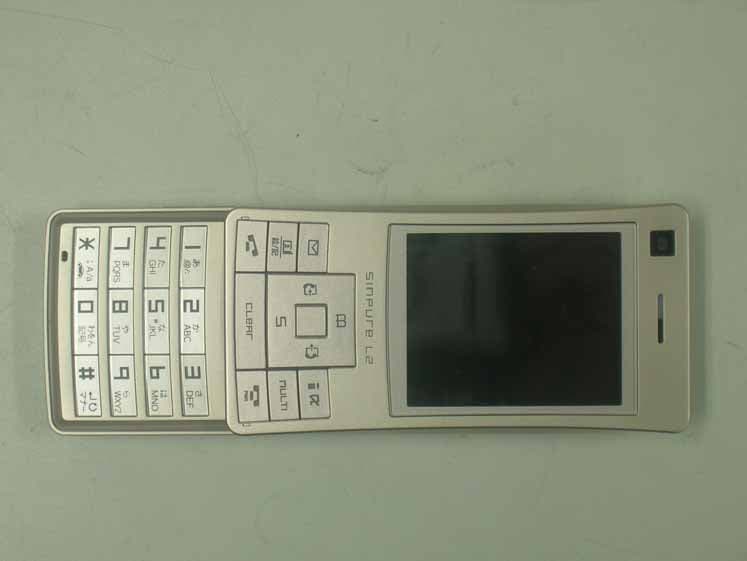
Click to zoom
Application Details
- Equipment Class
- JBP - Part 15 Class B Computing Device Peripheral
- Date of Grant
- Feb 19, 2007
- Application Purpose
- Original Equipment
- Date of Application
- Feb 19, 2007
- Equipment Note
- PCS GSM Phone
- Company
- LG Electronics USA, Inc.
- Country
- United States
Documents & Files
Document Text
Text extracted from the exhibit documents filed with the FCC. Open a document above to read the original.
Users Manual
Part 15.21 statement " Change or Modifications that are not expressly approved by the manufacturer could void the user's authority to operate the equipment. " Part 15.105 statement This equipment has been tested and found to comply with the limits for a class B digital device, pursuant to Part 15 of the FCC Rules. These limits are designed to provide reasonable protection against harmful interference in a residential installation. This equipment generates uses and can radiate radio frequency energy and, if not installed and used in accordance with the instructions, may cause harmful interference to radio communications. However, there is no guarantee that interference will not occur in a particular installation. if this equipment does cause harmful interference or television reception, which can be determined by turning the equipment off and on, the user is encouraged to try to correct the interference by one or more of the following measures: - Reorient or relocate the receiving antenna. - Increase the separation between the equipment and receiver. - Connect the equipment into an outlet on a circuit different from that to which the receiver is connected - Consult the dealer or an experienced radio/TV technician for help. LIMITED WARRANTY STATEMENT 1. WHAT THIS WARRANTY COVERS: LG offers you a limited warranty that the enclosed subscriber unit and its enclosed accessories will be free from defects in material and workmanship, according to the following terms and conditions: (1) The limited warranty for the product extends for ONE (1) year beginning on the data of purchase of the product. (2) The limited warranty extends on to the original purchaser of the product and is not assignable or transferable to any subsequent purchaser/end user. (3) This warranty is good only to the original purchaser of the product during the warranty period as long as it is in the U.S., including Alaska, Hawaii, U.S. Territories and Canada. (4) The external housing and cosmetic parts shall not be covered under these limited warranty terms. (5) Upon request from LG, the consumer must provide information to reasonably prove the date of purchase. (6) The customer shall bear the cost of shipping the product to the Customer Service Department of LG. LG shall bear the cost of shipping the product back to the consumer after the completion of service under this limited warranty. 2. WHAT THIS WARRANTY DOES NOT COVER: (1) Defects or damages resulting from use of the product in other than its normal and customary manner. (2) Defects or damages from abnormal use, abnormal conditions, improper storage, exposure to moisture or dampness, unauthorized modifications, unauthorized connections, unauthorized repair, misuse, neglect, abuse, accident, alteration, improper installation, or other acts which are not the fault of LG, including damage caused by shipping blown fuses spills of food or liquid. (3) Breakage or damage to antennas unless caused directly by defects in material or workmanship. (4) That the Customer Service Department at LG was net notified by consumer of the alleged defect or malfunction of the product during the applicable limited warranty period. (5) Products which have had the serial number removed or made illegible. (6) The limited warranty is in lieu of all other warranties, express or implied either in fact or by operations law, statutory or otherwise, including, but limited to any implied warranty of marketability or fitness for a particular use. (7) Damage resulting from use of non-LG approved accessories. (8) All plastic surfaces and all other externally exposed parts that are scratched or damaged due to normal customer use. (9) Products operated outside published maximum ratings. 3 (10) Products used or obtained in a rental program. (11) Consumables (such as fuses). 3. STATE LAW RIGHTS: No other express warranty is applicable to this product. THE DURATION OF ANY IMPLIED WARRANTIES, INCLUDING THE IMPLIED WARRANTY OF MARKETABILITY, IS LIMITED TO THE DURATION OF THE EXPRESS WARRANTY HEREIN. LG INFOCOMM INC. SHALL NOT BE LIABLE FOR THE LOSS OF THE USE OF THE PRODUCT, INCONVENIENCE, LOSS OR ANY OTHER DAMAGES, DIRECT OR CONSEQUENTIAL, RISING OUT OF THE USE OF, OR INABILITY TO USE, THIS PRODUCT OR FOR ANY BREACH OF ANY EXPRESS OR IMPLIED WARRANTY, INCLUDING THE IMPLIED WARRANTY OF MARKETABILITY APPLICABLE TO THIS PRODUCT. Some states do not allow the exclusive of imitation of incidental or consequential damages or limitations on how long an implied warranty lasts; so these limitations or exclusions may not apply to you. This warranty gives you specific legal rights and you may also have other rights which vary from state to state. 4. HOW TO GET WARRANTY SERVICE: To obtain warranty service, please call the following web address: www.lgeservice.com 8 For Your Safety Important InformationThis user guide contains important information on the use andoperation of this phone. Please read all the informationcarefully for optimal performance and to prevent any damageto or misuse of the phone. Any changes or modifications notexpressly approved in this user guide could void your warrantyfor this equipment.Before You StartSafety InstructionsWARNING! To reduce the possibility of electric shock, do not expose your phone to high humidity areas, such as thebathroom, swimming pool, etc.Always store your phone away from heat. Never store your phone in settings that may expose it to temperatures less than32°F or greater than 104°F, such as outside during extremeweather conditions or in your car on a hot day. Exposure toexcessive cold or heat will result in malfunction, damageand/or catastrophic failure.Be careful when using your phone near other electronicdevices. RF emissions from your mobile phone may affect nearby in adequately shielded electronic equipment. Youshould consult with manufacturers of any personal medicaldevices such as pacemakers and hearing aides to determine ifthey are susceptible to interference from your m…
Text truncated - open the document above for the full version.
Users Manual
271 Appendix Next Page Appendix Kuten digit 1 to 3 Kuten digit 4 Kuten digit 4 Kuten digit 4 Kuten digit 1 to 3 Kuten digit 1 to 3 272 Appendix Appendix Kuten digit 1 to 3 Kuten digit 4 Kuten digit 4 Kuten digit 4 Kuten digit 1 to 3 Kuten digit 1 to 3 273 Appendix Next Page Appendix Kuten digit 1 to 3 Kuten digit 4 Kuten digit 4 Kuten digit 4 Kuten digit 1 to 3 Kuten digit 1 to 3 274 Appendix Appendix Kuten digit 1 to 3 Kuten digit 4 Kuten digit 4 Kuten digit 4 Kuten digit 1 to 3 Kuten digit 1 to 3 275 Appendix Next Page Appendix Kuten digit 1 to 3 Kuten digit 4 Kuten digit 4 Kuten digit 4 Kuten digit 1 to 3 Kuten digit 1 to 3 276 Appendix Appendix Kuten digit 1 to 3 Kuten digit 4 Kuten digit 4 Kuten digit 4 Kuten digit 1 to 3 Kuten digit 1 to 3 277 Appendix Appendix Kuten digit 1 to 3 Kuten digit 4 Kuten digit 4 Kuten digit 4 Kuten digit 1 to 3 Kuten digit 1 to 3 List of city in World time 278 Appendix Appendix Country name City name Country name City name Country name City name Afghanistan Kabul Colombo Aregentina Buenos Aires Australia CanberraSydney Austria Vienna Bangladesh Dhaka BrazilBelgiumCanadaCzechDenmarkEgyptFinland Rio de Janeiro Sri Lanka Taipei Taiwan Bangkok Thailand AzoresBrusselsMontrealPragueCopenhagenCairoHelsinki France Paris GreeceGermanyHungary Ireland AthensBerlinBudapest Dublin Iran Tehran USA UAE Abu Dhabi UK London Japan Tokyo Kuwait Kuwait Lebanon Beirut Mexico Mexico City Netherlands Amsterdam New Zealand Auckland People's Republicof China BeijingHong Kong Philippines Manila Portugal Lisbon Russia Moscow Republic of Korea SeoulSaudi Arabia Jedda Singapore Singapore IndiaIndonesia Sweden Stockholm New Delhi Italy Rome Spain Madrid Jakarta VenezuelaViet Nam CaracasHanoi AnchorageBostonChicagoDallasDenverDetroitGuamHonoluluLos AngelesNew YorkSeattleWashington D.C. 279 Appendix Appendix Multiaccess Combination Patterns You can simultaneously use a voice call and packet transmission (i-mode, i-mode mail, etc.) as well as SMS with the multiaccess ing function on the FOMA phone. The available combinations of operations for the multiaccessing function are shown below: O : Available x : Not available – : The combination is functionally not possible. 1: If you have signed up for Call Waiting Service, you can make another voice call with the current voice call put on hold.2: If you have signed up for “Voice Mail” or “Call Forwarding Service”, and you have not yet activated either service, you can answer another incoming call after ending the current transmission. 3: You can check the missed call after ending a call.4: You cannot use this menu during communicating i-appli.5: The message will be stored in i-mode center with a mark on upper of screen. (The mark is not displayed on the top of the screen during a packet transmission connecting with a personal computer.) 6: You cannot receive message while downloading.7: You can receive SMS after ending current transmission.8: You cannot activate i-appli which needs data communication while transmitting by packet.9: If i-appli runs without connecting the network, the packet transmission cannot be activated.10: You can activate i-appli only if you call from site of i-mode.11: You can send i-mode mail or i-appli if you compose the mail from the submenus of i-mode browser. You can insert the displayed site or URL into the body of mail. Video-phone During a callDuring a Video-phone callWhile using i-appliDuring i-modeDuring a packet transmission with PC connection Transmission Added Current Transmission Voice call i-mode i-appli i-mode mail Packet transmission SMS Outgoing Incoming Outgoing Incoming Sending Receiving Send Receive Sending 280 Appendix Appendix Multitask Combination Patterns You can run multiple functions simultaneously and usethem switching displays with the Multitask function. Using Multitask 1. While running each function, N 1: “Own number” function is not included.2: If you switch i-mode/ i-appli, the play is ended, and then is displayed. 3: “Schedule” function is not included.4: “Custom menu”, “Infrared”. 2. Select ] C ] Select from the following new functions ] C Call The Phone Number entry screen appears. > P48 Mail The Mail menu appears. > P137 i-mode The i-mode menu appears. > P119 i-appli The Software List screen appears. > P159 Search phonebook The Phonebook Search screen appears. > P66 Melody The Melody Folder List screen appears. > P176 You can confirm the functions running.You can switch functions by selectingthe icon. Select DoCoMo IchiroDoCoMo SaburoDoCoMo JiroDoCoMo Taro Search phonebook Phonebook 1/4 Description Icon Description Icon Setting the setting menu Description Icon Voice call function runningMail function runningi-mode functionrunning Scheduler functionrunning Calculator functionrunning Description Icon Tool function running 4 Setting the soundfunction Setting the display menu Multimedia functionrunning i-appli function running ( 2 ) Data box functionrunning (The player isplaying back)Phonebook function 1 running Setting the network/Displaying the historyof recent calls Own number isdisplayed 281 Appendix Appendix Camera-mode The Still Image Finder screen appears. > P110 Scheduler The Monthly Schedule screen appears. > P191 Calculator The Calculator screen appears. > P184 Own number Own number is displayed. > P72 • A few functions are not selected depending on activating the task. > P282 Information • To bring up the Task Menu display from Stand-by screen, press and hold N for 1 or more seconds. • When you activate multitask function, the submenus can be used. • It may be a few cases that you cannot use “Search phonebook” depending on the memory status of FOMAhandset. Ending the task/ Going back to previous task1. Q / P • You can terminate the running function.• When an application is running or i-mode is being connected, terminate it by pressing P . 282 Appendix Appendix Combination of Functions You may not be able to select some items on the Task Menu display depending on the added fun…
Text truncated - open the document above for the full version.
Attestation Statements
LG Electronics Inc. 60-39, Gasan-dong, Gumchon-gu Seoul 153-801, Korea Tel: 82-2-2033-1110, Fax: 82-2-2033-1222 Date: FEBRUARY 13, 2007 Federal Communications Commission Authorization and Evaluation Division 7435 Oakland Mills Road, Columbia, MD 21046 RE: Request of Confidentiality for FCC ID: BEJL602I To Whom It May Concern: Pursuant to Sections 0.457 and 0.459 of the Commission’s Rules (CFR 47), and Section 552 (b) (4) of the Freedom of Information Act, LG Electronics Inc. hereby requests confidentiality and treatment of certain information accompanying this application. The materials contain trade secrets and proprietary information not customarily released to the public. The public disclosure of these matters might be harmful to the Applicant and provide unjustified benefits to its competitors. We are also hereby request Short-Term Confidentiality for 180 days after the grant as outlined in Public Notice DA 04-1705. This provision will give LG Electronics Inc. temporary confidentiality of commercially sensitive information prior to product release. The requested Confidential and Temporary Confidential exhibits are listed as follows: CONFIDENTIAL AND SHORT-TERM CONFIDENTIAL LIST Exhibit Description 1 Block Diagram CONFIDENTIAL 2 Operational Descriptions 3 External Photos 4 Internal Photos 5 Test-Setup Photos SHORT-TERM CONFIDENTIAL 6 User’s Manual The Applicant understands that pursuant to Rule 0.457, disclosure of this application and all accompanying documentations, where applicable, will not be made public before the date of the Grant for this application. Sincerely, E.S.Park Manager Mobile Handset R&D Center Mobile Communications Company LG Electronics Inc.
Test Report
Test Report for FCC Company name Address Telephone Product name Model No. Serial No. Test date Testing location Standard □ Class A ■ Class B Test resultOK □ Class A ■ Class B Test resultOK Tested by Reviewed by Abbreviation * Note - This test report is not permitted to copy partly without our permission - This test result is dependent on only equipment to be used - This test result based on a single evaluation of one sample of the above mentioned Report Number : ESTF150702-011 , Web : www. estech. co. kr Page 1 of 11 Report NumberESTF150702-011 Manufacturer Country of origin Applicant Product 7-Feb-07 GSM Phone L602i NONE LG Electronics Inc. KOREA Date of issue ESTECH. Co., Ltd. 97-1 Hoiuk-Ri Majang-Myon, Icheon-city, KyungKi-Do, Korea Test item ■ Conducted Emission ■ Radiated Emission FCC PART 15 2006 , ANSI C 63.4 2003 2007-02-05 OK, Pass = Passed, Fail = Failed, N/A = not applicable LG Electronics Inc. 459-9, Kasan-dong, Keumchun-ku, Seoul 153-023, Korea 82-2-2033-3847 Measurement facility registration number Engineer J.H.Kim Manager Engineer J.M.Yang 94696 (Signature) (Signature) 3 4 5 6 8 8 8 9 10 10 10 11 Appendix 1. Spectral diagram Report Number : ESTF150702-011 , Web : www. estech. co. kr Page 2 of 11 5. Measurement of radiated emission ............................................................... 5.1 Measurement e quipment ........................................................................... Contents 1. Laboratory Information ................................................................................. 2. Description of EUT ....................................................................................... 3. Test Standards ............................................................................................. 4. Measurement condition ................................................................................. 5.2 Environmental conditions ........................................................................ 5.3 Test data ............................................................................................. ... 6. Measurement of conducted emission ............................................................ 6.1 Measurement e quipment ........................................................................... 6.2 Environmental conditions ........................................................................... 6.3 Test data ................................................................................................ 1. Laboratory Information 1.1 General 1.2 Test Lab. Corporation Name : ESTECH Co. Ltd Head Office : Rm 1015, World Venture Center II, 426-5, Gasan-dong, Geumcheon-gu, Seoul, Kor e (Safety & Telecom. Test Lab) EMC Test Lab : 58-1 Osan-Ri, GaNam-Myon, YeoJoo-Gun, KyungKi-Do, Korea 97-1 Hoiuk-Ri Majang-Myon, Icheon-city, KyungKi-Do, Korea 1.3 Official Qualification(s) MIC : Granted Accreditation from Ministry of Information & Communication for EMC, Safety and Telecommunication KOLAS : Accredited Lab By Korea Laboratory Accreditation Schema base on CENELEC requirements FCC : Filed Laboratory at Federal Communications Commission VCCI : Granted Accreditation from Voluntary Control Council for Interference from ITE This EUT (Equipment Under Test) has been shown to be capable of compliance with the applicable technical standards and is tested in accordance with the measurement procedures as indicated in this report. ESTECH Lab attests to accuracy of test data. All measurement reported herein were performed by ESTECH Co., Ltd. ESTECH Lab assume full responsibility for the completeness of these measurements and vouch for the qualifications of all persons taking them. Report Number : ESTF150702-011 , Web : www. estech. co. kr Page 3 of 11 2. Description of EUT 2.1 Summary of Equipment Under Test Product name : Model Number : L602i Serial Number : Manufacturer : Country of origin : Rating : Receipt Date : 4-Jan-07 Report Number : ESTF150702-011 , Web : www. estech. co. kr Page 4 of 11 GSM Phone NONE LG Electronics Inc. KOREA Supplied from note pc 3. Test Standards Test Standard : FCC PART 15 (2006) Test Method : ANSI C 63.4 (2003) This standard sets forth uniform methods of measurement of radio-frequency (RF) signals and noise emitted from both unintentional and intentional emitters of RF energy in the frequency range 9 kHz to 40 GHz. Methods for the measurement of radiated and AC power-line conducted radio noise are covered and may be applied to any such equipment unless otherwise specified by individual equipment requirements. These methods cover measurement of certain decides that deliberately radiate energy, such as intentional emitters, but does not cover licensed transmitters. This standard is not intended for certification/approval of avionic equipment or for industrial, scientific, and medical (ISM) equipment These method apply to the measurement of individual units or systems comprised of multiple units This Standard sets out the regulations under which an intentional, unintentional, or incidental radiator may be operated without an individual license. It also contains the technical specifications, administrative requirements and other conditions relating to the marketing of Part 15 devices. Report Number : ESTF150702-011 , Web : www. estech. co. kr Page 5 of 11 4. Measurement Condition 4.1 EUT Operation. 4.2 Configuration and Peripherals * The EUT was in the following operation mode during all testing * The operational conditions of the EUT was determined by the manufacturer according to the typical use of the EUT with respect to the expected hightest level of emission. * Connect the EUT to Note PC. * Install sync program to Note PC. * Transferred media data between the phone and note pc during the test. Report Number : ESTF150702-011 , Web : www. estech. co. kr Page 6 of 11 4.3 EUT and Support equipment Equipment Name Remark (FCC ID) GSM PhoneEUT Earset Note PC Adapter Printer Adapter 4.4 Cable Connecting NameI/O portI/O portLe…
Text truncated - open the document above for the full version.
Contact Information
Applicant
David Kim(Team leader, LGEUS NA Policy & Regulatory Affairs)
Technical Contact
PCTEST Engineering Lab., Inc.Randy Ortanez
[email protected]410-290-6652
6660-B Dobbin Road · Columbia, Maryland · United States
Test Firm
ESTECH Co., Ltd.Yang Jinmo
Technical Specifications
| # | Rule Parts | Frequency Range | Power Output |
|---|---|---|---|
| 1 | 15B | - | - |
Other Applications from LG Electronics USA, Inc.

BEJTFHOBINI1F1
Jan 08, 2025Telematics
Equipment Class
DTS - Digital Transmission SystemBEJNT-16Z90TS
Oct 02, 2024Notebook Computer
Equipment Class
DSS - Part 15 Spread Spectrum TransmitterBEJSP-PEW8
Sep 26, 2024Stylus Pen
Equipment Class
DCD - Part 15 Low Power Transmitter Below 1705 kHzBEJ-RSMV2
Sep 24, 2024RF Module
Equipment Class
FDS - Part 15 Field Disturbance SensorBEJTFBMEIBN3EU
Sep 24, 2024Telematics
Equipment Class
NII - Unlicensed National Information Infrastructure TX