BEJLG500GCellular/PCS GSM Phone with Bluetooth
LG Electronics USA, Inc.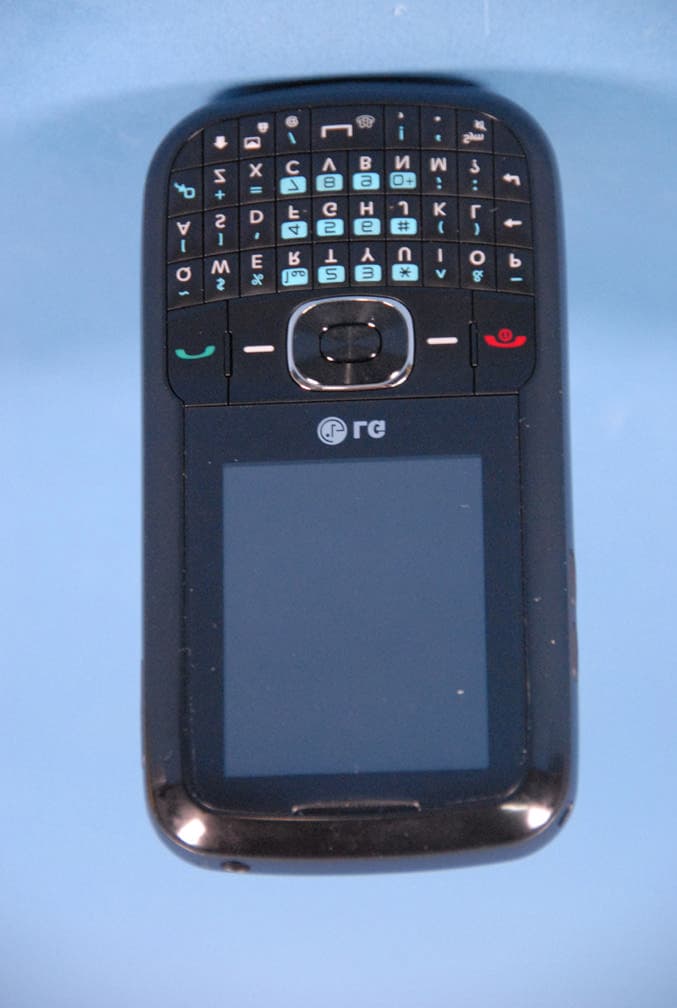
Click to zoom
Application Details
- Equipment Class
- JBP - Part 15 Class B Computing Device Peripheral
- Date of Grant
- Sep 29, 2010
- Application Purpose
- Original Equipment
- Date of Application
- Sep 29, 2010
- Equipment Note
- Cellular/PCS GSM Phone with Bluetooth
- Company
- LG Electronics USA, Inc.
- Country
- United States
Documents & Files
Document Text
Text extracted from the exhibit documents filed with the FCC. Open a document above to read the original.
Users Manual
LG 500G Quick Start Guide • Depending on the software installed or your service provider or country, some of the descriptions in this guide may not match your phone exactly. • Depending on your country, your phone and accessories may appear different from the picture in this guide. Bluetooth QD ID B000000 P/N: MMBB0000000 (1.0) H Installing the SIM and Battery Installing the SIM card Slide the SIM card into the SIM card holder. Make sure that the gold contact area on the card is facing downwards (as shown below). To remove the SIM card, pull it gently in the reverse direction. Installing the Battery To install the battery, align the battery contacts (1) with those in the battery compartment. Press the battery down until it clicks into place (2). With the battery in position in the phone, replace the battery cover on the back of your phone. 1. 2. Removing the Battery With your phone turned off , push the button above the battery cover in (1) and lift off the battery cover to remove it. Lift the battery up (1) and away (2) from the phone, as shown. WARNING: Do not remove the battery when the phone is switched on, as this may damage the phone. 1. 2. Charging your phone Pull out the cover of the charger slot on the top left side of your LG500G. Plug in the charger, making sure that the 'B' side is facing you (as displayed below), and plug the other end into a wall socket. Your LG500G will need to be charged until a message reading “Battery full” appears on screen. Installing the SIM and BatteryInstalling the SIM and Battery Phone Components & Features Phone Components & Features Easy-to-read LCD screen with status icons. Messaging, voicemail, and caller ID. Speakerphone feature. Menu-driven interface with prompts for easy operation and configuration. Any Key answer, Auto Redial and Speed Dials (with 9 locations). Bilingual (English and Spanish) capabilities. Internal Antenna. • • • • • • • Earpiece Display screen Send key Alphanumeric keys Left soft key Microphone Right soft key PWR/END key Vibrate Mode key Standby mode is when you are not on a call or using a menu. You must be in Standby mode to enter a phone number to dial. Display Navigation key Status icons Main display area Soft key options Your phone displays the following status indicators at the top of the screen: Indicates the strength of the network signal. Indicates that GPRS service is available. Indicates the status of the battery charge. Indicates a call is in progress. Indicates the alarm has been set and is on. Indicates a Calendar event for the day. Indicates a new message. Indicates a new voicemail message. Indicates that the Normal Profile has been set. Indicates that the Silent Profile has been set. Indicates the TTY has been set and is on. Icon Description Turning the Phone On or Off Make sure a charged battery is installed. Then press until the LCD screen lights up. To turn off , press and hold until the display turns off . 1. 2. 3. Changing the display language Allows you to use the bilingual feature according to your preference. Choose between English and Spanish. In Standby mode, press the Left soft key Menu. Press J J . Use to highlight Automatic, English or, Español, then press Select. Making Calls Make sure the phone is turned on. Enter the phone number (include the area code if needed). Press to dial. Press to end the call. 1. 2. 3. 1. 2. 3. 4. Recent Calls The Recent Calls menu displays a list of the last phone numbers or Contacts entries for calls missed, received, or dialed. It is continually updated as new numbers are added to the beginning of the list and the oldest entries are removed from the bottom of the list. Note: To view a quick list of all your recent calls, press Key while in standby mode. All Calls : Allows you to view the list of the most recent missed, received and dialed calls. Press the Left Soft Key , , , . 1. Sound Options to customize your phone's sounds: Ringers Press the Left Soft Key , , . Use to highlight the ringtone among Ringtone, Voice Record- ings or Default Sounds folder. Press Play to play the ringtone, or press the Left soft key Options and select Use As to set the ringtone to your phone. 1. 2. 3. Missed Calls : Allows you to view a list of the most recent missed calls. Press the Left Soft Key , , J Use to highlight an entry. Received Calls : Allows you to view a list of the most recent received calls. Press the Left Soft Key , , J Use to highlight an entry. Dialed Numbers : Allows you to view a list of the most recent dialed calls. Press the Left Soft Key , , J Use to highlight an entry. Call Duration : Allows you to view the duration of the calls, by type. Press the Left Soft Key , , J Use to highlight one of the call types (below). All Calls/ Dialed Calls/ Received Calls/ Last Call 2. 3. 4. 5. *Many of the features and services described are network dependent and may require additional subscription and/or usage charges. Not all features are available for purchase or use in all areas. Other conditions and restrictions may apply. See carrier for more information. © 2010 LG Electronics, Inc. SoundMenu map 1. Prepaid For more information about the Prepaid menu, please refer to the Quick Activation Guide. 2. Contacts 2.1 Names 2.2 Settings 2.3 Groups 2.4 Speed Dials 2.5 Service Dial Numbers 2.6 Own Number 2.7 My Business Card 3. Messages 3.1 Create New Message 3.2 Inbox 3.3 Drafts 3.4 Outbox 3.5 Sent Items 3.6 Saved Items 3.7 Emoticons 3.8 Message Settings 4. Recent Calls 4.1 Call Log 4.2 Missed Calls 4.3 Received Calls 4.4 Dialled Numbers 4.5 Call Duration 4.6 Packet Data Counter 4.7 Call Costs 5. My Stuff 5.1 My Memory Card 5.2 Pictures 5.3 Sounds 5.4 Videos 5.5 Other Files 5.6 Camera 5.7 Video 5.8 Music 5.9 Voice Recorder 6. Applications 7. Tools 7.1 Alarm Clock 7.2 Calendar 7.3 To-Do List 7.4 Notes 7.5 Secret Notes 7.6 Calculator 7.7 Stopwatch 7.8 Date Finder 7.9 Converter 7.10 World Time 7.11 Go to 7.12 STK (SIM service) 7.13 Settings 8. Settings 8.1 Profiles 8.2 Display 8.3 C…
Text truncated - open the document above for the full version.
Cover Letter(s)
LG Electronics USA 1000 Sylvan Avenue Englewood Cliffs, NJ 07632 Date: September 16, 2010 Fed eral Communications Commission Authorization and Evaluation Division 7435 Oakland Mills Road, Columbia, MD 21046 RE: Request of Confidentiality for FCC ID: BEJ LG500G Equip ment Class: JBP: Part 15 Class B Computing Device Peripheral To Whom It May Concern: Pursuant to Sections 0.457 and 0.459 of the Commission’s Rules (CFR 47), and Section 552 (b) (4) of the Freedom of Information Act, LG Electronics USA hereby requests confidentiality and treatment of certain information accompanying this application. The materials contain trade secrets and proprietary information not customarily released to the public. The public disclosure of these matters might be harmful to the Applicant and provide unjustified benefits to its competitors. We are also hereby request Short-Term Confidentiality for 180 days after the grant as outlined in Public Notice DA 04-1705. This provision will give LG Electronics USA temporary confidentiality of commercially sensitive information prior to product release. The requested Permanent and Temporary Confidential exhibits are listed as follows: PERMANENT AND SHORT-TERM CONFIDENTIAL LIST Exhibit Description 1 Block Diagram PERMANENT 2 Operational Descriptions 3 External Photos 4 Internal Photos 5 Test-Setup Photos SHORT-TERM 6 User’s Manual The Applicant understands that pursuant to Rule 0.457, disclosure of this application and all accompanying documentations, where applicable, will not be made public before the date of the Grant for this application. Sincerely, Jae Cheon(J.C.) Lee Ge neral Manager LG Electronics USA LG Electronics USA 1000 Sylvan Avenue Englewood Cliffs, NJ 07632
External Photos
LG FCC ID: BEJLG500G Model: LG500G External Photos EUT Type: 850/1900 GSM/GPRS Phone with Bluetooth Page 1 of 4 © 2010 PCTEST Engineering Laboratory Inc. EXTERNAL PHOTOGRAPHS LG FCC ID: BEJLG500G Model: LG500G External Photos EUT Type: 850/1900 GSM/GPRS Phone with Bluetooth Page 2 of 4 © 2010 PCTEST Engineering Laboratory Inc. LG FCC ID: BEJLG500G Model: LG500G External Photos EUT Type: 850/1900 GSM/GPRS Phone with Bluetooth Page 3 of 4 © 2010 PCTEST Engineering Laboratory Inc. LG FCC ID: BEJLG500G Model: LG500G External Photos EUT Type: 850/1900 GSM/GPRS Phone with Bluetooth Page 4 of 4 © 2010 PCTEST Engineering Laboratory Inc.
ID Label/Location Info
Model No: LG500G FCC ID : BEJLG500G S/N : Made in Korea LG Electronics Inc. LGE
Internal Photos
LG FCC ID: BEJLG500G Model: LG500G Internal Photos EUT Type: 850/1900 GSM/GPRS Phone with Bluetooth Page 1 of 9 © 2010 PCTEST Engineering Laboratory Inc. INTERNAL PHOTOGRAPHS LG FCC ID: BEJLG500G Model: LG500G Internal Photos EUT Type: 850/1900 GSM/GPRS Phone with Bluetooth Page 2 of 9 © 2010 PCTEST Engineering Laboratory Inc. LG FCC ID: BEJLG500G Model: LG500G Internal Photos EUT Type: 850/1900 GSM/GPRS Phone with Bluetooth Page 3 of 9 © 2010 PCTEST Engineering Laboratory Inc. LG FCC ID: BEJLG500G Model: LG500G Internal Photos EUT Type: 850/1900 GSM/GPRS Phone with Bluetooth Page 4 of 9 © 2010 PCTEST Engineering Laboratory Inc. LG FCC ID: BEJLG500G Model: LG500G Internal Photos EUT Type: 850/1900 GSM/GPRS Phone with Bluetooth Page 5 of 9 © 2010 PCTEST Engineering Laboratory Inc. LG FCC ID: BEJLG500G Model: LG500G Internal Photos EUT Type: 850/1900 GSM/GPRS Phone with Bluetooth Page 6 of 9 © 2010 PCTEST Engineering Laboratory Inc. LG FCC ID: BEJLG500G Model: LG500G Internal Photos EUT Type: 850/1900 GSM/GPRS Phone with Bluetooth Page 7 of 9 © 2010 PCTEST Engineering Laboratory Inc. LG FCC ID: BEJLG500G Model: LG500G Internal Photos EUT Type: 850/1900 GSM/GPRS Phone with Bluetooth Page 8 of 9 © 2010 PCTEST Engineering Laboratory Inc. LG FCC ID: BEJLG500G Model: LG500G Internal Photos EUT Type: 850/1900 GSM/GPRS Phone with Bluetooth Page 9 of 9 © 2010 PCTEST Engineering Laboratory Inc.
Test Report
FCC ID: BEJLG500G Report No.: HCTE1009FE15 Date: September 14, 2010 HCT CO., LTD. SAN 136-1, AMI-RI, BUBAL-EUP, ICHEON-SI, KYOUNGKI-DO, 467-701, KOREA TEL: +82 31 639 8539 FAX: +82 31 639 8535 www.hct.co.kr Page 2 of 17 TABLE OF CONTENTS PAGE 1. GENERAL INFORMATION 1.1 Product description 3 1.2 Related submittal(s)/Grant(s) 3 1.3 Tested system details 4 1.4 Cable description 5 1.5 Noise suppression parts on cable. (I/O cable) 5 1.6 Test methodology 6 1.7 Test facility 6 1.8 Frequency Range of Radiated Measurements 6 2. SYSTEM TEST CONFIGURATION 2.1 Configuration of tested system 7 3. PRELIMINARY TEST 3.1 Conducted Emission test 8 3.2 Radiated Emission test 8 4. CONDUCTED AND RADIATED EMISSION TESTS SUMMARY 4.1 Conducted Emission test 9 4.2 Radiated Emission test 14 5. FIELD STRENGTH CALCULATION 15 6. TEST EQUIPMENT 16 7. CONCLUSION 17 ATTACHMENT: TEST SETUP PHOTOGRAPHS FCC ID: BEJLG500G Report No.: HCTE1009FE15 Date: September 14, 2010 HCT CO., LTD. SAN 136-1, AMI-RI, BUBAL-EUP, ICHEON-SI, KYOUNGKI-DO, 467-701, KOREA TEL: +82 31 639 8539 FAX: +82 31 639 8535 www.hct.co.kr Page 3 of 17 1. GENERAL INFORMATION 1.1 Product Description Equipment Under Test (E.U.T) is Cellular/PCS GSM Phone with Bluetooth, Model: LG500G, LG500g manufactured by LG Electronics Inc. Its basic purpose is used for communications. Model (s) LG500G, LG500g FCC ID BEJLG500G E.U.T Type Cellular/PCS GSM Phone with Bluetooth TX Frequency 824.20 ㎒ to 848.80 ㎒ (GSM 850) 1 850.20 ㎒ to 1 909.80 ㎒ (GSM 1 900) RX Frequency 869.20 ㎒ to 893.80 ㎒ (GSM 850) 1 930.20 ㎒ to 1 989.80 ㎒ (GSM 1 900) 1.2 Related Submittal(s) / Grant(s) Original submittal only. FCC ID: BEJLG500G Report No.: HCTE1009FE15 Date: September 14, 2010 HCT CO., LTD. SAN 136-1, AMI-RI, BUBAL-EUP, ICHEON-SI, KYOUNGKI-DO, 467-701, KOREA TEL: +82 31 639 8539 FAX: +82 31 639 8535 www.hct.co.kr Page 4 of 17 1.3 Tested System Details All equipment descriptions used in the tested system (including inserted cards) are: Device Type Manufacturer Model Number/ Part Number FCC ID / DoC Connected To Cellular/PCS GSM Phone with Bluetooth LG LG500G BEJLG500G Notebook PC Notebook PC SAMSUNG NT-R519 DoC E.U.T Notebook PC adaptor DELTA ADP-60ZH D AD-6019R - Notebook PC Mouse Microsoft Intellimouse optical USB and PS/2 compatible DoC Notebook PC USB Cable - - - Notebook PC E.U.T Headset - - - E.U.T FCC ID: BEJLG500G Report No.: HCTE1009FE15 Date: September 14, 2010 HCT CO., LTD. SAN 136-1, AMI-RI, BUBAL-EUP, ICHEON-SI, KYOUNGKI-DO, 467-701, KOREA TEL: +82 31 639 8539 FAX: +82 31 639 8535 www.hct.co.kr Page 5 of 17 1.4 Cable Description * The marked "(D)" means the data cable and "(P)" means the power cable. 1.5 Noise Suppression Parts on Cable. (I/O cable) Product Name Port Ferrite Bead (Y/N) Location Metal Hood (Y/N) Location Headset jack N - Y E.U.T End Cellular/PCS GSM Phone with Bluetooth USB data N - Y Both End Notebook PC USB (Mouse) Y Notebook PC End Y Notebook PC End Product Name Port Power Cord Shielded (Y/N) I/O Cable Shielded (Y/N) Length (m) Headset jack - N (D)1.0 Cellular/PCS GSM Phone with Bluetooth USB data Y Y (P,D)1.2 Notebook PC USB (Mouse) - Y (D)1.8 FCC ID: BEJLG500G Report No.: HCTE1009FE15 Date: September 14, 2010 HCT CO., LTD. SAN 136-1, AMI-RI, BUBAL-EUP, ICHEON-SI, KYOUNGKI-DO, 467-701, KOREA TEL: +82 31 639 8539 FAX: +82 31 639 8535 www.hct.co.kr Page 6 of 17 1.6 Test Methodology Both Conducted and Radiated testing was performed according to the procedures in ANSI C63.4/2003. Radiated testing was performed at an antenna to E.U.T distance of 3 m 1.7 Test Facility The open area test site and conducted measurement facility used to collect the radiated data are located at the 254-1, Maekok-ri, Hobup-myun, Ichon-si, Kyoungki-do, 467-701, KOREA. The site is constructed in conformance with the requirements of ANSI C63.4 and CISPR Publication 22. Detailed description of test facility was submitted to the Commission and accepted dated June 10, 2009. (Registration Number: 90661) 1.8 Frequency Range of Radiated Measurements An unintentional radiator, including a digital device, the spectrum shall be investigated from the lowest radio frequency signal generated or used in the device, without going below the lowest frequency for which a Radiated Emission limit is specified, up to the frequency shown in the following table Highest frequency generated or used in the device or on which the device operates or tunes (㎒) Upper frequency of measurement range (㎒) Below 1.705 30 1.705 to 108 1 000 108 to 500 2 000 500 to 1 000 5 000 Above 1 000 5 th harmonic of the highest frequency or 40 ㎓, whichever is lower FCC ID: BEJLG500G Report No.: HCTE1009FE15 Date: September 14, 2010 HCT CO., LTD. SAN 136-1, AMI-RI, BUBAL-EUP, ICHEON-SI, KYOUNGKI-DO, 467-701, KOREA TEL: +82 31 639 8539 FAX: +82 31 639 8535 www.hct.co.kr Page 7 of 17 2. SYSTEM TEST CONFIGURATION 2.1 Configuration of Test System Power Line Conducted test : E.U.T was connected to LISN via Notebook PC adaptor. Preliminary Power Line Conducted Emission tests were performed by using the procedure in ANSI C63.4/2003 7.2.3 to determine the worst operating conditions. Radiated Emission test : Preliminary Radiated Emission tests were performed by using the procedure in ANSI C63.4/2003 8.3.1.1 to determine the worst operating condition. Final Radiated Emission tests were performed at 3 m open area test site. [Configuration of Tested System] Power Line: 110VAC Non-Conductive Table Notebook PC adaptor E.U.T Headset Mouse Notebook PC FCC ID: BEJLG500G Report No.: HCTE1009FE15 Date: September 14, 2010 HCT CO., LTD. SAN 136-1, AMI-RI, BUBAL-EUP, ICHEON-SI, KYOUNGKI-DO, 467-701, KOREA TEL: +82 31 639 8539 FAX: +82 31 639 8535 www.hct.co.kr Page 8 of 17 3. PRELIMINARY TEST 3.1 Conducted Emission Test ■ Test E.U.T with Data Communication mode, after connecting all peripheral devices. During preliminary tests, the following operating mode was investigated: Operation Mode The Worst Operating Condition Data Communication ○ 3. 2 Radiated Em…
Text truncated - open the document above for the full version.
Test Setup Photos
FCC ID: BEJLG500G Report No. HCTE1009FE15 Date: September 14, 2010 HCT CO., LTD. SAN 136-1, AMI-RI, BUBAL-EUP, ICHEON-SI, KYOUNGKI-DO, 467-701, KOREA TEL: +82 31 639 8539 FAX: +82 31 639 8535 www.hct.co.kr Page 1 of 5 ATTACHMENT - TEST SETUP PHOTOS - FCC ID: BEJLG500G Report No. HCTE1009FE15 Date: September 14, 2010 HCT CO., LTD. SAN 136-1, AMI-RI, BUBAL-EUP, ICHEON-SI, KYOUNGKI-DO, 467-701, KOREA TEL: +82 31 639 8539 FAX: +82 31 639 8535 www.hct.co.kr Page 2 of 5 1. CONDUCTED MEASUREMENT PHOTOS FCC ID: BEJLG500G Report No. HCTE1009FE15 Date: September 14, 2010 HCT CO., LTD. SAN 136-1, AMI-RI, BUBAL-EUP, ICHEON-SI, KYOUNGKI-DO, 467-701, KOREA TEL: +82 31 639 8539 FAX: +82 31 639 8535 www.hct.co.kr Page 3 of 5 FCC ID: BEJLG500G Report No. HCTE1009FE15 Date: September 14, 2010 HCT CO., LTD. SAN 136-1, AMI-RI, BUBAL-EUP, ICHEON-SI, KYOUNGKI-DO, 467-701, KOREA TEL: +82 31 639 8539 FAX: +82 31 639 8535 www.hct.co.kr Page 4 of 5 2. RADIATED MEASUREMENT PHOTOS FCC ID: BEJLG500G Report No. HCTE1009FE15 Date: September 14, 2010 HCT CO., LTD. SAN 136-1, AMI-RI, BUBAL-EUP, ICHEON-SI, KYOUNGKI-DO, 467-701, KOREA TEL: +82 31 639 8539 FAX: +82 31 639 8535 www.hct.co.kr Page 5 of 5
Contact Information
Applicant
David Kim(Team leader, LGEUS NA Policy & Regulatory Affairs)
Technical Contact
PCTEST Engineering Laboratory, Inc.Randy Ortanez
[email protected]410-290-6652
6660-B Dobbin Road · Columbia, Maryland · United States
Test Firm
HCT Co., LTDSang Lee
Technical Specifications
| # | Rule Parts | Frequency Range | Power Output |
|---|---|---|---|
| 1 | 15B | - | - |
Other Applications from LG Electronics USA, Inc.

BEJTFHOBINI1F1
Jan 08, 2025Telematics
Equipment Class
DTS - Digital Transmission SystemBEJNT-16Z90TS
Oct 02, 2024Notebook Computer
Equipment Class
DSS - Part 15 Spread Spectrum TransmitterBEJSP-PEW8
Sep 26, 2024Stylus Pen
Equipment Class
DCD - Part 15 Low Power Transmitter Below 1705 kHzBEJ-RSMV2
Sep 24, 2024RF Module
Equipment Class
FDS - Part 15 Field Disturbance SensorBEJTFBMEIBN3EU
Sep 24, 2024Telematics
Equipment Class
NII - Unlicensed National Information Infrastructure TX