BEJLG56B15" LCD Monitor
LG Electronics USA, Inc.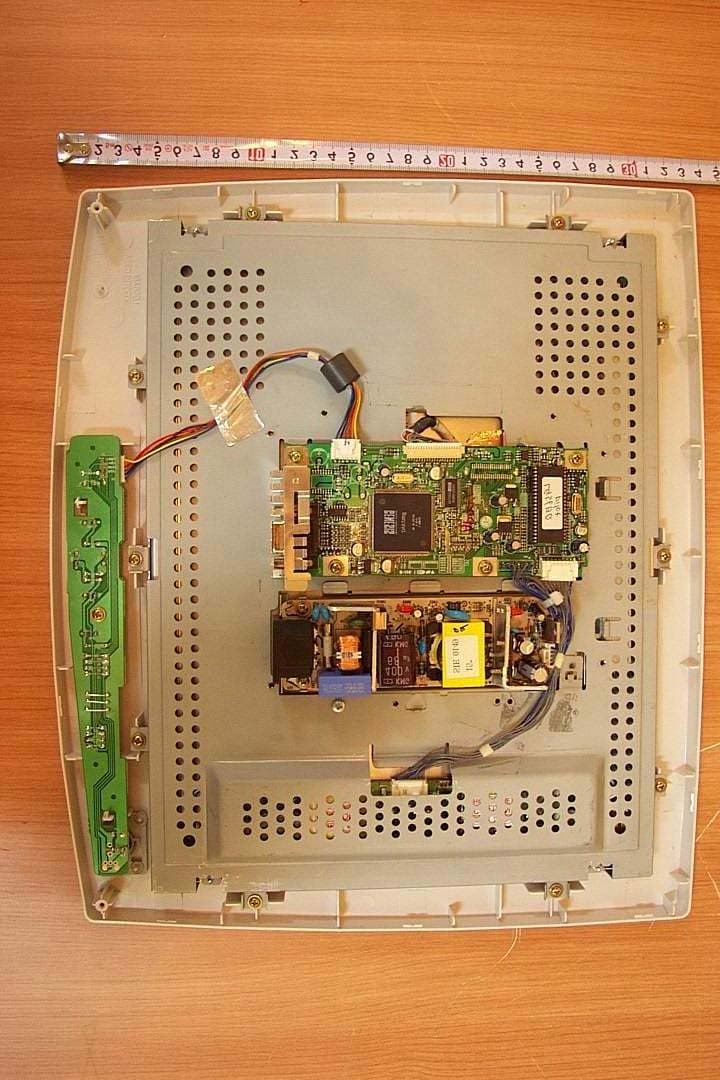
Click to zoom
Application Details
- Equipment Class
- JBP - Part 15 Class B Computing Device Peripheral
- Date of Grant
- Jan 10, 2002
- Application Purpose
- Original Equipment
- Date of Application
- Jan 10, 2002
- Equipment Note
- 15" LCD Monitor
- Company
- LG Electronics USA, Inc.
- Country
- United States
Documents & Files
Document Text
Text extracted from the exhibit documents filed with the FCC. Open a document above to read the original.
Users Manual
Test Report No.: GETEC-E3-02-001 FCC Class B Certification APPENDIX I : USER’S MANUAL EUT Type: 15” LCD Monitor FCC ID: BEJLG56B i Contents 1 Using Your Flat Panel Display . . . . . . . . . . . . . . . . . . . . . . . . . . . . . . . . . . . 1 Connecting the flat panel display . . . . . . . . . . . . . . . . . . . . . . . . . . . . . . . . . . . . . . . 2 Starting the flat panel display . . . . . . . . . . . . . . . . . . . . . . . . . . . . . . . . . . . . . . . . . . 5 Adjusting display settings . . . . . . . . . . . . . . . . . . . . . . . . . . . . . . . . . . . . . . . . . . . . . 6 External controls . . . . . . . . . . . . . . . . . . . . . . . . . . . . . . . . . . . . . . . . . . . . . . . . . 6 OSD options . . . . . . . . . . . . . . . . . . . . . . . . . . . . . . . . . . . . . . . . . . . . . . . . . . . . 7 Software controls . . . . . . . . . . . . . . . . . . . . . . . . . . . . . . . . . . . . . . . . . . . . . . . 10 Video modes . . . . . . . . . . . . . . . . . . . . . . . . . . . . . . . . . . . . . . . . . . . . . . . . . . . 14 Power management . . . . . . . . . . . . . . . . . . . . . . . . . . . . . . . . . . . . . . . . . . . . . . . . 15 ENERGY STAR . . . . . . . . . . . . . . . . . . . . . . . . . . . . . . . . . . . . . . . . . . . . . . . . 15 Energy declaration . . . . . . . . . . . . . . . . . . . . . . . . . . . . . . . . . . . . . . . . . . . . . . 15 Maintenance . . . . . . . . . . . . . . . . . . . . . . . . . . . . . . . . . . . . . . . . . . . . . . . . . . . . . . 16 Troubleshooting . . . . . . . . . . . . . . . . . . . . . . . . . . . . . . . . . . . . . . . . . . . . . . . . . . . . 17 No power . . . . . . . . . . . . . . . . . . . . . . . . . . . . . . . . . . . . . . . . . . . . . . . . . . . . . . 17 No picture . . . . . . . . . . . . . . . . . . . . . . . . . . . . . . . . . . . . . . . . . . . . . . . . . . . . . 17 Display colors are wrong . . . . . . . . . . . . . . . . . . . . . . . . . . . . . . . . . . . . . . . . . 18 Picture has shadows or “ghosts” . . . . . . . . . . . . . . . . . . . . . . . . . . . . . . . . . . . 18 Color is not uniform . . . . . . . . . . . . . . . . . . . . . . . . . . . . . . . . . . . . . . . . . . . . . 18 Image is not sized or centered properly . . . . . . . . . . . . . . . . . . . . . . . . . . . . . . 19 Image cannot be adjusted full screen . . . . . . . . . . . . . . . . . . . . . . . . . . . . . . . 19 Specifications . . . . . . . . . . . . . . . . . . . . . . . . . . . . . . . . . . . . . . . . . . . . . . . . . . . . . . 20 A Safety, Regulatory, and Legal Information . . . . . . . . . . . . . . . . . . . . . . 21 8508376.book Page i Thursday, October 18, 2001 9:20 AM ii 8508376.book Page ii Thursday, October 18, 2001 9:20 AM 1 www.gateway.com Using Your Flat Panel Display The FPD 1520 Flat Panel Display is a high-resolution color LCD with: ■1024 × 768 maximum resolution ■Over 16 million colors ■Excellent contrast and legibility ■Space-saving and lightweight design ■Reduced power usage 8508376.book Page 1 Thursday, October 18, 2001 9:20 AM Chapter 1: Using Your Flat Panel Display www.gateway.com Connecting the flat panel display To connect the flat panel display: 1Position the computer and monitor so you can easily reach the back panel of each. 2Set the monitor upright, then feed the power and video cables through the hole in the stand. 3Lay the monitor down on its back. 8508376.book Page 2 Thursday, October 18, 2001 9:20 AM Starting the flat panel display www.gateway.com Starting the flat panel display To start the monitor: 1Press the power button once. The LED on the button turns on. 2Turn on the computer. 3After the computer is running, the LED on the power button should be green. Allow about 10 seconds for the display image to appear. If the power LED is not green or you do not see an display image, check the connections. For more troubleshooting information, see “Troubleshooting” on page 17. 4Adjust the tilt of the display for the best viewing angle. 5Adjust the controls to get the best picture. Press the AUTO/SET button to automatically adjust your display image to the ideal settings. Adjust other display settings by using the On-Screen Display (OSD). For more information, see “Adjusting display settings” on page 6. ImportantWhen adjusting your display settings, always press the AUTO/SET button before entering the OSD. This will automatically adjust your display image to the ideal settings for the current screen resolution size (display mode). The best display mode is 1024×768. Power button and LED 8508376.book Page 5 Thursday, October 18, 2001 9:20 AM Chapter 1: Using Your Flat Panel Display www.gateway.com Adjusting display settings You can adjust your display image by using external controls (located on the display itself) and software controls (accessible in Windows). External controls This flat panel display features an On-Screen Display (OSD) that lets you adjust and save contrast, brightness, and other settings for the display. The flat panel display saves changes you make to the settings, even if you turn the display off. ■OSD. Press to view the OSD. Press again to exit. ■Arrows. OSD active: Press to select or adjust OSD options. OSD inactive: Pressandto adjust the contrast, and press and to adjust the brightness. ■Auto/Set. OSD active: Press to enter a selection in the OSD. OSD inactive: Press the Auto/Set button to re-detect the video source. 8508376.book Page 6 Thursday, October 18, 2001 9:20 AM Auto setting Menu selection arrows and OSD button Auto/Set button Adjusting display settings www.gateway.com OSD options To adjust the OSD settings: 1Press the OSD button. The OSD menu opens. 2Use the and buttons to highlight a control, then press the Auto/Set button. 3Use the buttons to adjust the control to the desired level. 4When you have finished making all adjustments, press the OSD button to exit the OSD. OSD menus You can access any of these menus in the OSD: OSD AdjustDescription Brightness.…
Text truncated - open the document above for the full version.
Block Diagram
Test Report No.: GETEC-E3-02-001 FCC Class B Certification APPENDIX D : BLOCK DIAGRAM EUT Type: 15” LCD Monitor FCC ID : BEJLG56B Block Diagram Block Diagram ( LCD panel : HT15X13 ( LCD panel : HT15X13 - - 200A, HYUNDAI) 200A, HYUNDAI) gmZAN2 ADC S cali ng PLL O SD LV DS Transm i tter LV DS Transm i tter Panel MCU EEPROM (S ystem) TTL LVDS Analog(R/G/B) BR T - CTL INV-CTL Out 0 ~ 3 ± Clo c k out ± RE/ G E/B E 0~5 RO/ G O/B O 0~5 Hs, V s,D E ,CLK 12 V To Invert er D-Sub To Ke y Control SMPS Fil t er 12V 5V 12V R e g u lato r R e g u lato r R e g u lato r R e g u lato r 3.3V2.5V 5V 5V 3.3V BD 901 C905 T901 SMPSCon t rol IC9 0 1 Block Diagram Block Diagram ( LCD panel : LM151X05, LG Philips) ( LCD panel : LM151X05, LG Philips) gmZAN2 ADC S cali ng PLL O SD MCU EEPROM (S ystem) TTL Analog(R/G/B) BR T - CTL INV-CTL RE/ G E/B E 0~5 RO/ G O/B O 0~5 Hs, V s,D E ,CLK 12 V To Invert er D-Sub To Ke y Control SMPS Fil t er 12V 5V 12V R e g u lato r R e g u lato r R e g u lato r R e g u lato r 3.3V2.5V 5V 5V BD 901 C905 T901 SMPSCon t rol IC9 0 1
ID Label/Location Info
Test Report No.: GETEC-E3-02-001 FCC Class B Certification APPENDIX C : ID SAMPLE LABEL & LOCATION EUT Type: 15” LCD Monitor FCC ID : BEJLG56B Test Report No.: GETEC-E3-02-001 FCC Class B Certification LABELLING REQUIREMENTS The label shown shall be permanently affixed at a conspicuous location on the device and be readily visible to the user at the time of purchase. ID Label EUT Type: 15” LCD Monitor FCC ID : BEJLG56B Test Report No.: GETEC-E3-02-001 FCC Class B Certification ID Label Location of EUT I.D Label EUT Type: 15” LCD Monitor FCC ID : BEJLG56B
Internal Photos
Test Report No.: GETEC-E3-02-001 FCC Class B Certification APPENDIX G : INTERNAL PHOTOGRAPHS (Ι) Used HT15X13-200A LCD Panel (HYUNDAI) EUT Type: 15” LCD Monitor FCC ID : BEJLG56B Test Report No.: GETEC-E3-02-001 FCC Class B Certification EUT Type: 15” LCD Monitor FCC ID : BEJLG56B Test Report No.: GETEC-E3-02-001 FCC Class B Certification EUT Type: 15” LCD Monitor FCC ID : BEJLG56B Test Report No.: GETEC-E3-02-001 FCC Class B Certification EUT Type: 15” LCD Monitor FCC ID : BEJLG56B Test Report No.: GETEC-E3-02-001 FCC Class B Certification EUT Type: 15” LCD Monitor FCC ID : BEJLG56B Test Report No.: GETEC-E3-02-001 FCC Class B Certification EUT Type: 15” LCD Monitor FCC ID : BEJLG56B Test Report No.: GETEC-E3-02-001 FCC Class B Certification EUT Type: 15” LCD Monitor FCC ID : BEJLG56B Test Report No.: GETEC-E3-02-001 FCC Class B Certification EUT Type: 15” LCD Monitor FCC ID : BEJLG56B Test Report No.: GETEC-E3-02-001 FCC Class B Certification EUT Type: 15” LCD Monitor FCC ID : BEJLG56B Test Report No.: GETEC-E3-02-001 FCC Class B Certification EUT Type: 15” LCD Monitor FCC ID : BEJLG56B Test Report No.: GETEC-E3-02-001 FCC Class B Certification EUT Type: 15” LCD Monitor FCC ID : BEJLG56B Test Report No.: GETEC-E3-02-001 FCC Class B Certification EUT Type: 15” LCD Monitor FCC ID : BEJLG56B Test Report No.: GETEC-E3-02-001 FCC Class B Certification EUT Type: 15” LCD Monitor FCC ID : BEJLG56B Test Report No.: GETEC-E3-02-001 FCC Class B Certification EUT Type: 15” LCD Monitor FCC ID : BEJLG56B Test Report No.: GETEC-E3-02-001 FCC Class B Certification EUT Type: 15” LCD Monitor FCC ID : BEJLG56B Test Report No.: GETEC-E3-02-001 FCC Class B Certification EUT Type: 15” LCD Monitor FCC ID : BEJLG56B Test Report No.: GETEC-E3-02-001 FCC Class B Certification EUT Type: 15” LCD Monitor FCC ID : BEJLG56B
Internal Photos
Test Report No.: GETEC-E3-02-001 FCC Class B Certification APPENDIX H : INTERNAL PHOTOGRAPHS (ΙΙ) Used LM151X05 LCD Panel (LG Philips LCD) EUT Type: 15” LCD Monitor FCC ID : BEJLG56B Test Report No.: GETEC-E3-02-001 FCC Class B Certification EUT Type: 15” LCD Monitor FCC ID : BEJLG56B Test Report No.: GETEC-E3-02-001 FCC Class B Certification EUT Type: 15” LCD Monitor FCC ID : BEJLG56B Test Report No.: GETEC-E3-02-001 FCC Class B Certification EUT Type: 15” LCD Monitor FCC ID : BEJLG56B Test Report No.: GETEC-E3-02-001 FCC Class B Certification EUT Type: 15” LCD Monitor FCC ID : BEJLG56B Test Report No.: GETEC-E3-02-001 FCC Class B Certification EUT Type: 15” LCD Monitor FCC ID : BEJLG56B Test Report No.: GETEC-E3-02-001 FCC Class B Certification EUT Type: 15” LCD Monitor FCC ID : BEJLG56B Test Report No.: GETEC-E3-02-001 FCC Class B Certification EUT Type: 15” LCD Monitor FCC ID : BEJLG56B Test Report No.: GETEC-E3-02-001 FCC Class B Certification EUT Type: 15” LCD Monitor FCC ID : BEJLG56B Test Report No.: GETEC-E3-02-001 FCC Class B Certification EUT Type: 15” LCD Monitor FCC ID : BEJLG56B Test Report No.: GETEC-E3-02-001 FCC Class B Certification EUT Type: 15” LCD Monitor FCC ID : BEJLG56B Test Report No.: GETEC-E3-02-001 FCC Class B Certification EUT Type: 15” LCD Monitor FCC ID : BEJLG56B Test Report No.: GETEC-E3-02-001 FCC Class B Certification EUT Type: 15” LCD Monitor FCC ID : BEJLG56B Test Report No.: GETEC-E3-02-001 FCC Class B Certification EUT Type: 15” LCD Monitor FCC ID : BEJLG56B Test Report No.: GETEC-E3-02-001 FCC Class B Certification EUT Type: 15” LCD Monitor FCC ID : BEJLG56B Test Report No.: GETEC-E3-02-001 FCC Class B Certification EUT Type: 15” LCD Monitor FCC ID : BEJLG56B Test Report No.: GETEC-E3-02-001 FCC Class B Certification EUT Type: 15” LCD Monitor FCC ID : BEJLG56B
Test Report
Test Report No.: GETEC-E3-02-001 FCC Class B Certification CONTENTS 1. SCOPE .........................................................................................................................................................................3 2. INTRODUCTION .....................................................................................................................................................4 3. TEST CONDITIONS & EUT INFORMATION ...............................................................................................5 3.1 D ESCRIPTION OF EUT.............................................................................................................................................5 3.2 S UPPORT E QUIPMENT USED.....................................................................................................................................6 4 . DESCRIPTION OF TESTS ....................................................................................................................................7 4.1 C ONDUCTED E MISSION............................................................................................................................................7 4.2 R ADIATED E MISSIONS..............................................................................................................................................8 5. CONDUCTED DISTURBANCE VOLTAGE....................................................................................................9 5.1 O PERATING ENVIRONMENT .....................................................................................................................................9 5.2 T EST SET - UP.............................................................................................................................................................9 5.3 M EASUREMENT UNCERTAINTY................................................................................................................................9 5.4 L IMIT ......................................................................................................................................................................10 5.5 T EST EQUIPMENT USED ..........................................................................................................................................10 5.6 T EST DATA FOR POWER LINE CONDUCTED EMISSION ...........................................................................................11 6. RADIATED ELECTROMAGNETIC FIELD .................................................................................................13 6.1 O PERATING ENVIRONMENT ...................................................................................................................................13 6.2 T EST SET - UP...........................................................................................................................................................13 6.3 M EASUREMENT UNCERTAINTY..............................................................................................................................13 6.4 L IMIT......................................................................................................................................................................14 6.5 T EST EQUIPMENT USED..........................................................................................................................................14 6.5 T EST DATA FOR RADIATED EMISSION ....................................................................................................................15 7. SAMPLE CALCULATIONS ...............................................................................................................................17 7.1 E XAMPLE 1 :...........................................................................................................................................................17 7.2 E XAMPLE 2 :...........................................................................................................................................................17 8. RECOMMENDATION & CONCLUSION......................................................................................................18 APPENDIX A – ATTESTATION STATEMENT APPENDIX B – PLOTS OF CONDUCTED EMISSIONS APPENDIX C – ID SAMPLE LABEL & LOCATION APPENDIX D – BLOCK DIAGRAM APPENDIX E – TEST SET-UP PHOTOGRAPHS APPENDIX F – EXTERNAL PHOTOGRAPHS APPENDIX G –INTERNAL PHOTOGRAPHS ( Ι ) APPENDIX H –INTERNAL PHOTOGRAPHS ( ΙΙ ) APPENDIX I – USER’S MANUAL EUT Type: 15” LCD Monitor FCC ID : BEJLG56B P age 2 of 18 Test Report No.: GETEC-E3-02-001 FCC Class B Certification 1. Scope Measurement and determination of electromagnetic emissions (EME) of radio frequency devices including intentional and / or unintentional radiators for compliance with technical rules and regulations of the Federal Communications Commission . Responsible Party: LG Electronics Inc. Contact Person: Mr. Yeong Hur, EMC Manager Product Engineering Dept., Safety & EMC Team Digital Information Display Division Manufacturer: 642, Jinpyoung-dong, Gumi-city, Gyeongsangbuk-do, Korea Tel No.: +82-54-470-2933 z FCC ID BEJLG56B z Equipment Class B Digital Device z EUT Type 15” LCD Monitor z Model No. FPD1520 z Max. Resolution 1024×768 Non-interlaced @ 75Hz z Frequency Range H-Sync: 31kHz – 61kHz V-Sync: 56Hz – 75Hz z Trade Name Gateway z Cable(s): Shielded D-sub with ferrite on both ends z Power Cord Unshielded AC Power Cord z Rule Part(s) FCC Part 15 Subparts B z Test Procedure(s) ANSI C63.4 (1992) z Standard(s) EN55022: 1998 (CISPR22: 1997) z Dates of Test 04, January 2002 z Place of Test Gumi College EMC Center z Test Report No. GETEC-E3-02-001 EUT Type: 15” LCD Monitor FCC ID : BEJLG56B P age 3 of 18 Test Report No.: GETEC-E3-02-001 FCC Class B Certification 2. Introduction The measurement procedure described in American National Standard for Methods of Measurement of Radio-Nose Emissions…
Text truncated - open the document above for the full version.
Test Setup Photos
Test Report No.: GETEC-E3-02-001 FCC Class B Certification APPENDIX E : TEST SET UP PHOTOGRAPHS EUT Type: 15” LCD Monitor FCC ID : BEJLG56B Test Report No.: GETEC-E3-02-001 FCC Class B Certification The Conducted Test Picture and Radiated Test Picture show the worst-case configuration and cable placement. Conducted Test Picture (Front) Conducted Test Picture (Rear) EUT Type: 15” LCD Monitor FCC ID : BEJLG56B Test Report No.: GETEC-E3-02-001 FCC Class B Certification Radiated Test Picture (Front ) Radiated Test Picture (Rear ) EUT Type: 15” LCD Monitor FCC ID : BEJLG56B
Contact Information
Applicant
David Kim(Team leader, LGEUS NA Policy & Regulatory Affairs)
Test Firm
Gumi University EMC CenterTae-Sig Park
Technical Specifications
| # | Rule Parts | Frequency Range | Power Output |
|---|---|---|---|
| 1 | 15B | - | - |
Other Applications from LG Electronics USA, Inc.

BEJTFHOBINI1F1
Jan 08, 2025Telematics
Equipment Class
DTS - Digital Transmission SystemBEJNT-16Z90TS
Oct 02, 2024Notebook Computer
Equipment Class
DSS - Part 15 Spread Spectrum TransmitterBEJSP-PEW8
Sep 26, 2024Stylus Pen
Equipment Class
DCD - Part 15 Low Power Transmitter Below 1705 kHzBEJ-RSMV2
Sep 24, 2024RF Module
Equipment Class
FDS - Part 15 Field Disturbance SensorBEJTFBMEIBN3EU
Sep 24, 2024Telematics
Equipment Class
NII - Unlicensed National Information Infrastructure TX