BEJLM568E15-inch LCD Monitor
LG Electronics USA, Inc.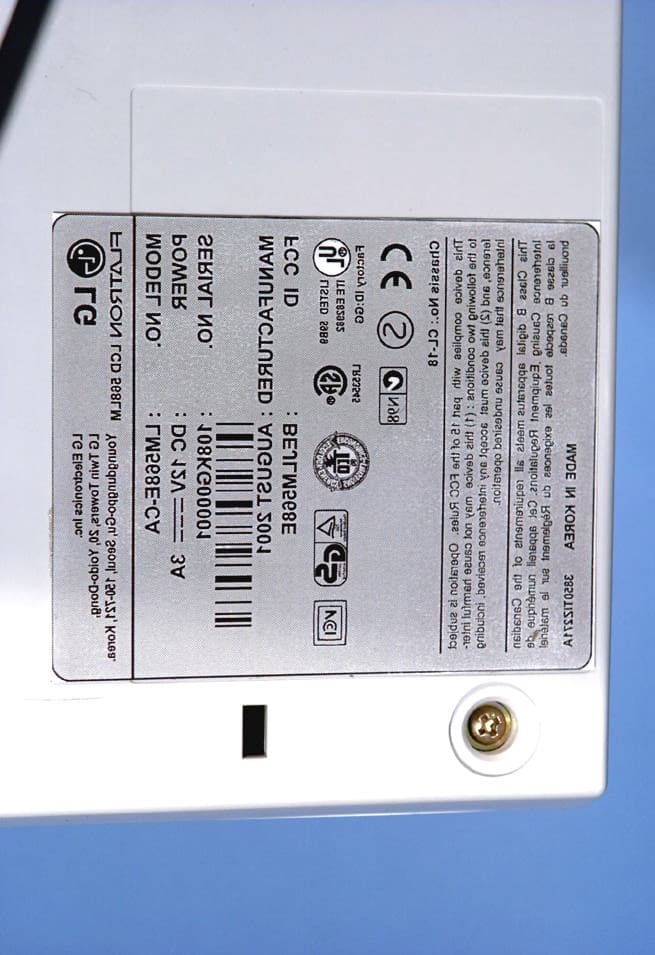
Click to zoom
Application Details
- Equipment Class
- JBP - Part 15 Class B Computing Device Peripheral
- Date of Grant
- Sep 04, 2001
- Application Purpose
- Original Equipment
- Date of Application
- Sep 03, 2001
- Equipment Note
- 15-inch LCD Monitor
- Company
- LG Electronics USA, Inc.
- Country
- United States
Documents & Files
Document Text
Text extracted from the exhibit documents filed with the FCC. Open a document above to read the original.
Users Manual
2001 PCTEST LAB ATTACHMENT J — USER’S MANUAL P/NO : 3828TUL193T (S-0107) Printed in Korea Please read this manual carefully before operating your set.Retain it for future reference.Record model number and serial number of the set.See the label attached on the back cover and quote thisinformation to your dealer when you require service. http://www.lge.com Color Monitor LCD 568LM User’s Guide A1 Introduction The Monitor has an active matrix TFT (Thin-Film Transistor) LCD (Liquid Crystal Display). This monitor is designed for use in small working areas or for those who need more working space on the desk. Features The Monitor is a 15inch (15 inches viewable) intelligent micropro-cessor based monitor. Digitally controlled auto-scanning is done with the microprocessor for horizontal scan frequencies between 31 and 61kHz, and vertical scan frequencies between 56 and 75Hz. The microprocessor-based digital controls allow you to adjust conveniently a variety of image controls by using the OSD (On Screen Display). The monitor is shipped with 14 factory pre-programmed video modes that are permanently resident. In addition, there are 16 user-storable modes, for a total of 30 memory modes. Plug and play capability if supported by your system. This monitor has DDC 2B function.* Compliant with the following regulated specifications :* - EPA ENERGYSTAR -Swedish TCO’99 ENGLISH *For detailed information, please refer to the Reference Guideprovided . Connecting the Monitor A2 To set up the monitor, ensure that the power is turned off to the monitor, computer system, and other attached devices, then follow these steps: Place the monitor in a convenient, well-ventilated location near your computer. Power off both the monitor and Computer. Slightly press and pull the latch on Stand cover. Connect the end of monitor signal cable to the connectorat the rear panel of your monitor throught the slot and cable holder on Stand. Connect the other end to the 15-pin connector on the rear panel of the computer and tighten the screws. Be sure the signal cable aligns with the 15-pin connector. Connect the end of monitor signal cable to the connectorat the rear panel of your monitor throught the slot and cable holder on Stand. Connect the other end of the monitor signal cable to the rear panel of Macintosh computer through a Macintosh adapter and then tighten screws. Connect the plug from the AC adapter into the base of the monitor. Connect one end of the AC power cord to the AC adapter and the other end to a properly grounded AC outlet that is easily accessible and close to the monitor. After connecting cables, put stand cover correctly into the holes unders stand. If securely connected, you can hear click sound from the latch. Power ON the PC, then the monitor. If you see the NO SIGNALmessage, check the signal cable and connectors. After using the system, power OFF the monitor, then the PC. 4 3 2 1 1 IBM PC MACINTOSH D-15P Mac Adapter 1 2 3 4 4' 5 6 7 8 9 24V A U D I O D C O U T Power Cord Signal Cable AC adapter D-15P 3 4 1 2 Stand cover Latch *NOTE :If you see the “OUT OF RANGE” message, check to make sure your system is set to one of the factory preset modes.(see page A9) A3 Connecting the Monitor 24V A U D IO D C O U T Connection the Audio A4 Location and Function of Controls Rear View Front View AUTO VOL MUTEMENU SET 2 4 V A U D I O D C O U T D-Sub Signal Connector Stand Cover Power Button Power Indicator MENU Button MUTE Button Buttons AUTO/SET Button DC Power Connecter - + 1 2 V VESA wall mounting Connected to another object (stand type and wall-mounted type - optional) Kensington Security Slot Connected to a locking cable that can be purchased separately at most computer stores NOTE : This monitor accept a 75mm x 75mm VESA-compliant mounting interface pad. A5 Control Panel Function Front Panel Controls AUTO VOL MUTEMENU SET Use this button to enter and from the on screen display (OSD). Use this button to turn the audio on or off. Use these buttons to choose or adjust items in the on screen display. MENU Button MUTE Button Buttons This indicator lights up green when the monitor operates normally. If the monitor is in DPM (Energy Saving) mode (stand-by/ suspend/power off), this indicator color changes to amber. Power (DPMS) Indicator Use this button to turn the monitor on or off.Power Button Use this button to enter a selection in the on screen display. * AUTO adjustment function Touch the AUTO/SETbutton before using OSD menu. This button is for the automatic adjustment of the screen position, clock and phase. Note: Some signal from some graphics boards may not function properly. If the results are unsatisfactory, adjust your monitor’s Position, Clock and Phase manually. AUTO/SETButton ControlFunction MUTE Button MENU Button AUTO/SET Button Power Button Power (DPMS) Indicator Buttons PROCESSING AUTO CONFIGURATION MENU MUTE VOL AUTO SET A6 Making adjustments to the image size, position and operating parameters of the monitor are quick and easy with the On Screen Display Control system. A quick example is given below to familiarize you with the use of the controls. Following section is an outline of the available adjustments and selections you can make using the OSD. To make adjustments in the On Screen Display, follow these steps: Press the MENU Button, then the main menu of the OSD appears. To access a control, use the Buttons. When the icon you want becomes highlighted, press the AUTO/SET Button. Use the Buttonsto adjust the item to the desired level. Accept the changes by pressing the AUTO/SET Button. Exit the OSD by Pressing theMENU Button. On Screen Display (OSD) Control Adjustment NOTE Allow the monitor to stabilize for at least 30 minutes before making image adjustment. 1 1 2 3 4 5 6 7 1 2 2 3 4 5 6 7 1 2 3 3 4 5 6 7 1 2 3 4 4 5 6 7 1 2 3 4 5 5 6 7 A7 On Screen Display(OSD) Selection and Adjustment You were introduced to the procedure of selection and adjusting an item using the OSD system. Listed below are t…
Text truncated - open the document above for the full version.
Attestation Statements
2001 PCTEST LAB ATTACHMENT B — ATTESTATION STATEMENT(S) @ LG Electronics Inc.& January 10, 2001 Federal Communications Commission Authorization and Evaluation Division Equipment Authorization Branch 7435 Oakland Mills Road Columbia, MD 21046 U.S.A. To whom it may concern: We, the undersigned, hereby authorize PCTEST Engineering Laboratory, Inc., to act on our behalf in all matters relating to applications for equipment authorization, including the signing of all documents relating to these matters. Any and all acts carried out by PCTEST Engineering Laboratory, Inc. on our behalf shall have the same effect as acts of our own. We also hereby certify that no party to the application is subject to a denial of benefits, including FCC benefits, pursuant to Section 5301 of the Anti-Drug Abuse Act of 1988, 21 U.S.C. 853(a). Sincerely, General Manager of New York Office LG Electronics Inc.
Block Diagram
2001 PCTEST LAB ATTACHMENT F — BLOCK DIAGRAM(S)
Cover Letter(s)
2001 PCTEST LAB ATTACHMENT A — COVER LETTER(S) August 28, 2001 Federal Communications Commission Equipment Approval Services 7435 Oakland Mills Road Columbia, MD 21046 SUBJECT:LG ELECTRONICS INC. FCC ID: BEJLM568E Gentlemen: Transmitted herewith, on behalf of LG Electronics Inc. is an application for certification of the following 15–inch LCD monitor: FCC ID:BEJLM568E MODEL:LM568E TRADE NAMES:LG EUT TYPE:15-inch LCD Monitor Attached are the applicant’s authorization letter, measurement report (test data and test plots), FCC ID label and location, test setup photographs, internal and external photographs, block diagram, and the user's manual. Should you have any questions or comments concerning the above, please contact the undersigned. cc:Mr. Yeong Hur, EMC Engineer LG Electronics Inc.
External Photos
2001 PCTEST LAB ATTACHMENT H —EXTERNAL PHOTOGRAPHS © 2001 PCTEST Lab 15” LCD Monitor NVLAP Lab Code: 100431-0 LG Electronics Inc. FCC ID: BEJLM568E © 2001 PCTEST Lab 15” LCD Monitor NVLAP Lab Code: 100431-0 LG Electronics Inc. FCC ID: BEJLM568E © 2001 PCTEST Lab 15” LCD Monitor NVLAP Lab Code: 100431-0 LG Electronics Inc. FCC ID: BEJLM568E © 2001 PCTEST Lab 15” LCD Monitor NVLAP Lab Code: 100431-0 LG Electronics Inc. FCC ID: BEJLM568E © 2001 PCTEST Lab 15” LCD Monitor NVLAP Lab Code: 100431-0 LG Electronics Inc. FCC ID: BEJLM568E © 2001 PCTEST Lab 15” LCD Monitor NVLAP Lab Code: 100431-0 LG Electronics Inc. FCC ID: BEJLM568E
ID Label/Location Info
2001 PCTEST LAB ATTACHMENT E — FCC ID LABEL & LOCATION © 2001 PCTEST Lab FCC ID SAMPLE LABEL & LOCATION LABELLING REQUIREMENTS PER §§ 2.925 & 15.19 The Label shown shall be permanently affixed at a conspicuous location on the device and be readily visible to the user at the time of purchase. (SEE NEXT PAGE)
Internal Photos
2001 PCTEST LAB ATTACHMENT I — INTERNAL PHOTOGRAPHS © 2001 PCTEST Lab 15” LCD Monitor NVLAP Lab Code: 100431-0 LG Electronics Inc. FCC ID: BEJLM568E © 2001 PCTEST Lab 15” LCD Monitor NVLAP Lab Code: 100431-0 LG Electronics Inc. FCC ID: BEJLM568E © 2001 PCTEST Lab 15” LCD Monitor NVLAP Lab Code: 100431-0 LG Electronics Inc. FCC ID: BEJLM568E © 2001 PCTEST Lab 15” LCD Monitor NVLAP Lab Code: 100431-0 LG Electronics Inc. FCC ID: BEJLM568E © 2001 PCTEST Lab 15” LCD Monitor NVLAP Lab Code: 100431-0 LG Electronics Inc. FCC ID: BEJLM568E © 2001 PCTEST Lab 15” LCD Monitor NVLAP Lab Code: 100431-0 LG Electronics Inc. FCC ID: BEJLM568E © 2001 PCTEST Lab 15” LCD Monitor NVLAP Lab Code: 100431-0 LG Electronics Inc. FCC ID: BEJLM568E © 2001 PCTEST Lab 15” LCD Monitor NVLAP Lab Code: 100431-0 LG Electronics Inc. FCC ID: BEJLM568E © 2001 PCTEST Lab 15” LCD Monitor NVLAP Lab Code: 100431-0 LG Electronics Inc. FCC ID: BEJLM568E © 2001 PCTEST Lab 15” LCD Monitor NVLAP Lab Code: 100431-0 LG Electronics Inc. FCC ID: BEJLM568E © 2001 PCTEST Lab 15” LCD Monitor NVLAP Lab Code: 100431-0 LG Electronics Inc. FCC ID: BEJLM568E © 2001 PCTEST Lab 15” LCD Monitor NVLAP Lab Code: 100431-0 LG Electronics Inc. FCC ID: BEJLM568E © 2001 PCTEST Lab 15” LCD Monitor NVLAP Lab Code: 100431-0 LG Electronics Inc. FCC ID: BEJLM568E © 2001 PCTEST Lab 15” LCD Monitor NVLAP Lab Code: 100431-0 LG Electronics Inc. FCC ID: BEJLM568E
Test Report
2001 PCTEST LAB ATTACHMENT C — TEST REPORT © 2001 PCTEST Engineering Lab., Inc. PCTEST Engineering Laboratory, Inc. 6660-B Dobbin Road 6660-B Dobbin Road •• Columbia, MD 21045 Columbia, MD 21045 •• U.S.A. U.S.A. TEL (410) 290-6652 TEL (410) 290-6652 •• FAX (410) 290-6654 FAX (410) 290-6654 http://www.pctestlab.comhttp://www.pctestlab.com CERTIFICATE OF COMPLIANCE LG Electronics Inc. – DID DIVISIONDates of Tests: August 23-24, 2001 642, Jinpyung-dong, Kumi,Test Report S/N: B.210823507.BEJ Kyoungsangbuk-do, KOREATest Site: PCTEST Lab., MD U.S.A. Attn: Mr. Yeong Hur, EMC Engineer FCC ID BEJLM568E APPLICANT LG ELECTRONICS INC. Rule Part(s):FCC Part 15 Subpart B Equipment Class:Class B Peripheral Device (JBP) Standard(s):EN55022: 1998 (CISPR 22) EUT Type: 15-inch LCD Monitor Max. Resolution(s): 1024 x 768 Non-interlaced @ 75Hz Trade Name(s): LG ® Model(s): LM568E This equipment has been shown to be in compliance with the applicable technical standards as indicated in the measurement report and was tested in accordance with the measurement procedures specified in ANSI C63.4-1992 (Note Codes: #19 & #28). I attest to the accuracy of data. All measurements reported herein were performed by me or were made under my supervision and are correct to the best of my knowledge and belief. I assume full responsibility for the completeness of these measurements and vouch for the qualifications of all persons taking them. PCTEST certifies that no party to this application has been denied the FCC benefits pursuant to Section 5301 of the Anti-Drug Abuse Act of 1988, 21 U.S.C. 862. Lab Code 100431-0 © 2001 PCTEST Engineering Laboratory, Inc. FCC Class B TABLE OF CONTENTS ATTACHMENT A: COVER LETTER(S) ATTACHMENT B: ATTESTATION STATEMENT(S) ATTACHMENT C: TEST REPORT 1.1SCOPE 1 2.1INTRODUCTION (SITE DESCRIPTION) 2 3.1PRODUCTION INFORMATION 3 4.1DESCRIPTION OF TESTS (CONDUCTED) 4 4.3DESCRIPTION OF TESTS (RADIATED) 5 5.1LIST OF SUPPORT EQUIPMENT 6 6.1TEST DATA (CONDUCTED) 7 7.1TEST DATA (RADIATED)8 8.1SAMPLE CALCULATIONS 9 9.1ACCURACY OF MEASUREMENT 10 10.1LIST OF TEST EQUIPMENT 11 11.1TEST SOFTWARE USED 12 12.1CONCLUSION 13 ATTACHMENT D: TEST PLOTS ATTACHMENT E: FCC ID LABEL & LOCATION ATTACHMENT F: BLOCK DIAGRAM(S) ATTACHMENT G: TEST SETUP PHOTOGRAPHS ATTACHMENT H: EXTERNAL PHOTOGRAPHS ATTACHMENT I: INTERNAL PHOTOGRAPHS ATTACHMENT J: USER’S MANUAL Test Report S/N: B.210823507.BEJFCC Class B Dates of Tests: August 23-24, 2001Certification © 2001 PCTEST Lab15” LCD Monitor1 LG Electronics Inc. FCC ID: BEJLM568E MEASUREMENT REPORT 1.1 Scope Measurement and determination of electromagnetic emissions (EME) of radio frequency devices including intentional and/or unintentional radiators for compliance with the technical rules and regulations of the Federal Communications Commission. Applicant Name:LG ELECTRONICS INC. – DID DIVISION Address:642, Jinpyung-dong, Kumi-city, Kyoungsangbuk-do, Korea Contact Person:Yeong Hur, EMC Engineer Product Engineering Dept., Safety & EMC Team • FCC ID:BEJLM568E • Equipment Class:B Peripheral Device / Peripheral (JBP) • EUT Type:15-inch LCD Monitor • Trade Name(s):LG ® • Model(s):LM568E • Max. Resolution:1024 x 768 Non-interlaced @ 75Hz • Frequency Range:H-Sync: 31kHz – 61kHz V-Sync: 56Hz – 85Hz • Cable(s):Shielded D-Sub w/ ferrite on both ends • Power Cord:Unshielded AC Power Cord • Rule Part(s):FCC Part 15 Subpart B • Test Procedure(s):ANSI C63.4 (1992) • Dates of Tests:August 23-24, 2001 • Place of Tests:PCTEST Lab, Columbia, MD U.S.A. • Test Report S/N:B.210823507.BEJ Test Report S/N: B.210823507.BEJFCC Class B Dates of Tests: August 23-24, 2001Certification © 2001 PCTEST Lab15” LCD Monitor2 LG Electronics Inc. FCC ID: BEJLM568E 2.1 INTRODUCTION The measurement procedure described in American National Standard for Methods of Measurement of Radio- Noise Emissions from Low-Voltage Electrical and Electronic Equipment in the Range of 9kHz to 40GHz (ANSI C63.4-1992) was used in determining radiated and conducted emissions emanating from LG Electronics Inc. 15” LCD Monitor FCC ID: BEJLM568E. These measurement tests were conducted at PCTEST Engineering Laboratory, Inc. facility in New Concept Business Park, Guilford Industrial Park, Columbia, Maryland. The site address is 6660-B Dobbin Road, Columbia, MD 21045. The test site is one of the highest points in the Columbia area with an elevation of 390 feet above mean sea level. The site coordinates are 39° 11'15" N latitude and 76° 49'38" W longitude. The facility is 1.5 miles North of the FCC laboratory, and the ambient signal and ambient signal strength are approximately equal to those of the FCC laboratory. There are no FM or TV transmitters within 15 miles of the site. The detailed description of the measurement facility was found to be in compliance with the requirements of § 2.948 according to ANSI C63.4 on October 19, 1992. 2.2 PCTEST Location The map at right shows the location of the PCTEST Lab, its proximity to the FCC Lab, the Columbia vicinity area, the Baltimore-Washington International (BWI) airport, and the city of Baltimore, and the Washington, D.C. area. (see Figure 1). Figure 1. Map of the Greater Baltimore and Metropolitan Washington, D.C. area. Test Report S/N: B.210823507.BEJFCC Class B Dates of Tests: August 23-24, 2001Certification © 2001 PCTEST Lab15” LCD Monitor3 LG Electronics Inc. FCC ID: BEJLM568E 3.1 Product Information 3.2 Equipment Description The Equipment Under Test (EUT) is the LG Electronics Inc. (LG Model: LM568E) 15-inch LCD Monitor FCC ID: BEJLM568E. Maximum Resolution(s):1024 x 768 Non-interlaced @ 75Hz Frequency Range(s):H-Sync: 31kHz – 61kHz V-Sync: 56Hz – 85Hz Pixel Pitch:0.297 x 0.297 mm Power Input:DC 12V 3A Power Cord:Unshielded AC power cord Port(s)/Input Connector(s):15-pin D-Sub type connector Cable(s):Shielded D-Sub w/ ferrite on both ends Weight:4.8 kg Dimensions (WXHXD):389.2 x 382.4 x 16.18 cm Test Report S/N: B.210823507.BEJFCC Class B Dates of Tests: August 23-24, 2001Certification © 2001 PC…
Text truncated - open the document above for the full version.
Test Report
2001 PCTEST LAB ATTACHMENT D — TEST PLOT(S)
Test Setup Photos
2001 PCTEST LAB ATTACHMENT G — TEST SETUP PHOTOGRAPHS © 2001 PCTEST Lab 15” LCD Monitor NVLAP Lab Code: 100431-0 LG Electronics Inc. FCC ID: BEJLM568E © 2001 PCTEST Lab 15” LCD Monitor NVLAP Lab Code: 100431-0 LG Electronics Inc. FCC ID: BEJLM568E © 2001 PCTEST Lab 15” LCD Monitor NVLAP Lab Code: 100431-0 LG Electronics Inc. FCC ID: BEJLM568E
Contact Information
Applicant
David Kim(Team leader, LGEUS NA Policy & Regulatory Affairs)
Technical Contact
PCTEST Engineering Laboratory, Inc.Randy Ortanez
[email protected]410-290-6652
6660-B Dobbin Road · Columbia, Maryland · United States
Test Firm
PCTEST Engineering Laboratory, Inc.Randy Ortanez
Technical Specifications
| # | Rule Parts | Frequency Range | Power Output |
|---|---|---|---|
| 1 | 15B | - | - |
Other Applications from LG Electronics USA, Inc.

BEJTFHOBINI1F1
Jan 08, 2025Telematics
Equipment Class
DTS - Digital Transmission SystemBEJNT-16Z90TS
Oct 02, 2024Notebook Computer
Equipment Class
DSS - Part 15 Spread Spectrum TransmitterBEJSP-PEW8
Sep 26, 2024Stylus Pen
Equipment Class
DCD - Part 15 Low Power Transmitter Below 1705 kHzBEJ-RSMV2
Sep 24, 2024RF Module
Equipment Class
FDS - Part 15 Field Disturbance SensorBEJTFBMEIBN3EU
Sep 24, 2024Telematics
Equipment Class
NII - Unlicensed National Information Infrastructure TX