BEJNT-13U70PNotebook Computer
LG Electronics USA, Inc.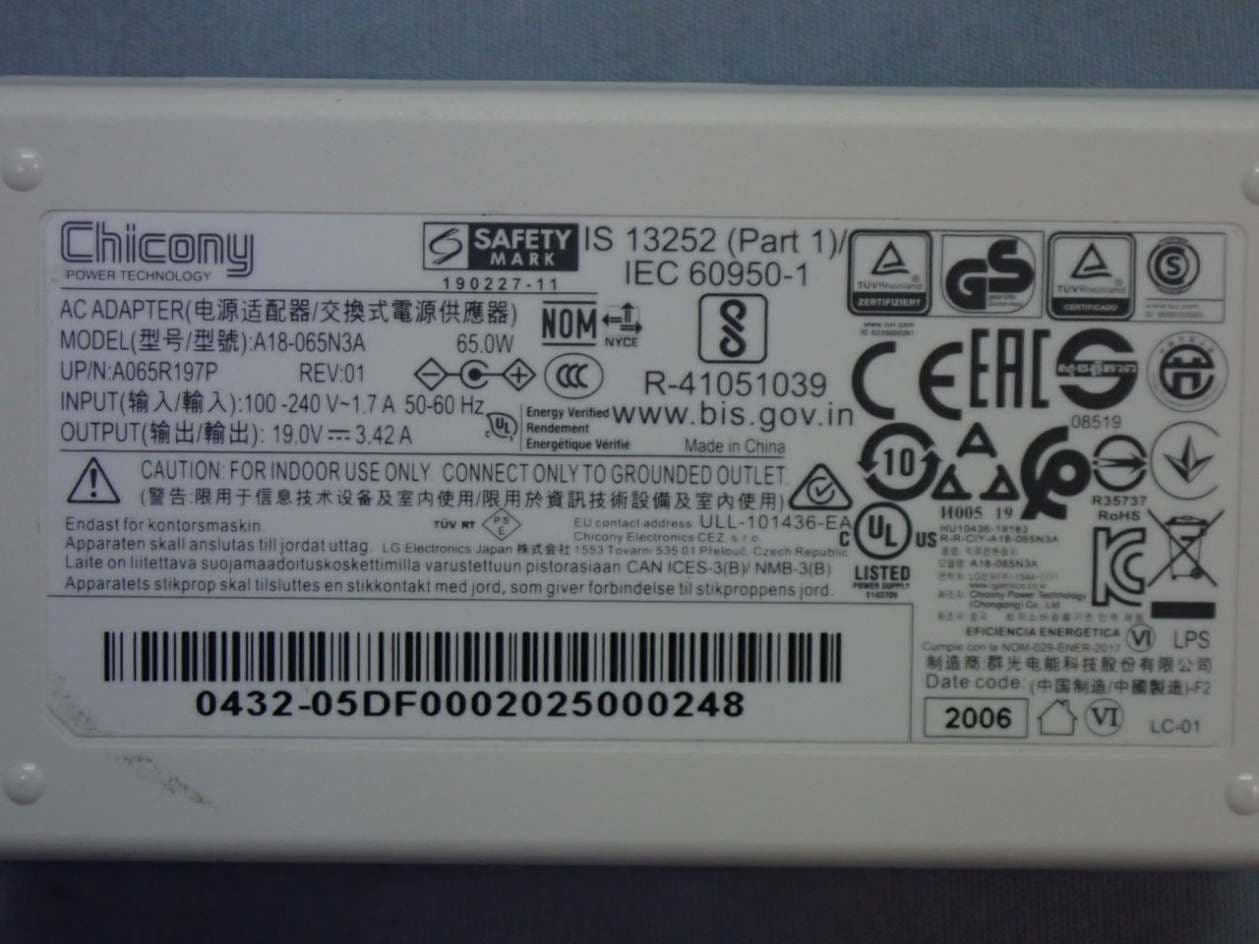
Click to zoom
Application Details
- Equipment Class
- NII - Unlicensed National Information Infrastructure TX
- Date of Grant
- Nov 03, 2020
- Application Purpose
- Original Equipment
- Date of Application
- Nov 02, 2020
- Equipment Note
- Notebook Computer
- Frequency Range
- 5745.00000000 - 5825.00000000
- Company
- LG Electronics USA, Inc.
- Country
- United States
Documents & Files
Document Text
Text extracted from the exhibit documents filed with the FCC. Open a document above to read the original.
Users Manual
LG EASY GUIDE NOTEBOOK 13U70P Series Copyright © 2020 LG Electronics Inc. All rights reserved. www.lg.com 2 Introduction / Important Safety Precautions Introduction / Important Safety Precautions UsingLG Easy Guide, LG TroubleShooting LG Electronics Inc. providesLG Easy Guide(User's Guide) andLG TroubleShooting(TroubleShooting Guide) to users for their easy and convenient use of the product. TIP LG Easy GuideandLG TroubleShootingare provided with the UWP app and they can be downloaded again on theMicrosoft Storeif they are deleted. If you want to download the files again, connect to theMicrosoft Store, search for the files and install them. •Press the [] button to run[LG Easy Guide 2.0]or[LG TroubleShooting 2.0]. ENGLISH Introduction / Important Safety Precautions 3 Information/Precautions Before Using Before readingLG Easy Guide, first check the following information. •ThisLG Easy Guidehas been written for the Windows 10 operating system. •The screen and menu configurations may differ from this manual depending on the status of the Windows and software update. •Representative images are used inLG Easy Guide. Product purchased may differ in appearance and color. •LG Easy Guideincludes instruction about optional products.There may be information about products you did not purchase. •The contents ofLG Easy Guideare subject to change without prior notice. •Use, duplication, or reproduction of any part ofLG Easy Guidewithout prior permission from LG Electronics Inc. is strictly prohibited. •LG Electronics Inc. does not provide warranty for data loss. In order to minimize damage from data loss, please make backup copies of important data. •The optical disk drive (DVD, CD-ROM, etc.) is optional and may not be provided upon purchasing the product. •Manufacturers and installers cannot provide services related to human safety as this wireless device may cause radio interference. Safety Precaution Notations The below symbols are to inform you of dangers and safety concerns that you must be aware of. Read the symbol-indicated instructions with caution to avoid any possible mishap. WARNING Appears in the case of noncompliance with the instruction that may cause serious physical damage or fatal injuries. CAUTION Appears in the case of noncompliance with the instruction that may cause minor damage to the body or the machine. Text Notations The symbols below are used to display information required to use the product. Familiarize yourself with the instructions marked by the symbols to ensure proper operation of the product. ENGLISH 4 Introduction / Important Safety Precautions TIP Indicates that the following information is added to help the user utilize the machine more conveniently. OPTION The Option symbol indicates that the concerned device is not included in the product package and thus has to be purchased separately, or the device may not be applied to the user's machine depending on model type. Manufacturer and Copyright Microsoft™, MS™, WinPE™, and Windows ® are the registered trademarks of Microsoft Corporation™. USB Type-C™and USB-C™are the trademarks of USB Implementers Forum. NVMe™is a trademark of NVM Express, Inc The Bluetooth ® word mark and logos are registered trademarks owned by the Bluetooth SIG, Inc. and any use of such marks by LG Electronics is under license. Other trademarks and trade names are those of their respective owners. Manufacturer and Copyright represent the logo and trademark of the manufacturer, and bear no relationship to the functions supported by the product. LG logo is a registered trademark of LG Electronics Inc. Micro SD Logo is a trademark of SD-3C, LLC For DTS patents, see http://patents.dts.com. Manufactured under license from DTS Licensing Limited. DTS, the Symbol, & DTS and the Symbol together, DTS:X, the DTS:X logo, and DTS:X Ultra are registered trademarks or trademarks of DTS, Inc. in the United States and/or other countries. © DTS, Inc. All Rights Reserved. The terms HDMI, HDMI High-Definition Multimedia Interface, and the HDMI Logo are trademarks or registered trademarks of HDMI Licensing Administrator, Inc. The SuperSpeed USB Trident logo is a registered trademark of USB Implementers Forum, Inc. ENGLISH Introduction / Important Safety Precautions 5 LG Easy Guidemay contain undetectable errors despite our dedicated efforts to provide users with reliable information. We ask for your understanding. The illustrated figures inLG Easy Guidemay differ in appearance with the actual products. Unauthorized reproduction or duplication of any part ofLG Easy Guideis strictly prohibited. LG Electronics Inc. reserves the right to modify any part of this manual for quality purposes, without prior notice. Copyright (C) 2020 LG Electronics Inc. Digitalmate Co., LTD Country of OriginChina ManufacturerLG Electronics Inc. Open Source Software Notice Information To obtain the source code under GPL, LGPL, MPL, and other open source licenses, that is contained in this product, please visit http://opensource.lge.com. In addition to the source code, all referred license terms, warranty disclaimers and copyright notices are available for download. LG Electronics will also provide open source code to you on CD-ROM for a charge covering the cost of performing such distribution (such as the cost of media, shipping, and handling) upon email request to [email protected]. This offer is valid for a period of three years after our last shipment of this product.This offer is valid to anyone in receipt of this information. System Protection Feature If the system becomes too hot, the system protection feature automatically stops recharging and switches the power mode to Hibernate or Off. The PC system has to cool down before it can be reactivated. Information on Hard Drive / Memory Capacity Information on Hard Drive (HDD, SSD, eMMC) Capacity The hard drive capacity shown by Windows is lower than that stated by the hard drive manufacturer due to a difference in calculation. Manufacturer H…
Text truncated - open the document above for the full version.
Users Manual
110 Using the PC Setting Touchpad You can change the touchpad features or enable/disable the gesture feature. The figures herein may differ by language selection and are subject to change without prior notice. 1Click the [] button and select the [Settings] menu. TIP Press the [ ] key or [Ctrl] + [Esc] to display the Start menu. ENGLISH Using the PC 111 2When the [Settings] screen appears, select [Devices]. 3Change the settings as needed on the [Touchpad] menu. ENGLISH 112 Using the PC Connecting to External Display Connecting to the HDMI Port HDMI is a high-speed multimedia interface that can transfer uncompressed full digital audio and video signals. In some models, DTS Audio may not work when you use HDMI. TIP Ensure the monitor power is off before connecting the external monitor to the PC. 1Connect the HDMI cable to the PC and the external device (TV, monitor) that supports HDMI. 2HDMI port transfers both video and audio simultaneously. Hence, there is no need for a separate audio connection. 3On the PC, press [Fn] + [F7] to display the monitor (projector) toggling screen. Select the desired screen output. TIP •Every time you press [] + [P], the screen output option changes. Release the keys to display the selected screen output. ENGLISH Using the PC 113 CAUTION •If you do not set Speaker as the default value after disconnecting the HDMI cable, the system may not produce any sound. •If a program was running already, you must exit and restart the program to produce sound. ENGLISH 114 Using the PC Connecting to Wireless Display The wireless display feature connects the PC screen and sound to a display (TV, projector, etc.). OPTION •To use the wireless display feature, the display device must support this feature. •To connect to the display device that does not support wireless display, you must separately purchase a wireless display connection device. •Once the wireless display connection is established, no additional procedures and searching are necessary the next time you try to connect. Connecting to Wireless Display 1Press the Action Center [] icon on the right side of the taskbar. ENGLISH Using the PC 115 2When the Action Center screen appears, press the[Connect]tile. TIP If the tile does not appear, press the [Expand] menu. 3Search for wireless display devices in the proximity. ENGLISH 116 Using the PC 4Once the wireless display device is connected, it outputs the PC screen and its sound. ENGLISH Using the PC 117 Using the USB-C™Port The USB-C™port mounted on this product supports USB 3.2 Gen 2x1 standards. You can use the USB-C™port to connect the USB devices, charge the external devices, and display the screen output. TIP The names of USB versions have changed from USB 3.0 (or USB 3.1 Gen 1) and USB 3.1 (or USB 3.1 Gen 2) to USB 3.2 Gen 1x1 and USB 3.2 Gen 2x1. CAUTION Charging the notebook PC battery via the USB-C™port is not supported. Connecting a USB Device If a USB device is connected to a USB-C™port, the port works as an ordinary USB port. TIP To use a conventional USB device, a separate conversion adapter should be used. (Conversion adapters may be purchased separately.) Outputting to an External Display By connecting a display that supports USB-C™Alternate Mode, you can use the USB-C™port to output a screen to an external display. TIP The Alternate mode allows you to use the DP (DisplayPort) and HDMI outputs through the USB-C™port. We support DP (DisplayPort) interface standards. CAUTION You must use a cable that supportsAlternate Modeto output a screen to another display. If you use USB-C™accessories (cables, interface adapters, etc.) that are used for other products, you may have compatibility problems (no screen output or a malfunction). ENGLISH 118 Using the PC Charging the external devices You can charge the external devices by connecting them to the USB-C™port. •The external devices that use the USB-C™port can be charged at 10 W (5 V / 2 A), 15 W (5 V / 3 A), and 18 W (9 V / 2 A). •USB PD (Power Delivery) supports charging at 15 W (5 V / 3 A) or 18 W (9 V / 2 A) when connected, whereas a regular USB device supports general charging at 10 W (5 V / 2 A). •When the remaining battery capacity of the notebook PC falls below 10 %, both USB PD and regular USB device support charging at 10 W (5 V / 2 A) only. •Always-On Charging is supported only with USB-C™ports, but not with the regular USB ports. •If you connect an AC adapter while the notebook PC is being used to charge an external device, it may take more time to charge the notebook PC. TIP The charging status of the external device being charged is not displayed on the notebook PC. If you connected a smartphone, you should select "Charge mobile phone" on the smartphone screen to charge the phone battery. ENGLISH Using the PC 119 Bluetooth Bluetooth allows the user to access wirelessly various devices such as camera, cell phone, headset, printer, and GPS receiver that support Bluetooth . It can also establish a network and exchange data with other Bluetooth -enabled PC or smartphone. OPTION The Bluetooth device is optional, and it may not be available in some models. The figures herein may differ by language selection and are subject to change without prior notice. For details on connecting a Bluetooth device, refer to the user manual that came with the Bluetooth device. 1Click the [] button and select the [Settings] menu. TIP Press the [ ] key or [Ctrl] + [Esc] to display the Start menu. ENGLISH 120 Using the PC 2When the [Settings] screen appears, select [Devices]. ENGLISH Using the PC 121 3Select[Bluetooth & other devices]>[Add Bluetooth or other device]>[Bluetooth]to search for Bluetooth devices. ENGLISH 122 Using the PC 4Select a device to connect to. 5Complete the Bluetooth connection as directed. ENGLISH Using the PC 123 Wired LAN LAN is the network environment that users can connect to by using a cable to connect to their internet providers or the company's network. Using Wired LAN LAN is installed with an aut…
Text truncated - open the document above for the full version.
Cover Letter(s)
Federal Communications Commission Authorization and Evaluation Division Date: October 14, 2020 ATTESTATION FCC ID: BEJNT-13U70P IC:2703H-13U70P Product descriotion: Notebook Computer We, LG Electronics USA hereby declare that the [ Notebook Computer, 13U70P ] for being in compliance with KDB 594280 and KDB 848637 is disabled following bands/ functions by software 1. Ad-hoc and Wi-Fi Direct are disabled. 2. When the client in non-associated mode,This device is client software and associated drivers will not initate any transmissionon DFS frequencies without initiation by a master.without DFS detection function capability. This includes transmissions for beacon ad-hoc peer-to-peer modes. 3. This device is not able to operate in non-US/IC frequencies, and without country code selection function. Best regards _______________________________________ KyungSu Han Director, Standards & Compliance LG Electronics USA
Cover Letter(s)
053019 – 12 Authority to Act as Agent Date: October 15, 2020 American Certification Body, Inc. 6731 Whittier Avenue Suite C110 McLean, VA 22101 To Whom It May Concern: ______AUDIX Technology Corporation_______ is authorized to act on our behalf, until otherwise notified, for applications to American Certification Body, Inc. (ACB). We certify that we are not subject to denial of federal benefits, that includes FCC benefits, pursuant to Section 5301 of the Anti-Drug Abuse Act of 1988, 21 U.S.C. 862. Further, no party, as defined in 47 CFR 1.2002 (b), to the application is subject to denial of federal benefits, that includes FCC benefits. We also declare that the information provided to the FCC is true and correct to the best of our knowledge (47 CFR 2.911(d)) and we have been informed of the grantee responsibilities (47 CFR 2.909) with regard to certified equipment. Thank you, Agency Agreement Expiration Date: ___ __October 15, 2021_____ By: __________________________ _KyungSu Han ________ (Signature 1 ) (Print name) Title: ___Director, Standards & Compliance _ On behalf of: _____LG Electronics USA ______ (Company Name) Telephone: _____201-472-2623 _______ 1 - Must be signed by applicant contact given for applicant on the FCC site, or by the authorized agent if an appropriate authorized agent letter has been provided. Letters should be placed on appropriate letterhead.
Cover Letter(s)
Date: October 1 5, 2020 Subject: Family model declaration letter Product: Notebook Computer Model: 13U70P, 13UD70P, 13UB70P, 13UG70P FCC ID: BEJNT-13U70P We hereby declare that models 13U70P, 13UD70P, 13UB70P and 13UG70P, we apply for are totally identical except to the sales customers . Sincerely, _______________________________________ Kyung Su Han Director, Standards & Compliance LG Electronics Inc.
Cover Letter(s)
053019 – 12 Request for Confidentiality Date: October 15, 2020 Subject: Confidentiality Request for: ______FCC ID: BEJNT-13U70P______ Pursuant to FCC 47 CFR 0.457(d) and 0.459 and IC RSP-100, Section 9.4, the applicant requests that a part of the subject FCC application be held confidential. Type of Confidentiality Requested Exhibit ☐ Short Term ;Permanent Block Diagrams ; Short Term External Photos ; Short Term ☐Permanent * 2 Internal Photos ☐ Short Term ;Permanent Operation Description/Theory of Operation ☐ Short Term ☐ Permanent Parts List & Placement/BOM ☐ Short Term ☐ Permanent Tune-Up Procedure ☐ Short Term ; Permanent Schematics ; Short Term Test Setup Photos ; Short Term ☐Permanent * 3 User’s Manual ______LG Electronics USA______ has spent substantial effort in developing this product and it is one of the first of its kind in industry. Having the subject information easily available to "competition" would negate the advantage they have achieved by developing this product. Not protecting the details of the design will result in financial hardship. Permanent Confidentiality: The applicant requests the exhibits listed above as permanently confidential be permanently withheld from public review due to materials that contain trade secrets and proprietary information not customarily released to the public. Short-Term Confidentiality: The applicant requests the exhibits selected above as short term confidential be withheld from public view for a period of ___45___ days from the date of the Grant of Equipment Authorization and prior to marketing. This is to avoid premature release of sensitive information prior to marketing or release of the product to the public. Applicant is also aware that they are responsible to notify ACB in the event information regarding the product or the product is made available to the public before the requested period has expired. ACB will then release the documents listed above for public disclosure pursuant to FCC Public Notice DA 04-1705. NOTE for Industry Canada Applications: IC currently only distinguishes Permanent Confidentiality exhibits as shown above. Short Term confidentiality is not considered applicable to IC applications. Sincerely, By: __________________________ _______ KyungSu Han_________________ (Signature/ Director, Standards & Compliance 3 ) (Print name) 2 - The asterisked items (*) require further information to be provided to ACB before permanent confidentiality will beextended to these exhibits. Please refer to FCC KDB 726920 and the specific Document link for D01 found at: https://apps.fcc.gov/oetcf/kdb/forms/FTSSearchResultPage.cfm?switch=P&id=41731 and review section II, 3) regarding specific information that must accompany these requests. 3 - Must be signed by applicant contact given for applicant on the FCC site, or by the authorized agent if an appropriate authorized agent letter has been provided. Letters should be placed on appropriate letterhead.
External Photos
LG Electronics Inc. Notebook Computer Model : 13U70P Series EUT External Photos Figure 1 General Appearance (Top View) Figure 2 General Appearance (Bottom View) LG Electronics Inc. Notebook Computer Model : 13U70P Series Figure 3 General Appearance (Front View) Figure 4 General Appearance (Back View) LG Electronics Inc. Notebook Computer Model : 13U70P Series Figure 5 General Appearance (Side View) Figure 6 General Appearance (Side View) LG Electronics Inc. Notebook Computer Model : 13U70P Series Figure 7 LAN Gender, Front View Figure 8 LAN Gender, Back View LG Electronics Inc. Notebook Computer Model : 13U70P Series Figure 9 LAN Gender, Front View Figure 10 LAN Gender, Back View LG Electronics Inc. Notebook Computer Model : 13U70P Series Figure 11 AC Adapter, Front View Figure 12 AC Adapter, Back View LG Electronics Inc. Notebook Computer Model : 13U70P Series Figure 13 AC Adapter, AC Inlet View Figure 14 AC Adapter, Label View LG Electronics Inc. Notebook Computer Model : 13U70P Series Figure 15 AC Power Cord
ID Label/Location Info
LG Electronics Inc. Notebook Computer Model : 13U70P Series FCC ID/IC Label Location z FCC ID/IC Label Placement Location FCC ID/ICLabel Placement Location (EUT Bottom View) z FCC ID / IC Label Format
Internal Photos
LG Electronics Inc. Notebook Computer Model : 13U70P Series EUT Internal Photos Figure 16 Internal View Figure 17 Internal View LG Electronics Inc. Notebook Computer Model : 13U70P Series Figure 18 Internal View Figure 19 Internal View LG Electronics Inc. Notebook Computer Model : 13U70P Series Figure 20 Internal View Figure 21 Antenna Location LG Electronics Inc. Notebook Computer Model : 13U70P Series Figure 22 Internal View Figure 23 Internal View LG Electronics Inc. Notebook Computer Model : 13U70P Series Figure 24 Battery Pack, Front View Figure 25 Battery Pack, Back View LG Electronics Inc. Notebook Computer Model : 13U70P Series Figure 26 Main Board, Front View Figure 27 Main Board, Back View LG Electronics Inc. Notebook Computer Model : 13U70P Series Figure 28 WLAN SUB Board, Front View Figure 29 WLAN SUB Board, Back View LG Electronics Inc. Notebook Computer Model : 13U70P Series Figure 30 Storage (SSD), SK Hynix, 512GB (M.2), Front View Figure 31 Storage (SSD), SK Hynix, 512GB (M.2), Back View LG Electronics Inc. Notebook Computer Model : 13U70P Series Figure 32 Storage (SSD), Samsung, 512GB (M.2), Front View Figure 33 Storage (SSD), Samsung, 512GB (M.2), Back View LG Electronics Inc. Notebook Computer Model : 13U70P Series Figure 34 Samsung, 256GB (M.2), Storage (SSD), Front View Figure 35 Samsung, 256GB (M.2), Storage (SSD), Back View LG Electronics Inc. Notebook Computer Model : 13U70P Series Figure 36 SK Hynix, 16GB View #1, Memory (RAM) View Figure 37 SK Hynix, 16GB View #2, Memory (RAM) View LG Electronics Inc. Notebook Computer Model : 13U70P Series Figure 38 Samsung, 16GB View #1, Memory (RAM) View Figure 39 Samsung, 16GB View #2, Memory (RAM) View LG Electronics Inc. Notebook Computer Model : 13U70P Series Figure 40 Samsung, 8GB View #1, Memory (RAM) View Figure 41 Samsung, 8GB View #2, Memory (RAM) View LG Electronics Inc. Notebook Computer Model : 13U70P Series Figure 42 RYZEN 7 4700U, CPU View Figure 43 RYZEN 5 4500U, CPU View LG Electronics Inc. Notebook Computer Model : 13U70P Series Figure 44 RYZEN 3 4300U, CPU View Figure 45 WLAN Combo Card, Front View LG Electronics Inc. Notebook Computer Model : 13U70P Series Figure 46 WLAN Combo Card, Back View Figure 47 WLAN Combo Card, Remove Cover View LG Electronics Inc. Notebook Computer Model : 13U70P Series Figure 48 Main, LG (AWAN), WLAN Combo Antenna, Front View Figure 49 Main, LG (AWAN), WLAN Combo Antenna, Back View LG Electronics Inc. Notebook Computer Model : 13U70P Series Figure 50 AUX, LG (AWAN), WLAN Combo Antenna, Front View Figure 51 AUX, LG (AWAN), WLAN Combo Antenna, Back View LG Electronics Inc. Notebook Computer Model : 13U70P Series Figure 52 Main, LG (Speed), WLAN Combo Antenna, Front View Figure 53 Main, LG (Speed), WLAN Combo Antenna, Back View LG Electronics Inc. Notebook Computer Model : 13U70P Series Figure 54 AUX, LG (Speed), WLAN Combo Antenna, Front View Figure 55 AUX, LG (Speed), WLAN Combo Antenna, Back View
RF Exposure Info
Page 1 of 50 Audix Technology Corp. Tel: +886 2 26099301 No. 53-11, Dingfu, Linkou, Dist., Fax: +886 2 26099303 New Taipei City244,Taiwan File Number: C1M2009193 Report Number: EM-SR200013 This test report may be reproduced in full only. The document may only be updated by Audix Technology Corp. personnel. Any changes will be noted in the Document History section of the report. FCC 2.1093 SAR Test Report for LG Electronics Inc. 222, LG-roJinwi-myeon, Pyeongtaek-Si, Gyeonggi-Do, 451-713, Korea Product Name : Notebook Computer Model Name : (1)13U70P (2)13UD70P (3)13UB70P (4)13UG70P Brand : LG FCC ID : BEJNT-13U70P Prepared by: : AUDIX Technology Corporation, EMC Department The test report is based on a single evaluation of one sample of the above-mentioned products. It does notimply an assessment of the whole production and does not permit the use of the test lab logo. The report must not be used by the client to claim product certification, approval, or endorsement by NVLAP, NIST, or any agency of the U.S. Government. Page 2 of 50 Audix Technology Corp. Tel: +886 2 26099301 No. 53-11, Dingfu, Linkou, Dist., Fax: +886 2 26099303 New Taipei City244,Taiwan File Number: C1M2009193 Report Number: EM-SR200013 This test report may be reproduced in full only. The document may only be updated by Audix Technology Corp. personnel. Any changes will be noted in the Document History section of the report. TABLE OF CONTENTS Description Page TEST REPORT ................................................................................................................................... 3 1. REVISION RECORD OF TEST REPORT ............................................................................ 4 2. SUMMARY OF TEST RESULTS ........................................................................................... 5 3. GENERAL INFORMATION ................................................................................................... 7 3.1. Description of Application .............................................................................................................. 7 3.2. Description of EUT ......................................................................................................................... 8 3.3. Reference Test Guidance ................................................................................................................. 9 3.4. Antenna Information ....................................................................................................................... 9 3.5. EUT Specifications Assessed in Current Report ........................................................................... 10 3.6. Description of Key Components ................................................................................................... 12 3.7. Test Environment .......................................................................................................................... 14 3.8. Description of Test Facility ........................................................................................................... 14 3.9. Measurement Uncertainty ............................................................................................................. 15 4. MEASUREMENT EQUIPMENTLIST ................................................................................. 17 5. SAR MEASUREMENT SYSTEM ......................................................................................... 17 5.1. Definition of Specific Absorption Rate (SAR) .............................................................................. 18 5.2. SPEAG DASY System .................................................................................................................. 18 5.3. SAR System Verification .............................................................................................................. 26 5.4. SAR Measurement Procedure ....................................................................................................... 32 6. SAR MEASUREMENT EVALUATION .............................................................................. 35 6.1. EUT Configuration and Setting ..................................................................................................... 35 6.2. EUT Testing Position .................................................................................................................... 36 6.3. Tissue Calibration Result .............................................................................................................. 37 6.4. SAR Exposure Limits .................................................................................................................... 38 6.5. Conducted Power Measurement .................................................................................................... 39 6.6. SAR Test Result ............................................................................................................................ 45 APPENDIX A TEST DATA AND PLOTS APPENDIX B TESTPHOTOGRAPHS Page 3 of 50 Audix Technology Corp. Tel: +886 2 26099301 No. 53-11, Dingfu, Linkou, Dist., Fax: +886 2 26099303 New Taipei City244,Taiwan File Number: C1M2009193 Report Number: EM-SR200013 This test report may be reproduced in full only. The document may only be updated by Audix Technology Corp. personnel. Any changes will be noted in the Document History section of the report. TEST REPORT Applicant : LG Electronics Inc. Manufacturer : LG Electronics Inc. Factory : DIGITEK (CHONGQING) LIMITED EUT Description (1) Product : Notebook Computer (2) Model : (1)13U70P (2)13UD70P (3)13UB70P (4)13UG70P (3) Brand : LG (4) Power Supply : DC 19V, 3.42A Applicable Standards: Title 47 FCC CFR, Part 2(§2.1093) IEEE 1528-2013 Audix Technology Corp. tested the equipment mentioned in accordance with the requirements set forth in the above standards. Test results indicate that the equipment tested is capable of demonstrating compliance with the…
Text truncated - open the document above for the full version.
RF Exposure Info
APPENDIX A Page 1 of 41 Audix Technology Corp. Tel: +886 2 26099301 No. 53-11, Dingfu, Linkou, Dist., Fax: +886 2 26099303 New Taipei City244,Taiwan File Number: C1M2009193 Report Number: EM-SR200013 This test report may be reproduced in full only. The document may only be updated by Audix Technology Corp. personnel. Any changes will be noted in the Document History section of the report. Test SKU: SKU #1 with AWAN Antenna APPENDIX A Page 2 of 41 Audix Technology Corp. Tel: +886 2 26099301 No. 53-11, Dingfu, Linkou, Dist., Fax: +886 2 26099303 New Taipei City244,Taiwan File Number: C1M2009193 Report Number: EM-SR200013 This test report may be reproduced in full only. The document may only be updated by Audix Technology Corp. personnel. Any changes will be noted in the Document History section of the report. APPENDIX A Page 3 of 41 Audix Technology Corp. Tel: +886 2 26099301 No. 53-11, Dingfu, Linkou, Dist., Fax: +886 2 26099303 New Taipei City244,Taiwan File Number: C1M2009193 Report Number: EM-SR200013 This test report may be reproduced in full only. The document may only be updated by Audix Technology Corp. personnel. Any changes will be noted in the Document History section of the report. APPENDIX A Page 4 of 41 Audix Technology Corp. Tel: +886 2 26099301 No. 53-11, Dingfu, Linkou, Dist., Fax: +886 2 26099303 New Taipei City244,Taiwan File Number: C1M2009193 Report Number: EM-SR200013 This test report may be reproduced in full only. The document may only be updated by Audix Technology Corp. personnel. Any changes will be noted in the Document History section of the report. APPENDIX A Page 5 of 41 Audix Technology Corp. Tel: +886 2 26099301 No. 53-11, Dingfu, Linkou, Dist., Fax: +886 2 26099303 New Taipei City244,Taiwan File Number: C1M2009193 Report Number: EM-SR200013 This test report may be reproduced in full only. The document may only be updated by Audix Technology Corp. personnel. Any changes will be noted in the Document History section of the report. APPENDIX A Page 6 of 41 Audix Technology Corp. Tel: +886 2 26099301 No. 53-11, Dingfu, Linkou, Dist., Fax: +886 2 26099303 New Taipei City244,Taiwan F…
Text truncated - open the document above for the full version.
Contact Information
Applicant
David Kim(Team leader, LGEUS NA Policy & Regulatory Affairs)
Technical Contact
AUDIX Technology CorporationBen Cheng
[email protected]+886226099301
NO. 53-11, Dingfu, Linkou Dist., · New Taipei City · Taiwan
Test Firm
Audix Technology CorporationAllen Wang
Technical Specifications
| # | Rule Parts | Frequency Range | Power Output |
|---|---|---|---|
| 5 | 15E | 5.75 GHz - 5.83 GHz | 206.00 mW |
Other Applications from LG Electronics USA, Inc.

BEJTFHOBINI1F1
Jan 08, 2025Telematics
Equipment Class
DTS - Digital Transmission SystemBEJNT-16Z90TS
Oct 02, 2024Notebook Computer
Equipment Class
DSS - Part 15 Spread Spectrum TransmitterBEJSP-PEW8
Sep 26, 2024Stylus Pen
Equipment Class
DCD - Part 15 Low Power Transmitter Below 1705 kHzBEJ-RSMV2
Sep 24, 2024RF Module
Equipment Class
FDS - Part 15 Field Disturbance SensorBEJTFBMEIBN3EU
Sep 24, 2024Telematics
Equipment Class
NII - Unlicensed National Information Infrastructure TX