BEJPDA-L12C-WLPDA
LG Electronics USA, Inc.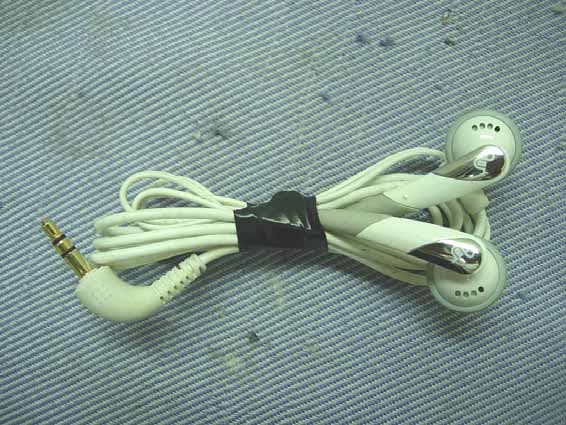
Click to zoom
Application Details
- Equipment Class
- DTS - Digital Transmission System
- Date of Grant
- Jul 20, 2006
- Application Purpose
- Original Equipment
- Date of Application
- Jul 20, 2006
- Equipment Note
- PDA
- Frequency Range
- 2412.00000000 - 2462.00000000
- Company
- LG Electronics USA, Inc.
- Country
- United States
Documents & Files
Document Text
Text extracted from the exhibit documents filed with the FCC. Open a document above to read the original.
Users Manual
HP iPAQ Product Information Guide Antenna House XSL Formatter (Evaluation) http://www.antennahouse.com/ © 2006 Hewlett-Packard Development Company, L.P. Microsoft, Windows, the Windows logo, Outlook, and ActiveSync are trademarks of Microsoft Corporation in the U.S. and other countries. HP iPAQ Products are Powered by Microsoft® Windows Mobile™ 5.0 software for Pocket PC. SD Logo is a trademark of its proprietor. Bluetooth® is a trademark owned by its proprietor and used by Hewlett-Packard Development Company, L.P. under license. All other product names mentioned herein may be trademarks of their respective companies. Hewlett-Packard Company shall not be liable for technical or editorial errors or omissions contained herein. The information is provided “as is” without warranty of any kind and is subject to change without notice. The warranties for Hewlett-Packard products are set forth in the express limited warranty statements accompanying such products. Nothing herein should be construed as an additional warranty. This document contains proprietary information that is protected by copyright. No part of this document may be photocopied, reproduced, or translated to another language without the prior written consent of Hewlett-Packard Development Company, L.P. HP iPAQ Product Information Guide First Edition (September 2006) Antenna House XSL Formatter (Evaluation) http://www.antennahouse.com/ Table of contents HP iPAQ Product Information Guide Welcome .............................................................................................................................................. 1 Box Contents ........................................................................................................................................ 2 Components ......................................................................................................................................... 3 Top Components ................................................................................................................. 3 Front Components ............................................................................................................... 4 Back Components ............................................................................................................... 5 Left and Right Side Components ......................................................................................... 6 Getting Started CD Contents ................................................................................................................ 7 Navigation Quick Start .......................................................................................................................... 8 Installing the Battery ............................................................................................................ 8 Powering On and Setting Up ............................................................................................. 10 HP Quick Launch ............................................................................................................... 10 Navigation Setup ............................................................................................................... 11 Car Kit Setup ..................................................................................................................... 12 Using TomTom Navigator 6 ............................................................................................... 15 Navigating to Destinations ................................................................................ 15 Menus ............................................................................................................... 15 Saving Destinations .......................................................................................... 16 Preferences ....................................................................................................... 16 Points of Interest (POI) ...................................................................................... 17 TomTom Plus .................................................................................................... 17 Travel Tools ....................................................................................................................... 18 WorldMate Standard Edition ............................................................................. 18 Organizer Features ........................................................................................... 18 Continuing Setup ................................................................................................................................ 18 Setting Up the Travel Companion ...................................................................................... 18 Finding the Serial Number and Model Number ................................................................. 22 Protecting Your HP iPAQ with a Password ....................................................................... 22 Today Screen .................................................................................................................... 23 Status Icons ...................................................................................................... 23 iPAQ Wireless ................................................................................................... 24 Checking the Battery Charge Level ................................................................................... 25 Battery Saving Tips ............................................................................................................ 25 Entering Text ...................................................................................................................................... 25 Entering Text Using Block Recognizer .............................................................................. 26 Entering Text Using the On-screen Keyboard ..…
Text truncated - open the document above for the full version.
Users Manual
From: "Audix\(??\)???" <[email protected]> To: "Timothy R. Johnson" <[email protected]> Cc: "ATCB ?????" <[email protected]> Subject: Re: ATCB003762 (FCC ID. BEJPDA-L12C-WL) Date: Fri, 21 Jul 2006 17:02:52 +0800 X-Mailer: Microsoft Outlook Express 6.00.2900.2869 X-OriginalArrivalTime: 21 Jul 2006 09:03:01.0421 (UTC) FILETIME=[77FB4DD0:01C6ACA4] Dear Tim, We added user instructions to the user maunal. Attached pls find user instructions Thank you Best Regards Monica Chang
Users Manual
"For body worn operation, this phone has been tested and meets the FCC RF exposure guidelines when used with the manufacture accessories supplied for this product. Use of other accessories may not ensure compliance with FCC RF exposure guidelines."
Cover Letter(s)
Request for Confidentiality Date: Jun. 27, 2006 Federal Communications Commission Authorization and Evaluation Division Subject: Confidentiality Request regarding Application for certification of FCC ID: BEJPDA-L12C-WL Gentlemen: Pursuant to Section 0.457 and 0.459 of the Commission’s Rules, we hereby request confidential treatment of information accompanying this application as outlined below: Functional Block Diagram Operational Description (theory of operation) Schematic Diagram The above materials contain trade secrets and proprietary information not customarily released to the public. The public disclosure of these materials may be harmful to the applicant and provide unjustified benefits to its competitors. The Applicant understands that pursuant to Section 0.457 of the Rules, disclosure of this application and all accompanying documentation will not be made before the date of the Grant for this application. Sincerely, _______________________________________ Jonghoon Park Technical Manager LG Electronics Inc.
Cover Letter(s)
Request for Short-Term Confidentiality Date: Jun. 27, 2006 Federal Communications Commission Authorization and Evaluation Division Subject: Confidentiality Request regarding Application for certification of FCC ID: BEJPDA-L12C-WL To whom it may concern: In accordace with 0.457 and 0.459 of Commision’s Rules, We hereby request short-term confidentiality for the test setup photos, external photos, internal photos, and user’s manual of the attached test report. These documents contain detailed system and equipment descriptions and related information about the product, which LG Electonics Inc. considers to be proprietary, confidential, and a custom design and otherwise, would not release to the general public. Since this design is basis from which future tehchnological products will evolve, LG Electronics feels that this informaiton would be of benefit to its competitors, and that the disclosure of the information in these documents would give our competitors an unfair advantage in the market. Jonghoon Park Technical Manager LG Electronics Inc.
Cover Letter(s)
American Telecommunications Certification Body Inc. 6731 Whittier Ave, McLean, VA 22101 July 18, 2006 RE: LG Electronics FCC ID: BEJPDA-L12C-WL After a review of the submitted information, I have a few comments on the above referenced Application. 1) The block diagram should show the frequencies of all oscillators (clocks) in both the TX portions of the device (CFR 2.1033(a)(5)). Please correct. 2) Photographs of the back of the WLAN module/board, and underneath its shield must be provided. Please provide. 3) Because it is not obvious looking at internal photos, kindly provide an internal photo marking/showing placement of the antennas for the device. 4) Bluetooth theory cites the device is capable of +7dBm, while its maximum tested was only +2.4 dBm. Please explain as the FCC expects the device to be tested at its maximum. 5) If the device is capable of TX while powered from the AC adapter, then AC powerline conducted emissions are required in this configuration per 15.207. 6) Radiated tests for portable devices are to investigate all 3 axis positioning of the EUT. Although only worse case data is necessary to be provided, it can not be determined if the device was investigated in all 3 axis (as required by ANSI C63.4). Please review/correct/comment as necessary. 7) Section 15.15(b) prohibits adjustments of any control by the user that will cause operation of a device in violation of the regulations. Accordingly, any proposal to allow the end user to choose extended channels on frequencies outside of an allowable frequency band in the USA is not acceptable. For example, a WLAN device operating according to Section 15.247 on channels 1-11 between 2.4 - 2.483.5 GHz must not have any user controls or software to allow the device to operate on channels 12 and 13 which are outside of the allowed USA band. For instance, the user should not be able to select alternative countries which would allow different channel plans outside of the allowed USA band. Please explain how this device is compliant to this requirement. 8) For SAR testing, the device appears to be placed into a particular case. Please confirm if this is the case provided by the manufacturer. If not provided, then typically a device would be tested either directly against the phantom or at a minimum distance (i.e. 1.5 cm) which would be discussed in further detail in the manual. Please explain. 9) It appears that the WLAN and BT may function at the same time. Therefore, the Worse Case WLAN configuration should have been tested for SAR both with and without BT operational. Please note that for SAR with devices containing BT, the FCC prefers all testing on the dominate TX to be done with BT off, and then an additional test at the worse case position with the BT on. Note however that for purposes of this application, we will only require the worse case position reported with and without BT operational. Please provide. 10) Z-axis plots of worse case test data must be provided. Please provide. 11) For SAR, please provide procedures to establish the test signals described (put phone on a call, e.g., base-station simulator vs internal test codes)? This may include a test equipment list or test codes as appropriate. 12) SAR report should report probe tip distance to phantom inner surface during scans. 13) Ambient and liquid temperatures should be reported on each plot. Please update. 14) FYI.....Due to large delta existing between peak and average emissions for Bluetooth, it appears that BT RADIATED emissions were measured with the device hopping and not in CW mode. Note that due to the pulsed nature at each frequency, average measurements are not allowed. Instead a duty factor for the worse case duty factor on a particular channel in 100 msec should be used for z Page 2 July 20, 2006 correction. However given the duty factor for DH5 is > 20 dB, therefore if peak measurements meet the limits, average will also meet since the limits between peak and average are 20 dB. In the future please ensure testing is done with a CW mode, or correct average by using the appropriate duty factors. 15) FYI....Page 107 & 113 of the manual mentions “This PDA has been tested and demonstrated compliance when Bluetooth and WLAN are transmitting simultaneously. This PDA must not be co-located or operating in conjunction with any other antenna or transmitter.” It is recommended that at least this be changed to cite “RF Compliance” or “SAR Compliance”. 16) FYI....For part 15 devices, the frequency range on the 731 should be the tunable frequencies and not frequency band (i.e. 2412 – 2462 WLAN, 2402 – 2480 BT). Please consider this in the future. 17) FYI....Regarding short term confidentiality, you are responsible for the following: a) Note that any documents held under the short-term confidentiality will automatically become public after 45 days. A manufacturer may extend this period up to an additional 45 days. This requires an additional cover letter requesting this extension must be submitted to ATCB a minimum of 7 days prior to the expiration of the original 45 day temporary grant of confidentiality b) If the manufacturer engages in public marketing activities or otherwise publicizes the device prior to the expiration of the short-term confidentiality period, the applicant must immediately notify ATCB so the exhibits can be made publicly available. Attached: Short Term Confidentiality Memos Timothy R. Johnson Examining Engineer mailto: [email protected] The items indicated above must be submitted before processing can continue on the above referenced application. Failure to provide the requested information may result in application termination. Correspondence should be considered part of the permanent submission and may be viewed from the Internet after a Grant of Equipment Authorization is issued. Please do not respond to this correspondence using the email reply button. In order for your response to be processed expeditiously, you must submit your …
Text truncated - open the document above for the full version.
Cover Letter(s)
Below is our answers 1) We have revised Functional Block Diagram. 2) We have revised EUT internal photos. 3) We have revised EUT internal photos. 4) This device is set under 4dB by the manufacuturer. 5) AC conducted emissions has been evaluated at TX mode of operation and found to be identical to the data (Page 17-20) provided in the test report. 6) This device was tested in all 3 axis. The test data in this report only documents the worst case 7) The channels 12 and 13 have been disabled by the manufacturer. these two channels will not be used in USA. Thank you Best Regards Monica Chang Page 1 of 1=?big5?B?s6/CRblGW21ham9yXQ==?=, 05:18 PM 7/20/2006 +0800, FW: ATCB003762 (FCC ID. BE... 7/21/2006Printed for "Timothy R. Johnson" <[email protected]>
Cover Letter(s)
Dear Tim & Major, Thank you for your comment! Below is our engineer response for your comment #8 to #13 8) Answer: The particular case is provided by manufacturer-LG. 9) Answer: refer to Page23~26, BT on and BT off test result 10) Answer: refer to Page23~26, the Z-axis plots of the worse case data is under of the test result. 11) Answer: when SAR test, LG Engineer set up EUT on engineer test mode to let EUT continue emission. 12) Answer: refer to Page19, 8.3.2 13) Answer: Ambient and liquid temperatures, refer to last two column of test result table on P23~26 If any further question, please let me know! Best regards, Mandy Lu / §f²úªÚ Page 1 of 1=?big5?B?tLm0X6zsp94tp2ay+qra?=, 04:48 PM 7/21/2006 +0800, RE: ATCB003762 (FCC ID. BEJPD... 7/21/2006Printed for "Timothy R. Johnson" <[email protected]>
External Photos
Hewlett-Packard Company Personal Digital Assistant of Pocket PCFCC ID. : BEJPDA-L12C-WL EUT External Photos Figure 1 General Appearance (Front View) Figure 2 General Appearance (Back View) Hewlett-Packard Company Personal Digital Assistant of Pocket PCFCC ID. : BEJPDA-L12C-WL Figure 3 General Appearance (Right View) Figure 4 General Appearance (Left View) Hewlett-Packard Company Personal Digital Assistant of Pocket PCFCC ID. : BEJPDA-L12C-WL Figure 5 General Appearance (Bottom View) Figure 6 Switching Power Supply, General Appearance (Front & Side View) Hewlett-Packard Company Personal Digital Assistant of Pocket PCFCC ID. : BEJPDA-L12C-WL Figure 7 Switching Power Supply, General Appearance (Back & Side View) Figure 8 Switching Power Supply, General Appearance (Label View) Hewlett-Packard Company Personal Digital Assistant of Pocket PCFCC ID. : BEJPDA-L12C-WL Figure 9 Earphone Figure 10 Dong Myung, Data Sync Cable Hewlett-Packard Company Personal Digital Assistant of Pocket PCFCC ID. : BEJPDA-L12C-WL Figure 11 Phihong Data Sync Cable
ID Label/Location Info
Hewlett-Packard Company Personal Digital Assistant of Pocket PCFCC ID. : BEJPDA-L12C-WL FCC ID Label Format z FCC Label Format
Internal Photos
Hewlett-Packard Company Personal Digital Assistant of Pocket PCFCC ID. : BEJPDA-L12C-WL EUT Internal Photos Figure 12 Internal View (Back Cover & Rechargeable Battery Pack Removed) Figure 13 Internal View (Rechargeable Battery, Front View) Hewlett-Packard Company Personal Digital Assistant of Pocket PCFCC ID. : BEJPDA-L12C-WL Figure 14 Internal View (Rechargeable Battery, Back View) Figure 15 Internal View (Top Cover Removed) Hewlett-Packard Company Personal Digital Assistant of Pocket PCFCC ID. : BEJPDA-L12C-WL Figure 16 Internal View (Top Cover) Figure 17 Internal View (Speaker) Hewlett-Packard Company Personal Digital Assistant of Pocket PCFCC ID. : BEJPDA-L12C-WL Figure 18 Internal View (Main Board Removed) Figure 19 Internal View (Main Board, Component Side) Hewlett-Packard Company Personal Digital Assistant of Pocket PCFCC ID. : BEJPDA-L12C-WL Figure 20 Internal View (Main Board, Foil Side) Figure 21 Internal View (Wireless LAN Module with Shield) Hewlett-Packard Company Personal Digital Assistant of Pocket PCFCC ID. : BEJPDA-L12C-WL Figure 22 Internal View (Wireless LAN Module/ Component Side) Figure 23 Internal View (Wireless LAN Module/ Foil Side) Hewlett-Packard Company Personal Digital Assistant of Pocket PCFCC ID. : BEJPDA-L12C-WL Figure 24 Internal View (Wireless LAN Module - ANTENNA Position) Figure 25 Internal View (Covers, LCD Panel and Bluetooth Board) ANT Hewlett-Packard Company Personal Digital Assistant of Pocket PCFCC ID. : BEJPDA-L12C-WL Figure 26 Internal View (Bluetooth Board, Front View) Figure 27 Internal View (Bluetooth Board, Back View) Hewlett-Packard Company Personal Digital Assistant of Pocket PCFCC ID. : BEJPDA-L12C-WL Figure 28 Internal View (Bluetooth Board - ANTENNA Position) Figure 29 Internal View (LCD Panel, Front View) ANT Hewlett-Packard Company Personal Digital Assistant of Pocket PCFCC ID. : BEJPDA-L12C-WL Figure 30 Internal View (LCD Panel, Back View) Figure 31 Switching Power Supply (Internal View) Hewlett-Packard Company Personal Digital Assistant of Pocket PCFCC ID. : BEJPDA-L12C-WL Figure 32 Switching Power Supply (PCB/ Component Side) Figure 33 Switching Power Supply (PCB/ Foil Side)
RF Exposure Info
©2005 ATL Techno. Corp. RF Testing Lab Page 1 of 38 This report shall not be reproduced except in full, without the written approval of ATL. Rev.01 This document may be altered or revised by ATL Techno. Corp. RF Testing Lab. personnel only, and shall be noted in the revision section of the document A Test Lab Techno. Corp. RF Testing Lab Tao-Yuan Lab:No. 140 -1, Changan Street, Bade City, Taoyuan County, Taiwan R.O.C. Te l:886-(0)3-271-0188 / Fax:886-(0)3-271-0190 SAR EVALUATION REPORT Test Report No.: 06-0146-S-00-02-01 Applicant: Hewlett-Packard Company FCC ID: BEJPDA-L12C-WL IC: 466Q-HHL12CWL Trade Name: Hewlett-Packard Model Name: HSTNH-L12C-WL EUT Type: Personal Digital Assistant or Pocket PC Dates of Test: Jul. 12, 2006 Test Environment: Ambient Temperature: 22 ± 3 °C Relative Humidity: 40 - 70 % Test Specification: Standard C95.1-1999 IEEE Std. 1528-2003 Max. SAR: 0.125 W/kg 802.11b Body SAR 0.054 W/kg 802.11g Body SAR FCC Classification: Part 15 Spread Spectrum Transmitter (Wi-Fi) IC Classification: RSS-102 FCC Rule Part(s) : §2.1093;FCC/OET Bulletin 65 Supplement C [July 2001] IC Rule Part(s) : RSS-102 Issue 2 [November 2005] Test Lab : Changan Lab 1. The test operations have to be performed with cautious behavior, the test results are as attached. 2. The test results are under chamber environment of ATL. ATL does not assume responsibility for any conclusions and generalizations drawn from the test results with regard to other specimens or samples. 3. The measurement report has to be written approval of ATL. It may only be reproduced or published in full. Country Huang 20060714 Testing Center Manager ATL Techno. Corp. RF Testing Lab ATL Techno. Corp. RF Testing Lab Test Report No:06-0146-S-00-02-01 Tao-Yuan Lab:No. 140 -1, Changan Street, Bade City, Taoyuan County, Taiwan R.O.C. . Test Dates ﹕Jul. 12 , 2006 Te l:886-(0)3-271-0188 / Fax:886-(0)3-271-0190 © 2005 ATL Techno. Corp. RF Testing Lab Page 2 of 38 This report shall not be reproduced except in full, without the written approval of ATL. Rev.01 This document may be altered or revised by ATL Techno. Corp. RF Testing Lab. personnel only, and shall be noted in the revision section of the document Contents 1. Description of Equipment Under Test (EUT).......................................................................................... 3 2. Introduction................................................................................................................................................ 4 3. SAR Definition........................................................................................................................................... 4 4. SAR Measurement Setup.......................................................................................................................... 5 5. System Components................................................................................................................................. 6 5.1 DASY4 E-Field Probe System........................................................................................................... 6 5.1.1 ET3DV6 E-Field Probe Specification....................................................................................... 7 5.1.2 ET3DV6 E-Field Probe Calibration.......................................................................................... 8 5.2 Data Acquisition Electronic (DAE) System......................................................................................... 8 5.3 Robot.................................................................................................................................................. 9 5.4 Measurement Server.......................................................................................................................... 9 5.5 Device Holder for Transmitters.......................................................................................................... 9 5.6 Phantom-TWIN SAM V4.0................................................................................................................. 10 5.7 Data Storage and Evaluation............................................................................................................. 10 5.7.1 Data Storage............................................................................................................................ 10 5.7.2 Data Evaluation........................................................................................................................ 11 6. Test Equipment List.................................................................................................................................. 13 7. Tissue Simulating Liquids........................................................................................................................ 14 7.1 Liquid Confirmation............................................................................................................................ 14 7.1.1 Parameters............................................................................................................................... 15 7.1.2 Liquid Depth............................................................................................................................. 15 8. Measurement Process.............................................................................................................................. 16 8.1 Device and Test Conditions................................................................................................................ 16 8.2 System Performance Check.............................................................................................................. 17 8.2.1 Symmetric Dipoles for System Validation................................................................................ 17 8.2.2 Validation............................................................................................................................... ... 18 8…
Text truncated - open the document above for the full version.
Test Report
FCC ID. BEJPDA-L12C-WL Page 1 of 178 Audix Corporation Report No. EM-F950245 APPLICATION FOR CERTIFICATION On Behalf of Hewlett-Packard Company Personal Digital Assistant or Pocket PC Model No.HSTNH-L12C-WL Brand: HP FCC IDBEJPDA-L12C-WL Prepared for : Hewlett-Packard Company 20555 SH 249, HOUSTON, TX 77070-2698, USA Prepared by : Audix Corporation Technical Division EMC Department No. 53-11, Tin-Fu Tsun, Lin-Kou, Taipei County, Taiwan, R.O.C. Tel : (02) 2609-9301, 2609-2133 Fax: (02) 2609-9303 File Number EM950863A Report Number EM-F950245 Date of Test Jun. 19 ~ 21, 2006 Date of Report Jul. 03, 2006 FCC ID. BEJPDA-L12C-WL Page 2 of 178 Audix Corporation Report No. EM-F950245 TABLE OF CONTENTS Description Page TEST REPORT CERTIFICATION .......................................................................................................4 1. GENERAL INFORMATION .......................................................................................................6 1.1. Description of Device (EUT).................................................................................................................. 6 1.2. Tested Supporting System Details .......................................................................................................... 7 1.3. Description of Test Facility .................................................................................................................... 8 1.4. Measurement Uncertainty....................................................................................................................... 9 2. CONDUCTED EMISSION MEASUREMET...........................................................................10 2.1. Test Equipment ..................................................................................................................................... 10 2.2. Block Diagram of Test Setup................................................................................................................ 10 2.3. Conducted Emission Limits (§15.207) ................................................................................................. 11 2.4. Operating Condition of EUT ................................................................................................................ 11 2.5. Test Procedure ...................................................................................................................................... 11 2.6. Conducted Emission Measurement Results..........................................................................................12 3. RADIATED EMISSION MEASUREMENT ............................................................................21 3.1. Test Equipment ..................................................................................................................................... 21 3.2. Test Setup ............................................................................................................................................. 21 3.3. Radiated Emission Limits (§15.209) .................................................................................................... 23 3.4. Operating Condition of EUT ................................................................................................................ 23 3.5. Test Procedure ...................................................................................................................................... 24 3.6. Radiated Emission Measurement Results............................................................................................. 24 4. 6dB BANDWIDTH MEASUREMENT (WLAN) ...................................................................123 4.1. Test Equipment ................................................................................................................................... 123 4.2. Block Diagram of Test Setup.............................................................................................................. 123 4.3. Specification Limits (§15.247(a)(2)) .................................................................................................. 123 4.4. Operating Condition of EUT ..........................................................…
Text truncated - open the document above for the full version.
Contact Information
Applicant
David Kim(Team leader, LGEUS NA Policy & Regulatory Affairs)
Technical Contact
Audix CorporationMonica Chang
[email protected]886 2609 9301
No. 53-11, Tin-Fu Tsun, Lin-Lou Hsiang · Taipei · Taiwan
Test Firm
Audix Technology CorporationJeff Chen
Technical Specifications
| # | Rule Parts | Frequency Range | Power Output |
|---|---|---|---|
| 1 | 15C | 2.41 GHz - 2.46 GHz | 76.00 mW |
Other Applications from LG Electronics USA, Inc.

BEJTFHOBINI1F1
Jan 08, 2025Telematics
Equipment Class
DTS - Digital Transmission SystemBEJNT-16Z90TS
Oct 02, 2024Notebook Computer
Equipment Class
DSS - Part 15 Spread Spectrum TransmitterBEJSP-PEW8
Sep 26, 2024Stylus Pen
Equipment Class
DCD - Part 15 Low Power Transmitter Below 1705 kHzBEJ-RSMV2
Sep 24, 2024RF Module
Equipment Class
FDS - Part 15 Field Disturbance SensorBEJTFBMEIBN3EU
Sep 24, 2024Telematics
Equipment Class
NII - Unlicensed National Information Infrastructure TX