BEJPDAPE2030AWireless PDA
LG Electronics USA, Inc.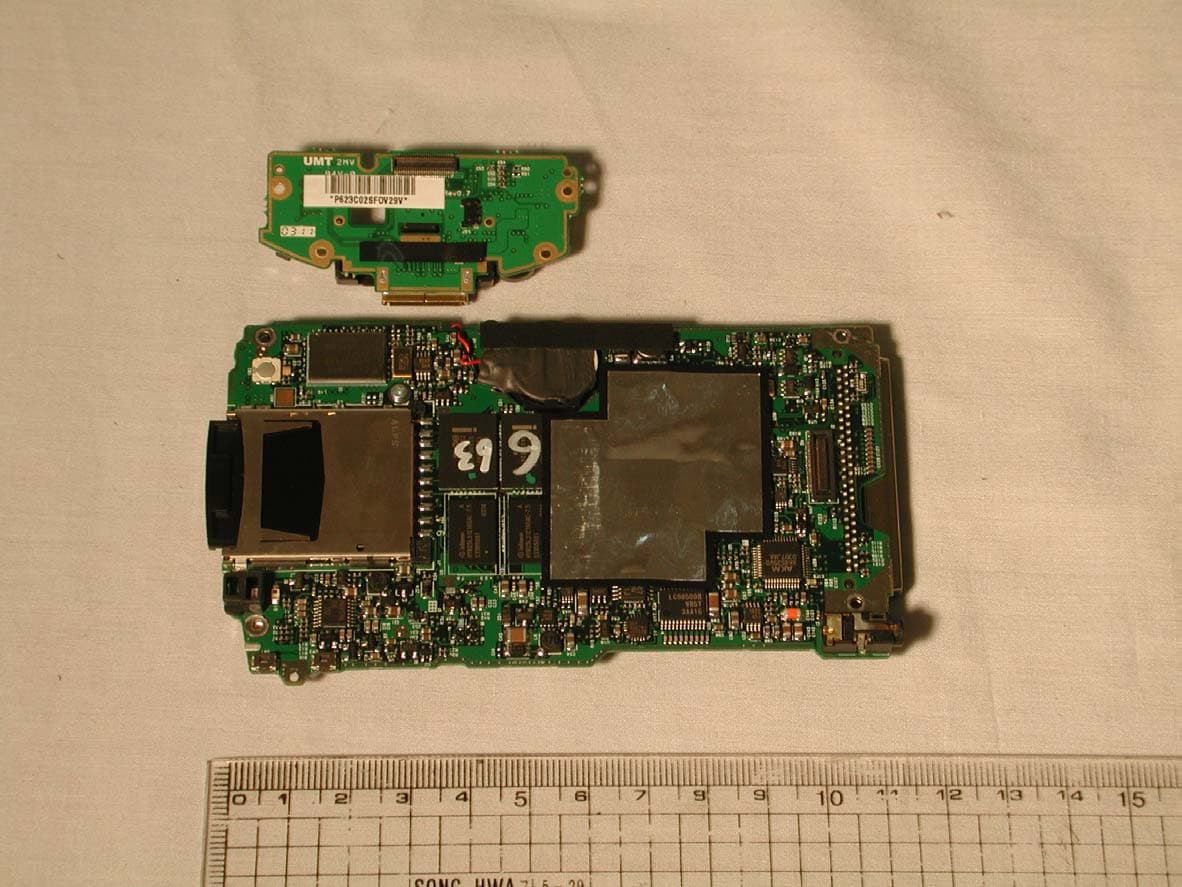
Click to zoom
Application Details
- Equipment Class
- DSS - Part 15 Spread Spectrum Transmitter
- Date of Grant
- Jun 23, 2003
- Application Purpose
- Original Equipment
- Date of Application
- Jun 23, 2003
- Equipment Note
- Wireless PDA
- Frequency Range
- 2402.00000000 - 2480.00000000
- Company
- LG Electronics USA, Inc.
- Country
- United States
Documents & Files
Document Text
Text extracted from the exhibit documents filed with the FCC. Open a document above to read the original.
Users Manual
User’s Guide hp iPAQ Pocket PC h5100 and h5500 series Document Part Number: 304926-001 May 2003 Note: Model shown in illustrations is iPAQ Pocket PC h5500 Series © 2003 Hewlett-Packard Development Company, L.P. HP, Hewlett Packard, and the Hewlett-Packard logo are trademarks of Hewlett-Packard Company in the U.S. and other countries. iPAQ is a trademark of Hewlett-Packard Development Company, L.P. in the U.S. and other countries. Microsoft, Windows, the Windows logo, Outlook, and ActiveSync are trademarks of Microsoft Corporation in the U.S. and other countries. hp iPAQ Pocket PC is Powered by Microsoft® Windows®. SD Logo is a trademark of Secure Digital in the U.S. and other countries. XScale is a registered trademark of Intel Corporation in the U.S. and other countries. All other product names mentioned herein may be trademarks of their respective companies. Hewlett-Packard Company shall not be liable for technical or editorial errors or omissions contained herein or for incidental or consequential damages in connection with the furnishing, performance, or use of this material. The information in this document is provided “as is” without warranty of any kind, including, but not limited to, the implied warranties of merchantability and fitness for a particular purpose, and is subject to change without notice. The warranties for HP products are set forth in the express limited warranty statements accompanying such products. Nothing herein should be construed as constituting an additional warranty. This document contains proprietary information that is protected by copyright. No part of this document may be photocopied, reproduced, or translated to another language without the prior written consent of Hewlett-Packard Company. Å WARNING: Text set off in this manner indicates that failure to follow directions could result in bodily harm or loss of life. Ä CAUTION: Text set off in this manner indicates that failure to follow directions could result in damage to equipment or loss of information. User’s Guide hp iPAQ Pocket PC h5100 and h5500 series First Edition (May 2003) Document Part Number: 304926-001 User’s Guide1 Contents 1 Getting to Know Your iPAQ Pocket PC Using the Stylus. . . . . . . . . . . . . . . . . . . . . . . . . . . . . . . . 1–5 Setting the Date and Time . . . . . . . . . . . . . . . . . . . . . . . . 1–6 Setting the Time for Home and Visiting Locations. . . . . . . . . . . . . . . . . . . . . . . . . . . . . . . . . . 1–6 Setting the Date. . . . . . . . . . . . . . . . . . . . . . . . . . . . . 1–7 Entering Owner Information . . . . . . . . . . . . . . . . . . . . . . 1–7 Resetting the Unit. . . . . . . . . . . . . . . . . . . . . . . . . . . . . . . 1–8 Performing a Normal Reset. . . . . . . . . . . . . . . . . . . . 1–8 Performing a Full Reset. . . . . . . . . . . . . . . . . . . . . . . 1–9 Aligning the Screen . . . . . . . . . . . . . . . . . . . . . . . . . . . . 1–10 Routine Care. . . . . . . . . . . . . . . . . . . . . . . . . . . . . . . . . . 1–11 2 Using ActiveSync Connecting to a Computer. . . . . . . . . . . . . . . . . . . . . . . . 2–2 Synchronizing with Your Computer . . . . . . . . . . . . . 2–2 Using the Serial Infrared (IR) Connection . . . . . 2–3 Changing Synchronization Settings. . . . . . . . . . . . . . 2–4 Copying Files. . . . . . . . . . . . . . . . . . . . . . . . . . . . . . . . . . 2–5 Installing Applications. . . . . . . . . . . . . . . . . . . . . . . . . . . 2–6 Backing up and Restoring . . . . . . . . . . . . . . . . . . . . . . . . 2–6 Synchronizing Links . . . . . . . . . . . . . . . . . . . . . . . . . . . . 2–7 Sending and Receiving E-mail. . . . . . . . . . . . . . . . . . . . . 2–7 Requesting Meetings . . . . . . . . . . . . . . . . . . . . . . . . . . . . 2–7 Contents User’s Guide2 3 Managing the Battery Installing the Battery . . . . . . . . . . . . . . . . . . . . . . . . . . . . 3–1 Removing the Battery . . . . . . . . . . . . . . . . . . . . . . . . . . . 3–3 Charging. . . . . . . . . . . . . . . . . . . . . . . . . . . . . . . . . . . . . . 3–3 Charging with the AC Adapter and Charger Adapter . . . . . . . . . . . . . . . . . . . . . . . . . . . . 3–4 Charging with the Universal Desktop Cradle and AC Adapter. . . . . . . . . . . . . . . . . . . . . . . 3–5 Charging with the Optional USB Autosync Cable . . . . . . . . . . . . . . . . . . . . . . . . . . . . . 3–7 Charging a Low Battery . . . . . . . . . . . . . . . . . . . . . . 3–7 Preserving Battery Time . . . . . . . . . . . . . . . . . . . . . . . . . 3–8 Adjusting the Standby Setting. . . . . . . . . . . . . . . . . . 3–8 Changing the Backlight Settings. . . . . . . . . . . . . . . 3–10 Disabling the Application and Record Buttons. . . . 3–10 Manually Monitoring the Battery . . . . . . . . . . . . . . 3–11 4 Learning the Basics Using the Today Screen. . . . . . . . . . . . . . . . . . . . . . . . . . 4–1 Navigation Bar and Command Bar. . . . . . . . . . . . . . 4–2 Status Icons . . . . . . . . . . . . . . . . . . . . . . . . . . . . . . . . 4–3 Pop-Up Menus. . . . . . . . . . . . . . . . . . . . . . . . . . . . . . 4–4 Creating information . . . . . . . . . . . . . . . . . . . . . . . . . 4–5 Customizing the Today Screen . . . . . . . . . . . . . . . . . 4–6 Using Applications. . . . . . . . . . . . . . . . . . . . . . . . . . . . . . 4–8 Opening Applications . . . . . . . . . . . . . . . . . . . . . . . . 4–8 Minimizing Applications. . . . . . . . . . . . . . . . . . . . . . 4–8 Closing Applications. . . . . . . . . . . . . . . . . . . . . . . . . 4–9 Closing with iTask . . . . . . . . . . . . . . . . . . . . . . . 4–9 Closing Manually . . . . . . . . . . . . . . . . . . . . . . . . 4–9 Installing Applications. . . . . . . . . . . . . . . . . . . . . . . . 4–9 Contents User’s Guide3 Using iPAQ Image Viewer . . . . . . . . . . . . . . . . . . . 4–10 Locating an Image. . . . . . . . . . . . . . . . . . . . . . . 4–11 Viewing Image Information . . . . . . . . . . . . . . . 4–11…
Text truncated - open the document above for the full version.
Cover Letter(s)
LG Electronics Inc Date:09.05.2003 Federal Communications Commission Authorization and Evaluation Division Laboratory Division 7435 Oakland Mills Road Columbia, MD 21046 Re: LG Electronics Inc, PDA Request for withholding from public disclosure proprietary information submitted pursuant to an application for certification of a PE2030 A. FCC ID:BEJPDAPE2030A Sir/Madam: LG Electronics Inc requests that certain materials submitted with this application for certification of the PE2030 A be withheld from public disclosure. This request is made under the provision of Section 0.457 (d) of the Commission’s Rule and Section 552 (b) (4) of the Freedom of Information Act, Trade Secrets. The items marked “Confidential” contain detailed block diagram, schematic, part list, operational description and PCB layout, submitted to the FCC for review with this application. The information contains proprietary information (trade secrets) regarding the circuit operation and capabilities (specific values of components, circuit design details and system architecture) which are the result of our extensive investment in research and development. Without the disclosed information, competitive organizations would take considerable more time to assess and develop a workable competitive product. Therefore, we believe that disclosure of these company guarded materials would compromise our leading position in this market. We therefore formally request that the materials marked “Confidential” be kept strictly confidential and not made available for inspection by any other party, except on a need to know basis for the sole purpose of the certification process. Sincerely yours, Hoseob Sung Senior Research Engineer
External Photos
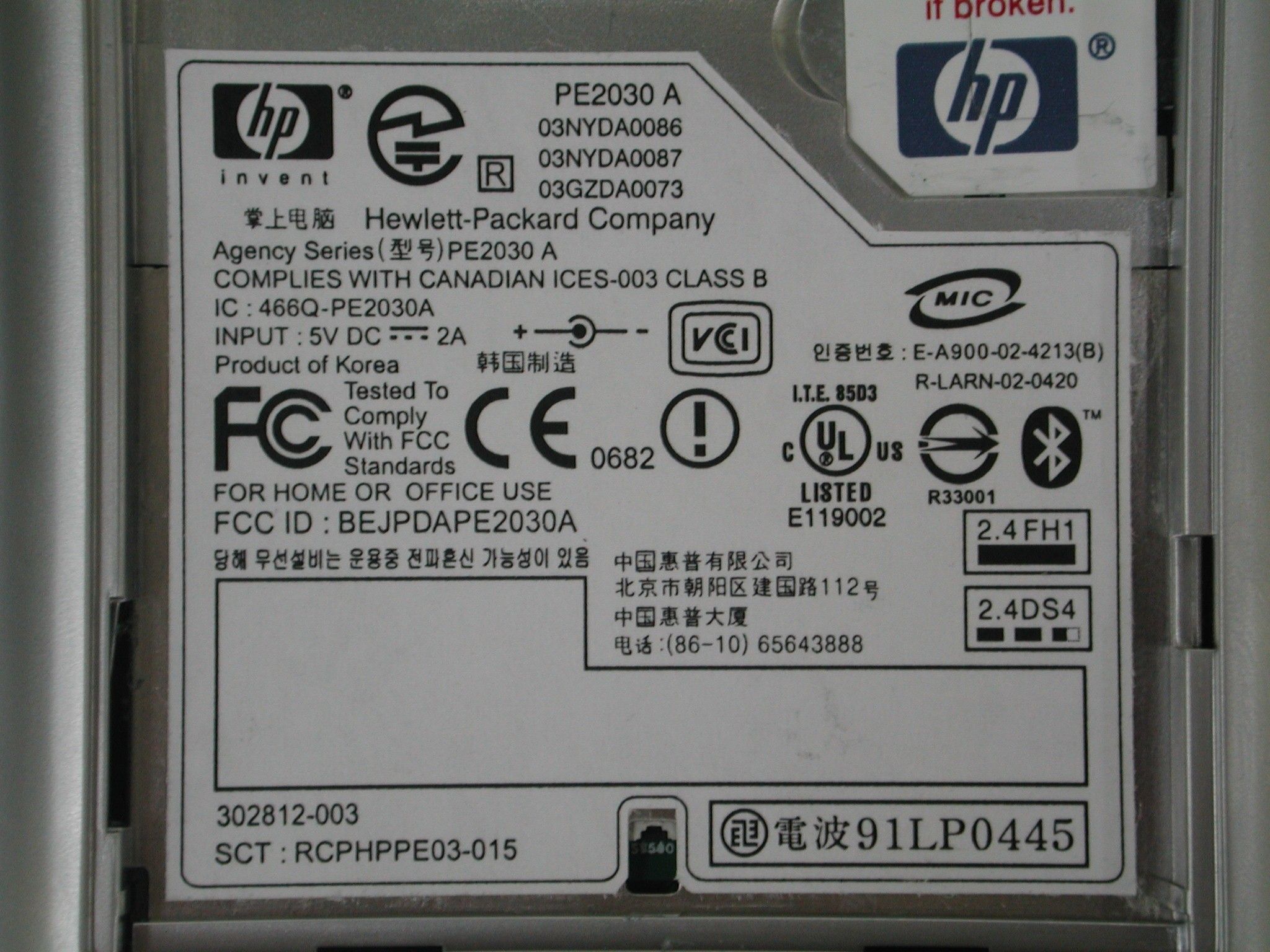
Front View 1 Front View 2 Rear View Rear View 2 Rear View 3 Label Internal View 1 Internal View 2 Internal View 3 Main and Sub Board 1 Main and Sub Board 2
Internal Photos
Front View 1 Front View 2 Rear View Rear View 2 Rear View 3 Label Internal View 1 Internal View 2 Internal View 3 Main and Sub Board 1 Main and Sub Board 2
RF Exposure Info
CETECOM ICT Services GmbH Untertuerkheimer Str. 6-10, 66117 Saarbruecken, GermanyPhone: +49 (0) 681 598-0Fax: -8475 SAR-Laboratory Phone: +49 (0) 681 598-8454 . As of May 13, 2003Page 1 of 79 Accredited testing laboratory DAR registration number: TTI-P-G 166/98 Federal Motor Transport Authority (KBA) DAR registration number: KBA-P 00070-97 Test report no. : 4-0977-01-03/03-B Type identification : PE2030 A Test specification : Draft IEEE Std 1528-200X FCC-ID: BEJPDAPE2030A Test specification : CETECOM ICT Services GmbH Test report no.: 4-0977-01-03/03-B As of May 13, 2003Page 2 of 79 Table of Contents 1General Information............................................................................................................................................................... 3 1.1Notes .............................................................................................................................................................................. 3 1.1.1 Statement of Compliance ........................................................................................................................................... 3 1.2Testing laboratory .......................................................................................................................................................... 4 1.3Details of applicant ........................................................................................................................................................ 4 1.4Application details ......................................................................................................................................................... 4 1.5Test item ........................................................................................................................................................................ 5 1.6Test specification(s) ....................................................................................................................................................... 6 1.6.1 RF exposure limits ..................................................................................................................................................... 6 2Technical test ......................................................................................................................................................................... 7 2.1Summary of test results.................................................................................................................................................. 7 2.2Test environment ........................................................................................................................................................... 7 2.3Measurement and test set-up.......................................................................................................................................... 7 2.4Measurement system...................................................................................................................................................... 8 2.4.1 System Description .................................................................................................................................................... 8 2.4.2 Test environment ....................................................................................................................................................... 9 2.4.3 Probe description ....................................................................................................................................................... 9 2.4.4 Phantom description................................................................................................................................................. 10 2.4.5 Device holder description ........................................................................................................................................ 10 2.4.6 Scanning procedure.................................................................................................................................................. 11 2.4.7 Spatial Peak SAR Evaluation................................................................................................................................... 12 2.4.8 Data Storage and Evaluation.................................................................................................................................... 13 2.4.9 Test equipment utilized............................................................................................................................................ 15 2.4.10Tissue simulating liquids : dielectric properties................................................................................................... 16 2.4.11Tissue simulating liquids : parameters ................................................................................................................. 17 2.4.12Measurement uncertainties .................................................................................................................................. 18 2.4.13System validation................................................................................................................................................. 19 2.4.14Validation procedure............................................................................................................................................ 20 2.5Test results (Head SAR) .............................................................................................................................................. 21 2.6Test results (Body SAR - Diamonics battery).............................................................................................................. 21 2.7Test results (Body SAR - Samsung battery) ................................................................................................................ 22 2.8Tes…
Text truncated - open the document above for the full version.
RF Exposure Info
CETECOM ICT Services GmbH Untertuerkheimer Str. 6-10, 66117 Saarbruecken, GermanyPhone: +49 (0) 681 598-0Fax: -8475 SAR-Laboratory Phone: +49 (0) 681 598-8454 . As of February 24, 2003Page 1 of 30 Accredited testing laboratory DAR registration number: TTI-P-G 166/98 Federal Motor Transport Authority (KBA) DAR registration number: KBA-P 00070-97 Calibration data and Phantom information for test report no. 4-0977-01-03/03-B Test specification : CETECOM ICT Services GmbH Calibration Data and Phantom Information; Report No.: 4-0977-01-03/03-B As of February 24, 2003Page 2 of 30 CETECOM ICT Services GmbH Calibration Data and Phantom Information; Report No.: 4-0977-01-03/03-B As of February 24, 2003Page 3 of 30 CETECOM ICT Services GmbH Calibration Data and Phantom Information; Report No.: 4-0977-01-03/03-B As of February 24, 2003Page 4 of 30 CETECOM ICT Services GmbH Calibration Data and Phantom Information; Report No.: 4-0977-01-03/03-B As of February 24, 2003Page 5 of 30 CETECOM ICT Services GmbH Calibration Data and Phantom Information; Report No.: 4-0977-01-03/03-B As of February 24, 2003Page 6 of 30 CETECOM ICT Services GmbH Calibration Data and Phantom Information; Report No.: 4-0977-01-03/03-B As of February 24, 2003Page 7 of 30 CETECOM ICT Services GmbH Calibration Data and Phantom Information; Report No.: 4-0977-01-03/03-B As of February 24, 2003Page 8 of 30 CETECOM ICT Services GmbH Calibration Data and Phantom Information; Report No.: 4-0977-01-03/03-B As of February 24, 2003Page 9 of 30 CETECOM ICT Services GmbH Calibration Data and Phantom Information; Report No.: 4-0977-01-03/03-B As of February 24, 2003Page 10 of 30 CETECOM ICT Services GmbH Calibration Data and Phantom Information; Report No.: 4-0977-01-03/03-B As of February 24, 2003Page 11 of 30 CETECOM ICT Services GmbH Calibration Data and Phantom Information; Report No.: 4-0977-01-03/03-B As of February 24, 2003Page 12 of 30 CETECOM ICT Services GmbH Calibration Data and Phantom Information; Report No.: 4-0977-01-03/03-B As of February 24, 2003Page 13 of 30 CETECOM ICT Services GmbH Calibration Data and Phantom Information; Report No.: 4-0977-01-03/03-B As of February 24, 2003Page 14 of 30 CETECOM ICT Services GmbH Calibration Data and Phantom Information; Report No.: 4-0977-01-03/03-B As of February 24, 2003Page 15 of 30 CETECOM ICT Services GmbH Calibration Data and Phantom Information; Report No.: 4-0977-01-03/03-B As of February 24, 2003Page 16 of 30 CETECOM ICT Services GmbH Calibration Data and Phantom Information; Report No.: 4-0977-01-03/03-B As of February 24, 2003Page 17 of 30 CETECOM ICT Services GmbH Calibration Data and Phantom Information; Report No.: 4-0977-01-03/03-B As of February 24, 2003Page 18 of 30 CETECOM ICT Services GmbH Calibration Data and Phantom Information; Report No.: 4-0977-01-03/03-B As of February 24, 2003Page 19 of 30 CETECOM ICT Services GmbH Calibration Data and Phantom Information; Report No.: 4-0977-01-03/03-B As of February 24, 2003Page 20 of 30 CETECOM ICT Services GmbH Calibration Data and Phantom Information; Report No.: 4-0977-01-03/03-B As of February 24, 2003Page 21 of 30 CETECOM ICT Services GmbH Calibration Data and Phantom Information; Report No.: 4-0977-01-03/03-B As of February 24, 2003Page 22 of 30 CETECOM ICT Services GmbH Calibration Data and Phantom Information; Report No.: 4-0977-01-03/03-B As of February 24, 2003Page 23 of 30 CETECOM ICT Services GmbH Calibration Data and Phantom Information; Report No.: 4-0977-01-03/03-B As of February 24, 2003Page 24 of 30 CETECOM ICT Services GmbH Calibration Data and Phantom Information; Report No.: 4-0977-01-03/03-B As of February 24, 2003Page 25 of 30 Application Note Validation and system Check Purpose of validation The Validation and system check verify that the system operates within ist specifications. System and operator errors can be detected and corrected. It is recommended that the validation be performed prior to any usage of the system in order to guarantee reproducible results. The measurement of the Specific Absorption Rate (SAR) is a complicated task and the resultdepends on the proper functioning of many components and the correct settings of manyparameters. Faulty results due to drift, failures or incorrect parameters might not berecognized, since they often look similar in distribution to the correct ones. The DosimetricAssessment System DASY3 incorporates a validation procedure to test the properfunctioning of the system. The system validation uses normal SAR measurements in asimplified setup (the flat phantom section of the Generic Twin Phantom) with a wellcharacterized source (a matched dipole of a specified distance). This setup was selected to give a high sensitivity to all parameters that might fail or vary over time (e.g. probe, liquid parameters, and software settings) and a low sensitivity to external effects inherent in the system (e.g. positioning uncertainty of the device holder). The validation does not replace the calibration of the components. The accuracy of the validation is not sufficient for calibration purposes. It is possible to calculate the field quite accurately in this simple setup; however, due to the open field situation some factors (e.g. laboratory reflections) cannot be accounted for. Calibrations in the flat phantom are possible with transfer calibration methods, using either temperature probes or calibrated E-field probes. The validation also does not test the system performance for arbitrary field situations encountered during real measurements of mobile phones. These checks are performed at SPEAG by testing the components under various conditions (e.g. spherical isotropy measurements in liquid, linearity measurements, temperature variations, etc.), the results of which are used for an error estimation of the system. The validation will indicate situations where the system uncertainty is exceeded due to drift or failure. Validation procedure Preparation The conductivity should be…
Text truncated - open the document above for the full version.
Test Report
CETECOM ICT Services GmbH Radio Satellite Communication Untertürkheimer Straße 6-10 . D-66117 SaarbrückenTelephon: +49 (0)681 598-0Telefax: -9075 RSC14issue test report consist of 108 PagesPage 1 (108) Recognized by the Federal Communications Commission FCC–Identification Number: 90462 TCB ID: DE 0001 Accredited by the German Accreditation Council DAR–Registration Number TTI–P–G 166/98 Independent ETSI compliance test house ETSI Accredited Bluetooth™ Test Facility (BQTF) Test Report No.: 4-0977-01-02-D/03 FCC Part 15.247 / CANADA RSS-210 PE2030 A FCC ID: BEJPDA-PE2030A CETECOM – ICT Services GmbH Untertürkheimerstr. 6-10 66117 Saarbrücken, Germany Telephone: + 49 (0) 681 / 598-0 Fax: + 49 (0) 681 / 9075 BLUETOOTH is a trademark owned by Bluetooth SIG, Inc. and licensed to CETECOM CETECOM ICT Services GmbH Test Report No.: 4-0977-01-02-D/03Issue Date: 2003-05-06 Page 2 (108) Table of Contents 1 General Information 1.1 Notes 1.2 Testing Laboratory 1.3 Details of Applicant 1.4 Application Details 1.5 Test Item 1.6 Test Specifications 2 Technical Test 2.1 Summary of Test Results 2.2 Test Report CETECOM ICT Services GmbH Test Report No.: 4-0977-01-02-D/03Issue Date: 2003-05-06 Page 3 (108) 1 General Information 1.1 Notes The test results of this test report relate exclusively to the test item specified in 1.5. The CETECOM ICT Services GmbH does not assume responsibility for any conclusions and generalisations drawn from the test results with regard to other specimens or samples of the type of the equipment represented by the test item. The test report may only be reproduced or published in full. Reproduction or publication of extracts from the report requires the prior written approval of the CETECOM ICT Services GmbH. Test Laboratory Manager: 2003-05-12RSC8411Berg M. DateSectionNameSignature Technical Responsibility for Area of Testing: 2003-05-12RSC8412Hausknecht D. DateSectionNameSignature CETECOM ICT Services GmbH Test Report No.: 4-0977-01-02-D/03Issue Date: 2003-05-06 Page 4 (108) 1.2 Testing Laboratory CETECOM ICT Services GmbH Untertürkheimer Straße 6 - 10 66117 Saarbrücken Germany Telephone: + 49 681 598 - 0 Telefax : + 49 681 598 - 9075 E-mail : [email protected] Internet : www.cetecom-ict.de Accredited testing laboratory The Test laboratory (area of testing) is accredited according to DIN EN ISO/IEC 17025. DAR-registration number : TTI-P-G 166/98-30 Accredited Bluetooth™ Test Facility (BQTF) BLUETOOTH is a trademark owned by Bluetooth SIG, Inc. and licensed to CETECOM 1.3Details of Applicant Name : Hewlett Packard Company Street : MS 060607 City : 20555 SH 249 Houston ,TX 77070-2698 Country : USA Telephone : +1 281 514 2756 Telefax : +1 281 514 8029 Contact : Walter Overcash Telephone : +1 281 514 2756 1.4Application Details Date of receipt of application : 2003-04-17 Date of receipt of test item : 2003-04-28 Date of test : 2003-04-28/29/30 CETECOM ICT Services GmbH Test Report No.: 4-0977-01-02-D/03Issue Date: 2003-05-06 Page 5 (108) 1.5Test Item Type of equipment : PDA with Bluetooth ® transmitter Type designation: PE2030 A Manufacturer: LG Electronics Inc. Street: 19-1 Cheongho-Ri, Jinwuy-Myeon City: Pyungtaik-Shi Kyunggi-Do Country: Republic of Korea 451-713 Serial number: FCC ID: BEJPDA-PE2030A Hardware: 0.4 Software : 1. OS version: Windows CE 4.2 2. Bluetooth: Firmware version: 1.7.0 - 1.8.0 (S/W ver.) 3. Wireless LAN: Firmware version: 0.100.5.39 (S/W ver.) Additional information : Frequency: 2402 – 2480 MHz Type of modulation: 1M00FXD / 79M8FXD (FHSS) Number of channels : 79 Antenna: Print antenna Power supply: Li-Ion rechargeable battery 3,7V Output power: EIRP: 1.38 mW (worst case); conducted : 1.20 mW Field strength: 94.80 dBμV/m Occupied bandwidth: 991.984 kHz Transmitter spurious : -.- Receiver spurious. -.- Temperature range: 0°C - +40°C DECLARATION OF COMPLIANCE: I declare that the testing was performed or supervised by me; that the test measurements were made in accordance with the above-mentioned Industry Canada standard(s); and that the equipment identified in this application has been subjected to all the applicable test conditions specified in the Industry Canada standards and all of the requirements of the standard have been met. Signature: _______________________________________________ Date: _____2003-05-09 Michael Berg Test Management______ NAME AND TITLE (Please print or type): 1.6 Test Specifications: FCC Part 15 §15.247 CANADA RSS-210 CETECOM ICT Services GmbH Test Report No.: 4-0977-01-02-D/03Issue Date: 2003-05-06 Page 6 (108) 2 Technical Test 2.1Summary of Test Results The radiated measurements are performed in vertical and horizontal plane in the frequency range from 9 kHz to 25 GHz in semi-anechoic chambers. The EUT is positioned on a non- conductive support with a height of 0.80 m above a conductive ground plane that covers the whole chamber. The receiving antennas are conform with specifications ANSI C63.2-1987 clause 15 and ANSI C63.4-1992 clause 4.1.5. These antennas can be moved over the height range between 1.0 m and 4.0 m in order to search for maximum field strength emitted from EUT. The measurement distances between EUT and receiving antennas are indicated in the test setups for the various frequency ranges. For each measurement, the EUT is rotated in all three axes until the maximum field strength is received. The wanted and unwanted emissions are received by spectrum analysers where the detector modes and resolution bandwidths over various frequency ranges are set according to requirement ANSI C63-4-1992 clause 4.2. Antennas are conform with ANSI C63.2-1996 item 15. 150 kHz - 30 MHz: Quasi Peak measurement, 9kHz Bandwidth, passive loop antenna. 30 MHz - 200 MHz: Quasi Peak measurement, 120KHz Bandwidth, biconical antenna 200MHz - 1GHz: Quasi Peak measurement, 120KHz Bandwidth, log periodic antenna 1GHz: Average, RBW 1MHz, VBW 10 MHz, waveguide horn All measurements are done in accordance with the Filing and Measurement Guidelimes for Fr…
Text truncated - open the document above for the full version.
Test Setup Photos
CETECOM ICT Services GmbH Test Report No.: 4-0977-01-02-D/03Issue Date: 2003-05-06Page 90 (108) Test setup CETECOM ICT Services GmbH Test Report No.: 4-0977-01-02-D/03Issue Date: 2003-05-06Page 91 (108) Test site Radiated Emissions CETECOM ICT Services GmbH Test Report No.: 4-0977-01-02-D/03Issue Date: 2003-05-06Page 92 (108) Test site Conducted emissions CETECOM ICT Services GmbH Test Report No.: 4-0977-01-02-D/03Issue Date: 2003-05-06Page 93 (108) Test site Conducted emissions CETECOM ICT Services GmbH Test Report No.: 4-0977-01-02-D/03Issue Date: 2003-05-06Page 94 (108) Photographs of the equipment CETECOM ICT Services GmbH Test Report No.: 4-0977-01-02-D/03Issue Date: 2003-05-06Page 95 (108) CETECOM ICT Services GmbH Test Report No.: 4-0977-01-02-D/03Issue Date: 2003-05-06Page 96 (108) CETECOM ICT Services GmbH Test Report No.: 4-0977-01-02-D/03Issue Date: 2003-05-06Page 97 (108) PDA with Sharp Corp. LCD Panel CETECOM ICT Services GmbH Test Report No.: 4-0977-01-02-D/03Issue Date: 2003-05-06Page 98 (108) LCD panel Philps Electronics CETECOM ICT Services GmbH Test Report No.: 4-0977-01-02-D/03Issue Date: 2003-05-06Page 99 (108) LCD panel Philps Electronics CETECOM ICT Services GmbH Test Report No.: 4-0977-01-02-D/03Issue Date: 2003-05-06Page 100 (108) SAMSUNG Battery CETECOM ICT Services GmbH Test Report No.: 4-0977-01-02-D/03Issue Date: 2003-05-06Page 101 (108) DANIONICS Battery CETECOM ICT Services GmbH Test Report No.: 4-0977-01-02-D/03Issue Date: 2003-05-06Page 102 (108) AC/DC Adapter CETECOM ICT Services GmbH Test Report No.: 4-0977-01-02-D/03Issue Date: 2003-05-06Page 103 (108) AC/DC Adapter CETECOM ICT Services GmbH Test Report No.: 4-0977-01-02-D/03Issue Date: 2003-05-06Page 104 (108) Headphone CETECOM ICT Services GmbH Test Report No.: 4-0977-01-02-D/03Issue Date: 2003-05-06Page 105 (108) Cradle ( Docking) CETECOM ICT Services GmbH Test Report No.: 4-0977-01-02-D/03Issue Date: 2003-05-06Page 106 (108) Y-Cable CETECOM ICT Services GmbH Test Report No.: 4-0977-01-02-D/03Issue Date: 2003-05-06Page 107 (108) CF Card Jacket w/Battery CETECOM ICT Services GmbH Test Report No.: 4-0977-01-02-D/03Issue Date: 2003-05-06Page 108 (108) CF card Jacket with battery
Contact Information
Applicant
David Kim(Team leader, LGEUS NA Policy & Regulatory Affairs)
Test Firm
CETECOM GmbHWolfgang Richter
Technical Specifications
| # | Rule Parts | Frequency Range | Power Output | Emission |
|---|---|---|---|---|
| 1 | 15C | 2.40 GHz - 2.48 GHz | 1.20 mW | 1M00FXD |
Other Applications from LG Electronics USA, Inc.

BEJTFHOBINI1F1
Jan 08, 2025Telematics
Equipment Class
DTS - Digital Transmission SystemBEJNT-16Z90TS
Oct 02, 2024Notebook Computer
Equipment Class
DSS - Part 15 Spread Spectrum TransmitterBEJSP-PEW8
Sep 26, 2024Stylus Pen
Equipment Class
DCD - Part 15 Low Power Transmitter Below 1705 kHzBEJ-RSMV2
Sep 24, 2024RF Module
Equipment Class
FDS - Part 15 Field Disturbance SensorBEJTFBMEIBN3EU
Sep 24, 2024Telematics
Equipment Class
NII - Unlicensed National Information Infrastructure TX