BEJRD3000Cellular CDMA Phone
LG Electronics USA, Inc.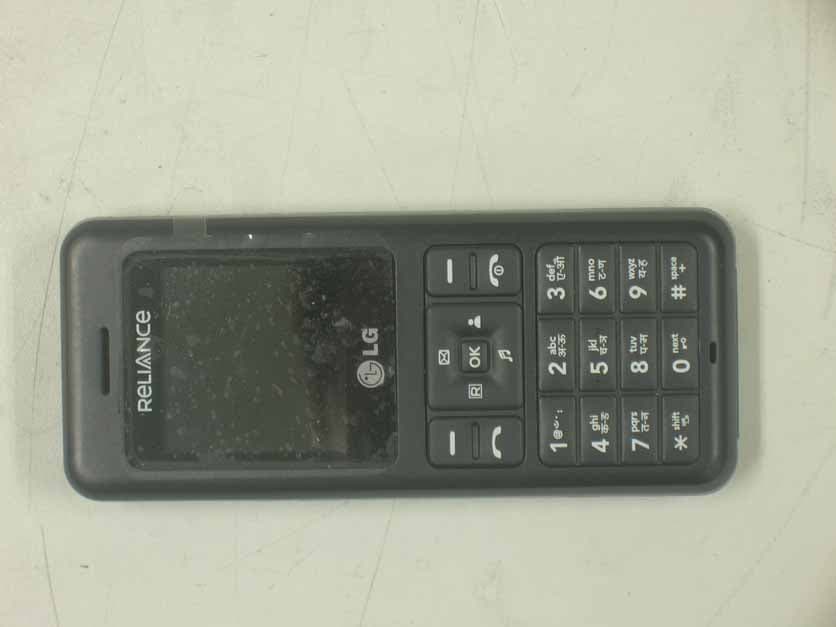
Click to zoom
Application Details
- Equipment Class
- TNE - Licensed Non-Broadcast Transmitter Held to Ear
- Date of Grant
- Apr 15, 2007
- Application Purpose
- Original Equipment
- Date of Application
- Apr 15, 2007
- Equipment Note
- Cellular CDMA Phone
- Frequency Range
- 824.70000000 - 848.31000000
- Company
- LG Electronics USA, Inc.
- Country
- United States
Documents & Files
Document Text
Text extracted from the exhibit documents filed with the FCC. Open a document above to read the original.
Users Manual
6. Operating Manual LG-RD3000 User Guide CDMA PHONE Contents Introduction Highlights Important Information Check Accessories Before You Start FCC RF EXPOSURE INFORMATION Chapter 1. Getting Started Cautions Phone Overview On screen Icons Chapter 2. Basic Functions Turning the Phone On and Off Making a Call Correcting Dialing Mistakes Receiving Calls Emergency Dialing Speed Dialing Phone Book Features Chapter 3. Menu Features General Guidelines to MENU Access and Settings Names Messages Call History Profiles Display Settings Organizer R World Chapter 4. Book Features Names Chapter 5. Message Features Write Message Inbox 1234 Services Outbox Voice Mail Archive Draft Templates Msg Groups Erase Msgs Msg Settings Chapter 6. Functions used during a call Scratch pad Mute Voice Privacy Send my number Short DTMF Chapter 7. Accessories Chapter 1. Getting Started Cautions z Using the phone in proximity to receiving equipment (i.e., TV or radio) may cause interference. z Keep your phone in a safe place when not in use. z Only use the batteries, antennas, and chargers provided by LG. Using the wrong accessories could void your warranty. z Only authorized personnel should service the phone and its accessories. Faulty installation or service may result in accidents and consequently invalidate the warranty. z Do not hold the antenna while the phone is in use. z Do not use the phone in designated “no cellular phone use” areas. z Do not expose the phone to high temperature or humidity. z Avoid getting your phone wet. If the phone gets wet, turn the power off immediately and remove the battery pack. If the phone is mal-functional, return it to the dealer for service. z Avoid shock or impact on the phone. Phone Overview On screen Icons The phone screen displays several onscreen icons and onscreen icons appears when the phone is power on. D Chapter 2. Basic Functions Turning the Phone On and Off Turning the Phone On 1. Install a charged battery pack or connect the phone to an external power source such as the cigarette lighter adapter or car kit. 2. Press [END/PWR] for a few seconds until the red light on the top of the phone flashes. z Fully extend the antenna for the best performance. <Note> Like any other radio device, avoid any unnecessary contact with the antenna while your phone is on. Turning the Phone Off 1. Press and hold until display screen will be turned off, and then release the key. 2. Protect the antenna by pushing it back into the phone, if extended. Making a Call When you make a call, follow these simple steps: 1. Make sure the phone is turned on. z If not, press [END/PWR]. 2. Enter the phone number with area code, if needed. 3. Press [SEND]. z If the phone is locked, enter the lock code. z “Call Failed” indicates that the call did not go through. 4. Press [END/PWR] to disconnect the call. Correcting Dialing Mistakes If you make mistakes in dialing a number, press [CLR] key once to erase the cursor positioned digit or hold down [CLR] for at least two second to delete all digits, or simply press soft key 2 [BACK] to exit dialing state. And, you can move the cursor by pressing [5],[6],[3],[4] Receiving Calls 1. When the phone rings or vibrate (if the Vibrate Mode is enabled), press any key (except [END]) or depending on the Call settings. z When you press once, when a call is received, the phone stops ringing or vibrating depending on the mode it is in. Press twice to disconnect. 2. To end an answered call press [END]. In call waiting mode, the present call is on hold as you answer another incoming call. This service is provided by your service provider. When the call waiting function is activated, your phone will beep to let you know if you have an incoming call. 3. If you are not in the condition to receive call, pressing Soft key 2 will send a Preset SMS to Caller. The SMS can be editted using "Edit SMS on Call Reject" function given under Settings' Call. Dialing a call from Phone Book You can place a call from any memory location either by speed dialing or by pressing [SEND] while looking up the memory location. One-Touch Dialing : One-touch dialing is a convenient feature which enables you to dial frequently used numbers in your speed-dial data by pressing a key . z Entry 9 is designated to Emergency Call. z For locations 1 to 8, you can use one-touch dialing (if enabled, see “One-Touch” on page 9.) by pressing and holding down the key corresponding to the memory location. OR z Press digit, then press [SEND]. Two-Touch Dialing (Speed Dialing) : This dialing feature enables you to dial numbers in your phone book through two keys (for locations 10 to 99). 1) Press the first digit. 2) Press and hold the key of the second digit. OR 1) Press the first and second digits, then press [SEND]. Dialing from a Memory List 1) From a memory list, press the scroll keys to go to the memory location you want. 2) Press [SEND]. Dialing from a Memory Location. On viewing and checking the memory location to call, press [SEND]. Chapter 3. Menu Features General Guidelines to MENU Access and Settings 1. Press Soft Key 1 [Menu]. The animation of menu category will appear on the display screen. 2. Press Soft key 1 [Ok]. The menu items will appear on the display screen. 3. Press[v] to go through the list of menu features, or use the side keys. 4. Press the corresponding number to the menu item that you want to select. Then the sub-menu list will appear on the screen. 5. Press the appropriate key to select the sub-menu you want to access. 6. Select preferred settings, using the [v] keys. Press Soft Key 2 [Back] to go one step backward while accessing menu or selecting settings. 7. Press Soft Key 1 [Ok] to save the settings or Soft Key 2 [Back] to cancel without saving. Names ([Menu]+[1]) see “Book Feature” on page 10. Messages ([Menu]+[2]) see “Message Feature” on page 12. Call History ([Menu]+[3]) Allows you to view list of all Missed/Received/Dialled Calls. (Maximum 60 numbers are possible including Missed, Receive…
Text truncated - open the document above for the full version.
Attestation Statements
LG Electronics Inc. 60-39, Gasan-dong, Gumchon-gu Seoul 153-801, Korea Tel: 82-2-2033-1110, Fax: 82-2-2033-1222 Date: APRIL 5, 2007 Federal Communications Commission Authorization and Evaluation Division 7435 Oakland Mills Road, Columbia, MD 21046 RE: Request of Confidentiality for FCC ID: BEJRD3000 To Whom It May Concern: Pursuant to Sections 0.457 and 0.459 of the Commission’s Rules (CFR 47), and Section 552 (b) (4) of the Freedom of Information Act, LG Electronics Inc. hereby requests confidentiality and treatment of certain information accompanying this application. The materials contain trade secrets and proprietary information not customarily released to the public. The public disclosure of these matters might be harmful to the Applicant and provide unjustified benefits to its competitors. We are also hereby request Short-Term Confidentiality for 180 days after the grant as outlined in Public Notice DA 04-1705. This provision will give LG Electronics Inc. temporary confidentiality of commercially sensitive information prior to product release. The requested Confidential and Temporary Confidential exhibits are listed as follows: CONFIDENTIAL AND SHORT-TERM CONFIDENTIAL LIST Exhibit Description 1 Block Diagram 2 Operational Descriptions 3 Parts Lists and Tune-Up Procedure CONFIDENTIAL 4 Schematics 5 External Photos 6 Internal Photos 7 Test-Setup Photos SHORT-TERM CONFIDENTIAL 8 User’s Manual The Applicant understands that pursuant to Rule 0.457, disclosure of this application and all accompanying documentations, where applicable, will not be made public before the date of the Grant for this application. Sincerely, E.S.Park Manager Mobile Handset R&D Center Mobile Communications Company LG Electronics Inc.
RF Exposure Info
Ͳͽ ͅʹͲͿ΅͑ͿͲ;Ͷ͑͗͑Ͳ͵͵Ͷ ́ ́͑ͫ ͵Ͳ΅Ͳ͑͗͑ͽʹͲ΅ ͅͿ͑ͷ͑΅Ͷ ́΅ ͅͿ ͽ͑ͶΝΖΔΥΣΠΟΚΔΤ͑ ͅΟΔ͟ ͵ΒΥΖΤ͑ΠΗ͑ΥΖΤΥΚΟΘ͑ͫ͑ ΅ΖΤΥ͑ ́ΚΥΖ͑ͫ͑Ͷ ́΅Ͷʹ͑ʹΠ͑͟͝ͽΥΕ͑͟ͼΠΣΖΒ ΅ΖΤΥ͑͵ΖΧΚΔΖ͑ͫ͑ ΅ΖΤΥ͑ΣΖΡΠΣΥ͑ΟΠ͑ͫͿΦΞΓΖΣ͑ΠΗ͑ΡΒΘΖ͑ͫ ʹΠΟΥΒΔΥ͑ΡΖΣΤΠΟ͑ͫΖΤΡΠΟΤΚΓΝΖ͑ΥΖΤΥ͑ͶΟΘΚΟΖΖΣ͑ͫ ͲΡΡΝΚΔΒΟΥ͑΅ΪΡΖ͑ͫ ͷʹʹ͑ʹͽͲ ́ ́ ͅͷ ͅʹͲ΅ ͅͿ͑ͫ ͷʹʹ͑ΦΝΖ͑ΒΣΥ͙Τ͚ ΅ΖΤΥ͑ΣΖΤΦΝΥΤ͑ͫ͑ ͵ΒΥΖ͑ΒΟΕ͑ ́ΚΘΟΒΥΦΣΖΤ͑ͫ͑ ͧ͑͡;ΒΣΔΙͣͨ͑͡͡ ΖΡΠΣΥ͑ΣΖΡΒΣΖΕ͑ͳΪ͑ͫ͑ ͶΟΘΚΟΖΖΣ͑͠ ͟ͅͼ͟ΠΟΘ ͙ ́ΚΘΟΒΥΦΣΖ͚ ͶΟ ΘΚΟΖΖΣΚΟΘ͑;ΒΟΒΘΖΣ͑͠ͻΒΪ͑ͼΚΞ ͙ ́ΚΘΟΒΥΦΣΖ͚ {GGGaGlz{zhyW^WZTWWY ͷʹʹ͑ ͅ͵͑ͫ͑ͳͶͻ͵ͤ͑͡͡͡ΈΖΓ͑ͫ͑ΨΨΨ͑͟ΖΤΥΖΔΙ͑͟ΔΠ͑͟ΜΣ͑͑͑͑͑͑͑ΒΘΖ͑͑͢ΠΗ͑ͣͤ ͑͑΅ΙΖ͑΅ΖΤΥΖΕ͑ΕΖΧΚΔΖ͑ΔΠΞΡΝΚΖΤ͑ΨΚΥΙ͑ΥΙΖ͑ΣΖΦΚΣΖΞΖΟΥΤ͑ΚΟ͑ΣΖΤΡΖΔΥ͑ΠΗ͑ΒΝΝ ΡΒΣΒΞΖΥΖΣΤ͑ΤΦΓΛΖΔΥ͑ΥΠ͑ΥΙΖ͑ΥΖΤΥ͑͟΅ΙΖ͑ΥΖΤΥ͑ΣΖΤΦΝΥΤ͑ΒΟΕ͑ΤΥΒΥΖΞΖΟΥΤ͑ΣΖΝΒΥΖ͑ΠΟΝΪ ΥΠ͑ΥΙΖ͑ΚΥΖΞΤ͑ΥΖΤΥΖΕ͑͟΅ΙΖ͑ΥΖΤΥ͑ΣΖΡΠΣΥ͑ΤΙΒΝΝ͑ΟΠΥ͑ΓΖ͑ΣΖΡΣΠΕΦΔΖΕ͑ΣΖ ΔΖΡΥ͑ΚΟ͑ΗΦΝΝ͝ ΨΚΥΙΠΦΥ͑ΨΣΚΥΥΖΟ͑ΒΡΡΣΠΧΒΝ͑ΠΗ͑ΥΙΖ͑ΝΒΓΠΣΒΥΠΣΪ͟ ͅͶͶͶ͙͑ͦͣͩ͢͵ΖΔ͚ͣͤ͟͡͡ ΖΔΠΞΞΖΟΕΖΕ͑ΣΒΔΥΚΔΖ͑ΗΠΣ͑͵ΖΥΖΣΞΚΟΚΟΘ͑ΥΙΖ͑ΖΒΜ͑ ́ΡΒΥΚΒΝ͞ͲΧΖΣΒΘΖ͑ ́ΡΖΔΚΗΚΔ ͲΓΤΠΣΡΥΚΠΟ͑ΒΥΖ͙ ́Ͳ͚͑ΚΟ͑ΥΙΖ͑ΦΞΒΟ͑ͳΠΕΪ͑͵ΦΖ͑ΥΠ͑ΈΚΣΖΝΖΤΤ͑ʹΠΞΞΦΟΚΔΒΥΚΠΟΤ ͵ΖΧΚΔΖ͑ͫ͑ͶΩΡΖΣΚΞΖΟΥΒΝ͑΅ΖΔΙΟΚΦΖΤ ηͣͪͤͬ͑͟͢͡ͷʹʹ͠Ͷ΅͑ͳΦΝΝΖΥΚΟ͑ͧͦ͑ ́ΦΡΡΝΖΞΖΟΥ͑ʹ͙͑ͻΦΝΪ͚͑ͣ͢͡͡ ʹΖΣΥΚΗΚΔΒΥΚΠΟ ͽΚΔΖΟΤΖΕ͑ͿΠΟ͞ͳΣΠΒΕΔΒΤΥ͑΅ΣΒΟΤΞΚΥΥΖΣ͑ΖΝΕ͑ΥΠ͑ͶΒΣ͙͑΅ͿͶ͚ ΅ΖΤΥΚΟΘ͑ΙΒΤ͑ΓΖΖΟ ʹΒΣΣΚΖΕ͑ΠΦΥ͑ΚΟ ͲΔΔΠΣΕΒΟΔΖ͑ΨΚΥΙ͑ͫ ́Ͳ͑ʹΠΞΡΝΚΒΔΖ͑΅ΖΤΥ͑ΖΡΠΣΥ Ͷ ́΅ ́Ͳͨͤͣͣͤ͡͡͞͡͡ ͥͦͪͪ͑͞͝ͼΒΤΒΟ͞ΕΠΟΘ͑͝ͼΖΦΞΔΙΦΟ͞ΜΦ͝ ́ΖΠΦΝ͑ͦͤͣͤ͑͢͞͡͝ͼΠΣΖΒ ;ΠΕΖΝΤ͑ͫ͑͵ͤ͑͡͡͡͝͵ͤ͢͡͡ ͷʹʹ͑ ͅ͵͑ͫ͑ͳͶͻ͵ͤ͡͡͡ ΅ΊͶ͑ͫ͑ʹ͵;Ͳ͑ΙΠΟΖ͙͑ΣΠΥΠΥΪΡΖ͚ ͑ͷΖΓΣΦΒΪ͑ͣͨ͑͑͑͡͡ί͑ͧ͑͡;ΒΣΔΙ͑ͣͨ͡͡ ͟ͅͼ͟ΠΟΘͳΠΟΘ͑ΪΠ͑͝ΒΟ 1. SUMMARY FOR SAR TET REPORT --------------------------------------------------------------------- ͤ 1.1 Head Configuration ----------------------------------------------------------------------------------------- - ͤ 1.2 Body Worn Configuration --------------------------------------------------------------------------------- - ͤ 1.3 Measurement Uncertainty -------------------------------------------------------------------------------- - ͤ 2. INTRODUCTION ----------------------------------------------------------------------------------------------- - ͥ 3. DESCRIPTION OF THE DEVICE UNDER TEST ------------------------------------------------------ ͦ 3.1 Antenna Description ---------------------------------------------------------------------------------------- ͦ 3.2 Device Description ------------------------------------------------------------------------------------------ - ͦ 3.3 Battery Option ------------------------------------------------------------------------------------------------ ͦ 4. TEST CONDITIONS ------------------------------------------------------------------------------------------- - ͧ 4.1 Ambient Conditions ----------------------------------------------------------------------------------------- ͧ 4.2 RF Characteristics of The Test Site -------------------------------------------------------------------- - ͧ 4.3 Test Signal, Frequencies, And Output Power -------------------------------------------------------- - ͧ 5. DESCRIPTION OF THE TEST EQUIPMENT ----------------------------------------------------------- - ͨ 5.1 Test System Specifications ------------------------------------------------------------------------------- ͨ 5.2 SAR Measurement Setup --------------------------------------------------------------------------------- ͨ 5.3 DASY 4 E-Field Probe System -------------------------------------------------------------------------- - ͩ 5.4 Phantom & Equivalent Tissues -------------------------------------------------------------------------- - ͢͡ 6. DESCRIPTION OF THE TEST PROCEDURE --------------------------------------------------------- - ͣ͢ 6.1 Definition of Reference Point ----------------------------------------------------------------------------- ͣ͢ 6.2 Test Configuration Positions ----------------------------------------------------------------------------- - ͤ͢ 6.3 Scan Procedures -------------------------------------------------------------------------------------------- - ͧ͢ 6.4 SAR Averaging Methods ---------------------------------------------------------------------------------- - ͧ͢ 7. MEASUREMENT UNCERTAINTY ------------------------------------------------------------------------- ͨ͢ 8. SYSTEM VERIFICATION ------------------------------------------------------------------------------------ - ͩ͢ 8.1 Tissue Verification ------------------------------------------------------------------------------------------ - ͩ͢ 8.2 Test System Validation ------------------------------------------------------------------------------------ - ͩ͢ 9. RESULTS -------------------------------------------------------------------------------------------------------- - ͪ͢ 10. REFERENCES ------------------------------------------------------------------------------------------------ - ͣͤ APPENDIX A : Validation Test Data of Tissue APPENDIX B : Validation Test Data APPENDIX C : SAR Test Data APPENDIX D : Calibration Certificates ͑ {GGGaGlz{zhyW^WZTWWY ͷʹʹ͑ ͅ͵͑ͫ͑ͳͶͻ͵ͤ͑͡͡͡ΈΖΓ͑ͫ͑ΨΨΨ͑͟ΖΤΥΖΔΙ͑͟ΔΠ͑͟ΜΣ͑͑͑͑͑͑͑ΒΘΖ͑ͣ͑ΠΗ͑ͣͤ ΅ΒΓΝΖ͑ΠΗ͑ʹΠΟΥΖΟΥΤ ͑͢͟͢ΖΒΕ͑ʹΠΟΗΚΘΦΣΒΥΚΠΟ͑ ͑͑͑;ΒΩ͑͟ ́Ͳ͑;ΖΒΤΦΣΖΞΖΟΥ ;Ϋ ʹΙΕͳΞ ͳΒΥΥΖΣΪ ͩͤͦͩͪ͟ ͤͧͤ ʹ͵;Ͳ ͣͥͦ͟ ́ΥΒΟΕΒΣΕ ͽΖΗΥ͑ΥΠΦΔΙͧͪͧ͟͡ ͣ͑͢͟ͳΠΕΪ͑ΈΠΣΟ͑ʹΠΟΗΚΘΦΣΒΥΚΠΟ͑ ͑͑͑;ΒΩ͑͟ ́Ͳ͑;ΖΒΤΦΣΖΞΖΟΥ ;Ϋ ʹΙΕͳΞ ͳΒΥΥΖΣΪ ͩͤͦͩͪ͟ ͤͧͤ ʹ͵;Ͳ ͣͥͦ͟ ́ΥΒΟΕΒΣΕ ͣΔΞ͑ΌΨ͠Π͑ΠΝΤΥΖΣΎ ͥͧͩ͟͡ ͤ͑͢͟;ΖΒΤΦΣΖΞΖΟΥ͑ΆΟΔΖΣΥΒΚΟΥΪ {GGGaGlz{zhyW^WZTWWY ͷʹʹ͑ ͅ͵͑ͫ͑ͳͶͻ͵ͤ͑͡͡͡ΈΖΓ͑ͫ͑ΨΨΨ͑͟ΖΤΥΖΔΙ͑͟ΔΠ͑͟ ΜΣ͑͑͑͑͑͑͑ΒΘΖ͑ͤ͑ΠΗ͑ͣͤ ͑͢͟ ́Ά;;ͲΊ͑ͷ͑΅Ͷ ́΅͑Ͷ΅ ͑͵ΒΥΖ͑ΠΗ͑ΥΖΤΥ ͑ͷʹʹ͑ ͅ͵ ͑;ΖΒΤΦΣΖΞΖΟΥ͑ΡΖΣΗΠΣΞΖΕ͑ΓΪ ͑ͷΖΓΣΦΒΪ͑ͣͨ͑͑͑͡͡ί͑ͧ͑͡;ΒΣΔΙ͑ͣͨ͡͡ ͳͶͻ͵ͤ͑͡͡͡ ͻΒΪ͑ͼΚΞ͑ΖΤΡΠΟΤΚΓΝΖ͑ΥΖΤΥ͑ΖΟΘΚΟΖΖΣ ͟ͅͼ͟ΠΟΘ ͑ͶΆ΅͑΅ΪΡΖ ͑΅Ω͑ͷΣΖΦΖΟΔΪ ʹ͵;Ͳ͑ΙΠΟΖ͙͑ΣΠΥΠΥΪΡΖ͚͑ ͩͣͥͨ͑͟͡ί͑ͩͥͩͤ͑͟͢;Ϋ͙ʹ͵;Ͳ͚͑ͩͦ͡ ͷͶΆͶͿʹΊ ͑Ω͑ͷΣΖΦΖΟΔΪ ͑;ΒΩ͑͟ͷ͑ΦΥΡΦΥ͑ΠΨΖΣ ͩͧͪͨ͑͟͡ί͑ͩͪͤͤ͑͟͢;Ϋ͙ʹ͵;Ͳ͚͑ͩͦ͑͡ ͑ʹ͵;Ͳ͙͑ͩͦ͑ͣͥͦ͑͟͡ΕͳΞ͚͑ ́Ͳ ͙Έ͠ΜΘ͚ ́Ͳ ͙Έ͠ΜΘ͚ ͷͶΆͶͿʹΊ ;ΠΕΦΝΒΥΚΠΟ ʹΠΟΕΦΔΥΖΕ͑ΠΨΖΣ͙ΕͳΞ͚ ́ΖΡΒΣΒΥΚΠΟ͑ΥΖΤΥ ΡΠΤΚΥΚΠΟ ͵ΖΧΚΔΖ͑ΥΖΤΥ ΡΠΤΚΥΚΠΟ ;ΠΕΦΝΒΥΚΠΟ ʹΠΟΕΦΔΥΖΕ͑ΠΨΖΣ͙ΕͳΞ͚ ρ͙͑ͣͣ͑͟͡͡Μ͖ͮͣ͑ͪͦ͑͝ʹͿͷ ͅ͵ͶͿʹͶ͑ͽͶ·Ͷͽ͚ ʹΠΞΓΚΟΖ͑ ́ΥΒΟΕΒΣΕ͑ΆΟΔΖΣΥΒΚΟΥΪ ͶΩΥΖΟΕΖΕ͑ ́ΥΒΟΕΒΣΕ͑ΆΟΔΖΣΥΒΚΟΥΪ ρ͙͑͑͢͢͟͡͡Μ͚ͮ͢ SAR Definition ͷΚΘΦΣΖ͑ͣ͑͟͢ ́Ͳ͑;ΒΥΙΖΞΒΥΚΔΒΝ͑ͶΦΒΥΚΠΟ ́Ͳ͑ΚΤ͑ΖΩΡΣΖΤΤΖΕ͑ΚΟ͑ΦΟΚΥΤ͑ΠΗ͑ΈΒΥΥΤ͑ΡΖΣ͑ͼΚΝΠΘΣΒΞ͙͑Έ͠ΜΘ͚͟ ́Ͳ͑ͮ͑…
Text truncated - open the document above for the full version.
Test Report
Product Name Model Name Applicant FCC ID RD3000,RD3100 LG Electronics Inc. BEJRD3000 ESTECH CO., LTD Rm. 1015 World Venture Center, 426-5 Gasan-dong, Geumcheon-gu, Seoul, 153-803, Korea. Tel:82-2-867-3201, Fax:82-2-867-3204 ͑͑ESTECH CO., LTD. http://www.estech.co.kr FCC TEST REPORT Single Band CDMA Phone Report Number : ESTR0703-0261 of 18 FCC ID : BEJRD3000 Company Name Address Product Name Model No.Manufacturer Serial No. Country of origin Issued DateTested Date ͑͑ESTECH CO., LTD. http://www.estech.co.kr Rm. 1015 World Venture Center, 426-5 Gasan-dong, Geumcheon-gu, Seoul, 153-803, Korea. Tel:82-2-867-3201, Fax:82-2-867-3204 ESTECH CO., LTD FCC Test Report Applicant Product Report Number RD3000,RD3100 KOREA LG Electronics Inc. o This is certified that the above mentioned products have been tested for the sample provided by client. o No part of this document may not be duplicated or reproduced by any means without the express written permission of Estech Co., Ltd. Standard PART 22 Subpart H Tested by Approved by S.R. Kim/ Engineer (Signature) Jay Kim/ Engineering Manager (Signature) ESTR0703-026 459-9, Kasan-dong, Keumchun-ku, Seoul 153-023, Korea Single Band CDMA Phone NONE LG Electronics Inc. Test Result Pass 2007-03-30 2007-02-15 ~ 2007-03-30 Other Report Number : ESTR0703-0262 of 18 FCC ID : BEJRD3000 1. General Information Page 4 2. Laboratory Information Page 5 3. Summary of Test Results Page 5 4. RF Output Power Page 6 5. Occupied Bandwidth Page 8 6. Spurious and Harmonic Emission at Antenna Terminal Page 10 7. Field Strength of Spurious Radiation Page 15 8. Frequency stability Page 17 Contents ͑͑ESTECH CO., LTD. http://www.estech.co.kr Report Number : ESTR0703-0263 of 18 FCC ID : BEJRD3000 1. General Information 1.1 EUT Description Channel Tx :824.70 ~ 848.31MHz CDMA850 (1013/363/777) CDMA Frequency Rx :869.70 ~ 893.31MHz 3.7VDC(3.2 ~ 4.3VDC) Power Rating ͑͑ ESTECH CO., LTD. http://www.estech.co.kr FCC ID BEJRD3000 Modulation Type Product Name Model Name Single Band CDMA Phone RD3000,RD3100 Report Number : ESTR0703-0264 of 18 FCC ID : BEJRD3000 2. Laboratory Information 3. Summary of Test Results Result PASS PASS PASS PASS ͑͑ ESTECH CO., LTD. http://www.estech.co.kr 58-1, Osan-Ri, GaNam-Myon, YeoJoo-Gun, KyungKi-Do, Korea 97-1, Hoiuk-Ri Majang-Myon, Icheon-city, KyungKi-Do, Korea 2.4 Major Accredited Mark Test Item Accredited by KOLAS(ISO/IEC 17025) Head Office EMC Lab(Ichon) EMC Lab(Yanggi) Standard RF Output Power Occupied Bandwidth PASS 2.1 Laboratory Name 2.2 Location 2.3 Quality System Estech Co., Ltd. Rm. 1015, World Venture Center II, 426-5 Gasan-dong Geumcheon-gu, Seoul, 153-803. Korea. Part 22 Field Strength of Spurious Radiation Frequency stability Spurious and Harmonic Emission at Antenna Terminal Report Number : ESTR0703-0265 of 18 FCC ID : BEJRD3000 4. RF Output Power 4.1 Test Procedure 4.2 Test Equipments The following test equipments are used during tests Cal. Due Date 2007-08-24 2007-09-07 2008-03-02 2008-02-07 2007-06-26 2007-05-01 4.3.1 Test Results 1013824.70 363835.89 777848.31 24.40 24.48 20.29 21.51 Ch No.Freq (MHz) 24.2119.60 Peak Power Meter(dBm)Peak Power EIRP(dBm) ESPI7 HP HP Manufacturer Rohde & Schwarz 83620B EPM-442A AgilentE5515C Horn Antenna 847F BBHA 9120 DSCHWARZBECK Pre AmplifierHP ͑͑ ESTECH CO., LTD. http://www.estech.co.kr Signal Generator Power Meter Equipment Receiver The EUT was placed on a wooden turn table 3 meters from the receive antenna. The receive antenna height and turn table rotation was adjusted for the highest reading on the receive spectrum analyzer. For CDMA signals, a peak detector is used, with RBW = VBW = 3MHz. For AMPS, GSM, and NADC TDMA signals, a peak detector is used, with RBW = VBW = 1MHz, A Horn antenna was substituted in place of the EUT. This Horn antenna was driven by a signal generator and the level of the signal generator was adjusted to obtain the same receive spectrum analyzer reading. This spurious level is recorded. For reading 1GHz, the above procedure is repeated using horn antennas and the difference between the gain of the horn and an isotropic or dipole antenna are taken into consideration. Model Wireless Communications Test Set Report Number : ESTR0703-0266 of 18 FCC ID : BEJRD3000 Antenna gain(dBd) Cable Loss (dB) 824.70 92.671.00 3.3021.9019.6038.5V 835.89 94.831.29 3.3022.3020.2938.5V 848.31 96.331.61 3.3023.2021.5138.5v ́ͣ͡ ́ͣ͡ ́ͦͦ͡ ́ͦͦ͡ ʹ͢͢͠ʹͤͤ͠ʹ͢͢͠ʹͤͤ͠ ͤ͢͢͡ ͣͥͥͤ͟ ͣͥͥͩ͟ ͣͥͥͤ͟ ͣͥͥͨ͟ ͤͧͤ ͣͥ͟͢͡ ͣͥͦ͟͢ ͣͥ͟͢͢ ͣͥͨ͟͢ ͨͨͨ ͣͥͤͦ͟ ͣͥͤͧ͟ ͣͥͥͦ͟ ͣͥͥ͟͢ ʹ͵;Ͳ͑ͩͦ͡ ͣͥͥͦ͟ ͣͥͧ͟͢ ͣͥͥͣ͟ ͳΒΟΕʹΙΒΟΟΖΝ ΅͵ ́͡ ́ͤͣ͡ ʹͤͤ͠ FREQ (MHz) Correction Factor (dB) POL (H/V) Limit (dBm) EIRP (dBm) SG Reading (dBm) Receiver Reading (dBuV) ͑͑ ESTECH CO., LTD. http://www.estech.co.kr ͙Ά΅Ά΅͑ΈͶ͑΅ͲͳͽͶ͚ Report Number : ESTR0703-0267 of 18 FCC ID : BEJRD3000 5. Occupied Bandwidth 5.1 Test Procedure 5.2 Test Equipments The following test equipments are used during tests Cal. Due Date 2008-03-02 2008-03-02 2008-02-07 5.3 Test Results 1.42 ͑͑ ESTECH CO., LTD. http://www.estech.co.kr Wireless Communications Test Set EquipmentModel E4407B E5515C The transmitter output is connected to the spectrum analyzer. The RBW is set to 1% of the Emission bandwidth. The VBW is set to 3 times the RBW. The sweep time is coupled. Manufacturer HP Spectrum Analyzer 26dB Bandwidth(kHz) Agilent Agilent ChannelFrequency(MHz) Dual Directional Coupler778D 1013824.701.41 777848.311.43 363835.89 Report Number : ESTR0703-0268 of 18 FCC ID : BEJRD3000 5.4 Test Plot PCS1900 26dB Channel Bandwidith(1013) 26dB Channel Bandwidith(363) 26dB Channel Bandwidith(777) ͑͑ESTECH CO., LTD. http://www.estech.co.kr Report Number : ESTR0703-0269 of 18 FCC ID : BEJRD3000 6. Spurious and Harmonic Emission at Antenna Terminal 6.1 Test Procedure 6.2 Test Equipments The following test equipments are used during tests Cal. Due Date 2008-03-02 2008-03-02 2008-02-07 6.3 Test Results CDMA(Spurious Emission: Band Edge) ChannelFrequencyResultLimitMargin 1013824.70-16.09-13.003.09 777848.31-13.5…
Text truncated - open the document above for the full version.
Contact Information
Applicant
David Kim(Team leader, LGEUS NA Policy & Regulatory Affairs)
Technical Contact
PCTEST Engineering Lab., Inc.Randy Ortanez
[email protected]410-290-6652
6660-B Dobbin Road · Columbia, Maryland · United States
Test Firm
ESTECH Co., Ltd.Yang Jinmo
Technical Specifications
| # | Rule Parts | Frequency Range | Power Output | Emission | Tolerance |
|---|---|---|---|---|---|
| 1 | 22H | 824.7 MHz - 848.31 MHz | 142.00 mW | 1M28F9W | 2.5000000000 ppm |
Other Applications from LG Electronics USA, Inc.

BEJTFHOBINI1F1
Jan 08, 2025Telematics
Equipment Class
DTS - Digital Transmission SystemBEJNT-16Z90TS
Oct 02, 2024Notebook Computer
Equipment Class
DSS - Part 15 Spread Spectrum TransmitterBEJSP-PEW8
Sep 26, 2024Stylus Pen
Equipment Class
DCD - Part 15 Low Power Transmitter Below 1705 kHzBEJ-RSMV2
Sep 24, 2024RF Module
Equipment Class
FDS - Part 15 Field Disturbance SensorBEJTFBMEIBN3EU
Sep 24, 2024Telematics
Equipment Class
NII - Unlicensed National Information Infrastructure TX