BEJW2240TVLCD MONITOR.
LG Electronics USA, Inc.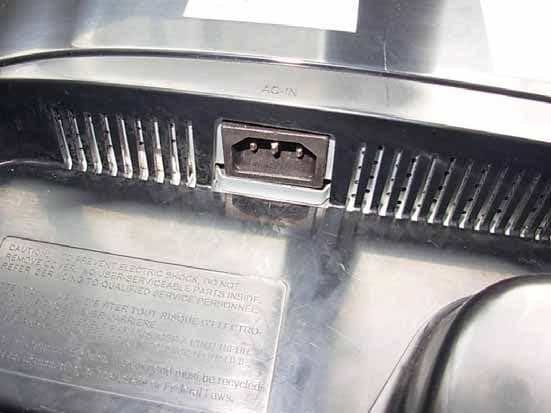
Click to zoom
Application Details
- Equipment Class
- JBP - Part 15 Class B Computing Device Peripheral
- Date of Grant
- Jan 03, 2010
- Application Purpose
- Original Equipment
- Date of Application
- Jan 03, 2010
- Equipment Note
- LCD MONITOR.
- Company
- LG Electronics USA, Inc.
- Country
- United States
Documents & Files
Document Text
Text extracted from the exhibit documents filed with the FCC. Open a document above to read the original.
Users Manual
Make sure to read the Important Precautionsbefore using the product. Keep the User's Guide(CD) in an accessible place for future reference. See the label attached on the product and give the information to your dealer when you ask for service. W2040T W2240T W2340T User’s Guide 1 This unit has been engineered and manufactured to ensure your personal safety, however improper use may result in potential electrical shock or fire hazards. In order to allow the proper operation of all safeguards incorporated in this display, observe the following basic rules for its installation, use, and servicing. On Safety Use only the power cord supplied with the unit. In case you use another power cord, make sure that it is certified by the applicable national standards if not being provided by the supplier. If the power cable is faulty in any way, please contact the manufacturer or the nearest authorized repair service provider for a replacement. The power supply cord is used as the main disconnection device. Ensure that the socket-outlet is easily accessible after installation. Operate the display only from a power source indicated in the specifications of this manual or listed on the display. If you are not sure what type of power supply you have in your home, consult with your dealer. Overloaded AC outlets and extension cords are dangerous. So are frayed power cords and broken plugs. They may result in a shock or fire hazard. Call your service technician for replacement. As long as this unit is connected to the AC wall outlet, it is not disconnected from the AC power source even if the unit is turned off. Do not Open the Display: There are no user serviceable components inside. There are Dangerous High Voltages inside, even when the power is OFF. Contact your dealer if the display is not operating properly. To Avoid Personal Injury : Do not place the display on a sloping shelf unless properly secured. Use only a stand recommended by the manufacturer. Do not drop an object on or apply impact to the product. Do not throw any toys or objects on the product screen. It can cause injury to human, problem to product and damage the display. To Prevent Fire or Hazards: Always turn the display OFF if you leave the room for more than a short period of time. Never leave the display ON when leaving the house. Keep children from dropping or pushing objects into the display's cabinet openings. Some internal parts carry hazardous voltages. Do not add accessories that have not been designed for this display. When the display is to be left unattended for an extended period of time, unplug it from the wall outlet. In the presence of thunder and lightning, never touch the power cord and signal cable because it can be very dangerous. It can cause electric shock. Important Precautions Important Precautions NOTE THE MANUFACTURER IS NOT RESPONSIBLE FOR ANY RADIO OR TV INTRERFERENCE CAUSED BY UNAUTHORIZED MODIFICATIONS TO THIS EQUIPMENT.SUCH MODIFICATIONS COULD VOID THE USER'S AUTHORITY NOTE This epuipment has been tested and found to comply with the limits for a class B digital device,pursuant to part 15 of the FCC Rules.These limits are designed to provide reasonable protection against harmful interference in a residential installation.This equipment generates,uses and can radiate radio frequency cause harmful interference to radio communications.However,there is no guarantee that interference will not occur in a particular installation.If this which can be determined by turning the equipment off and on,the user is encouraged to try to correct the interference by one or more of the following measures: -Reorient or relocate the receiving antenna. -Increase the separation between the equipment and the receiver. -Connect the equipment into an outlet on a circuit different from that to which the receiver is connected. energy and,if not installed and used in accordance with the instructions,may equipment does cause harmful interference to radio or television reception, TO OPERATE THE EQUIPMENT. -Consult the dealer or an experienced radio/TV technician for help. A3 2 Important Precautions On Installation Do not allow anything to rest upon or roll over the power cord, and do not place the display where the power cord is subject to damage. Do not use this display near water such as near a bathtub, washbowl, kitchen sink, laundry tub, in a wet basement, or near a swimming pool. Displays are provided with ventilation openings in the cabinet to allow the release of heat generated during operation. If these openings are blocked, built-up heat can cause failures which may result in a fire hazard. Therefore, NEVER: Block the bottom ventilation slots by placing the display on a bed, sofa, rug, etc. Place the display in a built-in enclosure unless proper ventilation is provided. Cover the openings with cloth or other material. Place the display near or over a radiator or heat source. Do not rub or strike the Active Matrix LCD with anything hard as this may scratch, mar, or damage the Active Matrix LCD permanently. Do not press the LCD screen with your finger for a long time as this may cause some afterimages. Some dot defects may appear as Red, Green or Blue spots on the screen. However, this will have no impact or effect on the display performance. If possible, use the recommended resolution to obtain the best image quality for your LCD display. If used under any mode except the recommended resolution, some scaled or processed images may appear on the screen. However, this is characteristic of the fixed-resolution LCD panel. Leaving a fixed image on the screen for a long time may cause damage to the screen and cause image burn-in. Make sure to use a screen saver on the product. Burn-in and related problems are not covered by the warranty on this product. Do not shock or scratch the front and sides of the screen with metallic objects. Otherwise, it may cause damage to the screen. Make sure the panel faces forward and hold it with both hand…
Text truncated - open the document above for the full version.
Block Diagram
W2240/2340T Block diagram INPUT: 120V 60Hz FUNDAMENTAL OPERATION FREQUENCY IS 0.030-0.083 MHz . L V D SL V D S dule DSUB(R/G/B) Sub 1920X1080@ 60Hz 148.5Mhz Display Processing Engine Response Time Enhancement LVDS Panel Interface TSUMO58E-1 Vcc5V Mod D-S VI-D DVI(TMDS) Flash (EDID) Dual Interface Engine DRAM KEY DV EEPROM (EDID) OSD Clock Generator MCU 3.3V LIPS 1.8V Flash ROM Crystal 14.318MHz Regulator Filter 5V 3.3V 5V Filter 12V Inverter(4Lamps) Crystal : HLX-U-F ; HC-49/S (alternate) Regulation : 14.31818MHz+/- 30PPM
Cover Letter(s)
Power of Attorney Federal Communication Commission Office of Engineering and Technology Equipment Authorization Division 7345 Oakland Mills Road Columbia, Maryland 21046 We, Company: LG Electronics U.S.A., Inc. Address: 1000 Sylvan Avenue, Englewood Cliffs, NJ 07632 Would like to inform you that we nominated Audix Technology (Shanghai) Co., Ltd, Mr. Byron Kwo to act on behalf of our LG Electronics Inc. to apply FCC ID for the LCD Monitors with LG brand. Kind Regards, Place, date Signature 2009-12-21 Jae Cheon Lee ________________ ________________
Cover Letter(s)
Statement FCC ID: BEJW2240TV Data: Dec 21, 2009 We LG Electronics U.S.A., Inc. declare under our own responsibility that the product LCD Monitor to which this declaration refers conforms with all electrical and mechanical devices employed for spurious radiation suppression, including any modifications made during certification testing, must be incorporated in each unit marked. 2009.12.21 [Data] [Name and Signature of person responsible]
External Photos
FIGURE 1 LCD MONITOR (M/N: W2240TV) GENERAL APPEARANCE (FRONT VIEW) F IGURE 2 LCD MONITOR (M/N: W2240TV) GENERAL APPEARANCE (BACK VIEW) FIGURE 3 LCD MONITOR (M/N: W2240TV) SIGNAL PORTS F IGURE 4 LCD MONITOR (M/N: W2240TV) POWER PORT FIGURE 5 LCD MONITOR (M/N: W2240TV) D-SUB CABLE #1 F IGURE 6 LCD MONITOR (M/N: W2240TV) D-SUB CABLE #2 FIGURE 7 LCD MONITOR (M/N: W2240TV) DVI CABLE #1 F IGURE 8 LCD MONITOR (M/N: W2240TV) DVI CABLE #2 FIGURE 9 LCD MONITOR (M/N: W2240TV) POWER CORD
ID Label/Location Info
Label Location Information Refer to the below red arrow: (For example)
Internal Photos
FIGURE 1 LCD MONITOR (M/N: W2240TV) COVER REMOVED F IGURE 2 LCD MONITOR (M/N: W2240TV) BOARDS REMOVED FIGURE 3 LCD MONITOR (M/N: W2240TV) KEY BOARD (COMPONENT SIDE) F IGURE 4 LCD MONITOR (M/N: W2240TV) KEY BOARD (SOLDERED SIDE) FIGURE 5 LCD MONITOR (M/N: W2240TV) POWER BOARD (COMPONENT SIDE) F IGURE 6 LCD MONITOR (M/N: W2240TV) POWER BOARD (SOLDERED SIDE) FIGURE 7 LCD MONITOR (M/N: W2240TV) MAIN BOARD (COMPONENT SIDE) F IGURE 8 LCD MONITOR (M/N: W2240TV) MAIN BOARD (SOLDERED SIDE) FIGURE 9 LCD MONITOR (M/N: W2240TV) CHIP & CRYSTAL ON MAIN BOARD FIGURE 10 LCD MONITOR (M/N: W2240TV) LABEL ON PANEL FIGURE 11 LCD MONITOR (M/N: W2240TV) LCD PANEL MAIN BOARD (COMPONENT SIDE) F IGURE 12 LCD MONITOR (M/N: W2240TV) LCD PANEL MAIN BOARD (SOLDERED SIDE) FIGURE 13 LCD MONITOR (M/N: W2240TV) DEBUG #1 F IGURE 14 LCD MONITOR (M/N: W2240TV) DEBUG #2
Operational Description
LG Electronics U.S.A., Inc. FCC ID: BEJW2240TV 1 Equipment Description The Equipment Under Test (EUT) is the LG Electronics U.S.A., Inc. LCD Monitor. General Specification LG Electronics U.S.A., Inc. FCC ID: BEJW2240TV 2 EUT Operating Conditions a. Setup the EUT and Peripherals as shown in Sec. 3.2 of the test report. b. Turn on the power of all equipment and the EUT. c. Set the contrast & brightness of EUT to maximum. d. PC system ran the self-test program “EMC Test” by windows XP and sent “H” characters to EUT through graphic card, the EUT’s screen displayed and filled with “H” pattern by its resolution (Via D-Sub & DVI Input). e. Repeat above procedure from c to d for difference test mode. f. The other peripherals devices were driven and operated during the test. g. The test modes are as follows: Test Mode D-Sub 640*480@60Hz D-Sub 1024*768@60Hz D-Sub 1680*1050@60Hz D-Sub 1920*1080@60Hz DVI 640*480@60Hz DVI 1024*768@60Hz DVI 1680*1050@60Hz DVI 1920*1080@60Hz
Schematics
PDF created with pdfFactory Pro trial version www.pdffactory.com PDF created with pdfFactory Pro trial version www.pdffactory.com
Test Report
LG Electronics U.S.A., Inc. FCC ID: BEJW2240TV Page 1 of 33 Audix Technology (Shanghai) Co., Ltd. Report No.: ACI-F09141 Prepared For : LG Electronics U.S.A., Inc. 1000 Sylvan Avenue, Englewood Cliffs, NJ 07632, United States Prepared By : Audix Technology (Shanghai) Co., Ltd. 3F 34Bldg 680 Guiping Rd, Caohejing Hi-Tech Park, Shanghai 200233, China Tel: +86-21-64955500 Fax: +86-21-64955491 Report No. : ACI-F09141 Date of Test : Dec 29, 2009 Date of Report : Jan 04, 2010 Application for FCC Certificate On Behalf of LG Electronics U.S.A., Inc. LCD Monitor Model No.: W2240TV Serial No.: E2009120803 FCC ID : BEJW2240TV LG Electronics U.S.A., Inc. FCC ID: BEJW2240TV Page 2 of 33 Audix Technology (Shanghai) Co., Ltd. Report No.: ACI-F09141 TABLE OF CONTENTS Page 1 SUMMARY OF STANDARDS AND RESULTS .......................................................................... 4 1.1 Description of Standards and Results ......................................................................................... 4 2 GENERAL INFORMATION .......................................................................................................... 5 2.1 Description of Equipment Under Test ........................................................................................ 5 2.2 Peripherals .................................................................................................................................. 6 2.3 Description of Test Facility ........................................................................................................ 7 2.4 Measurement Uncertainty .......................................................................................................... 7 3 CONDUCTED EMISSION TEST .................................................................................................. 8 3.2 Block Diagram of Test Setup ..................................................................................................... 8 3.3 Conducted Emission Limit [FCC Part 15 Subpart B 15.107(a)] ................................................ 9 3.4 Test Configuration ...................................................................................................................... 9 3.5 Operating Condition of EUT .................................................................................................... 10 3.6 Test Procedures ........................................................................................................................ 10 3.7 Test Results .............................................................................................................................. 11 4 RADIATED EMISSION TEST ..................................................................................................... 20 4.1 Test Equipment ......................................................................................................................... 20 4.2 Block Diagram of Test Setup ................................................................................................... 20 4.3 Radiated Emission Limit [FCC Part 15 Subpart B 15.109(a)] ................................................. 21 4.4 Test Configuration .................................................................................................................... 21 4.5 Operating Condition of EUT .................................................................................................... 22 4.6 Test Procedures ........................................................................................................................ 22 4.7 Test Results .............................................................................................................................. 23 5 DEVIATION TO TEST SPECIFICATIONS .............................................................................. 32 6 DEBUG DESCRIPTION ............................................................................................................... 33 LG Electronics U.S.A., Inc. FCC ID: BEJW2240TV Page 3 of 33 Audix Technology (Shanghai) Co., Ltd. Report No.: ACI-F09141 TEST REPORT FOR FCC CERTIFICATE Applicant : LG Electronics U.S.A., Inc. Manufacturer : LG Electronics Nanjing Display Co., Ltd. EUT Description : LCD Monitor (A) Model No. : W2240TV (B) Serial No. : E2009120803 (C) Power Supply : 120V/60Hz Test Procedure Used: FCC RULES AND REGULATIONS PART 15 SUBPART B CLASS B OCTOBER 2008 AND ANSI C63.4-2003 The device described above is tested by Audix Technology (Shanghai) Co., Ltd. to determine the maximum emission levels emanating from the device. The maximum emission levels are compared to the FCC Part 15 Subpart B (Class B) and ICES-003, Issue 4 February 2004 (CISPR 22:2002) limits both radiated and conducted emissions. The test results are contained in this test report and Audix Technology (Shanghai) Co., Ltd. is assumed full responsibility for the accuracy and completeness of these measurements. This report shows that the EUT (M/N: W2240TV; S/N: E2009120803) which was tested in 3m anechoic chamber Dec 29, 2009 is technically compliance with the FCC official limits also. This report applies to above tested sample only. This report shall not be reproduced in part without written approval of Audix Technology (Shanghai) Co., Ltd. This report contains data that are not covered by the NVLAP accreditation. This report must not be used by the client to claim product certification, approval, or endorsement by NVLAP, NIST, or any agency of the federal government. Date of Test : Dec 29, 2009 Date of Report : Jan 04, 2010 Producer : ZENO GU / Assistant Review : BYRON WU / Supervisor Signatory : DIO YANG / Deputy Assistant Manager LG Electronics U.S.A., Inc. FCC ID: BEJW2240TV Page 4 of 33 Audix Technology (Shanghai) Co., Ltd. Report No.: ACI-F09141 1 SUMMARY OF STANDARDS AND RESULTS 1.1 Description of Standards and Results The EUT have been tested according to the applicable standards as referenced below: Description of Tes…
Text truncated - open the document above for the full version.
Test Setup Photos
Test Set-Up Photos 1. Conducted Emission Test F RONT VIEW B ACK VIEW 2. Radiated Electromagnetic Emission Test FRONT VIEW OF RADIATED EMISSION TEST B ACK VIEW OF RADIATED EMISSION TEST SETUP WITH MAXIMUM DETECTED EMISSION AT HORIZONTAL POLARIZATION (TEST MODE: DVI 1680*1050@60HZ) SETUP WITH MAXIMUM DETECTED EMISSION AT VERTICAL POLARIZATION (TEST MODE: DVI 1680*1050@60HZ)
Contact Information
Applicant
David Kim(Team leader, LGEUS NA Policy & Regulatory Affairs)
Test Firm
Audix Technology ( Shanghai ) Co., Ltd.Byron Kwo
Technical Specifications
| # | Rule Parts | Frequency Range | Power Output |
|---|---|---|---|
| 1 | 15B | - | - |
Other Applications from LG Electronics USA, Inc.

BEJTFHOBINI1F1
Jan 08, 2025Telematics
Equipment Class
DTS - Digital Transmission SystemBEJNT-16Z90TS
Oct 02, 2024Notebook Computer
Equipment Class
DSS - Part 15 Spread Spectrum TransmitterBEJSP-PEW8
Sep 26, 2024Stylus Pen
Equipment Class
DCD - Part 15 Low Power Transmitter Below 1705 kHzBEJ-RSMV2
Sep 24, 2024RF Module
Equipment Class
FDS - Part 15 Field Disturbance SensorBEJTFBMEIBN3EU
Sep 24, 2024Telematics
Equipment Class
NII - Unlicensed National Information Infrastructure TX