DO4IUSR07000RFID System
Checkpoint Systems Inc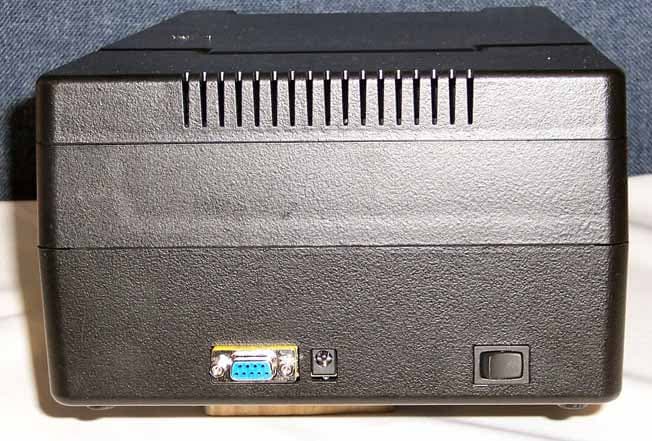
Click to zoom
Application Details
- Equipment Class
- DXT - Part 15 Low Power Transceiver, Rx Verified
- Date of Grant
- Mar 07, 2006
- Application Purpose
- Original Equipment
- Date of Application
- Mar 07, 2006
- Equipment Note
- RFID System
- Frequency Range
- 13.56000000 - 13.56000000
- Company
- Checkpoint Systems Inc
- Country
- United States
Documents & Files
Document Text
Text extracted from the exhibit documents filed with the FCC. Open a document above to read the original.
Users Manual
Intelligent Library System (ILS) 2.6 User Guide P/N 7305198 ii Intelligent Library System 2.6 (ILS) User Guide Copyright © 2/15/06 by Checkpoint Systems Inc. Released February 15, 2006. Published by: Checkpoint Systems Inc. 101 Wolf Drive Thorofare, NJ 08086 1st Edition - January 5, 2006 Part number: 7305198 For use with Checkpoint’s Intelligent Library System Version 2.6. Checkpoint, Circulation Circuit, Intelligent Library System are registered trademarks of Checkpoint Systems, Inc. All rights reserved. Information in this document is subject to change without notice. Companies, names and data used in examples herein are fictitious unless otherwise noted. No part of the contents of this book may be reproduced or transmitted in any form or by any means without the written permission of the publisher. Portions of this software is licensed under the GPL license (see license.txt in your installation directory). In compliance of Section 3 of the GPL terms, contact your Checkpoint Representative for a source distribution. Other product and company names herein may be trademarks of their respective owners. Windows and Windows 2000 © Microsoft, Inc., Redmond, Wash. Other products © or ® their respective manufacturers or copyright holders . Document revision information Document Conventions Caution:This is a Caution or Warning icon. When it appears, the corresponding text indicates a cautionary statement by which you must abide. Note:This is a Note icon. When it appears, the corresponding text indicates a helpful note or tip when using the feature. The following usage conventions are used throughout the Intelligent Library System User Manual. Button Name - This describes a button or selection on the screen. For example, the <DONE> button is represented in this document as Done. Key Name - This describes a keystroke on a keyboard. For example Ctrl represents the Control key on a keyboard. RevDescriptionDateAuthor 00Initial Draft1/5/06M. Reeves 01Edits2/15/06M. Reeves iii Important Information to our Users in North America FCC Regulatory Compliance Statement Checkpoint Systems, Inc., offers Radio Frequency Identification Products that have been FCC certified or verified to 47 CFR Part 15 Subparts B/C and/or 47 CFR Part 18. Appropriately, one of the following labels will apply to the approval: NOTE: This equipment has been tested and found to comply with the limits for a class A digital device, pursuant to Part 15 of the FCC Rules. These limits are designed to provide reasonable protection against harmful interference when the equipment is operated in a commercial environment. This equipment generates, uses, and can radiate interference to radio communications. Operation of this equipment in a residential area is likely to cause harmful interference in which case the user will be required to correct the interference at his own expense. - OR - This device complies with Part 15 of the FCC Rules. Operation is subject to the following two conditions: (1) including this device may not cause harmful interference, and (2) this device must accept any interference received, including interference that may cause undesired operation, which may include intermittent decreases in detection and/or intermittent increases in alarm activity. - OR - NOTE: This equipment has been tested and found to comply with the limits for a miscellaneous type ISM device, pursuant to Part 18 of the FCC Rules. This equipment generates, uses, and can radiate radio frequency energy and, if not installed and used in accordance with the instruction manual, may cause harmful interference to radio communications. However, there is no guarantee that interference will not occur in a particular installation. If this equipment does cause harmful interference to radio communications reception, which can be determined by turning the equipment off and on, please contact Checkpoint Systems, Inc., at 1 (800) 257-5540 for further assistance. Equipment Safety Compliance Statement Checkpoint Systems Radio Frequency Identification products have been designed to be safe during normal use and, where applicable, certain components of the system or accessory sub-assemblies have been certified, listed or recognized in accordance with one or more of the following Safety standards: UL 1012, UL 1037, UL 1310, UL 60950-1, CSA C22.2 No. 205, CSA C22.2 No. 220, CSA C22.2 No. 223, CSA C22.2 No. 60950-1. Additional approvals may be pending. WARNING: Changes or modifications to Checkpoint’s Radio Frequency Identification (RFID) equipment not expressly approved by the party responsible for assuring compliance could void the user’s authority to operate the equipment in a safe or otherwise regulatory compliant manner. iv Important Information to our Users in Europe CE Compliance Statement Where applicable, Checkpoint Systems, Inc., offers certain Radio Frequency Identification (RFID) products that have CE Declarations of Conformity according to R&TTE Directive 99/5/EC. System Electromagnetic Compatibility (EMC), has been tested and notified through Spectrum Management Authorities if necessary, using accredited laboratories, whereby, conformity is declared by voluntarily accepted European Telecommunications Standards Institute (ETSI) standards EN 301489-3 and EN 300330-2. NOTE: Certain Radio Frequency Identification (RFID) equipment have been tested and found to conform with the CE emission and immunity requirement in Europe. This equipment generates, uses, and can radiate radio frequency energy and, if not installed and used in accordance with the instruction manual, may cause harmful interference to radio communications. Under unusual circumstances, interference from external sources may degrade the system performance, which may include intermittent decreases in detection and/or intermittent increases in alarm activity. However, there is no guarantee that interference will not occur in a particular installation. If this equipment experiences frequent interference fr…
Text truncated - open the document above for the full version.
Users Manual
Portable Reader: Conducting Shelf Order Search 4-29 Shelf Order Search Window The Shelf Order Search window displays the following information: Figure 4.38 Shelf Order Searching • Items in file The original count of the items read from the Shelf Order file. •Items Read The number of items read during the search. •Items in order The number of items that were read in shelf order. • Items not in order The number of items that were read that are not in shelf order. • Offset in use Adjust the offset by changing the number and tapping Set. This indicates the current setting used to determine how many barcodes can be separated (or offset) before they are considered out of shelf order. So in the example above, a barcode would be considered out of order if found separated by 10 barcodes. An offset is needed because the wand can read items in a random order within its read range, allowing for adjustment when items of different thickness are being scanned. For example, poetry books are usually slim while reference books are much thicker, thus allowing more or less books within the read range of the inventory wand. 4-30ILS 2.6 User Guide • Alerts Enabled When checked, an alert displays and a sound occurs for items of interest. Tap this button to disable alerts. Alerts occur for the following reasons: See “Shelf Order Alert” on page 4-30 for more details. 5Tap Start to begin your inventory search. You must scan items at the starting shelf location in the list. The Offset in use and the Alerts enabled settings may be changed at any time during the search. 6When finished, tap Done. If all of the items shelf order list are found, an alert window notifies you. Tap OK to continue. See “Shelf Order Results” on page 4-31 for details on what to do next. Shelf Order Alert When a Shelf Order Alert displays for an item that: • Is not in the list, the barcode displays. The Item Status field indicates Not in List. • Is not in shelf order, the barcode, shelf location, and title displays. The Item Status field indicates Out of Range. Figure 4.39 Shelf Order Alert - Out of Range/Not in List •Show Prev Displays the previous item read. You can tap this button to display the last item in order to assist in locating the item on the shelf. Out of range • The item read was found in the Shelf Order list, but was not located close enough to the last item in the shelf order. Not in list • The item read was not found in the Shelf Order list. Portable Reader: Conducting Shelf Order Search 4-31 •If Not in List, this item should probably be removed from the shelf, since it is not in the shelf order list. •If Out of Range, this item should be repositioned on the shelf in the correct order. • Show Next Displays the next item read. •Show Item Returns the display to the item that is not in the list. Tap Continue when you are ready to resume the scan. Be sure to start at the position you were in when the alert occurred. “Offset in use” and “Alert enable” settings may be changed once the search is resumed. Shelf Order Results When the shelf order search is completed, the Shelf Order Results window is displayed. The Shelf order results window shows the counters from the completed search. From the results you can: • Create a new search list • Create files of various types from each of the items with results • View the results of each items Notice that there is no prompt to perform file transfer at this point because you need to specify the type of file you wish to transfer. Once the file has been created, you would then dock the Portable Data Terminal to copy the file to the Application Server. Figure 4.40 Shelf Order Results 4-32ILS 2.6 User Guide Creating a New Search List 1Tap on the item of interest in the Shelf order results field. For example, “Items not in file.” Items in file does not generate a file. 2Tap New Search List. 3If a result is present, the File Created field automatically populates with the file name of the Shelf Order Search file and the correct extension “.psl”. For example, if the “Items not in file” line is selected, a new search could be performed to locate the items that do not belong on the shelf: Figure 4.41 PSL file The next time you dock the Portable Data Terminal, the file created is uploaded to the Intelligent Library Controller. 4Tap Done. 5You may now import this file to scan for the barcode(s) into Item Search. See “Preparing an Item Search List File” on page 4-17 for more details. Creating a File from Shelf Order Results This creates a new Search Order Result file, based on which counter is selected in the Shelf order results window. The file extension used determines the type of file, explained below: 1Tap on the item of interest in the Shelf order results field. For example, “Items not in file.” Items in file does not generate a file. 2Tap Create File and the file is created. The File Created field automatically populates with the file name of the Shelf Order Search file and the correct extension. For example, if the “Items not in file” line is selected, the extension of “.pnl” is used: Figure 4.42 PNL file Table 4.2Search Order Results ItemDescription Items in file The original count of the items in the Shelf Order file. (no file is created.) Items in order The number of items that were read in shelf order. (.pio) Items out of order The number of items that were read that are not in shelf order. (.poo) Items not found The number of items in the Shelf Order file that were not found. (.pmi) Items not in file The number of items read that were not in the Shelf Order file. (.pnl) Portable Reader: Conducting Shelf Order Search 4-33 3You may now import this file to scan for the barcode(s) into Item Search. See “Preparing an Item Search List File” on page 4-17 for more details. Viewing Shelf Order Results View List displays the results of a Shelf Order scan. Each item read is displayed in order, with the appropriate status information. Figure 4.43 Shelf Order View List window 1 Tap on the item of interest…
Text truncated - open the document above for the full version.
Cover Letter(s)
Checkpoint Systems, Inc. 101 Wolf Drive, P.O. Box 188 Thorofare, NJ 08086 800 257 5540 Toll Free 856 848 1800 Phone 856 848 0937 Fax March 7, 2006 FEDERAL COMMUNICATIONS COMMISSION 7435 Oakland Mills Road Columbia, MD 21046 U.S.A. Subject: Confidentiality Statement for Intelligent Unlocking Station Applicant: Checkpoint Systems Inc. FCC ID: DO4IUSRO7000 Dear Sir/Madam: Pursuant to Sections 0.457d(1)(ii), and 0.459 of the Federal Communications Commission’s rules, and Section 552(b)(4) of the Freedom of Information Act, the Applicant hereby requests confidential treatment of the accompanying information outlined below for the certification of FCC ID: DO4IUSRO7000. - Block Diagram - Theory of Operation - Schematics The above materials contain trade secrets and proprietary information not customarily released to the public. The public disclosure of these matters might be harmful to the Applicant and provide unjustified benefits to its competitors. The Applicant understands that pursuant to Rule 0.457(d)(1)(ii) and Section 552(b)(4) of the Freedom of Information Act, disclosure of this Application and all accompanying documentation will not be made before the date of Grant for this Application. Sincerely, Bayode Olabisi Regulatory Engineering Checkpoint Systems, Inc. Tel +1.856.251.2141 Fax +1.856.384.2366 Email. [email protected]
Test Report
Document 9084/5-01, Rev. 0 FCC ID: D04IUSR07000 Certification Test Report Washington Laboratories, Ltd February 2006 IC ID: 3356B-IUSR07K Certification Test Report for Checkpoint Systems Inc. FCC ID: D04IUSR07000 IC ID: 3356B-IUSR07K February 28, 2006 Prepared for: Checkpoint Systems Inc. 101 Wolf Drive Thorofare, NJ 08086 Prepared By: Washington Laboratories, Ltd. 7560 Lindbergh Drive Gaithersburg, Maryland 20879 Certification Test Report Document 9084/5-01, Rev. 0 FCC ID: D04IUSR07000 Certification Test Report Washington Laboratories, Ltd February 2006 IC ID: 3356B-IUSR07K Certification Test Report for the Checkpoint Systems Inc. Intelligent Unlocking System FCC ID: D04IUSR07000 IC ID: 3356B-IUSR07K February 28, 2006 WLL JOB# 9084/5 Prepared by: Brian J. Dettling Documentation Specialist Reviewed by: Michael F. Violette President Document 9084/5-01, Rev. 0 FCC ID: D04IUSR07000 Certification Test Report Washington Laboratories, Ltd February 2006 IC ID: 3356B-IUSR07K ii Abstract This report has been prepared on behalf of Checkpoint Systems Inc. to support the attached Application for Equipment Authorization. The test report and application are submitted for an Intentional Radiator under FCC Part 15.225 and Industry Canada RSS- 210. This Certification Test Report documents the test configuration and test results for a Checkpoint Systems Inc. Intelligent Unlocking System. Testing was performed on an Open Area Test Site (OATS) of Washington Laboratories, Ltd, 7560 Lindbergh Drive, Gaithersburg, MD 20879. Site description and site attenuation data have been placed on file with the FCC's Sampling and Measurements Branch at the FCC laboratory in Columbia, MD. Washington Laboratories, Ltd. has been accepted by the FCC and Industry Canada (Industry Canada file numbers IC 3035-1 [Site 1] and IC 3035-2 [Site 2]) and approved by NIST NVLAP (NVLAP Lab Code 200066-0) as an independent laboratory. The application was prepared by Washington Laboratories Ltd. in Gaithersburg, MD. The Intelligent Unlocking Station (IUS) is an automated unlocking unit that library patrons use at a Self-Checkout Station to check out CD/DVD media without staff assistance. The Intelligent Unlocking Station complies with the limits for an Intentional Radiator device under FCC Part 15.225 and Industry Canada RSS-210. Document 9084/5-01, Rev. 0 FCC ID: D04IUSR07000 Certification Test Report Washington Laboratories, Ltd February 2006 IC ID: 3356B-IUSR07K iii Table of Contents Abstract ............................................................................................................................... ii 1 Introduction..............................................................................................................1 1.1 Compliance Statement ........................................................................................ 1 1.2 Test Scope ........................................................................................................... 1 1.3 Contract Information........................................................................................... 1 1.4 Test Dates ........................................................................................................... 1 1.5 Test and Support Personnel ................................................................................ 1 1.6 Abbreviations ...................................................................................................... 2 2 Equipment Under Test .............................................................................................3 2.1 EUT Identification & Description ...................................................................... 3 2.2 Test Configuration .............................................................................................. 3 2.3 Testing Algorithm............................................................................................... 5 2.4 Test Location ...................................................................................................... 5 2.5 Measurements ..................................................................................................... 5 2.5.1 References....................................................................................................... 5 2.6 Measurement Uncertainty................................................................................... 5 3 Test Equipment ........................................................................................................6 4 Test Results ..............................................................................................................8 4.1 Occupied Bandwidth........................................................................................... 8 4.2 Radiated Spurious Emissions, §15.225, §15.209, and RSS-210 ...................... 10 4.2.1 Test Procedure............................................................................................ 10 4.2.2 Test Results ................................................................................................... 11 4.3 AC Powerline Conducted Emissions: (FCC Part §15.207, RSS-210).............. 15 4.4 Frequency Stability, §15.225(e) and RSS-GEN ............................................... 19 List of Tables Table 1: Device Summary .................................................................................................. 3 Table 2: Test Equipment List............................................................................................. 6 Table 3: Occupied Bandwidth Results................................................................................ 9 Table 4: Radiated Spurious Emissions Limits .................................................................. 10 Table 5: Radiated Spurious Emissions, §15.225, §15.209 and RSS-210 ......................... 12 Table 6: Conducted Emissions Test Data: Molded Unit, IMX Cable Set ........................ 16 Table 7: Comparison of IMX…
Text truncated - open the document above for the full version.
Contact Information
Applicant
Nimesh Shah(R&D Director of Operations)
Test Firm
Washington Laboratories, Ltd.Michael Violette
Technical Specifications
| # | Rule Parts | Frequency Range | Power Output | Tolerance |
|---|---|---|---|---|
| 1 | 15C | 13.56 MHz - 13.56 MHz | - | 0.0100000000 % |
Other Applications from Checkpoint Systems Inc
DO4NS20
Sep 11, 2026EAS RF System
Equipment Class
DXX - Part 15 Low Power Communication Device TransmitterDO4WRTZ1550
Aug 19, 2026UHF-RFID Reader WRTZ-1550
Equipment Class
DSS - Part 15 Spread Spectrum TransmitterDO4EG35
Aug 06, 2026EAS RF Detection System
Equipment Class
DXX - Part 15 Low Power Communication Device TransmitterDO4EP30
Aug 05, 2026EAS RFDetection System
Equipment Class
DXX - Part 15 Low Power Communication Device TransmitterDO4NEO3NP
Mar 23, 2026Antenna Pedestal
Equipment Class
DXX - Part 15 Low Power Communication Device Transmitter