DXLC-IH-90001RF Remote Control
Lung Hwa Electronics Co Ltd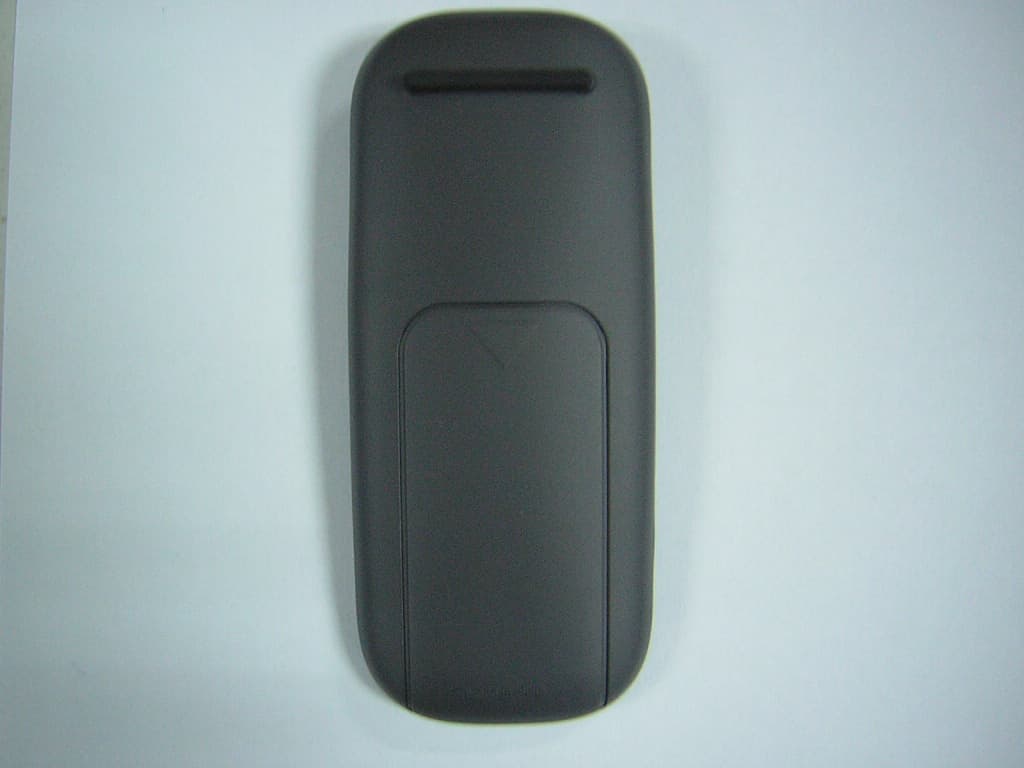
Click to zoom
Application Details
- Equipment Class
- DSC - Part 15 Security/Remote Control Transmitter
- Date of Grant
- Jan 30, 2007
- Application Purpose
- Original Equipment
- Date of Application
- Jan 30, 2007
- Equipment Note
- RF Remote Control
- Frequency Range
- 434.16700000 - 434.16700000
- Company
- Lung Hwa Electronics Co Ltd
- Country
- Taiwan
Documents & Files
Document Text
Text extracted from the exhibit documents filed with the FCC. Open a document above to read the original.
Users Manual
Quick Start Guide Verkorte Handleiding Schnellstarthandbuch Guide de Démarrage Rapide Gravel In Home QRG_all_v0200.ind1 1Gravel In Home QRG_all_v0200.ind1 128-11-2006 13:17:3028-11-2006 13:17:30 2 IN HOME Quick Start Guide 3 Verkorte Handleiding 14 Guide de Démarrage Rapide 25 Schnellstarthandbuch 36 Gravel In Home QRG_all_v0200.ind2 2Gravel In Home QRG_all_v0200.ind2 228-11-2006 13:17:4528-11-2006 13:17:45 3 TABLE OF CONTENTS GUIDELINES FOR SAFE OPERATION Please read the following information carefully before using the In Home. Please keep this manual in a safe place for future reference. Warning Do not use the device with a faulty or third party power supply. A power overload can cause the product to overheat. Do not sharply bend or twist the power ca- bles supplied as this can damage the cable. Do not plug or unplug the battery charger with wet hands or in a moist environment to avoid electric shocks. Use only the adaptor provided with the device or the recommended Commodore replacement. General Remarks Do not attempt to repair or disassemble the device yourself. Do not use corrosive chemicals or detergents to clean the device. Do not use the device near strong magnetic fi elds. Do not drop the device. Do not use the device at temperatures of >40°C or <0°C, or in areas of high humidity. • • • • • • • • • • • • Do not use the device in a dusty or smoky environment. Safe Operation Parental warning: Please ensure that your children use the product with due care. Special Features Software Upgrades: Software upgrades can be downloaded from www.commodoreworld.com ensuring that your In Home remains up to date. Use of accessories and external memory devices USB cable: When copying fi les, ensure that the USB cable is attached until the copy operation has been completed. Insert external memory devices carefully and according to instructions supplied with the device. Environmental Care The device is supplied with a minimum of pack- aging material. Please dispose of packaging materials and electronic products in accordance with local environmental regulations. • • • • • Guidelines For Safe Operation 3 Getting Started 4 Getting To Know Your In Home 5 Using the Remote Control 6 Your In Home Connections 6 Installing The In Home Software 7 Setting In Home Preferences 7 Updating Your In Home 8 Using Your In Home 8 Show What Is Playing Now 9 In Home Music 10 Artists 10 Playlists 11 Friends 11 Local 11 Network 12 Warranty 13 Gravel In Home QRG_all_v0200.ind3 3Gravel In Home QRG_all_v0200.ind3 328-11-2006 13:17:4528-11-2006 13:17:45 4 GETTING STARTED Please read this section carefully to set up your In Home quickly and easily. Your In Home is supplied with the following components. Carefully unwrap the components, and make sure that any plastic bags are disposed of and kept out of children’s reach. PLEASE NOTE If you have a problem, please contact us before returning this product to the supplier. The Commo- doreWorld website provides detailed service information and FAQ’s. General Notice Please fi ll in and return the Product Guaran- tee Card to the designated service center within 30 days of purchase. In case of any diff erences between the device and the manual, please refer to the device. • • • Commodore reserves the right to change technology parameters without prior notifi cation. Commodore reserves the right to revise the manual without prior notifi cation. • • Commodore gravel In Home Remote Control 2x AAA Batteries In Home Power Adapter and Cable Analogue Audio/Video Cable Component to Scart Adapter Quick Start Guide (this booklet) Gravel In Home QRG_all_v0200.ind4 4Gravel In Home QRG_all_v0200.ind4 428-11-2006 13:17:4528-11-2006 13:17:45 5 GETTING TO KNOW YOUR IN HOME The In Home has been designed for use with all types of audio visual media systems, with ports for TV, audio systems and computer networks. If you have a WiFi connection at home, the In Home will detect this and connect you directly to your home network. IMPORTANT NOTICE : PIN CODE You have to register your In Home with CommodoreWorld to receive the Pin Code which is required in the setup phase. Instructions Go to www.commodoreworld.com to register your In Home and receive your Pin Code. You will fi nd the serial number and activation code on the warranty. Please follow the instructions on the warranty card carefully. For a step by step explanation of the setup phase, please read the In Home manual on www.com- modoreworld.com • • • Power On/Off switch DC Power outlet WiFi antenna Coaxial & S/PDIF cable outlet Scart adapter connector port 1. 2. 3. 4. 5. RC Port VGA port HDMI port USB 2.0 slots (2 x) LAN port 6. 7. 8. 9. 10. 67 2 1 8 3 45910 USB 2.0 slot1. 1 Gravel In Home QRG_all_v0200.ind5 5Gravel In Home QRG_all_v0200.ind5 528-11-2006 13:17:5328-11-2006 13:17:53 6 Using the In Home Remote Control The remote control supplied with your In Home is all you need to listen to music, watch fi lms, view photos and manage your In Home. The Remote Control has a unique shuttle control for navigation and selection. First of all, insert the batteries provided in the remote control and pair it with your In Home ( go to the pairing section for detailed information) Inserting the batteries Remove the battery cover Insert the batteries as indicated on the bat- tery cover. Slide the battery cover back into place. Shuttle button • • • 1. Navigation Keys: 2. Forward/Back 3. Left /Right 4. CommodoreWorld™ Instructions Use the keys for on screen navigation. Confi rm your choice by pushing the shuttle button. The CommodoreWorld™ button on the front of the remote control can be used to turn your In Home on and off . Pairing your Remote Control with your In Home You can only access and adjust your In Home functions using the navigation keys and shuttle control on your remote control. You fi rst have to pair the remote control with your In Home. Instructions Press the red button (RC Port) at the rear of the In Home. The In Home front panel LED turns red. …
Text truncated - open the document above for the full version.
Attestation Statements
LUNG HWA Electronices Co.,LTD. Date:Dec 22, 2006 Federal Communications Commission Authorization and Evaluation Division FCC ID: DXLC-IH-9000 ATTESTATION FCC ID: DXLC-IH-9000 Product: RF Remote Control Model: 59F-0811-0001 We don't provide any controls or software to allow operation outside the USA frequency band when we sell this product in USA. Sincerely, ___________________________ Ted Liu/engineer LUNG HWA Electronices Co.,LTD.
Cover Letter(s)
RF_160, Issue 01 Declaration of Authorization We Name: LUNG HWA Electronices Co.,LTD. Address: 3F.248,Pei Sheng Rd Sec.3.Sheng Keng TaiPei Hsien(222),Taiwan.R.O.C City: Taiwan ............................................................... . Country: P.R.China ........................................................................... . Declare that: Name: QuieTek Corp. Address: Fl.2, No.345, Xin-hu 2 nd Rd., Nei-hu District City: Taipei Country Taiwan R.O.C. is authorized to apply for Certification of the following product(s): Product description: ... RF Remote Control ........................... . Type designation: 59F-0811-0001 ......... . Trademark: .................. on our behalf. Date: ...... 2006/12/22 ... City: ...... Taiwan ......... Name: ......... ............... . Signature: ........................ .
External Photos
RF Remote Control (M/N: 59F-0811-0001) ¾ EUT Photograph – External Photographs (1) EUT Photo (2) EUT Photo
ID Label/Location Info
IP-Set Top Box (M/N: S179L, S179C, S179, S179H) FCC Label Position
Internal Photos
RF Remote Control (M/N: 59F-0811-0001) ¾ EUT Photograph - Internal Photographs (1) EUT Photo (2) EUT Photo (3) EUT Photo
Parts List/Tune Up Info
RF Remote/Receiver BOM Remote Circuit Component Package Number JP2 IA4220 SOP16 1 JP1 HT48E10 SOP24 1 Crystal Oscillator Y2 10M HC-49S 1 10pf Porcelain Oscillator Y1 4M 3 Pins DIP 1 Flat Resistance R3 100k 0603 1 50v 5% R1 10k 0603 1 50v 5% R2 12k 0603 1 50v 5% R5 150 0805 1 50v 5% Flat Capacitor C1 0.1uf 0603 1 25v 20% C6 100p 0603 1 25v 20% C7 10p 0603 1 25v 20% C8 1uf 0603 1 25v 20% C2 0.1uf 0603 1 25v 20% C3 0.01uf 0603 1 25v 20% Red Led BL-HS133-TRB 1206 1 Button k1 Pt-5501 1 K2 Soq-152bjst 1 Electrolysis Capacitor C9 100UF 5*10 1 10v 20% Spring 3 PCB 1 Receiver Circuit Component Package Number JP2 IA4320 SSOP 1 CR4 HT48E06 SOP18 1 Flat Resistor R2 100k 0603 1 50v 5% R3 10k 0603 1 50v 5% R5 200ohm 0603 1 50v 5% Flat Capacitor C9 C3 0.1uf 0603 2 25v 20% C2 0.01uf 0603 1 25v 20% C4 10p 0603 1 25v 20% C5 1uf 0603 1 25v 20% C6 100p 0603 1 25v 20% Electrolysis Capacitor C11 100UF 5*10 1 10v 20% SMT Tantalum Capacitor C12 100UF 3528 1 20% Crystal Oscillator Y2 10M Hc-49s 1 10pf Porcelain Oscillator Y1 4M 3 Pins DIP 1 And SN74AHC1G08 DIP 1 Choose able Light Press Switch PT5501 3 Colors LED 1 Xh3 cn1 cn2 2 Xh4 jp1 1 PCB 1
Test Report
Test Report Product Name : RF Remote Control Model No. : 59F-0811-0001 FCC ID : DXLC-IH-9000 Applicant : LUNG HWA Electronices Co .,LTD Address : 3F. 248, Pei Sheng Rd Sec. 3. Sheng Keng Taipei Hsien(222), Taiwan.R.O.C Date of Receipt : 2006/11/10 Issued Date : 2007/01/30 Report No. : 06BS006-RF-US-P04V01 The test results relate only to the samples tested. The test results shown in the test report are traceable to the national/international standard through the calibration of the equipment and evaluated measurement uncertainty herein. This report must not be used to claim product endorsement by CNLA, NVLAP, NIST or any agency of the Government. The test report shall not be reproduced except in full without the written approval of QuieTek Corporation. Report No: 06BS006-RF-US-P04V01 Page: 2 of 38 Test Report Certification Issued Date : 2007/01/30 Report No. : 06BS006-RF-US-P04V01 Product Name : RF Remote Control Applicant : LUNG HWA Electronices Co .,LTD Address : 3F. 248, Pei Sheng Rd Sec. 3. Sheng Keng Taipei Hsien(222), Taiwan.R.O.C Manufacturer : Expert Electronics (Wujiang)Co.,LTD Model No. : 59F-0811-0001 FCC ID : DXLC-IH-9000 Rated Voltage : AC 120 V / 60 Hz EUT Voltage : AC 100-240 V / 50-60 Hz Trade Name : N/A Applicable Standard : FCC CFR Title 47 Part 15 Subpart C: 2006 ANSI C63.4: 2003 Test Result : Complied Performed Location : SuZhou EMC laboratory No.99 Hongye Rd., Suzhou Industrial Park Loufeng Hi-Tech Development Zone., SuZhou, China TEL: +86-512-6251-5088 / FAX:+86-512-6251-5098 FCC Registration number: 800392 Documented By : ( Mandy Liu ) Reviewed By : ( Dream Cao ) Approved By : ( Gene Chang ) Report No: 06BS006-RF-US-P04V01 Page: 3 of 38 Laboratory Information We , QuieTek Corporation, are an independent EMC and safety consultancy that was established the whole facility in our laboratories. The test facility has been accredited by the following accreditation Bodies in compliance with ISO 17025, EN 45001 and Guide 25: The related certificate for our laboratories about the test site and management system can be downloaded from QuieTek Corporation’s Web Site : http://tw.quietek.com/modules/myalbum/ The address and introduction of QuieTek Corporation’s laboratories can be founded in our Web site : http://www.quietek.com/ If you have any comments, Please don’t hesitate to contact us. Our contact information is as below: HsinChu Testing Laboratory : No.75-2, 3rd Lin, Wangye Keng, Yonghxing Tsuen, Qionglin Shiang, Hsinchu County 307, Taiwan, R.O.C. TEL:+886-3-592-8858 / FAX:+886-3-592-8859 E-Mail : [email protected] LinKou Testing Laboratory : No. 5-22, Ruei-Shu Valley, Ruei-Ping Tsuen, Lin-Kou Shiang, Taipei, Taiwan, R.O.C. TEL : 886-2-8601-3788 / FAX : 886-2-8601-3789 E-Mail : [email protected] Suzhou Testing Laboratory : No.99 Hongye Rd., Suzhou Industrial Park Loufeng Hi-Tech Development Zone., SuZhou, China TEL : +86-512-6251-5088 / FAX : 86-512-6251-5098 E-Mail : [email protected] Taiwan R.O.C. : BSMI, DGT, CNLA Germany : TUV Rheinland Norway : Nemko, DNV USA : FCC, NVLAP Japan : VCCI 0914 1313 1596 Report No: 06BS006-RF-US-P04V01 Page: 4 of 38 TABLE OF CONTENTS Description Page 1. General Information .......................................................................................................6 1.1. EUT Description.........................................................................................................6 1.2. Mode of Operation .....................................................................................................7 1.3. Tested System Details ...............................................................................................8 1.4. Configuration of Tested System .................................................................................9 1.5. EUT Exercise Software............................................................................................10 2. Technical Test .............................................................................................................. 11 2.1. Summary of Test Result........................................................................................... 11 2.2. Test Environment .....................................................................................................12 3. Conducted Emission ....................................................................................................13 3.1. Test Equipment ........................................................................................................13 3.2. Test Setup................................................................................................................13 3.3. Limit... .....................................................................................................................14 3.4. Test Procedure ........................................................................................................14 3.5. Uncertainty ..............................................................................................................14 3.6. Test Result ...............................................................................................................14 4. Radiated Emission.......................................................................................................15 4.1. Test Equipment ........................................................................................................15 4.2. Test Setup................................................................................................................15 4.3. Limit... .....................................................................................................................16 4.4. Test Procedure ........................................................................................................17 4.5. Uncertainty ..............................................................................................................18 4.6. Test Result ...................…
Text truncated - open the document above for the full version.
Test Setup Photos
RF Remote Control (M/N: 59F-0811-0001) Test Mode: Mode 1: Transmit Description: Front View of Radiated Test for Under 1GHz Test Mode: Mode 1: Transmit Description: Back View of Radiated Test for Under 1GHz Test Mode: Mode 1: Transmit Description: Front View of Radiated Test for Above 1GHz Test Mode: Mode 1: Transmit Description: Back View of Radiated Test for Above 1GHz ¾
Contact Information
Applicant
Peter Pai
Technical Contact
QuieTek Technology (Suzhou) Co., Ltd.Vincent Lin
No.99 Hongye RD. Suzhou Industrial Park · Suzhou · China
Test Firm
DEKRA Testing and Certification (Suzhou) Co., Ltd.Jerry Pan
Technical Specifications
| # | Rule Parts | Frequency Range | Power Output |
|---|---|---|---|
| 1 | 15.231 | 434.167 MHz - 434.167 MHz | - |
Other Applications from Lung Hwa Electronics Co Ltd
DXLC-IH-9000
Feb 26, 2007IP-Set Top Box
Equipment Class
DTS - Digital Transmission SystemDXLCM17A
May 29, 1997JBP - Part 15 Class B Computing Device Peripheral
Equipment Class
JBP - Part 15 Class B Computing Device PeripheralDXLDP18
Jan 02, 1997JBP - Part 15 Class B Computing Device Peripheral
Equipment Class
JBP - Part 15 Class B Computing Device PeripheralDXLSW101
Dec 09, 1996JBP - Part 15 Class B Computing Device Peripheral
Equipment Class
JBP - Part 15 Class B Computing Device PeripheralDXLCM311
Sep 08, 1996JBP - Part 15 Class B Computing Device Peripheral
Equipment Class
JBP - Part 15 Class B Computing Device Peripheral