E2K5HCKT802.11a/b/g Mini PCI type 3B Card
Dell Inc.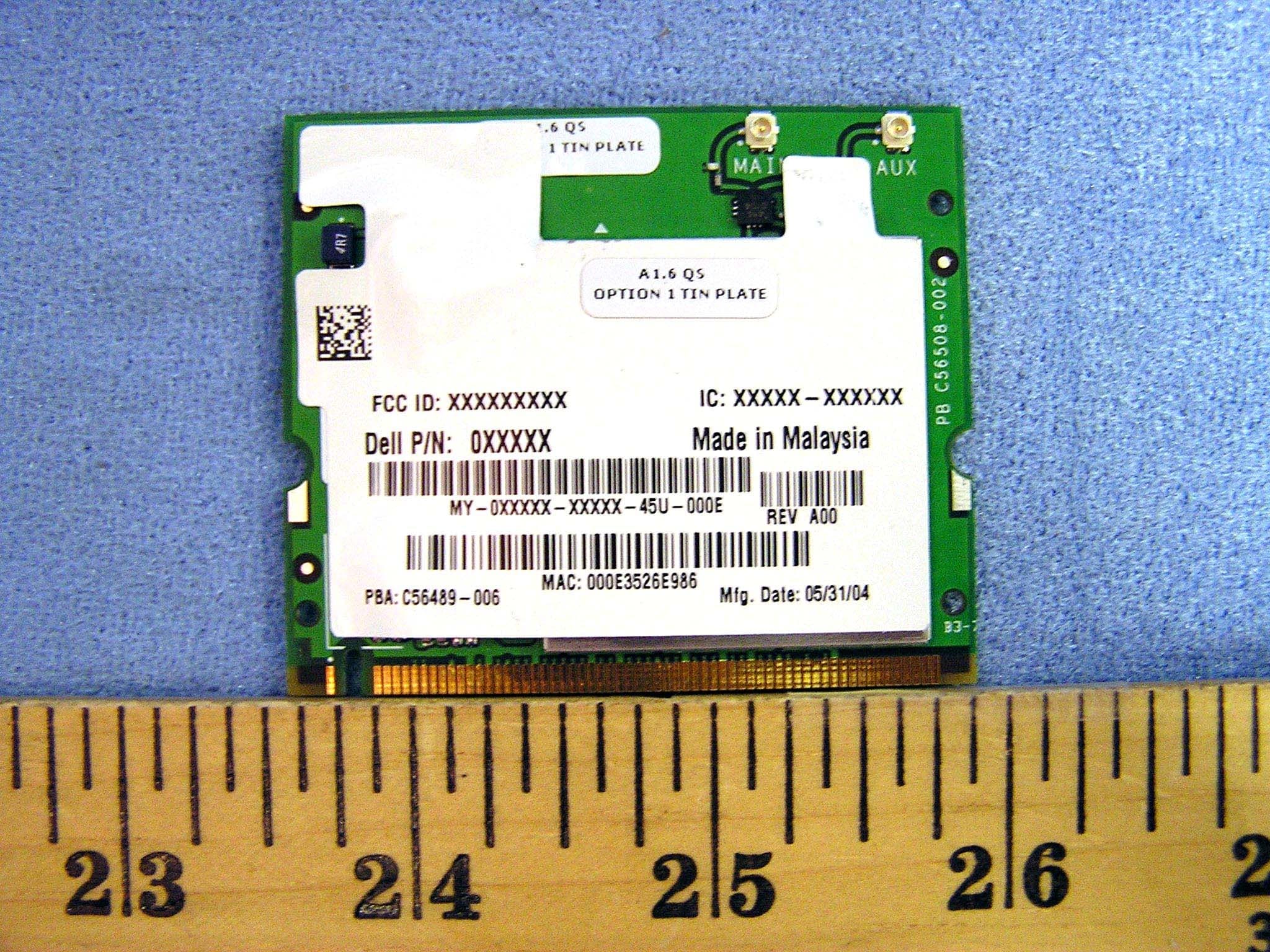
Click to zoom
Application Details
- Equipment Class
- NII - Unlicensed National Information Infrastructure TX
- Date of Grant
- Sep 02, 2004
- Application Purpose
- Original Equipment
- Date of Application
- Jun 27, 2004
- Equipment Note
- 802.11a/b/g Mini PCI type 3B Card
- Frequency Range
- 5180.00000000 - 5320.00000000
- Company
- Dell Inc.
- Country
- United States
Documents & Files
Document Text
Text extracted from the exhibit documents filed with the FCC. Open a document above to read the original.
Users Manual
Contents Intel(R) PRO/Wireless 2915ABG Network Connection User Guide With your wireless network card, you can access wireless networks, share files or printers, or even share your Internet connection. All of these features can be explored using a wireless network in your home or office. This wireless LAN solution is designed for both home and business use. Additional users and features can be added as your networking needs grow and change. Your Intel(R) PROSet/Wireless 2915ABG Network Connection adapter is compatible with 802.11a, 802.11b or 802.11g wireless standards. Operating at 5 GHz or 2.4 GHz frequency at speeds of up to 54 Mbps you can now connect your computer to existing high-speed networks using multiple access points within large or small environments. Your wireless adapter maintains automatic data rate control according to access point location to achieve the fastest possible connection. provide enhanced security measures using 802.1x network authentication. All of your wireless networks connections can be easily managed by Intel PROSet/Wireless. Intel(R) PRO/Wireless profiles provide enhanced security measures using 802.1x network authentication. NOTE: The software is compatible with the Intel PROSet/Wireless 2915ABG Network Connection and the Intel PROSet Wireless 2200BG Network Connection. Table of Contents l Using Intel PROSet/Wireless l Using Profiles l Setting up Security l Security Overview l Introduction to Wireless Networking l Connecting to a Network l Specifications l Troubleshooting l Glossary l Customer Support l Safety and Regulatory Information l Warranty l Adapter Registration Information in this document is subject to change without notice. file:///C|/CX2%20Muroc%20UG/6-15-04/index.htm (1 of 2) [6/15/2004 3:40:01 PM] Contents © 2000–2004 Intel Corporation. All rights reserved. Intel Corporation, 5200 N.E. Elam Young Parkway, Hillsboro, OR 97124-6497 USA The copying or reproducing of any material in this document in any manner whatsoever without the written permission of Intel Corporation is strictly forbidden. Intel(R) is a trademark or registered trademark of Intel Corporation or its subsidiaries in the United States and other countries. Other trademarks and trade names may be used in this document to refer to either the entities claiming the marks and names or their products. Intel disclaims any proprietary interest in trademarks and trade names other than its own. Microsoft and Windows are registered trademarks of Microsoft Corporation. *Other names and brands may be claimed as the property of others. Intel Corporation assumes no responsibility for errors or omissions in this document. Nor does Intel make any commitment to update the information contained herein. June 2004 file:///C|/CX2%20Muroc%20UG/6-15-04/index.htm (2 of 2) [6/15/2004 3:40:01 PM] Using Intel(R)PROSet/Wireless Back to Contents Using Intel PROSet/Wireless Software: Intel(R) PRO/Wireless 2915ABG Network Connection User Guide l Using Intel(R) PROSet/Wireless as your Wireless Manager l Starting Intel PROSet/Wireless l Launch Intel PROSet/Wireless from the task tray l Task Tray Menu Options l Tool Tips and Balloon Message Prompts l Intel PROSet/Wireless Main Window l Connection Status Icons l Connection Details l Profile List l Available Networks l Menus (Tools and Profile menus) l Tools Menu m Application Settings m Adapter Settings m Use Microsoft Client m Advanced Statistics m Intel Wireless Troubleshooter m Administrator Tool l Profiles Menu m Import/Export m Manage Exclusions l Enabling and Disabling the Radio l Installing and Uninstalling the Software l Installing and Uninstalling Single Sign On Feature Using Intel(R) PROSet/Wireless as your Wireless Manager Intel PROSet/Wireless can be used to setup, edit and manage network profiles to connect to a network. It also includes advanced settings such as power management and channel selection for setting up ad-hoc networks. If you are using Windows XP as your wireless manager, you can disable it from the Wireless Network tab. To disable Windows XP as your wireless manager: 1. Double-click the Intel PROSet/Wireless icon in the desktop task tray or click Start ‡Settings ‡Control Panel and double-click on Network Connections. 2. Right-click Wireless Network Connection and click Properties. 3. Click on Wireless Networks tab on the Wireless Network Connection Properties. 4. Verify that the Use Windows to configure my wireless network settings box is not selected. If it is, deselect it. 5. Click OK. This confirms that the Intel PROSet/Wireless utility is configured to manage your network profiles. file:///C|/CX2%20Muroc%20UG/6-15-04/assist.htm (1 of 32) [6/15/2004 3:40:06 PM] Using Intel(R)PROSet/Wireless NOTE: Check that the Application Settings option Notify me when another application is using the wireless device is selected. This option prompts you when Windows XP starts to manage your network profiles. Starting Intel PROSet/Wireless Launch Intel PROSet/Wireless either from the task tray icon, the Windows Start button, or from the Windows Control Panel icon. To launch Intel PROSet/Wireless use either of the following methods: l Click Start > Programs > Intel Wireless > Intel PROSet/Wireless. l Right-click the task tray icon located in the lower right corner of your Windows Desktop, and click the menu option Open Intel PROSet/Wireless. l Double-click the task tray icon to open Intel PROSet/Wireless. Exit Intel PROSet/Wireless: l To exit Intel PROSet/Wireless and close the task tray icon, click Exit from the from the task tray menu or click the Close button on the Intel PROSet/Wireless main window. Launch Intel PROSet/Wireless from the task tray To launch Intel PROSet/Wireless, double-click the task tray icon located in the lower right corner of your Windows desktop or right-click the task tray icon and click Open Intel PROSet/Wireless. Exit Intel PROSet/Wireless To exit Intel PROSet/Wireless and hide the task tray icon, right-click the task tr…
Text truncated - open the document above for the full version.
Users Manual
Index Intel PROSet/Wireless 2915ABG Network Connection User's Guide With your wireless network card, you can access wireless networks, share files or printers, or even share your Internet connection. All of these features can be explored using a wireless network in your home or office. This wireless LAN solution is designed for both home and business use. Additional users and features can be added as your networking needs grow and change. NOTE: This software is compatible with the Intel® PROSet/Wireless 2915ABG Network Connection and the Intel® PROSet/Wireless 2200BG Network Connection. Making a Basic Network Connection in Windows XP Making a Basic Network Connection in Windows 2000 Using the Intel PROSet for Wireless Utility Using Intel PROSet/WirelessProfiles Security Overview Configuring Advanced Network Security Settings in Windows XP Configuring Advanced Network Security Settings in Windows 2000 Specifications Regulatory Information Troubleshooting Glossary Information in this document is subject to change without notice. © 2000–2004 Dell Inc. All rights reserved. The copying or reproducing of any material in this document in any manner whatsoever without the written permission of Dell Inc. is strictly forbidden. The trademarks Dell, Latitude, Inspiron, the DELL logo, and TrueMobile are trademarks of Dell Inc. Microsoft and Windows are registered trademarks of Microsoft Corporation. Other trademarks and trade names may be used in this document to refer to either the file:///C|/Documents%20and%20Settings/pguillor/Desktop/w2k5/index.htm (1 of 2) [7/2/2004 12:27:06 PM] Index entities claiming the marks and names or their products. Dell disclaims any proprietary interest in trademarks and trade names other than its own. August 2004 file:///C|/Documents%20and%20Settings/pguillor/Desktop/w2k5/index.htm (2 of 2) [7/2/2004 12:27:06 PM] Making a Basic Network Connection in Windows XP: Intel PRO/Wireless 2915ABG Network Connection User's Guide Back to Contents Making a Basic Network Connection in Windows XP: Intel® PRO/Wireless 2915ABG Network Connection User's Guide Connecting to a Network in Windows XP Viewing the Status of Your Wireless Connection Connecting to a Network in Windows XP The information in this User's Guide assumes that your wireless card and the software are already installed in your system. If you did not receive your wireless card as part of a system, refer to the Setup Guide that came with your wireless card for hardware and software installation instructions. You can check your system to verify that the wireless card is installed. To see if you have a wireless card installed: 1. From your Windows desktop, right-click My Computer and select Properties. 2. From the Hardware tab, click Device Manager. 3. Double-click Network adapters. If the wireless card is installed you will see Intel® PRO/Wireless 2915ABG Network Connection. If the wireless card is not installed this name will not be displayed. If you are using Windows XP, it is recommended that you follow the steps below to configure your wireless network connection. You can also choose to use Intel® PROSet/Wireless to configure your wireless card. This is discussed in the Making a Basic Network Connection in Windows 2000 section. file:///C|/Documents%20and%20Settings/pguillor/Desktop/w2k5/XPsetup.htm (1 of 9) [7/2/2004 12:29:13 PM] Making a Basic Network Connection in Windows XP: Intel PRO/Wireless 2915ABG Network Connection User's Guide NOTE: If you are using Windows XP (Service Pack 2) Category View some of the dialogs shown in the following examples may appear different from those on your screen. To switch from Category View to Classic view, click Start ‡Control Panel and on the navigation bar click Switch to Classic View. Connecting to a Network Before attempting to connect to your network, make sure that your access point or wireless router is connected correctly. Please consult your access point or wireless router documentation to configure your access point or wireless router. You should now choose the type of security for your wireless network. Most home networks use either no security or Wired Equivalent Privacy ( WEP) encryption. Additional security settings are also available that are typically used in corporate environments or for advanced users who require higher levels of security. 1. Right-click the Intel® PROSet/Wireless icon on the task tray and click Open Microsoft client. The Wireless Network Connection Properties dialog opens: file:///C|/Documents%20and%20Settings/pguillor/Desktop/w2k5/XPsetup.htm (2 of 9) [7/2/2004 12:29:13 PM] Making a Basic Network Connection in Windows XP: Intel PRO/Wireless 2915ABG Network Connection User's Guide NOTE: The names of wireless networks your computer can see are shown under Preferred networks. The name of your network is usually shown here. 2. On the Wireless Networks tab, under Preferred networks, click Add. The Wireless network properties dialog opens: file:///C|/Documents%20and%20Settings/pguillor/Desktop/w2k5/XPsetup.htm (3 of 9) [7/2/2004 12:29:13 PM] Making a Basic Network Connection in Windows XP: Intel PRO/Wireless 2915ABG Network Connection User's Guide NOTE: The names of wireless networks your computer can see are shown under Available Networks. For Windows XP SP2, it is necessary to Click on View Wireless Networks to see a list of available networks. The name of your network is usually shown here. If a blank network name (SSID) is received from a silent mode wireless router, there will be no entry for that network in the available networks list. To associate with a "silent mode" wireless router, a new profile must first be created before connection. After connection, the associated SSID can be viewed in the available networks list and in the preferred networks list. 3. Enter the name of your network in the Network name (SSID) field. 4. Click OK. The new network name appears in the Preferred networks list: file:///C|/Documents%20and%20Settings/pguillor/De…
Text truncated - open the document above for the full version.
Users Manual
Back to Contents Regulatory Information: Intel(R) PRO/Wireless Network Connection User's Guide Intel(R) PRO/Wireless 2200BG Network Connection Intel(R) PRO/Wireless 2915ABG Network Connection Intel(R) PRO/Wireless 2915ABG Network Connection Information for the User Regulatory Information Intel(R) PRO/Wireless 2200BG Network Connection Information for the User Regulatory Information Intel(R) PRO/Wireless 2915ABG Network Connection The information in this document applies to the following products: Tri-mode wireless LAN adapters (802.11a/802.11b/802.11g ) Intel(R) PRO/Wireless 2915ABG Network Connection (model WM3B2915ABG) Intel(R) PRO/Wireless 2915ABG Network Connection (model WM3A2915ABG) Information for the user Safety Notices The FCC with its action in ET Docket 96-8 has adopted a safety standard for human exposure to radio frequency (RF) electromagnetic energy emitted by FCC certified equipment. The Intel(R) PRO/Wireless 2915ABG Network Connection adapter meets the Human Exposure limits found in OET Bulletin 65, 2001, and ANSI/IEEE C95.1, 1992. Proper operation of this radio according to the instructions found in this manual will result in exposure substantially below the FCC’s recommended limits. The following safety precautions should be observed: l Do not touch or move antenna while the unit is transmitting or receiving. l Do not hold any component containing the radio such that the antenna is very close or touching any exposed parts of the body, especially the face or eyes, while transmitting. l Do not operate the radio or attempt to transmit data unless the antenna is connected; if not, the radio may be damaged. l Use in specific environments: ° The use of wireless devices in hazardous locations is limited by the constraints posed by the safety NOTE: Due to the evolving state of regulations and standards in the wireless LAN field (IEEE 802.11 and similar standards), the information provided herein is subject to change. Intel Corporation assumes no responsibility for errors or omissions in this document. Nor does Intel make any commitment to update the information contained herein. directors of such environments. ° The use of wireless devices on airplanes is governed by the Federal Aviation Administration (FAA). ° The use of wireless devices in hospitals is restricted to the limits set forth by each hospital. l Antenna use: ° In order to comply with FCC RF exposure limits, low gain integrated antennas should be located at a minimum distance of 20 cm (8 inches) or more from the body of all persons. ° High-gain, wall-mount, or mast-mount antennas are designed to be professionally installed and should be located at a minimum distance of 30 cm (12 inches) or more from the body of all persons. Please contact your professional installer, VAR, or antenna manufacturer for proper installation requirements. l Explosive Device Proximity Warning (see below) l Antenna Warning (see below) l Use on Aircraft Caution (see below) l Other Wireless Devices (see below) l Power Supply (Access Point) (see below) Explosive Device Proximity Warning Warning: Do not operate a portable transmitter (such as a wireless network device) near unshielded blasting caps or in an explosive environment unless the device has been modified to be qualified for such use. Antenna Warnings Warning: To comply with the FCC and ANSI C95.1 RF exposure limits, it is recommended for the Intel(R) PRO/Wireless 2915ABG Network Connection adapter installed in a desktop or portable computer, that the antenna for this device be installed so as to provide a separation distance of al least 20 cm (8 inches) from all persons and that the antenna must not be co-located or operating in conjunction with any other antenna or radio transmitter. It is recommended that the user limit exposure time if the antenna is positioned closer than 20 cm (8 inches). In case of antennas are installed within 20 cm separation distance from the antennas to the body of user, SAR evaluation has performed to demonstrate RF exposure compliance in the typical lap held operating configuration. Use On Aircraft Caution Caution: Regulations of the FCC and FAA prohibit airborne operation of radio-frequency wireless devices because their signals could interfere with critical aircraft instruments. Other Wireless Devices Safety Notices for Other Devices in the Wireless Network: Refer to the documentation supplied with wireless Ethernet adapters or other devices in the wireless network. Local Restrictions on 802.11a and 802.11b Radio Usage Caution: Due to the fact that the frequencies used by 802.11a and 802.11b wireless LAN devices may not yet be harmonized in all countries, 802.11a and 802.11b products are designed for use only in specific countries, and are not allowed to be operated in countries other than those of designated use. As a user of these products, you are responsible for ensuring that the products are used only in the countries for which they were intended and for verifying that they are configured with the correct selection of frequency and channel for the country of use. The device transmit power control (TPC) interface is part of the Intel(R) PROSet/Wireless software. Operational restrictions for Equivalent Isotropic Radiated Power (EIRP) are provided by the system manufacturer. Any deviation from the permissible power and frequency settings for the country of use is an infringement of national law and may be punished as such. For country-specific information, see the additional compliance information supplied with the product. Wireless interoperability The Intel(R) PRO/Wireless 2915ABG Network Connection adapter is designed to be interoperable with other wireless LAN products that are based on direct sequence spread spectrum (DSSS) radio technology and to comply with the following standards: l IEEE Std. 802.1b-1999. Standard on Wireless LAN. l Wireless Fidelity (WiFi) certification, as defined by the WECA (Wireless Ethernet Compatibility Alliance). The In…
Text truncated - open the document above for the full version.
Users Manual
Back to Contents Regulatory Information: Intel(R) PRO/Wireless Network Connection User's Guide Intel(R) PRO/Wireless 2200BG Network Connection Intel(R) PRO/Wireless 2915ABG Network Connection Intel(R) PRO/Wireless 2915ABG Network Connection Information for the User Regulatory Information Intel(R) PRO/Wireless 2200BG Network Connection Information for the User Regulatory Information Intel(R) PRO/Wireless 2915ABG Network Connection The information in this document applies to the following products: Tri-mode wireless LAN adapters (802.11a/802.11b/802.11g ) Intel(R) PRO/Wireless 2915ABG Network Connection (model WM3B2915ABG) Intel(R) PRO/Wireless 2915ABG Network Connection (model WM3A2915ABG) NOTE: Due to the evolving state of regulations and standards in the wireless LAN field (IEEE 802.11 and similar standards), the information provided herein is subject to change. Intel Corporation assumes no responsibility for errors or omissions in this document. Nor does Intel make any commitment to update the information contained herein. Information for the user Safety Notices The FCC with its action in ET Docket 96-8 has adopted a safety standard for human exposure to radio frequency (RF) electromagnetic energy emitted by FCC certified equipment. The Intel(R) PRO/Wireless 2915ABG Network Connection adapter meets the Human Exposure limits found in OET Bulletin 65, 2001, and ANSI/IEEE C95.1, 1992. Proper operation of this radio according to the instructions found in this manual will result in exposure substantially below the FCC’s recommended limits. The following safety precautions should be observed: l Do not touch or move antenna while the unit is transmitting or receiving. l Do not hold any component containing the radio such that the antenna is very close or touching any exposed parts of the body, especially the face or eyes, while transmitting. l Do not operate the radio or attempt to transmit data unless the antenna is connected; if not, the radio may be damaged. l Use in specific environments: m The use of wireless devices in hazardous locations is limited by the constraints posed by the safety directors of such environments. m The use of wireless devices on airplanes is governed by the Federal Aviation Administration (FAA). m The use of wireless devices in hospitals is restricted to the limits set forth by each hospital. l Antenna use: m In order to comply with FCC RF exposure limits, low gain integrated antennas should be located at a minimum distance of 20 cm (8 inches) or more from the body of all persons. m High-gain, wall-mount, or mast-mount antennas are designed to be professionally installed and should be located at a minimum distance of 30 cm (12 inches) or more from the body of all persons. Please contact your professional installer, VAR, or antenna manufacturer for proper installation requirements. l Explosive Device Proximity Warning (see below) l Antenna Warning (see below) l Use on Aircraft Caution (see below) l Other Wireless Devices (see below) l Power Supply (Access Point) (see below) Explosive Device Proximity Warning Warning: Do not operate a portable transmitter (such as a wireless network device) near unshielded blasting caps or in an explosive environment unless the device has been modified to be qualified for such use. Antenna Warnings Warning: To comply with the FCC and ANSI C95.1 RF exposure limits, it is recommended for the Intel(R) PRO/Wireless 2915ABG Network Connection adapter installed in a desktop or portable computer, that the antenna for this device be installed so as to provide a separation distance of al least 20 cm (8 inches) from all persons and that the antenna must not be co-located or operating in conjunction with any other antenna or radio transmitter. It is recommended that the user limit exposure time if the antenna is positioned closer than 20 cm (8 inches). This device has also been evaluated for and shown compliant with the FCC RF exposure limits under portable exposure conditions (antennas are within 20 cm of a persons body) when installed in certain specific OEM configurations. Details of the authorized configurations can be found at http://www.fcc.gov/oet/fccid/help.html by entering the FCC ID number on the device." Use On Aircraft Caution Caution: Regulations of the FCC and FAA prohibit airborne operation of radio-frequency wireless devices because their signals could interfere with critical aircraft instruments. Other Wireless Devices Safety Notices for Other Devices in the Wireless Network: Refer to the documentation supplied with wireless Ethernet adapters or other devices in the wireless network. Local Restrictions on 802.11a and 802.11b Radio Usage Caution: Due to the fact that the frequencies used by 802.11a and 802.11b wireless LAN devices may not yet be harmonized in all countries, 802.11a and 802.11b products are designed for use only in specific countries, and are not allowed to be operated in countries other than those of designated use. As a user of these products, you are responsible for ensuring that the products are used only in the countries for which they were intended and for verifying that they are configured with the correct selection of frequency and channel for the country of use. The device transmit power control (TPC) interface is part of the Intel(R) PROSet/Wireless software. Operational restrictions for Equivalent Isotropic Radiated Power (EIRP) are provided by the system manufacturer. Any deviation from the permissible power and frequency settings for the country of use is an infringement of national law and may be punished as such. For country-specific information, see the additional compliance information supplied with the product. Wireless interoperability The Intel(R) PRO/Wireless 2915ABG Network Connection adapter is designed to be interoperable with other wireless LAN products that are based on direct sequence spread spectrum (DSSS) radio technology and to comply with the following standards: l IEEE Std. 802.1b…
Text truncated - open the document above for the full version.
Cover Letter(s)
Dell Computer Corporation FCC ID: E2K5HCKT Request for transmitter Limited Modular Approval Transmitter Module Characteristics Item Requirements EUT 1 Yes Have its own RF shielding Device is equipped with Metal shielding to cover RF section. Refer to external photos 2 Yes Have buffered modulation/data inputs (if such inputs are provided), All inputs to the modules are buffered through logic or microprocessor inputs. See theory of operation. 3 Yes Have it own power supply regulation Internal power regulator. Refer to Block diagram 4 Yes Meet the antenna requirements of Section 15.203 Device is equipped with unique antenna ( u.FL(v)- LP-040) connector. Refer to external photos 5 Yes Be tested in a stand-alone configuration, i.e., the antenna, AC or DC power and data input/output lines must be connected to the module but, the module must not be inside another case during testing Device was tested inside the laptop for limited modular approval. Refer to setup photos. 6 Yes Be labeled with its own FCC ID number, and if the FCC ID is not visible when the module is installed inside another device, then the outside of the device into which the module is installed must also display a label referring to the enclosed module. Two proposed FCC ID label format are included in the filing. One of label is to be placed on the module and the other label is to be placed on the outside of system. Refer to FCC ID label format and location file. 7 Yes The modular transmitter is manufactured so that the user cannot influence the operation of the transmitter that will operate outside of the scope of the regulations. Refer to “User’s Guide” Exhibit 8 Yes Address compliance with the Commission's RF exposure limits in Sections 1.1310 and 2.1093. In addition, spread spectrum transmitters operating under Section 15.247 are required to address RF exposure compliance in accordance with Section 15.247(b)(4). For host platforms in which this device will be installed and operated while maintaining a minimum body to antenna distance of 20cm, MPE calculations are included in the test report. For host platforms in which this device will be installed and operated with a minimum body to antenna distance of less than 20cm, SAR test was performed. Please see SAR reports for these host platforms.
External Photos
WNC Confidential 2003/1/15 Linbergh/Kapalua Antenna Regulatory Information Description : Triple-band Antenna(Main+Aux) Compal P/N: DC330005300 DC330005310 Wistron NeWeb P/N: 81.CA915.001 81.CA915.002 Wistron NeWeb Corporation No. 10-1,Li-hsin Road I, Science-base Industrial Park, Hsinchu 300,Taiwan, R.O.C. Tel: 886-3-6667799#6545 Fax: 886-3-6667711 Provided by Wistron NeWeb Corp. Reviewed by Wistron NeWeb Corp. David Tau Weili Cheng WNC Confidential 2003/1/15 I. Antenna Type Position Main Antenna (Right-side Antenna) Aux Antenna (Left-side Antenna) Antenna Type PIFA PIFA Material Metal sheet Metal sheet II. Peak Gain and Average Gain 2G4 ISM (2.400 GHz - 2.4835 GHz)U-NII (5.150 GHz - 5.350 GHz) HyperLAN (5.470 GHz - 5.725 GHz) Antenna Gain 2.40 GHz 2.45 GHz 2.50GHz5.15 GHz5.25 GHz5.35 GHz5.47 GHz 5.5975 GHz5.725 GHz Peak dBi 2.34 2.39 2.07 2.18 3.29 2.54 1.82 2.29 1.35 MAIN Avg dBi -2.16 -2.35 -2.25 -3.66 -2.79 -3.13 -2.65 -2.13 -3.05 Peak dBi 0.38 1.32 0.97 3.12 3.39 3.47 2.65 3.38 2.63 AUX Avg dBi -2.96 -3.07 -2.88 -3.60 -2.67 -2.43 -2.63 -2.28 -2.40 III. Antenna Model Number Model number: CA9-C IV. Manufacturing Info Wistron NeWeb Corporation No. 10-1,Li-hsin Road I, Science-base Industrial Park, Hsinchu 300,Taiwan, R.O.C. V. Antenna Dimensions (Mechanical drawings) (See Next 2 Pages) WNC Confidential 2003/1/15 VI. Pictures of Antennas Main Antenna Aux Antenna VII. Cable Length Left-side antenna: 221mmΦ1.13mm Right-side antenna: 480mmΦ1.13mm (From the center of connector to the end of cable) VIII. Cable Loss (including connector) Unit: dB 2G4 band U-NII band HyperLAN band 221mm 1.03 1.34 1.44 480mm 1.81 2.61 2.77 XI. Antenna Material Main antenna Aux antenna 1. Stamped metal 2. Junkosha cable and IPEX connector (Nissei cable and HRS connector) 3. Sponge 4. Tape 1. Stamped metal 2. Junkosha cable and IPEX connector (Nissei cable and HRS connector) 3. Sponge 4. Tape 5. Gasket e WNC Confidential 2003/1/15 XII. Connector Info (general description) Description (Cable) Inner Conductor: AWG#32(7/0.8), Silver plating annealed copper wire or its performance equivalent Dielectric core: D0.68mm Outer conductor: 16/4/0.05 D0.93mm, Silver plating annealed copper wire or its performance equivalent Jacket: D1.13mm Requirements Characteristic impedance: 50(+2,-2)ohm Nominal capacitance: 97pF/m Conductor resistance of inner conductor at 293K(20): 520ohm/km MAX Insulation resistance: 1500mega-ohm.km MIN Dielectric withstand voltage: no breakdown at AC1000V for 1min. Ratings Rated voltage: AC60Vrms Nominal characteristics impedance: 50ohm VSWR: 1.3MAX DC~3GHz, 1.7MAX 3~6GHz Contact resistance 10mA MAX(DC or 1000Hz) Center contact 74mohm MAX. Outer contact 27mohm MAX. Insulation resistance 100V DC 500Mohm MIN Electric characteristics Voltage proof 200V AC for 1 min. Current leakage 2mA MAX No flashover or breakdown XIII. Radiation Pattern Platform: Linber g h PT 4 Supplier:Date: CONFIG F REQ GH z A vg dBi Pk dBi 2.4 -2.36 2.34 2.45 -2.57 2.38 2.5 -2.45 2.06 2.4 -9.95 0.86 2.45 -9.78 -5.10 2.5 -9.89 -4.89 2.4 -5.85 -0.27 2.45 -5.66 0.11 2.5 -4.93 0.61 2.4 -4.60 0.32 2.45 -4.94 1.60 2.5 -5.18 1.18 Note: The outer circle approximatel y represents the 0 dBi g ain circle Aux Vert 2G4 ISM (2.400 GHz - 2.4835 GHz) Main Horz Main Vert 2003/1/15 2G4 ISM (2.400 GHz - 2.4835 GHz) Antenna Radiation Patterns Wistron NeWeb coporation Aux Horz Main Horizontal 2.40 GHz2.45 GHz2.50GHz Main Vertical 2.40 GHz2.45 GHz2.50GHz Aux Horizontal 2.40 GHz2.45 GHz2.50GHz Aux Vertical 2.40 GHz2.45 GHz2.50GHz VSWR open = lid/keyboard angle 110 Platform: Platform: Linber g h PT 4 Supplier: Supplier:Date: Date: CONFIG F REQ GH z A vg dBi Pk dBi 5.15 -4.37 2.12 5.25 -3.45 3.26 5.35 -4.1…
Text truncated - open the document above for the full version.
Contact Information
Applicant
Don A Bobo(Distinguished Member of Technical Staff)
Technical Contact
COMPLIANCE CERTIFICATION SERVICESMichael Heckrotte
[email protected]408-463-0885
561F MONTEREY ROAD · MORGAN HILL, California · United States
Test Firm
Compliance Certification Services IncSteve Cheng
Technical Specifications
| # | Rule Parts | Frequency Range | Power Output |
|---|---|---|---|
| 1 | 15E | 5.18 GHz - 5.32 GHz | 38.00 mW |
Other Applications from Dell Inc.
E2K-DWRFID2601
Aug 17, 2026RFID 13.56MHz Wireless Module
Equipment Class
DXX - Part 15 Low Power Communication Device TransmitterE2K-DWRFID2501
May 04, 2026RFID 13.56MHz Wireless Module
Equipment Class
DXX - Part 15 Low Power Communication Device Transmitter
E2K-DWRFID2406
Sep 30, 2025RFID 13.56MHz Wireless Module
Equipment Class
DXX - Part 15 Low Power Communication Device Transmitter
E2K-DRU77440
Dec 01, 20245G NR Remote Radio Unit 4TX 4RX 40W-per-TX
Equipment Class
TNB - Licensed Non-Broadcast Station Transmitter
E2K-DWRFID2401
Oct 03, 2024RFID 13.56MHz Wireless Module
Equipment Class
DXX - Part 15 Low Power Communication Device Transmitter