E2KV03B001SMART PHONE
Dell Inc.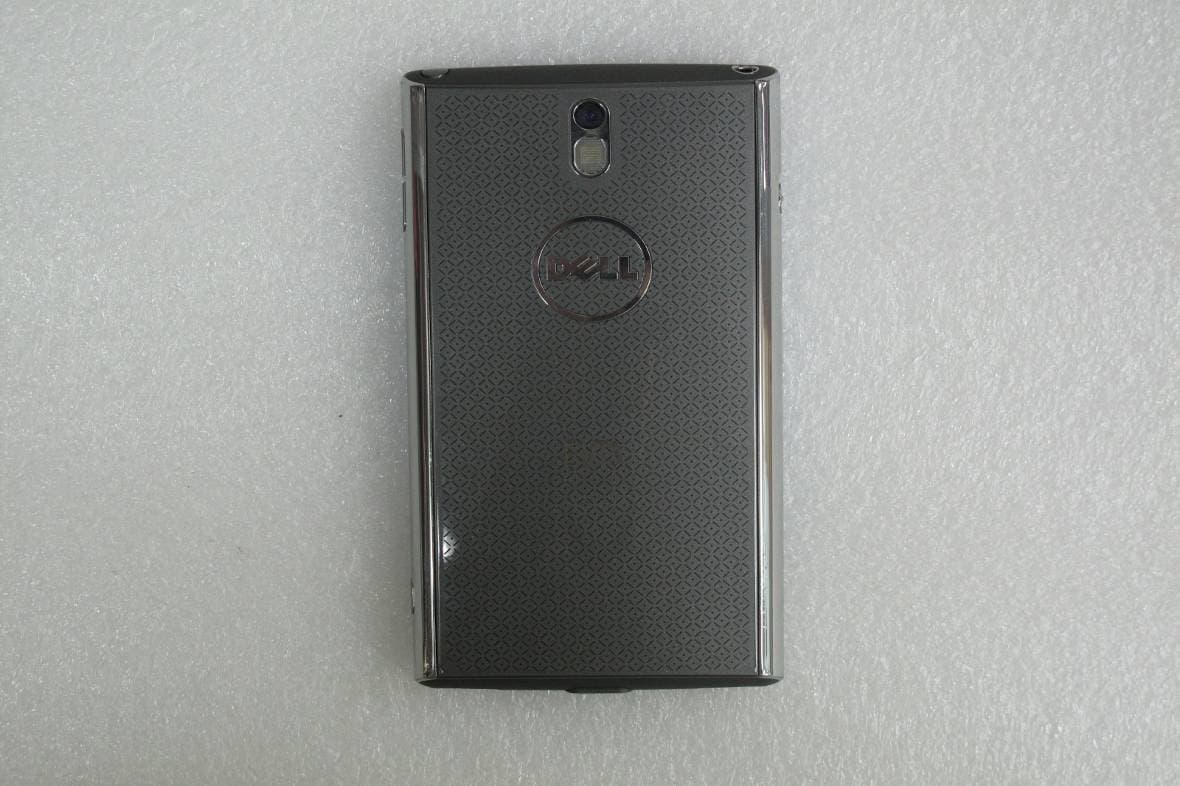
Click to zoom
Application Details
- Equipment Class
- PCE - PCS Licensed Transmitter held to ear
- Date of Grant
- Oct 27, 2010
- Application Purpose
- Original Equipment
- Date of Application
- Oct 26, 2010
- Equipment Note
- SMART PHONE
- Frequency Range
- 1852.40000000 - 1907.60000000
- Company
- Dell Inc.
- Country
- United States
Documents & Files
Document Text
Text extracted from the exhibit documents filed with the FCC. Open a document above to read the original.
Users Manual
Dell ™ Venue User's Manual COMMENT Thunder_UM.book Page 1 Wednesday, October 13, 2010 1:35 PM Notes, Cautions, and Warnings NOTE: A NOTE indicates important information that helps you make better use of your smartphone. CAUTION: A CAUTION indicates potential damage to hardware or loss of data if instructions are not followed. WARNING: A WARNING indicates a potential for property damage, personal injury, or death. ____________________ Information in this document is subject to change without notice. © 2010 Dell Inc. All rights reserved. Reproduction of these materials in any manner whatsoever without the written permission of Dell Inc. is strictly forbidden. Trademarks used in this text: Dell ™ and the DELL logo are trademarks of Dell Inc. Adobe Acrobat ® is a trademark of Adobe Systems Incorporated which may be registered in certain jurisdictions; Microsoft ® , Windows ® , Excel ® , and Powerpoint ® , are either trademarks or registered trademarks of Microsoft Corporation in the United States and/ or other countries; Bluetooth ® is a registered trademark owned by Bluetooth SIG, Inc. and is used by Dell under license. Other trademarks and trade names may be used in this document to refer to either the entities claiming the marks and names or their products. Dell Inc. disclaims any proprietary interest in trademarks and trade names other than its own. August 2010A00 Federal Communications Commission (FCC) Statement This smartphone complies with Part 15 of the FCC Rules. Operation is subject to the following two conditions: 1) this smartphone may not cause harmful interference and 2) this smartphone must accept any interference received, including interference that may cause undesired operation of the smartphone. FCC RF Radiation Exposure Statement: For body worn operation, this smartphone has been tested and meets FCC RF exposure guidelines when used with an accessory that contains no metal and that positions the handset a minimum of 1.5 cm from the body. Use of other accessories may not ensure compliance with FCC RF exposure guidelines. Thunder_UM.book Page 2 Wednesday, October 13, 2010 1:35 PM Contents3 Contents 1 Setting Up Your Dell Venue Smartphone . . . . . . . . . . . . . . . . . . . . 7 Getting Your Smartphone Ready for Use. . . . . 7 Turning On Your Smartphone . . . . . . . . . . 11 Turning Off Your Smartphone . . . . . . . . . . 12 Turning Off the Screen . . . . . . . . . . . . . . 12 2 Dell Venue Smartphone Features . . 13 Touch Screen . . . . . . . . . . . . . . . . . . . 18 Screen Orientation . . . . . . . . . . . . . . . . 24 Applications, Widgets, and Shortcuts . . . . . . 24 Dell Stage . . . . . . . . . . . . . . . . . . . . . 24 Status Bar . . . . . . . . . . . . . . . . . . . . . 38 Quick Buttons . . . . . . . . . . . . . . . . . . . 41 Navigating Applications . . . . . . . . . . . . . 42 3 Using Your Dell Venue Smartphone . . . . . . . . . . . . . . . . . . . 44 Calling . . . . . . . . . . . . . . . . . . . . . . . 44 Managing Contacts. . . . . . . . . . . . . . . . 51 Thunder_UM.book Page 3 Wednesday, October 13, 2010 1:35 PM 4Contents Messaging . . . . . . . . . . . . . . . . . . . . . 56 Pop-Up Menu . . . . . . . . . . . . . . . . . . . 63 Android Keyboard. . . . . . . . . . . . . . . . . 64 Swype Keyboard . . . . . . . . . . . . . . . . . . 68 Google Search Widget . . . . . . . . . . . . . . 70 Power Control Widget . . . . . . . . . . . . . . 71 Managing Your Smartphone Settings . . . . . . 72 4 Internet . . . . . . . . . . . . . . . . . . . . . . . 74 Connecting to the Internet . . . . . . . . . . . 74 Browsing the Internet . . . . . . . . . . . . . . 77 E-mail . . . . . . . . . . . . . . . . . . . . . . . . 84 Web Applications . . . . . . . . . . . . . . . . . 86 5 Customizing Your Dell Venue Smartphone . . . . . . . . . . . . . . . . . . 130 To change the display settings. . . . . . . . . . 130 To change sound and ringtone settings . . . . 131 To manually set the date, time and time zone . 133 To set the language. . . . . . . . . . . . . . . . 134 6 Protecting Your Dell Venue Smartphone . . . . . . . . . . . . . . . . . . 135 Thunder_UM.book Page 4 Wednesday, October 13, 2010 1:35 PM Contents5 Protect Your Smartphone Data With a Screen Unlock Pattern . . . . . . . . . . . . . . . . . . 135 Protect Your Smartphone Data With a PIN . . . 138 Protect Your Smartphone Data With a Password . . . . . . . . . . . . . . . . . . . . . . 138 Protect Your SIM Card With the SIM Lock Password . . . . . . . . . . . . . . . . . . . . . . 139 7 Applications . . . . . . . . . . . . . . . . . . 140 Camera. . . . . . . . . . . . . . . . . . . . . . . 140 Copying Files to and from the MicroSD. . . . . 145 Bluetooth . . . . . . . . . . . . . . . . . . . . . 146 Photos and Videos . . . . . . . . . . . . . . . . 148 Music. . . . . . . . . . . . . . . . . . . . . . . . 151 Calendar . . . . . . . . . . . . . . . . . . . . . . 154 Alarm Clock . . . . . . . . . . . . . . . . . . . . 155 Calculator . . . . . . . . . . . . . . . . . . . . . 158 Sound Recorder . . . . . . . . . . . . . . . . . . 158 Voice Dialer . . . . . . . . . . . . . . . . . . . . 159 SIM Manager . . . . . . . . . . . . . . . . . . . . 159 SIM Toolkit . . . . . . . . . . . . . . . . . . . . . 159 Thunder_UM.book Page 5 Wednesday, October 13, 2010 1:35 PM 6Contents 8 Synchronizing Your Dell Venue Smartphone and Computer Using Nero SyncWizard . . . . . . . . . . . . . . 160 Connect to a Computer and Install Nero SyncWizard . . . . . . . . . . . . . . . . . . . . 160 Using Nero SyncWizard . . . . . . . . . . . . . 161 9 Troubleshooting. . . . . . . . . . . . . . . 162 Thunder_UM.book Page 6 Wednesday, October 13, 2010 1:35 PM Setting Up Your Dell Venue Smartphone7 1 Setting Up Your Dell Venue Smartphone Getting Your Smartphone Ready for Use 1 Remove the back cover aSlide the back cover down towards the bottom of the smartphone. bLift the back cover off the smartphone. Thunder_UM.book Page 7 Wednesday, October 13, 2010 1:35 PM 8…
Text truncated - open the document above for the full version.
Users Manual
Dell™ Venue Safety, Environmental, and Regulatory Information Safety, Environmental, and Regulatory Information Model V02S book.book Page 1 Monday, September 27, 2010 6:28 PM V03B Notes and Warnings NOTE: A NOTE indicates important information that helps you make better use of your Mini device. WARNING: A WARNING indicates a potential for property damage, personal injury, or death. __________________ Information in this document is subject to change without notice. © 2010 Dell Inc. All rights reserved. Reproduction of these materials in any manner whatsoever without the written permission of Dell Inc. is strictly forbidden Trademarks used in this text: Dell and the DELL logo are trademarks of Dell Inc. Other trademarks and trade names may be used in this document to refer to either the entities claiming the marks and names or their products. Dell Inc. disclaims any proprietary interest in trademarks and trade names other than its own. September 2010P/N JHT4TRev. A00 book.book Page 2 Monday, September 27, 2010 6:28 PM 3 Before Using Your Dell device Read all safety and operating instructions before using your Dell™ device to avoid injury. For detailed operating instructions, the latest User's Manual, and updates to the safety and regulatory information, see support.dell.com/manuals. Product Safety Information Distraction — While Driving It is recommended not to use your Dell device (even with a hands free kit) while driving as it may cause distractions and may lead to an accident. You must comply with local laws and regulations restricting the use of wireless devices while driving. Product Handling General Statement on Handling and Use • You must always switch off your Dell device wherever the use of a cell phone or other wireless device is prohibited. • Always treat your Dell device and its accessories with care and keep it in a clean and dust-free place. • Please check local regulations for disposal of electronic products. • Do not expose your Dell device or its accessories to open flames or lit tobacco products. • Do not expose your Dell device or its accessories to liquid, moisture, or high humidity. • Do not drop, throw, or try to bend your Dell device or its accessories. book.book Page 3 Monday, September 27, 2010 6:28 PM 4 • Do not use harsh chemicals, cleaning solvents, or aerosols to clean the device or its accessories. • Do not paint your Dell device or its accessories. • Do not attempt to disassemble your Dell device or its accessories. Only qualified personnel must service or repair the Dell device or its accessories. • Do not expose your Dell device or its accessories to extreme temperatures. The recommended operating temperature is minimum: –10°C and maximum: +55°C. • Do not carry your Dell device in your back pocket as it could break when you sit. Choking Hazard for Small Children WARNING: If this device is broken or dissassembled, small parts may pose a choking hazard to small children. Do not leave your Dell device and its accessories within the reach of small children or allow them to play with it. Demagnetization To avoid the risk of demagnetization, do not allow electronic devices or magnetic media close to your Dell device for a long time. Eye Strain, Seizures, and Blackouts Certain games and videos may be designed to produce flashing lights or light patterns. If you have a history of blackouts or seizures with exposure to flashing lights or light patterns, it is recommended that you consult a physician before you play games or watch videos on your Dell device. To prevent eye strain, avoid viewing the screen for prolonged duration. book.book Page 4 Monday, September 27, 2010 6:28 PM 5 Repetitive Strain To minimize the risk of Repetitive Strain Injury (RSI), when texting or playing games with your Dell device: • Do not grip the Dell device too tightly • Press the buttons lightly • Take breaks to stretch and relax Emergency Communication You may not be able to use your device for emergency communication in conditions where radio signals are low or unavailable. Loud Noise WARNING: Your Dell device is capable of producing loud noises which may damage your hearing permanently. Set the volume to a safe level. Electrical Safety Accessories Use only Dell approved accessories and battery pack with your Dell device. Your Dell device and the charger may become warm during charging. Ensure that the devices are properly ventilated while charging. Take care not to touch or allow metal objects, such as coins or key rings, to contact or short-circuit the battery terminals. book.book Page 5 Monday, September 27, 2010 6:28 PM 6 Device Battery Safety WARNING: Using an incompatible battery may increase the risk of fire or explosion. Replace the battery only with a compatible battery purchased from Dell that is designed to work with your Dell device. Do not disassemble the battery. Faulty and Damaged Products Do not use the Dell device, charger, and accessories if they are damaged. Do not attempt to disassemble your Dell device or its accessories. Only qualified personnel must service or repair the Dell device or its accessories. Pacemakers WARNING: To avoid potential interference with the pacemaker it is recommended that you maintain a minimum separation of 15 - 20 cm between your Dell device and a pacemaker. Ensure that you use your device on the opposite side to your pacemaker and do not carry it in a breast pocket. Hospitals Switch off your Dell device when requested to do so in hospitals, clinics, or health care facilities. These requests are designed to prevent possible interference with sensitive medical equipment. book.book Page 6 Monday, September 27, 2010 6:28 PM 7 Explosive Environments Petrol Stations and Explosive Atmospheres In locations with potentially explosive atmospheres, obey all posted signs to turn off wireless devices such as your Dell device or other radio equipment. FCC Radiation Exposure Statement WARNING: The Dell device radiates radio frequency energy at a leve…
Text truncated - open the document above for the full version.
Users Manual
Dell™ Venue Safety, Environmental, and Regulatory Information Safety, Environmental, and Regulatory Information Model V02S book.book Page 1 Monday, September 27, 2010 6:28 PM V03B Notes and Warnings NOTE: A NOTE indicates important information that helps you make better use of your Mini device. WARNING: A WARNING indicates a potential for property damage, personal injury, or death. __________________ Information in this document is subject to change without notice. © 2010 Dell Inc. All rights reserved. Reproduction of these materials in any manner whatsoever without the written permission of Dell Inc. is strictly forbidden Trademarks used in this text: Dell and the DELL logo are trademarks of Dell Inc. Other trademarks and trade names may be used in this document to refer to either the entities claiming the marks and names or their products. Dell Inc. disclaims any proprietary interest in trademarks and trade names other than its own. September 2010P/N JHT4TRev. A00 book.book Page 2 Monday, September 27, 2010 6:28 PM 3 Before Using Your Dell device Read all safety and operating instructions before using your Dell™ device to avoid injury. For detailed operating instructions, the latest User's Manual, and updates to the safety and regulatory information, see support.dell.com/manuals. Product Safety Information Distraction — While Driving It is recommended not to use your Dell device (even with a hands free kit) while driving as it may cause distractions and may lead to an accident. You must comply with local laws and regulations restricting the use of wireless devices while driving. Product Handling General Statement on Handling and Use • You must always switch off your Dell device wherever the use of a cell phone or other wireless device is prohibited. • Always treat your Dell device and its accessories with care and keep it in a clean and dust-free place. • Please check local regulations for disposal of electronic products. • Do not expose your Dell device or its accessories to open flames or lit tobacco products. • Do not expose your Dell device or its accessories to liquid, moisture, or high humidity. • Do not drop, throw, or try to bend your Dell device or its accessories. book.book Page 3 Monday, September 27, 2010 6:28 PM 4 • Do not use harsh chemicals, cleaning solvents, or aerosols to clean the device or its accessories. • Do not paint your Dell device or its accessories. • Do not attempt to disassemble your Dell device or its accessories. Only qualified personnel must service or repair the Dell device or its accessories. • Do not expose your Dell device or its accessories to extreme temperatures. The recommended operating temperature is minimum: –10°C and maximum: +55°C. • Do not carry your Dell device in your back pocket as it could break when you sit. Choking Hazard for Small Children WARNING: If this device is broken or dissassembled, small parts may pose a choking hazard to small children. Do not leave your Dell device and its accessories within the reach of small children or allow them to play with it. Demagnetization To avoid the risk of demagnetization, do not allow electronic devices or magnetic media close to your Dell device for a long time. Eye Strain, Seizures, and Blackouts Certain games and videos may be designed to produce flashing lights or light patterns. If you have a history of blackouts or seizures with exposure to flashing lights or light patterns, it is recommended that you consult a physician before you play games or watch videos on your Dell device. To prevent eye strain, avoid viewing the screen for prolonged duration. book.book Page 4 Monday, September 27, 2010 6:28 PM 5 Repetitive Strain To minimize the risk of Repetitive Strain Injury (RSI), when texting or playing games with your Dell device: • Do not grip the Dell device too tightly • Press the buttons lightly • Take breaks to stretch and relax Emergency Communication You may not be able to use your device for emergency communication in conditions where radio signals are low or unavailable. Loud Noise WARNING: Your Dell device is capable of producing loud noises which may damage your hearing permanently. Set the volume to a safe level. Electrical Safety Accessories Use only Dell approved accessories and battery pack with your Dell device. Your Dell device and the charger may become warm during charging. Ensure that the devices are properly ventilated while charging. Take care not to touch or allow metal objects, such as coins or key rings, to contact or short-circuit the battery terminals. book.book Page 5 Monday, September 27, 2010 6:28 PM 6 Device Battery Safety WARNING: Using an incompatible battery may increase the risk of fire or explosion. Replace the battery only with a compatible battery purchased from Dell that is designed to work with your Dell device. Do not disassemble the battery. Faulty and Damaged Products Do not use the Dell device, charger, and accessories if they are damaged. Do not attempt to disassemble your Dell device or its accessories. Only qualified personnel must service or repair the Dell device or its accessories. Pacemakers WARNING: To avoid potential interference with the pacemaker it is recommended that you maintain a minimum separation of 15 - 20 cm between your Dell device and a pacemaker. Ensure that you use your device on the opposite side to your pacemaker and do not carry it in a breast pocket. Hospitals Switch off your Dell device when requested to do so in hospitals, clinics, or health care facilities. These requests are designed to prevent possible interference with sensitive medical equipment. book.book Page 6 Monday, September 27, 2010 6:28 PM 7 Explosive Environments Petrol Stations and Explosive Atmospheres In locations with potentially explosive atmospheres, obey all posted signs to turn off wireless devices such as your Dell device or other radio equipment. FCC Radiation Exposure Statement WARNING: The Dell device radiates radio frequency energy at a leve…
Text truncated - open the document above for the full version.
Cover Letter(s)
Sep 27,20 10 Federal Communications Comm ission Authoriz ation and Evaluation Division Dear Regulatory Authority, We, the undersigned, hereby declare that Decla ration of Conformity procedures will be applied to the digital device portion o f the following product: Type: Smart Phone Model: V03B T est report: E I/20 1 0170010 SG S Taiwan td.: T W 1016 ( Product Identifi catio n ) It is herew ith confirmed and found to comply with th req uirements set up by ANSI C63.4 & F C PART 15 regulations for the evaluation of electromagnetic compatibil ity. This Devic e complies with Part 15 of the FCC rules, operation is subj ect to the foHowing two cond itions. This device may n ot cause hannful i nterference and This device must accept any interference received, including interference that may ca use undesired operation. TEST LABORATORY SGS Taiwan Ltd. E lectron ic s & Communication Laboratory No. 134, Wu Kung Rd., Wuku Industrial Zone, Taipei County, Taiwan. FCC Registration Numbe r: 94644. TAF Accreditation No.: L0513-090505, BSMI MRA Test Lab. Sincerely, C hase Berry/ Reg~atory Engineer Dell Jne.
Cover Letter(s)
Dell Inc. Richard Worley, NCE MS: PS4-30 EMC, Global Regulations and Standards One Dell Way Telephone 512.728.1081 Round Rock, Texas 78682 Telefax 512.283.9268 www.dell.com e-mail [email protected] Worldwide Regulatory Compliance Engineering & Environmental Affairs June 23, 2010 To whom it may concern, I, the undersigned, as the authorized signatory for the Dell Inc grantee code E2K, hereby authorize Chase Berry, EMC & Wireless Regulatory Engineering of Dell Inc., to act on my behalf in all manners relating to application (FCC ID: E2KV03B001) for equipment authorization, including signing of all documents relating to this application. Any and all acts carried out by Chase Berry of Dell Inc. on our behalf shall have the same effects as acts of our own. This authorization shall be sent along with application when filing with the FCC Certification Division and is valid until further written notice from the applicant. If you have any questions or need additional information, please feel free to contact me at 512-728-1081 or 512-431-1084. Sincerley, Richard Worley Dell Inc. FRN: 0008359580
Cover Letter(s)
Date: 20 I 0/09/27 Federal Comm unications Co mmissi o n Authorization and Eval uation Division Subject : Request for C onfidentiality FCC ID: E2KV03BOOI To Whom It May Concern: Pursuant to the provisio ns of Sections 0.457 and 0.459 o f the Commission's Rules ( 47 CFR §§ 0.457,0.459), we are req uesting t be C ommission to w ith hold th e following attachments as confidential document from public disclos ure inde finitely. Sch ematic ( [ConfidenlialjSchemalic_ E2KV03BOO 1) Block Diagram ([ConfidenlialjBlock Diagram_ E2KV03B001) Part List ([ConfidentialjPart List_ E2KV03BOO 1) O perational Description ([ConfidenllaljOperational description_ E2KV03B001) Tune-up procedure ([ConfidentialjTune Up Procedure_ E2KV03B001) Above mentioned document ontains detailed system and equip ment description are considered as proprietary information in operation of the equipme nt. T h public d isclosure of above d ocuments might be harmfu l to our company and would give competitor an unfair advantage in the market. In additi onal to abo ve mentioned documents, pursuant to Public N otice DA 04-1705 of the Commission's poli cy, in oder to comply w ith the marketing regulations in 47CFR §2 .8 03 and the importation rules in 4 7 C F R §2.1204, whi le ens uring that business sensitive informat ion remains confidential until the actual marketing o f newly au thorized devices. We are requesting the commission to grant short-tenn confidentiality request on the fo llow ing attachm ents 180 days. External Photos ([Short-tern Con fid ential]Ex ternal Photo_ E2KV03B001) Internal Pho tos([Short-tern Confiden tial]Interna l Photo_ E2KV03B001) Test Setup Photos([Short-tern Confidential]Set up Photo_ E2KV03BOO 1) User Manual([S hort- tern Confidentia l]User M anual_ E2KV03B001) It is our u nderstanding that all measurement test r eports, FCC ID label format and co rrespondent during certification review process cannot be granted as confidential documents and those in form atio n will be available for public re view once the g rant of equipment authorizatio n is issued. Si ncerely, ry Engi neer Dell Lnc.
Cover Letter(s)
Authority to Act as Agent Date: Sep 27,2010 Timco E ngineering, Inc. 849 NW State Road 45 PO Box 370 Newberry, FL 32669 USA To Whom It May Concern: SGS Taiwan Ltd. is authorized to act on o ur behalf , until otherwise notified, for applications to Timco Engineering Inc .. We certify that we are not subject to denial of federal benefits, that i ncludes F C benefits, pursuant to Section 5301 ofthe Anti-Drug Abuse A t of 1988, 21 U .S .c. 862 . Further, no party, as defined in 47 CFR 1.2002 (b) t the application is subj ect to denial of federal benefits, that includes FCC benefits. Thank you, Agency Agreement Expiratio n Date: __,..::::O..o....l0,,--S::.>,=20,,-,1:...:1,-_S..:,ep~2-,--7.=2=--=e=.lp,,-,2=6 By: Chase Berry (Print name) Title: Regulatory Engineer On behalf of: Dell Inc. (Company Name) Telephone: +512-725-0249 J _ Must be signed b~ npplil.:unt 'onlilc:t given for applicant 011 the I'(,L Site or h) lh ' <tuthoriEcu agent if Ull appropriate l1U lilllrized agent IcLtcr has been proviucd Lctlcrs ~11l)ult.l he plai..cJ Oil appropl iale ICIt<:rlie • .H.I. 11/2008 -1
External Photos
FCC ID: E2KV03B001 Unless otherwise stated the results shown in this test report refer only to the sample(s) tested and such sample(s) are retained for 90 days only. 除非另有說明,此報告結果僅對測試之樣品負責,同時此樣品僅保留90天。本報告未經本公司書面許可,不可部份複製。 This document is issued by the Company subject to its General Conditions of Service printed overleaf, available on request or accessible at www.sgs.com/terms_and_conditions.htm and, for electronic format documents, subject to Terms and Conditions for Electronic Documents at www.sgs.com/terms_e-document.htm . Attention is drawn to the limitation of liability, indem- nification and jurisdiction issues defined therein. Any holder of this document is advised that information contained hereon reflects the Company’s findings at the time of its intervention only and within the limits of Client’s instructions, if any. The Company’s sole responsibility is to its Client and this document does not exonerate parties to a transaction from exercising all their rights and obligations under the transaction documents. This document cannot be reproduced except in full, without prior written approval of the Company. Any unauthorized altera- tion, forgery or falsification of the content or appearance of this document is unlawful and offenders may be prosecuted to the fullest extent of the law. SGS Taiwan Ltd. No.134, Wu Kung Road, Wuku Industrial Zone, Taipei County, Taiwan /台北縣五股工業區五工路134號 台灣檢驗科技股份有限公司 t (886-2) 2299-3279 f (886-2) 2298-0488 www.tw.sgs.com Member of SGS Group APPENDIX 2 PHOTOGRAPHS OF EUT FCC ID: E2KV03B001 Unless otherwise stated the results shown in this test report refer only to the sample(s) tested and such sample(s) are retained for 90 days only. 除非另有說明,此報告結果僅對測試之樣品負責,同時此樣品僅保留90天。本報告未經本公司書面許可,不可部份複製。 This document is issued by the Company subject to its General Conditions of Service printed overleaf, available on request or accessible at www.sgs.com/terms_and_conditions.htm and, for electronic format documents, subject to Terms and Conditions for Electronic Documents at www.sgs.com/terms_e-document.htm . Attention is drawn to the limitation of liability, indem- nification and jurisdiction issues defined therein. Any holder of this document is advised that information contained hereon reflects the Company’s findings at the time of its intervention only and within the limits of Client’s instructions, if any. The Company’s sole responsibility is to its Client and this document does not exonerate parties to a transaction from exercising all their rights and obligations under the transaction documents. This document cannot be reproduced except in full, without prior written approval of the Company. Any unauthorized altera- tion, forgery or falsification of the content or appearance of this document is unlawful and offenders may be prosecuted to the fullest extent of the law. SGS Taiwan Ltd. No.134, Wu Kung Road, Wuku Industrial Zone, Taipei County, Taiwan /台北縣五股工業區五工路134號 台灣檢驗科技股份有限公司 t (886-2) 2299-3279 f (886-2) 2298-0488 www.tw.sgs.com Member of SGS Group All of EUT Front View of EUT FCC ID: E2KV03B001 Unless otherwise stated the results shown in this test report refer only to the sample(s) tested and such sample(s) are retained for 90 days only. 除非另有說明,此報告結果僅對測試之樣品負責,同時此樣品僅保留90天。本報告未經本公司書面許可,不可部份複製。 This document is issued by the Company subject to its General Conditions of Service printed overleaf, available on request or accessible at www.sgs.com/terms_and_conditions.htm and, for electronic format documents, subject to Terms and Conditions for Electronic Documents at www.sgs.com/terms_e-document.htm . Attention is drawn to the limitation of liability, indem- nification and jurisdiction issues defined therein. Any holder of this document is advised that information contained hereon reflects the Company’s findings at the time of its intervention only and within the limits of Client’s instructions, if any. The Company’s sole responsibility is to its Client and this document does not exonerate parties to a transaction from exercising all their rights and obligations under the transaction documents. This document cannot be reproduced except in full, without prior written approval of the Company. Any unauthorized altera- tion, forgery or falsification of the content or appearance of this document is unlawful and offenders may be prosecuted to the fullest extent of the law. SGS Taiwan Ltd. No.134, Wu Kung Road, Wuku Industrial Zone, Taipei County, Taiwan /台北縣五股工業區五工路134號 台灣檢驗科技股份有限公司 t (886-2) 2299-3279 f (886-2) 2298-0488 www.tw.sgs.com Member of SGS Group Back View of EUT Side View of EUT – 1 FCC ID: E2KV03B001 Unless otherwise stated the results shown in this test report refer only to the sample(s) tested and such sample(s) are retained for 90 days only. 除非另有說明,此報告結果僅對測試之樣品負責,同時此樣品僅保留90天。本報告未經本公司書面許可,不可部份複製。 This document is issued by the Company subject to its General Conditions of Service printed overleaf, available on request or accessible at www.sgs.com/terms_and_conditions.htm and, for electronic format documents, subject to Terms and Conditions for Electronic Documents at www.sgs.com/terms_e-document.htm . Attention is drawn to the limitation of liability, indem- nification and jurisdiction issues defined therein. Any holder of this document is advised that information contained hereon reflects the Company’s findings at the time of its intervention only and within the limits of Client’s instructions, if any. The Company’s sole responsibility is to its Client and this document does not exonerate parties to a transaction from exercising all their rights and obligations under the transaction documents. This document cannot be reproduced except in full, without prior written approval of the Company. Any unauthorized altera- tion, forgery or falsification of the content or appearance of this document is unlawful and offenders may be prosecuted to the fullest extent of the law. SGS Taiwan Ltd. No.134, Wu Kung Road, Wuku Industrial Zone, Taipei County, Taiwan /台北縣五股工業區五工路…
Text truncated - open the document above for the full version.
ID Label/Location Info
Location
Internal Photos
FCC ID: E2KV03B001 Unless otherwise stated the results shown in this test report refer only to the sample(s) tested and such sample(s) are retained for 90 days only. 除非另有說明,此報告結果僅對測試之樣品負責,同時此樣品僅保留90天。本報告未經本公司書面許可,不可部份複製。 This document is issued by the Company subject to its General Conditions of Service printed overleaf, available on request or accessible at www.sgs.com/terms_and_conditions.htm and, for electronic format documents, subject to Terms and Conditions for Electronic Documents at www.sgs.com/terms_e-document.htm . Attention is drawn to the limitation of liability, indem-…
Text truncated - open the document above for the full version.
Contact Information
Applicant
Don A Bobo(Distinguished Member of Technical Staff)
Test Firm
SGS TAIWAN LTD.NELSON BAI
Technical Specifications
| # | Rule Parts | Frequency Range | Power Output | Emission | Tolerance |
|---|---|---|---|---|---|
| 6 | 24E | 1.85 GHz - 1.91 GHz | 379.00 mW | 4M16F9W | 2.5 ppm |
Other Applications from Dell Inc.
E2K-DWRFID2601
Aug 17, 2026RFID 13.56MHz Wireless Module
Equipment Class
DXX - Part 15 Low Power Communication Device TransmitterE2K-DWRFID2501
May 04, 2026RFID 13.56MHz Wireless Module
Equipment Class
DXX - Part 15 Low Power Communication Device Transmitter
E2K-DWRFID2406
Sep 30, 2025RFID 13.56MHz Wireless Module
Equipment Class
DXX - Part 15 Low Power Communication Device Transmitter
E2K-DRU77440
Dec 01, 20245G NR Remote Radio Unit 4TX 4RX 40W-per-TX
Equipment Class
TNB - Licensed Non-Broadcast Station Transmitter
E2K-DWRFID2401
Oct 03, 2024RFID 13.56MHz Wireless Module
Equipment Class
DXX - Part 15 Low Power Communication Device Transmitter