E2XOMR6000KWIRELESS MULTIMEDIA KEYBOARD
Samsung Electro Mechanics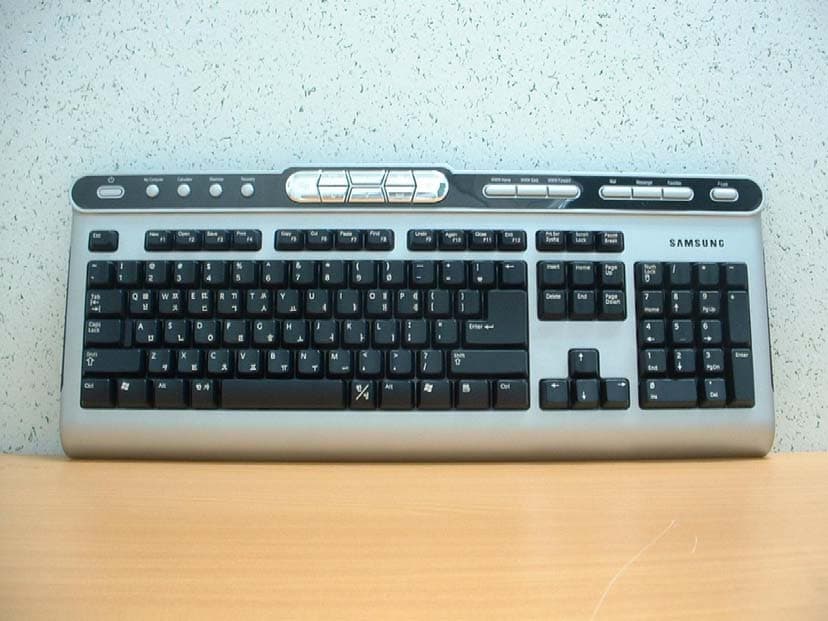
Click to zoom
Application Details
- Equipment Class
- DXX - Part 15 Low Power Communication Device Transmitter
- Date of Grant
- Aug 15, 2004
- Application Purpose
- Original Equipment
- Date of Application
- Aug 15, 2004
- Equipment Note
- WIRELESS MULTIMEDIA KEYBOARD
- Frequency Range
- 27.04500000 - 27.04500000
- Company
- Samsung Electro Mechanics
- Country
- South Korea
Documents & Files
Document Text
Text extracted from the exhibit documents filed with the FCC. Open a document above to read the original.
Users Manual
Warranty Period This product is guaranteed for one year. Limited to general or office use only. This period is halved if it is used for business purposes. Replacement of consumables that have reached the end of their service life will be subject to a charge. A/S Service http://www.sem.samsung.com Wireless Multimedia Keyboard & Optical Mouse OMR6000 User’s Manual EW-002 www.sem.samsung.com 4. Click the button on the top of the receiver to connect the keyboard.5. Click the button on the left upper part on the bottom of keyboard. 6. Click the button on the top of the receiver to connect the mouse.7. Click the button on the bottom of the mouse. Retry if the mouse or keyboard do not operate. Install1. Insert the CD provided with the product into the CD-ROM drive. 2. When the CD is inserted, the installation will run automatically. 3. If the program does not run automatically, click on Setup.exe.4. Select the installation language and press the Next button.5. Follow the instructions as they appear on the screen. You can download this program at our website. Uninstall 1. Select Samsung>OMR6000>Uninstall from the Start menu.2. Or, select the Add/Remove Program icon from the Control Panel to remove the OMR 6000. (Picture 3, 5) (Picture 6) (Picture 4) , . Thank you for purchasing Samsung's wireless keyboard and mouse. FeaturesConnect to Computer( Make sure to install driver after plugging USB receiver to the computer.) 1. Turn on your computer (Picture 1) 2. Connect the receiver to a USB port (Picture 2) 3. Insert 2 non-rechargeable AA type batteries in keyboard and mouse batteries observing the correct polarities. (Picture 3) Item Features Keyboard Mouse RF TechnologyInterfaceMaximum operating distanceResolutionWakeup from power-savingOS 27MHz, 1ChUSB1.5mInput of any keyWin98/Me/2000/XP 27MHz, 1ChUSB1m800 DPIButton clickWin98/Me/2000/XP Maximum operating distance may differ depending on the situation. (Picture 1) (Picture 3) , . , . (Picture 2) - Internet key: rerun explorer. - Office key: may not operate properly at specific program (Ex : Hangul 97, etc.) - Media key: update the Windows Media Player. (Produced based on Win98: Windows media player 7, WinMe/2000/XP: Windows media player 9 series.) 7. Application error occurs while hot key program is used. - Conflict may occur between applications. (Rerun keyboard program: Start>Samsung>OMR6000>Keyboard) 8. Cannot install program. - After connecting USB receiver, insert CD and install the driver. Keyboard Hot Key Function 1 Internet Internet Run Internet Explorer 2 Mail Internet Run Outlook Express 3 Previous page Internet Move to previous page 4 Next page Internet Move to next page 5 Messenger Internet Run MSN 6 My Computer Internet Run My Computer 7 Calculator Internet Run Calculator 8 Minimize window Internet Minimize Windows window No. Hot Key Name Classification Function - Initialize ID: click the button on the top of the receiver and then click the button on the bottom of the keyboard/mouse. 2. Mouse does not work. - Wakeup: the power circuit is suspended automatically if you do not use the mouse for 5 minutes or more. Press any button to resume operation. (Picture 7) 3. Communication is poor. - For best performance it is recommended to place the receiver at least 20 cm away from any metal, or electrical devices such as the monitor, computer, or a remote control. Operating distances may differ depending on obstacles and the actual location of the receiver. (Picture 8) 4. If the mouse cursor moves unevenly - Highly reflective surfaces such as glass, or surfaces with a repeated pattern such as wood grain, may affect the operation of the optical mouse sensor. Use the mouse on a different surface. - It may not operate properly if the voltage of battery is low. Replace battery. 5. The mouse batteries do not last. - Battery consumption varies greatly depending on the type of surface (mouse pad) on which the wireless optical mouse is used. It is strongly recommended to use a bright (white) surface. 6. Hot key does not work properly. (Picture 7) 4$ 20cm (Picture 8) Hot key may not properly work depending on program and version(Outlook Express, Windows Media Player, Word Processor, etc) Cautions 1. The red LED on the mouse button is tested to the relevant specifications and has been proved to be safe. However, avoid looking at it directly too frequently. 2. If you experience any of the symptoms of CTS (Carpal Tunnel Syndrome) or MD (Musculoskeletal Disorder) after or during computer work, consult your doctor. 3. Insert 2 non-rechargeable AA type batteries in the keyboard/mouse battery compartments. 4. Do not use this product for purpose other than designated. 5. Do not modify this product without approval. 6. If you do not install this program, you may not use some functions of keyboard/mouse. , . , . 9 Maximize window Internet Maximize Windows window 10 Bookmark Internet Open/Close Bookmark 11 Volume down Multimedia Windows master volume down 12 Volume up Multimedia Windows master volume up 13 Volume mute Multimedia Windows mater volume mute 14 Media Player Multimedia Run Windows Media Player 15 Play/Pause Multimedia Play/Pause Windows Media Player 16 Stop Multimedia Stop Windows Media Player 17 Previous track Multimedia Previous track of Windows Media Player 18 Next track Multimedia Next track of Windows Media Player 19 New document Office Run New of word processor 20 Open Office Run Open of word processor 21 Save Office Run Save of word processor 22 Print Office Run Print of word processor 23 Copy Office Run Copy of word processor 24 Cut Office Run Cut of word processor 25 Find Office Run Find of word processor 26 Paste Office Run Paste of word processor 27 Undo Office Run Undo of word processor 28 Rerun Office Run Rerun of word processor 29 Close Office Close document of word processor 30 Exit Office Exit word processor 31 F-Lock Function F1~F12 key Function Shift Cautions Modifications not expressly approv ed by the party responsible for complian…
Text truncated - open the document above for the full version.
Cover Letter(s)
314, Maethan-3 Dong, Paldal-Ku, Suwon-City, Korea Aug 05, 2004 Federal Communications Commission Equipment Authorization Branch 7435 Oakland Mills Road Columbia, MD 21046 In re : SAMSUNG Electro-Mechanics Co.,Ltd. FCC ID : E2XOMR6000K Request for Confidentiality Gentlemen: In accordance with 0.459 of CFR 47, SAMSUNG Electro-Mechanics Co., Ltd. hereby requests confidentiality of the Schematics, Parts list and Operational description of the attached test report. These documents contain detailed system and equipment description and related information about the product which SAMSUNG Electro-Mechanics Co., Ltd. considers to be proprietary, confidential, and a custom design and, otherwise, would not release to the general public. Since this design is a basis from which future technological products will evolve, SAMSUNG Electro-Mechanics Co., Ltd. considers that this information would be of benefit to its competitors, and that the disclosure of the information in these documents would give competitors an unfair advantage in the market. Sincerely, J.H. LIM / Manager
External Photos
FCC ID: E2XOMR6000K Copyright Ⓒ 2004, DIGITAL EMC Co., Ltd. View 1
ID Label/Location Info
FCC ID: E2XOMR6000K FCC ID SAMPLE LABEL & LOCATION LABELLING REQUIREMENTS PER §2.925 The Label shown shall be permanently affixed at a conspicuous location on the device and be readily visible to the user at the time of purchase (SEE NEXT PAGE) FCC ID: E2XOMR6000K APPENDIX - 1 FCC ID: E2XOMR6000K Model No.: OMR6000K This device complies with Part 15 of the FCC Rules. Operation is subject to the following two conditions: (1)this device may not cause harmful interference, and (2) this device must accept any interference received, including interference that may cause undesired operation.
Internal Photos
FCC ID: E2XOMR6000K Copyright Ⓒ 2004, DIGITAL EMC Co., Ltd. View 1 FCC ID: E2XOMR6000K Copyright Ⓒ 2004, DIGITAL EMC Co., Ltd. View 2 FCC ID: E2XOMR6000K Copyright Ⓒ 2004, DIGITAL EMC Co., Ltd. View 3 FCC ID: E2XOMR6000K Copyright Ⓒ 2004, DIGITAL EMC Co., Ltd. View 4
Test Report
DEMC#DR50110408A FCC ID: E2XOMR6000K Copyright ○ c 2004, DIGITAL EMC Co., Ltd. Page 1 of 12 683-3, Yubang-Dong, Yongin-Si, Kyunggi-Do, Korea. 449-080 Tel: +82-31-321-2664 Fax: +82-31-321-1664 http://www.digitalemc.com CERTIFICATE OF COMPLIANCE FCC Part 15C Certification Dates of Tests: August 09 ~ 11, 2004 Test Report S/N:DR50110408A Test Site : DIGITAL EMC CO., LTD. FCC ID. APPLICANT FCC Classification : Low Power Communication Device Transmitter Device name : 27MHz Wireless Multimedia Keyboard Manufacturer : Dongguan Samsung Electro-Mechanics Co., Ltd. Quan-Tang Village, Liao-Bu Town, Dong-Guan City, Guang-Dong Province P.R CHINA P.C:523425 Brand : Model name : OMR6000K Test Device Serial number : Identical prototype FCC Rule Part(s) : FCC Part 15.227 Subpart C; ANSI C-63.4-2001 Frequency Range : 27.045 MHz Data of issue : August 12, 2004 I attest to the accuracy of data. All measurements reported herein were performed by me or were made under my supervision and are correct to the best of my knowledge and belief. I assume full responsibility for the completeness of these measurements and vouch for the qualifications of all persons taking them. E2XOMR6000K SAMSUNG Electro-Mechanics Co., Ltd. DEMC#DR50110408A FCC ID: E2XOMR6000K Copyright ○ c 2004, DIGITAL EMC Co., Ltd. Page 2 of 12 TABLE OF CONTENTS 1. GENERAL INFORMATION’S -------------------------------------------------------------------------- 2. INFORMATION’S ABOUT TEST ITEM ------------------------------------------------------------- 3. TEST REPORT --------------------------------------------------------------------------------------------- 3.1 SUMMARY OF TESTS ------------------------------------------------------------------------------ 3.2 TRANSMITTER REQUIREMENTS --------------------------------------------------------------- 3.2.1 RADIATED EMISSION ------------------------------------------------------------------------ 3.2.2.1 THE FIELD STRENGTH OF ANY EMISSION WITHIN THE BAND 26.96–27.28 MHz. ---- 3.2.2.2 OUT OF BAND EMISSION -------------------------------------------------------------------------- 3.2.2 ADDITIONAL PROVISIONS THO THE GENERAL RADIATED EMISSION LIMITATIONS - ANNEX TEST EQUIPMENT USED FOR TESTS --------------------------------------------------- 3 4 5 5 6 6 7 8 9 10 DEMC#DR50110408A FCC ID: E2XOMR6000K Copyright ○ c 2004, DIGITAL EMC Co., Ltd. Page 3 of 12 1. General information’s This report contains the result of tests performed by: DIGITAL EMC CO., LTD. Address : 683-3, Yubang-Dong, Yongin-Si, Kyunggi-Do, Korea. 449-080 http://www.digitalemc.com E-mail : [email protected] Tel: +82-31-321-2664 Fax: +82-31-321-1664 Quality control in the testing laboratory is implemented as per ISO/IEC 17025 which is the “General requirements for the competents of calibration and testing laboratory”. This laboratory is accredited by NVLAP for NVLAP Lab. Code : 200559-0. Test operator: engineer August 12, 2004 Won -Jong LEE Data Name Signature Report Reviewed By: manager August 12, 2004 Dong -Min JUNG Data Name Signature Ordering party: Company name : SAMSUNG Electro-Mechanics Co., Ltd. Address : 314, Maethan-3Dong, Paldal-Ku, City/town : Suwon City, Kyunggi Do Country : Korea Zip code : 442-743 Date of order : July 27, 2004 Att. : Mr. Jun-Hwan, Lim DEMC#DR50110408A FCC ID: E2XOMR6000K Copyright ○ c 2004, DIGITAL EMC Co., Ltd. Page 4 of 12 2. Information’s about test item E2XOMR6000K 2.1 Equipment information Equipment model name OMR6000K Type of equipment 27MHz Wireless Multimedia Keyboard Frequency band 27.045 MHz Type of Modulation FSK Physical channel 1 CH Power DC 3 V (By AA size Battery * 2EA) 2.2 Tested environment Temperature : 15 ~ 35 ( o C) Relative humidity content : 20 ~ 75 % Air pressure : 86 ~ 103 kPa Details of power supply : DC 3 V (By AA size Battery * 2EA) 2.3 Ancillary Equipment Equipment Model No. Serial No. Manufacturer Notebook PP02X 8K493A01 DELL Printer 2225C 3245S12493 HP Receiver OMR6000R N/A Samsung Keyboard (EUT) OMR6000K N/A Samsung Mouse OMR6000M N/A Samsung Mic N/A N/A N/A Earphone N/A N/A N/A 2.4 EMI Suppression Device(s)/Modifications None DEMC#DR50110408A FCC ID: E2XOMR6000K Copyright ○ c 2004, DIGITAL EMC Co., Ltd. Page 5 of 12 3. Test Report 3.1 Summary of tests FCC Part Section(s) Parameter Status (note 1) Transmitter requirements 15.227(a) Radiated Emission - The field strength of any emission within the band 26.96–27.28 MHz. C 15.227(b) / 15.209 Radiated Emission - Out of Band Emissions C 15.215 Additional provisions to the general radiated emission limitations. C 15.207 Conducted Emissions Limits NA Note 1: C= Complies NC=Not Complies NT=Not Tested NA=Not Applicable The sample was tested according to the following specification: FCC Parts 15.227, 15.215; ANSI C-63.4-2001 DEMC#DR50110408A FCC ID: E2XOMR6000K Copyright ○ c 2004, DIGITAL EMC Co., Ltd. Page 6 of 12 3.2 Transmitter requirements 3.2.1 Radiated Emission Procedure: The EUT was placed on a 0.8m high wooden table inside a shielded enclosure. An antenna was placed near the EUT and measurements of frequencies and amplitudes of field strengths were recorded for reference during final measurements. For final radiated testing, measurements were performed in a OATS. Measurements were performed with the EUT oriented in 3 orthogonal axis and rotated 360 degrees to determine worst-case orientation for maximum emissions. The spectrum analyzer is set to: Frequency Range = 27 MHz ~ 10 th harmonic. RBW = 120 kHz ( 30MHz ~ 1 GHz) = 1 MHz (1 GHz ~ 10 th harmonic ) VBW ≥ RBW Trace = max hold Detector function = peak / Quasi-peak / average Sweep = auto Measurement Data: - Refer to the Next page Minimum Standard: FCC Part 15.227 / 15.209 Frequency (MHz) Limit (uV/m) @ 3m 26.96–27.28 < 10000 30 ~ 88 100 ** 88 ~ 216 150 ** 216 ~ 960 200 ** Above 960 500 ** Except as provided in 15.209(g), fundamental emissions from intentional radiators operating under this Section shall not be located in the frequency bands 54-72 MHz, 76-88MHz, 174-216MHz or 470-8…
Text truncated - open the document above for the full version.
Contact Information
Applicant
Jinhwan Lim(Assistant Manager)
Test Firm
DT&C Co.,Changho Lee
Technical Specifications
| # | Rule Parts | Frequency Range | Power Output |
|---|---|---|---|
| 1 | 15C | 27.045 MHz - 27.045 MHz | - |
Other Applications from Samsung Electro Mechanics

E2X-ST-GR2900N
Oct 01, 2015ESL Graphic TAG
Equipment Class
DTS - Digital Transmission System
E2X-ST-GM29XXF
Sep 23, 2015ESL Graphic TAG
Equipment Class
DTS - Digital Transmission System
E2X-ST-GM22XXF
Sep 16, 2015ESL Graphic TAG
Equipment Class
DTS - Digital Transmission System
E2X-ST-GM42003N
Sep 10, 2015ESL Graphic TAG
Equipment Class
DTS - Digital Transmission System
E2X-ST-GM6000N
Aug 26, 2015ESL Graphic TAG
Equipment Class
DTS - Digital Transmission System