FHOIK88T900MHz Analog Baby Monitor - Baby Unit
IKEA of Sweden AB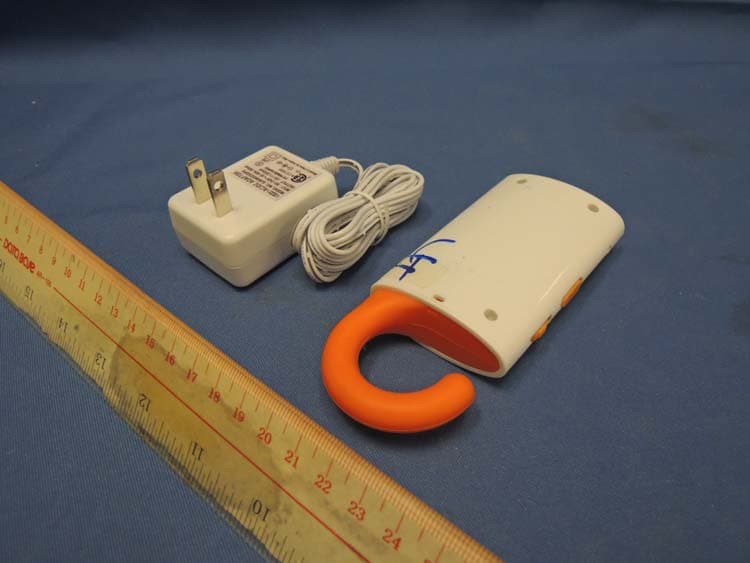
Click to zoom
Application Details
- Equipment Class
- DXX - Part 15 Low Power Communication Device Transmitter
- Date of Grant
- Nov 06, 2013
- Application Purpose
- Original Equipment
- Date of Application
- Nov 06, 2013
- Equipment Note
- 900MHz Analog Baby Monitor - Baby Unit
- Frequency Range
- 904.00000000 - 904.90000000
- Company
- IKEA of Sweden AB
- Country
- Sweden
Documents & Files
Document Text
Text extracted from the exhibit documents filed with the FCC. Open a document above to read the original.
Users Manual
PATRULL Design Jonas Forman Design and Quality IKEA of Sweden 1 2 3 4 5 6 7 8 9 1 0 ENGLISH 6 DEUTSCH 12 FRANÇAIS 18 NEDERLANDS 24 DANSK 30 ÍSLENSKA 36 NORSK 42 SUOMI 48 SVENSKA 54 ČESKY 60 ESPAÑOL 66 ITALIANO 72 MAGYAR 78 POLSKI 84 LIETUVIŲ 90 PORTUGUÊS 96 ROMÂNA 102 SLOVENSKY 108 БЪЛГАРСКИ 114 HRVATSKI 120 ΕΛΛΗΝΙΚΑ 126 РУССКИЙ 132 SRPSKI 138 SLOVENŠČINA 144 TÜRKÇE 150 عربي 156 1 2 3 4 5 6 7 8 9 1 0 A 6 5 4 3 8 16 11 12 13 14 17 2 10 18 9 15 19 1 7 B B How to use A, Baby unit (transmitter) 1.Switch the power on by pushing the Power switch (1) from O to I. When the power is on, the Power supply indicator (3) lights up steady green. If the indicator starts blinking red, the unit needs to be charged. 2.Select one of the ten channels on the Channel selector (8). You need to use a coin or similar object to turn the channel selector to the desired position. This is a precaution to prevent the unit from switching channels accidentally. 3.You can adjust the sensitivity of the microphone from 1 to 8 using the Microphone sensitivity control (2). The microphone is most sensitive to sound when it is set to 8, and least sensitive when it is set to 1. If there is a lot of background noise, it’s a good idea to lower the microphone sensitivity. If the surroundings are quiet, the microphone sensitivity can be set higher. 4. The Transmitting indicator (4) lights up red when it picks up sound. It stays lit for 5 seconds after the sound has stopped, before it goes back to stand-by mode. In stand-by mode, the light goes off. While in stand-by mode, the baby unit emits a signal to the adult unit at regular intervals to make sure they are in contact with each other. This is indicated by the red light. 5.Place the baby unit near your child, with the microphone facing the child. Make sure the unit is close enough to pick up sounds from your child, but not so close that your child can reach it. 1 metre (3.2 feet) is a good distance. B, Adult unit (receiver) NOTE! Make sure the adult unit is at least a couple of metres away from the baby unit before you switch it on. If the units are too close to each other, feedback between the units can create a loud screeching noise. 1.Switch the power on by pushing the Power switch (9) from O to I. When the power is on, the Power supply indicator (11) lights up steady green. If the indicator starts blinking red, the unit needs to be charged. 2.Select the same channel for this unit as for the baby unit, using the Channel selector (16). In case you notice any interference or static noises, select another channel and implement on both units. 3.You can adjust volume of the Speaker (13) from 1 (lowest) to 8 (highest) using the Volume control (10). 4.When a signal is received, the Signal indicator (14) will light up red. The brightness of the light varies according to how strong the sound is, i.e it adjusts to the level of your child’s cries. This indicator is useful for monitoring your child when the volume of the adult unit is set on low. 5.When the adult unit is in contact with the baby unit, this is indicated by a green steady light on the Connection indicator (12). If the units are out of contact with each other for more than 30 seconds, the Connection indicator will start blinking red. There will also be a beeping signal to alert your attention. This signal is also activated if the baby unit is switched off, or if the selected channels on the two units don’t match. 6.You can carry the adult unit with you by attaching a neckband through the Hole for neckband (17) or using the included Belt clip (18). Just slide the Belt clip over the receiver until it snaps in place. To remove it, bend it outwards and pull it off the unit. How to charge the units Only use the included AC adapters (19) to charge the units by plugging them into the Jack for charger (7, 15). Using other adapters could cause damage to the baby monitor units. Two chargers are included, so you can charge both units at the same time. You can charge the units when they’re on as well as off. When a unit is being charged, the Power supply indicator (3,11) will light up steady red. IMPORTANT! THE BATTERIES CANNOT BE REPLACED. Disposal of batteries to be done according to instructions, see below. Only use the included 6V 300mA type AC adapters for charging the baby monitor units. Other adapters could cause damage to the units. If you don’t plan to use the units for more than a week, make sure the batteries are fully charged before putting the units away. Leaving the units unused and completely uncharged could cause them to stop functioning. Used regularly and for the intended purpose, the batteries will last approximately 3-4 years. 89 Disconnect the AC adapters from the wall socket when not in use, in order to save energy. The baby monitor units can be used in temperatures ranging from 0 ̊C to 50 ̊C (32 ̊F to 122 ̊F) Do not leave the units in direct sunlight or near any heat source, since this can cause overheating. Do not subject the units to wet, moist or excessively dusty environments since this can cause damage to the units. Care instructions To clean the units, wipe them with a soft cloth moistened with a little mild detergent. Use another soft dry cloth to wipe them dry. NOTE! Never use abrasive cleaners or chemical solvents since this can damage the products. End of use Disposal of batteries to be done according to instructions below: ENVIRONMENTAL DISPOSAL INSTRUCTIONS The crossed-out wheeled bin symbol indicates that the item should be disposed of separately from household waste. The item should be handed in for recycling in accordance with local environmental regulations for waste disposal. By separating a marked item from household waste, you will help reduce the volume of waste sent to incinerators or land-fill and minimize any potential negative impact on human health and the environment. For more information, please contact your IKEA store. 1011 A. Babyeinheit (Sender) 1. Schalter An/Aus 2. Einstellrad für …
Text truncated - open the document above for the full version.
External Photos
INTERTEK TESTING SERVICES External Photos FCC ID: FHOIK88T external photos - 1 of 1 HK12120973 Job Number HK12120973 Job Number
ID Label/Location Info
IKEA of Sweden AB SE 343 81 Ä lmhult IKEA of Sweden AB SE 343 81 Ä lmhult IKEAFCC ID:FHOIK88T IKEA
Internal Photos
INTERTEK TESTING SERVICES Internal photos FCC ID: FHOIK88T internal photos - 1 of 3 Baby Unit assembly Baby Unit Main PCB comp side INTERTEK TESTING SERVICES Internal photos FCC ID: FHOIK88T internal photos - 2 of 3 Baby Unit Main PCB solder side (View 1) Baby Unit Main PCB solder side (View 2) INTERTEK TESTING SERVICES Internal photos FCC ID: FHOIK88T internal photos - 3 of 3 Baby Unit Oscillator PCB comp side
RF Exposure Info
INTERTEK TESTING SERVICES FCC ID: FHOIK88T RF exposure info- 1 of 1 For Standalone SAR test exclusion consideration, when the corresponding SAR Exclusion Threshold requirement in KDB 447498 is satisfied, standalone SAR evaluation for general population exposure conditions, by measurement or numerical simulation is not required. Description the tested model: IK88 EUT Description : 900MHz Analog Modulation Baby Unit Model : IK88 Operating Configuration(s) : Table-top Operating mode (s) : Voice Device Category : Portable Device Tx Frequency : 904.000 – 904.900 MHz Production tolerance : -11 dBm (Minimum) to -2.2 dBm (Maximum) Antenna gain : 0 dBi = 1.00 (num gain) Maximum source-based time- averaging duty factor : 100.0% = (1/1 x100%) Minimum separation distance : 5 mm Applicable FCC KDB : FCC KDB 447498 D01r01 FCC KDB 865664 D02r01 From above data, the source-based time-averaging output power is as follow: The Maximum Conducted Power = -2.2 dBm = 0.6 mW The Maximum conducted Power source-based time-averaging output power = (0.6 * 1.000) mW = 0.60 mW In the frequency range of 100MHz to 6GHz and test separation distance ≤ 50mm, the SAR Exclusion Threshold will be determined as follow, The SAR exclusion threshold = )(/0.3GHzFTD = 15.77 mW where TD = 5 mm and F(GHz) = 0.905 GHz Conclusion Since the calculated conducted source-based time-averaged output power is 0.60 mW, which is less than the SAR Exclusion Threshold at 5mm test separation distance 15.77 mW for general population and uncontrolled exposure, standalone SAR evaluation for general population exposure conditions, by measurement or numerical simulation is not required.
Test Report
Issuing Laboratory: Intertek Testing Services Hong Kong Limited Hong Kong Accreditation Service (HKAS) has accredited this laboratory under the Hong Kong Laboratory Accreditation Scheme (HOKLAS) for specific laboratory activities as listed in the HOKLAS directory of accredited laboratories. The results shown in this report were determined by this laboratory in accordance with its terms of accreditation. Test Report Number: 12120973HKG-001 Page 1 of 23 FCC ID: FHOIK88T Intertek Testing Services Hong Kong Ltd. 2/F., Garment Centre, 576 Castle Peak Road, Kowloon, Hong Kong. Tel: (852) 2173 8888 Fax: (852) 2785 5487 Website: www.hk.intertek-etlsemko.com GENERAL INFORMATION Applicant Name: IKEA of Sweden AB Applicant Address: Box 700 34381 Älmhult Sweden FCC Specification Standard: FCC Part 15, October 1, 2012 Edition FCC ID: FHOIK88T FCC Model(s): IK88 Type of EUT: Transmitter Description of EUT: 900MHz 10 Channel Analog Modulation Baby Monitor - Baby Unit Serial Number: N/A Sample Receipt Date: January 4, 2013 Date of Test: March 4, 2013 to March 7, 2013 Report Date: September 27, 2013 Environmental Conditions: Temperature: +10 to 40°C Humidity: 10 to 90% Issuing Laboratory: Intertek Testing Services Hong Kong Limited Hong Kong Accreditation Service (HKAS) has accredited this laboratory under the Hong Kong Laboratory Accreditation Scheme (HOKLAS) for specific laboratory activities as listed in the HOKLAS directory of accredited laboratories. The results shown in this report were determined by this laboratory in accordance with its terms of accreditation. Test Report Number: 12120973HKG-001 Page 2 of 23 FCC ID: FHOIK88T Intertek Testing Services Hong Kong Ltd. 2/F., Garment Centre, 576 Castle Peak Road, Kowloon, Hong Kong. Tel: (852) 2173 8888 Fax: (852) 2785 5487 Website: www.hk.intertek-etlsemko.com Table of Contents 1.0 Test Results Summary & Statement of Compliance......................................... 4 1.1 Summary of Test Results ................................................................................... 4 1.2 Statement of Compliance ................................................................................... 4 2.0 General Description............................................................................................ 6 2.1 Product Description ............................................................................................ 6 2.2 Test Methodology............................................................................................... 6 2.3 Test Facility........................................................................................................ 6 3.0 System Test Configuration................................................................................. 8 3.1 Justification ........................................................................................................ 8 3.2 EUT Exercising Software.................................................................................... 9 3.3 Details of EUT and Description of Accessories................................................. 10 3.4 Measurement Uncertainty ................................................................................ 10 4.0 Test Results....................................................................................................... 12 4.1 Field Strength Calculation................................................................................. 13 4.2 Radiated Emissions.......................................................................................... 14 4.2.1 Radiated Emission Configuration Photograph ................................................ 14 4.2.2 Radiated Emission Data ................................................................................ 14 4.2.3 Transmitter Duty Cycle Calculation ................................................................ 16 4.3 Radiated Emission on the Bandedge................................................................ 17 4.4 AC Power Line Conducted Emission ................................................................ 19 4.4.1 AC Power Line Conducted Emission Configuration Photograph..................... 19 4.4.2 AC Power Line Conducted Emission Data ..................................................... 19 5.0 Equipment List................................................................................................. 23 Issuing Laboratory: Intertek Testing Services Hong Kong Limited Hong Kong Accreditation Service (HKAS) has accredited this laboratory under the Hong Kong Laboratory Accreditation Scheme (HOKLAS) for specific laboratory activities as listed in the HOKLAS directory of accredited laboratories. The results shown in this report were determined by this laboratory in accordance with its terms of accreditation. Test Report Number: 12120973HKG-001 Page 3 of 23 FCC ID: FHOIK88T Intertek Testing Services Hong Kong Ltd. 2/F., Garment Centre, 576 Castle Peak Road, Kowloon, Hong Kong. Tel: (852) 2173 8888 Fax: (852) 2785 5487 Website: www.hk.intertek-etlsemko.com EXHIBIT 1 TEST RESULTS SUMMARY & STATEMENT OF COMPLIANCE Issuing Laboratory: Intertek Testing Services Hong Kong Limited Hong Kong Accreditation Service (HKAS) has accredited this laboratory under the Hong Kong Laboratory Accreditation Scheme (HOKLAS) for specific laboratory activities as listed in the HOKLAS directory of accredited laboratories. The results shown in this report were determined by this laboratory in accordance with its terms of accreditation. Test Report Number: 12120973HKG-001 Page 4 of 23 FCC ID: FHOIK88T Intertek Testing Services Hong Kong Ltd. 2/F., Garment Centre, 576 Castle Peak Road, Kowloon, Hong Kong. Tel: (852) 2173 8888 Fax: (852) 2785 5487 Website: www.hk.intertek-etlsemko.com 1.0 Test Results Summary & Statement of Compliance 1.1 Summary of Test Results Test Items FCC Part 15 Section Results Details see section Antenna Requirement 15.203 Pass 2.1 Radiated Emission Radiated Emission on the B…
Text truncated - open the document above for the full version.
Test Setup Photos
INTERTEK TESTING SERVICES The Worst Case Configuration Photographs - Mode: Transmission FCC ID: FHOIK88T config photos (radiated emission - baby unit) - 1 of 1 Radiated Emission Front View Rear View INTERTEK TESTING SERVICES The Worst Case Configuration Photographs - Mode: Talk FCC ID: FHOIK88T config photos (conducted emission) - 1 of 2 Conducted Emission Front View Right Side View INTERTEK TESTING SERVICES The Worst Case Configuration Photographs - Mode: Talk FCC ID: FHOIK88T config photos (conducted emission) - 2 of 2 Conducted Emission Left Side View
Contact Information
Applicant
Ivan Susak(Business Area Product Engineering Manager)
Technical Contact
Intertek Testing Services Hong Kong Ltd.Melvin Nip
[email protected]852-2173-8888
Flat D, 5/F., Garment Centre · Kowloon · Hong Kong
Non-Technical Contact
Intertek Testing Services Hong Kong Ltd.Melvin Nip
[email protected]852-2173-8888
Test Firm
Intertek Testing Services Hong Kong Ltd.Billy Chow
Technical Specifications
| # | Rule Parts | Frequency Range | Power Output |
|---|---|---|---|
| 1 | 15C | 904 MHz - 904.9 MHz | - |
Other Applications from IKEA of Sweden AB
Jul 31, 2026
FHO-E2705
Jul 31, 2026Door window sensor
Equipment Class
JAB - Part 15 Class B Digital DeviceFHO-LED2510R3K5NA
Jul 11, 2026LED lamp
Equipment Class
JAV - Other Non-Digital SDoC DevicesFHO-LED2510R3NA
Jul 11, 2026LED lamp
Equipment Class
JAV - Other Non-Digital SDoC DevicesFHO-E2704
Jul 11, 2026Remote Control (Scroll Wheel)
Equipment Class
JAB - Part 15 Class B Digital Device