FYORECEIVERF-DOLPHIN AIRMOUSE
Shenzhen KehWin Technologies Co., Ltd.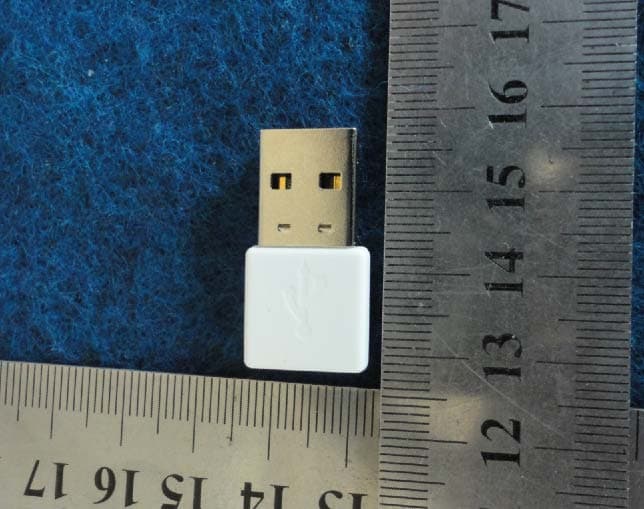
Click to zoom
Application Details
- Equipment Class
- JBP - Part 15 Class B Computing Device Peripheral
- Date of Grant
- Apr 10, 2012
- Application Purpose
- Original Equipment
- Date of Application
- Apr 10, 2012
- Equipment Note
- F-DOLPHIN AIRMOUSE
- Country
- China
Documents & Files
Document Text
Text extracted from the exhibit documents filed with the FCC. Open a document above to read the original.
Users Manual
Media Player Control Play/Pause Click: STOP Double Click: ESC Pre Next Click: MuteDouble Click: Switch on/off Soft KeyboardHold Press: Adjust Volume through Wrist Movement Raise wrist to increase the volumeLower wrist to decrease the volume F-Dolphin Air Mouse Guide KehWin Device LED Power (A1) MIC (A7) Mouse Left Button (A20) USB Receiver A13 Run LED Hold press “power” key [A1] more than 1.5 second, power on Air Mouse;If Run Led rhythmically flashes in blue, indicate that air mouse is connected with USB receiver properly, can start to use;If Run Led rhythmically flashes in pink and blue, indicate that air mouse is not connected with USB receiver properly;*Please check if USB receiver is properly installed in host device. If USB receiver is properly installed, need to start regist ration process.Hold press “SRC/M” key [A13] more than 4 seconds, start registration process between air mouse and USB receiver. Vibration indicates the registration process is properly finished and Run Led recovers to rhythmically flash in blue. Step 1 ͵ Power On Up/Down/Left/Right key. Detailed Description please refer to Key Definition Table.Support Finger touch Mouse Wheel roll and slide control rolling clockwise: Mouse Scrolls Downrolling counter-clock wise: Mouse Scrolls Up Slide from Left to Right ˖ End Slide from Right to Left ˖ Home Slide Downward ˖ Page Down Slide Upward ˖ Page Up Described as Default. Can be configured as different control functions on requirement. Cross Arrow Key and Touch Control Can be Configured as PC Windows Mode or Android Mode according to different Host Device Platforms Device Mode Control Back Menu Search Mouse Right Button Mouse Right Button Return Click: Swap task WindowDouble Click: Close task Window Space Click: HomeDouble Click: Switchon/off F-Dolphin Driver Click: Back to Windows DesktopDouble Click: Switch on/offF-Dolphin Driver Android Mode PC Windows Mode DEV:Hold Press more than 1.5 second, Swap between 2.4G RF controlled device and IR controlled device. :Hold Press more than 1.5 second, Power on/off remote device under control; Double Click, Switch on/off Laser Pointer Mode. SRC/M:Click, switch on/off Mouse/Key Game Mode; Double Click, switch on/off Motion Game Mode;Hold Press more than 4 seconds, start registration process between air mouse and USB receiver. Device Mode Control Click "MIC"(A7) key to switch on audio input function. When F-Dolphin Audio Input function is on, the “Run” LED flashes Blue quickly. Click "MIC" key again to switch off audio input function.When Audio input function is on, fingers touch "Mouse Left Button" key will suspend audio input function and switch on mouse function, after fingers remove from "Mouse Left Button" key, audio input function will recover.KehWin-Device Driver support more features such as Audio Input parameters adjustment and field Record/Play, detailed information please refer to KehWin-Device Driver documents. Step 3 ͵ Audio Input Forefinger touch Mouse Left Button [A20] to turn on mouse output; forefinger leave Mouse Left Button to turn off mouse output. Keep forefinger touch Mouse Left Button, slightly rotate the wrist to move the mouse cursor anywhere on the screen.Keep F-Dolphin in *approximately horizontal (angle of inclination is between -45 to 45 degrees with the horizontal plane) can g et better experience. Use F-Dolphin with any adjustable posture to ensure ease and comfort. Loosen forefinger not touch “Mouse Left Button” if it needs to adjust the alignment relation of F-Dolphin and screen cursor whe n in use, adjust wrist posture to make F-Dolphin align to cursor, and then touch “Mouse Left Button” with forefinger for continuo us use.In applications (for example, shooting and clicking games) if fast clicking and tracking is needed, click "SRC/M"(A13) key to t urn on Mouse-Key Game Mode. Detailed operation please refer to Step 4. Step 2 ͵ Mouse Operation Press and push to open back cover;Pick the USB Receiver from back cover;Plug the USB receiver in the Host Device's USB port; Can place the USB Receiver into back cover when not used. Install USB Receiver Double click " " Key to enter into Laser Pointer Mode;In Laser Pointer Mode, Keep press Mouse Left Button to output laser, Loosen Mouse Left Button to close laser output;Double click " " Key again to leave Laser Pointer Mode and recover to normal mouse operation; *When enter into Laser Pointer mode, Run LED keeps lighting in Blue. And F-Dolphin is only used as a Laser Pointer, other functions are disabled. Laser Pointer Hold press "DEV" key more than 1.5 second to enter into IR Remoter Mode.In IR Remoter mode, click "DEV" to switch target device between defined IR remote control Devices, the key function of the remoter is defined by KehWin-Device Driver installed on Host, and the key function definition may be different from devices. Hold press "DEV" key more than 1.5 second again to leave IR Remoter Mode and recover to normal mouse operation. *When enter into IR Remoter Mode, Run LED is dark, and corresponding device LED keeps lighting. In IR Remoter Mode, F-Dolphin is only used as an IR Remoter. IR Remoter Press and push to open the back cover *When enter into Motion Game mode, Run LED flashes slowly in Blue and Pink. * When enter into Mouse/Key Game mode, Run Led flashes quickly in Blue and Pink. Step4 ͵ Game Operation Mouse/Key Game operation : Click "SRC/M" key to switch on Mose/Key Game mode, mouse operation is the same as described in Step 2. After game is finished, click"SRC/M" key again to switch off Mose/Key Game mode and recover to normal mouse operation.Motion Game operation : Double click "SRC/M" key to switch on/off F-Dolphin Motion Game Mode. Detailed operation process described as follow: Open KehWin Device Driver and Click on selected Game button in Driver to switch on the game control function; and then run the game;After setting and selection process is finished by mouse and key operation, double click "SRC/M" key to switch on F-Dolphin Motio…
Text truncated - open the document above for the full version.
Block Diagram
RECEIVER MCU U5 HT82K95E Crystal X2 16.00MHz RF 2.4GHz RF MODULE U3 NRF24L01 Crystal X1 12.00MHz BLOCK ANTENNA
External Photos
Appearance photograph of EUT Appearance photograph of EUT
Operational Description
DESCRIPTION This kit power supply is 5V that through USB connector to PC. Receiver have two p arts. One is 2.4G RF receiver. It will receive the data packet that send out from Keyboard TX moduel. Then p ass the packet to Receiver MCU (U5) to decode the data and pass to PC through USB connector.
Test Report
Page 1 FCC ID TEST REPORT for F-Dolphin AirMouse MODEL: KMsWand-06, KMsWand-08 Trade Mark: N/A FCC ID: FYORECEIVER Test Report Number: WSCT11120846E-1 Issued Date: March 26, 2012 Issued for: Shenzhen KehWin Technologies Co., Ltd. W2207-2209, Nanshan Digital-Culture Industrial Park, Shenzhen, China Issued by: World Standardization Certification & Testing CO., LTD. Building A, Baoshi Road, Baoshi Science & Technology Park, Bao’an District, Shenzhen, Guangdong, China TEL: +86-755-26996192 FAX: +86-755-26996253 Note: This report shall not be reproduced except in full, without the written approval of World Standardization Certification& Testing CO., LTD. This document may be altered or revised by World Standardization Certification& Testing CO., LTD. personnel only, and shall be noted in the revision section of the document. The test results in the report only apply to the tested sample. Report reference No.: WSCT11120846E-1 Issued: March 26, 2012 Revised: None TRF No.: FCC Part 15B-13/A0 Page 2 of 27 FCC ID: FYORECEIVER This report shall not be reproduced except in full, without the written approval of World Standardization Certification & Testing CO., LTD. Revision History Rev. Issue No. Revisions Effect Page Revised By 00 WSCT11120846E-1 Initial Issue ALL Kallen Wang Report reference No.: WSCT11120846E-1 Issued: March 26, 2012 Revised: None TRF No.: FCC Part 15B-13/A0 Page 3 of 27 FCC ID: FYORECEIVER This report shall not be reproduced except in full, without the written approval of World Standardization Certification & Testing CO., LTD. TABLE OF CONTENTS 1 TEST RESULT CERTIFICATION ................................................................................................. 4 2 EUT DESCRIPTION ..................................................................................................................... 4 3 TEST METHODOLOGY ................................................................................................................ 6 3.1. DECISION OF FINAL TEST MODE ........................................................................................................ 6 3.2. EUT SYSTEM OPERATION ................................................................................................................... 6 4 SETUP OF EQUIPMENT UNDER TEST ...................................................................................... 7 4.1. DESCRIPTION OF SUPPORT UNITS ................................................................................................... 7 4.2. CONFIGURATION OF SYSTEM UNDER TEST .................................................................................... 8 5 FACILITIES AND ACCREDITATIONS ......................................................................................... 9 5.1. FACILITIES ............................................................................................................................................. 9 5.2. ACCREDITATIONS ................................................................................................................................. 9 5.3. MEASUREMENT UNCERTAINTY .......................................................................................................... 9 6 CONDUCTED EMISSION MEASUREMENT ............................................................................. 10 6.1. LIMITS OF CONDUCTED EMISSION MEASUREMENT ..................................................................... 10 6.2. TEST INSTRUMENTS .......................................................................................................................... 10 6.3.TEST PROCEDURES ............................................................................................................................ 11 6.4. TEST SETUP ........................................................................................................................................ 12 6.5. TEST RESULTS .................................................................................................................................... 12 7 RADIATED EMISSION MEASUREMENT .................................................................................. 15 7.1. LIMITS OF RADIATED EMISSION MEASUREMENT .......................................................................... 15 7.2. TEST INSTRUMENTS .......................................................................................................................... 15 7.3. TEST PROCEDURES ........................................................................................................................... 16 7.4. TEST SETUP ........................................................................................................................................ 18 7.5. TEST RESULTS .................................................................................................................................... 19 8 PHOTOGRAPHS OF THE TEST CONFIGURATION ................................................................ 23 9 PHOTOGRAPHS OF EUT .......................................................................................................... 26 Report reference No.: WSCT11120846E-1 Issued: March 26, 2012 Revised: None TRF No.: FCC Part 15B-13/A0 Page 4 of 27 FCC ID: FYORECEIVER This report shall not be reproduced except in full, without the written approval of World Standardization Certification & Testing CO., LTD. 1 TEST RESULT CERTIFICATION Product: F-Dolphin AirMouse Model: KMsWand-06, KMsWand-08 Trade Mark: N/A Applicant: Shenzhen KehWin Technologies Co., Ltd. W2207-2209, Nanshan Digital-Culture Industrial Park, Shenzhen, China Manufacturer: Shenzhen KehWin Technologies Co., Ltd. W2207-2209, Nanshan Digital-Culture Industrial Park, Shenzhen, China Tested Date: December 26, 2011 ~ March 26, 2012 Test Voltage: DC 5V(PC Input AC 120V/60Hz) EMISSION Standard Item ResultRemarks FCC 47 CFR Part 15 Subpart B, ANSI C63.4-2003 Conducted (Main Port) PASS Meet Class B limit Radiated PASS …
Text truncated - open the document above for the full version.
Test Setup Photos
CONDUCTED EMISSION TEST RADIATED EMISSION TEST 9KHz-30MHz RADIATED EMISSION TEST 30MHz-1GHz RADIATED EMISSION TEST ABOVE 1GHz
Contact Information
Applicant
Zhongliang Guo(Manager)
Test Firm
World Standardization Certification&TestingCO.,LTDKelly Wu
Technical Specifications
| # | Rule Parts | Frequency Range | Power Output |
|---|---|---|---|
| 1 | 15B | - | - |
Other Applications from Shenzhen KehWin Technologies Co., Ltd.
FYOTRANSMITTER
Apr 10, 2012F-DOLPHIN AIRMOUSE
Equipment Class
DXX - Part 15 Low Power Communication Device Transmitter