G4O-SXSP715ATablet PC
SKYTEX Technology Inc.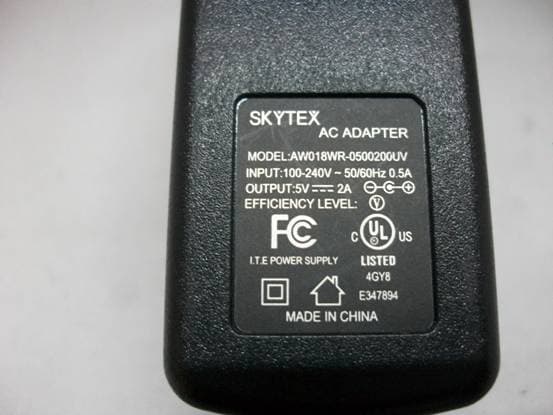
Click to zoom
Application Details
- Equipment Class
- JBC - Part 15 Class B Computing Device/Personal Computer
- Date of Grant
- Apr 11, 2012
- Application Purpose
- Original Equipment
- Date of Application
- Apr 11, 2012
- Equipment Note
- Tablet PC
- Company
- SKYTEX Technology Inc.
- Country
- United States
Documents & Files
Document Text
Text extracted from the exhibit documents filed with the FCC. Open a document above to read the original.
Users Manual
User Manual 1 CONTENTS Section Page Introduction 3 Section 1: Getting Started 4-5 Section 2: Understanding Your Device 6-9 Section 3: Settings 10-17 Section 4: Wireless Connectivity 18-19 Section 5: Web Browsing 20-21 Section 6: Pictures, Music and Video 22-25 Section 7: Camera and Email 26-28 Section 8: USB and Micro SD 29-30 Section 9: About SKYPAD Alpha 2 31 Section 10: Health and Safety Information 32-34 2 Introduction THANK YOU FOR PURCHASING THE SKYPAD ALPHA 2 INTERNET TABLET BY SKYTEX TECHNOLOGY. WE HOPE YOU ENJOY YOUR NEW DEVICE. PLEASE READ THIS MANUAL BEFORE OPERATING YOUR TABLET, AND KEEP IT FOR FUTURE REFERENCE. PLEASE BE ADVISED THAT MANY SERVICES AND APPLICATIONS OFFERED THROUGH THIS DEVICE ARE PROVIDED BY VARIOUS OPERATING SYSTEMS, SOFTWARE AND APPLICATIONS DEVELOPERS. IF YOU USE, LINK TO OR DOWNLOAD SUCH A SERVICE, OR AN APPLICATION, CHAT ROOM, FORUMS, MARKETPLACE OR SOCIAL NETWORK FROM THIS DEVICE, YOU SHOULD CAREFULLY REVIEW THE TERMS OF SUCH SERVICE OR APPLICATION. PERSONAL INFORMATION YOU SUBMIT MAY BE READ, COLLECTED, OR USED BY THE SERVICE OR APPLICATION PROVIDER AND/OR OTHER USERS OF THOSE FORUMS. PLEASE CAREFULLY REVIEW ANY AND ALL TERMS AND CONDITIONS APPLICABLE TO THOSE APPLICATIONS AND SERVICES, INCLUDING THOSE RELATED TO ANY LOCATION BASED SERVICES FOR ANY PARTICULAR PRIVACY POLICIES, RISKS OR WAIVERS. 3 SECTION 1: Getting Started Device controls and ports 1. Volume + 2. Volume - 3. Power 4. Microphone 5. 3.5mm Audio Jack 6. mini-HDMI 1.4 port 7. mini-USB OTG port 8. DC IN 9. Micro SD card reader 10. Speaker 11. Touch Key - Back 12. Touch Key - Home 13. Touch Key - Menu Turning Your Device On Press and hold the power button, the system will enter the 4 startup process, as follows: . Boot Logo startup . Unlock Screen (place your finger on the image of the lock and drag it up to the green dot) Turning Your Device Off Press and hold the power button, a pop-up menu of options will appear. Touch “Power off” and then “OK”. 5 . Widgets: Applications that run on the Home screen . Shortcuts: Shortcuts to commonly used applications . Status/Notifications bar: Displays network signal strength, battery life, time, and system notifications . Quick search box: Quick search the web by typing search terms Navigating Your Device Use command keys (home, back, menu) and the touch screen to navigate. Volume keys: changes the volume outputting through the speakers or headphones. Power key: Long press for power on/off, short press to enter or leave hibernation. Menu button: Displays the menu options for current operation. Home button: Back to the home screen Back: Return to last interface. 7 Finger Gestures . Tap items to select or launch them. . Tap a menu item to select it. . Tap an application’s icon to launch the application. . Pinch/expand to zoom in or out in the web browser and apps with pinch-to-zoom support. . Touch and hold a widget on the home screen to move or delete it. . Touch and hold on an empty area to display a pop-up menu of options (add widgets, shortcuts and folders, or change wallpaper). Notification panel . The notification panel shows information about connections, downloads, updates, etc. Applications Tray To open your applications tray, tap the corresponding icon on your shortcut menu: 8 The app tray displays all of the applications that have been installed to the device. Stock applications include a web browser, clock, camera, calculator, market (1 Mobile), gallery and more. 9 Section 3: Settings This section explains Settings for customizing your device. System Settings Click the main menu interface in the "settings" icon; you can open the system settings interface, as shown below: Accessing settings . From the Home screen, press the Menu key → Settings. . From the Home screen, touch Applications → Settings. Wireless and networks . Control your device’s wireless connections. . Wi-Fi settings interface as shown below: 10 . Your device supports Wi-Fi b/g/n. Use Wi-Fi settings to manage your device’s Wi-Fi connections. . Turning Wi-Fi On and Off. When you turn the Wi-Fi service on, your device automatically searches for available, in-range wireless Access Points. Managing Wireless Access Points . Tap Wi-Fi settings to choose the access point you wish to connect to . Tap the name of the access point of choice and enter the password/network key (if required) Sound and display Set the volume level for music, videos and apps . From the Home screen, press the Menu key→Settings→Volume . Touch and drag the sliders to set . or press the Volume +/- keys of the device to set 11 Date and time settings To set the date and time for your device, go to Settings → Date & time settings: . You can choose to automatically use the Network Time. . You can also manually set the date, select the time zone, and set the time, time format, and date format. For example: Select +: to increase the unit by 1, Select -: to decrease the unit by 1. You can also choose the number by entering the input mode. Manually enter the desired number, then select done. Like so: 12 Screen brightness To adjust screen brightness go to Settings → Display, scroll down section, select "Brightness", move the slider to the desired position and tap “OK”: Standby The screen can be set to automatically timeout when the tablet is idle over a set period of time. To set the screen timeout time, go to Settings → Display, then choose the length of time the tablet idles before the screen times out: Note: While playing video, the screen timeout is disabled. 13 HDMI The SKYPAD Alpha 2 supports HDMI 1.4 through a mini-HDMI port. . Plug a mini-HDMI-to-HDMI cable to an HD capable television or monitor Downloading and Installing Applications First we must allow the device to accept downloads from “unknown sources”. (Note: Android considers all 3 rd party app markets as “unknown sources”, including 1Mobile) . Go to Settings → Applications as shown below: Tap “Unknown Sources”, and then tap “OK”, as shown below: 14 The offic…
Text truncated - open the document above for the full version.
Cover Letter(s)
SKYTEX Technology Inc. Federal Communications Commission Equipment Authorization Branch 7435 Oakland Mills Road Columbia, MD 21046 Request for Confidentiality Company name: SKYTEX Technology Inc. FCC ID: G4O-SXSP715A FCC Part 15 Certification Gentlemen, Pursuant to 47 CFR 0.457(d)(1)(ii) and 0.459 we hereby requests permanent confidentiality of the following documents for the subject application: Exhibit Type r r r r Schematics Block Diagrams Bill Of Materials Operational Description Description All circuitry of devices and component values Details of device showing the frequency of all oscillators Parts list of the product for the radio device Description of the circuit functions Note: Exhibit types that are commonly held confidential are: (1} Schematics, (2) Block Diagrams, (3) Bill Of Materials, (4) Operational Descriptions Any exhibit NOT granted confidentiality is viewable on the FCC website as soon as a grant is issued These documents contain detailed system and equipment description and related information about the product which we considers to be proprietary, confidential and a custom design and otherwise would not release to the general public. Since the design is a basis from which future technological products will evolve, we consider that this information would be of benefit to its competitors and that the disclosure of the information in these documents would give competitors an unfair advantage in the market. Yours sincerely, Signatory Name Position Company Name Address Tel / Fax E-Mail Cindy CFO SKYTEX Technology Inc. 1900 Proforma Ave., #F-1, Ontario, CA91761 909-923-881 8/888-769-5977 [email protected]
External Photos
FRONT VIEW OF SAMPLE BACK VIEW OF SAMPLE LEFT VIEW OF SAMPLE RIGHT VIEW OF SAMPLE TOP VIEW OF SAMPLE BOTTOM VIEW OF SAMPLE PHOTO OF POWER SUPPLY-1 PHOTO OF POWER SUPPLY-2 PHOTO OF POWER Battery-1 PHOTO OF POWER USB CABLE-1 PHOTO OF THE ENTIRE SAMPLE-1 PHOTO OF THE ENTIRE SAMPLE-2
ID Label/Location Info
Model Name:SX-SP715A FCC ID:G4O-SXSP715A This device complies with part 15 of the FCC rules. Operation is subject to the following two conditions: (1)this device may not cause harmful interference, and (2)this device must accept any interference received,including interference that may cause undesired operation. MADE IN CHINA
ID Label/Location Info
Model Name:SX-SP715A FCC ID:G4O-SXSP715A This device complies with part 15 of the FCC rules. Operation is subject to the following two conditions: (1)this device may not cause harmful interference, and (2)this device must accept any interference received,including interference that may cause undesired operation. MADE IN CHINA
Internal Photos
INTERNAL PHOTO OF SAMPLE – 1 INTERNAL PHOTO OF SAMPLE – 2 INTERNAL PHOTO OF SAMPLE –3 INTERNAL PHOTO OF SAMPLE –4
Test Report
FCC 47 CFR PART 15 SUBPART B TEST REPORT For Applicant: SKYTEX Technology Inc. Address: 1900 Proforma Ave., #F-1, Ontario, CA91761 Product Name: Tablet PC Model Number: SX-SP715A(Other models are shown on APPENDIX I) Brand Name: N/A FCC ID: G4O-SXSP715A Report No.: MTE/EAH/D12030258 Date of Issue: Apr. 01, 2012 Issued by:Most Technology Service Co., Ltd. Address: No.5, Langshan 2nd Rd., North Hi-Tech Industrial park, Nanshan, Shenzhen, Guangdong, China Tel: 86-755-8617 0306 Fax : 86-755-8617 0310 The report consists 24 pages in total. It may be duplicated completely for legal use with the approval of the applicant. It should not be reproduced except in full, without the written approval of our laboratory. The client should not use it to claim product endorsement by MOST. The test results in the report only apply to the tested sample. The test report shall be invalid without all the signatures of testing engineers, reviewer and approver. FCC ID: G4O-SXSP715A Report No.: MTE/EAH/D12030258 Page 2 of 24 TABLE OF CONTENTS 1.VERIFICATION OF CONFORMITY .............................................................................................................. 3 2. GENERAL INFORMATION ............................................................................................................................ 4 2.1 PRODUCT INFORMATION .......................................................................................................................... 4 2.2 OBJECTIVE ................................................................................................................................................. 5 2.3 TEST STANDARDS AND RESULTS ............................................................................................................ 5 2.4 ENVIRONMENTAL CONDITIONS ............................................................................................................... 5 2.5 MEASUREMENT UNCERTAINTY ............................................................................................................... 5 3. TEST METHODOLOGY ................................................................................................................................. 6 3. 1TEST FACILITY............................................................................................................................................ 6 3.2 GENERAL TEST PROCEDURES ................................................................................................................ 6 3.3 FCC PART 15.205 RESTRICTED BANDS OF OPERATIONS..................................................................... 7 4 SETUP OF EQUIPMENT UNDER TEST ........................................................................................................ 8 4.1 SETUP CONFIGURATION OF EUT............................................................................................................. 8 4.2 SUPPORT EQUIPMENT.............................................................................................................................. 8 4. 3 TEST EQUIPMENT LIST ............................................................................................................................ 9 5. 47 CFR PART 15B REQUIREMENTS ....................................................................................................... 10 5.1 GENERAL INFORMATION......................................................................................................................... 10 6. LINE CONDUCTED EMISSION TEST .......................................................................................................11 6.1. LIMITS OF LINE CONDUCTED EMISSION TEST ....................................................................................11 6.2. BLOCK DIAGRAM OF TEST SETUP.........................................................................................................11 6.3. PRELIMINARY PROCEDURE OF LINE CONDUCTED EMISSION TEST ............................................... 12 6.4. FINAL PROCEDURE OF LINE CONDUCTED EMISSION TEST ............................................................. 12 6.5. TEST RESULT OF LINE CONDUCTED EMISSION TEST ....................................................................... 13 7. RADIATED EMISSION TEST ..................................................................................................... ............... 15 7.1. LIMITS OF RADIATED DISTURBANCES AT 3M DISTANCES FOR CLASS B ........................................ 15 7.2 TEST DESCRIPTION................................................................................................................................. 16 7.3 TEST RESULT ........................................................................................................................................... 17 APPENDIX I ..................................................................................................................................................... 20 APPENDIX II .................................................................................................................................................... 22 PHOTOGRAPHS OF TEST SETUP................................................................................................................. 22 FCC ID: G4O-SXSP715A Report No.: MTE/EAH/D12030258 Page 3 of 24 1.VERIFICATION OF CONFORMITY Equipment Under Test: Tablet PC Brand Name: N/A Model Number: SX-SP715A Series Number: Other models are shown on APPENDIX I FCC ID: G4O-SXSP715A SKYTEX Technology Inc. Applicant: 1900 Proforma Ave., #F-1, Ontario, CA91761 Shaoxing LongXin Electronics CO., Ltd. Manufacturer: Xujiadai Village, Sundun Town, Shaoxing County, Zhejiang, China Technical Standards: FCC Part 15 B File Number: MTE/EAH/D12030258 Date of test: Mar. 28, 2012 Deviation: None Condition of Test Sample: Normal The above equipment was tested by MOST for compliance with the requirements set forth in FCC Part 15 and the Technic…
Text truncated - open the document above for the full version.
Test Setup Photos
CE TEST SETUP RE TEST SETUP CONDUCTED SPURIOUS EMISSION TEST SETUP ------END OF REPORT------
Contact Information
Applicant
Cindy Cheung(CFO)
Test Firm
Most Technology Service Co., Ltd.Mark Wen
Technical Specifications
| # | Rule Parts | Frequency Range | Power Output |
|---|---|---|---|
| 1 | 15B | - | - |
Other Applications from SKYTEX Technology Inc.

G4O-ATM7021
Mar 25, 2014MID
Equipment Class
DTS - Digital Transmission System
G4O-SP728
Mar 14, 2014MID
Equipment Class
DTS - Digital Transmission System
G4O-SP910
Jun 18, 2013MID
Equipment Class
DTS - Digital Transmission System
G4O-4301
May 04, 2013MID
Equipment Class
DTS - Digital Transmission System
G4O-SP722
Feb 24, 2013MID
Equipment Class
DTS - Digital Transmission System