GU6-SDCCF20GSummit WLAN radio Module
Avery Dennison Retail Information Services, LLC
Click to zoom
Application Details
- Equipment Class
- DTS - Digital Transmission System
- Date of Grant
- Dec 08, 2009
- Application Purpose
- Original Equipment
- Date of Application
- Dec 08, 2009
- Equipment Note
- Summit WLAN radio Module
- Frequency Range
- 2412.00000000 - 2462.00000000
- Country
- United States
Documents & Files
Document Text
Text extracted from the exhibit documents filed with the FCC. Open a document above to read the original.
Users Manual
Quick Start Guide for Summit Data Communications Radios Summit Data Communications, Inc. Quick Start Guide For a Summit radio card or module with version 2.01 of software for Windows CE or Windows Mobile June 2008 Summit Data Communications, Inc. i Quick Start Guide for Summit Data Communications Radios Overview SDC-CF10G SDC-CF20G SDC-PC10G SDC-PC20G Thank you for choosing one of the following products from Summit Data Communications, Inc.: • SDC-CF10G 802.11g compact flash radio module with antenna connectors • SDC-CF20G 802.11g compact flash radio card with integrated antennas • SDC-PC10G 802.11g PCMCIA radio module with antenna connectors • SDC-PC20G 802.11g PCMCIA radio card with integrated antennas • SDC-CF10AG 802.11a/g compact flash radio module with antenna connectors • SDC-PC10AG 802.11a/g PCMCIA radio module with antenna connectors (If you are using the SDC-MCF10G miniature compact flash radio module with antenna connectors, contact Summit for hardware installation information and assistance. The software is the same as for other Summit products.) When you install and use your Summit radio module or card in a computing device, that device can communicate to a computing network using the IEEE 802.11 protocols that the Summit radio supports: • G radio: 802.11b and 802.11g • AG radio: 802.11a, 802.11b, and 802.11g For details on the capabilities of Summit products, go to: http://www.summitdatacom.com/products.htm . The software that Summit provides for its radios runs on the computing device that houses a radio. That software includes: • A device driver • An integrated IEEE 802.1X supplicant, which supports SDC-CF10AG SDC-PC10AG the highest level of standards-based wireless LAN (WLAN) security with a broad range of options • The Summit Client Utility (SCU), a configuration, monitoring, and management application designed for Summit radio modules • A service that displays a Windows System Tray icon that provides a visual status for the Summit radio and enables the user to launch SCU by tapping the icon V2.01 of Summit software runs on the following operating systems: • Windows CE .NET 4.2, 5.0, and 6.0 • Windows Mobile 2003, 5.0, 6, and 6.1 Your Summit radio module is Wi-Fi CERTIFIED ® and certified for Cisco Compatible Extensions (CCX): Summit Data Communications, Inc. 1 Quick Start Guide for Summit Data Communications Radios • Wi-Fi: The Wi-Fi Alliance certifies that Summit radio modules support 802.11b and 802.11g with WPA and WPA2, both Personal and Enterprise. The tested EAP type was PEAP-MSCHAPv2. For details, visit the Wi-Fi Alliance Web site at http://www.wi-fi.com , click on the “Wi-Fi CERTIFIED ® Products” link, and search for Summit Data Communications. • CCX: Summit radio modules are certified to Version 4 of the CCX specification for application- specific devices (ASDs). For an overview of CCX, go to http://www.cisco.com/web/partners/pr46/pr147/partners_pgm_concept_home.html . For details on the features in CCX V4 for ASDs, go to http://www.cisco.com/warp/public/765/ccx/versions_and_features.shtml . Getting Started Before you can use a Summit radio, you or your device manufacturer must install Summit software and the radio in your computing device. If you are doing the software and hardware installation, then you will need the following: • A mobile computing device: - With a compact flash (CF) Type I or Type II slot or a PCMCIA (PC Card) Type II slot - That runs one of the operating systems listed on page 1 • Summit software, which is available from the organization from which you purchased your Summit radio • A Summit radio module or radio card • For a 10G Series radio module, one or two antennas, each with a cable that is fitted with a Hirose U.FL connector that can be attached to an antenna connector on the radio module • For a 10AG Series radio module, two or four antennas, each with a cable that is fitted with a Hirose U.FL connector that can be attached to an antenna connector on the radio module You will perform the following four steps: 1. Install the Summit software on your mobile computing device. 2. Install the radio module or radio card in your device. 3. Configure the manner of obtaining an IP address. 4. Configure the radio to connect to your wireless network. It is recommended that you install the software before you install the hardware. If you insert the card in your device before you install the software, then the "Found New Hardware Wizard" screen will appear, and you must select "Cancel" to cancel the Hardware Wizard. Step 1: Install the Summit Software Summit software is in a .cab file, which is the software equivalent of a “file cabinet”. A Summit .cab file contains all software components, including the device driver and the Summit Client Utility (SCU). To install the Summit software, perform these tasks: • Download the appropriate .cab file for the operating system and processor of your device. You can obtain your device’s operating system and processor from the system information under Windows Control Panel (Tap Start, then Settings, and then System or Control Panel) - Pocket PC or Windows Mobile: Select a .cab file with a name that begins with “mobile”. - Windows CE .NET: Select a .cab file with a name that begins with “sdc_armv4i”. • Copy the file to your device using a supported file transfer mechanism. Common methods of moving the file include: - Place the file on a supported Compact Flash or SD memory card and use that card for copying the file to the device. Summit Data Communications, Inc. 2 Quick Start Guide for Summit Data Communications Radios - Use a program such as FTP or Microsoft ActiveSync. • On the device, use the resident File Explorer program to locate the .cab file. • Run the .cab file by single-clicking the file or by right-clicking and selecting “run”. • If asked to replace any existing files on the device, answer “Yes to all”. Step 2: Install the Radio in the Host Device Once you have installed the Summit software, you mu…
Text truncated - open the document above for the full version.
Users Manual
System Administrator's Guide ®®® Monarch Pathfinder Ultra Platinum Printer ©2007 Avery Dennison Corp. All rights reserved. TC6039SA Rev. AH 11/09 28028 28028 0 0 04/18/07 7512 653258 $15.50 32232 SALE $25.00 58523 49 PEARL EARRINGS 99565 $200.00 04/18/07 8 7512 45453 9 Each product and program carries a respective written warranty, the only warranty on which the customer can rely. Avery Dennison reserves the right to make changes in the product, the programs, and their availability at any time and without notice. Although Avery Dennison has made every effort to provide complete and accurate information in this manual, Avery Dennison shall not be liable for any omissions or inaccuracies. Any update will be incorporated in a later edition of this manual. 2006 Avery Dennison Corporation. All rights reserved. No part of this publication may be reproduced, transmitted, stored in a retrieval system, or translated into any language in any form by any means, without the prior written permission of Avery Dennison. This device has been tested and found to comply with the limits for a Class B digital device pursuant to Part 15 of the Federal Communications Commissions Rules and Regulation. These limits are designed to provide reasonable protection against harmful interference when the equipment is operated in a commercial environment. This equipment generates, uses, and can radiate radio frequency energy and, if not installed and used in accordance with the instruction manual, may cause harmful interference to radio communications. Operation of this equipment in a residential area is likely to cause harmful interference in which case the user will be required to correct the interference at his own expense. However, there is no guarantee that interference will not occur in a particular installation. If the equipment does cause harmful interference to radio or television reception, which can be determined by turning the equipment off and on, the user is encouraged to try to correct the interference by one or more of the following measures: ♦ Re-orient or relocate the receiving antenna. ♦ Increase the separation between the equipment and receiver. ♦ Connect the equipment into an outlet on a circuit different from that which the receiver is connected. This Class B digital apparatus meets the requirements of the Canadian Interference-Causing Equipment Regulations. Cet appareil numérique de la Classe B respecte toutes les exigences du Règlement sur le Matériel Brouilleur du Canada. Trademarks Monarch®, Pathfinder®, Ultra®, 6039, 6063, 9462, and 9465 are trademarks of Avery Dennison Retail Information Services, LLC. Avery Dennison® is a trademark of Avery Dennison Corporation. Microsoft and Windows are trademarks of Microsoft Corporation. Summit Data Communications is a trademark of Summit Data Communications, Inc. Avery Dennison Printer Systems Division 170 Monarch Lane Miamisburg, OH 45342 Outside the U.S., send batteries to: EMEA, 4 Awberry Court Croxley Business Park, Hatters Lane, Watford, WD18 8PD TABLE OF CONTENTS INTRODUCTION......................................................................................................................1-1 Using This Manual..............................................................................................................1-1 Audience...........................................................................................................................1-1 ADMINISTRATIVE TOOLS........................................................................................................2-1 Using the Taskbar Lockdown Option.....................................................................................2-1 Locking the Taskbar........................................................................................................2-1 Removing Applications....................................................................................................2-2 Unlocking the Taskbar.....................................................................................................2-2 Using Asset Tracking..........................................................................................................2-2 Editing Owner Data.........................................................................................................2-2 Printing an Asset Tracking Label......................................................................................2-3 Using Printer Passthru........................................................................................................2-3 CONFIGURING WIRELESS SETTINGS......................................................................................3-1 About the Symbol® 802.11b Wireless Card...........................................................................3-1 Using the Mobile Companion...............................................................................................3-1 Finding a Network...........................................................................................................3-1 Creating a Profile............................................................................................................3-2 Setting a Password.........................................................................................................3-3 About the Motorola® 802.11b/g Wireless Card......................................................................3-4 Using Fusion..................................................................................................................... 3-4 Finding a Network...........................................................................................................3-4 Creating a Profile............................................................................................................3-5 Setting a Password.........................................................................................................3-6 About the Summit 802…
Text truncated - open the document above for the full version.
Users Manual
TC603xRCD Rev AG 11/08 ©2007 Paxar Americas, Inc. a subsidiary of Avery Dennison Corp. All R ights Reserved. REGULATORY COMPLIANCE INFORMATION Paxar products are designed to be complian t with the rules and regulations in the locations into which they are sold and will be labeled as required. Any changes or modifications to Paxar equipment not expressly approved by Paxar could void the user authority to operate the equipment. Follow all cautions and instructions marked on the product. Do not operate Paxar products without the covers in place. It may damage the product or cause personal injury. Never push objects of any kind through openings in the equipment. Dangerous voltages might be present and cause fire, electric shock, or damage to the printer. Do not block or cover the openings of the equipment. Do not place the product near a radiator or heat register. It could cause the product to overheat. Paxar products are designed to work wi th power systems that have a grounded neutral (grounded return for DC-powered products). Do not plug a Paxar product into any other type of power system. This could cause electric shock. Contact your facilities manager or qualified electrician if you are not sure what power supply you have. The power cord serves as the primary disconnect for the product. Plug the power chord into a nearby grounded power outlet. Do not connect the power cord when the power supply has been removed from the product. Copyright Information Each product and program carries a respecti ve written warranty, the only warranty on which the customer can rely. Paxar reserves the right to make changes in the product, the programs, and their availability at any time and without notice. Although Paxar has made every effort to provide complete and accurate information in this manual, Paxar shall not be liable for any omissions or inaccuracies. Any update will be incorporated in a later edition of this manual. No part of this publication may be reproduc ed, transmitted, stored in a retrieval system, or translated into any language in any form by any means, without the prior written permission of Paxar Americas, Inc., a subsidiary of Avery Dennison Corporation. Note: Information in this document supercedes information in previous versions. 2 Trademark Credits Monarch® Sierra Sport, 9416®, 9433, 9433NP, 9433SNP, 9460, 9460NP, 9460SNP, 9463, 9490, 9493, 9496, Ultra® 6032, and 6039 and are trademarks of Paxar Americas, Inc. Paxar® is a trademark of Paxar Corporation. Avery Dennison® is a trademark of Avery Dennison Corporation. Avery Dennison Printer Systems Division 170 Monarch Lane Miamisburg, OH 45342 Waste Electrical and Electronic Equipment (WEEE) for European Union (EU) Customers Paxar is fully commi tted to achieving the EU mandated WEEE directives. This product, its components, and accessories must be sent to a designated collection facility for the proper disassembly and disposal in accordance with the WEEE directives. Any product or accessory marked with the W EEE symbol must be returned to a designated collection facility. For proper disposal of the printe r outside of the U.S., send the printer and its accessories to: EMEA, 4 Awberry Court Croxley Business Park, Hatters Lane, Watford, WD18 8PD U.S. Battery Recycling Information Do not throw in trash. Recycle to your local regulations. The Rechargeable Battery Recycling Corporation (RBRC ) is a non-profit organization created to promote recycling of rechargeable batteries. For more information about how to recycle batteries in your area, visit www.rb rc.org. Batteries ca n also be returned postage-paid to: ERC; 200 Monarch Lane Door #39; Miamisburg, OH 45342. WEEE Symbol 3 FCC Regulations – Class B This device has been tested and found to comply with the limits for a Class B digital device pursuant to Part 15 of the Federal Communications Commissions Rules and Regulation. These limits are des igned to provide reasonable protection against harmful interference when the equipment is operated in a commercial environment. This equipment generates, uses, and can radiate radio frequency energy and, if not installed and used in accordance with the instruction manual, may cause harmful interference to radio communications. Operation of this equipment in a residential area is likely to cause harmful interference in which case the user will be required to correct the interference at his own expense. However, there is no guarantee that interference will not occur in a particular installation. If the equipment does cause harmful interfer ence to radio or television reception, which can be determined by turning the equipment off and on, the user is encouraged to try to correct the interference by one or more of the following measures: ♦ Re-orient or relocate the receiving antenna. ♦ Increase the separation between the equipment and receiver. ♦ Connect the equipment into an outlet on a circuit different from that which the receiver is connected. This Class B digital apparatus meets the requirements of the Canadian Interference-Causing Equipment Regulations. Cet appareil numérique de la Classe B respecte toutes les exigences du Règlement sur le Matériel Brouilleur du Canada. 4 802.11B/G REGULATORY COMPLIANCE This section details the regulatory compliance information specific to the wireless components in your printer. It may not apply to other RF devices in the printer. Refer to the documentation provided with those other RF devices for regulatory information. Paxar RF products are designed to be compliant with the rules and regulations in the locations into which they are sold and wi ll be labeled as required. The majority of Paxar RF devices are type approved and do not require the user to obtain a license or authorization before using the equipment. Check your local regulations for more specific information. Any c hanges or modifications to Paxar equipment not expressly approved by Paxar could void the user authority to operate the equipment…
Text truncated - open the document above for the full version.
Cover Letter(s)
Avery Dennison Retail Information Services, LLC, a Subsidiary of Avery Dennison Corporation Printer Systems Division 170 Monarch Lane Miamisburg, OH 45342 Phone 1.937.865.2123 Fax 1.937.865.2048 December 4, 2009 Federal Communications Commission 7435 Oakland Mills Road Columbia, MD 21046 Ref: FCC ID: GU6-SDCCF20G / DA 00-1407 Released: June 26, 2000 PART 15 UNLICENSED PORTABLE MODULAR TRANSMITTER APPROVAL To Whom It May Concern: Our FCC ID: GU6-SDCCF20G wireless card can be used inside any device that has a Compact Flash card slot, however it is the intention of the Avery Dennison RIS LLC not to sell it on it’s own, but to use it only in our model 6039 printer scanner. Below are the eight elements a module is required to meet to comply with Part 15, Unlicensed Modular Approval notice, DA 00-1407. Also included are our arguments on why our module meets the requirements. 1. The modular transmitter must have its own RF shielding. • The Transmitter provided by Summit (TWG-SDCCF10G) is provided with an enclosure that provides the required shielding. 2. The modular transmitter must have buffered modulation/data inputs • The inputs are buffered CMOS and the data is processed by a microprocessor in the Summit module, thereby eliminating excessive data rates or over modulation. 3. The modular transmitter must have its own power supply regulation. • The module has it’s own on board regulator and will be supplied a regulated +5 volts in our final product. 4. The modular transmitter must comply with the antenna requirements of Section 15.203 and 15.204(c). • The antenna is built into the module and not changeable. 5. The modular transmitter must be tested in a stand-alone configuration • Base unit was tested stand alone 6. The modular transmitter must be labeled with its own FCC ID number. • This module will only be used in Avery Dennison RIS LLC. Model 6039 which will have a label on it stating the printer scanner stating the module is inside. Avery Dennison Retail Information Services, LLC, a Subsidiary of Avery Dennison Corporation 7. The modular transmitter must comply with any specific rule or operating requirements applicable to the transmitter and the manufacture must provide adequate instruction along with the module to explain any such requirements • All of the timing is controlled by software in the Summit module and is not adjustable by the user. 8. The modular transmitter must comply with any applicable RF exposure requirements. • Through SAR testing Avery Dennison RIS LLC has confirmed our compliance with RF Exposure limits. If you have any questions or concerns, please contact me by email at [email protected]; phone at 1-937-865-2020; or by fax at 1-937-865-2048. Sincerely, James A Bacher Senior Engineer Avery Dennison RIS LLC Printer Systems Division 170 Monarch Lane Miamisburg, Ohio 45342 1-937-865-2020 (voice) 1-937-865-2048 (fax) [email protected] cc: L. Neuhard M. Stern G. Vena
Cover Letter(s)
Avery Dennison Retail Information Services, LLC, a Subsidiary of Avery Dennison Corporation Printer Systems Division 170 Monarch Lane Miamisburg, OH 45342 Phone 1.937.865.2123 Fax 1.937.865.2048 October 22, 2009 SIEMIC, INC. 2206 Ringwood Avenue, San Jose, CA 95131 USA Dear Sir/Madam, Re: Project and Product Certification Representative Authorization Letter We, Avery Dennison RIS LLC hereby authorize SIEMIC, INC. to act as a Certification Body for certifying for the following project(s): Part Number: 128949 FCC ID: GU6- SDCCF20G We affirm that between SIEMIC and Avery Dennison RIS LLC, any difference in understanding, including test plan, measurement methods, applicable standards and relevant procedures and processes have been resolved prior to commencement of testing activities. If you have any questions or concerns, please contact me by email at [email protected]; phone at 1-937-865-2020; or by fax at 1-937-865-2048. Sincerely, James A Bacher Senior Engineer Avery Dennison RIS LLC Printer Systems Division 170 Monarch Lane Miamisburg, Ohio 45342 1-937-865-2020 (voice) 1-937-865-2048 (fax) [email protected] cc: L. Neuhard, M. Stern, G. Vena
Cover Letter(s)
Avery Dennison Retail Information Services, LLC, a Subsidiary of Avery Dennison Corporation Printer Systems Division 170 Monarch Lane Miamisburg, OH 45342 Phone 1.937.865.2123 Fax 1.937.865.2048 October 22, 2009 Federal Communications Commission 7435 Oakland Mills Road Columbia, MD 21046 To Whom It May Concern: Avery Dennison RIS LLC, hereby authorizes Siemic, Inc. 2206 Ringwood Avenue, San Jose, CA 95131, USA to act as its agent for FCC ID GU6- SDCCF20G. APPLICANT ANTI-DRUG ABUSE CERTIFICATION: In signing this letter, Applicant certifies that, in the case of an individual applicant, he or she is not subject to a denial of federal benefits, that includes: FCC benefits, pursuant to Section 5301 of the Anti-Drug Abuse Act of 1988, 21 U.S.C. 853(a), or, in the case of a non-individual applicant. No party to the application is subject to a denial of federal benefits that includes FCC benefits, pursuant to that section. For the definition of a “party” for these purposes, see 47 CFR 1.2002(b). Sincerely, James A Bacher Senior Engineer Avery Dennison RIS LLC Printer Systems Division 170 Monarch Lane Miamisburg, Ohio 45342 1-937-865-2020 (voice) 1-937-865-2048 (fax) [email protected] cc: L. Neuhard M. Stern G. Vena
Cover Letter(s)
Avery Dennison Retail Information Services, LLC, a Subsidiary of Avery Dennison Corporation Printer Systems Division 170 Monarch Lane Miamisburg, OH 45342 Phone 1.937.865.2123 Fax 1.937.865.2048 October 22, 2009 Federal Communications Commission Authorization and Evaluation Division 7435 Oakland Mills Road Columbia, MD Subject: Permanent Confidentiality Request for FCC ID: GU6-SDCCF20G To Whom It May Concern: The following information is to be held confidential pursuant of 47 CFR Part 0 §0.459 and Section 552(b)(4) of the Freedom of Information Act, because the information provided contains trade secrets and is proprietary. If made public, the information might be used to the disadvantage of the applicant in the market place. • Schematics • Theory of Operation • Block Diagram • BOM We hereby request confidential treatment of information accompanying this application as outlined below: The above materials contain trade secrets and proprietary information not customarily released to the public. The public disclosure of these materials may be harmful to the applicant and provide unjustified benefits to its competitors. The applicant understands that pursuant to Section 0.457 & 0.459 of the Rules, disclosure of this application and all accompanying documentation will not be made before the date of the Grant for this application. Avery Dennison Retail Information Services, LLC, a Subsidiary of Avery Dennison Corporation If you have any questions or concerns, please contact me by email at [email protected]; phone at 1-937-865-2020; or by fax at 1-937-865-2048. Sincerely, James A Bacher Senior Engineer Avery Dennison RIS LLC Printer Systems Division 170 Monarch Lane Miamisburg, Ohio 45342 1-937-865-2020 (voice) 1-937-865-2048 (fax) [email protected] cc: L. Neuhard M. Stern G. Vena
External Photos
HOST EUT Photo Top View Bottom View Right Side View Left Side View
ID Label/Location Info
Proposed FCC Label for the Module FCC Label for the Host Avery Dennison RIS, Inc. Model: 128949 FCC ID: GU6-SDCCF20G IC: 1502A-SDCCF20G Module FCC Label Location Host FCC label location
Internal Photos
EUT-RF Module Top View Bottom View Shielding ON-Top View Shielding Off-Top View Solder View- Off-Bottom View Antenna 1 Antenna 2
RF Exposure Info
© 2009 RF Exposure Lab, LLC This report shall not be reproduced except in full without the written approval of RF Exposure Lab, LLC. 2867 Progress Place, Suite 4D • Escondido, CA 92029 • U.S.A. TEL (760) 737-3131 • FAX (760) 737-9131 http://www.rfexposurelab.com CERTIFICATE OF COMPLIANCE SAR EVALUATION Avery Dennison Retail Information Services, LLC Dates of Test: October 26, 2009 170 Monarch Lane Test Report Number: SAR.20091005 Miamisburg, OH 45342 Revision A This wireless mobile and/or portable device has been shown to be compliant for localized specific absorption rate (SAR) for uncontrolled environment/general exposure limits specified in ANSI/IEEE Std. C95.1-1999 and had been tested in accordance with the measurement procedures specified in IEEE 1528-2003, OET Bulletin 65 Supp. C, RSS-102 and Safety Code 6 (See test report). I attest to the accuracy of the data. All measurements were performed by myself or were made under my supervision and are correct to the best of my knowledge and belief. I assume full responsibility for the completeness of these measurements and vouch for the qualifications of all persons taking them. RF Exposure Lab, LLC certifies that no party to this application has been denied FCC benefits pursuant to Section 5301 of the Anti-Drug Abuse Act of 1988, 21 U.S.C. 853(a). Jay M. Moulton Vice President Certificate # 2387.01 FCC ID: GU6-SDCCF20G IC Certificate: 1502A-SDCCF20G Model(s): 6039 Summit WLAN: Model: SDC-CF20G FCC ID: TWG-SDCCF10G Test Sample: Engineering Unit Same as Production Serial No.: 07082483 Equipment Type: Wireless Printer Classification: Portable Transmitter Next to Body TX Frequency Range: 2412 – 2462 MHz Frequency Tolerance: ± 25 ppm Maximum RF Output: 2450 Mhz (b) – 17.40 dBm, 2450 MHz (g) – 16.50 dBm Conducted Signal Modulation: DSSS, OFDM Antenna Type (Length): Antenna Manufacturer: Johansson Part Number: 2450AT42B100 Battery: Avery Dennison Part Number: 12009502 Application Type: Certification FCC Rule Parts: Part 15 Industry Canada: RSS-102 FCC ID: GU6-SDCCF20G © 2009 RF Exposure Lab, LLC Page 2 of 61 This report shall not be reproduced except in full without the written approval of RF Exposure Lab, LLC. Table of Contents 1. Introduction ...........................................................................................................................3 SAR Definition [5]......................................................................................................................3 2. SAR Measurement Setup .....................................................................................................4 Robotic System .........................................................................................................................4 System Hardware .....................................................................................................................4 System Description ...................................................................................................................4 E-Field Probe ............................................................................................................................5 3. Robot Specifications .............................................................................................................7 4. Probe and Dipole Calibration ................................................................................................8 5. Phantom & Simulating Tissue Specifications........................................................................9 SAM Phantom ...........................................................................................................................9 Brain & Muscle Simulating Mixture Characterization ................................................................9 Device Holder ...........................................................................................................................9 6. Definition of Reference Points.............................................................................................10 Ear Reference Point................................................................................................................10 Device Reference Points ........................................................................................................10 7. Test Configuration Positions .................................................…
Text truncated - open the document above for the full version.
Contact Information
Applicant
Michael Ouziel(Regulatory Engineer)
Test Firm
Bureau Veritas Consumer Products Services, Inc.Sarb Shelopal
[email protected]+1 925 963 4420
Technical Specifications
| # | Rule Parts | Frequency Range | Power Output |
|---|---|---|---|
| 1 | 15C | 2.41 GHz - 2.46 GHz | 55.00 mW |
Other Applications from Avery Dennison Retail Information Services, LLC
GU6WTB4010
Aug 25, 2021ZippyYum Thermometer
Equipment Class
DTS - Digital Transmission System
GU6-QUATECH1
Oct 04, 2015Mobile PrinterModel name - 9485NP
Equipment Class
DTS - Digital Transmission System
GU6-RS500GX
Aug 13, 2014UHF RFID Module
Equipment Class
DSS - Part 15 Spread Spectrum Transmitter
GU6-QUATECH
Oct 04, 2012MOBILE PRINTER
Equipment Class
JBP - Part 15 Class B Computing Device Peripheral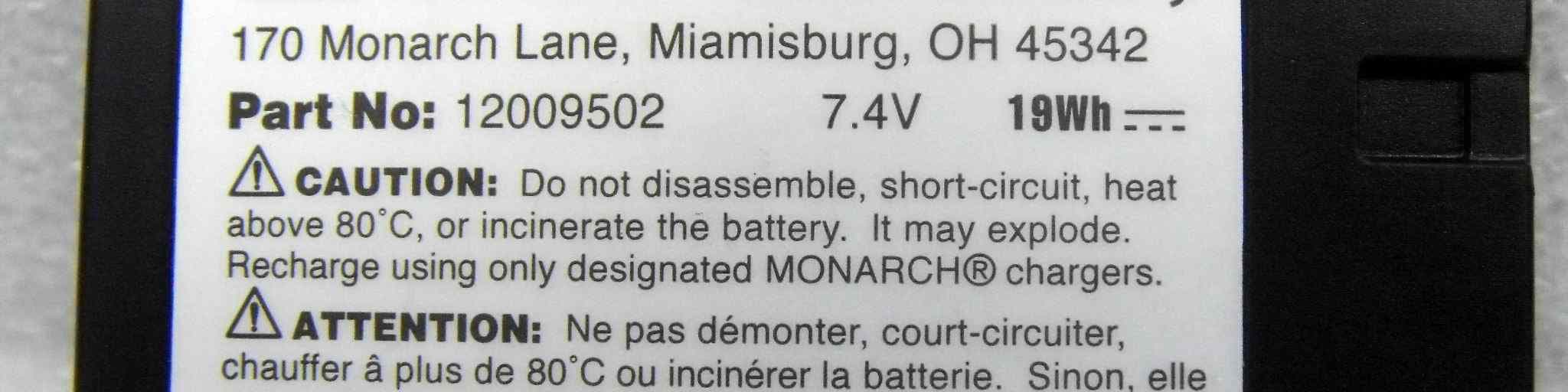
GU6-MTT
Oct 04, 2012MOBILE PRINTER
Equipment Class
JBP - Part 15 Class B Computing Device Peripheral