GU66037LA4121Monarch Pathfinder Ultra Gold Wireless Printer
Avery Dennison Retail Information Services, LLC
Click to zoom
Application Details
- Equipment Class
- DTS - Digital Transmission System
- Date of Grant
- May 13, 2004
- Application Purpose
- Original Equipment
- Date of Application
- May 13, 2004
- Equipment Note
- Monarch Pathfinder Ultra Gold Wireless Printer
- Frequency Range
- 2412.00000000 - 2462.00000000
- Country
- United States
Documents & Files
Document Text
Text extracted from the exhibit documents filed with the FCC. Open a document above to read the original.
Users Manual
Rhein Tech Laboratories, Inc. Client: Paxar America’s, Inc. 360 Herndon Parkway Model: 6037 with Symbol LA-4121 Suite 1400 Standards FCC 15.247 & IC RSS-210 FCC ID: GU66037LA4121 Herndon, VA 20170 http://www.rheintech.com Report #: 2003210 Page 41 of 63 APPENDIX J: MANUAL Please refer to the following pages. Monarch Pathfinder Ultra Gold Printer TC6037EM Rev. AA 7/02 ©2002 Paxar Corporation. All rights reserved. Each product and program carries a respective written warranty, the only warranty on which the customer can rely. Monarch reserves the right to make changes in the product and the programs and their availability at any time and without notice. Although Monarch has made every effort to provide complete and accurate information in this manual, Monarch shall not be liable for any omissions or inaccuracies. Any update will be incorporated in a later edition of this manual. ©2002 Paxar Corporation. All rights reserved. No part of this publication may be reproduced, transmitted, stored in a retrieval system, or translated into any language in any form by any means, without the written permission of Paxar Corporation. Trademarks Monarch®, Pathfinder®, Ultra®, 6037, 6076, 9462, and 9464 are registered trademarks of Monarch Marking Systems, Inc. Paxar is a trademark of Paxar Corporation. RBRC® is a trademark of Rechargeable Battery Recycling Corporation. Paxar Corporation 170 Monarch Lane Miamisburg, OH 45342 Table of Contents i TABLE OF CONTENTSIntroduction .....................................................................................1-1 Getting Started ...............................................................................1-1Using this Manual ...........................................................................1-2 Using Batteries ................................................................................2-1 Using the Main Battery ....................................................................2-1 Charging the Main Battery............................................................2-2Changing the Main Battery ...........................................................2-2 Using the Backup Battery ................................................................2-3 Changing the Backup Battery .......................................................2-4 Battery and Safety Information .........................................................2-6 Using Supplies .................................................................................3-1 Loading Supplie s ............................................................................3-1 Loading for Peel Mode .................................................................3-3Loading for Non-Peel Mode ..........................................................3-6 Removing Supplies .........................................................................3-6 Basic Operations..............................................................................4-1 Using the Keypad ...........................................................................4-1 Entering Data .............................................................................4-2 Using the Display ...........................................................................4-3 Reading the Status Line...............................................................4-3 Scanning Bar Codes .......................................................................4-3 Certification Note............................................................................4-5Printing .........................................................................................4-6Power Management ........................................................................4-6 ii Table of Contents Radio Frequency Communications ....................................................4-6Attaching the Safety Strap ...............................................................4-7Helpful Reminders ..........................................................................4-8 Care and Maintenance ......................................................................5-1 Cleaning ........................................................................................5-1 Printhead ...................................................................................5-2Platen Roller ..............................................................................5-3Pinch and Feed Rollers................................................................5-4Sensors .....................................................................................5-4Scanner Window .........................................................................5-5 Clearing Supply Jams .....................................................................5-6Storing the Printer ..........................................................................5-7 Troubleshooting ...............................................................................6-1 Error Codes ................................................................................6-2 Glossary ..........................................................................................6-1Reference Information ......................................................................6-3 Specifications.................................................................................6-3Accessories/Options .......................................................................6-4 Introduction 1-1 INTRODUCTIONThe Monarch® Pathfinder® Ultra® Gold 6037™ printer prints, scans bar codes, collects data, a nd communicates with other devices. Your System Administrator must configure it for you to use. This manual describes how to use these printers.Getting StartedTo start using the printer, you must:1. Charge the main battery. See “Charging the Main Battery” in Chapter 2. NOTE: You must charge the battery before using it. For optimal batterylife, charge the battery within three months of recei…
Text truncated - open the document above for the full version.
Users Manual
TCWIRELSINFO Rev. AA 7/03 2003 Paxar Americas, Inc. All rights reserved. REGULATORY COMPLIANCE Paxar products are designed to be compliant with the rules and regulations in the locations into which they are so ld and will be labeled as required. The majority of RF devices are type approv ed and do not require the user to obtain license or authorization before usi ng the equipment. Any changes or modifications to Paxar equipment not expressly approved by Paxar could void the user authority to operate the equipment. Radio Frequency Interference Requirements This device complies with Part 15 of the FCC Rules. Operation is subject to the following two conditions: 1) this device may not cause harmful interference, and 2) this device must accept any interference that may cause undesired operations. Radio Frequency Interference Requirements - Canada This digital apparatus does not exceed the Class B limits for radio noise emissions from digital apparatus set out in the Radio Interference Regulations of the Canadian Department of Communications. Le présent appareil numérique n’émet pas de bruits radioélectriques dépassant les limites applicables aux appareils numér iques de la classe B prescrites dans le Réglement sur le brouillage radioélectrique édicte par le ministère des Communications du Canada. European Economic Area The European variant is intended for use throughout the European Economic Area, and is compliant with the R&TTE directives; however, authorization for use restricted as follows: European standards dictate maximums radi ated transmit power of 100 mW EIRP and frequency range 2.400 –2.4835 GHz. France, the equipment is to be rest ricted to the 2.4465 – 2.4835 GHz frequency range. Belgium outside, the equipment is to be restricted to the 2.460 – 2.4835 GHz frequency range. Operation in Italy requires a user license.
Cover Letter(s)
American Telecommunications Certification Body Inc. 6731 Whittier Ave, McLean, VA 22101 May 5, 2004 RE: Paxar FCC ID: GU66037LA4121 This appears to be a filing for a new FCC ID and not a Class II PC. Therefore I have a number of comments on this Application. 1.) Please provide a detailed Block Diagram of the transmitter. Response : As already agreed upon, the block diagram of the transmitter was included in the original upload. 2.) Please provide Schematics of the transmitter. Response : As already agreed upon, the schematics of the transmitter were included in the original upload. 3.) Please provide an MPE estimation for the prescribed RF Category “Mobile” distance of 20cm. Response : The EUT can be body worn through the use of a belt clip, and is therefore considered portable. The EUT was sent to Celltech Labs for evaluation. The result of the evaluation was the following (sent from Jon Hughes via email, Thursday 1/22/04 6:05 PM): Due to the very low duty cycle of this device, the calculated source-based time-averaged output power falls well below the minimum low threshold power of 24.49 mW, as defined in the July 2002 TCB exclusion list. As a Part 15 device in which routine SAR evaluation is not mandatory unless the source-based time- averaged output power is greater than the low threshold, routine SAR evaluation is not required for this unit. 4.) Please review 15.247. Several required tests are missing. Response : Please excuse the oversight, and refer to the revised test report uploaded with this response. 5.) Please provide details on the sensor used for your RF Power measurements. Be sure that measurements were made using a sensor with a “video bandwidth” greater than the 6dB BW of the transmitter emission. Response : The power measurements were made with an Agilent Technologies E9323A Peak and Average Power Sensor. We have verified 802.11b measurements with this sensor using the diode detector/signal generator substitution method. I believe you verified the same thing when you performed some experiments using ADT in Taiwan last year (please reference your email of June 19, 2003 to Joe Dichoso - subject "Peak Power Measurement Test Result"). 6.) Some of the internal photographs are not acceptably clear. Please review and resubmit as needed. Response : Please refer to the revised internal photograph exhibit uploaded with this response. 7.) The label appears to be on a removable cover. This is not permitted under FCC rules. See 2.925(d) for additional information. Response : As this is a small portable device, all covers are removable. The cover is a key element of holding all of the parts in place. If the user removes the cover, the unit will basically fall apart and cease to work. The unit cannot be used without the cover. Only a skilled technician, or one of our trained assembly people, would be able to reassemble the unit. American Telecommunications Certification Body Inc. 6731 Whittier Ave, McLean, VA 22101 8.) Required information under 15.21 and RF Exposure warnings appear to be missing from the Manual. If it does exist, my apologies – kindly indicate where these items may be found. Response : The normal product does not have any wireless cards. Like a portable PC, the printer has a PCMCIA card slot that one can plug any PCMCIA card into, including cards like memory cards. A number of our customers do not even have PCMCIA cards in their units. When it has a memory card, it cannot have a wireless card. As a result, we keep the main product manual generic so it applies to all versions of the product. When we sell a unit with a wireless card in it we add two items to the box. One is the RF warning sheet from the manufacturer of the wireless card, and our own RF warning. We include the original company’s RF warning in case they remove the wireless card from the unit and put it in a PC. A copy of the current RF warning we provide is provided with this response. Both of these address their issue. The only real difference between our printer and a portable PC is that on a portable PC, the card slot is open to the end user, where our card slot is not. We had to seal the PCMCIA card slot as our customers’ employees were stealing the cards for use on their home systems. 9.) The Operational Description exhibit is insufficient. Please provide a detailed description of how the transmitter operates per 2.1033(b)(4). Response : Please refer to the operational description uploaded with this response. 10.) The Agent Authorization received at ATCB is blank. Please review. Response : My copy is not blank. Please try the letter uploaded with this response. 11.) Please indicate the overall location of the antenna and transmitter for this product. Photographs showing the transmitter installation and it’s connection to the internal stripline antennas would be useful. Response : Please refer to the revised Internal Photograph exhibit uploaded with this response. 12.) The PCMCIA card must be in an inaccessible location to the end user. Otherwise, the Symbol FCC ID labeling should be removed from this product. Please comment. Response : The PCMCIA card is in fact inaccessible to the user. This fact is stated in the original operational description letter. 13.) Page 66 to 69 of the Manual seems to indicate this device is user installable. This is not permitted under FCC rules. Response : The original Symbol LA-4121 user's manual was submitted with this application for informational purposes. The card as used in this application is not accessible to the end user. We have removed the Symbol manual from the user's manual exhibit. American Telecommunications Certification Body Inc. 6731 Whittier Ave, McLean, VA 22101 14.) Since the end user will be writing and implementing much of their own DOS based programs, is it possible for the equipment to be programmed to transmit on channels 12 and 13? Response : Symbol will not provide us with the information to control the card at that level. They will only let …
Text truncated - open the document above for the full version.
Cover Letter(s)
American Telecommunications Certification Body Inc. 6731 Whittier Ave, McLean, VA 22101 May 12, 2004 RE: Paxar FCC ID: GU66037LA4121 I have a few additional comments on this Application. 1.) Your responses to item #8 of my comments of May 05, 2004 indicate this equipment can be operated with any PCMCIA card. However, the FCC ID referred to in this filing covers the entire wireless product and printer. Please indicate how only the wireless PCMCIA card specified in this filing and no other will be used under this FCC ID with this device. Response : Paxar has a fixed build of materials that combine the right labels with the right cards. Paxar is an ISO9001:2000 registered company, so the controls on the labels and OEM modules are pretty tight. Jim Bacher reviews and signs off on all Engineering Change Notices, so he has full control over all changes. If someone puts a card into it in the field, he voids the warranty and it becomes his issue, not Paxar’s, just as it would be with a portable PC. Paxar has no control over what someone puts into the product once it has left the building, but what happens to the product at Paxar can be, and is, controlled. 2.) In addition, your description about the ease in which PCMCIA cards can be swapped tends to negate your response to item #7. Please note that all FCC identifiers must be permanently affixed to the device as prescribed in Parts 2 and 15 of the Rules. Response : When Paxar receives the cards, they have the original manufacturer’s FCC ID on them, and Paxar leaves it in place. Due to its small size and the nature of the unit, all parts are replaceable. The same thing would be true for any portable product, be it a PDA or a scanner or even a portable PC. The Paxar unit is not field repairable. It is returned to the factory for repairs. Most people who tear one apart are never able to put it back together in working condition. Once again due to Paxar’s ISO certification, the repaired unit always meets the print when it is returned to the customer. In today’s world everything is modular, the concept of a permanent part is no longer valid on many products. 3.) Please provide graphical data to support your RF duty cycle as described in the RF Exposure exhibit. Response : Paxar’s typical customer prints 3,000 labels on the printer in a 24 hour day. If one assumes just an 8 hour day, that is one label every 10 seconds. Typically the user would scan a barcode, which would cause the unit to send a less than a 20 character data stream to the main computer. The main computer would process the data and send back data to be printed. As the unit contains fixed label formats, the typical response back is anywhere from 4 to 60 characters. The user would print the label and apply it. They would then scan the next barcode. This means that during any 10 second period less than 100 characters will be transferred through the wireless network. During the test Paxar sent 64 characters ten times a second, or 6,400 during a 10 second interval. This is significantly greater transmit time than the unit will see in actual use. As each application is custom written and implemented, it is impossible to provide a graphical plot. 4.) Since it is your contention that SAR testing is not required, both your “Portable” and “Mobile” exposure statements in your “Regulatory Compliance” supplement to the manual are unsubstantiated and should be removed. Response : Paxar will remove the wordings from the insert. American Telecommunications Certification Body Inc. 6731 Whittier Ave, McLean, VA 22101 William H. Graff President and Director of Engineering mailto: [email protected] The items indicated above must be submitted before processing can continue on the above referenced application. Failure to provide the requested information may result in application termination. Correspondence should be considered part of the permanent submission and may be viewed from the Internet after a Grant of Equipment Authorization is issued. Please do not respond to this correspondence using the email reply button. In order for your response to be processed expeditiously, you must submit your documents through the AmericanTCB.com website. Also, please note that partial responses increase processing time and should not be submitted. Any questions about the content of this correspondence should be directed to the sender.
Cover Letter(s)
Paxar Americas, Inc. 170 Monarch Lane Miamisburg, OH 45342 800 543-6650 FAX 937-865-2048 February 26, 2004 American TCB, Inc. 6731 Whittier Avenue Suite C110 McLean, VA 22101 Re: Agent Authorization To Whom It May Concern: Paxar Americas, Inc. hereby authorizes Rhein Tech Laboratories, Inc. (RTL), 360 Herndon Parkway, Suite 1400, Herndon, VA 20170 to act as agent. APPLICANT ANTI-DRUG ABUSE CERTIFICATION: In signing this letter, Applicant certifies that, in the case of an individual applicant, he or she is not subject to a denial of federal benefits, that includes: FCC benefits, pursuant to Section 5301 of the Anti-Drug Abuse Act of 1988, 21 U.S.C. 853(a), or, in the case of a non-individual applicant. No party to the application is subject to a denial of federal benefits that includes FCC benefits, pursuant to that section. For the definition of a “party” for these purposes, see 47 CFR 1.2002(b). If you have any questions or concerns, please contact me by email at [email protected]; phone at 1-937-865-2020; or by fax at 1-937-865-2048. Sincerely, James A. Bacher Senior Engineer Paxar Americas, Inc. A division of Paxar Corp. cc: H. Dayton J. Duckett L. Neuhard
Cover Letter(s)
Rhein Tech Laboratories, Inc. Client: Paxar America’s, Inc. 360 Herndon Parkway Model: 6037 with Symbol LA-4121 Suite 1400 Standards FCC 15.247 & IC RSS-210 FCC ID: GU66037LA4121 Herndon, VA 20170 http://www.rheintech.com Report #: 2003210 Page 35 of 63 APPENDIX E: CONFIDENTIALITY REQUEST LETTER Please refer to the following page.
External Photos
Rhein Tech Laboratories, Inc. Client: Paxar America’s, Inc. 360 Herndon Parkway Model: 6037 with Symbol LA-4121 Suite 1400 Standards FCC 15.247 & IC RSS-210 FCC ID: GU66037LA4121 Herndon, VA 20170 http://www.rheintech.com Report #: 2003210 Page 44 of 63 APPENDIX L: EXTERNAL PHOTOGRAPHS PHOTOGRAPH 5: TOP VIEW Rhein Tech Laboratories, Inc. Client: Paxar America’s, Inc. 360 Herndon Parkway Model: 6037 with Symbol LA-4121 Suite 1400 Standards FCC 15.247 & IC RSS-210 FCC ID: GU66037LA4121 Herndon, VA 20170 http://www.rheintech.com Report #: 2003210 Page 45 of 63 PHOTOGRAPH 6: RIGHT SIDE VIEW Rhein Tech Laboratories, Inc. Client: Paxar America’s, Inc. 360 Herndon Parkway Model: 6037 with Symbol LA-4121 Suite 1400 Standards FCC 15.247 & IC RSS-210 FCC ID: GU66037LA4121 Herndon, VA 20170 http://www.rheintech.com Report #: 2003210 Page 46 of 63 PHOTOGRAPH 7: LEFT SIDE VIEW Rhein Tech Laboratories, Inc. Client: Paxar America’s, Inc. 360 Herndon Parkway Model: 6037 with Symbol LA-4121 Suite 1400 Standards FCC 15.247 & IC RSS-210 FCC ID: GU66037LA4121 Herndon, VA 20170 http://www.rheintech.com Report #: 2003210 Page 47 of 63 PHOTOGRAPH 8: FRONT VIEW Rhein Tech Laboratories, Inc. Client: Paxar America’s, Inc. 360 Herndon Parkway Model: 6037 with Symbol LA-4121 Suite 1400 Standards FCC 15.247 & IC RSS-210 FCC ID: GU66037LA4121 Herndon, VA 20170 http://www.rheintech.com Report #: 2003210 Page 48 of 63 PHOTOGRAPH 9: BOTTOM VIEW Rhein Tech Laboratories, Inc. Client: Paxar America’s, Inc. 360 Herndon Parkway Model: 6037 with Symbol LA-4121 Suite 1400 Standards FCC 15.247 & IC RSS-210 FCC ID: GU66037LA4121 Herndon, VA 20170 http://www.rheintech.com Report #: 2003210 Page 49 of 63 PHOTOGRAPH 10: BACK VIEW Rhein Tech Laboratories, Inc. Client: Paxar America’s, Inc. 360 Herndon Parkway Model: 6037 with Symbol LA-4121 Suite 1400 Standards FCC 15.247 & IC RSS-210 FCC ID: GU66037LA4121 Herndon, VA 20170 http://www.rheintech.com Report #: 2003210 Page 50 of 63 PHOTOGRAPH 11: BATTERY TOP VIEW Rhein Tech Laboratories, Inc. Client: Paxar America’s, Inc. 360 Herndon Parkway Model: 6037 with Symbol LA-4121 Suite 1400 Standards FCC 15.247 & IC RSS-210 FCC ID: GU66037LA4121 Herndon, VA 20170 http://www.rheintech.com Report #: 2003210 Page 51 of 63 PHOTOGRAPH 12: BATTERY BOTTOM VIEW WITH LABEL
ID Label/Location Info
Rhein Tech Laboratories, Inc. Client: Paxar America’s, Inc. 360 Herndon Parkway Model: 6037 with Symbol LA-4121 Suite 1400 Standards FCC 15.247 & IC RSS-210 FCC ID: GU66037LA4121 Herndon, VA 20170 http://www.rheintech.com Report #: 2003210 Page 37 of 63 APPENDIX G: LABEL AND LABEL LOCATION Please refer to the following page for a sample of the FCC and Industry Canada Identification Label, the label location is shown below. Because the module can be seen from an external view of the host device; the module is labeled with the FCC ID label, per DA 00-1407. PHOTOGRAPH 1: LOCATION OF FCC ID LABEL AND 2-PART STATEMENT LABEL FCC ID Label Here FCC 2-Part Statement Graphic Number Rev Rev Dwg Size Scale Designer Client Name Date Ref. Number 6037 Scan Label (NEW) J. Bacher GB Arnold 1/22/03 LocSymChangeEn No.DateByChk A B C D 23 6 4 5 7 236 4 5 7 A B C D Paxar Americas, Inc. 170 Monarch Lane Miamisburg, OH 45342 937 865-8025 FAX 937 865-2048 ID Artmaster aw-09506 pn- 1:1 8.5 x 11 D e si g n N otes: 1. Artwork shown represents sizeand style of finished product only. 2. Artwork does not necessarily reflect manufacturing process and/or tooling requirements. 3. Please refer to product drawing for location on part and color. 4. Dimensions are for reference only. This information is the confidential, restricted, and sole property of PaxarAmericas, Inc. It should be used by the recipient only for the purposes benefiting Paxar, and shall not be disclosed, reproduced, or used by others without prior written approval. N oti ce : Notes: 1. Outline for graphic location on insert. Do not print. 2. Dimensions are for reference. See part drawing for location and details. 35 mm 25 mm ~~Color Sample~~ Note: 1. This is a purchased two color label. 2. To be used on new Pathfinder Ultra products WITH scanner option. White background Black background Pantone 116 graphics Yellow background Pantone 116 CAUTION Laser Radiation - Do not stare into beams Class 2 laser product According to IEC60825-1:1993+A1+A2 +PO=0.15 mW, Pp=1.2 mW, f=36Hz, lambda=650nm Type: LA-4121 Power: 100mW Frequency: 2.4GHz FCC ID: GU66037LA4121 IC : 15491032076A This product includes an approved RLAN card. 0168 CAUTION Laser Radiation - Do not stare into beams Class 2 laser product According to IEC60825-1:1993+A1+A2 +PO=0.15 mW, Pp=1.2 mW, f=36Hz, lambda=650nm This product includes an approved RLAN card. 0168 Type: LA-4121 Power: 100mW Frequency: 2.4GHz FCC ID: GU66037LA4121 IC : 15491032076A Similar label: aw-09414; pn-124509 Rhein Tech Laboratories, Inc. Client: Paxar America’s, Inc. 360 Herndon Parkway Model: 6037 with Symbol LA-4121 Suite 1400 Standards FCC 15.247 & IC RSS-210 FCC ID: GU66037LA4121 Herndon, VA 20170 http://www.rheintech.com Report #: 2003210 Page 38 of 63 PHOTOGRAPH 2: FCC 2-PART STATEMENT LABEL
Internal Photos
Rhein Tech Laboratories, Inc. Client: Paxar America’s, Inc. 360 Herndon Parkway Model: 6037 with Symbol LA-4121 Suite 1400 Standards FCC 15.247 & IC RSS-210 FCC ID: GU66037LA4121 Herndon, VA 20170 http://www.rheintech.com Report #: 2003210 Page 57 of 68 APPENDIX M: INTERNAL PHOTOGRAPHS PHOTOGRAPH 13: LOCATION OF ANTENNA RELATIVE TO THE KEYPAD, ON EDGE OF THE PCB Rhein Tech Laboratories, Inc. Client: Paxar America’s, Inc. 360 Herndon Parkway Model: 6037 with Symbol LA-4121 Suite 1400 Standards FCC 15.247 & IC RSS-210 FCC ID: GU66037LA4121 Herndon, VA 20170 http://www.rheintech.com Report #: 2003210 Page 58 of 68 PHOTOGRAPH 14: ANTENNA AND CONNECTOR Rhein Tech Laboratories, Inc. Client: Paxar America’s, Inc. 360 Herndon Parkway Model: 6037 with Symbol LA-4121 Suite 1400 Standards FCC 15.247 & IC RSS-210 FCC ID: GU66037LA4121 Herndon, VA 20170 http://www.rheintech.com Report #: 2003210 Page 59 of 68 PHOTOGRAPH 15: PCMCIA CARD SLOT; COAX ROUTED BETWEEN CARD AND ANTENNA Rhein Tech Laboratories, Inc. Client: Paxar America’s, Inc. 360 Herndon Parkway Model: 6037 with Symbol LA-4121 Suite 1400 Standards FCC 15.247 & IC RSS-210 FCC ID: GU66037LA4121 Herndon, VA 20170 http://www.rheintech.com Report #: 2003210 Page 60 of 68 PHOTOGRAPH 16: INSIDE FRONT Rhein Tech Laboratories, Inc. Client: Paxar America’s, Inc. 360 Herndon Parkway Model: 6037 with Symbol LA-4121 Suite 1400 Standards FCC 15.247 & IC RSS-210 FCC ID: GU66037LA4121 Herndon, VA 20170 http://www.rheintech.com Report #: 2003210 Page 61 of 68 PHOTOGRAPH 17: PCB’S IN UNIT SIDE VIEW Rhein Tech Laboratories, Inc. Client: Paxar America’s, Inc. 360 Herndon Parkway Model: 6037 with Symbol LA-4121 Suite 1400 Standards FCC 15.247 & IC RSS-210 FCC ID: GU66037LA4121 Herndon, VA 20170 http://www.rheintech.com Report #: 2003210 Page 62 of 68 PHOTOGRAPH 18: TOP OF UPPER PCB WITH ANTENNA CONNECTOR AND TRACE Rhein Tech Laboratories, Inc. Client: Paxar America’s, Inc. 360 Herndon Parkway Model: 6037 with Symbol LA-4121 Suite 1400 Standards FCC 15.247 & IC RSS-210 FCC ID: GU66037LA4121 Herndon, VA 20170 http://www.rheintech.com Report #: 2003210 Page 63 of 68 PHOTOGRAPH 19: BOTTOM OF UPPER PCB Rhein Tech Laboratories, Inc. Client: Paxar America’s, Inc. 360 Herndon Parkway Model: 6037 with Symbol LA-4121 Suite 1400 Standards FCC 15.247 & IC RSS-210 FCC ID: GU66037LA4121 Herndon, VA 20170 http://www.rheintech.com Report #: 2003210 Page 64 of 68 PHOTOGRAPH 20: TOP OF MIDDLE PCB Rhein Tech Laboratories, Inc. Client: Paxar America’s, Inc. 360 Herndon Parkway Model: 6037 with Symbol LA-4121 Suite 1400 Standards FCC 15.247 & IC RSS-210 FCC ID: GU66037LA4121 Herndon, VA 20170 http://www.rheintech.com Report #: 2003210 Page 65 of 68 PHOTOGRAPH 21: BOTTOM OF MIDDLE PCB Rhein Tech Laboratories, Inc. Client: Paxar America’s, Inc. 360 Herndon Parkway Model: 6037 with Symbol LA-4121 Suite 1400 Standards FCC 15.247 & IC RSS-210 FCC ID: GU66037LA4121 Herndon, VA 20170 http://www.rheintech.com Report #: 2003210 Page 66 of 68 PHOTOGRAPH 22: TOP OF LOWER PCB Rhein Tech Laboratories, Inc. Client: Paxar America’s, Inc. 360 Herndon Parkway Model: 6037 with Symbol LA-4121 Suite 1400 Standards FCC 15.247 & IC RSS-210 FCC ID: GU66037LA4121 Herndon, VA 20170 http://www.rheintech.com Report #: 2003210 Page 67 of 68 PHOTOGRAPH 23: BOTTOM OF LOWER PCB Rhein Tech Laboratories, Inc. Client: Paxar America’s, Inc. 360 Herndon Parkway Model: 6037 with Symbol LA-4121 Suite 1400 Standards FCC 15.247 & IC RSS-210 FCC ID: GU66037LA4121 Herndon, VA 20170 http://www.rheintech.com Report #: 2003210 Page 68 of 68 PHOTOGRAPH 24: INSIDE FRONT PANEL
RF Exposure Info
Rhein Tech Laboratories, Inc. Client: Paxar America’s, Inc. 360 Herndon Parkway Model: 6037 with Symbol LA-4121 Suite 1400 Standards FCC 15.247 & IC RSS-210 FCC ID: GU66037LA4121 Herndon, VA 20170 http://www.rheintech.com Report #: 2003210 Page 32 of 63 APPENDIX B: FCC PART 1.1307, 1.1310, 2.1091, 2.1093 RF EXPOSURE Paxar Corporation attests that: The default setting is 64 characters per packet which is sent every 100 ms. The over head is probably more than the data. With a 10 mega bit data rate, the time per character would be 0.000001 seconds. Allowing for 128 characters for the over head and data, it would work out to at least 0.000128 seconds per packet. Typical use for the product would be to scan a bar code (which would be typically less than 64 characters), then to transmit the barcode data back to a main computer. The main computer would process the data and send back a command to scan the next barcode, or to print a label (in which case the bulk of the xmit is the access point and not the 6037). As a result, even at the default setting it is a far heavier transmission rate than what the real usage would be. Due to the very low duty cycle of this device, the calculated source-based, time-averaged output power falls well below the minimum low threshold power of 24.49 mW, as defined in the July 2002 TCB exclusion list. As a Part 15 device in which routine SAR evaluation is not mandatory unless the source-based time-averaged output power is greater than the low threshold, routine SAR evaluation is not r…
Text truncated - open the document above for the full version.
Contact Information
Applicant
Michael Ouziel(Regulatory Engineer)
Technical Contact
Rhein Tech LaboratoriesDesmond A Fraser
[email protected]703 689 0368
360 Herndon Parkway · Herndon, Virginia · United States
Test Firm
Rhein Tech Laboratories, Inc.Galina Yushina
Technical Specifications
| # | Rule Parts | Frequency Range | Power Output |
|---|---|---|---|
| 1 | 15C | 2.41 GHz - 2.46 GHz | 96.00 mW |
Other Applications from Avery Dennison Retail Information Services, LLC
GU6WTB4010
Aug 25, 2021ZippyYum Thermometer
Equipment Class
DTS - Digital Transmission System
GU6-QUATECH1
Oct 04, 2015Mobile PrinterModel name - 9485NP
Equipment Class
DTS - Digital Transmission System
GU6-RS500GX
Aug 13, 2014UHF RFID Module
Equipment Class
DSS - Part 15 Spread Spectrum Transmitter
GU6-QUATECH
Oct 04, 2012MOBILE PRINTER
Equipment Class
JBP - Part 15 Class B Computing Device Peripheral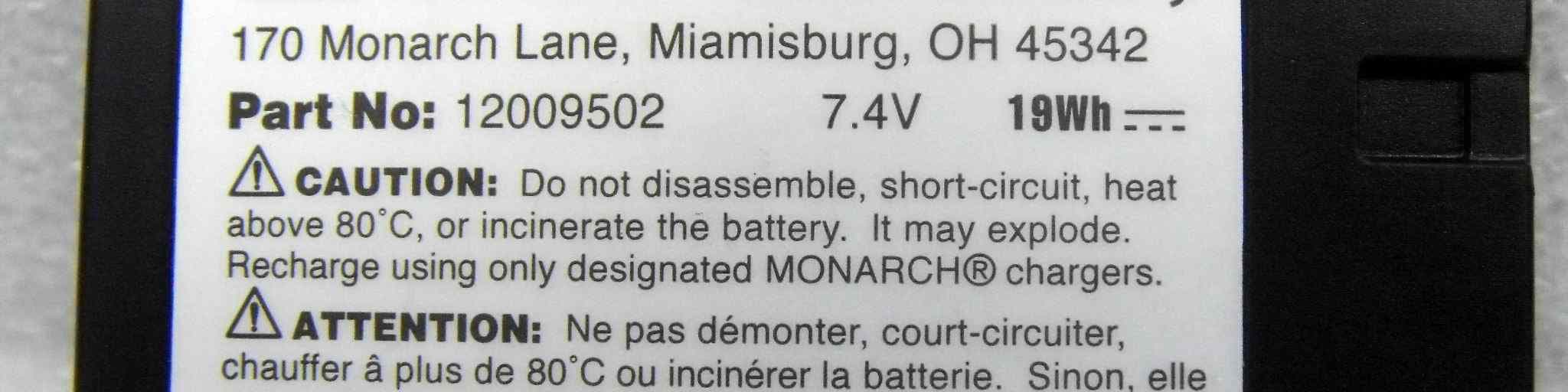
GU6-MTT
Oct 04, 2012MOBILE PRINTER
Equipment Class
JBP - Part 15 Class B Computing Device Peripheral