HD57800LGDolphin� 7800 Mobile Computer
Honeywell International Inc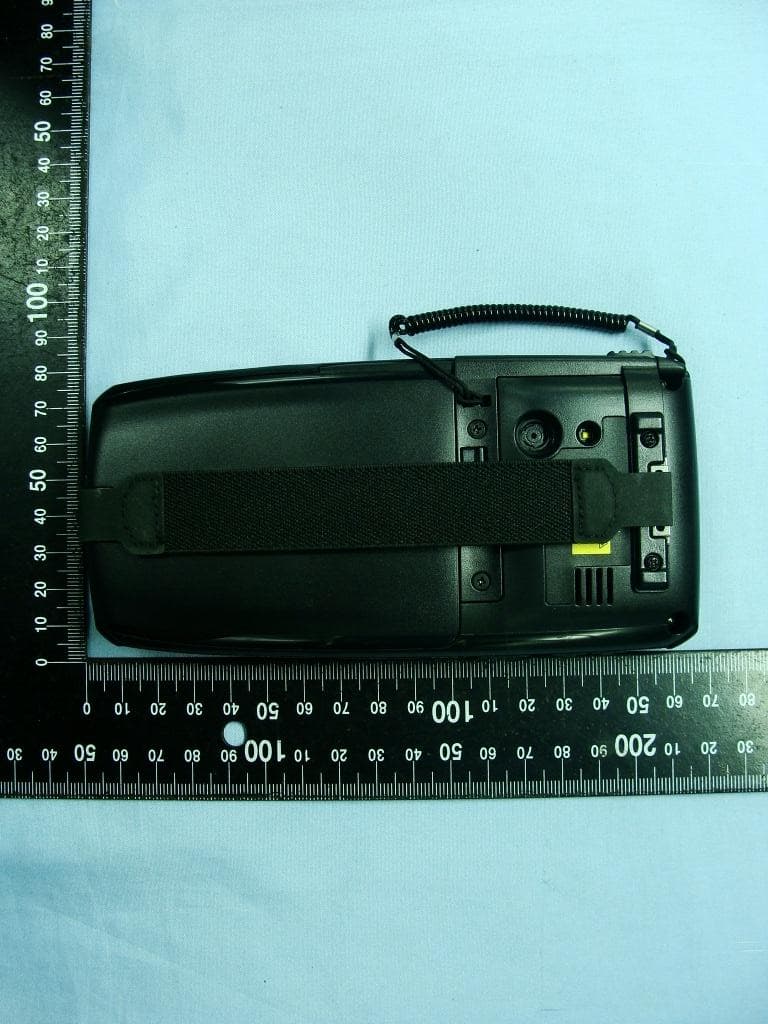
Click to zoom
Application Details
- Equipment Class
- NII - Unlicensed National Information Infrastructure TX
- Date of Grant
- Nov 26, 2011
- Application Purpose
- Original Equipment
- Date of Application
- Nov 24, 2011
- Equipment Note
- Dolphin� 7800 Mobile Computer
- Frequency Range
- 5500.00000000 - 5700.00000000
- Company
- Honeywell International Inc
- Country
- United States
Documents & Files
Document Text
Text extracted from the exhibit documents filed with the FCC. Open a document above to read the original.
Users Manual
DRAFT COPY 11/11/11 Dolphin™ 7800 with Windows ® Embedded Handheld 6.5 User’s Guide DRAFT COPY 11/11/11 Disclaimer Honeywell International Inc. (“HII”) reserves the right to make changes in specifications and other information contained in this document without prior notice, and the reader should in all cases consult HII to determine whether any such changes have been made. The information in this publication does not represent a commitment on the part of HII. HII shall not be liable for technical or editorial errors or omissions contained herein; nor for incidental or c onsequential damages resulting from the furnishing, performance, or use of this material. This document contains proprietary information that is protected by copyright. All rights are reserved. No p art of this document may be photocopied, reproduced, or translated into another language without the prior written consent of HII. Web Address: www.honeywellaidc.com Trademarks Dolphin, Dolphin RF, HomeBase, Mobile Base, ChargeBase, Net Base and QuadCharger are trademarks or registered trademarks of Hand Held Products, Inc. or Honeywell International Inc. Microsoft, Windows, Windows Mobile, Windows Phone, Windows Embedded Handheld, Windows CE, W indows 98 Second Edition, Windows NT, Windows 2000, Windows ME, Windows XP, Windows 7, Windows Vista, ActiveSync, Outlook, and the Windows logo are trademarks or registered trademarks of Microsoft Corporation. The Bluetooth trademarks are owned by Bluetooth SIG, Inc., U.S.A. and licensed to Honeywell. Other product names mentioned in this manual may be trademarks or registered trademarks of their respective companies and are the property of their respective owners. Patents For patent information, please refer to w ww.honeywellaidc.com/patents. ©2011 Honeywell International Inc. All rights reserved. DRAFT COPY 11/11/11 iii Table of Contents Chapter 1 - Dolphin 7800 Terminal Agency Information Laser Safety .........................................................................................................................1-1 Label Locations ..............................................................................................................1-1 Model Number, Serial Number and IMEI Labels............................................................1-1 Laser Safety Label .........................................................................................................1-1 Laser Safety Statement..................................................................................................1-1 LED Safety ...........................................................................................................................1-2 LED Safety Statement....................................................................................................1-2 UL and C-UL Statement.......................................................................................................1-2 Approvals by Country...........................................................................................................1-2 R&TTE Compliance Statement—802.11a/b/g/n, Bluetooth, and/or GSM............................1-3 Dolphin RF Terminal—802.11a/b/g/n, Bluetooth, and/or GSM ............................................1-3 Canadian Compliance..........................................................................................................1-4 Conformité à la règlementation canadienne ........................................................................1-4 RF Exposure Information (SAR) ..........................................................................................1-4 For European Community Users .........................................................................................1-5 Waste Electrical and Electronic Equipment Information ......................................................1-5 China RoHS .........................................................................................................................1-6 Pacemakers, Hearing Aids and Other Electrically Powered Devices ..................................1-6 Hearing Aid Compatibility (HAC)..........................................................................................1-6 Microwaves ..........................................................................................................................1-7 Chapter 2 - Getting Started Out of the Box ......................................................................................................................2-1 I nitial Setup for Dolphin 7800 Terminals ..............................................................................2-1 Replacing the Main Battery Pack .........................................................................................2-4 Home Screen .......................................................................................................................2-5 Title Bar................................................................................................................................2-5 Icons in the Title Bar ............................................................................................................2-5 Horizontal Scroll ...................................................................................................................2-8 Tile Bar.................................................................................................................................2-8 Pop-Up Menus .....................................................................................................................2-8 Selecting Programs..............................................................................................................2-8 File Explorer .........................................................................................................................2-9 File Provisioning on the 7800..................................................................................…
Text truncated - open the document above for the full version.
Users Manual
DRAFT COPY 11/11/11 7 - 15 RIL The RIL Information screen displays useful statistics for the GSM WAN Voice module (PH8). To verify whether or not the GSM radio is enabled, check the Dolphin Wireless Manager (see page 8-4). Power Power system settings contains two tabs: Battery and Advanced Tap > Settings > System > Power Battery Tab The battery tab displays the power level status of the m ain battery and the status of the backup battery. Note: The Backup Battery gauge registers either 0% or 100%. T he percentage is not an indication of the level of charge remaining on the backup battery. An installed and functional battery registers 100%. A total discharge or a battery error registers 0%. For detailed information on the main battery pack, see B attery on page 7-10. A dvanced Tab Determines power time-outs. For O n battery power, select from the drop-down list, the number of minutes of inactivity you want to pass before the terminal powers off when running on battery power. For On external power, select from the drop-down list, the number of minutes of inactivity you want to pass before the terminal powers off when running on external power. N ote: When the terminal “powers off”, it enters Suspend Mode, see page 2-11 for additional information. Regional Settings Regional Settings enables you to customize the appearance and formatting to your geographic region. Specifically, you can customize numbers (i.e., number of decimal places allowed), currency (i.e.,using the $ or € symbol), time, and date. These specifications apply to all screens, including the Home screen. The Region tab displays an overview of the region selected in the drop-down list at the top. DRAFT COPY 11/11/11 7 - 16 The terminal is loaded with a number of pre-programmed regional settings. Select one from the list and the results appear on the screen. To see specific settings or to change a specific setting, tap on one of the items on the horizontal scroll bar (i.e., Region, Number, Date), make the change, and tap OK to save. Remove Programs Remove Programs enables you to remove programs installed on the terminal. Any program (usually CAB o r DLL files) stored in the \\IPSM\Honeywell\Autoinstall folder re-installs after a software upgrade or a factory reset. If a program is manually removed using the Remove Programs application, the program does not re-install on a hard or soft reset. Note: A program (file) does not automatically install if it is added to the \\IPSM\Honeywell\Autoinstall folder and a h ard or soft reset is performed. For information on program installation, see Installing Additional Software on page 8-8. For information about the system resets, see Resetting the Terminal on page 2-11. See Honeywell sup- port for more information on how to perform a factory reset. 1. Tap Remove Programs. In the list, select the program you want to remove. 2. Tap R emove. The following message appears: 3. Tap Y es. Wait while the program is removed. 4. Verify that the program no longer appears in the list. DRAFT COPY 11/11/11 7 - 17 Screen The Screen system setting contains three screens: General, Clear Type, and Text Size. General Screen Orientation The General screen enables you to set the dynamic screen rotation. Three choices of screen orientation are supported: Portrait, Landscape (right-handed), and Landscape (left- handed). ClearType Screen Align Screen The General Tab also allows you to re-align the screen. You need to re-align the screen if tapping buttons or icons with the stylus no longer seems to work appropriately. Tapping A lign Screen brings up the align screen window where you are guided to tap a target several times. This re- calibrates how the touch screen receives input. • Alignment should always be performed with a stylus designed for touch panel applications. The small point is required for accurate calibration. • Press the stylus firmly into the center of the cross-hair target once and release. Do not “double-tap” the target. T he display supports ClearType font rendering, which is a Microsoft technology that dramatically increases the readability of text on LCD displays. To enable ClearType font rendering, select E nable ClearType and tap OK. For more information about ClearType font rendering, visit: w ww.microsoft.com/typography/WhatIsClearType.mspx. DRAFT COPY 11/11/11 7 - 18 T ext Size Screen The Text Size screen enables you to perform font scaling within certain views of the: • Home screen, • Contacts, • Calendar, • Messaging, and • Tasks. Font scaling means that you can increase or decrease the point size of the font on application windows. To change the font size, move the slider toward S mallest or Largest. The Example text changes to reflect the font change. Tap OK to save the new font size setting. Task Manager The Task Manager provides information about applications and processes running on your mobile com- p uter. You can use the Task Manager to monitor the memory and CPU usage of specific applications and processes. Check the Task Manager when you are receiving out of memory errors or when the mobile computer is running slowly. DRAFT COPY 11/11/11 7 - 19 Using the Task Manager A pplications To view the status of the programs running on your mobile computer, tap the Menu button at the bottom of the screen, then tap View > Applications. From the application list, you can: • Tap and hold on an application, then tap Switch To on the pop-up menu. • Tap and hold on an application, then tap End Task or End All Tasks on the pop-up menu. Note: Anytime you stop a running program, it frees up memory. To free up memory, return to the running program, save your data, and close the application. Processes To view information about the processes running on the mobile computer, tap the Menu button at the bottom of the screen, then tap View > Processes. DRAFT COPY 11/11/11 7 - 20 8 - 1 8 DRAFT COPY 11/11/11 Communication Connections Menu The Connections system setting provides access to the terminal’s vario…
Text truncated - open the document above for the full version.
Attestation Statements
Honeywell International Inc Honeywell Scanning and Mobility 9680 Old Bailes Road Fort Mill, SC 29707 USA Date: 28- O ctober-2011 Federal Communications Commission Authorization and Evaluation Division 1435 Oakland Mills Road Columbia, MD 21046 SUBJECT: FCC Application for FCC ID: HD57800LG To Whom It May Concern: We, Honeywell International Inc, hereby attest to the fact that we will apply the Declaration of Conformity procedure to the class B computer peripheral portion of this composite filing. Sincerely, Product Compliance - Imaging Systems [email protected] (315) 554-6000 telephone USA Michael Robinson Honeywell International Inc Honeywell Scanning and Mobility 700 Visions Drive PO Box 208 Skaneateles Falls, NY 13153-0208 USA
Attestation Statements
Honeywell International Inc Honeywell Scanning and Mobility 9680 Old Bailes Road Fort Mill, SC 29707 USA Date: 28- October-2011 Statement We, Honeywell International Inc, states that our device, FCC ID: HD57800LG, has no space to put the label except the battery compartment of this device. The label will be put under the battery inside the battery compartment and it is visible to the users as they purchase the products and install the battery. Sincerely, Product Compliance - Imaging Systems [email protected] (315) 554-6000 telephone USA Michael Robinson Honeywell International Inc Honeywell Scanning and Mobility 700 Visions Drive PO Box 208 Skaneateles Falls, NY 13153-0208 USA
Attestation Statements
Honeywell International Inc Honeywell Scanning and Mobility 9680 Old Bailes Road Fort Mill, SC 29707 USA Date: November 7, 2011 DTS-UNII Device Declaration Letter To whom it may concern: We have declared below featured for FCC equipment authorization, Device FCC ID: HD57800LG (1) DFS Device -- Master , Client with Radar detection capability , Client without radar detection capability, N/A (2) Active / Passive Scanning , adhoc mode access point capability Frequency Band (MHz) Active Scanning (the device can transmit a probe (beacon)) passive scanning (where the device is can listen only with no probes) Ad Hoc Mode or WIFI Direct capability Access point capability 2412-2462 Yes , No Yes , No Yes , No Yes , No 5745-5825 Yes , No Yes , No Yes , No Yes , No 5180-5240 Yes , No Yes , No Yes , No Yes , No 5260-5320 Yes , No Yes , No Yes , No Yes , No 5500-5700 Yes , No Yes , No Yes , No Yes , No (3) Country code selection ability - Yes , No If yes, please explain how it was implemented : (pls also help to provide detail of options for each country selection) (4) Meet 15.202 requirement - Yes , No , pls check below : A master device is defined as a device operating in a mode in which it has the capability to transmit without receiving an enabling signal. In this mode it is able to select a channel and initiate a network by sending enabling signals to other devices A client device is defined as a device operating in a mode in which the transmissions of the device are under control of the master. A device in client mode is not able to initiate a network. (5) For client devices that have software configuration control to operate in different modes (active scanning in some and passive scanning in others) in different bands (devices with multiple equipment classes or those that operate on non-DFS frequencies) or modular devices which configure the modes of operations through software, the application must provide software and operations description on how the software and / or hardware is implemented to ensure that proper operations modes can not be modified by end user or an installer. Apply , No Apply , (If apply , pls help to provide explanation on it was implement , and how software was controlled) ________________________ Contact Person: Michael Robinson Company: Honeywell International Inc TEL: 315.554.6387 E‐mail:[email protected]
Cover Letter(s)
Honeywell International Inc Honeywell Scanning and Mobility 9680 Old Bailes Road Fort Mill, SC 29707 USA Date: 28- October-2011 Power of Attorney To whom it may concern, This authorization is limited to the product of as following: FCC ID: HD57800LG Please be notified that I, Michael Robinson, have designated Jones Tsai in Sporton International Inc. and Mandana Salahshour in Honeywell International Inc as the persons being responsible for this project and to sign the form 731 and other documentation. Any and all acts carried out by Jones Tsai in Sporton International Inc. and Mandana Salahshour in Honeywell International Inc on the matters of relating to all processes required in the FCC approval and any communication needed with the national authority, shall have the same legal authority as acts on our own behalf. We further certifies that neither the applicant nor any party to this application, as defined in 47 CFR Ch. 1.2002 (b), is subject to a denial to Federal benefits, that include FCC benefits, pursuant to section 5301 of the Anti-Drug Abuse Act of 1998, 21 U.S.C. 835(a). If you have any acknowledgement and response, please send it to Sporton International Inc. directly. Should you have any questions or comments regarding this matter, please have my best attention. Sincerely, Product Compliance - Imaging Systems [email protected] (315) 554-6000 telephone USA Michael Robinson Honeywell International Inc Honeywell Scanning and Mobility 700 Visions Drive PO Box 208 Skaneateles Falls, NY 13153-0208 USA
Cover Letter(s)
SCS-F18: Project and Product Certification Representative Authorization Letter Page 1 of 2 Rev 2.0 2206 Ringwood Avenue San Jose, CA 95131 Tel: 408-526-1188 Fax: 408-526-1088 Email: [email protected] Project and Product Certification Representative Authorization Letter Reason for Amendment (current / obsolete) Revision History Approved Date From To Initial Release (current) 1.0 1.0 November 15, 2011 SCS-F18: Project and Product Certification Representative Authorization Letter Page 2 of 2 Rev 2.0 Sporton International Inc. November 15, 2011 To: SIEMIC, INC. 2206 Ringwood Avenue, San Jose, CA 95131 USA Dear Sir/Madam, Re: Project and Product Certification Representative Authorization Letter We, _Sporton International Inc._hereby authorize SIEMIC, INC. to act as a Certification Body for certifying for the following project(s): Product description: Dolphin® 7800 Mobile Computer Model name: Dolphin® 7800 We affirm that between SIEMIC and __Sporton Internationl Inc.___, any difference in understanding, including test plan, measurement methods, applicable standards and relevant procedures and processes have been resolved prior to commencement of testing activities. Sincerely, Client’s signature: Client’s name / title: Jones Tsai / Director Contact information / address: No.52, HwaYa 1st Rd., Kwei-Shan Hsiang, Taoyuan Hsien 333, Taiwan, R.O.C.
Cover Letter(s)
Honeywell International Inc Honeywell Scanning and Mobility 9680 Old Bailes Road Fort Mill, SC 29707 USA Date: 28- October-2011 Federal Communications Commission Authorization and Evaluation Division RE : Certification Application FCC ID : HD57800LG To Whom It May Concern, Pursuant to sections 0.457 and 0.459 of CFR 47 and to avoid premature release of sensitive information prior to marketing or release of the product to the public, the applicant requests the following documents contained in this certification application be temporarily withheld from public disclosure for an initial period of 180 days: External Photos (file: Dolphin® 7800_ExtPho.pdf) Internal Photos (file: Dolphin® 7800_IntPho.pdf) Test Setup Photos (file: Dolphin® 7800_Tsup.pdf) User Manual (file: Dolphin® 7800_UserMan.pdf) The application contains technical information, which Honeywell International Inc deems to be trade secrets and proprietary. If made public, the information might be used to the disadvantage of the applicant in the market place. Sincerely, Product Compliance - Imaging Systems [email protected] (315) 554-6000 telephone USA Michael Robinson Honeywell International Inc Honeywell Scanning and Mobility 700 Visions Drive PO Box 208 Skaneateles Falls, NY 13153-0208 USA
Cover Letter(s)
Honeywell International Inc Honeywell Scanning and Mobility 9680 Old Bailes Road Fort Mill, SC 29707 USA Date: 28- October-2011 Federal Communications Commission Authorization and Evaluation Division Confidentiality Request regarding application for certification of FCC ID: HD57800LG Pursuant to Sections 0.457 and 0.459 of the Commission’s Rules, we hereby request confidential treatment of information accompanying this application as outlined below: Schematics (file: Dolphin® 7800_Schem.pdf) Block Diagram (file: Dolphin® 7800_BlkDia.pdf) Parts List (file: Dolphin® 7800_PartsLst.pdf) Operation Description (file: Dolphin® 7800_OpDes.pdf) Tune up Procedure (file: Dolphin® 7800_TunPro.pdf) The above materials contain trade secrets and proprietary information not customarily released to the public. The public disclosure of these materials may be harmful to the applicant and provide unjustified benefits to its competitors. Sincerely, Product Compliance - Imaging Systems [email protected] (315) 554-6000 telephone USA Michael Robinson Honeywell International Inc Honeywell Scanning and Mobility 700 Visions Drive PO Box 208 Skaneateles Falls, NY 13153-0208 USA
External Photos
Photographs of EUT Report No.: EP162005 Brand Name: Honeywell / Model Name: Dolphin® 7800 SPORTON INTERNATIONAL INC. Page Number : 1 of 29 TEL : 886-3-327-3456 Report Issued Date : Nov. 22, 2011 FAX : 886-3-328-4978 Report Version : Rev. 01 FCC ID : HD57800LG 1. External Photograph of EUT EUT with Keypad 1 (QWERTY Keypad with 46 Keys) Photographs of EUT Report No.: EP162005 Brand Name: Honeywell / Model Name: Dolphin® 7800 SPORTON INTERNATIONAL INC. Page Number : 2 of 29 TEL : 886-3-327-3456 Report Issued Date : Nov. 22, 2011 FAX : 886-3-328-4978 Report Version : Rev. 01 FCC ID : HD57800LG Photographs of EUT Report No.: EP162005 Brand Name: Honeywell / Model Name: Dolphin® 7800 SPORTON INTERNATIONAL INC. Page Number : 3 of 29 TEL : 886-3-327-3456 Report Issued Date : Nov. 22, 2011 FAX : 886-3-328-4978 Report Version : Rev. 01 FCC ID : HD57800LG EUT with Keypad 2 (Numeric Keypad with 30 Keys and LED Backlight) Photographs of EUT Report No.: EP162005 Brand Name: Honeywell / Model Name: Dolphin® 7800 SPORTON INTERNATIONAL INC. Page Number : 4 of 29 TEL : 886-3-327-3456 Report Issued Date : Nov. 22, 2011 FAX : 886-3-328-4978 Report Version : Rev. 01 FCC ID : HD57800LG 720510 Photographs of EUT Report No.: EP162005 Brand Name: Honeywell / Model Name: Dolphin® 7800 SPORTON INTERNATIONAL INC. Page Number : 5 of 29 TEL : 886-3-327-3456 Report Issued Date : Nov. 22, 2011 FAX : 886-3-328-4978 Report Version : Rev. 01 FCC ID : HD57800LG List of Accessory: Specification of Accessory AC Adapter Brand Name DVE Model Name DSA-24CA-05 Battery Brand Name Honeywell Model Name 7800-BTXC USB Cable Brand Name Honeywell Model Name D7800-USB WWAN Module Brand Name Sierra wireless Model Name MC8355 WLAN Module Brand Name Murata Model Name LBEH1Z9PFC-TEMP Holster Brand Name Honeywell Model Name D7800-HOLSTER LCD Panel Brand Name Ortus Model Name COM35H3M74UTC Camera Brand Name Abico Model Name SS36A770 Remark: For accessories equipped with this EUT, please refer to the following photos. 2. Photograph of Accessory Photographs of EUT Report No.: EP162005 Brand Name: Honeywell / Model Name: Dolphin® 7800 SPORTON INTERNATIONAL INC. Page Number : 6 of 29 TEL : 886-3-327-3456 Report Issued Date : Nov. 22, 2011 FAX : 886-3-328-4978 Report Version : Rev. 01 FCC ID : HD57800LG 720510 AC Adapter Photographs of EUT Report No.: EP162005 Brand Name: Honeywell / Model Name: Dolphin® 7800 SPORTON INTERNATIONAL INC. Page Number : 7 of 29 TEL : 886-3-327-3456 Report Issued Date : Nov. 22, 2011 FAX : 886-3-328-4978 Report Version : Rev. 01 FCC ID : HD57800LG Photographs of EUT Report No.: EP162005 Brand Name: Honeywell / Model Name: Dolphin® 7800 SPORTON INTERNATIONAL INC. Page Number : 8 of 29 TEL : 886-3-327-3456 Report Issued Date : Nov. 22, 2011 FAX : 886-3-328-4978 Report Version : Rev. 01 FCC ID : HD57800LG Photographs of EUT Report No.: EP162005 Brand Name: Honeywell / Model Name: Dolphin® 7800 SPORTON INTERNATIONAL INC. Page Number : 9 of 29 TEL : 886-3-327-3456 Report Issued Date : Nov. 22, 2011 FAX : 886-3-328-4978 Report Version : Rev. 01 FCC ID : HD57800LG Battery Photographs of EUT Report No.: EP162005 Brand Name: Honeywell / Model Name: Dolphin® 7800 SPORTON INTERNATIONAL INC. Page Number : 10 of 29 TEL : 886-3-327-3456 Report Issued Date : Nov. 22, 2011 FAX : 886-3-328-4978 Report Version : Rev. 01 FCC ID : HD57800LG Photographs of EUT Report No.: EP162005 Brand Name: Honeywell / Model Name: Dolphin® 7800 SPORTON INTERNATIONAL INC. Page Number : 11 of 29 TEL : 886-3-327-3456 Report Issued Date : Nov. 22, 2011 FAX : 886-3-328-4978 Report Version : Rev. 01 FCC ID : HD57800LG Photographs of EUT Report No.: EP162005 Brand Name: Honeywell / Model Name: Dolphin® 7800 SPORTON INTERNATIONAL INC. Page Number : 12 of 29 TEL : 886-3-327-3456 Report Issued Date : Nov. 22, 2011 FAX : 886-3-328-4978 Report Version : Rev. 01 FCC ID : HD57800LG USB Cable Photographs of EUT Report No.: EP162005 Brand Name: Honeywell / Model Name: Dolphin® 7800 SPORTON INTERNATIONAL INC. Page Number : 13 of 29 TEL : 886-3-327-3456 Report Issued Date : Nov. 22, 2011 FAX : 886-3-328-4978 Report Version : Rev. 01 FCC ID : HD57800LG Photographs of EUT Report No.: EP162005 Brand Name: Honeywell / Model Name: Dolphin® 7800 SPORTON INTERNATIONAL INC. Page Number : 14 of 29 TEL : 886-3-327-3456 Report Issued Date : Nov. 22, 2011 FAX : 886-3-328-4978 Report Version : Rev. 01 FCC ID : HD57800LG Photographs of EUT Report No.: EP162005 Brand Name: Honeywell / Model Name: Dolphin® 7800 SPORTON INTERNATIONAL INC. Page Number : 15 of 29 TEL : 886-3-327-3456 Report Issued Date : Nov. 22, 2011 FAX : 886-3-328-4978 Report Version : Rev. 01 FCC ID : HD57800LG Holster Photographs of EUT Report No.: EP162005 Brand Name: Honeywell / Model Name: Dolphin® 7800 SPORTON INTERNATIONAL INC. Page Number : 16 of 29 TEL : 886-3-327-3456 Report Issued Date : Nov. 22, 2011 FAX : 886-3-328-4978 Report Version : Rev. 01 FCC ID : HD57800LG
External Photos
Photographs of EUT Report No.: EP162005 Model Name: Dolphin® 7800 SPORTON INTERNATIONAL INC. Page Number : 1 of 1 TEL : 886-3-327-3456 Issued Date : Nov. 22, 2011 FAX : 886-3-328-4978 Report Version : Rev. 01 FCC ID : HD57800LG Antenna location Length Width WWAN Main Antenna <Tx / Rx> 5.2 cm 2.0 cm WWAN Aux. Antenna & AGPS Antenna <Rx> 5.0 cm 2.1 cm WLAN Antenna (5G) <Tx / Rx> 1.4 cm 1.1 cm Bluetooth & WLAN Antenna (2.4G) <Tx / Rx> 1.0 cm 0.8 cm GPS Antenna <Rx> 1.1 cm 1.1 cm Bluetooth & WLAN Antenna (2.4G) <Tx / Rx> WWAN Main Antenna <Tx / Rx> 6.8 cm 0.8 cm 5.5 cm 10.1 cm 0.4 cm 0.6cm 0.5 cm 5.1 cm 4.3 cm WWAN Aux. Antenna & AGPS Antenna <Rx> WLAN Antenna (5G) <Tx / Rx> GPS Antenna <Rx> 3.1 cm
ID Label/Location Info
TITLE: Unless otherwise tolerence specified MODEL NO F 12 DESCRIPTION A2 NO DATE E D SCALE: Universal Scientific Industrial Co.,Ltd. 3 APP BY DESIGNER ± 0.5 USI R DATE DATE 4 SHEET DWG NO USI P/N UNIT: mm REV F E D C B A 12 C B 34 A A3 A5 A4 A8 A7 A6 A9 Mark Xiang ED/SHED/MDE SOURCE ORGANIZATION 59-529176-01 2B-033691 A1 1 free D7800 NOTES: PGAA Code: PGAA-LP3253; UL Category Code: PGDQ2 ,HY-01. UL Marking: DACHANG,MH45513,HY-01 10/08'11 10/08'11 1. MATERIAL: .127mm (.005") THICK CLEAR TEXTURED POLYCARBIBATE BACKED WITH 3M #467 MP ADHESIVE WITH RELEASE LINER. 3. ALL DIMENSIONS .127mm. 4. UL Certifications: Company Name(DACHANG),UL File Number(MH45513); PC8B35;ADHESIVE:3M467 2. COLORS:BACKGROUND: PANTONE PROCESS BLACK ALL GRAPHICS: PANTONE PROCESS WHITE 46.39 30.39 28.09 44.09 R0.7 3.01 22.4 15.77 DIE CUT HOLE. (5 PL) 0678 XXXXXXXXXX ): 7800LGMODEL ( 型號 D L P H I 7800 N TM O 手持式電腦 PROTO LABEL ONLY MADE IN CHINA 中国制造 N21909 Honeywell International Inc www.honeywellaidc.com FCC ID: HD57800LG IC: 1693B-7800LGD CFT: xxxxxxxxxxxxxx MATRL #: 50107033-001 BT, WLAN, GSM, (GOBI 3000) USE HONEYWELL INTERNATIONAL INC BATTERY: 7800-BTSC AND 7800-BTXC, 3.7VDC LiIon E153740 輸入 INPUT 5V 3A KCC-CRM-HWK-7800 인증번호 “해당무선설비는 운용 중 전파 혼신 가능성이 있음.” For patent information, please refer to www.honeywellaidc.com/patents 7800LG agency label,50107033-001. THESE DRAWINGS AND SPECIFICATIONS ARE THE PROPERTY AND CONFIDENTIAL MATERIAL OF HONEYWELL INTERNATIONAL INC AND SHALL NOT BE REPRODUCED, OR COPIED, OR USED AS A BASIS FOR MANUFACTURE OR SALE OF EQUIPMENT OR DEVICES WITHOUT WRITTEN PERMISSION. c REV#REV DESCRIPTION DESIGNED BY DATE ARTWORK LEVEL TITLE: A DRAWING NO: REV SCALE DO NOT SCALE SHEET 1 OF 1 DRAWING NO. DATE 500030318 RELEASE LABEL, 7800 BATTERY WELL AGENCY 500030318 A 09/29/11 D.FLETCHER 08/10/11 A CC# 500000020370 MATERIAL # ONE 50104233-001, 50107033-001, 50107034-001, 50107035-001 I PLACE PURCHASED 3mm x 3mm ICASA LABEL HERE NOTES REQUIRED FOR LABEL MANUFACTURER: 1. ROHS COMPLIANT INKS. SEE ENVIRONMENTAL SPECIFICATION DOCUMENT #500007391 2. COLORS:BACKGROUND: PANTONE PROCESS BLACK ALL GRAPHICS: PANTONE PROCESS WHITE 3. REFERENCE CAD MECHANICAL DOCUMENT 500030317 FOR DIE CUT AND MATERIAL SPECIFICATIONS. 4. LABEL TO MEET UL REQUIREMENTS FOR MARKING AND LABELING SYSTEMS, AND TO BE UL RECOGNIZED. PLACE UL RECOGNIZED LABEL INFORMATION ON EACH SMALLEST PACKAGING CONTAINER. THE PACKAGE LABELING TO INCLUDE: UL LOGO, SUPPLIER COMPANY TRADE MARK, SUPPLIER UL FILE NUMBER, SUPPLIER UL DESIGNATION, PER UL STANDARD REQUIREMENTS. 5. PRIOR TO MASS PRODUCTION, SAMPLE APPROVAL IS NEEDED ACCORDING TO HONEYWELL PPAP PROCESS. DETAIL DOCUMENT REQUIREMENTS ARE SPECIFIED ON HONEYWELL FORM L4-GLBL-LOG-1724, (LABELS APPLY TO LEVEL 2). FOR ASSISTANCE WITH THIS PROCEDURE, CONTACT THE HONEYWELL ISC GROUP FOR DOCUMENTATION AND FURTHER INSTRUCTIONS. PLASTIC TYPE OF HOUSING LABEL IS ADHERED TO PLASTIC HOUSING PART NUMBER PC (LEXAN) EXL9330 “A” Format Artwork Template No. 500030434, REV A CC# 500000020919 Valox 357 0678 XXXXXXXXXX ): 7800LGMODEL ( 型號 D L P H I 7800 N TM O 手持式電腦 PROTO LABEL ONLY MADE IN CHINA 中国制造 N21909 Honeywell International Inc w…
Text truncated - open the document above for the full version.
Contact Information
Applicant
Cindy Jiang(Global Regulatory Compliance Manager)
Test Firm
Sporton International IncKathy Lin
Technical Specifications
| # | Rule Parts | Frequency Range | Power Output |
|---|---|---|---|
| 3 | 15E | 5.50 GHz - 5.70 GHz | 35.40 mW |
Other Applications from Honeywell International Inc
HD5-CT47HFUHF
Aug 04, 2026A rugged accessory for the Honeywell CT47 mobile computer which enables HF and UHF reading. Reader is supplied from mobile computer CT47.
Equipment Class
DXX - Part 15 Low Power Communication Device TransmitterHD5CT47HFUHF
Aug 04, 2026A rugged accessory for the Honeywell CT47 mobile computer which enables HF and UHF reading. Reader is supplied from mobile computer CT47.
Equipment Class
DTS - Digital Transmission SystemHD5-8680IC
Jun 17, 2026Barcode Scanner
Equipment Class
DSS - Part 15 Spread Spectrum TransmitterHD5-CT70X1
Jan 26, 2026Mobile Computer
Equipment Class
CBE - Citizens Band End User DevicesHD5-1972
Dec 25, 2025Barcode Scanner
Equipment Class
DSS - Part 15 Spread Spectrum Transmitter