HD5950003Hand Held Computer with a 802.11b radio
Honeywell International Inc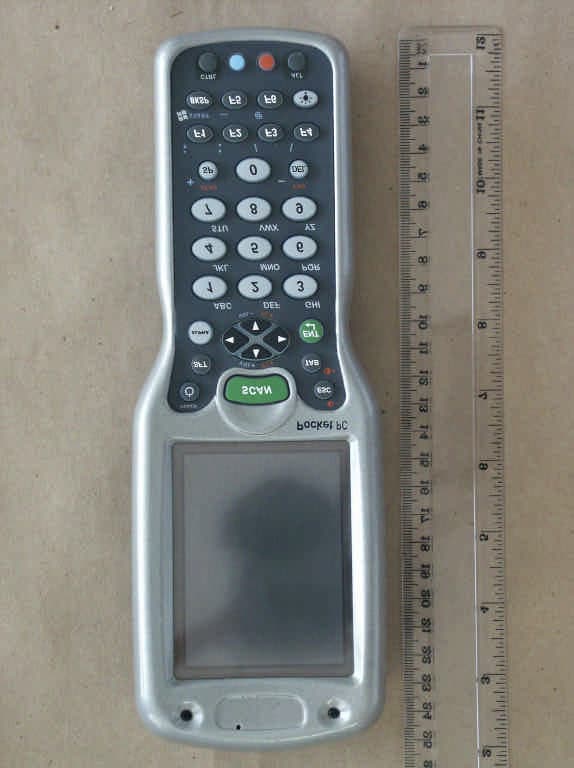
Click to zoom
Application Details
- Equipment Class
- DTS - Digital Transmission System
- Date of Grant
- Aug 12, 2003
- Application Purpose
- Original Equipment
- Date of Application
- Aug 12, 2003
- Equipment Note
- Hand Held Computer with a 802.11b radio
- Frequency Range
- 2412.00000000 - 2462.00000000
- Company
- Honeywell International Inc
- Country
- United States
Documents & Files
Document Text
Text extracted from the exhibit documents filed with the FCC. Open a document above to read the original.
Users Manual
™ User’s Guide Dolphin® 9500/9550 Mobile Computer Dr a f t 0 2 6 / 1 8 / 0 3 Trademarks Dolphin, HomeBase, Mobile Base and QuadCharger are trademarks or registered trademarks of Hand Held Products, Inc. Microsoft, MS ActiveSync, Outlook, Windows, and Windows NT are trademarks of Microsoft Corporation. Other product names mentioned in this manual may be trademarks or registered trademarks of their respective companies and are hereby acknowledged. Disclaimer Hand Held Products, Inc. d/b/a HHP (“HHP”) reserves the right to make changes in specifications and other information contained in this document without prior notice, and the reader should in all cases consult HHP to determine whether any such changes have been made. The information in this publication does not represent a commitment on the part of HHP. HHP shall not be liable for technical or editorial errors or omissions contained herein; nor for incidental or consequential damages resulting from the furnishing, performance, or use of this material. This document contains proprietary information which is protected by copyright. All rights are reserved. No part of this document may be photocopied, reproduced, or translated into another language without the prior written consent of HHP. 2000-2002 Hand Held Products, Inc. All rights reserved. Web Address: www.HHP.com Dolphin® 9500/9550 Mobile Computer User’s Guide0 - i Chapter 1 - Introduction Safety ...................................................................................................................................................1-2 Required Safety Labels .................................................................................................................1-2 If Your Dolphin 9500/9550 has a WLAN radio ...........................................................................1-3 FCC Compliance ...........................................................................................................................1-4 Regulatory and Safety Agency Approvals ....................................................................................1-5 Dolphin 9500/9550 RF Bluetooth R&TTE Compliance Statement .............................................1-5 Dolphin 9500/9550 RF 802.11b R&TTE Compliance Statement ................................................1-6 Batteries ...............................................................................................................................................1-6 Care and Cleaning of the Dolphin 9500/9550 .....................................................................................1-7 Chapter 2 - Getting Started Accessories for the Dolphin 9500/9550 ..............................................................................................2-1 Dolphin 9500/9550 Models and Options.............................................................................................2-1 Image Engine Options and Bar Code Symbologies Supported ...........................................................2-2 Using Dolphin 9500/9550 for the First Time ......................................................................................2-2 Setting the Time Zone .........................................................................................................................2-6 Setting the Time and Date.............................................................................................................2-7 Chapter 3 - Dolphin 9500/9550 Overview System Features ...................................................................................................................................3-1 Processor .......................................................................................................................................3-1 Operating System ..........................................................................................................................3-1 Memory .........................................................................................................................................3-1 Wireless Radio Options ................................................................................................................3-1 Front Panel Features............................................................................................................................3-2 Back Panel Features.............................................................................................................................3-4 Dolphin 9500/9550.......................................................................................................................3-4 Dolphin 9550.................................................................................................................................3-5 Rubber Nose Bumpers ..................................................................................................................3-6 Scan Trigger ..................................................................................................................................3-6 Pistol Grip Handle.........................................................................................................................3-6 Side Panel Features..............................................................................................................................3-7 Bottom Panel Features .........................................................................................................................3-8 Com Port Assignment Table .........................................................................................................3-8 Industrial Connector......................................................................................................................3-8 Batteries ........................................................................................................................................3-8 Internal Li-Ion Backup Battery .....................…
Text truncated - open the document above for the full version.
Users Manual
5 - 34Dolphin® 9500/9550 Mobile Computer User’s Guide Prepare for File Transfer 1. Make sure the remote device has file sharing enabled. It must support the OBEX File Transfer server profile. Note:If the other device is also using the Bluetooth Connection Kit, you can enable file sharing by tapping the Bluetooth icon. In the pop-up menu, tap Transfer via Bluetooth | Enable File Sharing. 2. Now you are ready to browse the remote device. Tap on the Bluetooth icon. In the pop-up menu, tap Transfer via Bluetooth | Browse Remote Device. 3. If your mobile computer has no devices in the Bluetooth Devices Folder that supports OBEX File Transfer, then it will begin to search for Bluetooth devices nearby. 4. Select the Bluetooth device you wish to browse. If the desired device is not listed, tap Find. 5. Your mobile computer will begin to establish a file sharing connection. Dolphin® 9500/9550 Mobile Computer User’s Guide5 - 35 6. After the devices successfully connect, the Bluetooth File Explorer will appear. Half of the screen shows contents of the remote device, while the other half shows contents of your device (the local device). The very bottom of the screen reports the connection status. Send/Receive File(s) or Folder(s) 1. Select the file(s) or folder(s) that you wish to transfer. You can only select items from one device per transfer session. Single-tap items to select them for transfer. Double-tap on a folders to open it and see its contents. 2. There are two different ways to initiate the transfer. • Tap on the File menu. Select Send to remote or Get from remote, as applicable. The inappropriate option should be gray. • Tap on the Send to remote icon or Get from remote icon, as applicable. The inappropriate icon should be gray. 3. A screen will report the status of the transfer. 5 - 36Dolphin® 9500/9550 Mobile Computer User’s Guide 4. After the transfer, a copy of each selected item should appear in the other device. Create a Folder 1. Tap on the File menu. Select Remote device or Local device, wherever you want to create a folder, then tap Create remote folder or Create local folder, as applicable. 2. Alternatively, on the Dolphin 9500/9550, you can tap and hold your stylus on an item in either the remote or local device that you wish to put in a new folder. In the pop-up menu, select Create folder. 3. In the next screen, enter a name for your new folder. Tap OK. 4. The new folder should be listed under the appropriate device. Delete File(s) or Folder(s) 1. Select item(s) that you wish to delete. You can only delete item(s) from one device at a time. 2. Tap on the File menu. Select Remote device or Local device, wherever the item(s) are located, then tap Delete remote item(s) or Delete local item(s), as applicable. Dolphin® 9500/9550 Mobile Computer User’s Guide5 - 37 3. Tap and hold your stylus an item in either the remote or local device that you wish to put in a new folder. In the pop-up menu, select Delete folder. 4. In the Confirm screen, tap Yes. Refresh Remote View 1. Tap on the Device menu. Select Refresh remote view. 2. Your local device will begin to read the contents of the remote device. 3. After a few seconds, the view of the contents of the remote device will be refreshed. Connect/Disconnect To connect to the remote device, do the following: 1. Make sure the remote device has file sharing enabled. 2. Start the connection process by either of two methods: • ·Tap on the Device menu. Select Connect. • ·Tap on the Connect icon. 3. In the next screen, select the device you wish to connect to. Tap Select. Your mobile computer will attempt to connect to the device selected. To disconnect from the remote device, do the following: 1. Start the disconnection process by either of two methods: • Tap on the Device menu. Select Disconnect. • Tap on the Connect icon. 2. Your mobile computer will disconnect from the remote device. Afterwards, no contents will be listed for the remote device. 5 - 38Dolphin® 9500/9550 Mobile Computer User’s Guide Exit Bluetooth File Explorer To exit the Bluetooth File Explorer, tap File | Exit. Receive Contact or File 1. Tap on the Bluetooth icon. In the pop-up menu, tap Transfer via Bluetooth | Receive Contact or File. 2. The Receive Contact or File status screen will appear. Your mobile computer will wait two minutes for the contact or file. 3. After successfully connecting to the remote device, the screen will report Connected then disappear. The new contact or file should now be on your device. 4. If two minutes passes before you receive the item, tap Wait Again. 5. After you receive the file or contact, the "Receive Contact or File" feature is automatically disabled. Dolphin® 9500/9550 Mobile Computer User’s Guide5 - 39 Enable File Sharing 1. Tap on the Bluetooth icon. In the pop-up menu, tap Transfer via Bluetooth | Enable File Sharing. 2. The Enable File Sharing status screen will appear. Your mobile computer will wait two minutes for the remote device to connect. 3. After successfully connecting to the remote device, the screen will report Connected. 4. If two minutes passes before you connect, tap Wait Again. 5. File sharing will be enabled until you end it by tapping Cancel. The Dialer This section explains how to assign a dialing prefix and use the Dialer to dial a number directly from your Contacts list. The Dialer makes it quick and easy to perform dial-up networking. If you have not done so already, be sure to run the Dialer Installer from the Bluetooth Card Installation CD. While installing the program, you can also assign the dialing prefix. Note: The Dialer has been verified to work with Nokia and Ericsson phones and is known not to work with the Motorola 270c, NTT Docomo Paldio 633S or Sony au C413S phone. Results may vary with other phones that are not listed as being supported by the Bluetooth system. Assign a Dialing Prefix If you have not already assigned a dialing prefix during the install process, you can do so by following these st…
Text truncated - open the document above for the full version.
External Photos
Registrationnumber : U0M20304-4891-T-47b ELECTRONIC TECHNOLOGY SYSTEMS DR. GENZ GMBH STORKOWER STR.38c, D-15526 REICHENWALDE B. BERLIN page 1 of 15 ELECTRONIC TECHNOLOGY SYSTEMS DR.GENZ GMBH Annex D Picture external Registrationnumber : U0M20304-4891-T-47b ELECTRONIC TECHNOLOGY SYSTEMS DR. GENZ GMBH STORKOWER STR.38c, D-15526 REICHENWALDE B. BERLIN page 2 of 15 ELECTRONIC TECHNOLOGY SYSTEMS DR.GENZ GMBH Registrationnumber : U0M20304-4891-T-47b ELECTRONIC TECHNOLOGY SYSTEMS DR. GENZ GMBH STORKOWER STR.38c, D-15526 REICHENWALDE B. BERLIN page 3 of 15 ELECTRONIC TECHNOLOGY SYSTEMS DR.GENZ GMBH Registrationnumber : U0M20304-4891-T-47b ELECTRONIC TECHNOLOGY SYSTEMS DR. GENZ GMBH STORKOWER STR.38c, D-15526 REICHENWALDE B. BERLIN page 4 of 15 ELECTRONIC TECHNOLOGY SYSTEMS DR.GENZ GMBH Registrationnumber : U0M20304-4891-T-47b ELECTRONIC TECHNOLOGY SYSTEMS DR. GENZ GMBH STORKOWER STR.38c, D-15526 REICHENWALDE B. BERLIN page 5 of 15 ELECTRONIC TECHNOLOGY SYSTEMS DR.GENZ GMBH Registrationnumber : U0M20304-4891-T-47b ELECTRONIC TECHNOLOGY SYSTEMS DR. GENZ GMBH STORKOWER STR.38c, D-15526 REICHENWALDE B. BERLIN page 6 of 15 ELECTRONIC TECHNOLOGY SYSTEMS DR.GENZ GMBH
Internal Photos
Registrationnumber : U0M20304-4891-T-47b ELECTRONIC TECHNOLOGY SYSTEMS DR. GENZ GMBH STORKOWER STR.38c, D-15526 REICHENWALDE B. BERLIN page 7 of 15 Annex D Picture internal ELECTRONIC TECHNOLOGY SYSTEMS DR.GENZ GMBH Registrationnumber : U0M20304-4891-T-47b ELECTRONIC TECHNOLOGY SYSTEMS DR. GENZ GMBH STORKOWER STR.38c, D-15526 REICHENWALDE B. BERLIN page 8 of 15 Registrationnumber : U0M20304-4891-T-47b ELECTRONIC TECHNOLOGY SYSTEMS DR. GENZ GMBH STORKOWER STR.38c, D-15526 REICHENWALDE B. BERLIN page 9 of 15 Registrationnumber : U0M20304-4891-T-47b ELECTRONIC TECHNOLOGY SYSTEMS DR. GENZ GMBH STORKOWER STR.38c, D-15526 REICHENWALDE B. BERLIN page 10 of 15 Registrationnumber : U0M20304-4891-T-47b ELECTRONIC TECHNOLOGY SYSTEMS DR. GENZ GMBH STORKOWER STR.38c, D-15526 REICHENWALDE B. BERLIN page 11 of 15 Registrationnumber : U0M20304-4891-T-47b ELECTRONIC TECHNOLOGY SYSTEMS DR. GENZ GMBH STORKOWER STR.38c, D-15526 REICHENWALDE B. BERLIN page 12 of 15 Registrationnumber : U0M20304-4891-T-47b ELECTRONIC TECHNOLOGY SYSTEMS DR. GENZ GMBH STORKOWER STR.38c, D-15526 REICHENWALDE B. BERLIN page 13 of 15 Registrationnumber : U0M20304-4891-T-47b ELECTRONIC TECHNOLOGY SYSTEMS DR. GENZ GMBH STORKOWER STR.38c, D-15526 REICHENWALDE B. BERLIN page 14 of 15
RF Exposure Info
ELECTRONIC TECHNOLOGY SYSTEMS DR. GENZ GMBH TEST - REPORT SAR Compliance Test Report Test report no.: U9M20306-4895-S-8 SAR ELECTRONIC TECHNOLOGY SYSTEMSSTORKOWER STRASSE 38C, D-15526 REICHENWALDE B. BERLIN DR. GENZ GMBHPHONE +49-33631-888 00 FAX +49-33631-888 660 ETS Dr. Genz GmbH, GermanyRegistration number: U9M20306-4895-S-8Page 1 of 22 ELECTRONIC TECHNOLOGY SYSTEMS DR.GENZ GMBH TABLE OF CONTENTS 1General information 1.1Notes 1.2Testing laboratory 1.3Details of approval holder 1.4 Manufacturer 1.5Application details 1.6Test item 1.7Test results 1.8Test standards 2Technical test 2.1Summary of test results 2.2Test environment 2.3Test equipment utilized 2.4Definitions 2.5Measurement system description 2.6Test system specification 2.7Measurement procedure 2.8Reference points 2.9Test positions 2.10Measurement uncertainty 3Tissue and system verification 3.1Tissue verification 3.2System verification 4Test Results 5References 6Appendix ETS Dr. Genz GmbH, GermanyRegistration number: U9M20306-4895-S-8Page 3 of 22 ELECTRONIC TECHNOLOGY SYSTEMS DR.GENZ GMBH 1.2 Testing laboratory 1.2.1Location ELECTRONIC TECHNOLOGY SYSTEM DR. GENZ GMBH (ETS) Storkower Straße 38c D-15526 Reichenwalde b. Berlin Germany Telephone : +49 33631 888 00 Fax: +49 33631 888 660 1.2.2Details of accreditation status ACCREDITED TESTING LABORATORY DAR-REGISTRATION NUMBER: TTI-P-G 126/96 FCC FILED TEST LABORATORY REG. NO. 96970 BLUETOOTH QUALIFICATION TEST FACILITY (BQTF) ACCREDITED BY BLUETOOTH QUALIFICATION REVIEW BOARD INDUSTRY CANADA FILED TEST LABORATORY REG. NO. IC 3470 A2LA ACCREDITED Certificate Number 1983-01 1.3Details of approval holder Name: HHP NC Street: 7520 East Independent Blvd., Suite 230 Town: Charlotte, NC 28227 Country: U.S.A. Telephone: +1 315 685 2931 Fax: Contact: Mr. Naveen Velagapudi Telephone: +1 315 685 2931 1.4Manufacturer: (if applicable) Name: Street: Town: Country: ETS Dr. Genz GmbH, GermanyRegistration number: U9M20306-4895-S-8Page 4 of 22 ELECTRONIC TECHNOLOGY SYSTEMS DR.GENZ GMBH 1.5Application details Date of receipt of application: 18.06.2003 Date of receipt of test item: 18.06.2003 Date of test: 23.06.2003 - 24.06.2003 1.6Test item FCC ID: HD5950003 Description of test item: Dolphin 9500 with 802.11b Radio Type identification: D9500-03 Serial number: without;Identical prototype Device category: DTS (Digital Tranmission System) Technical data TX / RX Frequency range: 2400,0 - 2483,5 MHz Tested Frequency : Ch.1 2412,0 MHz : Ch.6 2437,0 MHz : Ch.11 2462,0 MHz Max. Conducted RF output power : 17,75 dBm (59,6 mW) Power supply : 7,4 V DC rechargeable battery Antenna Tx: integral Antenna RX: integral Additional information: Tx and Rx. antenna are the same. 1.7Test Results Max. SAR Measurement: 0.299 W/kg (averaged over 1 gram) This EUT has been shown to be capable of compliance for localized specific absorption rate (SAR) for uncontrolled environment/general population exposure limits specified in ANSI/IEEE Std. C95.1-1992 and had been tested in accordance with the measurement procedures specified in FCC/OET Bulletin 65 Supplement C (2001) and IEEE Std. 1528-200X (Draft 6.5, January 2002). ETS Dr. Genz GmbH, GermanyRegistration number: U9M20306-4895-S-8Page 5 of 22 ELECTRONIC TECHNOLOGY SYSTEMS DR.GENZ GMBH FORMULARDROPDOWN1.8Test standards Standards: - IEEE Std. 1528-200X (Draft 6.5, January 2002) FCC Rule Part(s): - FCC OET Bulletin 65, Supplement C, Edition 01-01 2Technical test 2.1Summary of test results EUT complies with the RF radiation exposure limits of the FCC as shown by the SAR measurement results. These measurements are taken to simulate the RF effects exposure under worst-case conditions. The EUT complies with the requirements in respect to all parameters subject to the test. The test results and statements relate only to the item(s) tested. Please note that the absorption and distribution of electromagnetic energy in the body are very complex phenomena that depend on the mass, shape, and size of the body, the orientation of the body with respect to the field vectors, and the electrical properties of both the body and the environment. Other variables that may play a substantial role in possible biological effects are those that characterize the environment (e.g. ambient temperature, air velocity, relative humidity, and body insulation) and those that characterize the individual (e.g. age, gender, activity level, debilitation, or disease). Because innumerable factors may interact to determine the specific biological outcome of an exposure to electromagnetic fields, any protection guide shall consider maximal amplification of biological effects as a result of field-body interactions, environmental conditions, and physiological variables. [1] 2.2Test environment Room temperature: 22,2 -22,6 o C Liquid Temperature: :22,1-22,4 ° C Relative humidity content: 20 ...75 % Air pressure: 86 ...103 k P a Details of power supply: 7,4 V DC ETS Dr. Genz GmbH, GermanyRegistration number: U9M20306-4895-S-8Page 6 of 22 ELECTRONIC TECHNOLOGY SYSTEMS DR.GENZ GMBH 2.3Test equipment utilized No.Measurement device:Type:Manufacturer: ETS 0253Spectrum analyzerFSIQ 26Rohde & Schwarz ETS 0449Stäubli RobotRX90B LStäubli ETS 0450Stäubli Robot ControllerCS/MBs&pStäubli ETS 0451DASY 4 Measurement ServerSchmid & Partner ETS 0452Control PendantStäubli ETS 0453Compaq ComputerPentium IV, 2 GHz,Schmid & Partner ETS 0454Dabu Acquisition ElectronicsDAE3V1Schmid & Partner ETS 0455Dummy ProbeSchmid & Partner ETS 0456Dosimetric E-Field ProbeET3DV6Schmid & Partner ETS 0457Dosimetric E-Field ProbeET3DV6Schmid & Partner ETS 0458Dosimetric H-Field ProbeH3DV6Schmid & Partner ETS 0459System Validation KitD900V2Schmid & Partner ETS 0460System Validation KitD1800V2Schmid & Partner ETS 0461System Validation KitD1900V2Schmid & Partner ETS 0462System Validation KitD2450V2Schmid & Partner ETS 0463Probe Alignment UnitLBV2Schmid & Partner ETS 0464SAM Twin phantomV 4.0Schmid & Partner ETS 0465Mounting DeviceV 3.1Schmid & Partner ETS 0224aM…
Text truncated - open the document above for the full version.
Test Report
ELECTRONIC TECHNOLOGY SYSTEMS DR. GENZ GMBH COMPETENT BODY DAR-REGISTRATION NUMBER: BPT-ZE-026/96-00 ACCREDITED TESTING LABORATORY DAR-REGISTRATION NUMBER: TTI-P-G 126/96-30 TEST - REPORT FCC 15.247 Test report no.: U0M20304-4891-T-47b ELECTRONIC TECHNOLOGY SYSTEMS STORKOWER STR.38c D-15526 REICHENWALDE B. BERLIN DR. GENZ GMBH PHONE +49-33631-888-0 FAX +49-33631-888-660 Registrationnumber : U0M20304-4891-T-47b ELECTRONIC TECHNOLOGY SYSTEMS DR. GENZ GMBH STORKOWER STR.38c, D-15526 REICHENWALDE B. BERLIN page 2 of 25 ELECTRONIC TECHNOLOGY SYSTEMS DR.GENZ GMBH Table of Contents 1.0 GENERAL INFORMATION..........................................................................................................................................3 1.1. NOTES..................................................................................................................................................................................3 1.2. TESTING LABORATORY.....................................................................................................................................................4 1.2.1. Location.....................................................................................................................................................................4 1.2.2. Details of accreditation status................................................................................................................................4 2.0 SUMMARY OF TESTS....................................................................................................................................................5 3.0 GENERAL DESCRIPTION............................................................................................................................................6 3.1. PRODUCT DESCRIPTION....................................................................................................................................................6 3.2. RELATED SUBMITTAL(S) GRANTS..................................................................................................................................6 3.3. TEST METHODOLOGY.......................................................................................................................................................7 3.4. TEST FACILITY...................................................................................................................................................................7 4.0 SYSTEM TEST CONFIGURATION...........................................................................................................................8 4.1. SUPPORT EQUIPMENT AND DESCRIPTION.......................................................................................................................8 4.2. BLOCK DIAGRAM OF TEST SETUP...................................................................................................................................8 4.3. JUSTIFICATION...................................................................................................................................................................8 4.4. SOFTWARE EXERCISE PROGRAM.....................................................................................................................................9 4.5. MODE OF OPERATION DURING TEST..............................................................................................................................9 4.6. MODIFICATIONS.................................................................................................................................................................9 4.7. ADDITIONS, DEVIATIONS AND EXCLUSIONS FROM STANDARDS...............................................................................9 4.8. TEST ENVIRONMENT..........................................................................................................................................................9 4.9. TEST EQUIPMENT UTILIZED............................................................................................................................................10 5.0 MEASUREMENT RESULTS.......................................................................................................................................12 5.1. DSSS SYSTEMS...............................................................................................................................................................12 5.1.1. Maximum Peak Output Power............................................................................................................................12 5.1.2. Minimum 6 dB Bandwidth...................................................................................................................................14 5.1.3. Maximum Power Density.....................................................................................................................................15 5.1.4. Out of Band Radiated Emissions........................................................................................................................16 5.1.5. Transmitter Radiated Emissions in Restricted Bands......................................................................................17 5.1.6. Radiated Emissions from Receiver Section of Transceiver...........................................................................20 ANNEX A DIAGRAMS MINIMUM 6 DB BANDWIDTH................................................................................................21 ANNEX B DIAGRAM MAXIMUM POWER DENSITY..................................................................................................23 ANNEX C DIAGRAMS SPURIOUS EMISSION TRANCEIVER................................................................................24 ANNEX D PICTURE EXTERNAL / INTERNAL / TESTSETUP..................................................................................25 Registrationnumber : U0M20304-4891-T-47b ELECTRON…
Text truncated - open the document above for the full version.
Test Report
Registrationnumber : U0M20304-4891-T-47b ELECTRONIC TECHNOLOGY SYSTEMS DR. GENZ GMBH STORKOWER STR.38c, D-15526 REICHENWALDE B. BERLIN page 1 of 110 ELECTRONIC TECHNOLOGY SYSTEMS DR.GENZ GMBH Annex C Diagrams Tranceiver Channel 1 average Registrationnumber : U0M20304-4891-T-47b ELECTRONIC TECHNOLOGY SYSTEMS DR. GENZ GMBH STORKOWER STR.38c, D-15526 REICHENWALDE B. BERLIN page 2 of 110 ELECTRONIC TECHNOLOGY SYSTEMS DR.GENZ GMBH Registrationnumber : U0M20304-4891-T-47b ELECTRONIC TECHNOLOGY SYSTEMS DR. GENZ GMBH STORKOWER STR.38c, D-15526 REICHENWALDE B. BERLIN page 3 of 110 ELECTRONIC TECHNOLOGY SYSTEMS DR.GENZ GMBH Registrationnumber : U0M20304-4891-T-47b ELECTRONIC TECHNOLOGY SYSTEMS DR. GENZ GMBH STORKOWER STR.38c, D-15526 REICHENWALDE B. BERLIN page 4 of 110 ELECTRONIC TECHNOLOGY SYSTEMS DR.GENZ GMBH Registrationnumber : U0M20304-4891-T-47b ELECTRONIC TECHNOLOGY SYSTEMS DR. GENZ GMBH STORKOWER STR.38c, D-15526 REICHENWALDE B. BERLIN page 5 of 110 ELECTRONIC TECHNOLOGY SYSTEMS DR.GENZ GMBH Registrationnumber : U0M20304-4891-T-47b ELECTRONIC TECHNOLOGY SYSTEMS DR. GENZ GMBH STORKOWER STR.38c, D-15526 REICHENWALDE B. BERLIN page 6 of 110 ELECTRONIC TECHNOLOGY SYSTEMS DR.GENZ GMBH Registrationnumber : U0M20304-4891-T-47b ELECTRONIC TECHNOLOGY SYSTEMS DR. GENZ GMBH STORKOWER STR.38c, D-15526 REICHENWALDE B. BERLIN page 7 of 110 ELECTRONIC TECHNOLOGY SYSTEMS DR.GENZ GMBH Registrationnumber : U0M20304-4891-T-47b ELECTRONIC TECHNOLOGY SYSTEMS DR. GENZ GMBH STORKOWER STR.38c, D-15526 REICHENWALDE B. BERLIN page 8 of 110 ELECTRONIC TECHNOLOGY SYSTEMS DR.GENZ GMBH Registrationnumber : U0M20304-4891-T-47b ELECTRONIC TECHNOLOGY SYSTEMS DR. GENZ GMBH STORKOWER STR.38c, D-15526 REICHENWALDE B. BERLIN page 9 of 110 ELECTRONIC TECHNOLOGY SYSTEMS DR.GENZ GMBH Registrationnumber : U0M20304-4891-T-47b ELECTRONIC TECHNOLOGY SYSTEMS DR. GENZ GMBH STORKOWER STR.38c, D-15526 REICHENWALDE B. BERLIN page 10 of 110 ELECTRONIC TECHNOLOGY SYSTEMS DR.GENZ GMBH Registrationnumber : U0M20304-4891-T-47b ELECTRONIC TECHNOLOGY SYSTEMS DR. GENZ GMBH STORKOWER STR.38c, D-15526 REICHENWALDE B. BERLIN page 11 of 110 ELECTRONIC TECHNOLOGY SYSTEMS DR.GENZ GMBH Registrationnumber : U0M20304-4891-T-47b ELECTRONIC TECHNOLOGY SYSTEMS DR. GENZ GMBH STORKOWER STR.38c, D-15526 REICHENWALDE B. BERLIN page 12 of 110 ELECTRONIC TECHNOLOGY SYSTEMS DR.GENZ GMBH Registrationnumber : U0M20304-4891-T-47b ELECTRONIC TECHNOLOGY SYSTEMS DR. GENZ GMBH STORKOWER STR.38c, D-15526 REICHENWALDE B. BERLIN page 13 of 110 ELECTRONIC TECHNOLOGY SYSTEMS DR.GENZ GMBH Registrationnumber : U0M20304-4891-T-47b ELECTRONIC TECHNOLOGY SYSTEMS DR. GENZ GMBH STORKOWER STR.38c, D-15526 REICHENWALDE B. BERLIN page 14 of 110 ELECTRONIC TECHNOLOGY SYSTEMS DR.GENZ GMBH Registrationnumber : U0M20304-4891-T-47b ELECTRONIC TECHNOLOGY SYSTEMS DR. GENZ GMBH STORKOWER STR.38c, D-15526 REICHENWALDE B. BERLIN page 15 of 110 ELECTRONIC TECHNOLOGY SYSTEMS DR.GENZ GMBH Registrationnumber : U0M20304-4891-T-47b ELECTRONIC TECHNOLOGY SYSTEMS DR. GENZ GMBH STORKOWER STR.38c, D-15526 REICHENWALDE B. BERLIN page 16 of 110 ELECTRONIC TECHNOLOGY SYSTEMS DR.GENZ GMBH Channel 1 peak Registrationnumber : U0M20304-4891-T-47b ELECTRONIC TECHNOLOGY SYSTEMS DR. GENZ GMBH STORKOWER STR.38c, D-15526 REICHENWALDE B. BERLIN page 17 of 110 ELECTRONIC TECHNOLOGY SYSTEMS DR.GENZ GMBH Registrationnumber : U0M20304-4891-T-47b ELECTRONIC TECHNOLOGY SYSTEMS DR. GENZ GMBH STORKOWER STR.38c, D-15526 REICHENWALDE B. BERLIN page 18 of 110 ELECTRONIC TECHNOLOGY SYSTEMS DR.GENZ GMBH Registrationnumber : U0M20304-4891-T-47b ELECTRO…
Text truncated - open the document above for the full version.
Contact Information
Applicant
Cindy Jiang(Global Regulatory Compliance Manager)
Technical Contact
Hand Held Products IncAndrew Okraski
[email protected]704 998 3893
7520 Independence Blvd. · Charlotte, North Carolina · United States
Non-Technical Contact
Hand Held Products, IncNaveen Velagapudi
[email protected]315 685 2931
Test Firm
Eurofins Product Service GmbHRobert Kschiwan-Kaspar
Technical Specifications
| # | Rule Parts | Frequency Range | Power Output |
|---|---|---|---|
| 1 | 15C | 2.41 GHz - 2.46 GHz | 58.88 mW |
Other Applications from Honeywell International Inc
HD5-CT47HFUHF
Aug 04, 2026A rugged accessory for the Honeywell CT47 mobile computer which enables HF and UHF reading. Reader is supplied from mobile computer CT47.
Equipment Class
DXX - Part 15 Low Power Communication Device TransmitterHD5CT47HFUHF
Aug 04, 2026A rugged accessory for the Honeywell CT47 mobile computer which enables HF and UHF reading. Reader is supplied from mobile computer CT47.
Equipment Class
DTS - Digital Transmission SystemHD5-8680IC
Jun 17, 2026Barcode Scanner
Equipment Class
DSS - Part 15 Spread Spectrum TransmitterHD5-CT70X1
Jan 26, 2026Mobile Computer
Equipment Class
CBE - Citizens Band End User DevicesHD5-1972
Dec 25, 2025Barcode Scanner
Equipment Class
DSS - Part 15 Spread Spectrum Transmitter