HD59500LUPHand Held PC with GSM 850/1800/1900, WLAN and BT
Honeywell International Inc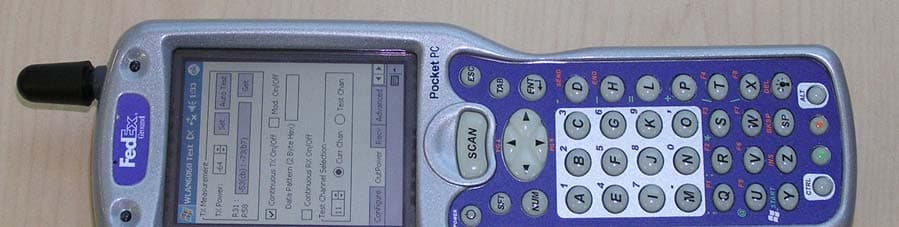
Click to zoom
Application Details
- Equipment Class
- PCE - PCS Licensed Transmitter held to ear
- Date of Grant
- Jan 23, 2005
- Application Purpose
- Original Equipment
- Date of Application
- Dec 22, 2004
- Equipment Note
- Hand Held PC with GSM 850/1800/1900, WLAN and BT
- Frequency Range
- 824.20000000 - 848.80000000
- Company
- Honeywell International Inc
- Country
- United States
Documents & Files
Document Text
Text extracted from the exhibit documents filed with the FCC. Open a document above to read the original.
Users Manual
™ User’s Guide - Preliminary Rev (d) 12/22/04 Dolphin ® 9500 Series Mobile Computer Windows Mobile ™ Software for Pocket PCs 2003 Disclaimer Hand Held Products, Inc. (“Hand Held Products”) reserves the right to make changes in specifications and other information contained in this document without prior notice, and the reader should in all cases consult Hand Held Products to determine whether any such changes have been made. The information in this publication does not represent a commitment on the part of Hand Held Products. Hand Held Products shall not be liable for technical or editorial errors or omissions contained herein; nor for incidental or consequential damages resulting from the furnishing, performance, or use of this material. This document contains proprietary information that is protected by copyright. All rights are reserved. No part of this document may be photocopied, reproduced, or translated into another language without the prior written consent of Hand Held Products. © 2004 Hand Held Products, Inc. All rights reserved. Web Address: www.handheld.com Trademarks Dolphin, HomeBase, Mobile Base, and QuadCharger are trademarks or registered trademarks of Hand Held Products, Inc. Windows Mobile, Windows, Windows NT, Windows 2000, Windows ME, Windows XP, ActiveSync, Outlook, and the Windows logo are trademarks or registered trademarks of Microsoft Corporation. Intel is a registered trademark of Intel Corporation. Chapter 7 (pages 7-1–7-11) contains copyrighted information from SyChip, Inc. Chapter 7 (pages 7-12–7-25) contains copyrighted information from Meetinghouse Corporation. Meetinghouse, the Meetinghouse logo, and all other Meetinghouse trademarks/service marks contained herein are trademarks or registered trademarks of Meetinghouse. Chapter 8 is copyrighted information used by permission from Bluetooth SIG, Inc. The Bluetooth trademarks are owned by Bluetooth SIG, Inc., U.S.A. and licensed to Hand Held Products. Chapter 9 (9-3–9-15 and 9-17–9-22) contains information with permission from INTRINSYC Software, Inc. Other product names mentioned in this manual may be trademarks or registered trademarks of their respective companies and are hereby acknowledged. Dolphin® 9500 Series Mobile Computer User’s Guide - Preliminary Rev (d) 12/22/04iii Table of Contents Chapter 1 - Introduction Required Safety Labels ................................................................................................................. 1-2 Dolphin 9500 Series Batch Terminal............................................................................................ 1-3 Regulatory and Safety Approvals for all Dolphin 9500 Series Terminals ..................................1-3 Dolphin 9500 Series WLAN (802.11b) or WPAN (Bluetooth) Radio .................................. 1-4 Dolphin 9500 WWAN (GSM) Radio..................................................................................... 1-6 FCC Compliance........................................................................................................................... 1-7 Dolphin 9500 Series Batch Terminal ..................................................................................... 1-7 Dolphin 9500 Series RF Terminal with 802.11b, Bluetooth, and/or GSM MC-45 or MC-46 Radios1-7 Canadian Compliance Dolphin 9500 Series RF Terminal with 802.11b, Bluetooth, and/or GSM MC-45 ............... 1-7 RF, Regulatory, and Safety Agency Approvals for 802.11b and Bluetooth ......................... 1-8 RF, Regulatory, and Safety Agency Approvals for GSM MC-45 ......................................... 1-8 RF, Regulatory, and Safety Agency Approvals for GSM MC-46 ......................................... 1-8 Dolphin 9500 Series 802.11b and/or Bluetooth R&TTE Compliance Statement.................. 1-8 Dolphin 9500 Terminal GSM MC-45 R&TTE Compliance Statement................................. 1-9 Pacemakers, Hearing Aids and Other Electrically Powered Devices........................................... 1-9 Microwaves................................................................................................................................... 1-9 Care and Cleaning of Dolphin 9500 Series Terminals ................................................................. 1-9 Chapter 2 - Getting Started Overview....................................................................................................................................... 2-1 Dolphin 9500 Series Terminals .................................................................................................... 2-2 Dolphin 9500 Series Models and Options .................................................................................... 2-2 Dolphin 9500 Series Peripherals................................................................................................... 2-3 Dolphin 9500 Series Accessories.................................................................................................. 2-4 Image Engine Options................................................................................................................... 2-5 Dolphin 9500 and Dolphin 9550 Terminals........................................................................... 2-5 Dolphin 9501 and Dolphin 9551 Terminals........................................................................... 2-5 Bar Code Symbologies Supported ........................................................................................ 2-6 Using the Dolphin 9500 Series for the First Time ........................................................................ 2-7 Charging with Dolphin Peripherals ........................................................................................ 2-8 Resetting the Terminal ................................................................................................................ 2-11 Soft Reset (Warm Boot) ..................................................................................…
Text truncated - open the document above for the full version.
Users Manual
7 - 36Dolphin® 9500 Series Mobile Computer User’s Guide - Preliminary Rev (d) 12/17/04 Advice and Workarounds IssuePossible Causes and Solutions The Client will not start on the device with an error message about missing files. Perform a soft reset. The wireless network interface (port) does not appear in the main AEGIS screen. • The license is not valid (If you have entered a time-limited license, is your clock on the device correct?). • Restart the client - on the main screen tap Client > Restart. • Perform a soft reset. • If the radio is turned off or the radio card is not present, this will sometimes cause the port name to not appear. • If the radio driver is very old and does not support NDIS 5.1 commands, the Client may not be able to detect it. The wireless network interface appears, but when I select it and go to the "configure" menu, the Scan button is disabled. Power up the radio; see Powering Up Radios and Radio Combinations on page 4-7. The client is not attaching to the correct access point. The default network profile instructs the client to attach to the first available access point. You must select a network, move it to the Configured Networks list, and then move it above default in the list using the up arrow buttons. For more information, see Wireless Networks Tab on page 7-29. The Client is failing authentication even though all my information was entered correctly. 1. Verify that the network profile for the access point corresponds to the authentication profile you created for it. • Select the network profile in the Configured Networks list. • Tap Properties. The Profile Info tab opens - see page 7-32. • In the Authentication profiles drop-down list, select the profile you want to review. • Tap View. The User tab appears displaying the profile’s information. 2. Verify that you have configured the identity and password into the correct fields on the User tab ( page 7-32) in the authentication profile. If you are using PEAP or TTLS, the username and password are entered in the Tunneled authentication section. My Access Point does not broadcast its SSID. Even though I have manually configured an access point with that name, the Client won't associate with it. • Make sure that the desired SSID is listed as the Network Name, not the Network Profile (which is a screen label) • Verify that Do Active Scan is selected on the Profile Info tab; see Do active scan on page 7-32. Otherwise, the Client will not attempt to find the access point. I am authenticated, but I don't get an IP address through DHCP. On the main screen, tap and hold on your access point, tap Configure on the popup menu, and select the Protocol tab. Verify that Renew IP Address is selected; see Renew IP address on page 7-30. I cannot attach to my old network that does not support 802.1x authentication, but is using WEP encryption. • Verify that you can see your SSID in the Available Networks list on the Wireless Networks tab. Move the SSID to the top of the Configured Networks list so that it is accessed first. If the SSID is not there, you can add it manually and enter the SSID as the network name - page 7-29 • Select the SSID and tap Properties. • On the Profile Info tab, select Do active scan if your access point does not broadcast its SSID. • On the WEP Mgmt tab, select Use key for data encryption and Use key to authenticate with AP. • Enter the WEP Key - see Key on page 7-33. • On the Protocol tab, select Renew IP Address (unless you have entered one manually separate from the Client) • Note that the port status indicator in the main screen reads "Associated," not "Authenticated" when the connection is complete; although the log file will indicate "Entered AUTHENTICATED state." Dolphin® 9500 Series Mobile Computer User’s Guide - Preliminary Rev (d) 12/17/047 - 37 I made changes, but they do not appear to have taken effect. Always tap OK before exiting a screen you have changed. Then restart the Client from the Client menu on the main screen. How do I enable peer-to-peer (ad-hoc) mode to have two clients communicate without an access point? • On the Wireless Networks tab, add a new profile to the Configured Network list. • On the Profile Info tab, give each side the same network name (SSID). • Select Peer-to-Peer Group (ad hoc mode) and Do active scan. • On the WEP management section, select Use key for data encryption and enter an identical key for both clients. • Verify that this network profile is the first (or only) one in the Configured Network list and try to restart both clients at roughly the same time. Advice and Workarounds IssuePossible Causes and Solutions 7 - 38Dolphin® 9500 Series Mobile Computer User’s Guide - Preliminary Rev (d) 12/17/04 How 802.1X Works The network elements in the above graphics are those involved in a typical wireless LAN. When 802.1X is running, a wireless device must authenticate itself with the access point in order to get access to the Existing LAN. With respect to the terms used in the 802.1X standard, access points (APs) function as authenticators and wireless devices function as supplicants. The authenticator keeps a control port status for each Client it is serving. If a Client has been authenticated, its control port status is said to be Authorized, and the Client can send application data to the LAN through the AP. Otherwise, the control port status is said to be Unauthorized, and application data cannot traverse the AP. Typical Message Exchange Using MD5 or TLS The above graphic displays the typical message exchange when the device and the AP support 802.1X. When an AP acting as an authenticator detects a wireless station on the LAN, it sends an EAP-Request for the user's identity to the terminal. In turn, the terminal responds with its identity, and the AP relays this identity to an authentication server, which is typically an external RADIUS server. The RADIUS server can then act as a central repository of user profile information. Such use of a centralized a…
Text truncated - open the document above for the full version.
External Photos
External Photos D9500LUP EUT – Top view External Photos D9500LUP EUT – Bottom view External Photos D9500LUP EUT Cradle – Top view External Photos D9500LUP EUT Cradle – Front view External Photos D9500LUP EUT Cradle – Bottom view
ID Label/Location Info
A 500004549 RELEASE LABEL, 9500 BLUETOOTH 802.11b AND GSM (MC46) RADIOS 500004549 A ONE 14DEC04 S. MONROE 14DEC04 Notes :1. COLORS: PANTONE PROCESS BLACK: BLUETOOTH SYMBOLPANTONE PROCESS WHITE: ALL OTHER GRAPHICSBACKGROUND: HAND HELD PRODUCTS BLUE GREY 500000003110 THESE DRAWINGS AND SPECIFICATIONS ARE THE PROPERTY AND CONFIDENTIALTHESE DRAWINGS AND SPECIFICATIONS ARE THE PROPERTY AND CONFIDENTIAL MATERIAL OF HAND HELD PRODUCTS, INC. AND SHALL NOT BEMATERIAL OF HAND HELD PRODUCTS, INC. AND SHALL NOT BE REPRODUCED, OR COPIED, OR USED AS A BASIS FOR MANUFACTURE OR SALEREPRODUCED, OR COPIED, OR USED AS A BASIS FOR MANUFACTURE OR SALE OF EQUIPMENT OR DEVICES WITHOUT WRITTEN PERMISSION. cOF EQUIPMENT OR DEVICES WITHOUT WRITTEN PERMISSION. c REV# REV DESCRIPTION REV DESCRIPTION DESIGNED BYDESIGNED BY DATE ARTWORK LEVEL ARTWORK LEVEL TITLE: A DRAWING NO:DRAWING NO: REV SCALE DO NOT SCALEDO NOT SCALE SHEET 1 OF 1 DRAWING NO. DRAWING NO. DATE ECN# 100001389 2. REFERENCE PRO-E DRAWING P9500031, REV B FOR DIE CUT AND MATERIAL SPECIFICATIONS SCALE 2X X ½X ½X ½X ½X 3. BLUETOOTH SYMBOL SHOULD CONTAIN A KEEP OUT AREA DEFINED AS A BOX ON EACH SIDE OF THE SYMBOL½ THE HEIGHT OF THE SYMBOL. THE BOX IS NOT PRINTED. N10410 Tested to Comply With FCC StandardsThis Class B Digital apparatus complies with FOR HOME OR OFFICE USE Canadian ICES-003. Cet appariel numerique de la Classe B est conforme a la norme NMB-003 du Canada. Hand Held Products, Inc. Made in USAof US &imported parts. No userserviceableparts. Opening VoidsWarranty. FCC ID: HD59500LUP www.handheld.com N10410 Tested to Comply With FCC StandardsThis Class B Digital apparatus complies with FOR HOME OR OFFICE USE Canadian ICES-003. Cet appariel numerique de la Classe B est conforme a la norme NMB-003 du Canada. Hand Held Products, Inc. Made in USAof US &imported parts. No userserviceableparts. Opening VoidsWarranty. FCC ID: HD59500LUP www.handheld.com External Photos D9500LUP EUT – Bottom view
Internal Photos
Internal Photos D9500LUP EUT – Open view Internal Photos D9500LUP EUT – Open view identifying BT and WLAN modules BT Module WLAN Module Internal Photos D9500LUP EUT Open view – showing GSM module GSM Module
Internal Photos
CETECOM ICT Services GmbH Test report no.: 2_3350-01-01/03Issue Date: 2003-08-01Page 87 (90) Photographs of the equipment CETECOM ICT Services GmbH Test report no.: 2_3350-01-01/03Issue Date: 2003-08-01Page 88 (90) Photographs of the equipment CETECOM ICT Services GmbH Test report no.: 2_3350-01-01/03Issue Date: 2003-08-01Page 89 (90) Photographs of the equipment CETECOM ICT Services GmbH Test report no.: 2_3350-01-01/03Issue Date: 2003-08-01Page 90 (90) Photographs of the equipment
RF Exposure Info
SAR Test Report No.: SAR_826_2004_FCC_850_1900_2400 Date of Report: 12/21/2004 Appendix A Plots Page 1 of 24 System / software: SARA2 / 2.3 VPM Input Power Drift: Date / Time: 12/20/2004 3:05:14 PM DUT Battery Model/No: Filename: temp.txt Probe Serial Number: 0106 Ambient Temperature: 22.0°C Liquid Simulant: 850 Device Under Test: HHP D9500 Relative Permittivity: 41.86 Relative Humidity: 50% Conductivity: 0.899 Phantom S/No: Head04_37.csv Liquid Temperature: 22.0°C Phantom Rotation: 0° Max SAR Y-axis Location: -10.00 mm DUT Position: Left touch Max SAR Z-axis Location: -101.00 mm Antenna Configuration: Integral Max E Field: 18.81 V/m Test Frequency: 836.6MHz SAR 1g: 0.286 W/kg Air Factors: 346 / 318 / 386 SAR 10g: 0.187 W/kg Conversion Factors: .510 / .510 / .510 SAR Start: 0.123 W/kg Type of Modulation: SAR End: 0.124 W/kg Modn. Duty Cycle: SAR Drift during Scan: 0.04 dB Diode Compression Factors (V*200): 10 / 11.7 / 7.7 Probe battery last changed: 11/30/04 Input Power Level: maximum Extrapolation: poly4 SAR Test Report No.: SAR_826_2004_FCC_850_1900_2400 Date of Report: 12/21/2004 Appendix A Plots Page 2 of 24 System / software: SARA2 / 2.3 VPM Input Power Drift: Date / Time: 12/20/2004 3:44:56 PM DUT Battery Model/No: Filename: lefttch190_3d.txt Probe Serial Number: 0106 Ambient Temperature: 22.0°C Liquid Simulant: 850 Device Under Test: HHP D9500 Relative Permittivity: 41.86 Relative Humidity: 50% Conductivity: 0.899 Phantom S/No: Head04_37.csv Liquid Temperature: 22.0°C Phantom Rotation: 0° Max SAR Y-axis Location: -3.00 mm DUT Position: left tilt Max SAR Z-axis Location: -101.00 mm Antenna Configuration: Integral Max E Field: 19.62 V/m Test Frequency: 836.6MHz SAR 1g: 0.308 W/kg Air Factors: 346 / 318 / 386 SAR 10g: 0.195 W/kg Conversion Factors: .510 / .510 / .510 SAR Start: 0.128 W/kg Type of Modulation: SAR End: 0.129 W/kg Modn. Duty Cycle: SAR Drift during Scan: 0.04 dB Diode Compression Factors (V*200): 10 / 11.7 / 7.7 Probe battery last changed: 11/30/04 Input Power Level: maximum Extrapolation: poly4 SAR Test Report No.: SAR_826_2004_FCC_850_1900_2400 Date of Report: 12/21/2004 Appendix A Plots Page 3 of 24 System / software: SARA2 / 2.3 VPM Input Power Drift: Date / Time: 12/20/2004 4:25:21 PM DUT Battery Model/No: Filename: lefttlt190_3d.txt Probe Serial Number: 0106 Ambient Temperature: 22.0°C Liquid Simulant: 850 Device Under Test: HHP D9500 Relative Permittivity: 41.86 Relative Humidity: 50% Conductivity: 0.899 Phantom S/No: Head04_37.csv Liquid Temperature: 22.0°C Phantom Rotation: 180° Max SAR Y-axis Location: 9.00 mm DUT Position: right touch Max SAR Z-axis Location: -112.00 mm Antenna Configuration: Integral Max E Field: 17.27 V/m Test Frequency: 836.6MHz SAR 1g: 0.245 W/kg Air Factors: 346 / 318 / 386 SAR 10g: 0.168 W/kg Conversion Factors: .510 / .510 / .510 SAR Start: 0.120 W/kg Type of Modulation: SAR End: 0.121 W/kg Modn. Duty Cycle: SAR Drift during Scan: 0.02 dB Diode Compression Factors (V*200): 10 / 11.7 / 7.7 Probe battery last changed: 11/30/04 Input Power Level: maximum Extrapolation: poly4 SAR Test Report No.: SAR_826_2004_FCC_850_1900_2400 Date of Report: 12/21/2004 Appendix A Plots Page 4 of 24 System / software: SARA2 / 2.3 VPM Input Power Drift: Date / Time: 12/20/2004 4:55:02 PM DUT Battery Model/No: Filename: righttch190_3d.txt Probe Serial Number: 0106 Ambient Temperature: 22.0°C Liquid Simulant: 850 Device Under Test: HHP D9500 Relative Permittivity: 41.86 Relative Humidity: 50% Conductivity: 0.899 Phantom S/No: Head04_37.csv Liquid Temperature: 22.0°C Phantom Rotation: 180° Max SAR Y-axis Location: 1.00 mm DUT Position: right tilt Max SAR Z-axis Location: -123.00 mm Antenna Configuration: Integral Max E Field: 18.60 V/m Test Frequency: 836.6MHz SAR 1g: 0.276 W/kg Air Factors: 346 / 318 / 386 SAR 10g: 0.192 W/kg Conversion Factors: .510 / .510 / .510 SAR Start: 0.134 W/kg Type of Modulation: SAR End: 0.134 W/kg Modn. Duty Cycle: SAR Drift during Scan: -0.01 dB Diode Compression Factors (V*200): 10 / 11.7 / 7.7 Probe battery last changed: 11/30/04 Input Power Level: maximum Extrapolation: poly4 SAR Test Report No.: SAR_826_2004_FCC_850_1900_2400 Date of Report: 12/21/2004 Appendix A Plots Page 5 of 24 System / software: SARA2 / 2.3 VPM Input Power Drift: Date / Time: 12/20/2004 5:32:40 PM DUT Battery Model/No: Filename: righttlt190_3d.txt Probe Serial Number: 0106 Ambient Temperature: 22.0°C Liquid Simulant: 850 Device Under Test: HHP D9500 Relative Permittivity: 42.02 Relative Humidity: 50% Conductivity: 0.889 Phantom S/No: Head04_37.csv Liquid Temperature: 22.0°C Phantom Rotation: 0° Max SAR Y-axis Location: -6.00 mm DUT Position: left tilt Max SAR Z-axis Location: -103.00 mm Antenna Configuration: Integral Max E Field: 15.83 V/m Test Frequency: 824.2MHz SAR 1g: 0.222 W/kg Air Factors: 346 / 318 / 386 SAR 10g: 0.140 W/kg Conversion Factors: .510 / .510 / .510 SAR Start: 0.095 W/kg Type of Modulation: SAR End: 0.095 W/kg Modn. Duty Cycle: SAR Drift during Scan: 0.03 dB Diode Compression Factors (V*200): 10 / 11.7 / 7.7 Probe battery last changed: 11/30/04 Input Power Level: maximum Extrapolation: poly4 SAR Test Report No.: SAR_826_2004_FCC_850_1900_2400 Date of Report: 12/21/2004 Appendix A Plots Page 6 of 24 System / software: SARA2 / 2.3 VPM Input Power Drift: Date / Time: 12/21/2004 9:28:37 AM DUT Battery Model/No: Filename: temp.txt Probe Serial Number: 0106 Ambient Temperature: 22.0°C Liquid Simulant: 850 Device Under Test: HHP D9500 Relative Permittivity: 41.68 Relative Humidity: 50% Conductivity: 0.912 Phantom S/No: Head04_37.csv Liquid Temperature: 22.0°C Phantom Rotation: 0° Max SAR Y-axis Location: -9.00 mm DUT Position: left tilt Max SAR Z-axis Location: -101.00 mm Antenna Configuration: Integral Max E Field: 20.15 V/m Test Frequency: 848.8MHz SAR 1g: 0.341 W/kg Air Factors: 346 / 318 / 386 SAR 10g: 0.218 W/kg Conversion Factors: .510 / .510 / .510 SAR Start: 0.147 W/kg Type of Modulation: SAR End: 0.146 W/kg Modn. Duty Cycle: SAR Dri…
Text truncated - open the document above for the full version.
RF Exposure Info
SAR Test Report No.: SAR_826_2004_FCC_850_1900_2400 Date of Report: 12/21/2004 Appendix B Page 1 of 9 Appendix B: Photos EUT Photos: Photo 1. EUT front SAR Test Report No.: SAR_826_2004_FCC_850_1900_2400 Date of Report: 12/21/2004 Appendix B Page 2 of 9 Photo 2. EUT back SAR Test Report No.: SAR_826_2004_FCC_850_1900_2400 Date of Report: 12/21/2004 Appendix B Page 3 of 9 Setup Photos Photo 3. Left touch SAR Test Report No.: SAR_826_2004_FCC_850_1900_2400 Date of Report: 12/21/2004 Appendix B Page 4 of 9 Photo 4. Left tilt SAR Test Report No.: SAR_826_2004_FCC_850_1900_2400 Date of Report: 12/21/2004 Appendix B Page 5 of 9 Photo 5. Right touch SAR Test Report No.: SAR_826_2004_FCC_850_1900_2400 Date of Report: 12/21/2004 Appendix B Page 6 of 9 Photo 6 Right tilt SAR Test Report No.: SAR_826_2004_FCC_850_1900_2400 Date of Report: 12/21/2004 Appendix B Page 7 of 9 Photo 7 Body SAR SAR Test Report No.: SAR_826_2004_FCC_850_1900_2400 Date of Report: 12/21/2004 Appendix B Page 8 of 9 Photo 8. Photo to demonstrate 15 cm Z-axis head phantom SAR Test Report No.: SAR_826_2004_FCC_850_1900_2400 Date of Report: 12/21/2004 Appendix B Page 9 of 9 Photo 9. Photo to demonstrate 15 cm Z-axis flat phantom
RF Exposure Info
SAR Test Report No: SAR_826_2004_FCC_850_1900_2400 Date of Report:12/21/2004 Appendix C Miscellaneous Page 1 of 11 1 Tissue Parameters 850MHz Head liquid: Recipe: The following recipe is provided in percentage by weight. 49.46% distilled water 49.46% DGBE 1.0% salt 0.1% bactericide Di-electric constants measured on 12/20/2004. SAR measurements were made within 24 hours of the measurement of liquid parameters. Freq. Rel. Condy (MHz) Perm. (S/m) 12/20 900 41.23 0.977 12/20 824.2 39.69 1.401 12/20 836.0 39.45 1.420 12/20 848.8 39.21 1.448 850MHz Body Liquid: Recipe: The following recipe is provided in percentage by weight. 49.8% distilled water 40.6% DGBE 8.9% salt 0.6% HEC 0.1% bactericide Di-electric constants measured on 12/20/2004. SAR measurements were made within 24 hours of the measurement of liquid parameters. Freq. Rel. Condy (MHz) Perm. (S/m) 824.2 55.56 0.981 836.0 56.17 0.989 848.8 55.82 0.993 SAR Test Report No: SAR_826_2004_FCC_850_1900_2400 Date of Report:12/21/2004 Appendix C Miscellaneous Page 2 of 11 2 1900MHz Head liquid: Recipe: The following recipe is provided in percentage by weight. 54.9% distilled water 44.92% DGBE 0.18% salt 0.1% bactericide Di-electric constants measured on 12/15/2004 and 12/20/2004. SAR measurements were made within 24 hours of the measurement of liquid parameters. Freq. Rel. Condy (MHz) Perm. (S/m) 12/15 1900 39.31 1.421 12/20 1900 39.36 1.423 12/20 1850.2 39.69 1.401 12/20 1880 39.45 1.420 12/20 1909.8 39.21 1.448 1900MHz Body Liquid: Recipe: The following recipe is provided in percentage by weight. 69.17% distilled water 30.29% DGBE 0.44% salt 0.1% bactericide Di-electric constants measured on 12/15/2004. SAR measurements were made within 24 hours of the measurement of liquid parameters. Freq. Rel. Condy (MHz) Perm. (S/m) 1850.2 53.32 1.563 1880 53.19 1.577 1909.8 52.99 1.581 SAR Test Report No: SAR_826_2004_FCC_850_1900_2400 Date of Report:12/21/2004 Appendix C Miscellaneous Page 3 of 11 3 2450MHz Head liquid: Recipe: 53.74% distilled water 22.59% DGBE 22.59% triton X-100 0.98% salt 0.1% bactericide Di-electric constants measured on 12/21/2004. SAR measurements were made within 24 hours of the measurement of liquid parameters. Freq. Rel. Condy (MHz) Perm. (S/m) 2450 39.86 1.79 2450MHz Body Liquid: Recipe: 73.3% distilled water 12.88% DGBE 12.88% triton X-100 0.84% salt 0.1% bactericide Di-electric constants measured on 12/21/2004. SAR measurements were made within 24 hours of the measurement of liquid parameters. Freq. Rel. Condy (MHz) Perm. (S/m) 2412 50.96 1.863 2437 50.99 1.912 2462 50.88 1.936 Environment 12/15/2004 to 12/21/2004: Temperature: 22.0 °C ± 2°C Humidity: 45% _ 55 % SAR Test Report No: SAR_826_2004_FCC_850_1900_2400 Date of Report:12/21/2004 Appendix C Miscellaneous Page 4 of 11 4 Test Equipment Test Equipment Model Serial Instrument description Supplier / Manufacturer Model Serial No. Calibration (date) Calibration Due (date) Bench top Robot Mitsubishi supplied by IndexSAR RV-E2 EA1030108 N/A N/A SAM Phantom Upright shell phantom made by Antennessa digitized and mounted by IndexSAR SAM 03FT26 04/03 N/A Flat Phantom IndexSAR HeadBox_Spou t N/A N/A N/A Software IndexSAR SARA2 v0.420 N/A N/A N/A 900 MHz Head Tissue Simulant Cetecom Inc. 900 Head N/A 12/16/2004 & 12/20/2004 N/A 850 MHz Body Tissue Simulant Cetecom Inc. 850 Body N/A 12/20/2004 N/A 1900 MHz Head Tissue Simulant Cetecom Inc. 1900 Head N/A 12/15/2004 & 12/20/2004 N/A 1900 MHz Body Tissue Simulant Cetecom Inc. 1900 Body N/A 12/15/2004 N/A 2400 MHz Body Tissue Simulant Cetecom Inc. 2400 Body N/A 12/21/2004 N/A 2400 MHz Head Tissue Simulant Cetecom Inc. 2400 Head N/A 12/21/2004 N/A 900 MHz Dipole IndexSAR – IEEE 1528 design IXD-090 0016 07/20/2004 07/20/2005 1900 MHz Dipole IndexSAR – IEEE 1528 design IXD-190 0016 07/20/2004 07/20/2005 2450 MHz Dipole IndexSAR – IEEE 1528 design IXD-245 0016 07/20/2004 07/20/2005 Netwok Analyzer Agilent 8753ES US39172511 05/03/2004 05/03/2005 Directional coupler Werlatone C6529 11249 N/A N/A RF Amplifier Vectawave VTL5400 N/A N/A N/A SAR Probe IndexSAR IXP-050 S/N 0123 10/07/2004 10/07/2005 Probe amplifier IndexSAR IXA-010 S/N 043 N/A N/A Thermometer Control Company 4039 20410549 11/20/2001 11/20/2005 Dielectric Measurement Kit IndexSAR Di-Line N/A N/A N/A SAR Test Report No: SAR_826_2004_FCC_850_1900_2400 Date of Report:12/21/2004 Appendix C Miscellaneous Page 5 of 11 5 Equipment Calibration/Performance Documents: Validation Dipoles Performance Measurements: Pages 6 to 11 Please Note: (The following pages of Appendix C show calibration documents. These calibration documents are inserted into this appendix. The header information with page numbering scheme is a part of this report and is included on all pages of the report and appendixes. This header is used to track all of the contents of this report.) SAR Test Report No: SAR_826_2004_FCC_850_1900_2400 Date of Report:12/21/2004 Appendix C Miscellaneous Page 6 of 11 6 Report No. SN0016_090-180-190-245 July 1 st 2002 Revised 7/20/2004 INDEXSAR Validation Dipoles Type IXD-090, IXD-180, IXD-190 & IXD-245 Performance measurements S/N: 090-0016 S/N: 180-0016 S/N: 245-0016 S/N: 190-0016 MI Manning Indexsar, Oakfield House, Cudworth Lane, Newdigate, Surrey RH5 5DR. UK. Tel: +44 (0) 1306 631233 Fax: +44 (0) 1306 631834 e-mail: [email protected] SAR Test Report No: SAR_826_2004_FCC_850_1900_2400 Date of Report:12/21/2004 Appendix C Miscellaneous Page 7 of 11 7 1. Measurement Conditions Measurements were performed using a box-shaped phantom made of PMMA with dimensions designed to meet the accuracy criteria for reasonably-sized phantoms that do not have liquid capacities substantially in excess of the volume of liquid required to fill the Indexsar upright SAM phantoms used for SAR testing of handsets against the ear. An HP 8753B vector network analyser was used for the return loss measurements. The dipole was placed in a special holder made of low-permittivity, low-loss materials. This holder…
Text truncated - open the document above for the full version.
RF Exposure Info
TTI-P-G 081/94-A0 Accredited according to ISO/IEC 17025 Bluetooth Qualification Test Facility (BQTF) FCC listed # 101450 IC recognized # 3925 CETECOM Inc. 411 Dixon Landing Road Milpitas, CA 95035 U.S.A. Phone: + 1 (408) 586 6200 Fax: + 1 (408) 586 6299 E-mail: [email protected] http://www.cetecom.com CETECOM Inc. is a Delaware Corporation with Corporation number: 2113686 Board of Directors: Dr. Harald Ansorge, Dr. Klaus Matkey, Hans Peter May V.2.16M-2002-03-12 \\stupendousman\rootappsdata\emc\projects_emc\hhp\826- 2004_d9500\sar\report\sar_826_2004_fcc__850_1900_2400_ver2.doc © Copyright by CETECOM SAR Test Report No. SAR_826_2004_FCC_850_1900_2400 for the Handheld Products Handheld Computer Model Number: Dolphin 9500LUP FCC ID: HD59500LUP Date of Report: 12/21/2004 Date of issue: 12/21/2004 Report Copy No.: 01 SAR Test Report No. SAR_826_2004_FCC_850_1900_2400 Date of Report: 12/21/2004 Page 2 of 32 This report shall not be reproduced except in full without the written approval of: CETECOM Inc. SAR 411 Dixon Landing Road Milpitas, CA 95035 U.S.A. Contents 1 ASSESSMENT ...................................................................................................................4 2 ADMINISTRATIVE DATA...................................................................................................5 2.1 Identification of the Testing Laboratory Issuing the SAR Assessment Report ...............5 2.2 Identification of the Client...........................................................................................5 2.3 Identification of the Manufacturer...............................................................................5 3 EQUIPMENT UNDER INVESTIGATION (EUI)...................................................................6 3.1 Identification of the Equipment under Investigation ...................................................6 3.2 Fron…
Text truncated - open the document above for the full version.
Contact Information
Applicant
Cindy Jiang(Global Regulatory Compliance Manager)
Test Firm
Cetecom Inc.Lothar Schmidt
Technical Specifications
| # | Rule Parts | Frequency Range | Power Output | Emission | Tolerance |
|---|---|---|---|---|---|
| 2 | 22H | 824.2 MHz - 848.8 MHz | 2 W | 300KGXW | 0.0149 ppm |
Other Applications from Honeywell International Inc
HD5-CT47HFUHF
Aug 04, 2026A rugged accessory for the Honeywell CT47 mobile computer which enables HF and UHF reading. Reader is supplied from mobile computer CT47.
Equipment Class
DXX - Part 15 Low Power Communication Device TransmitterHD5CT47HFUHF
Aug 04, 2026A rugged accessory for the Honeywell CT47 mobile computer which enables HF and UHF reading. Reader is supplied from mobile computer CT47.
Equipment Class
DTS - Digital Transmission SystemHD5-8680IC
Jun 17, 2026Barcode Scanner
Equipment Class
DSS - Part 15 Spread Spectrum TransmitterHD5-CT70X1
Jan 26, 2026Mobile Computer
Equipment Class
CBE - Citizens Band End User DevicesHD5-1972
Dec 25, 2025Barcode Scanner
Equipment Class
DSS - Part 15 Spread Spectrum Transmitter