HD599EXL099EX Mobile computer
Honeywell International Inc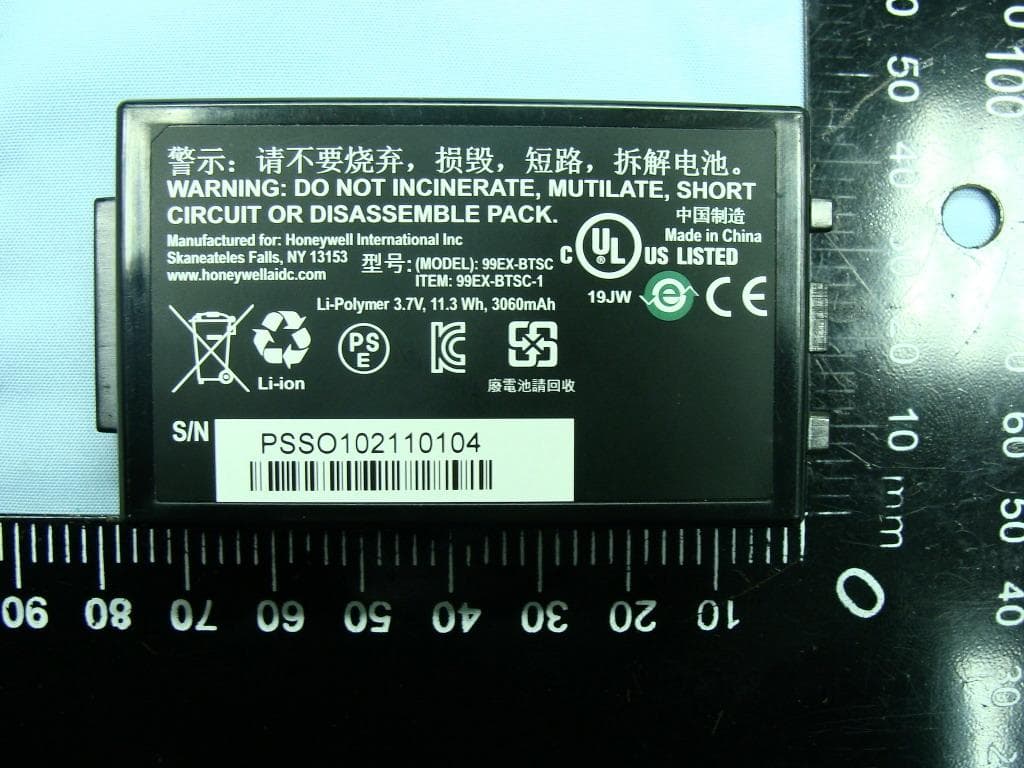
Click to zoom
Application Details
- Equipment Class
- NII - Unlicensed National Information Infrastructure TX
- Date of Grant
- Feb 22, 2011
- Application Purpose
- Original Equipment
- Date of Application
- Feb 22, 2011
- Equipment Note
- 99EX Mobile computer
- Frequency Range
- 5500.00000000 - 5700.00000000
- Company
- Honeywell International Inc
- Country
- United States
Documents & Files
Document Text
Text extracted from the exhibit documents filed with the FCC. Open a document above to read the original.
Users Manual
Dolphin ™ 99EX Mobile Computer with Windows ® Embedded Handheld 6.5 User’s Guide Preliminary Draft 1/19/11 Disclaimer Honeywell International Inc. (“HII”) reserves the right to make changes in specifications and other information contained in this document without prior notice, and the reader should in all cases consult HII to determine whether any such changes have been made. The information in this publication does not represent a commitment on the part of HII. HII shall not be liable for technical or editorial errors or omissions contained herein; nor for incidental or consequential damages resulting from the furnishing, performance, or use of this material. This document contains proprietary information that is protected by copyright. All rights are reserved. No part of this document may be photocopied, reproduced, or translated into another language without the prior written consent of HII. Web Address: www.honeywellaidc.com Trademarks Dolphin, Dolphin RF, HomeBase, Mobile Base, and QuadCharger are trademarks or registered trademarks of Hand Held Products, Inc. or Honeywell International Inc. Microsoft, Windows, Windows Mobile, Windows Embedded Handheld, Windows CE, Windows 98 Second Edition, Windows NT, Windows 2000, Windows ME, Windows XP, ActiveSync, Outlook, and the Windows logo are trademarks or registered trademarks of Microsoft Corporation. Other product names mentioned in this manual may be trademarks or registered trademarks of their respective companies and are the property of their respective owners. Patents For patent information, please refer to www.honeywellaidc.com/patents. Other Trademarks The Bluetooth trademarks are owned by Bluetooth SIG, Inc., U.S.A. and licensed to Honeywell. ©2011 Honeywell International Inc. All rights reserved. Preliminary Draft 1/19/11 iii Chapter 1 - Agency Information Laser Safety .........................................................................................................................1-1 Label Locations ..............................................................................................................1-1 Laser Safety Label .........................................................................................................1-1 Laser Eye Safety Statement ..........................................................................................1-1 LED Safety ...........................................................................................................................1-2 LED Safety Statement....................................................................................................1-2 Infrared LED Safety Statement ......................................................................................1-2 UL and C-UL Statement.......................................................................................................1-2 Approvals by Country...........................................................................................................1-2 R&TTE Compliance Statement—802.11a/b/g/n, Bluetooth, and/or GSM............................1-2 Dolphin RF Terminal—802.11a/b/g/n, Bluetooth, and/or GSM ............................................1-3 Canadian Compliance..........................................................................................................1-4 Conformité à la règlementation canadienne ........................................................................1-4 RF Exposure Information (SAR) ..........................................................................................1-4 For European Community Users .........................................................................................1-5 Waste Electrical and Electronic Equipment Information ......................................................1-5 Chapter 2 - Getting Started Out of the Box ......................................................................................................................2-1 Home Screen .......................................................................................................................2-4 Title Bar................................................................................................................................2-4 Icons in the Title Bar ............................................................................................................2-4 Horizontal Scroll ...................................................................................................................2-7 Tile Bar.................................................................................................................................2-7 Pop-Up Menus .....................................................................................................................2-7 Selecting Programs..............................................................................................................2-8 File Explorer .........................................................................................................................2-8 Search..................................................................................................................................2-9 Chapter 3 - Hardware Overview Standard Configurations for the 99EX .................................................................................3-1 Peripherals for the 99EX ......................................................................................................3-2 Accessories for the 99EX.....................................................................................................3-3 Front Panel: 99EX................................................................................................................3-5 Front Panel Features for the 99EX ................................................................................3-5 Back Panel: 99EX ..............................................................................................................…
Text truncated - open the document above for the full version.
Users Manual
8 - 3 5. When the IrDA port finds the aligned IrDA port, it immediately starts sending the selected file. The selected device reads “Sending.” 6. When the file transfer is complete, the selected device reads “Done.” Receiving Data The Beam Setting must be set to receive all incoming beams from other infrared devices. 1. Verify that beam settings are set to receive. Tap > Settings > Connections > Beam. The Beam Settings window should appear as follows: 2. Align the IrDA ports. 3. Have the owner of the other device send the data to you. 4. Your terminal automatically begins receiving the data. 5. A popup message appears asking if you want to save the incoming file. 6. Tap Yes to receive the file. Preliminary Draft 1/19/11 8 - 4 Connections Manager Microsoft’s Connections Manager sets up multiple network connections to Internet Service Providers (ISPs) via external modem. Do NOT enter connection parameters in the Connections Manager if: • You are using one of the on-board wireless radios to connect to a network. The Dolphin terminal uses the settings from each radio’s configuration utility to connect. • You are using Wireless Zero Config. By default, WZC is disabled on Dolphin terminals. To Access the Connections Manager Ta p > Settings > Connections > Connections . Tasks The Tasks screen enables you to initially configure, and then manage network settings when using a modem. Select an item in this list and then complete the setup screens that follow with the appropriate information for your network. My ISP The links under this heading enables you to add and manage modem connections to an ISP. To com- plete the setup screens, obtain the following information from your ISP: • ISP dial-up access telephone number • Username • Password • TCP/IP settings My Work Network These links enable you to establish the following connections types: • Modem • Virtual Private Network (VPN) Preliminary Draft 1/19/11 8 - 5 • Proxy server connection Note: If you are connected to your ISP or private network during synchronization, the terminal should download the proper proxy settings during synchronization with the PC. If these settings are not on your PC or need to be changed, ask your ISP or network administrator for the proxy sever name, server type, port, type of Socks protocol used, and your user name and password. To complete the setup screens, obtain the network parameters from your system administrator. Modify an Existing Connection Manage Existing Connections appears on the Connections tab after at least one network connection has been established. Ta p Manage Existing Connections on the Horizontal scroll and follow the setup screens. Advanced The Advanced screen enables you to select the default network, dialing rules, and IP address exceptions for modem connections. Note: You should not need to change Advanced settings because most ISPs now use DHCP addresses. Preliminary Draft 1/19/11 8 - 6 Dolphin Wireless Manager The Dolphin Wireless Manager provides a centralized interface that enables and disables all the on- board radios. Each radio has its own configuration program. The Dolphin Wireless Manager also pro- vides shortcuts to the configuration utilities for each radio. Ta p on the Home screen to access the Dolphin Wireless Manager. OR 1. Tap once on the Title bar to access the Horzontal Scroll bar. 2. Tap . 3. Select, “Dolphin Wireless Manager”. Dolphin Wireless Manager Window Enabling the Radios 1. Tap on the Home screen to access the Dolphin Wireless Manager. 2. Tap anywhere inside the rectangle or the OFF button inside the rectangle. If applicable, information about the radio appears when the radio is activated. These buttons show you the state of the radio. Preliminary Draft 1/19/11 8 - 7 3. The radio begins activating. 4. When the radio is activated (i.e., transmitting a signal), the OFF button changes to ON. Note: If applicable, information about the radio appears in the rectangle. Accessing Radio Configuration Utilities Each of the four radios has its own configuration utilities that you can access through the Menu. There are four radio configuration utilities: For 802.11a/b/g/n:Tap WLAN Settings and the Honeywell WLAN Security Supplicant opens. The Honeywell WLAN Security Supplicant User’s Guide is available for download from the Dolphin 99EX product page at www.honeywellaidc.com. For Bluetooth:Tap Bluetooth Settings and the Bluetooth Settings open. For details, see Working with the Bluetooth Radio on page 10-1. For GSM/HSDPA: Tap Phone Settings and the Phone opens. For details, see Working with Wireless Wide Area Networking (WWAN) on page 9-1. For GSM/CDMA: Tap Gobi Settings and the Gobi Manager opens. For details, see Gobi Manager on page 9-13. Preliminary Draft 1/19/11 8 - 8 Communication To synchronize data between the terminal and the workstation, ActiveSync (version 4.5 or higher) or Windows Mobile Device Center must be installed and configured for the appropriate communication type on the host workstation and the Dolphin terminal. Dolphin terminals ship with ActiveSync already installed. Therefore, if ActiveSync is already installed on the host workstation, you just need to connect the Dolphin terminal to the host workstation (via Dolphin peripheral) to initiate communication. If ActiveSync 4.5 or higher is not installed on the host workstation, you can download and install the most current version of ActiveSync from www.microsoft.com. Note: ActiveSync on your Dolphin terminal works with Windows Mobile Device Center on host workstations running Windows Vista or Windows 7 and with ActiveSync on host workstations running Windows XP. For detailed information on ActiveSync and WMDC visit Microsoft's Windows Mobile Web site. When communicating via ActiveSync or Windows Mobile Device Center, your terminal is designed to be connected to the host workstation with a communication peripheral sold/manufactured by Honeywell, such as the charge/communication cable. Use of any peripheral not sol…
Text truncated - open the document above for the full version.
Attestation Statements
Honeywell Scanning and Mobility 9680 Old Bailes Road Fort Mill, SC 29707 USA January/18/2011 Federal Communications Commission Authorization and Evaluation Division 1435 Oakland Mills Road Columbia, MD 21046 SUBJECT: FCC Application for FCC ID: HD599EXL0 To Whom It May Concern: We, Honeywell International Inc., hereby attest to the fact that we will apply the Declaration of Conformity procedure to the class B computer peripheral portion of this composite filing. Sincerely yours, Michael Robinson
Attestation Statements
Honeywell Scanning and Mobility 9680 Old Bailes Road Fort Mill, SC 29707 USA January/18/2011 Statement We, Honeywell International Inc, states that our device, FCC ID: HD599EXL0, has no space to put the label except the battery compartment of this device. The label will put under the battery compartment and it is visible to the users as they purchase the products and install the battery. Sincerely yours, _______________ Michael Robinson
Attestation Statements
Honeywell Scanning and Mobility 9680 Old Bailes Road Fort Mill, SC 29707 USA February/09/2011 Declaration Letter To Whom It May Concern: We, Honeywell International Inc, declare the device of FCC ID: HD599EXL0, Model Name: 99EX, disabled ad-hoc function for 5150 MHz ~ 5250 MHz, 5250 MHz ~ 5350 MHz, 5470 MHz ~ 5725 MHz that software and associated drivers will not initiate any transmission on DFS frequencies and the device does not support radar detection capability. This includes transmissions for beacon ad- hoc peer-to-peer mode s. Also, this device will disable the capability of transmitting in band 5600- 5650MHz in US and Canada. For DTS part of this device, only channels 1~11 will be used in North America. Bands of 802.11 b/g/n channel 12 ~ 13, non-US frequency, is disabled for hotspot capabilities and Ad Hoc functionality; personal hot-spot capabilities are disabled for all 802.11a 5GHz bands. Country code selection is also disabled. Should you have any questions or comments regarding this matter, please have my best attention. Sincerely yours, Contact Person: Michael Robinson Company: Honeywell International Inc TEL: 315.554.6387 FAX: 315.554.6393 E-mail: [email protected]
Cover Letter(s)
Honeywell Scanning and Mobility 9680 Old Bailes Road Fort Mill, SC 29707 Date: January 21, 2011 Power of Attorney To whom it may concern, Please be notified that I, Michael Robinson, have designated Roy Wu in Sporton International Inc. as the person being responsible for this project and to sign the form 731 and other documentation. Any and all acts carried out by Roy Wu in Sporton International Inc., on the matters of relating to all processes required in the FCC approval and any communication needed with the national authority, shall have the same legal authority as acts on our own behalf. We further certifies that neither the applicant nor any party to this application, as defined in 47 CFR Ch. 1.2002 (b), is subject to a denial to Federal benefits, that include FCC benefits, pursuant to section 5301 of the Anti-Drug Abuse Act of 1998, 21 U.S.C. 835(a). This authorization is limited to the product of as following: FCC ID: HD599EXL0 If you have any acknowledgement and response, please send it to Sporton International Inc. directly. Should you have any questions or comments regarding this matter, please have my best attention. Sincerely yours, Contact Person: Michael Robinson Company: Honeywell International Inc. TEL: 315.554.6387 FAX: 315.554.6393 E-mail: [email protected]
Cover Letter(s)
SCS-F18: Project and Product Certification Representative Authorization Letter Page 1 of 2 Rev 2.0 2206 Ringwood Avenue San Jose, CA 95131 Tel: 408-526-1188 Fax: 408-526-1088 Email: [email protected] Project and Product Certification Representative Authorization Letter Reason for Amendment (current / obsolete) Revision History Approved Date From To Initial Release (current) 1.0 1.0 February 18, 2011 SCS-F18: Project and Product Certification Representative Authorization Letter Page 2 of 2 Rev 2.0 Sporton International Inc. February 18, 2011 To: SIEMIC, INC. 2206 Ringwood Avenue, San Jose, CA 95131 USA Dear Sir/Madam, Re: Project and Product Certification Representative Authorization Letter We, _Sporton International Inc._hereby authorize SIEMIC, INC. to act as a Certification Body for certifying for the following project(s): Product description: 99EX Mobile computer Model name: 99EX We affirm that between SIEMIC and __Sporton Internationl Inc.___, any difference in understanding, including test plan, measurement methods, applicable standards and relevant procedures and processes have been resolved prior to commencement of testing activities. Sincerely, Client’s signature: Client’s name / title: Roy Wu Contact information / address: No.52, HwaYa 1st Rd., Kwei-Shan Hsiang, Taoyuan Hsien 333, Taiwan, R.O.C.
Cover Letter(s)
Honeywell Scanning and Mobility 9680 Old Bailes Road Fort Mill, SC 29707 USA January/18/2011 Federal Communications Commission Authorization and Evaluation Division RE : Certification Application FCC ID : HD599EXL0 To Whom It May Concern, Pursuant to sections 0.457 and 0.459 of CFR 47 and to avoid premature release of sensitive information prior to marketing or release of the product to the public, the applicant requests the following documents contained in this certification application be temporarily withheld from public disclosure for an initial period of 180 days: External Photos (file: 99EX_ExtPho.pdf) Internal Photos (file: 99EX_IntPho.pdf) Test Setup Photos (file: 99EX_Tsup.pdf) User Manual (file: 99EX_UserMan.pdf) The application contains technical information, which Honeywell International Inc. deems to be trade secrets and proprietary. If made public, the information might be used to the disadvantage of the applicant in the market place. The Applicant understands that pursuant to Rule 0.457, disclosure of this Application and all accompanying documentation will not be made before the date of the Grant for this application Sincerely, Michael Robinson
Cover Letter(s)
Honeywell Scanning and Mobility 9680 Old Bailes Road Fort Mill, SC 29707 USA January/18/2011 Federal Communications Commission Authorization and Evaluation Division Confidentiality Request regarding application for certification of FCC ID: HD599EXL0 Pursuant to Sections 0.457 and 0.459 of the Commission’s Rules, we hereby request confidential treatment of information accompanying this application as outlined below: Schematics (file: 99EX_Schem.pdf) Block Diagram (file: 99EX_BlkDia.pdf) Parts List (file: 99EX_PartsLst.pdf) Operation Description (file: 99EX_OpDes.pdf) The above materials contain trade secrets and proprietary information not customarily released to the public. The public disclosure of these materials may be harmful to the applicant and provide unjustified benefits to its competitors. The applicant understands that pursuant to Section 0.457 of the Rules, disclosure of this application and all accompanying documentation will not be made before the date of the Grant for this application. Sincerely, ________________________ Michael Robinson
External Photos
Photographs of EUT Report No.: EP0D0904-02 SPORTON INTERNATIONAL INC. Page Number : 1 of 10 TEL : 886-3-327-3456 Report Issued Date : Feb. 01, 2011 FAX : 886-3-328-4978 Report Version : Rev. 01 FCC ID : HD599EXL0 IC : 1693B-99EXBW 1. External Photograph of EUT Photographs of EUT Report No.: EP0D0904-02 SPORTON INTERNATIONAL INC. Page Number : 2 of 10 TEL : 886-3-327-3456 Report Issued Date : Feb. 01, 2011 FAX : 886-3-328-4978 Report Version : Rev. 01 FCC ID : HD599EXL0 IC : 1693B-99EXBW 720510 Photographs of EUT Report No.: EP0D0904-02 SPORTON INTERNATIONAL INC. Page Number : 3 of 10 TEL : 886-3-327-3456 Report Issued Date : Feb. 01, 2011 FAX : 886-3-328-4978 Report Version : Rev. 01 FCC ID : HD599EXL0 IC : 1693B-99EXBW List of Accessory: Specification of Accessory Battery Brand Name Honeywell Model Name 99EX-BTSC Holster Model Name 99EX-Holster LCD Panel Brand Name Casio Model Name OM37H3M04XLC Camera Brand Name LITE-ON Semiconductor Corp. Model Name DCM-300MCB Remark: For accessories equipped with this EUT, please refer to the following photos. 2. Photograph of Accessory Photographs of EUT Report No.: EP0D0904-02 SPORTON INTERNATIONAL INC. Page Number : 4 of 10 TEL : 886-3-327-3456 Report Issued Date : Feb. 01, 2011 FAX : 886-3-328-4978 Report Version : Rev. 01 FCC ID : HD599EXL0 IC : 1693B-99EXBW Photographs of EUT Report No.: EP0D0904-02 SPORTON INTERNATIONAL INC. Page Number : 5 of 10 TEL : 886-3-327-3456 Report Issued Date : Feb. 01, 2011 FAX : 886-3-328-4978 Report Version : Rev. 01 FCC ID : HD599EXL0 IC : 1693B-99EXBW 720510
ID Label/Location Info
Label Location FCC ID: HD599EXL0 IC: 1693B-99EXBW
Internal Photos
Photographs of EUT Report No.: EP0D0904-02 SPORTON INTERNATIONAL INC. Page Number : 6 of 10 TEL : 886-3-327-3456 Report Issued Date : Feb. 01, 2011 FAX : 886-3-328-4978 Report Version : Rev. 01 FCC ID : HD599EXL0 IC : 1693B-99EXBW 3. Internal Photograph of EUT Photographs of EUT Report No.: EP0D0904-02 SPORTON INTERNATIONAL INC. Page Number : 7 of 10 TEL : 886-3-327-3456 Report Issued Date : Feb. 01, 2011 FAX : 886-3-328-4978 Report Version : Rev. 01 FCC ID : HD599EXL0 IC : 1693B-99EXBW Photographs of EUT Report No.: EP0D0904-02 SPORTON INTERNATIONAL INC. Page Number : 8 of 10 TEL : 886-3-327-3456 Report Issued Date : Feb. 01, 2011 FAX : 886-3-328-4978 Report Version : Rev. 01 FCC ID : HD599EXL0 IC : 1693B-99EXBW GPS Antenna (Rx Only) Bluetooth and WLAN Antenna (Tx / Rx) Photographs of EUT Report No.: EP0D0904-02 SPORTON INTERNATIONAL INC. Page Number : 9 of 10 TEL : 886-3-327-3456 Report Issued Date : Feb. 01, 2011 FAX : 886-3-328-4978 Report Version : Rev. 01 FCC ID : HD599EXL0 IC : 1693B-99EXBW Bluetooth and WLAN Antenna Photographs of EUT Report No.: EP0D0904-02 SPORTON INTERNATIONAL INC. Page Number : 10 of 10 TEL : 886-3-327-3456 Report Issued Date : Feb. 01, 2011 FAX : 886-3-328-4978 Report Version : Rev. 01 FCC ID : HD599EXL0 IC : 1693B-99EXBW 720510 GPS Antenna
RF Exposure Info
SPORTON INTERNATIONAL INC. Page Number : 1 of 36 TEL : 886-3-327-3456 Report Issued Date : Feb. 18, 2011 FAX : 886-3-328-4978 Report Version : Rev. 01 FCC ID : HD599EXL0 FCC SAR Test Report Report No. : FA0D0904-02 FCC SAR Test Report APPLICANT : Honeywell International Inc. EQUIPMENT : 99EX Mobile computer BRAND NAME : Honeywell MODEL NAME : 99EX FCC ID : HD599EXL0 STANDARD : FCC 47 CFR Part 2 (2.1093) IEEE C95.1-1991 IEEE 1528-2003 FCC OET Bulletin 65 Supplement C (Edition 01-01) The product was received on Dec. 06, 2010 and completely tested on Dec. 20, 2010. We, SPORTON INTERNATIONAL INC., would like to declare that the tested sample has been evaluated in accordance with the procedures and shown the compliance with the applicable technical standards. The test results in this report apply exclusively to the tested model / sample. Without written approval of SPORTON INTERNATIONAL INC., the test report shall not be reproduced except in full. Reviewed by: Roy Wu / Manager SPORTON INTERNATIONAL INC. No. 52, Hwa Ya 1 st Rd., Hwa Ya Technology Park, Kwei-Shan Hsiang, Tao Yuan Hsien, Taiwan, R.O.C. SPORTON INTERNATIONAL INC. Page Number : 2 of 36 TEL : 886-3-327-3456 Report Issued Date : Feb. 18, 2011 FAX : 886-3-328-4978 Report Version : Rev. 01 FCC ID : HD599EXL0 FCC SAR Test Report Report No. : FA0D0904-02 Table of Contents Revision History ................................................................................................................................................................ 3 1. Statement of Compliance .......................................................................................................................................... 4 2. Administration Data ................................................................................................................................................... 5 2.1 Testing Laboratory ............................................................................................................................................ 5 2.2 Applicant ........................................................................................................................................................... 5 2.3 Manufacturer .................................................................................................................................................... 5 2.4 Application Details ............................................................................................................................................ 5 3. General Information ................................................................................................................................................... 6 3.1 Description of Device Under Test (DUT) ........................................................................................................... 6 3.2 Product Photos ................................................................................................................................................. 6 3.3 Applied Standards ............................................................................................................................................ 7 3.4 Device Category and SAR Limits ..................................................................................................................... 7 3.5 Test Conditions ................................................................................................................................................. 7 3.5.1 Ambient Condition .................................................................................................................................. 7 3.5.2 Test Configuration ................................................................................................................................... 7 4. Specific Absorption Rate (SAR) ................................................................................................................................ 8 4.1 Introduction ....................................................................................................................................................... 8 4.2 SAR Definition .................................................................................................................................................. 8 5. SAR Measurement System ........................................................................................................................................ 9 5.1 E-Field Probe...................................................................................................................................................10 5.1.1 E-Field Probe Specification ...................................................................................................................10 5.1.2 E-Field Probe Calibration ....................................................................................................................... 11 5.2 Data Acquisition Electronics (DAE) .................................................................................................................. 11 5.3 Robot ............................................................................................................................................................... 11 5.4 Measurement Server .......................................................................................................................................12 5.5 Phantom ..........................................................................................................................................................13 5.6 Device Holder ..................................................................................................................................................14 5.7 Data Storage and Evaluation ...........................................................................................................................16 5.7.1 Data Storage .................…
Text truncated - open the document above for the full version.
RF Exposure Info
Test Laboratory: Sporton International Inc. SAR/HAC Testing Lab Date: 2010/12/20 System Check_Body_2450MHz_101220 DUT: Dipole 2450 MHz Communication System: CW; Frequency: 2450 MHz;Duty Cycle: 1:1 Medium: MSL_2450_101220 Medium parameters used: f = 2450 MHz; σ = 2.02 mho/m; ε r = 53.9; ρ = 1000 kg/m 3 Ambient Temperature:22.5 °C; Liquid Temperature:21.5 °C DASY5 Configuration: - Probe: ET3DV6 - SN1788; ConvF(4.04, 4.04, 4.04); Calibrated: 2010/9/21 - Sensor-Surface: 4mm (Mechanical Surface Detection) - Electronics: DAE4 Sn778; Calibrated: 2010/10/22 - Phantom: SAM - Front; Type: SAM; Serial: TP-1446 - Measurement SW: DASY5, V5.0 Build 125; SEMCAD X Version 13.4 Build 125 Pin=100mW/Area Scan (91x91x1): Measurement grid: dx=10mm, dy=10mm Maximum value of SAR (interpolated) = 6.33 mW/g Pin=100mW/Zoom Scan (7x7x7)/Cube 0: Measurement grid: dx=5mm, dy=5mm, dz=5mm Reference Value = 56.5 V/m; Power Drift = -0.026 dB Peak SAR (extrapolated) = 12.7 W/kg SAR(1 g) = 5.5 mW/g; SAR(10 g) = 2.56 mW/g Maximum value of SAR (measured) = 6.08 mW/ g 0 dB = 6.08mW/g Test Laboratory: Sporton International Inc. SAR/HAC Testing Lab Date: 2010/12/16 System Check_Body_5200MHz_101216 DUT: Dipole 5GHz Communication System: CW; Frequency: 5200 MHz;Duty Cycle: 1:1 Medium: MSL_5G_101216 Medium parameters used: f = 5200 MHz; σ = 5.16 mho/m; ε r = 48.5; ρ = 1000 kg/m 3 Ambient Temperature:22.5 °C; Liquid Temperature:21.6 °C DASY5 Configuration: - Probe: EX3DV4 - SN3731; ConvF(3.87, 3.87, 3.87); Calibrated: 2010/9/20 - Sensor-Surface: 2.5mm (Mechanical Surface Detection) - Electronics: DAE4 Sn778; Calibrated: 2010/10/22 - Phantom: ELI 4.0; Type: QDOVA001BA; Serial: 1029 - Measurement SW: DASY5, V5.0 Build 125; SEMCAD X Version 13.4 Build 125 Pin=100mW/Area Scan (91x91x1): Measurement grid: dx=10mm, dy=10mm Maximum value of SAR (interpolated) = 13.2 mW/g Pin=100mW/Zoom Scan (8x8x8)/Cube 0: Measurement grid: dx=4.3mm, dy=4.3mm, dz=3mm Reference Value = 54.8 V/m; Power Drift = 0.112 dB Peak SAR (extrapolated) = 21 W/kg SAR(1 g) = 7.49 mW/g; SAR(10 g) = 2.18 mW/g Maximum…
Text truncated - open the document above for the full version.
Contact Information
Applicant
Cindy Jiang(Global Regulatory Compliance Manager)
Test Firm
Sporton International IncKathy Lin
Technical Specifications
| # | Rule Parts | Frequency Range | Power Output |
|---|---|---|---|
| 3 | 15E | 5.50 GHz - 5.70 GHz | 35.00 mW |
Other Applications from Honeywell International Inc
HD5-CT47HFUHF
Aug 04, 2026A rugged accessory for the Honeywell CT47 mobile computer which enables HF and UHF reading. Reader is supplied from mobile computer CT47.
Equipment Class
DXX - Part 15 Low Power Communication Device TransmitterHD5CT47HFUHF
Aug 04, 2026A rugged accessory for the Honeywell CT47 mobile computer which enables HF and UHF reading. Reader is supplied from mobile computer CT47.
Equipment Class
DTS - Digital Transmission SystemHD5-8680IC
Jun 17, 2026Barcode Scanner
Equipment Class
DSS - Part 15 Spread Spectrum TransmitterHD5-CT70X1
Jan 26, 2026Mobile Computer
Equipment Class
CBE - Citizens Band End User DevicesHD5-1972
Dec 25, 2025Barcode Scanner
Equipment Class
DSS - Part 15 Spread Spectrum Transmitter