HUFWU04001WIRELESS PRINT SERVER
Zero One Technology Co Ltd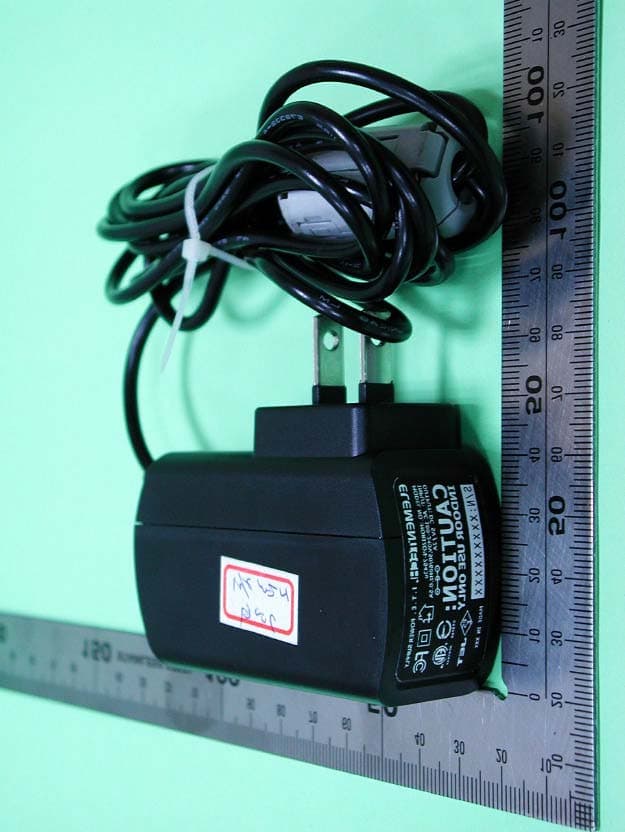
Click to zoom
Application Details
- Equipment Class
- DTS - Digital Transmission System
- Date of Grant
- Apr 06, 2005
- Application Purpose
- Original Equipment
- Date of Application
- Apr 06, 2005
- Equipment Note
- WIRELESS PRINT SERVER
- Frequency Range
- 2412.00000000 - 2462.00000000
- Company
- Zero One Technology Co Ltd
- Country
- Taiwan
Documents & Files
Document Text
Text extracted from the exhibit documents filed with the FCC. Open a document above to read the original.
Users Manual
TABLE OF CONTENTS COPYRIGHT........................................................................................................................................3 1. INTRODUCTION...........................................................................................................................4 PRODUCTOVERVIEW........................................................................................................................4 W IRELESSSPECIFICATIONS..............................................................................................................4 C OMPONENTS AND FEATURES..........................................................................................................5 H ARDWAREINSTALLATION.................................................................................................................6 N ETWORKENVIRONMENT..................................................................................................................7 2. PRINT SERVER INSTALLATION..............................................................................................9 P REPARATION....................................................................................................................................9 C ONFIGURATIONSOLUTIONTABLE...................................................................................................9 3. SOFTWARE INSTALLATION...................................................................................................11 I NSTALLING THE PSADMIN AND PRINTSERVER’SDRIVER.............................................................11 U SINGPSADMIN..............................................................................................................................20 W IZARD............................................................................................................................................20 M ANUALSETUP...............................................................................................................................22 R EFRESH..........................................................................................................................................25 M ULTIPLEPRINTQUEUESCONFIGURATION...................................................................................26 U NINSTALLING THE PSADMIN ON WINDOWSPC............................................................................26 4. INTERNET PRINTER CONNECTION AND HP WEB JETADMIN.....................................28 IPP O VERVIEW................................................................................................................................28 HP W EBJETADMINOVERVIEW......................................................................................................30 I NSTALLINGHP WEBJETADMIN.....................................................................................................31 R EMOVINGHP WEBJETADMINUTILITY.........................................................................................31 5. CONFIGURATION FROM EMBEDDED WEB SERVER......................................................32 O VERVIEW........................................................................................................................................32 U SINGEMBEDDEDWEBSERVER....................................................................................................32 S ETUPMENU...................................................................................................................................39 I NSTALLINGPRINTSERVER ON NETWARE4.X/5.X.........................................................................45 S ETTINGUP A MACINTOSHCOMPUTER..........................................................................................49 6. NETWORK PRINT MONITOR..................................................................................................50 P REPARATION..................................................................................................................................50 TCP/IP P ROTOCOLINSTALLATION.................................................................................................51 IPX/SPX- COMPATIBLEPROTOCOLINSTALLATION.........................................................................51 N ETBEUI PROTOCOLINSTALLATION..............................................................................................52 W IN95/98/ME/NT/2000/XP/2003 INSTALLATIONPROCEDURE...................................................52 U NINSTALLINGNETWORKPRINTPORT ON WINDOWS95/98/ME/NT/2000/XP/2003.................54 7. TCP/IP LPR PORT PRINTING INSTALLATION...................................................................55 B ASICTCP/IP INSTALLATIONOVERVIEW.......................................................................................55 A SSIGNING AN IP ADDRESS............................................................................................................55 W INDOWSNT LPR PORTPRINTINGINSTALLATION.......................................................................55 W INDOWS2000/XP/2003 STANDARDTCP/IP PORTPRINTINGINSTALLATION...........................57 UNIX I NSTALLATION........................................................................................................................60 1 V0.2.32 Draft version, for evaluation sample only. 8. UPGRADING PRINT SERVER.................................................................................................65 O VERVIEW........................................................................................................................................65 U PGRADING THE PRINT SERVER FROMPSADMIN...........................................................................65 U PGRADING THE PRINT SERVER FROMWINDOWSNT/2000/XP/2003 (THROUGHTCP/IP)........65 UPGRADING THE PRINT SERVER FROMUNIX (THROUGHTCP/IP)................................................66 U PGRADING THE PRINT SERVER FROMB…
Text truncated - open the document above for the full version.
Users Manual
V0.2.32 Draft version, for evaluation sample only. 5. Configuration from EmbeddedWebServer Overview The Print Server contains an embedded web server that can be accessed through a supported web browser on a LAN, for example, IE 4.0, Netscape 4.0 or above is recommended. The embedded web server provides access to configuration and management pages for the print server and the connected peripheral device. Using Embedded Web Server Before you can use the embedded web server, the print server must be configured with an IP address. There are many ways to configure the print server’s IP address. For example, the Windows-based of PSAdmin utility can easily set an IP address with the print server, please see the Properties – TCP/IP options of chapter 3. After an IP address is established on the print server, perform the following step: Status Menu Once you have finished the IP address configuration with print server. You should be use web browser to view and management the print server. The status menu of the print server helps administrator control the print server’s System, Printer, NetWare, TCP/IP, SNMP and AppleTalk of status for the time being. Preparation Enter the print server’s IP address in the Address field of your Web browser. Press Enter. Then the print server page will appear. From here you can configure all print server settings. Please follow this information in the status menu of the print server: System Status 1.ClickStatus, it then appears the sub-menu. 2.ClickSystem, it then as shown in the following picture. 32 V0.1.32 Draft version, for evaluation sample only Device Name: This option allows you to view device name of the print server. To correct the print server’s device name. System Contact: This option allows you to view contact name of the print server. To check the print server’s contact name who in charge of this device. System Location: This option allows you to view Location name of the print server. To confirm the print server’s location name where the print server is located in the office’s LAN. System Uptime: This option allows you to view uptime of the print server. When you start the print server, it will compute the print server from start time to power off time. Firmware Version: This option allows you to view firmware version of the print server. To verify the print server’s firmware version is newer in this time. MAC Address: This option allows you to view Node ID of the print server. The Node ID is unique from any print server. Printer Status 1.ClickStatus, it then appears the sub-menu. 2.ClickPrinter, it then as shown in the following picture. 33 V0.2.32 Draft version, for evaluation sample only. Manufacturer:This option allows you to view manufacturer of the printer. When the printer connected with the print server, it will be show in the manufacture box. Model Number: This option allows you to view model of the printer. When the printer connected with the print server, it will be show in the model box. Printing Language Supported: This option allows you to view command to set the printer. When the printer connected with the print server, it will be show in the command box. Current Status: This option allows you to view status of the printer. When the printer connected with the print server, it will be show in the status box. For Example, Waiting for job. It is means the printer already to printing. LPR Queue Name: This option allows you to view queue name of print server when you want to use the network printing via LPR setting. Wireless Status 1.ClickStatus, it then appears the sub-menu. 2.ClickWireless, it then as shown in the following picture. 34 V0.1.32 Draft version, for evaluation sample only Mode: This option shows the wireless operation mode of your print server. Type:Infrastructure or ad-Hoc mode. AP’s MAC Address: This option shows the MAC address of Access Point that associated with print server. SSID:The SSID of your wireless network. Channel Number: Current channel number. Data Transmit Rate: Current transmit rate. WEP Encryption:The status of WEP encryption. 802.11X (EAP): This option shows the 802.11X (EAP) is enabled or disabled. TCP/IP Status 1.ClickStatus, it then appears the sub-menu. 2.ClickTCP/IP, it then as shown in the following picture. 35 V0.2.32 Draft version, for evaluation sample only. Use DHCP/BOOTP: This option allows you to view DHCP/ BOOTP status. If there is a DHCP/BOOTP server on your network, this option allows the print server to obtain IP-related settings automatically from your DHCP server. IP Address: This option allows you to view IP address from the print server. The IP address must meet the IP addressing requirements of the network segment. Subnet Mask: This option allows you to view subnet mask from the print server. The IP address must meet the IP addressing requirements of the network segment. Gateway’s IP: This option allows you to view gateway from the print server. This IP address of gateway must meet the router or gateway to go across of the network segment. Netware Status: 1. Click Status, it then appears the sub-menu. 2. Click Netware it then as shown in the following picture. 36 V0.1.32 Draft version, for evaluation sample only General Settings: Print Server Name: This option allows you to view print server’s name would be configured by PSAdmin utility. Polling Time: This option allows you to view polling time from the print server. This function is search for NetWare Server by per time . NetWare NDS Setting: Use NDS Mode: Enable or Disable. Name of the NDS Tree. Name of the NDS Content. Current Status: Connect or Disconnect. NetWare Bindery Setting: Use Bindery Mode: Enable or Disable. Name of the File Server: Current Status: Connect or Disconnect. SNMP Status 37 V0.2.32 Draft version, for evaluation sample only. 1.ClickStatus, it then appears the sub-menu. 2.ClickSNMP, it then as shown in the following picture. SNMP Communities: This option allows you to view SNMP communities from the print server. Th…
Text truncated - open the document above for the full version.
External Photos
External Photos ofWirelessPrint Server -----------------------------------------1/15 Applicant: Zero One Technology Co., Ltd. FCC ID: HUFWU04001 Training Research Co., Ltd., TEL: 886-2-26935155, Fax: 886-2-26934440 Model: PU210W External Photos ofWirelessPrint Server -----------------------------------------2/15 Applicant: Zero One Technology Co., Ltd. FCC ID: HUFWU04001 Training Research Co., Ltd., TEL: 886-2-26935155, Fax: 886-2-26934440 Model: PU210W External Photos ofWirelessPrint Server -----------------------------------------3/15 Applicant: Zero One Technology Co., Ltd. FCC ID: HUFWU04001 Training Research Co., Ltd., TEL: 886-2-26935155, Fax: 886-2-26934440 Model: PUN2100W External Photos ofWirelessPrint Server -----------------------------------------4/15 Applicant: Zero One Technology Co., Ltd. FCC ID: HUFWU04001 Training Research Co., Ltd., TEL: 886-2-26935155, Fax: 886-2-26934440 Model: PUN2100W External Photos ofWirelessPrint Server -----------------------------------------5/15 Applicant: Zero One Technology Co., Ltd. FCC ID: HUFWU04001 Training Research Co., Ltd., TEL: 886-2-26935155, Fax: 886-2-26934440 Model: AXIS OfficeBasic USB Wireless G Print Server External Photos ofWirelessPrint Server -----------------------------------------6/15 Applicant: Zero One Technology Co., Ltd. FCC ID: HUFWU04001 Training Research Co., Ltd., TEL: 886-2-26935155, Fax: 886-2-26934440 Model: AXIS OfficeBasic USB Wireless G Print Server External Photos of Power Adapter------------------------------------------------7/15 Applicant: Zero One Technology Co., Ltd. FCC ID: HUFWU04001 Training Research Co., Ltd., TEL: 886-2-26935155, Fax: 886-2-26934440 External Photos of Power Adapter------------------------------------------------8/15 Applicant: Zero One Technology Co., Ltd. FCC ID: HUFWU04001 Training Research Co., Ltd., TEL: 886-2-26935155, Fax: 886-2-26934440
ID Label/Location Info
LABEL Sample and Location information -------------------------------------------------- 1/2 Applicant: Zero One Technology Co., Ltd. FCC ID: HUFWU04001 Training Research Co., Ltd., TEL: 886-2-26935155, Fax: 886-2-26934440 LABEL Format: Label Drawing: 1.) Label Material: #50 SILVER POLYESTER 2.) Glue Material: PET MAT POLYPROPYLENE 3.) Label Color: SILVER 4.) Font Color: BLACK 5.) Diameter of certification mark: 45mm X 28mm interference LABEL Sample and Location information -------------------------------------------------- 2/2 Applicant: Zero One Technology Co., Ltd. FCC ID: HUFWU04001 Training Research Co., Ltd., TEL: 886-2-26935155, Fax: 886-2-26934440 LABEL Position:
Internal Photos
Internal Photos ofWirelessPrint Server-----------------------------------------9/15 Applicant: Zero One Technology Co., Ltd. FCC ID: HUFWU04001 Training Research Co., Ltd., TEL: 886-2-26935155, Fax: 886-2-26934440 Internal Photos ofWirelessPrint Server-----------------------------------------10/15 Applicant: Zero One Technology Co., Ltd. FCC ID: HUFWU04001 Training Research Co., Ltd., TEL: 886-2-26935155, Fax: 886-2-26934440 Internal Photos ofWirelessPrint Server-----------------------------------------11/15 Applicant: Zero One Technology Co., Ltd. FCC ID: HUFWU04001 Training Research Co., Ltd., TEL: 886-2-26935155, Fax: 886-2-26934440 Internal Photos ofWirelessPrint Server-----------------------------------------12/15 Applicant: Zero One Technology Co., Ltd. FCC ID: HUFWU04001 Training Research Co., Ltd., TEL: 886-2-26935155, Fax: 886-2-26934440 Internal Photos ofWirelessPrint Server-----------------------------------------13/15 Applicant: Zero One Technology Co., Ltd. FCC ID: HUFWU04001 Training Research Co., Ltd., TEL: 886-2-26935155, Fax: 886-2-26934440 Internal Photos ofWirelessPrint Server-----------------------------------------14/15 Applicant: Zero One Technology Co., Ltd. FCC ID: HUFWU04001 Training Research Co., Ltd., TEL: 886-2-26935155, Fax: 886-2-26934440 Internal Photos ofWirelessPrint Server-----------------------------------------15/15 Applicant: Zero One Technology Co., Ltd. FCC ID: HUFWU04001 Training Research Co., Ltd., TEL: 886-2-26935155, Fax: 886-2-26934440
RF Exposure Info
Measurement of Maximum Permissible Exposure ---------------------------------------- 1/3 Applicant: Zero One Technology Co., Ltd. FCC ID: HUFWU04001 Training Research Co., Ltd., TEL: 886-2-26935155, Fax: 886-2-26934440 Measurement of Maximum Permissible Exposure 1. Foreword In adopt with the Human Exposure IEEE C95.1, and according to the FCC 1.1310. The Maximum Permissible Exposure (MPE) is obligated to measure in order to prove the safety of radiation harmfulness to the human body. The Gain of the antenna used is measured in an Anechoic chamber. The maximum total power to the antenna is to be recorded. By adopting the Friis Transmission Formula and the power gain of the antenna, we can find the distance right away from the product, where the limit of the MPE is. 2. Description of EUT FCC ID : HUFWU04001 Product Name : Wireless Printer Server Model Name : PU210W PUN2100W AXIS OFFICEBASIC USB WIRELESS G PRINT SERVER Classification : Mobile Device (i) Under normal use condition, the antenna is at least 20cm away from the user; (ii) Warning statement for keeping 20cm separation distance and the prohibition of operating next to the person has been printed in the user’s manual Frequency Range : 2.412GHz ~ 2.462GHz Support Channel : 11 Channels Modulation Skill : DBPSK, DQPSK, CCK, OFDM Power Type : Powered by the AC-DC adapter, Model: HORIZON-7943u I/P: 100-240VAC, 50/60Hz, 0.5A O/P: 5VDC, 2A 187cm length, non-shielded, with ferrite core Measurement of Maximum Permissible Exposure ---------------------------------------- 2/3 Applicant: Zero One Technology Co., Ltd. FCC ID: HUFWU04001 Training Research Co., Ltd., TEL: 886-2-26935155, Fax: 886-2-26934440 3. Limits for Maximum Permissible Exposure (MPE) Frequency Range (MHz) Electric Field Strength (V/m) Magnetic Filed Strength (H) (A/m) Power Density (S) (mW/cm2) Averaging Time |E| 2 , |H| 2 or S (minutes) (A) Limits for Occupational/Controlled Exposure 0.3-3.0 614 1.63 100 6 3.0-30 1842/f 4.89/f 900/f 2 6 30-300 61.4 0.163 1.0 6 300-1500 -- -- f/300 6 1500-100,000 -- -- 5 6 (B) Limits for General Population/Uncontrolled Exposure 0.3-1.34 614 1.63 100 30 1.34-30 824/f 2.19/f 180/f 2 30 30-300 27.5 0.073 0.2 30 300-1500 -- -- f/1500 30 1500-100,000 -- -- 1.0 30 [The EUT is tested in transmit and receive modes and in the first, middle and the last channel separately. The following shows only our observation have the greatest emissions.] According to OET BULLETIN 56 Fourth Edition/August 1999, Equation for Predicting RF Fields: Friis Transmission Formula: 2 22 /03211.0 )20(4 33.134.121 4 cmmW R PG S= × == ππ Estimated safe separation: cm PG R58363.3 4 33.134.124 4 = × == ππ Remarks: "The safe estimated separation that the user must maintain from the antenna is at least 3.58cm" Where: S = power density (in appropriate units, e.g. mW/cm2) P = power input to the antenna (in appropriate units, e.g., mW) G = power gain of the antenna in the direction of interest relative to an isotropic radiator R = distance to the center of radiation of the antenna (appropriate units, e.g., cm) The Numeric gain G of antenna with a gain specified in dB is determined by: G = Log -1 ( dB antenna gain / 10 ) G = Log -1 (1.25 / 10) = 1.33352 Measurement of Maximum Permissible Exposure ---------------------------------------- 3/3 Applicant: Zero One Technology Co., Ltd. FCC ID: HUFWU04001 Training Research Co., Ltd., TEL: 886-2-26935155, Fax: 886-2-26934440 Appendix Antenna Specification Antenna Measurement for WL007G Wireless Printer Server 0 270 90 180 Main X Z 0 90 270 180 Y 0 90 180 270 1. with covering 2.9 GHz 10 dB/ -80 dB 20 dB CH110 dB/REF 0 dB START2 GHzSTOP3 GHz100 MHz/ MAGdB FIL 1k1k FIL 1k1k CPL OFS S11 1 2 3 1: -36.18 dB 2.4 GHz 2: -31.77 dB 2.45 GHz 3: -22.13 dB 2.5 GHz 〈 0 dB Date: 27.AUG.03 06:50:41 2. Smith Chart 00.20.512510 -5 -2 -1 -0.5 0.5 1 2 5 CH1 ↑ 1 U START2 GHzSTOP3 GHz FIL 1k1k FIL 1k1k CPL OFS S11 1 2 3 1: 47.39 Ð j593.9 m Ð 2.4 GHz 2: 51.68 Ð j3.431 Ð 2.45 GHz 3: 55.91 Ð j9.069 Ð 2.5 GHz Date: 27.AUG.03 08:38:17
Test Report
Test Report ---------------------------------------------------------------------------------- 1/53 Report No.: A5415050165, FCC Part 15.247 Training Research Co., Ltd., TEL: 886-2-26935155, Fax: 886-2-26934440 MEASUREMENT REPORT of Wireless Print Server Applicant : Zero One Technology Co., Ltd. EUT : Wireless Print Server Model : PU210W PUN2100W AXIS OfficeBasic USB Wireless G Print Server FCC ID : HUFWU04001 Tested by : Training Research Co., Ltd. TEL : 886-2-26935155 FAX : 886-2-26934440 No. 255, Nanyang Street, Shijr, Taipei Hsien 221, Taiwan, R.O.C. Test Report ---------------------------------------------------------------------------------- 2/53 Report No.: A5415050165, FCC Part 15.247 Training Research Co., Ltd., TEL: 886-2-26935155, Fax: 886-2-26934440 CERTIFICATION We here by verify that: The test data, data evaluation, test procedures and equipment configurations shown in this report were made mainly in accordance with the procedures given in ANSI C63.4 (2003) as a reference. All test were conducted by Training Research Co., Ltd., 255 Nanyang Street, Shijr, Taipei Hsien 221, Taiwan, R.O.C. Also, we attest to the accuracy of each. We further submit that the energy emitted by the sample EUT tested as described in the report is in compliance with the technical requirements set forth in the FCC Rules Part 15 Subpart B (Declaration of Conformity) and C Section 15.247. Applicant : Zero One Technology Co., Ltd. Applicant Address : 5F, No. 5, Alley 22, Lane 513, Rei-Kuang Rd., Nei-Hu, Taipei 114, Taiwan Product Name : Wireless Print Server Model : PU210W, PUN2100W, AXIS OfficeBasic USB Wireless G Print Server Report No. : A5415050165 Test Date : March 1, 2005 Prepared by: Approved by: Jack Tsai Frank Tsai Conditions of issue : (1) This test report shall not be reproduced except in full, without written approval of TRC. And the test result contained within this report only relate to the sample submitted for testing. (2) This report must not be used by the client to claim product endorsement by NVLAP or any agency of U.S. Government. (3) This test report, measurements made by TRC are traceable to the NIST only Conducted and Radiated Method. NVLAP LAB CODE: 200174-0 Test Report ---------------------------------------------------------------------------------- 3/53 Report No.: A5415050165, FCC Part 15.247 Training Research Co., Ltd., TEL: 886-2-26935155, Fax: 886-2-26934440 Federal Communications Commission Declaration of Conformity for the following equipment: Product name : Wireless Print Server Model name : PU210W, PUN2100W, AXIS OfficeBasic USB Wireless G Print Server Trade name : Zero One Is herewith confirmed and found to comply with the requirements of CFR 47 part15 Subpart B - Unintentional Radiators regulation. The results of electromagnetic mission evaluation are shown in the report number : A5415050165 This device complies with Part 15 of the FCC Rules. Operation is subject to the following two conditions: (1) This device may not cause harmful interference, and (2) This device must accept any interference received, including interference that may cause undesired operation Manufacturer USA local representative Company name: Zero One Techology Co., Ltd. To be determined Computer address: 5F, No 5, Alley 22, Lane 513, Rei-Kuang Rd., Nei-Hu, Taipei 114, Taiwan ZIP / Postal code 114 Contact person: Peter Lin Title: CEO HTTP: www.zerone.com.tw Tel / Fax: 886-2-87973505 Test Report -------------------------------------------------------------------------------------4/53 Report No.: A5415050165, FCC Part 15.247 Training Research Co., Ltd., TEL: 886-2-26935155, Fax: 886-2-26934440 Tables of Contents I.GENERAL................................................................................................................... 6 1.1Introduction.......................................................................................................... 6 1.2Description of EUT .............................................................................................. 6 1.3Test method .......................................................................................................... 7 1.4Description of Support Equipment ....................................................................... 7 1.5Configuration of System Under Test .................................................................... 10 1.6Verify the Frequency and Channel ....................................................................... 12 1.7Test Procedure .................................................................................................... 13 1.8Location of the Test Site ...................................................................................... 13 1.9General Test Condition ....................................................................................... 13 II.Section 15.101(a) : Equipment Authorization of Unintentional Radiators............... 14 III.Section 15.203 : Antenna Requirement....................................................................... 15 IV.Section 15.207 : Power Line Conducted Emissions for AC Powered Units............ 16 4.1Test Condition & Setup ....................................................................................... 16 4.2List of Test Instruments ....................................................................................... 17 4.3Test Result of Conducted Emissions ................................................................... 18 RX mode................................................................................................................. 18 IEEE 802.11b......................................................................................................... 19 IEEE 802.11g......................................................................................................... 20 V.Section 15.247(a) : Technical Description of the EUT............................................... 22 VI.Section 15.247(a)(2) : Bandwidth f…
Text truncated - open the document above for the full version.
Test Setup Photos
Test Setup Photos ----------------------------------------------------------------------- 1/2 Applicant: Zero One Technology Co., Ltd. FCC ID: HUFWU04001 Training Research Co., Ltd., TEL: 886-2-26935155, Fax: 886-2-26934440 Conducted Test Setup Placement: Front View of the Test Configuration Side View of the Test Configuration Test Setup Photos ----------------------------------------------------------------------- 2/2 Applicant: Zero One Technology Co., Ltd. FCC ID: HUFWU04001 Training Research Co., Ltd., TEL: 886-2-26935155, Fax: 886-2-26934440 Radiated Test Setup Placement: Front View of the Test Configuration Rear View of the Test Configuration
Contact Information
Applicant
David Shus(Vice President)
Test Firm
Training Research Co., LtdJack Tsai
Technical Specifications
| # | Rule Parts | Frequency Range | Power Output |
|---|---|---|---|
| 1 | 15C | 2.41 GHz - 2.46 GHz | 121.34 mW |
Other Applications from Zero One Technology Co Ltd
HUFWP02001
Jun 02, 2002Wireless Print Server
Equipment Class
DTS - Digital Transmission System
HUFWR02001
Jun 02, 2002Broadband DSL/Cable Wireless Router
Equipment Class
DTS - Digital Transmission System