HV4-HSTNNTouch Pen
Wacom Co Ltd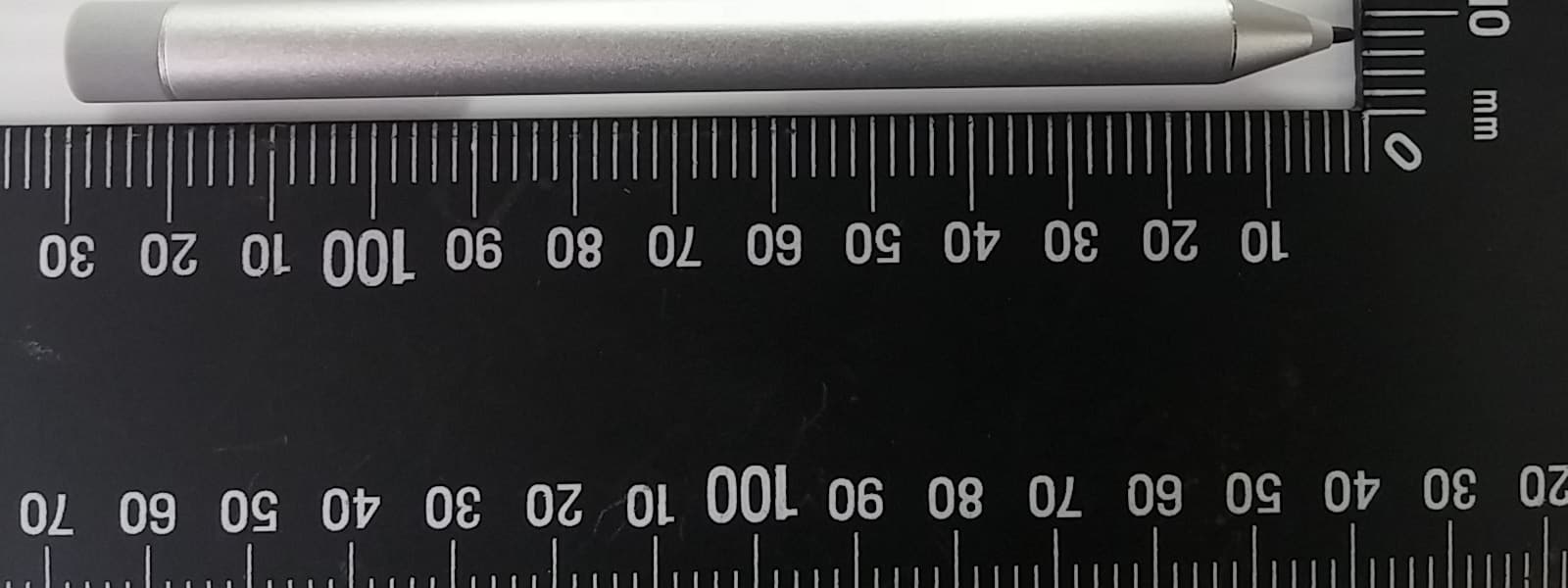
Click to zoom
Application Details
- Equipment Class
- DXX - Part 15 Low Power Communication Device Transmitter
- Date of Grant
- Sep 30, 2015
- Application Purpose
- Original Equipment
- Date of Application
- Sep 24, 2015
- Equipment Note
- Touch Pen
- Frequency Range
- 1.80000000 - 1.80000000
- Company
- Wacom Co Ltd
- Country
- Japan
Documents & Files
Document Text
Text extracted from the exhibit documents filed with the FCC. Open a document above to read the original.
Users Manual
1 Turn on your device. 2 Install the battery. 3 Turn on the pen by tapping the tip to any surface. The function of the A button varies, depending on the software. For regulatory and safety notices, refer to the Product Notices included with your product. *Select products only. Keyboard sold separately. 1 Turn on your device. 2 Install the battery. 3 Turn on the pen by tapping the tip to any surface. The function of the A button varies, depending on the software. For regulatory and safety notices, refer to the Product Notices included with your product. *Select products only. Keyboard sold separately. 1 Turn on your device. 2 Install the battery. 3 Turn on the pen by tapping the tip to any surface. The function of the A button varies, depending on the software. For regulatory and safety notices, refer to the Product Notices included with your product. *Select products only. Keyboard sold separately. 1 Turn on your device. 2 Install the battery. 3 Turn on the pen by tapping the tip to any surface. The function of the A button varies, depending on the software. For regulatory and safety notices, refer to the Product Notices included with your product. *Select products only. Keyboard sold separately. 1 Turn on your device. 2 Install the battery. 3 Turn on the pen by tapping the tip to any surface. The function of the A button varies, depending on the software. For regulatory and safety notices, refer to the Product Notices included with your product. *Select products only. Keyboard sold separately. 1 Turn on your device. 2 Install the battery. 3 Turn on the pen by tapping the tip to any surface. The function of the A button varies, depending on the software. For regulatory and safety notices, refer to the Product Notices included with your product. *Select products only. Keyboard sold separately. 1 Turn on your device. 2 Install the battery. 3 Turn on the pen by tapping the tip to any surface. The function of the A button varies, depending on the software. For regulatory and safety notices, refer to the Product Notices included with your product. *Select products only. Keyboard sold separately. 1 Turn on your device. 2 Install the battery. 3 Turn on the pen by tapping the tip to any surface. The function of the A button varies, depending on the software. For regulatory and safety notices, refer to the Product Notices included with your product. *Select products only. Keyboard sold separately. 1 Turn on your device. 2 Install the battery. 3 Turn on the pen by tapping the tip to any surface. The function of the A button varies, depending on the software. For regulatory and safety notices, refer to the Product Notices included with your product. *Select products only. Keyboard sold separately. 1 Turn on your device. 2 Install the battery. 3 Turn on the pen by tapping the tip to any surface. The function of the A button varies, depending on the software. For regulatory and safety notices, refer to the Product Notices included with your product. *Select products only. Keyboard sold separately. 1 Turn on your device. 2 Install the battery. 3 Turn on the pen by tapping the tip to any surface. The function of the A button varies, depending on the software. For regulatory and safety notices, refer to the Product Notices included with your product. *Select products only. Keyboard sold separately. 1 Turn on your device. 2 Install the battery. 3 Turn on the pen by tapping the tip to any surface. The function of the A button varies, depending on the software. For regulatory and safety notices, refer to the Product Notices included with your product. *Select products only. Keyboard sold separately. 1 Turn on your device. 2 Install the battery. 3 Turn on the pen by tapping the tip to any surface. The function of the A button varies, depending on the software. For regulatory and safety notices, refer to the Product Notices included with your product. *Select products only. Keyboard sold separately. 1 Turn on your device. 2 Install the battery. 3 Turn on the pen by tapping the tip to any surface. The function of the A button varies, depending on the software. For regulatory and safety notices, refer to the Product Notices included with your product. *Select products only. Keyboard sold separately. AR ID BG CS DA DE ES EL FR HR IT LV LT HU EN 1 Turn on your device. 2 Install the battery. 2 3 1 3 Turn on the pen by tapping the tip to any surface. A The function of the A button varies, depending on the software. For regulatory and safety notices, refer to the Product Notices included with your product. 2 * 1 *Select products only. Keyboard sold separately. 1 Turn on your device. 2 Install the battery. 3 Turn on the pen by tapping the tip to any surface. The function of the A button varies, depending on the software. For regulatory and safety notices, refer to the Product Notices included with your product. *Select products only. Keyboard sold separately. 1 Turn on your device. 2 Install the battery. 3 Turn on the pen by tapping the tip to any surface. The function of the A button varies, depending on the software. For regulatory and safety notices, refer to the Product Notices included with your product. *Select products only. Keyboard sold separately. 1 Turn on your device. 2 Install the battery. 3 Turn on the pen by tapping the tip to any surface. The function of the A button varies, depending on the software. For regulatory and safety notices, refer to the Product Notices included with your product. *Select products only. Keyboard sold separately. 1 Turn on your device. 2 Install the battery. 3 Turn on the pen by tapping the tip to any surface. The function of the A button varies, depending on the software. For regulatory and safety notices, refer to the Product Notices included with your product. *Select products only. Keyboard sold separately. 1 Turn on your device. 2 Install the battery. 3 Turn on the pen by tapping the tip to any surface. The function of the A button varies, depending on the software. Fo…
Text truncated - open the document above for the full version.
Users Manual
Regulatory notices This document provides country- and region-specific non-wireless and wireless regulatory notices and compliance information for your product. Some of these notices may not apply to your product. 이 문서에는 국가 및 지역별 유무선 규제사항 설명과 제품의 준수 정보가 있습니다. 이러한 정보 중 일부는 귀하의 제품에 적용되지 않을 수 있습니다. Federal Communications Commission notice This equipment has been tested and found to comply with the limits for a Class B digital device, pursuant to Part 15 of the FCC Rules. These limits are designed to provide reasonable protection against harmful interference in a residential installation. This equipment generates, uses, and can radiate radio frequency energy and, if not installed and used in accordance with the instructions, may cause harmful interference to radio communications. However, there is no guarantee that interference will not occur in a particular installation. If this equipment does cause harmful interference to radio or television reception, which can be determined by turning the equipment off and on, the user is encouraged to try to correct the interference by one or more of the following measures: ■Reorient or relocate the receiving antenna. ■Increase the separation between the equipment and receiver. ■Connect the equipment to an outlet on a circuit different from that to which the receiver is connected. ■Consult the dealer or an experienced radio or television technician for help. This device complies with Part 15 of the FCC Rules. Operation is subject to the following two conditions: 1.This device may not cause harmful interference, and 2.This device must accept any interference received, including interference that may cause undesired operation. For questions regarding this product, write to HP Inc. 1501 Page Mill Road Palo Alto, CA 94304 or call HP at 650-857-1501. To identify your product, refer to the part, series, or model number located on the product. Modifications The FCC requires the user to be notified that any changes or modifications made to this device that are not expressly approved by HP may void the user's authority to operate the equipment. Cables To maintain compliance with FCC Rules and Regulations, connections to this device must be made with shielded cables having metallic RFI/EMI connector hoods. Products with wireless LAN devices or HP Mobile Broadband Modules This device must not be co-located or operating in conjunction with any other antenna or transmitter. ÅWARNING: Exposure to Radio Frequency Radiation The radiated output power of this device is below the FCC/Industry Canada radio frequency exposure limits. Nevertheless, the device should be used in such a manner that the potential for human contact is minimized during normal operation of tablet PCs and notebook computers. During normal operation of tablet PCs and notebook computers with displays equal to or less than30.5 cm (12 inches): To avoid the possibility of exceeding the FCC/Industry Canada radio frequency exposure limits, human proximity to the antennas should not be less than 2.5 cm (1 inch). To identify the location of the wireless antennas, refer to the computer user guides included with your computer. During normal operation of notebook computers with displays greater than 30.5 cm (12 inches): To avoid the possibility of exceeding the FCC/Industry Canada radio frequency exposure limits, human proximity to the antennas should not be less than 20 cm (8 inches), including when the computer display is closed. To identify the location of the wireless antennas, refer to the computer user guides included with your computer. ÄCAUTION: When using IEEE 802.11a wireless LAN, this product is restricted to indoor use, due to its operation in the 5.15- to 5.25-GHz frequency range. FCC/Industry Canada requires this product to be used indoors for the frequency range of 5.15 GHz to 5.25 GHz to reduce the potential for harmful interference to co-channel mobile satellite systems. High-power radar is allocated as the primary user of the 5.25- to 5.35-GHz and 5.65- to 5.85-GHz bands. These radar stations can cause interference with and/or damage to this device. The antennas for this device are not replaceable. Any attempt at user access will damage your computer. Brazil notice Este equipamento opera em caráter secundário, isto é, não tem direito a proteção contra interferência prejudicial, mesmo de estações do mesmo tipo, e não pode causar interferência em sistemas operando em caráter primário. Este equipamento atende aos limites da Taxa de Absorção Específica referente à exposição a campos elétricos, magnéticos e eletromagnéticos de frequência adotados pela ANATEL. Canada notices This Class B digital apparatus meets all requirements of the Canadian Interference-Causing Equipment Regulations CAN ICES-3(B)/NMB-3(B). If this device has WLAN or Bluetooth capability, the device complies with Industry Canada license-exempt RSS standard(s). Operation is subject to the following two conditions: (1) this device may not cause interference, and (2) this device must accept any interference, including interference that may cause undesired operation of the device. Avis Canadien Ce dispositif numérique de Classe B répond aux exigences de la réglementation du Canada relative aux équipements causant des interférences CAN ICES-3(B)/NMB-3(B). Si ce dispositif est doté de fonctionnalités de réseau sans fil ou Bluetooth, il est conforme aux normes d’exemption de licence RSS d’Industrie Canada. Son fonctionnement est assujetti aux deux conditions suivantes : 1) Ce dispositif ne doit causer aucune interférence dangereuse, et 2) ce dispositif doit accepter toute interférence reçue, y compris les interférences pouvant provoquer un fonctionnement indésirable. Radiation Exposure Statement: This product complies with the US/Canada portable RF exposure limit set forth for an uncontrolled environment and is safe for intended operation as described in this manual. The further RF exposure reduction can be achieved if the product can be…
Text truncated - open the document above for the full version.
External Photos
Appendix P Photo Documentation Page 1 of 3 10052206 001; 10052207 001; 10052424 001 Product: Brand Name: HP Active Pen Wacom Type Identification: HSTNN-W01P Appendix P Photo Documentation Page 2 of 3 10052206 001; 10052207 001; 10052424 001 Product: Brand Name: HP Active Pen Wacom Type Identification: HSTNN-W01P Appendix P Photo Documentation Page 3 of 3 10052206 001; 10052207 001; 10052424 001 Product: Brand Name: HP Active Pen Wacom Type Identification: HSTNN-W01P
ID Label/Location Info
Label: Label Location
Internal Photos
Appendix P Photo Documentation Page 1 of 3 10052206 001; 10052207 001; 10052424 001 Product: Brand Name: HP Active Pen Wacom Type Identification: HSTNN-W01P Appendix P Photo Documentation Page 2 of 3 10052206 001; 10052207 001; 10052424 001 Product: Brand Name: HP Active Pen Wacom Type Identification: HSTNN-W01P Monopole Antenna Appendix P Photo Documentation Page 3 of 3 10052206 001; 10052207 001; 10052424 001 Product: Brand Name: HP Active Pen Wacom Type Identification: HSTNN-W01P
Test Report
Test Report No.10052206 10052424 001 Appendix D: Radiated and Mains Spurious Emission Data (File: 10052206 10052424AppendixD) Contents Emissions, Fundamental ............................................................................................................................ 2 Spurious Emissions, TX Mode, 9-150k...................................................................................................... 3 Spurious Emissions, TX Mode, 150k-30M ................................................................................................ 4 Spurious Emissions, TX Mode, 30M-1G ................................................................................................... 5 Spurious Emissions, RX Mode, 9k-30M .................................................................................................... 7 Spurious Emissions, RX Mode, 30M-1G ................................................................................................... 9 Emissions, Fundamental 2 Emissions, Fundamental Service No.: 114038311-NCC Test Distance: 0m Test Standard: NCC2.8_9k-1G Ant. Polarization: Test item: Radiation Emission Test Time: 2015/7/22 16:08:55 Applicant: Wacom Test Rating: DC 3V Product: HP Active Pen Temp.( °C °C°C °C)/Hum.(%): 23.9(°C °C°C °C)/53% Model No.: HSTNN-W01P Test Engineer: Hugo Chang Test Mode: Fundamental field strength Remark: 1.8MHz No. Frequency (MHz) Factor (dB/m) Reading (dBuV) Level (dBuV/m) Limit (dBuV/m) Margin (dB) Det. Height (cm) Azimuth (。 。。 。) Remark 1 1.8168 19.29 36.34 55.63 69.50 -13.87 QP 0 Tel:+886-2172-7000 fax:+886-2528-0018 11F., No.758, Sec.4 Bade Road. Songshan Dist, Taipei City 105 TUV Taiwan Spurious Emissions, TX Mode, 1-10G 3 Spurious Emissions, TX Mode, 9-150k Service No.: 114038311-NCC Test Distance: 3m Test Standard: NCC2.8_9k-1G_3m Ant. Polarization: Test item: Radiation Emission Test Time: 2015/7/22 15:53:30 Applicant: Wacom Test Rating: DC 3V Product: HP Active Pen Temp.( °C °C°C °C)/Hum.(%): 23.9(°C °C°C °C)/53% Model No.: HSTNN-W01P Test Engineer: Hugo Chang Test Mode: TX Remark: 1.8MHz No. Frequency (MHz) Factor (dB/m) Reading (dBuV) Level (dBuV/m) Limit (dBuV/m) Margin (dB) Det. Height (cm) Azimuth (。 。。 。) Remark 1 0.0096 20.31 33.07 53.38 127.84 -74.46 QP 0 2 0.0179 20.49 29.22 49.71 122.45 -72.74 QP 0 3 0.0478 19.71 28.71 48.42 113.95 -65.53 QP 0 4 0.0957 19.27 18.91 38.18 107.94 -69.76 QP 0 5 0.1270 19.24 11.42 30.66 105.49 -74.83 QP 0 6 0.1497 19.25 19.99 39.24 104.06 -64.82 QP 0 Tel:+886-2172-7000 fax:+886-2528-0018 11F., No.758, Sec.4 Bade Road. Songshan Dist, Taipei City 105 TUV Taiwan Spurious Emissions, TX Mode, 30M-1G 4 Spurious Emissions, TX Mode, 150k-30M Service No.: 114038311-NCC Test Distance: 3m Test Standard: NCC2.8_9k-1G_3m Ant. Polarization: Test item: Radiation Emission Test Time: 2015/7/22 15:55:31 Applicant: Wacom Test Rating: DC 3V Product: HP Active Pen Temp.(°C °C°C °C)/Hum.(%): 23.9(°C °C°C °C)/53% Model No.: HSTNN-W01P Test Engineer: Hugo Chang Test Mode: TX Remark: 1.8MHz No. Frequency (MHz) Factor (dB/m) Reading (dBuV) Level (dBuV/m) Limit (dBuV/m) Margin (dB) Det. Height (cm) Azimuth (。 。。 。) Remark 1 0.1500 19.25 22.21 41.46 104.02 -62.56 QP 2 4.7171 19.62 10.87 30.49 69.50 -39.01 QP 3 10.0004 20.49 10.88 31.37 69.50 -38.13 QP 4 14.3586 21.04 10.36 31.40 69.50 -38.10 QP 5 19.7018 21.71 13.50 35.21 69.50 -34.29 QP 6 22.9255 21.91 18.02 39.93 69.50 -29.57 QP Tel:+886-2172-7000 fax:+886-2528-0018 11F., No.758, Sec.4 Bade Road. Songshan Dist, Taipei City 105 TUV Taiwan Spurious Emissions, TX Mode, 30M-1G 5 Spurious Emissions, TX Mode, 30M-1G Service No.: 114038311-NCC Test Distance: 3m Test Standard: FCC 15.209_30M-40G_3m Ant. Polarization: Horizontal Test item: Radiation Emission Test Time: 2015/7/21 22:22:03 Applicant: Wacom Test Rating: DC 3V Product: HP Active Pen Temp.( °C °C°C °C)/Hum.(%): 24.5(°C °C°C °C)/51% Model No.: HSTNN-W01P Test Engineer: Hugo Chang Test Mode: TX Remark: 1.8MHz No. Frequency (MHz) Factor (dB/m) Reading (dBuV) Level (dBuV/m) Limit (dBuV/m) Margin (dB) Det. Height (cm) Azimuth (。 。。 。) Remark 1 30.0000 -6.03 27.13 21.10 40.00 -18.90 peak 100 307 2 150.2800 -13.10 26.78 13.68 43.52 -29.84 peak 100 43 3 289.9599 -10.64 26.11 15.47 46.02 -30.55 peak 100 187 4 537.3099 -6.89 28.06 21.17 46.02 -24.85 peak 100 115 5 775.9299 -3.49 28.28 24.79 46.02 -21.23 peak 100 14 6 864.2000 -2.21 28.60 26.39 46.02 -19.63 peak 100 253 Tel:+886-2172-7000 fax:+886-2528-0018 11F., No.758, Sec.4 Bade Road. Songshan Dist, Taipei City 105 TUV Taiwan Spurious Emissions, TX Mode, 30M-1G 6 Service No.: 114038311-NCC Test Distance: 3m Test Standard: FCC 15.209_30M-40G_3m Ant. Polarization: Vertical Test item: Radiation Emission Test Time: 2015/7/21 22:23:06 Applicant: Wacom Test Rating: DC 3V Product: HP Active Pen Temp.(°C °C°C °C)/Hum.(%): 24.5(°C °C°C °C)/51% Model No.: HSTNN-W01P Test Engineer: Hugo Chang Test Mode: TX Remark: 1.8MHz No. Frequency (MHz) Factor (dB/m) Reading (dBuV) Level (dBuV/m) Limit (dBuV/m) Margin (dB) Det. Height (cm) Azimuth (。 。。 。) Remark 1 30.9699 -6.59 30.83 24.24 40.00 -15.76 peak 100 243 2 141.5500 -12.80 28.73 15.93 43.52 -27.59 peak 100 89 3 260.8599 -10.91 26.10 15.19 46.02 -30.83 peak 100 293 4 450.0099 -7.90 27.68 19.78 46.02 -26.24 peak 100 330 5 629.4600 -5.59 28.42 22.83 46.02 -23.19 peak 100 243 6 806.0000 -3.18 28.98 25.80 46.02 -20.22 peak 100 147 Tel:+886-2172-7000 fax:+886-2528-0018 11F., No.758, Sec.4 Bade Road. Songshan Dist, Taipei City 105 TUV Taiwan Spurious Emissions, RX Mode, 1-10G 7 Spurious Emissions, RX Mode, 9k-30M Service No.: 114038311-NCC Test Distance: 3m Test Standard: NCC2.8_9k-1G_3m Ant. Polarization: Test item: Radiation Emission Test Time: 2015/7/22 15:56:47 Applicant: Wacom Test Rating: DC 3V Product: HP Active Pen Temp.( °C °C°C °C)/Hum.(%): 23.9(°C °C°C °C)/53% Model No.: HSTNN-W01P Test Engineer: Hugo Chang Test Mode: RX Remark: 1.8MHz No. Frequency (MHz) Factor (dB/m) Reading (dBuV) Level (dBuV/m) Limit (dBuV/m) Margin (dB) D…
Text truncated - open the document above for the full version.
Test Report
Produkte Products Prüfbericht - Nr.: Test Report No. 10052206 001 Seite 2 von 21 Page 2 of 21 TEST SUMMARY 5.1.1 ANTENNA REQUIREMENT RESULT: Passed 5.1.2 FIELD STRENGTH OF FUNDAMENTAL RESULT: Passed 5.1.3 99% BANDWIDTH RESULT: Passed 5.1.4 SPURIOUS EMISSION RESULT: Passed Produkte Products Prüfbericht - Nr.: Test Report No. 10052206 001 Seite 3 von 21 Page 3 of 21 Contents 1. GENERAL REMARKS ............................................................................................... 4 1.1 COMPLEMENTARY MATERIALS ................................................................................. 4 2. TEST SITES ............................................................................................................ 5 2.1 TEST FACILITIES ..................................................................................................... 5 2.2 LIST OF TEST AND MEASUREMENT INSTRUMENTS ...................................................... 6 2.3 TRACEABILITY ........................................................................................................ 7 2.4 CALIBRATION ......................................................................................................... 7 2.5 MEASUREMENT UNCERTAINTY ................................................................................. 7 3. GENERAL PRODUCT INFORMATION ........................................................................... 8 3.1 PRODUCT FUNCTION AND INTENDED USE ................................................................. 8 3.2 RATINGS AND SYSTEM DETAILS ............................................................................... 9 3.3 INDEPENDENT OPERATION MODES ......................................................................... 10 3.4 NOISE GENERATING AND NOISE SUPPRESSING PARTS ............................................ 10 3.5 SUBMITTED DOCUMENTS ....................................................................................... 10 4. TEST SET-UP AND OPERATION MODES ................................................................... 11 4.1 PRINCIPLE OF CONFIGURATION SELECTION ............................................................ 11 4.2 TEST OPERATION AND TEST SOFTWARE................................................................. 11 4.3 SPECIAL ACCESSORIES AND AUXILIARY EQUIPMENT ............................................... 11 4.4 COUNTERMEASURES TO ACHIEVE EMC COMPLIANCE .............................................. 12 4.5 TEST SETUP DIAGRAM .......................................................................................... 12 5. TEST RESULTS ..................................................................................................... 14 5.1 TRANSMITTER REQUIREMENT & TEST SUITES ......................................................... 14 5.1.1 Antenna Requirement ................................................................................................................ 14 5.1.2 Field strength of fundamental..................................................................................................... 15 5.1.3 99% Bandwidth .......................................................................................................................... 16 5.1.4 Spurious Emission ..................................................................................................................... 18 6. PHOTOGRAPHS OF THE TEST SET-UP ..................................................................... 19 7. LIST OF TABLES ................................................................................................... 21 8. LIST OF PHOTOGRAPHS......................................................................................... 21 Produkte Products Prüfbericht - Nr.: Test Report No. 10052206 001 Seite 4 von 21 Page 4 of 21 1. General Remarks 1.1 Complementary Materials All attachments are integral parts of this test report. This applies especially to the following appendix: Appendix 1: Photo Documentation (File Name: 10052206APPENDIX P) Appendix D: Test Result of Radiated Emissions (File Name: 10052206APPENDIX D) Test Specifications The following standards were applied (in bold: product standards, otherwise: basic standards). Table 1: Applied Standard and Test Levels Radio FCC CFR47 Part 15: Subpart C Section 15. 209 RSS-210 Issue 8, December 2010 RSS-Gen, Issue 4, November 2014 ANSI C63.10:2013 LP0002(2011)(100 年6月28日) Produkte Products Prüfbericht - Nr.: Test Report No. 10052206 001 Seite 5 von 21 Page 5 of 21 2. Test Sites 2.1 Test Facilities TUV Rheinland Taiwan Ltd. 11F. No.758, Sec. 4, Bade Rd., Songshan Dist. Taipei City 105 Taiwan (R.O.C.) FCC Registration No.: 365730 IC Canada Registration No.: 9465A-1 TAF Accredited NCC Test Lab. No.:0759 TAF ISO17025 Certification effective periods: 2013-Jul-1st to 2016-Jun-30th Produkte Products Prüfbericht - Nr.: Test Report No. 10052206 001 Seite 6 von 21 Page 6 of 21 2.2 List of Test and Measurement Instruments Table 2: List of Test and Measurement Equipment Kind of Equipment Manufacturer Type S/N Last Calibration Next Calibration EMI Test Receiver R&S ESR7 101062 31-Aug-14 30-Aug-15 Bilog Antenna TESEQ CBL6111D 29802 4-Jul-14 3-Jul-16 Spectrum Analyzer R&S FSV 40 100921 17-Dec-14 16-Dec-15 Spectrum Analyzer Agilent N9010A MY53470241 1-Apr-15 30-Mar-16 Horn Antenna ETS-Lindgren 3117 138160 12-Jan-15 11-Jan-17 Horn Antenna (18GHz~40GHz) COM-POWER AH840 101031 30-Oct-13 29-Oct-15 Preamplifier (30MHz -1GHz) HP 8447F 2805A03335 23-Aug-14 22-Aug-15 Preamplifier (18 GHz -40 GHz) COM-POWER PAM-840 461257 26-Aug-14 25-Aug-15 Pre-Amplifier (1GHz~18GHz) EM Electronics EM30180 60558 4-Nov-14 3-Nov-15 Loop Antenna Schwarzbeck FMZB 1513 1513-076 22-Oct-14 21-Oct-15 EMI Test Receiver R&S ESCI7 100797 28-Dec-14 27-Dec-15 Spectrum Analyzer R&S FSL3 101943 14-Sep-14 13-Sep-15 Produkte Products Prüfbericht - Nr.: Test Report No. 10052206 001 Seite 7 von 21 Page 7 of 21 2.3 Traceability All measurement equipment calibrations…
Text truncated - open the document above for the full version.
Test Setup Photos
Produkte Products Prüfbericht - Nr.: Test Report No. 10052206 001 Seite 19 von 21 Page 19 of 21 6. Photographs of the Test Set-Up Photograph 1: Set-up for Spurious Emissions TX (Front View) Photograph 2: Set-up for Fundamental Emissions Produkte Products Prüfbericht - Nr.: Test Report No. 10052206 001 Seite 20 von 21 Page 20 of 21 Photograph 3: Set-up for Spurious Emissions (Back View 1) Photograph 4: Set-up for Spurious Emissions (Back View 2)
Contact Information
Applicant
Koichi Yokoyama(Senior Director, Quality Assurance)
Test Firm
TUV Rheinland Taiwan Ltd.Spring Wang
Technical Specifications
| # | Rule Parts | Frequency Range | Power Output |
|---|---|---|---|
| 1 | 15C | 1.8 MHz - 1.8 MHz | - |
Other Applications from Wacom Co Ltd
HV4CTK6120
Aug 19, 2026Pen Tablet
Equipment Class
DCD - Part 15 Low Power Transmitter Below 1705 kHzHV4STU540A
May 12, 2026LCD SIGNATURE PAD
Equipment Class
DCD - Part 15 Low Power Transmitter Below 1705 kHzHV4DTHA140
Sep 16, 2025Portable Pad
Equipment Class
DTS - Digital Transmission SystemHV4PTK470
Oct 10, 2024Creative Pen Tablet
Equipment Class
DTS - Digital Transmission SystemHV4PTK870
Oct 10, 2024Creative Pen Tablet
Equipment Class
DCD - Part 15 Low Power Transmitter Below 1705 kHz