HV4CTH480Pen Tablet, Pen & Touch Tablet
Wacom Co Ltd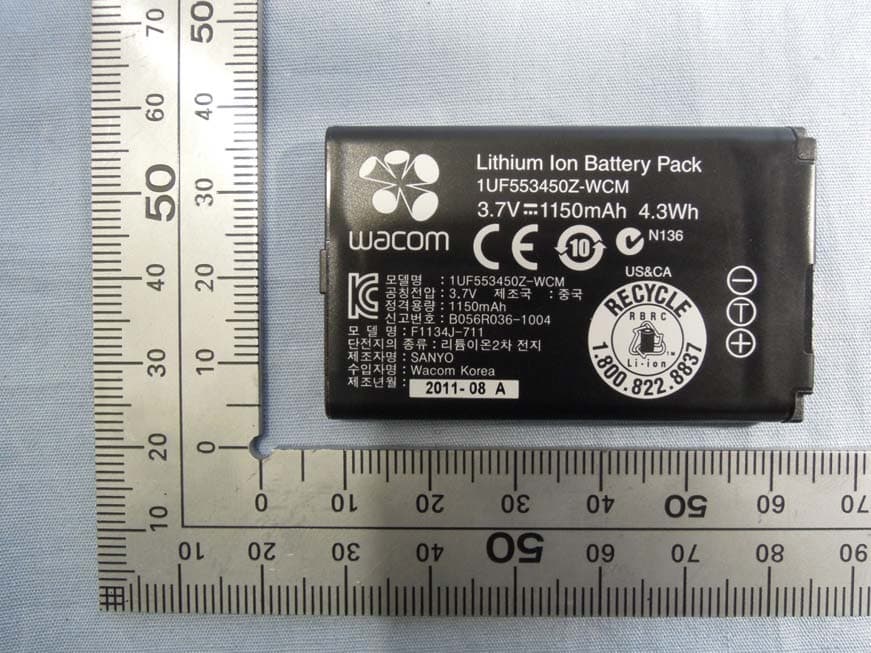
Click to zoom
Application Details
- Equipment Class
- DCD - Part 15 Low Power Transmitter Below 1705 kHz
- Date of Grant
- May 13, 2013
- Application Purpose
- Original Equipment
- Date of Application
- May 13, 2013
- Equipment Note
- Pen Tablet, Pen & Touch Tablet
- Frequency Range
- 0.66700000 - 0.66700000
- Company
- Wacom Co Ltd
- Country
- Japan
Documents & Files
Document Text
Text extracted from the exhibit documents filed with the FCC. Open a document above to read the original.
Users Manual
Quick start guide EN JP 퀵 스타트 가이드 KR 快速入門指南 TC 快速安装指南 SC CTL-480, CTH-480, CTH-680 Hazel QSG.indd 1Hazel QSG.indd 12013-4-9 8:59:312013-4-9 8:59:31 EN Setting up Intuos 1. Connect to the Internet. 2. Close all open applications. 3. Connect the USB cable. 4. Windows7 and Windows8: The installer is downloaded automatically. If your computer is not connected to the Internet, run the installer from the Installation CD. Windows Vista and Mac OS X: Insert the installation CD. If you don't have a CD/DVD drive, download the installer from http://www.wacom.asia/tablet-drivers Your driver installation is complete. Intuos works correctly if the light on the tablet is on. Intuos Intuos PenIntuos Hazel QSG.indd 2-3Hazel QSG.indd 2-32013-4-9 8:59:322013-4-9 8:59:32 EN Using the pen with Intuos Move the pen slightly above the tablet, without touching the surface, to position the screen cursor. Tap the tablet once with the pen tip to select. Using multi-touch with Intuos Some gestures are unique to the Wacom tablet. See the Intuos User’s Manual. Tap to clickDrag Using a single fi nger, tap to click. Tap twice to double- click. Tap to select, then tap and slide to drag. Lift to release. ZoomRotate Zoom in by expanding your fi ngers away from one another. Zoom out by pinching your fi ngers together. Move your fi ngers clockwise or counter- clockwise. Replacing the pen nib Hazel QSG.indd 4-5Hazel QSG.indd 4-52013-4-9 8:59:332013-4-9 8:59:33 EN Important information Compatibility: Microsoft Windows 8, Windows 7 SP1+, Windows Vista SP2; and Mac OS X v10.6.X or later. Register your Intuos at https://www.wacom-asia.com/register/english The User’s Manual is downloaded during installation. It provides information on using and customizing your tablet, changing your pen nibs, tips and tricks, and troubleshooting. Important Product Information is included in the CD. It provides information on safety, care of your tablet, specifi cations, warranties and licensing. Check for updates to the Intuos driver at http://www.wacom.asia/tablet-drivers Enhance your creativity with Intuos accessories Wireless accessory kit: Enjoy the freedom and convenience of working wirelessly. Accessory available in most countries. Other accessories include pens and nibs designed to enhance your creativity. Visit the following to purchase. http://buywacom.com.au/ (Australia/New Zealand) http://storelocator.wacom-asia.com/ (for other countries in the Asia-Pacifi c region.) Additional pen holders, pen rings and carrying bags are available to personalize your Intuos. (Availability of carrying bags differs from country to country) Training and Support Visit http://wacom-wapcc.com/inquiry/create for installation and training videos, FAQs, Wacom Gesture Guide, Customer Support contact information and other information to help get you started using your Intuos pen tablet. • • • • • Personalizing your pen holder Personalizing your pen ring Hazel QSG.indd 6-7Hazel QSG.indd 6-72013-4-9 8:59:332013-4-9 8:59:33 JP Hazel QSG.indd 8-9Hazel QSG.indd 8-92013-4-9 8:59:342013-4-9 8:59:34 JP Hazel QSG.indd 10-11Hazel QSG.indd 10-112013-4-9 8:59:352013-4-9 8:59:35 JP Hazel QSG.indd 12-13Hazel QSG.indd 12-132013-4-9 8:59:352013-4-9 8:59:35 JP Hazel QSG.indd 14-15Hazel QSG.indd 14-152013-4-9 8:59:362013-4-9 8:59:36 JP Hazel QSG.indd 16-17Hazel QSG.indd 16-172013-4-9 8:59:372013-4-9 8:59:37 JP Hazel QSG.indd 18-19Hazel QSG.indd 18-192013-4-9 8:59:372013-4-9 8:59:37 JP Hazel QSG.indd 20-21Hazel QSG.indd 20-212013-4-9 8:59:382013-4-9 8:59:38 KR Intuos 설치 1. 인터넷에 연결합니다. 2. 열려 있는 애플리케이션을 모두 닫습니다. 3. USB 케이블을 연결합니다. 4. Windows7 및 Windows8: 프로그램이 자동으로 다운로드됩니다. 컴퓨터가 인터넷에 연결되어 있지 않은 경 우는 타블렛 드라이버 CD-ROM에서 설치 프로그램을 시작합니다. Windows Vista 또는 Mac OS X : 타블렛 드라이버 CD-ROM을 컴퓨터의 CD / DVD 드라이브에 넣습니다. 컴퓨터에 CD / DVD 드라이브가없는 경우 아래에서 설치 프로그램 을 다운로드하십시오 http://www.wacom.asia/kr/tablet-drivers 이제 태블릿 드라이버 설치가 완료되었습니다. 펜 태블릿이 제대로 연결되면 본체의 상태 표시등이 켜집니다 Intuos Intuos 펜Intuos Hazel QSG.indd 22-23Hazel QSG.indd 22-232013-4-9 8:59:382013-4-9 8:59:38 KR Intuos 와 함께 펜 사용 펜촉을 타블렛의 표면에서 조금 띄운 상테로 펜 을 움직여 화면의 포인터를 움직입니다. 펜촉이 타블렛 표면에 닿지 않도록 해주십시오. 펜촉으로 타블렛을 한 번 눌러 선택합니다. Intuos와 함께 다중 터치 사용 일부 제스처는 와콤 타블렛에 고유한 것입니다. Intuos 사용설명서를 참조하십시오. 눌러 클릭하기 끌기 한 손가락으로 눌러 클릭합니다. 두 번 누르면 더블 클릭이 수행됩니다. 눌러 선택한 상태로 밀어서 끕니다. 손 가락을 때면 해제됩 니다. 확대/축소 회전 손가락 사이를 벌리 면 확대됩니다. 손 가락 사이를 좁히면 축소됩니다. 손가락을 시계 방향 이나 시계 반대 방 향으로 돌립니다. 펜촉 교체하기 Hazel QSG.indd 24-25Hazel QSG.indd 24-252013-4-9 8:59:392013-4-9 8:59:39 KR 펜 홀더 맞춤화하기 펜 링 맞춤화하기 중요 정보 호환성: Microsoft Windows 8, Windows 7 SP1+, Windows Vista SP2; 및 Mac OS X v10.6.X 이상. http://www.wacom.asia/kr에서 구입하신 Intuos를 등록하십시오. User ’ s Manual(사용자 설명서)은 드라이버 설치 중에 다운로드되며 타블렛 사용 및 사용자 정의, 펜심 변경, 작업 요령, 문제 해결 등에 대한 정보를 제공합니다. Important Product Information( 중요 제품 정보 ) 은 설치 CD에 포함되며 안전 , 타블 렛 취급 , 사양 , 보증 , 라이선스 등에 대한 정보를 제공합니다 . http://www.wacom.asia/kr에서 Intuos 드라이버 업데이트를 확인하십시오. Intuos 액세서리로 창의력을 높여보십시오. 무선 액세서리 키트: 무선 작업의 자유로움과 편리함을 만끽하십시오. 액세서리는 대부분의 국가에서 판매됩니다. 구입하시려면 http://www.wacom.asia/kr에 방문해 주십시오. Intuos를 개인적으로 맞춤화하기 위해 추가적인 펜 홀더, 펜 링 및 운반 가방을 사용할 수 있습니다. 지원 Intuos 펜 타플렛 초기 사용에 도움을 받기 위해, FAQ (자주하는 질문), 와콤 제스처 가이드, 고객 지원 연락처 정보 및 기타 정보를 구하려면 http://www.wacom.asia/kr사이트를 방문하십시오. • • • • • Hazel QSG.indd 26-27Hazel QSG.indd 26-272013-4-9 8:59:402013-4-9 8:59:40 TC Intuos Intuos 畫筆Intuos 設定 Intuos 1. 連線至網際網路 。 2. 請關閉所有開啟的應用程式 。 3. 連接 USB 連接線 。 4. Windows7 及 Windows8 : 安裝程式會自動下載 。 若您的電腦未連線至網際網路 , 請從安裝 CD 執行安裝程式 。 Windows Vista 及 Mac OS X : 插入安裝 CD 。 若您沒有 CD/DVD 光碟機 , 請下載安裝程式 , 網址為 : http://www.wacom.asia/tw/tablet-drivers 驅動程式安裝完成 。 若數位板上的指示燈亮起 , 即表示 Intuos 可正常運作 。 Hazel QSG.indd 28-29Hazel QSG.indd 28-292013-4-9 8:59:412013-4-9 8:59:41 TC 在 Intuos 上使用畫筆 將畫筆懸空於數位板上 , 但不觸碰數位板表面 , 以定位螢幕游標 。 使用畫筆尖輕敲數位板一下進行選擇 。 在 Intuos 上使用多點觸控 部分手勢為 Wacom 數位板特有 。 參閱Intuos使用手冊 。 輕點以單響 拖曳 使用單指輕點即可 單響 。 輕點兩次即 可雙響 。 輕點即可選擇 , 然 後輕點並滑動即可 拖曳項目 。 抬起即 可釋放 。 縮放 旋轉 將兩指向外展開可 放大 。 將兩指向內 併攏可縮小 。 順時針或逆時針移 動手指 。 更換筆尖 Hazel QSG.indd 30-31Hazel QSG.indd 30-312013-4-9 8:59:422013-4-9 8:59:42 TC 個人化筆架 個人化筆環 重要資訊 相容性 : Mi…
Text truncated - open the document above for the full version.
Users Manual
1 1 Important Product Information Intuos (CTL-480), Intuos touch Small (CTH-480), Intuos touch Medium (CTH-680) Precautions Product Specifications Disposal and Recycling Information Regulatory Statement License and Warranties PRECAUTIONS WARNING Improperly setting up, using, or caring for this product can increase the risk of an accident or human injury. Keep small parts away from children and pets. They could remove and accidentally swallow parts such as the pen nibs, nib refills, or pen buttons. Do not use the tablet in a facility control system that requires extremely high reliability. It may cause other electronic devices to malfunction, or other devices may cause the tablet to malfunction. Turn off your tablet in locations where electronic devices are not allowed. For example, turn it off during flights by unplugging it from your computer. Do not disassemble or otherwise modify the tablet or pen. Such actions may cause heat generation, ignition, electrical shock, or other damage, including human injury. Disassembly of the product will void your warranty. Avoid damaging the cables. Do not place heavy objects on them, repeatedly bend them sharply, or apply heavy stress to the cable connectors. Torn or otherwise damaged cables may increase the risk of product malfunction, electrical shock, or fire. If they are damaged, stop using the product and contact your local distributor or the Wacom customer support center for your region. Do not expose this product to water or other liquids. Do not spill on the tablet or pen. It may cause product malfunction or electrical shock. If the product is exposed to water or other liquids: unplug the tablet USB cable from the computer, turn off your computer and unplug the power cord from the wall outlet. Stop using the product and contact your local distributor or the Wacom customer support center for your region. Do not insert foreign material into the USB plug end or any other opening of this product. If a metal object or foreign material is inserted into the USB plug or other opening of this product, it may cause the product to malfunction or burn out, or cause electrical shock. Do not use any organic solvent (e.g. alcohol) or even mild detergent to clean the product and the pen. Use of these cleaners can damage the product. Damage of this kind is not covered by the manufacturer's warranty. Do not use or store this product under the following conditions: •Places where temperature changes are severe or exceed specifications (e.g. outdoors or inside a vehicle). •Dusty areas. Refrain from using this product during thunder or electrical storms. Such use may cause product malfunction, fire, or electrical shock. CAUTION Do not place or use this product on an unstable surface or workspace, for example, a shaky, inclined or vibrating surface. When cleaning your tablet, turn it off by unplugging the tablet USB cable from the computer. Electrical shock may occur if you attempt to clean this product when it is connected to your computer. Other precautions: •Do not place metal objects on the tablet when it is in use. They may cause interference, improper operation, or product malfunction. •Avoid damaging your tablet. Replace your pen nib when it becomes worn or sharp. •Do not use a distorted or bent pen nib with the pen; a pen in this condition may cause the pen to operate improperly and scratch your tablet. Therefore, avoid pressing too hard when using the pen and bending or distorting the nib. •Do not push hard on the pen tip, eraser, or buttons. This may shorten the pen tip life or cause the pen to malfunction. •Use pen nibs designed by Wacom. Using a pen nib from another manufacturer may cause the pen to malfunction. •Do not use excessive force when inserting or removing the pen from the pen stand. •Do not store the pen so that the pen tip, buttons, or eraser are continually depressed. 2 2 PRODUCT SPECIFICATIONS GENERAL SPECIFICATIONS,TABLET GENERAL SPECIFICATIONS, PEN GENERAL SPECIFICATIONS, MULTI-FINGER TOUCH INTUOS SMALL (CTL-480) INTUOS TOUCH SMALL (CTH-480) Communication interfaceUSB ConnectorUSB Type A (PC) to Micro B (Tablet) Cable length1.0 m (3.3 ft) Power requirementsDC 5V from USB Port with 500 mA capacity. (Self-powered USB hub or PC USB port) Operating temperature5 to 40 degrees C (41 to 104 degrees F) Storage temperature-20 to + 60 degrees C (-4 to 140 degrees F) Operating relative humidity30% to 80% non-condensing Storage relative humidity30% to 90% non-condensing Pen TechnologyWacom feel IT technology Pen Active Area Aspect Ratio16:10 Coordinate Resolution100 lines per mm (2540 lines per inch) Coordinate Accuracy+/-0.5 mm (0.02 in) Readable Height7 mm (0.28 in) Maximum Number of Fingers Detected10 fingers Gesture Support2 to 5 finger gestures Touch TechnologyWacom Multi-finger TouchNot supported ExpressKeys4 keys Wacom wireless kit supportSupported. RF technology, separately available Physical size (W x D x H)209.9 x 177.5 x 10.0 mm Weight300 g, approximately Active Area (W x D)152.0 x 95.0 mm (6.0 x 3.7 in) Power ConsumptionNormal use: 35 mA, approximately Charging: 500 mA (With Wacom Wireless Accessory Kit) Multi-finger TouchSupported ExpressKeys4 keys Wacom wireless kit supportSupported. RF technology, separately available Physical size (W x D x H)209.9 x 177.5 x 10.0 mm Weight310 g, approximately Active Area (W x D)152.0 x 95.0 mm (6.0 x 3.7 in) Power ConsumptionNormal use: 50 mA, approximately Charging: 500 mA (With Wacom Wireless Accessory Kit) 3 3 INTUOS TOUCH MEDIUM (CTH-680) PEN (LP-180) PEN (LP-180E) Multi-finger Touch SurfaceSupported ExpressKeys4 keys Wacom wireless kit supportSupported. RF technology, Wireless accessory kit is separately available. Physical size (W x D x H)275 x 221.5 x 10.1 mm Weight520 g, approximately Active Area (W x D)216.0 x 135.0 mm (8.5 x 5.3 in) Power ConsumptionNormal use: 55 mA, approximately Charging: 500 mA (With Wacom Wireless Accessory Kit) Pressure levels1024 levels Physical size (L x D)144.4 × 11…
Text truncated - open the document above for the full version.
External Photos
Wacom Co., Ltd. FCC ID: HV4CTH480 IC: 6888A-CTH480 Page 1 of 12 [CTL-480] Wacom Co., Ltd. FCC ID: HV4CTH480 IC: 6888A-CTH480 Page 2 of 12 Wacom Co., Ltd. FCC ID: HV4CTH480 IC: 6888A-CTH480 Page 3 of 12 Wacom Co., Ltd. FCC ID: HV4CTH480 IC: 6888A-CTH480 Page 4 of 12 [CTH-480] Wacom Co., Ltd. FCC ID: HV4CTH480 IC: 6888A-CTH480 Page 5 of 12 Wacom Co., Ltd. FCC ID: HV4CTH480 IC: 6888A-CTH480 Page 6 of 12 Wacom Co., Ltd. FCC ID: HV4CTH480 IC: 6888A-CTH480 Page 7 of 12 USB I/F for INF-A068 Space for storage for INF-A069 *not connected with CTL-480/ CTH-480 USB I/F for cable Wacom Co., Ltd. FCC ID: HV4CTH480 IC: 6888A-CTH480 Page 8 of 12 Note: INF-A068 (Wireless Module, FCC ID: HV4INFA068) and INF-A069 (Wireless Receiver for PC, FCC ID: HV4INFA069) are Wireless Accessory Kit for CTL-480 and CTH-480. Option Li-ion Battery (Wireless mode) Option: INF-A068 (Wireless mode) Spacer for INF-A069 Wacom Co., Ltd. FCC ID: HV4CTH480 IC: 6888A-CTH480 Page 9 of 12 [USB cable] *Accessory Wacom Co., Ltd. FCC ID: HV4CTH480 IC: 6888A-CTH480 Page 10 of 12 [LP-180] *Accessory for CTL-480 [LP-180E] *Accessory for CTH-480 Wacom Co., Ltd. FCC ID: HV4CTH480 IC: 6888A-CTH480 Page 11 of 12 [Li-ion Battery] *Option Wacom Co., Ltd. FCC ID: HV4CTH480 IC: 6888A-CTH480 Page 12 of 12
ID Label/Location Info
Label Location Label Bottom side
Internal Photos
Wacom Co., Ltd. FCC ID: HV4CTH480 IC: 6888A-CTH480 Page 1 of 12 [CTL-480] Wacom Co., Ltd. FCC ID: HV4CTH480 IC: 6888A-CTH480 Page 2 of 12 Wacom Co., Ltd. FCC ID: HV4CTH480 IC: 6888A-CTH480 Page 3 of 12 Wacom Co., Ltd. FCC ID: HV4CTH480 IC: 6888A-CTH480 Page 4 of 12 Wacom Co., Ltd. FCC ID: HV4CTH480 IC: 6888A-CTH480 Page 5 of 12 Wacom Co., Ltd. FCC ID: HV4CTH480 IC: 6888A-CTH480 Page 6 of 12 Wacom Co., Ltd. FCC ID: HV4CTH480 IC: 6888A-CTH480 Page 7 of 12 [CTH-480] Wacom Co., Ltd. FCC ID: HV4CTH480 IC: 6888A-CTH480 Page 8 of 12 Wacom Co., Ltd. FCC ID: HV4CTH480 IC: 6888A-CTH480 Page 9 of 12 Wacom Co., Ltd. FCC ID: HV4CTH480 IC: 6888A-CTH480 Page 10 of 12 Wacom Co., Ltd. FCC ID: HV4CTH480 IC: 6888A-CTH480 Page 11 of 12 Wacom Co., Ltd. FCC ID: HV4CTH480 IC: 6888A-CTH480 Page 12 of 12
Test Report
Page 2 of 21 TÜV SÜD Zacta Ltd. Report number: Z071C-13102 Test Report Rev.FCC-C1.0 FCC ID: HV4CTH480 IC Certification number: 6888A-CTH480 Table of contents Page 1. Summary of Test ................................................................................................................... 3 1.1 Purpose of test ....................................................................................................................................... 3 1.2 Standards ............................................................................................................................................... 3 1.3 List of applied test to the EUT .............................................................................................................. 3 1.4 Modification to the EUT by laboratory ................................................................................................. 3 2. Equipment Under Test .......................................................................................................... 4 2.1 General Description of equipment ....................................................................................................... 4 2.2 EUT information ..................................................................................................................................... 4 2.3 Variation of the family model(s) ............................................................................................................ 4 2.4 Operating mode ..................................................................................................................................... 4 3. Configuration of equipment ................................................................................................. 5 3.1 Equipment(s) used ................................................................................................................................ 5 3.2 Cable(s) used ......................................................................................................................................... 5 3.3 System configuration ............................................................................................................................ 6 4. Occupied Bandwidth ............................................................................................................ 7 4.1 Measurement procedure [IC RSS-Gen 4.6.1] ...................................................................................... 7 4.2 Limit ......................................................................................................................................................... 7 4.3 Measurement result ............................................................................................................................... 7 4.4 Trace data ............................................................................................................................................... 8 5. Radiated Emissions .............................................................................................................. 9 5.1 Measurement procedure [FCC 15.209, IC RSS-210 2.2, IC RSS-Gen 4.9, 4.10, 4.11] ...................... 9 5.2 Calculation method.............................................................................................................................. 10 5.3 Limit ........................................................................................................................................................ 11 5.3 Test data ................................................................................................................................................ 12 6. AC Power Line Conducted Emissions .............................................................................. 15 6.1 Measurement procedure [FCC 15.207, IC RSS-Gen 7.2.2] .............................................................. 15 6.2 Calculation method.............................................................................................................................. 15 6.3 Limit ....................................................................................................................................................... 15 6.3 Test data ................................................................................................................................................ 16 7. Uncertainty of measurement .............................................................................................. 19 8. Laboratory description ....................................................................................................... 20 Appendix A. Test equipment .................................................................................................. 21 Page 3 of 21 TÜV SÜD Zacta Ltd. Report number: Z071C-13102 Test Report Rev.FCC-C1.0 FCC ID: HV4CTH480 IC Certification number: 6888A-CTH480 1. Summary of Test 1.1 Purpose of test It is the original test in order to verify conformance to FCC Part 15 Subpart C. 1.2 Standards CFR47 FCC Part 15 Subpart C, RSS-210, RSS-Gen 1.2.1 Test Methods ANSI C63.4-2003 1.2.2 Deviation from standards None 1.3 List of applied test to the EUT Test items Section Classification of EUT Condition Result RSS-Gen 4.6.1 Occupied Bandwidth Radiated PASS 15.209 Rss-210 2.2 RSS-Gen 4.9, 4.10, 4.11 Radiated Emissions Radiated PASS 15.207 RSS-Gen 7.2.2 AC Power Line Conducted Emissions Conducted PASS 1.3.1 Test set up Table-Top 1.4 Modification to the EUT by laboratory None Page 4 of 21 TÜV SÜD Zacta Ltd. Report number: Z071C-13102 Test Report Rev.FCC-C1.0 FCC ID: HV4CTH480 IC Certification number: 6888A-CTH480 2. Equipment Under Test 2.1 General Description of equipment The EUT is Pen Tablet and Pen & Touch Tablet, which is transceiver. 2.2 EUT information Applicant : Wacom Co., Ltd. 2-510-1, Toyonodai, Kazo-shi, Saitama, 349-1148 Japan Phone: +81-480-78-1211 Fax: +81-480-78-1404 Equipment unde…
Text truncated - open the document above for the full version.
Test Setup Photos
Wacom Co., Ltd. FCC ID: HV4CTH480 IC: 6888A-CTH480 Page 1 of 6 CTH-480 Radiated Emission below 30MHz The photographs show maximized emission configuration Wacom Co., Ltd. FCC ID: HV4CTH480 IC: 6888A-CTH480 Page 2 of 6 Radiated Emission above 30MHz The photographs show maximized emission configuration Wacom Co., Ltd. FCC ID: HV4CTH480 IC: 6888A-CTH480 Page 3 of 6 Conducted Emission at mains port The photographs show maximized emission configuration. Wacom Co., Ltd. FCC ID: HV4CTH480 IC: 6888A-CTH480 Page 4 of 6 CTL-480 Radiated Emission below 30MHz The photographs show maximized emission configuration Wacom Co., Ltd. FCC ID: HV4CTH480 IC: 6888A-CTH480 Page 5 of 6 Radiated Emission above 30MHz The photographs show maximized emission configuration Wacom Co., Ltd. FCC ID: HV4CTH480 IC: 6888A-CTH480 Page 6 of 6 Conducted Emission at mains port The photographs show maximized emission configuration.
Contact Information
Applicant
Koichi Yokoyama(Senior Director, Quality Assurance)
Test Firm
TUV SUD Zacta Ltd.Shin-ichi Abe
Technical Specifications
| # | Rule Parts | Frequency Range | Power Output |
|---|---|---|---|
| 1 | 15C | 0.667 MHz - 0.667 MHz | - |
Other Applications from Wacom Co Ltd
HV4CTK6120
Aug 19, 2026Pen Tablet
Equipment Class
DCD - Part 15 Low Power Transmitter Below 1705 kHzHV4STU540A
May 12, 2026LCD SIGNATURE PAD
Equipment Class
DCD - Part 15 Low Power Transmitter Below 1705 kHzHV4DTHA140
Sep 16, 2025Portable Pad
Equipment Class
DTS - Digital Transmission SystemHV4PTK470
Oct 10, 2024Creative Pen Tablet
Equipment Class
DTS - Digital Transmission SystemHV4PTK870
Oct 10, 2024Creative Pen Tablet
Equipment Class
DCD - Part 15 Low Power Transmitter Below 1705 kHz