HV4DTK2100LCD TABLET
Wacom Co Ltd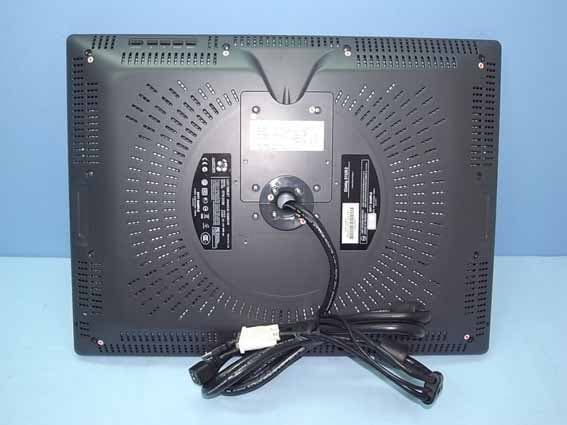
Click to zoom
Application Details
- Equipment Class
- DCD - Part 15 Low Power Transmitter Below 1705 kHz
- Date of Grant
- Feb 09, 2010
- Application Purpose
- Original Equipment
- Date of Application
- Feb 09, 2010
- Equipment Note
- LCD TABLET
- Frequency Range
- 0.66700000 - 0.66700000
- Company
- Wacom Co Ltd
- Country
- Japan
Documents & Files
Document Text
Text extracted from the exhibit documents filed with the FCC. Open a document above to read the original.
Users Manual
Installation Guide & Hardware Manual Model: DTK-2100 21UX_Monet_Manual.fm Page -1 Tuesday, January 5, 2010 9:51 AM Wacom Cintiq ® 21UX Installation Guide & Hardware Manual Version 1.0, Rev A0510 Copyright © Wacom Co., Ltd., 2010 All rights reserved. No part of this manual may be reproduced except for your express personal use. Wacom reserves the right to revise this publication without obligation to provide notification of such changes. Wacom does its best to provide current and accurate information in this manual. However, Wacom reserves the right to change any specifications and product configurations at its discretion, without prior notice and without obligation to include such changes in this manual. The above year indicates when this manual was prepared. However, the date of release to the users of the “manual” is simultaneous with the introduction into the market of the applicable Wacom product. DuoSwitch is a trademark, and Cintiq and Wacom are registered trademarks of Wacom Co., Ltd. Adobe, Reader, and Photoshop are either registered trademarks or trademarks of Adobe systems Incorporated in the United States and/or other countries. Microsoft, Windows, and Vista are either registered trademarks or trademarks of Microsoft Corporation in the United States and/or other countries. Apple, the Apple logo, and Macintosh are trademarks of Apple Computer, Inc., registered in the U.S. and other countries. Any additional company and product names mentioned in this documentation may be trademarked and/or registered as trademarks. Mention of third-party products is for informational purposes only and constitutes neither an endorsement nor a recommendation. Wacom assumes no responsibility with regard to the performance or use of these products. ExpressKey is a registered trademark of Ginsan Industries, Inc., and is used with permission. 21UX_Monet_Manual.fm Page 0 Tuesday, January 5, 2010 9:51 AM Introduction and overview Page 1 INTRODUCTION AND OVERVIEW The Wacom ® Cintiq ® interactive pen display combines the benefits of a Liquid Crystal Display (LCD) with the control, comfort, and productivity of Wacom’s cordless, battery-free pen technology. This gives you a direct pen-on-screen interface for your computer. The basic components of your Cintiq include a Wacom pen tablet internally mounted behind a TFT color display, the Wacom Grip Pen, and a modular display stand. This manual describes the installation and use of your Cintiq, Grip Pen, and display stand. •See “Unpacking your Cintiq” on page 9 before setting up the Cintiq stand or unpacking the Cintiq pen display. •The display stand allows you to easily rotate the pen display to any orientation, and to adjust the incline of the working surface. See “Setting up the Cintiq stand” on page 10 to learn more. •To learn about the many features of your product, see “Your Cintiq interactive pen display” on page 14. •Follow all instructions carefully when installing your product. See “Installation” on page 17. •There are many ways to use Cintiq. See “Working with your Cintiq” on page 24 for details. •Use the Wacom Tablet control panel to customize your pen and pen display settings. To learn more, see “Customizing” on page 34. The following information is not included with this product: information about your specific computer hardware or operating system, or information about your application software. Your best source for this information is the set of manuals and discs that came with your hardware, operating system, or application. Wacom’s philosophy is to continually improve all of its products. As a result, engineering changes and improvements are made from time to time. Therefore, some changes, modifications, and improvements may not be covered in this document. 21UX_Monet_Manual.fm Page 1 Tuesday, January 5, 2010 9:51 AM Precautions on use and handling Page 2 PRECAUTIONS ON USE AND HANDLING To ensure the safe usage of your product, be sure to follow all instructions, cautions, and warnings found within this manual. Failure to do so could cause the loss of data or damage to your computer. Failure to do so could also void your warranty, in which case Wacom shall have no responsibility to repair or replace the product. PHYSICAL LOCATION ENVIRONMENT Warning This symbol indicates an item that, if disregarded, may lead to loss of human life or serious injury. Caution This symbol indicates an item that, if disregarded, may lead to human injury or damage to personal property. Warning This symbol indicates an item that, if disregarded, may lead to loss of human life or serious injury. Exercise due care and diligence whenever engaging in a described action. Warning The interactive pen display is solely applicable in normal office environments but may be used also as center consoles in climate controlled environments. The product was tested by Wacom for the usage in a normal office environment only and there was no particular inspection with regards to its compatibility in medical and military application areas. In addition, the interactive pen display is neither waterproofed nor explosion- resistant. It serves and can be used solely as a passive display and input device. In all applications that are not designated for its sole usage, no information on the functionality and possible malfunctions of the interactive pen display can be supplied due to inadequate execution of tests. The adoption of the interactive pen display in other application areas than normal office environments is at the user’s risk. Temperature and humidity •Operating temperature and humidity: 5° to 35°C, 20 to 80% RH •Storage temperature and humidity: -10° to 60°C, 20 to 90% RH Caution Do not use or store Cintiq where: •Temperature changes are severe or exceed specifications (e.g., outdoors or inside a vehicle). •The pen display, the Grip Pen, and the Cintiq stand are exposed to direct sunlight or heat from an appliance, or are exposed to water or any other kind of liquid. Caution Do no…
Text truncated - open the document above for the full version.
External Photos
Wacom Co., Ltd. LCD Tablet FCC ID. : HV4DTK2100 EUT External Photos Figure 1 General Appearance (Front View) Figure 2 General Appearance (Back View) Wacom Co., Ltd. LCD Tablet FCC ID. : HV4DTK2100 Figure 3 General Appearance (Front & Side View) Figure 4 General Appearance (Back & Side View) Wacom Co., Ltd. LCD Tablet FCC ID. : HV4DTK2100 Figure 5 General Appearance (Removed Base) Figure 6 General Appearance (Function Control Button) Wacom Co., Ltd. LCD Tablet FCC ID. : HV4DTK2100 Figure 7 AC Adapter (General Appearance) Figure 8 AC Adapter (General Appearance/Label View) Wacom Co., Ltd. LCD Tablet FCC ID. : HV4DTK2100 Figure 9 Pen (General Appearance)
ID Label/Location Info
Wacom Co., Ltd. LCD Tablet FCC ID. : HV4DTK2100 FCC ID Label Location z Label Placement Location z FCC Label Format FCC Label Placement Location
Internal Photos
Wacom Co., Ltd. LCD Tablet FCC ID. : HV4DTK2100 EUT Internal Photos Figure 10 Internal View (Removed Back Cover) Figure 11 Internal View Wacom Co., Ltd. LCD Tablet FCC ID. : HV4DTK2100 Figure 12 Internal View (Removed Front Frame, LCD Panel, Front View) Figure 13 Internal View (Removed Switch Control Board) Wacom Co., Ltd. LCD Tablet FCC ID. : HV4DTK2100 Figure 14 Internal View (Switch Control Board, Front View) Figure 15 Internal View (Switch Control Board, Back View) Wacom Co., Ltd. LCD Tablet FCC ID. : HV4DTK2100 Figure 16 Internal View (Switch Control Board, Front View) Figure 17 Internal View (Switch Control Board, Back View) Wacom Co., Ltd. LCD Tablet FCC ID. : HV4DTK2100 Figure 18 Internal View (Switch Control & LED Board, Front View) Figure 19 Internal View (Switch Control & LED Board, Back View) Wacom Co., Ltd. LCD Tablet FCC ID. : HV4DTK2100 Figure 20 Internal View (Removed Back Cover) Figure 21 Internal View (Back Cover) Wacom Co., Ltd. LCD Tablet FCC ID. : HV4DTK2100 Figure 22 Internal View (Removed Back Cover) Figure 23 Internal View (Removed PCB) Wacom Co., Ltd. LCD Tablet FCC ID. : HV4DTK2100 Figure 24 Internal View (Inverter Board, Front View) Figure 25 Internal View (Inverter Board, Back View) Wacom Co., Ltd. LCD Tablet FCC ID. : HV4DTK2100 Figure 26 Internal View (Main Board, Front View) Figure 27 Internal View (Main Board, Back View) Wacom Co., Ltd. LCD Tablet FCC ID. : HV4DTK2100 Figure 28 Internal View (Control Board, Front View) Figure 29 Internal View (Control Board, Back View) Wacom Co., Ltd. LCD Tablet FCC ID. : HV4DTK2100 Figure 30 Internal View (LVDS Board, Front View) Figure 31 Internal View (LVDS Board, Back View) Wacom Co., Ltd. LCD Tablet FCC ID. : HV4DTK2100 Figure 32 Internal View (LVDS Board, Front View) Figure 33 Internal View (LVDS Board, Back View) Wacom Co., Ltd. LCD Tablet FCC ID. : HV4DTK2100 Figure 34 Internal View (Label View) Figure 35 Pen, Internal View (TX Module, Front View) Wacom Co., Ltd. LCD Tablet FCC ID. : HV4DTK2100 Figure 36 Pen, Internal View (TX Module, Back View) Figure 37 D-Sub to DVI Cable, DVI-D to DVI Cable
Test Report
FCC ID. HV4DTK2100 Page 1 of 21 AUDIX Technology Corporation Report No. EM-F990020 APPLICATION FOR CERTIFICATION On Behalf of Wacom Co., Ltd. LCD Tablet Model No.DTK-2100 FCC IDHV4DTK2100 Brand : Wacom REF. No.: KH-10478 Prepared for : Wacom Co., Ltd. 2-510-1, Toyonodai, Otone-machi, Kitasaitama-gun, Saitama 349-1148, Japan Prepared by : AUDIX Technology Corporation EMC Department No. 53-11, Tin-Fu Tsun, Lin-Kou Hsiang, Taipei Hsien, Taiwan Tel : (02) 2609-9301, 2609-2133 Fax: (02) 2609-9303 File Number EM982501B Report Number EM-F990020 Date of Test Jan. 05 ~ Feb. 02, 2010 Date of Report Feb. 03, 2010 FCC ID. HV4DTK2100 Page 2 of 21 AUDIX Technology Corporation Report No. EM-F990020 TABLE OF CONTENTS Description Page TEST REPORT CERTIFICATION .......................................................................................................3 1. GENERAL INFORMATION ........................................................................................................4 1.1. Description of Device (EUT).................................................................................................................. 4 1.2. Tested Supporting System Details .......................................................................................................... 5 1.3. Description of Test Facility .................................................................................................................... 6 1.4. Measurement Uncertainty....................................................................................................................... 6 2. POWERLINE CONDUCTED EMISSION MEASUREMET....................................................7 2.1. Test Equipment ....................................................................................................................................... 7 2.2. Block Diagram of Test Setup.................................................................................................................. 7 2.3. Powerline Conducted Emission Limit .................................................................................................... 7 2.4. Operating Condition of EUT .................................................................................................................. 8 2.5. Test Procedure ........................................................................................................................................ 8 2.6. Powerline Conducted Emission Measurement Results........................................................................... 8 3. RADIATED EMISSION MEASUREMENT .............................................................................11 3.1. Test Equipment ..................................................................................................................................... 11 3.2. Block Diagram of Test Setup................................................................................................................ 11 3.3. Radiated Emission Limits (§15.209) .................................................................................................... 13 3.4. Operating Condition of EUT ................................................................................................................ 13 3.5. Test Procedure ...................................................................................................................................... 14 3.6. Test Results........................................................................................................................................... 15 4. PHOTOGRAPHS .........................................................................................................................19 4.1. Photos of Conducted Disturbance Measurement .................................................................................. 19 4.2. Photos of Radiated Measurement at Semi-Anechoic Chamber ............................................................ 20 FCC ID. HV4DTK2100 Page 3 of 21 AUDIX Technology Corporation Report No. EM-F990020 TEST REPORT CERTIFICATION Applicant Wacom Co., Ltd. Manufacturer #1 Qisda Optronics (Suzhou) Co., Ltd. Manufacturer #2 Qisda Corporation EUT Description LCD Tablet FCC ID HV4DTK2100 (A) Model No. DTK-2100 (B) Serial No. N/A (C) Brand Wacom (D) Ref. No. KH-10478 (E) Power Supply DC 12V, 6A (F) Test Voltage AC 120V/60Hz (Via AC Adapter) Measurement Procedure Used: Industry Canada Rules and Regulations RSS-Gen (Issue 2), June 2007 and RSS-210 (Issue 7), June 2007 FCC RULES AND REGULATIONS PART 15 SUBPART C, July. 2008 AND ANSI C63.4/2003 (Canada RSS-210 §Annex 2.2 and FCC CFR 47 Part 15C, §15.207 and §15.209 ) The device described above was tested by AUDIX Technology Corporation to determine the maximum emission levels emanating from the device. The maximum emission levels were compared to the FCC Part 15 Subpart C and Canada RSS-210 (Issue 7) Annex 2.2. limits. The measurement results are contained in this test report and AUDIX Technology Corporation is assumed full responsibility for the accuracy and completeness of these measurements. Also, this report shows that the EUT to be technically compliant with the requirements of FCC Part 15 and Industry Canada RSS-Gen, RSS-210 standards. This report applies to above tested sample only. This report shall not be reproduced in part without written approval of AUDIX Technology Corporation. Date of Test : Jan. 05 ~ Feb. 02, 2010 Date of Report : Feb. 03, 2010 Producer : (Nita Lee/Administrator) Review : (Henning Chang/Supervisor) Signatory : (Ben Cheng/Manager) FCC ID. HV4DTK2100 Page 4 of 21 AUDIX Technology Corporation Report No. EM-F990020 1. GENERAL INFORMATION 1.1. Description of Device (EUT) Description LCD Tablet Model Number DTK-2100 Serial Number N/A Brand Wacom Ref. No KH-10478 FCC ID HV4DTK2100 Applicant Wacom Co., Ltd. 2-510-1, Toyonodai, Otone-machi, Kitasaitama-gun, Saitama 349-1148, Japan Manufacturer #1 Qisda Optronics (Suzhou) Co…
Text truncated - open the document above for the full version.
Test Setup Photos
FCC ID. HV4DTK2100 Page 19 of 21 AUDIX Technology Corporation Report No. EM-F990020 4. PHOTOGRAPHS 4.1. Photos of Conducted Disturbance Measurement FRONT VIEW OF CONDUCTED MEASUREMENT BACK VIEW OF CONDUCTED MEASUREMENT FCC ID. HV4DTK2100 Page 20 of 21 AUDIX Technology Corporation Report No. EM-F990020 4.2. Photos of Radiated Measurement at Semi-Anechoic Chamber 4.2.1. Frequency 9kHz-30MHz FRONT VIEW OF RADIATED MEASUREMENT BACK VIEW OF RADIATED MEASUREMENT FCC ID. HV4DTK2100 Page 21 of 21 AUDIX Technology Corporation Report No. EM-F990020 4.2.2. Frequency 30MHz-1000MHz FRONT VIEW OF RADIATED MEASUREMENT BACK VIEW OF RADIATED MEASUREMENT
Contact Information
Applicant
Koichi Yokoyama(Senior Director, Quality Assurance)
Test Firm
Audix Technology CorporationLeon Liu
Technical Specifications
| # | Rule Parts | Frequency Range | Power Output |
|---|---|---|---|
| 1 | 15C | 0.667 MHz - 0.667 MHz | - |
Other Applications from Wacom Co Ltd
HV4CTK6120
Aug 19, 2026Pen Tablet
Equipment Class
DCD - Part 15 Low Power Transmitter Below 1705 kHzHV4STU540A
May 12, 2026LCD SIGNATURE PAD
Equipment Class
DCD - Part 15 Low Power Transmitter Below 1705 kHzHV4DTHA140
Sep 16, 2025Portable Pad
Equipment Class
DTS - Digital Transmission SystemHV4PTK470
Oct 10, 2024Creative Pen Tablet
Equipment Class
DTS - Digital Transmission SystemHV4PTK870
Oct 10, 2024Creative Pen Tablet
Equipment Class
DCD - Part 15 Low Power Transmitter Below 1705 kHz