HV4DTK2241LCD Tablet
Wacom Co Ltd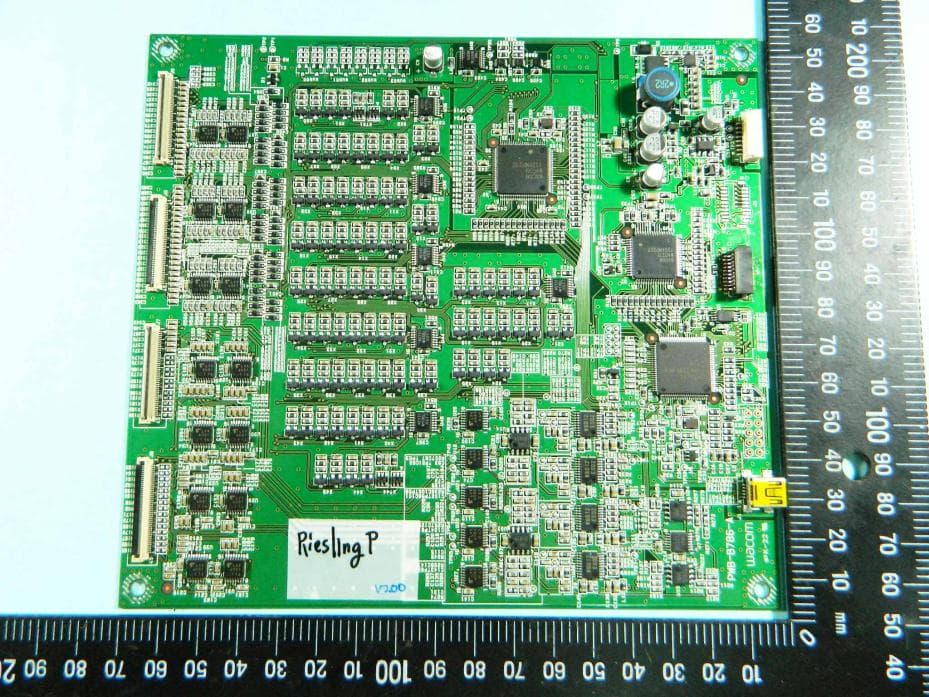
Click to zoom
Application Details
- Equipment Class
- DCD - Part 15 Low Power Transmitter Below 1705 kHz
- Date of Grant
- Mar 07, 2013
- Application Purpose
- Original Equipment
- Date of Application
- Mar 07, 2013
- Equipment Note
- LCD Tablet
- Frequency Range
- 0.66700000 - 0.66700000
- Company
- Wacom Co Ltd
- Country
- Japan
Documents & Files
Document Text
Text extracted from the exhibit documents filed with the FCC. Open a document above to read the original.
Users Manual
EN Quick start guide KR 퀵 스타트 가이드 TC 快速入門指南 SC 快速入门指南 DTK-2241 DTH-2242 Federal Communication Commission Interference Statement This equipment has been tested and found to comply with the limit s for a Class B digital device, pursuant to Part 15 of the FCC Rules. These limits are designed to provide reasonable protec tion against harmful interference in a residential installation. This equipment generates, uses and can radiate radio frequency ener gy and, if not installed and us ed in accordance with the instructions, may cause harmful interference to radio communications. Ho wever, there is no guarant ee that interference will not occur in a particular installation. If this equipment does ca use harmful interference to radio or television reception, wh ich can be determined by turning the equipment off and on, the user is encouraged to try to correct the interference by one or more of the following measures: Reorient or relocate the receiving antenna. Increase the separation between the equipment and receiver. Connect the equipment into an outlet on a circuit differ ent from that to which the receiver is connected. Consult the dealer or an experienced radio/TV technician for help. Any changes or modifications not expressl y approved by the party responsible for comp liance could void the user's authority to operate this equipment. This device complies with Part 15 of the FCC Rules. Operation is subject to the following two conditions: (1) This device may not cause harmful interference, and (2) this device must accept any in terference received, including interference that may cause undesired operation. This device and its antenna(s) must not be co-located or operating in conjunction with any other antenna or transmitter. This device complies with Industry Canada licence-exempt R SS standard(s). Operation is subject to the following two conditions: (1) this device may not cause interference, and (2) th is device must accept any interference, including interferenc e that may cause undesired operation of the device. This Class [B] digital apparatus complies with Canadian ICES-003. Important information Install the driver software for correct operation. Compatible operating systems: Windows 8 Windows 7 (SP1 or later) Windows Vista (SP2 or later) Windows XP (SP3 or later) Mac OS X v10.6.8 or later Only the DTK-2241 supports Windows Vista (SP2 or later) and Windows XP (SP3 or later). The following items provide help and support information for the pen display. Help and support informationDescription Quick Start Guide (This guide) Provides a general overview of the pen display. It includes information about connecting and using the pen display. User's Manual Downloaded to your computer when the driver software is installed. Refer to the User's Manual to learn useful information such as changing cables, using a VESA mount, troubleshooting, etc. Important Product Information Included on the installation CD. It contains precautions, product specifi cations, and other important information. Read this information carefully before use. To prevent scratching or damaging the pen display, replace your pen nibs regularly, and do not use felt nibs on the display. For additional information about recycling programs for electronics please go to http://www.wacom.com/ewaste. • • • • EN 1 EN Welcome Dear Customer, Thank you for your purchase of this DTK-2241/DTH-2242 interactive pen display. We appreciate your trust in us to provide you with the best and most reliable tools possible. We hope that you will enjoy this new pen display, which was designed to help you work more effectively and meets Wacom's exacting quality standards. To ensure that you get the most out of your new Wacom product, please read this Quick Start Guide and browse the User's Manual. If you cannot fi nd the answers you need, please contact us. Sincerely, The Wacom team 2 EN Supplied accessories Power adapterPower cableUSB cable VGA to DVI-I cable DVI-D to DVI-I cableInstallation CDPen Pen holderScrew Pen tether Some accessories are not supplied with all models. See the User's Manual for information on replacing the pen nib. 3 EN Connecting the pen display 1 Turn off your computer. 2 Select the proper video cable for your computer. Connect to the DVI-I IN connector on the pen display, then to the video output connector on your computer. 4 EN 3 Connect the power adapter to the power connector on the pen display and to the power cable, then connect the power cable to an AC outlet. 5 EN 4 Connect the USB cable to the USB connector on the pen display and a USB connector on your computer. 5 Turn on the pen display. The power LED will light orange. When a video signal is detected, the LED turns blue. 6 Turn on your computer. 6 EN Software installation Save your work and close all open applications. 1 Insert the installation CD of the pen display. If the software installer menu is not automatically displayed, double- click on the Install icon located on the CD. If your computer does not have a CD/DVD drive, download the software of the pen display from www.wacom.com. 2 Click Install Tablet and follow the prompts. Click the Important Product Information menu in the dialog to view the Important Product Information guide for the pen display. It includes product safety precautions, specifi cations, and other important information. The User's Manual is downloaded to your computer when the driver software is installed. 7 EN Calibrating the pen display For optimum performance, you must calibrate the pen display to align the screen cursor with the position of the pen on the display screen. This is required to compensate for the viewing angle, and to adjust for parallax. Position the pen display at the angle that you are going to be working from, then follow the procedure below to perform calibration. You may want to re-calibrate whenever you signifi cantly change your working position or viewing angle. 1 Open the Wacom Tablet control panel. See …
Text truncated - open the document above for the full version.
ID Label/Location Info
Spec. label Ta b l e t Back Side Upside
Internal Photos
FCC Test Report Report No. : FR312417-01 SPORTON International Inc. PAGE NUMBER : B1 OF B6 TEL : 886-3-327-3456 ISSUED DATE : Mar. 05, 2013 FAX : 886-3-327-0973 APPENDIX B. Photographs of EUT FCC Test Report Report No. : FR312417-01 SPORTON International Inc. PAGE NUMBER : B2 OF B6 TEL : 886-3-327-3456 ISSUED DATE : Mar. 05, 2013 FAX : 886-3-327-0973 FCC Test Report Report No. : FR312417-01 SPORTON International Inc. PAGE NUMBER : B3 OF B6 TEL : 886-3-327-3456 ISSUED DATE : Mar. 05, 2013 FAX : 886-3-327-0973 FCC Test Report Report No. : FR312417-01 SPORTON International Inc. PAGE NUMBER : B4 OF B6 TEL : 886-3-327-3456 ISSUED DATE : Mar. 05, 2013 FAX : 886-3-327-0973 FCC Test Report Report No. : FR312417-01 SPORTON International Inc. PAGE NUMBER : B5 OF B6 TEL : 886-3-327-3456 ISSUED DATE : Mar. 05, 2013 FAX : 886-3-327-0973 FCC Test Report Report No. : FR312417-01 SPORTON International Inc. PAGE NUMBER : B6 OF B6 TEL : 886-3-327-3456 ISSUED DATE : Mar. 05, 2013 FAX : 886-3-327-0973
Test Report
FCC Test Report Report No. : FR312417-01 SPORTON INTERNATIONAL INC. Page No. : 1 of 25 TEL : 886-3-327-3456 Report Version : Rev. 01 FAX : 886-3-327-0973 FCC Test Report Equipment : LCD Tablet Brand Name : Wacom Model No. : DTK-2241 Reference number: JS-15122 FCC ID : HV4DTK2241 Standard : 47 CFR FCC Part 15.209 Operating Band : 667 kHz (channel frequency 667kHz) Equipment Class : DCD Applicant : Wacom Co., Ltd. 2-510-1, Toyonodai, Kazo-shi, Saitama, 349-1148 Japan The product sample received on Jan. 30, 2013 and completely tested on Feb. 20, 2013. We, SPORTON, would like to declare that the tested sample has been evaluated in accordance with the procedures given in ANSI C63.10-2009 and shown compliance with the applicable technical standards. The test results in this report apply exclusively to the tested model / sample. Without written approval of SPORTON INTERNATIONAL INC., the test report shall not be reproduced except in full. Reviewed by: Wayne Hsu / Assistant Manager FCC Test Report Report No. : FR312417-01 SPORTON INTERNATIONAL INC. Page No. : 2 of 25 TEL : 886-3-327-3456 Report Version : Rev. 01 FAX : 886-3-327-0973 Table of Contents 1 GENERAL DESCRIPTION ............................................................................................................... 5 1.1 Information ........................................................................................................................................ 5 1.2 Accessories and Support Equipment ................................................................................................. 6 1.3 Testing Applied Standards ................................................................................................................ 6 1.4 Testing Location Information ............................................................................................................. 6 1.5 Measurement Uncertainty ................................................................................................................. 7 2 TEST CONFIGURATION OF EUT .................................................................................................... 8 2.1 The Worst Case Modulation Configuration ........................................................................................ 8 2.2 Test Channel Frequencies Configuration ........................................................................................... 8 2.3 The Worst Case Measurement Configuration .................................................................................... 8 2.4 Test Setup Diagram .......................................................................................................................... 9 3 TRANSMITTER TEST RESULT ..................................................................................................... 11 3.1 AC Power-line Conducted Emissions .............................................................................................. 11 3.2 Transmitter Radiated Emissions ...................................................................................................... 15 4 TEST EQUIPMENT AND CALIBRATION DATA ............................................................................. 25 APPENDIX A. TEST PHOTOS .................................................................................................................. A5 APPENDIX B. PHOTOGRAPHS OF EUT ................................................................................................ B13 FCC Test Report Report No. : FR312417-01 SPORTON INTERNATIONAL INC. Page No. : 3 of 25 TEL : 886-3-327-3456 Report Version : Rev. 01 FAX : 886-3-327-0973 Summary of Test Result Conformance Test Specifications Report Clause Ref. Std. Clause Description Measured Limit Result 1.1.3 15.203 Antenna Requirement Antenna connector mechanism complied FCC 15.203 Complied 3.1 15.207 AC Power-line Conducted Emissions [dBuV]: 0.3847160MHz 36.50 (Margin 11.68dB) - AV 41.52 (Margin 16.66dB) - QP FCC 15.207 Complied 3.2 15.209 Transmitter Radiated Unwanted Emissions [dBuV/m at 3m]: 667.4kHz 56.10 (Margin 15.02dB) - QP [dBuV/m at 3m]: 126.030MHz 37.58 (Margin 5.92dB) – PK FCC 15.209 Complied FCC Test Report Report No. : FR312417-01 SPORTON INTERNATIONAL INC. Page No. : 4 of 25 TEL : 886-3-327-3456 Report Version : Rev. 01 FAX : 886-3-327-0973 Revision History Report No. Version Description Issued Date FR312417 Rev. 01 Initial issue of report Mar. 05, 2013 FR312417-01 Rev. 01 Without finger touch function Mar. 05, 2013 FCC Test Report Report No. : FR312417-01 SPORTON INTERNATIONAL INC. Page No. : 5 of 25 TEL : 886-3-327-3456 Report Version : Rev. 01 FAX : 886-3-327-0973 1 General Description 1.1 Information 1.1.1 Manufacturer Qisda Corporation 157 & 159, Shan-Ying Road, Gueishan, Taoyuan, Taiwan Qisda (Suzhou) Co., Ltd. 169, Zhujiang Road, New District, Suzhou, Jiangsu Province, P.R. China Qisda Optronics (Suzhou) Co., Ltd. 169, Zhujiang Road, New District, Suzhou, Jiangsu 215129, P.R. China Qisda Mexicana S.A. De C.V. Calzada Venustiano Carranza, No. 88 Col. Plutarco Elias Calles, Mexocali B.C. Mexico C.P 21376 Mexico 1.1.2 RF General Information RF General Information Frequency Range Modulation Ch. Frequency (kHz) Channel Number Field Strength (dBuV/m) 667 kHz Array Coil Pointing 667 1 56.10 Note 1: Field strength performed quasi peak level at 3m. 1.1.3 Antenna Information Antenna Category Equipment placed on the market without antennas Integral antenna (antenna permanently attached) External antenna (dedicated antennas) 1.1.4 Type of EUT Identify EUT EUT Serial Number N/A Presentation of Equipment Production ; Pre-Production ; Prototype Type of EUT Stand-alone Combined (EUT where the radio part is fully integrated within another device) Combined Equipment - Brand Name / Model No.: ... Plug-in radio (EUT intended for a variety of host systems) Host System - Brand Name / Model No.: ... Other: FCC Test Report Report No. : FR312417-01 SPORTON INTERNATIONAL INC. Page …
Text truncated - open the document above for the full version.
Test Setup Photos
FCC Test Report Report No. : FR312417-01 SPORTON INTERNATIONAL INC. Page No. : A1 of A5 TEL : 886-3-327-3456 Report Version : Rev. 01 FAX : 886-3-327-0973 Appendix A. Test Photos FCC Test Report Report No. : FR312417-01 SPORTON INTERNATIONAL INC. Page No. : A2 of A5 TEL : 886-3-327-3456 Report Version : Rev. 01 FAX : 886-3-327-0973 1 Photographs of Conducted Emissions Test Configuration FRONT VIEW REAR VIEW FCC Test Report Report No. : FR312417-01 SPORTON INTERNATIONAL INC. Page No. : A3 of A5 TEL : 886-3-327-3456 Report Version : Rev. 01 FAX : 886-3-327-0973 SIDE VIEW FCC Test Report Report No. : FR312417-01 SPORTON INTERNATIONAL INC. Page No. : A4 of A5 TEL : 886-3-327-3456 Report Version : Rev. 01 FAX : 886-3-327-0973 2 Photographs of Radiated Emissions Test Configuration For radiated emissions 9kHz~30MHz FRONT VIEW REAR VIEW FCC Test Report Report No. : FR312417-01 SPORTON INTERNATIONAL INC. Page No. : A5 of A5 TEL : 886-3-327-3456 Report Version : Rev. 01 FAX : 886-3-327-0973 For radiated emissions 30MHz~1GHz FRONT VIEW REAR VIEW
Contact Information
Applicant
Koichi Yokoyama(Senior Director, Quality Assurance)
Test Firm
Sporton International Inc.Alex Chen
Technical Specifications
| # | Rule Parts | Frequency Range | Power Output |
|---|---|---|---|
| 1 | 15C | 0.667 MHz - 0.667 MHz | - |
Other Applications from Wacom Co Ltd
HV4CTK6120
Aug 19, 2026Pen Tablet
Equipment Class
DCD - Part 15 Low Power Transmitter Below 1705 kHzHV4STU540A
May 12, 2026LCD SIGNATURE PAD
Equipment Class
DCD - Part 15 Low Power Transmitter Below 1705 kHzHV4DTHA140
Sep 16, 2025Portable Pad
Equipment Class
DTS - Digital Transmission SystemHV4PTK470
Oct 10, 2024Creative Pen Tablet
Equipment Class
DTS - Digital Transmission SystemHV4PTK870
Oct 10, 2024Creative Pen Tablet
Equipment Class
DCD - Part 15 Low Power Transmitter Below 1705 kHz