HV4DTU2235BLCD TABLET
Wacom Co Ltd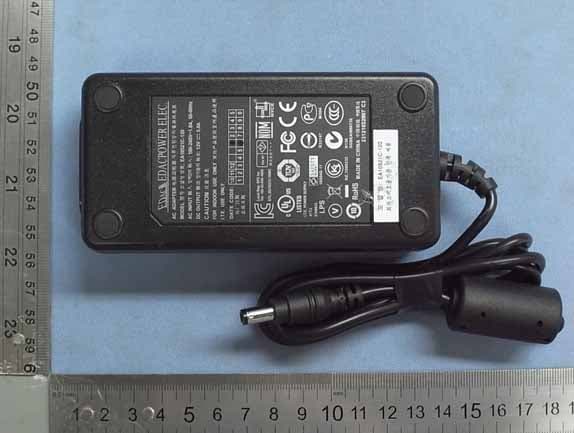
Click to zoom
Application Details
- Equipment Class
- DCD - Part 15 Low Power Transmitter Below 1705 kHz
- Date of Grant
- Aug 01, 2010
- Application Purpose
- Original Equipment
- Date of Application
- Jul 29, 2010
- Equipment Note
- LCD TABLET
- Frequency Range
- 0.53100000 - 0.59400000
- Company
- Wacom Co Ltd
- Country
- Japan
Documents & Files
Document Text
Text extracted from the exhibit documents filed with the FCC. Open a document above to read the original.
Users Manual
USER’S MANUAL Interactive pen display Model: 1 Index Contents 1 Index Contents Interactive pen display Installation Using the pen Customizing the pen Using the pen display Customizing the pen display Using the Radial Menu Application-specific settings Troubleshooting DTU-2235B 2 Index Contents 2 Index Contents Interactive pen display Interactive pen display User’s Manual Version 1.0, Rev F2910 Copyright © Wacom Co., Ltd., 2010 All rights reserved. No part of this manual may be reproduced except for your express personal use. Wacom reserves the right to revise this publication without obligation to provide notification of such changes. Wacom does its best to provide current and accurate information in this manual. However, Wacom reserves the right to change any specifications and product configurations at its discretion, without prior notice and without obligation to include such changes in this manual. The above year indicates when this manual was prepared. However, the date of release to the users of the “manual” is simultaneous with the introduction into the market of the applicable Wacom product. DuoSwitch is a trademark, and Wacom is a registered trademark of Wacom Co., Ltd. Adobe and Reader are either registered trademarks or trademarks of Adobe systems Incorporated in the United States and/or other countries. Microsoft, Windows, and Vista are either registered trademarks or trademarks of Microsoft Corporation in the United States and/or other countries. Apple, the Apple logo, and Macintosh are trademarks of Apple Computer, Inc., registered in the U.S. and other countries. Any additional company and product names mentioned in this documentation may be trademarked and/or registered as trademarks. Mention of third-party products is for informational purposes only and constitutes neither an endorsement nor a recommendation. Wacom assumes no responsibility with regard to the performance or use of these products. 3 Index Contents 3 Index Contents Interactive pen display TABLE OF CONTENTS About the manual 5 Navigating the manual 6 YOUR INTERACTIVE PEN DISPLAY 7 Pen display features 8 Front view 8 Rear view 9 Adjusting display incline 10 Pen features 11 INSTALLATION 12 System requirements 12 Step 1: Display installation 13 Step 2: Pen tablet installation 17 USB cable installation 17 Software installation 18 WORKING WITH THE INTERACTIVE PEN DISPLAY 19 Ergonomics 19 Using the pen 20 Holding the pen 20 Positioning 20 Clicking 21 Dragging 21 Using the side switch 22 Working with pressure sensitivity 22 Erasing 22 Working with multiple monitors 22 Adjusting the display 23 Factory presets, auto-sync, and user settings 23 On Screen Display (OSD) settings 23 Power saving 26 CUSTOMIZING 27 Opening the control panel 27 Control panel overview 28 Calibrating the pen display 30 Adjusting pitch and phase (VGA only) 31 Customizing the pen 32 Adjusting tip feel and double-click 32 Adjusting eraser feel 33 Advanced tip and eraser pressure settings 34 Customizing pen buttons 35 Button functions 36 Using and customizing the Radial Menu 40 Working with Display Toggle 41 Application-specific settings 42 Creating an application-specific setting 43 Changing application-specific settings 44 Removing application-specific settings 44 TROUBLESHOOTING 45 Testing the interactive pen display 46 Testing your pen 47 Display troubleshooting 48 General display problems 48 VGA problems 50 Pen tablet troubleshooting 51 General problems 51 Windows-specific problems 54 Macintosh-specific problems 55 Technical support options 57 Obtaining driver downloads 58 APPENDIX 59 Caring for the interactive pen display 59 Replacing the pen tip 60 Using an alternate mount or stand 61 Uninstalling the interactive pen display 62 Managing preferences 63 Installing multiple tablets 64 Pen and digital ink capabilities in Windows 65 About the Windows Tablet PC Input Panel 66 4 Index Contents 4 Index Contents Interactive pen display Product specifications 67 Model DTU-2235B interactive pen display 67 General specifications 67 Display 68 Ta b l e t 6 9 Power adapter 69 Pen (model UP-817E) 69 Pen (model UP-818E) 69 Product information 70 Ordering parts and accessories 70 Available parts and accessories 70 Radio and television interference 71 FCC notice 71 Industry Canada (Canada only) 72 CE declaration 72 Precautions 73 Physical location 73 Environment 73 Usage 74 Handling 74 Warranty (Worldwide, Except for Europe, Africa and Middle East) 76 Limited Warranty 76 Warranty Service in the U.S.A. and Canada 77 Warranty Service Outside of the U.S.A. and Canada 77 Licence warranty conditions (Europe, Africa and Middle East) 78 Software Licence Agreement 78 Limited Warranty 79 GLOSSARY 81 INDEX 83 5 Index Contents 5 Index Contents Interactive pen display ABOUT THE MANUAL This document provides quick access to information about your interactive pen display. Click on a navigation button or highlighted word to move through the document. The information is common to Windows and Macintosh computers and Windows screen captures are shown, unless otherwise noted. If you are new to electronic documentation, read navigating the manual . •Go directly to contents or index topics by clicking on them. •S MALL CAPITAL LETTERS identify the names of keyboard keys, dialog boxes, and control panel options. •You can use your viewer zoom-in tool to increase the size of the page on your display screen. •The following information is not included with this product: information about your specific computer hardware or operating system, or information about your application software. Your best source for this information is the set of manuals and discs that came with your hardware, operating system, or application. •Many applications have built-in support for pen display features (such as pressure sensitivity). Visit Wacom’s web site to find a listing of applications that support these features (see product information). •For information on how best to use pen display features with…
Text truncated - open the document above for the full version.
External Photos
Wacom Co., Ltd. LCD TABLET FCC ID. : HV4DTU2235B EUT External Photos Figure 1 General Appearance View Figure 2 General Appearance (Front View) Wacom Co., Ltd. LCD TABLET FCC ID. : HV4DTU2235B Figure 3 General Appearance (Back View) Figure 4 General Appearance (Back View) Wacom Co., Ltd. LCD TABLET FCC ID. : HV4DTU2235B Figure 5 General Appearance (Front & Side View) Figure 6 General Appearance (Back & Side View) Wacom Co., Ltd. LCD TABLET FCC ID. : HV4DTU2235B Figure 7 Appearance (Side View, I/O Ports) Figure 8 Pen (General Appearance View) Wacom Co., Ltd. LCD TABLET FCC ID. : HV4DTU2235B Figure 9 Pen (General Appearance View) Figure 10 AC Adapter (General Appearance View) Wacom Co., Ltd. LCD TABLET FCC ID. : HV4DTU2235B Figure 11 AC Adapter (General Appearance View)
ID Label/Location Info
Wacom Co., Ltd. LCD TABLET FCC ID. : HV4DTU2235B FCC ID Label Location z Label Placement Location z FCC Label Format FCC Label Placement Location
Internal Photos
Wacom Co., Ltd. LCD TABLET FCC ID. : HV4DTU2235B EUT Internal Photos Figure 12 Internal View (Back Cover Removed) Figure 13 Internal View (Back Cover Removed) Wacom Co., Ltd. LCD TABLET FCC ID. : HV4DTU2235B Figure 14 Internal View (USB Board, Front View) Figure 15 Internal View (USB Board, Back View) Wacom Co., Ltd. LCD TABLET FCC ID. : HV4DTU2235B Figure 16 Internal View (USB Board, Front View) Figure 17 Internal View (USB Board, Back View) Wacom Co., Ltd. LCD TABLET FCC ID. : HV4DTU2235B Figure 18 Internal View (Switch Control Board, Front View) Figure 19 Internal View (Switch Control Board, Back View) Wacom Co., Ltd. LCD TABLET FCC ID. : HV4DTU2235B Figure 20 Internal View (Control Board, Front View) Figure 21 Internal View (Control Board, Back View) Wacom Co., Ltd. LCD TABLET FCC ID. : HV4DTU2235B Figure 22 Internal View (Control Board, Front View) Figure 23 Internal View (Control Board, Back View) Wacom Co., Ltd. LCD TABLET FCC ID. : HV4DTU2235B Figure 24 Internal View (Removed Metal Covers) Figure 25 Internal View (Removed Main Board & Inverter Board) Wacom Co., Ltd. LCD TABLET FCC ID. : HV4DTU2235B Figure 26 Internal View (Main Board, Front View) Figure 27 Internal View (Main Board, Back View) Wacom Co., Ltd. LCD TABLET FCC ID. : HV4DTU2235B Figure 28 Internal View (Inverter Board, Front View) Figure 29 Internal View (Inverter Board, Back View) Wacom Co., Ltd. LCD TABLET FCC ID. : HV4DTU2235B Figure 30 Internal View (Removed Front Frame) Figure 31 Internal View (LCD Panel, Front View) Wacom Co., Ltd. LCD TABLET FCC ID. : HV4DTU2235B Figure 32 Internal View (Removed Metal Cover) Figure 33 Internal View (LCD Panel, Back View) Wacom Co., Ltd. LCD TABLET FCC ID. : HV4DTU2235B Figure 34 Internal View (Sensor Control Board, Front View) Figure 35 Internal View (Sensor Control Board, Back View) Wacom Co., Ltd. LCD TABLET FCC ID. : HV4DTU2235B Figure 36 Internal View (LVDS Board, Front View) Figure 37 Internal View (LVDS Board, Back View) Wacom Co., Ltd. LCD TABLET FCC ID. : HV4DTU2235B Figure 38 Pen, Internal View (Removed Cover) Figure 39 Pen, Internal View (TX Module, Front View) Wacom Co., Ltd. LCD TABLET FCC ID. : HV4DTU2235B Figure 40 Pen, Internal View (TX Module, Back View)
Test Report
FCC ID. HV4DTU2235B Page 1 of 21 AUDIX Technology Corporation Report No. EM-F990723 APPLICATION FOR CERTIFICATION On Behalf of Wacom Co., Ltd. LCD TABLET Model No.DTU-2235B FCC IDHV4DTU2235B Brand : WACOM & SMART REF. No.: JS-11549 Prepared for : Wacom Co., Ltd. 2-510-1, Toyonodai, Kazo-shi, Saitama, 349-1148 Japan Prepared by : AUDIX Technology Corporation EMC Department No. 53-11, Tin-Fu Tsun, Lin-Kou Hsiang, Taipei Hsien, Taiwan Tel : (02) 2609-9301, 2609-2133 Fax: (02) 2609-9303 File Number C1M1006357 Report Number EM-F990723 Date of Test Jul. 07 ~ 08, 2010 Date of Report Jul. 14, 2010 FCC ID. HV4DTU2235B Page 2 of 21 AUDIX Technology Corporation Report No. EM-F990723 TABLE OF CONTENTS Description Page TEST REPORT CERTIFICATION .......................................................................................................3 1. GENERAL INFORMATION ........................................................................................................4 1.1. Description of Device (EUT).................................................................................................................. 4 1.2. Tested Supporting System Details .......................................................................................................... 5 1.3. Description of Test Facility .................................................................................................................... 6 1.4. Measurement Uncertainty....................................................................................................................... 6 2. POWERLINE CONDUCTED EMISSION MEASUREMET....................................................7 2.1. Test Equipment ....................................................................................................................................... 7 2.2. Block Diagram of Test Setup.................................................................................................................. 7 2.3. Powerline Conducted Emission Limit (§15.207)....................................................................................7 2.4. Operating Condition of EUT .................................................................................................................. 8 2.5. Test Procedure ........................................................................................................................................ 8 2.6. Powerline Conducted Emission Measurement Results........................................................................... 8 3. RADIATED EMISSION MEASUREMENT .............................................................................11 3.1. Test Equipment ..................................................................................................................................... 11 3.2. Test Setup ............................................................................................................................................. 11 3.3. Radiated Emission Limits (§15.209) .................................................................................................... 13 3.4. Operating Condition of EUT ................................................................................................................ 13 3.5. Test Procedure ...................................................................................................................................... 14 3.6. Test Results........................................................................................................................................... 15 4. PHOTOGRAPHS .........................................................................................................................19 4.1. Photos of Conducted Disturbance Measurement .................................................................................. 19 4.2. Photos of Radiated Measurement at Semi-Anechoic Chamber ............................................................ 20 FCC ID. HV4DTU2235B Page 3 of 21 AUDIX Technology Corporation Report No. EM-F990723 TEST REPORT CERTIFICATION Applicant Wacom Co., Ltd. Manufacturer #1 Qisda Optronics (Suzhou) Co., Ltd. Manufacturer #2 Qisda Corporation EUT Description LCD TABLET FCC ID HV4DTU2235B (A) Model No. DTU-2235B (B) Serial No. N/A (C) Brand WACOM & SMART (D) Ref. No. JS-11549 (E) Power Supply DC 12V (F) Test Voltage AC 120V/60Hz (Via AC Adapter) Measurement Procedure Used: Industry Canada Rules and Regulations RSS-Gen (Issue 2), June 2007 and RSS-210 (Issue 7), June 2007 FCC RULES AND REGULATIONS PART 15 SUBPART C, Oct. 2009 AND ANSI C63.4/2003 (Canada RSS-210 §Annex 2.2 and FCC CFR 47 Part 15C, §15.207 and §15.209 and §15.209) The device described above was tested by AUDIX Technology Corporation to determine the maximum emission levels emanating from the device. The maximum emission levels were compared to the FCC Part 15 Subpart C and Canada RSS-210 (Issue 7) Annex 2.2. limits. The measurement results are contained in this test report and AUDIX Technology Corporation is assumed full responsibility for the accuracy and completeness of these measurements. Also, this report shows that the EUT to be technically compliant with the requirements of FCC Part 15 and Industry Canada RSS-Gen, RSS-210 standards. This report applies to above tested sample only. This report shall not be reproduced in part without written approval of AUDIX Technology Corporation. Date of Test: Jul. 07 ~ 08, 2010 Date of Report: Jul. 14, 2010 Producer: (Cherry Wang/Deputy Manager) Reviewer: (Henning Chang/Supervisor) Signatory: (Ben Cheng/Manager) FCC ID. HV4DTU2235B Page 4 of 21 AUDIX Technology Corporation Report No. EM-F990723 1. GENERAL INFORMATION 1.1. Description of Device (EUT) Description LCD TABLET (The EUT is a LCD Tablet, which is transceiver. The pen will be sold together with the EUT) Model Number DTU-2235B Serial Number N/A Brand WACOM & SMART Ref. No JS-11549 FCC ID HV4DTU2235B Applicant Wacom Co., Ltd. 2-510-1,…
Text truncated - open the document above for the full version.
Test Setup Photos
FCC ID. HV4DTU2235B Page 19 of 21 AUDIX Technology Corporation Report No. EM-F990723 4. PHOTOGRAPHS 4.1. Photos of Conducted Disturbance Measurement FRONT VIEW OF CONDUCTED MEASUREMENT BACK VIEW OF CONDUCTED MEASUREMENT FCC ID. HV4DTU2235B Page 20 of 21 AUDIX Technology Corporation Report No. EM-F990723 4.2. Photos of Radiated Measurement at Semi-Anechoic Chamber 4.2.1. Frequency 9kHz-30MHz FRONT VIEW OF RADIATED MEASUREMENT BACK VIEW OF RADIATED MEASUREMENT FCC ID. HV4DTU2235B Page 21 of 21 AUDIX Technology Corporation Report No. EM-F990723 4.2.2. Frequency 30MHz-1000MHz FRONT VIEW OF RADIATED MEASUREMENT BACK VIEW OF RADIATED MEASUREMENT
Contact Information
Applicant
Koichi Yokoyama(Senior Director, Quality Assurance)
Test Firm
Audix Technology CorporationLeon Liu
Technical Specifications
| # | Rule Parts | Frequency Range | Power Output |
|---|---|---|---|
| 1 | 15C | 0.531 MHz - 0.594 MHz | - |
Other Applications from Wacom Co Ltd
HV4CTK6120
Aug 19, 2026Pen Tablet
Equipment Class
DCD - Part 15 Low Power Transmitter Below 1705 kHzHV4STU540A
May 12, 2026LCD SIGNATURE PAD
Equipment Class
DCD - Part 15 Low Power Transmitter Below 1705 kHzHV4DTHA140
Sep 16, 2025Portable Pad
Equipment Class
DTS - Digital Transmission SystemHV4PTK470
Oct 10, 2024Creative Pen Tablet
Equipment Class
DTS - Digital Transmission SystemHV4PTK870
Oct 10, 2024Creative Pen Tablet
Equipment Class
DCD - Part 15 Low Power Transmitter Below 1705 kHz