HV4DTZ2000WLCD Tablet
Wacom Co Ltd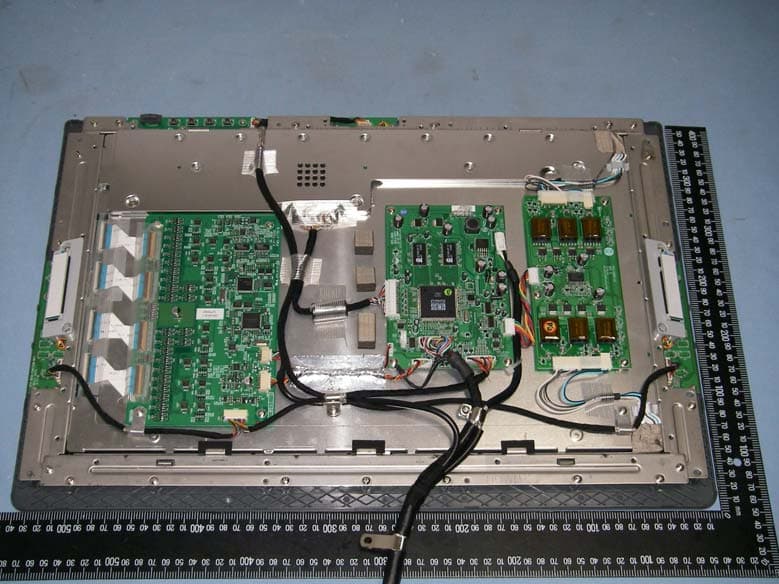
Click to zoom
Application Details
- Equipment Class
- DCD - Part 15 Low Power Transmitter Below 1705 kHz
- Date of Grant
- Feb 18, 2007
- Application Purpose
- Original Equipment
- Date of Application
- Feb 18, 2007
- Equipment Note
- LCD Tablet
- Frequency Range
- 0.66700000 - 0.66700000
- Company
- Wacom Co Ltd
- Country
- Japan
Documents & Files
Document Text
Text extracted from the exhibit documents filed with the FCC. Open a document above to read the original.
Users Manual
Introduction and overview Page 1 INTRODUCTION AND OVERVIEW The Wacom ® Cintiq ® DTZ-2000 pen display combines the benefits of an LCD monitor with the control, comfort, and productivity of Wacom’s cordless, battery-free pen technology. This gives you a direct pen-on-screen interface that can be used with a Personal Computer (PC) or Macintosh ® computer. Cintiq’s basic components include a Wacom pen tablet internally mounted behind a 20.1" wide format TFT color LCD monitor, and Wacom’s Grip Pen. Cintiq comes with a modular display stand, which allows you to easily rotate the pen display to any orientation, and to adjust the incline of the working surface to any angle between 10 and 65 degrees. Refer to Unpacking your Cintiq on page 7 before setting up the Cintiq stand or unpacking the Cintiq pen display. Please follow all instructions carefully. This manual describes how to install the Cintiq hardware and software. It also describes how to use Cintiq, the Grip Pen, and the modular display stand. The information is common to Windows and Macintosh computers, and Windows screen captures are shown unless otherwise noted. Note that the computer treats the Cintiq pen display as two separate devices (the LCD monitor and the pen tablet). Therefore, the installation process is completed in two stages: •First install the Cintiq as a display. •Then install the Cintiq as a pen tablet. Both stages require hardware and software installations and adjustments. Please follow all instructions carefully. IMPORTANT: You MUST install the Wacom pen tablet driver software for full pen and tablet functionality, otherwise the Cintiq pen will only function as a mouse device and the extended pen and tablet features will not be available. The following kinds of information are not included with this product: information about your specific computer hardware or operating system, or information about your application software. Your best source for this information is the set of manuals and disks that came with your hardware, operating system, or application. For information on using the Wacom Tablet control panel to customize your pen display tablet and pen settings, refer to Customizing on page 32 and to the electronic Software User’s Manual. See also Learning more about Cintiq on page 35. To use the pressure-sensitivity of the Grip Pen with your favorite drawing application, refer to instructions in that application’s manuals. DTZ-2000_Manual.fm Page 1 Wednesday, December 27, 2006 9:37 AM Precautions on use and handling Page 2 PRECAUTIONS ON USE AND HANDLING Be sure to follow all instructions, cautions, and warnings found within this manual. Failure to do so could cause the loss of data or damage to your computer. Failure to do so could also void your warranty, in which case Wacom shall have no responsibility to repair or replace the product. Physical location Environment Usage W ARNING Do not use the Cintiq pen displa y in a facility control system that requires extremely high reliability; it ma y cause other electronic devices to malfunction, or other devices may cause the pen display tablet to malfunction. Where use is prohibited, power off Cintiq to prevent the possibility of it causing other electronic devices to malfunction. Wacom does not accept any liability for direct or consequential damages. For details, please refer to your Warranty located at the end of this manual. Temperature and Humidity •Operating temperature and humidity: 5 ̊ to 35 ̊C, 20 to 80% RH •Storage temperature and humidity: -10 ̊ to 60 ̊C, 20 to 90% RH C AUTION Do not use or store Cintiq where: •Temperature changes are severe or exceed specifications (e.g., outdoors or inside a vehicle). •The pen display, the Grip Pen, and the Cintiq stand are exposed to direct sunlight or heat from an appliance, or are exposed to water or any other kind of liquid. C AUTION Do not use Cintiq in a dusty environment; this may damage the unit. W ARNING Only use the power adapter that came with Cintiq. If a different type of power adapter is used, Cintiq will not work properly or may be damaged. Using a different type of power adapter also has the potential to result in fire. Use of a different power adapter will void your warranty. C AUTION Be sure to use a grounded power source when applying power to Cintiq. C AUTION Do not connect or disconnect the video or power cables while Cintiq or your computer are turned on; this may damage the LCD monitor or computer video card. In this case, Wacom shall have no responsibility to repair or replace the product. C AUTION This product is for use with a DVI or VGA video card; using an inappropriate video card may damage Cintiq. C AUTION Do not block the rear panel ventilation holes; this may overheat and damage the unit. When not using Cintiq for long periods of time, unplug the power adapter from the AC outlet. DTZ-2000_Manual.fm Page 2 Wednesday, December 27, 2006 9:37 AM Precautions on use and handling Page 3 Handling W ARNING High Voltage. Do not open or disassemble the Cintiq pen display. There is a risk of electrical shock when the casing is open. This will also void your warranty and Wacom shall have no responsibility to repair or replace the product. W ARNING Do not operate the display stand incline adjustment levers when Cintiq is not mounted on the stand, and do not lift the stand by the adjustment levers; the stand is spring- loaded and may cause injury or damage if released without the weight of Cintiq on the stand. Improper operation may lead to physical injury or damage to the stand. W ARNING When moving Cintiq to a different location, either remove the display unit from the stand (see page 12 for details) and then move both items separately, use the lock screws to fix Cintiq to the stand (see page 56 for details), or hold onto both Cintiq and the stand to make sure that the stand does not separate from the display unit when moving them together. Before moving Cintiq, first adjust the stand to its full uprig…
Text truncated - open the document above for the full version.
Cover Letter(s)
Rev. 1/1/03 Wacom Co Ltd. 2-510-1 Toyonodai Otone-machi Jutasautana-gun Saitama Japan Ph: 81-480-78-1257 website: www.wacom.com Federal Communications Commission Authorization and Evaluation Division Confidentiality Request regarding application for certification of ID NO: HV4DTZ2000W Pursuant to Sections 0.457 and 0.459 of the Commission’s Rules, we hereby request confidential treatment of information accompanying this application as outlined below: File Description File Name Block Diagram Blockdiagram_DTZ2000W.pdf Schematics SCHEM_DTZ-2000 Function Key-3.pdf Schematics SCHEM_DTZ-2000 Inverter-A.pdf Schematics SCHEM_DTZ-2000 main-4.pdf Schematics SCHEM_DTZ-2000 OSD Key.pdf Schematics SCHEM_DTZ-2000 Power Key.pdf Circuit Description Operational Description_DTZ2000W.pdf The above materials contain trade secrets and proprietary information not customarily released to the public. The public disclosure of these materials may be harmful to the applicant and provide unjustified benefits to its competitors. The applicant understands that pursuant to Section 0.457 of the Rules, disclosure of this application and all accompanying documentation will not be made before the date of the Grant for this application. Sincerely, ( ) (Toshio Aoki)
Cover Letter(s)
Wacom Co. Ltd. 2-510-1 Toyonodai Otone-machi Jutasautana-gun Saitama Japan Phone: 81-480-78-1257 Website: www.wacom.com July 10, 2007 Federal Communications Commission Authorization and Evaluation Division Confidentiality Request regarding application for certification of FCC ID: HV4DTZ2000W Wacom and SRT Lab did not request confidentiality for the above referred FCC ID that was granted on February 19, 2007 Wacom and SRT Lab. understand that all exhibits have been displayed on the FCC website for public review since the grant was issued. Due to growing concern of our cutting-edge technology, we authorize Timco to request confidentiality for applicable exhibits. If you have any questions regarding this statement, please don’t hesitate to contact us. Thank you. Sincerely yours, ( ) (Johnson) -------------------------- ------------------------- Toshio Aoki / General Manager Johnson / Director
External Photos
Spectrum Research & Testing Lab., Inc. No. 101-10, Ling 8, Shan-Tong Li, Chung-Li City, Taoyuan, Taiwan, R.O.C. Photo Page: 1 of 31 PHOTOS OF EUT Spectrum Research & Testing Lab., Inc. No. 101-10, Ling 8, Shan-Tong Li, Chung-Li City, Taoyuan, Taiwan, R.O.C. Photo Page: 2 of 31 PHOTOS OF EUT Spectrum Research & Testing Lab., Inc. No. 101-10, Ling 8, Shan-Tong Li, Chung-Li City, Taoyuan, Taiwan, R.O.C. Photo Page: 3 of 31 PHOTOS OF EUT Spectrum Research & Testing Lab., Inc. No. 101-10, Ling 8, Shan-Tong Li, Chung-Li City, Taoyuan, Taiwan, R.O.C. Photo Page: 4 of 31 PHOTOS OF EUT Spectrum Research & Testing Lab., Inc. No. 101-10, Ling 8, Shan-Tong Li, Chung-Li City, Taoyuan, Taiwan, R.O.C. Photo Page: 5 of 31 PHOTOS OF EUT Spectrum Research & Testing Lab., Inc. No. 101-10, Ling 8, Shan-Tong Li, Chung-Li City, Taoyuan, Taiwan, R.O.C. Photo Page: 6 of 31 PHOTOS OF EUT Spectrum Research & Testing Lab., Inc. No. 101-10, Ling 8, Shan-Tong Li, Chung-Li City, Taoyuan, Taiwan, R.O.C. Photo Page: 7 of 31 PHOTOS OF EUT Spectrum Research & Testing Lab., Inc. No. 101-10, Ling 8, Shan-Tong Li, Chung-Li City, Taoyuan, Taiwan, R.O.C. Photo Page: 9 of 31 PHOTOS OF EUT Spectrum Research & Testing Lab., Inc. No. 101-10, Ling 8, Shan-Tong Li, Chung-Li City, Taoyuan, Taiwan, R.O.C. Photo Page: 17 of 31 PHOTOS OF EUT Spectrum Research & Testing Lab., Inc. No. 101-10, Ling 8, Shan-Tong Li, Chung-Li City, Taoyuan, Taiwan, R.O.C. Photo Page: 19 of 31 PHOTOS OF EUT (ADAPTER 1) Spectrum Research & Testing Lab., Inc. No. 101-10, Ling 8, Shan-Tong Li, Chung-Li City, Taoyuan, Taiwan, R.O.C. Photo Page: 20 of 31 PHOTOS OF EUT (ADAPTER 1 LABLE) Spectrum Research & Testing Lab., Inc. No. 101-10, Ling 8, Shan-Tong Li, Chung-Li City, Taoyuan, Taiwan, R.O.C. Photo Page: 21 of 31 PHOTOS OF EUT (ADAPTER 2) Spectrum Research & Testing Lab., Inc. No. 101-10, Ling 8, Shan-Tong Li, Chung-Li City, Taoyuan, Taiwan, R.O.C. Photo Page: 22 of 31 PHOTOS OF EUT (ADAPTER 2 LABLE) Spectrum Research & Testing Lab., Inc. No. 101-10, Ling 8, Shan-Tong Li, Chung-Li City, Taoyuan, Taiwan, R.O.C. Photo Page: 23 of 31 PHOTOS OF EUT (ADAPTER 3) Spectrum Research & Testing Lab., Inc. No. 101-10, Ling 8, Shan-Tong Li, Chung-Li City, Taoyuan, Taiwan, R.O.C. Photo Page: 24 of 31 PHOTOS OF EUT(ADAPTER 3 LABLE) Spectrum Research & Testing Lab., Inc. No. 101-10, Ling 8, Shan-Tong Li, Chung-Li City, Taoyuan, Taiwan, R.O.C. Photo Page: 25 of 31 PHOTOS OF EUT(ADAPTER 4 LABLE) Spectrum Research & Testing Lab., Inc. No. 101-10, Ling 8, Shan-Tong Li, Chung-Li City, Taoyuan, Taiwan, R.O.C. Photo Page: 26 of 31 PHOTOS OF EUT (ADAPTER 4 LABLE) Spectrum Research & Testing Lab., Inc. No. 101-10, Ling 8, Shan-Tong Li, Chung-Li City, Taoyuan, Taiwan, R.O.C. Photo Page: 27 of 31 PHOTOS OF EUT DVI CABLE PHOTOS OF EUT DVI CABLE CONNECTOR Spectrum Research & Testing Lab., Inc. No. 101-10, Ling 8, Shan-Tong Li, Chung-Li City, Taoyuan, Taiwan, R.O.C. Photo Page: 28 of 31 PHOTOS OF EUT DVI CABLE CONNECTOR Spectrum Research & Testing Lab., Inc. No. 101-10, Ling 8, Shan-Tong Li, Chung-Li City, Taoyuan, Taiwan, R.O.C. Photo Page: 29 of 31 PHOTOS OF EUT VGA CABLE PHOTOS OF EUT VGA CABLE CONNECTOR Spectrum Research & Testing Lab., Inc. No. 101-10, Ling 8, Shan-Tong Li, Chung-Li City, Taoyuan, Taiwan, R.O.C. Photo Page: 30 of 31 PHOTOS OF EUT VGA CABLE CONNECTOR Spectrum Research & Testing Lab., Inc. No. 101-10, Ling 8, Shan-Tong Li, Chung-Li City, Taoyuan, Taiwan, R.O.C. Photo Page: 31 of 31 PHOTOS OF EUT POWER CABLE PHOTOS OF EUT USB CABLE
ID Label/Location Info
Sample of FCC ID Label THIS DEVICE COMPLIES WITH PART 15 OF THE FCC RULES. OPERATION IS SUBJECT TO THE FOLLOWING TWO CONDITIONS. (1) THIS DEVICE MAY NOT CAUSE HARMFUL INTERFERENCE AND (2) THIS DEVICE MUST ACCEPT ANY INTERFERENCE RECEIVED , INCLUDING INTERFERENCE THAT MAY CAUSE UNDESIRED OPERATION. FCC ID :HV4DTZ2000W
Internal Photos
Spectrum Research & Testing Lab., Inc. No. 101-10, Ling 8, Shan-Tong Li, Chung-Li City, Taoyuan, Taiwan, R.O.C. Photo Page: 8 of 31 PHOTOS OF EUT Spectrum Research & Testing Lab., Inc. No. 101-10, Ling 8, Shan-Tong Li, Chung-Li City, Taoyuan, Taiwan, R.O.C. Photo Page: 10 of 31 PHOTOS OF EUT Spectrum Research & Testing Lab., Inc. No. 101-10, Ling 8, Shan-Tong Li, Chung-Li City, Taoyuan, Taiwan, R.O.C. Photo Page: 11 of 31 PHOTOS OF EUT Spectrum Research & Testing Lab., Inc. No. 101-10, Ling 8, Shan-Tong Li, Chung-Li City, Taoyuan, Taiwan, R.O.C. Photo Page: 12 of 31 PHOTOS OF EUT Spectrum Research & Testing Lab., Inc. No. 101-10, Ling 8, Shan-Tong Li, Chung-Li City, Taoyuan, Taiwan, R.O.C. Photo Page: 13 of 31 PHOTOS OF EUT Spectrum Research & Testing Lab., Inc. No. 101-10, Ling 8, Shan-Tong Li, Chung-Li City, Taoyuan, Taiwan, R.O.C. Photo Page: 14 of 31 PHOTOS OF EUT Spectrum Research & Testing Lab., Inc. No. 101-10, Ling 8, Shan-Tong Li, Chung-Li City, Taoyuan, Taiwan, R.O.C. Photo Page: 15 of 31 PHOTOS OF EUT Spectrum Research & Testing Lab., Inc. No. 101-10, Ling 8, Shan-Tong Li, Chung-Li City, Taoyuan, Taiwan, R.O.C. Photo Page: 16 of 31 PHOTOS OF EUT Spectrum Research & Testing Lab., Inc. No. 101-10, Ling 8, Shan-Tong Li, Chung-Li City, Taoyuan, Taiwan, R.O.C. Photo Page: 18 of 31 PHOTOS OF EUT
Test Report
Spectrum Research & Testing Lab., Inc. No. 101-10, Ling 8, Shan-Tong Li, Chung-Li City, Taoyuan, Taiwan, R.O.C. TEST REPORT Reference No.:A07010302 Report No.:FCCA07010302 FCC ID: HV4DTZ2000W Page:2 of 29 Date: Feb. 06, 2007 Table of Contents 1. DOCUMENT POLICY AND TEST STATEMENT ................................................ 3 1.1 DOCUMENT POLICY ........................................................................................ 3 1.2 TEST STATEMENT ............................................................................................ 3 1.3 EUT MODIFICATION ......................................................................................... 3 2. DESCRIPTION OF EUT AND TEST MODE....................................................... 4 2.1 GENERAL DESCRIPTION OF EUT................................................................... 4 2.2 DESCRIPTION OF EUT INTERNAL DEVICE.................................................... 5 2.3 DESCRIPTION OF TEST MODE ....................................................................... 5 2.4 DESCRIPTION OF SUPPORT UNIT ................................................................. 6 3. DESCRIPTION OF APPLIED STANDARDS ...................................................... 7 4. CONDUCTED EMISSION TEST ........................................................................ 8 4.1 CONDUCTED EMISSION LIMIT........................................................................ 8 4.2 TEST EQUIPMENT............................................................................................ 8 4.3 TEST SETUP..................................................................................................... 9 4.4 TEST PROCEDURE .......................................................................................... 9 4.5 EUT OPERATING CONDITION ......................................................................... 9 4.6 TEST RESULT ..................................................................................................10 5. RADIATED EMISSION TEST ........................................................................... 18 5.1 RADIATED EMISSION LIMIT............................................................................18 5.2 TEST EQUIPMENT...........................................................................................19 5.3 TEST SET-UP ...................................................................................................20 5.4 TEST PROCEDURE .........................................................................................22 5.5 EUT OPERATING CONDITION ........................................................................22 5.6 RADIATED EMISSION TEST RESULT .............................................................23 6. PHOTOS OF TESTING .................................................................................... 26 7. TERMS OF ABBREVIATION............................................................................ 29 Spectrum Research & Testing Lab., Inc. No. 101-10, Ling 8, Shan-Tong Li, Chung-Li City, Taoyuan, Taiwan, R.O.C. TEST REPORT Reference No.:A07010302 Report No.:FCCA07010302 FCC ID: HV4DTZ2000W Page:3 of 29 Date: Feb. 06, 2007 1. DOCUMENT POLICY AND TEST STATEMENT 1.1 DOCUMENT POLICY - The report shall not be reproduced except in full, without the written approval of SRT Lab, Inc. - The report must not be used by the applicant to claim that the product is endorsed by NVLAP, TÜV, NEMKO and SRT. - The NVLAP logo applies only to the applicable standards specified in this report. 1.2 TEST STATEMENT - The test results in the report apply only to the unit tested by SRT Lab. - There was no deviation from the requirements of test standards during the test. - AC power source, 120 Vac/60 Hz, was used during the test. 1.3 EUT MODIFICATION - No modification in SRT Lab. Spectrum Research & Testing Lab., Inc. No. 101-10, Ling 8, Shan-Tong Li, Chung-Li City, Taoyuan, Taiwan, R.O.C. TEST REPORT Reference No.:A07010302 Report No.:FCCA07010302 FCC ID: HV4DTZ2000W Page:4 of 29 Date: Feb. 06, 2007 2. DESCRIPTION OF EUT AND TEST MODE 2.1 GENERAL DESCRIPTION OF EUT PRODUCT LCD TABLET BRAND NAME WACOM Co., Ltd. MODEL NO. DTZ-2000X (X = 0-9, A-Z or blank) POWER SUPPLY DC from an external power adapter CABLE Shielded AC Power cable 1.8m. Shielded USB cable 1.2m with one ferrite core Shielded DVI cable 0.5m. Shielded VGA cable 0.3m. FREQUENCY 667KHz NUMBER OF CHANNEL 1 ANTENNA TYPE Loop Antenna TYPE Proto Type NOTE: The EUT has two kinds of adapters on market. Adapter Brand Model No. Specification 1 LI SHIN 0218B1270 I/P: 100-240V~60/50Hz 2.0A O/P: DC12V / 5.83A DC cable 1.2m shielded with a ferrite core. AC cable 1.8m shielded. 2 LI SHIN 0219B1270 I/P: 100-240V~60/50Hz 1.5A O/P: DC12V / 5.83A DC cable 1.2m shielded with a ferrite core. AC cable 1.8m shielded. 3 LIEN LE-0316B120072 I/P: 100-240V~60/50Hz 1.5A O/P: DC12V / 6.0A DC cable 1.2m shielded with a ferrite core. AC cable 1.8m shielded. 4 HJC HASU12FB I/P: 100-240V~60/50Hz 1.8A O/P: DC12V / 5.0A DC cable 1.2m shielded with a ferrite core. AC cable 1.8m shielded. For more detailed information, please refer to the EUT’s specification or user’s manual provided by manufacturer. Spectrum Research & Testing Lab., Inc. No. 101-10, Ling 8, Shan-Tong Li, Chung-Li City, Taoyuan, Taiwan, R.O.C. TEST REPORT Reference No.:A07010302 Report No.:FCCA07010302 FCC ID: HV4DTZ2000W Page:5 of 29 Date: Feb. 06, 2007 2.2 DESCRIPTION OF EUT INTERNAL DEVICE DEVICE BRAND / MAKERMODEL # FCC ID/DOC REMARK Grip Pen N/A ZP-501E-00A DOC NOTE : 1. The highest clock is 14.314MHz. 2. Frequency range to be measured. Radiated emission is 9 MHz to 1 GHz. 2.3 DESCRIPTION OF TEST MODE The EUT has four kinds of adapters on market. Adapter Brand Model No. Specification 1 LI SHIN 0218B1270 I/P: 100-240V~60/50Hz 2.0A O/P: DC12V / 5.83A DC cable 1.2m shielded with a ferrite core. AC cable 1.8m shielded. 2 LI SHIN 0219B1270 I/P: 100-240V~60/50Hz 1.5A O/P: DC12V / 5.83A DC ca…
Text truncated - open the document above for the full version.
Test Setup Photos
Spectrum Research & Testing Lab., Inc. No. 101-10, Ling 8, Shan-Tong Li, Chung-Li City, Taoyuan, Taiwan, R.O.C. TEST REPORT Reference No.:A07010302 Report No.:FCCA07010302 FCC ID: HV4DTZ2000W Page:26 of 29 Date: Feb. 06, 2007 6. PHOTOS OF TESTING - Conducted test Spectrum Research & Testing Lab., Inc. No. 101-10, Ling 8, Shan-Tong Li, Chung-Li City, Taoyuan, Taiwan, R.O.C. TEST REPORT Reference No.:A07010302 Report No.:FCCA07010302 FCC ID: HV4DTZ2000W Page:27 of 29 Date: Feb. 06, 2007 - Radiated test (9KHz ~ 30MHz) Spectrum Research & Testing Lab., Inc. No. 101-10, Ling 8, Shan-Tong Li, Chung-Li City, Taoyuan, Taiwan, R.O.C. TEST REPORT Reference No.:A07010302 Report No.:FCCA07010302 FCC ID: HV4DTZ2000W Page:28 of 29 Date: Feb. 06, 2007 - Radiated test (9KHz ~ 30MHz)
Contact Information
Applicant
Koichi Yokoyama(Senior Director, Quality Assurance)
Test Firm
Spectrum Research & Testing Lab.Linda Chiang
Technical Specifications
| # | Rule Parts | Frequency Range | Power Output |
|---|---|---|---|
| 1 | 15C | 0.667 MHz - 0.667 MHz | - |
Other Applications from Wacom Co Ltd
HV4CTK6120
Aug 19, 2026Pen Tablet
Equipment Class
DCD - Part 15 Low Power Transmitter Below 1705 kHzHV4STU540A
May 12, 2026LCD SIGNATURE PAD
Equipment Class
DCD - Part 15 Low Power Transmitter Below 1705 kHzHV4DTHA140
Sep 16, 2025Portable Pad
Equipment Class
DTS - Digital Transmission SystemHV4PTK470
Oct 10, 2024Creative Pen Tablet
Equipment Class
DTS - Digital Transmission SystemHV4PTK870
Oct 10, 2024Creative Pen Tablet
Equipment Class
DCD - Part 15 Low Power Transmitter Below 1705 kHz