HV4FT0405UTablet
Wacom Co Ltd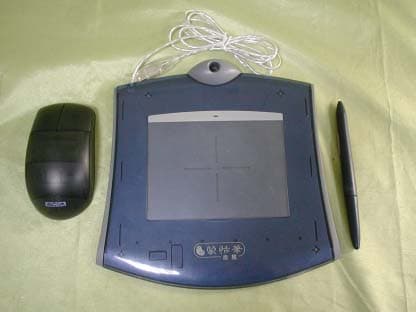
Click to zoom
Application Details
- Equipment Class
- DCD - Part 15 Low Power Transmitter Below 1705 kHz
- Date of Grant
- Jun 12, 2002
- Application Purpose
- Original Equipment
- Date of Application
- Jun 12, 2002
- Equipment Note
- Tablet
- Frequency Range
- 0.60000000 - 0.60000000
- Company
- Wacom Co Ltd
- Country
- Japan
Documents & Files
Document Text
Text extracted from the exhibit documents filed with the FCC. Open a document above to read the original.
Users Manual
1 LLC Tablet User's Guide TABLE OF CONTENTS PREFACE2 RADIO AND TELEVISION INTERFERENCE (U.S.A.)3 USB TABLET INSTALLATION FOR WINDOWS4 Tablet installation steps To view the Electronic Documentations: USB TABLET INSTALLATION FOR MACINTOSH6 Tablet installation steps To view the Electronic Documentations: iMac requirements USING THE LLC PEN AND CORDLESS MOUSE8 CUSTOMIZING YOUR LLC TOOLS — THE BASICS9 TROUBLE SHOOTING10 General Problems Windows and PC specific Problems Macintosh specific Problems PRODUCT SPECIFICATIONS15 APPENDICES16 Software License Warranty on Sales in Asia-Pacific area TABLE OF CONTENTS PRILIMINARY NOT FOR CIRCILATION --This document is created for the applica- tion of international standard certificates and compliances. 02.5.22, 10:13 AM1 2 PREFACE PREFACE Welcome to the Wacom LLC Tablet. This manual describes how to installLLC Tablet. Installation instruction is sepa- rately described according to the tablet's communication interface and your com- puter platform. Detailed information about how to use the tablet driver software is not included in this manual. Please refer to the Electronic documents in the driver software CD-ROM that came with your tablet. The followings are not included in this product. • Information about your specific computer hardware. • Information about your operating system. • Information about other Wacom tablets. • Information about application software. Please refer to your computer hardware, operating system, or software applica- tion manuals. Many graphics applications have built-in support for LLC Tablet features (such as pressure-sensitivity and eraser support). You can find a listing of applications that support these features at "www.wacom.com/productsupport/". Refer also to your application manuals for information on how best to use LLC Tablet features within specific applications. 02.5.22, 10:13 AM2 3 Radio and Television Interference (U.S.A.) The equipment described in this manual generates, uses, and can radiate radio- frequency energy. If it is not installed and used properly—that is, in strict accor- dance with Wacom instructions—it may cause interference with radio and televi- sion reception. Federal Communications Commission (FCC) Notice This equipment has been tested and found to comply with the limits for Class B digital devices, pursuant to Part 15 of FCC Rules. These limits are designed to provide reasonable protection against harmful interference in a residential instal- lation. This equipment generates, uses and can radiate radio frequency energy and, if not installed and used in accordance with the instructions, may cause harmful inter- ference to radio communications. However, there is no guarantee that interfer- ence will not occur in a particular installation. You can determine whether the LLC tablet is causing interference by powering it off. If the interference stops, it was probably caused by the Ithe LLC tablet. If your LLC tablet does cause interference to radio or television reception, you may be able to correct the interference by using one or more of the following measures: • Rotate the television or radio antenna until the interference stops. • Move the LLC tablet farther away from the television or radio. • Plug the Interactive Pen Display and computer into an outlet that is on a differ- ent circuit from the television or radio. If necessary, consult your Wacom dealer or an experienced radio/television tech- nician for help. Changes or modifications to this product not authorized by Wacom could void the FCC Certification and negate your authority to operate the product. 02.5.22, 10:13 AM3 4 USB TABLET INSTALLATIONI FOR WINDOWS Tablet installation steps 1 Plug LLC Tablet into an active USB port on your computer or an active USB hub. If your computer is off, turn it on now and allow the oprtating system to fully load. 2 LLC Tablet software installation steps For Windows 98: 1The N EW HARDWARE FOUND dialog box will display, followed by the A DD NEW HARDWARE Wizard. Click Next. If the dialog does not display, your computer may not be USB Ready. 2Follow the prompts, making sure to select the default options. Note: You may be prompted to insert the Windows 98 CD. Please have your Windows 98 CD available. If Windows 98 came bundled with your computer, the Windows 98 CAB files may be located on your hard disk or system recovery CD. When prompted, click OK. Enter the location for the Windows CAB files (e.g., d:\win98). Click OK, and then Finish. Reinsert the LLC Tablet CD if necessary. 3Insert the LLC Tablet CD into the CD-ROM drive. 4Double-click on the software S ETUP icon located on the LLC Tablet CD and follow the prompts. For Windows 2000: LLC Tablet will automatically register as a USB device and the LED will light. 1Insert the LLC Tablet CD into the CD-ROM drive. 2Double-click on the software S ETUP icon located on the LLC Tablet CD and follow the prompts. 3 After completing the LLC Tablet software installation, you should be able to use your LLC Tablet Pen on the tablet to move the screen cursor with absolute positioning. A WACOM TABLET group was created in the S TART menu under PROGRAMS (see Page 4). It contains the LLC Tablet control panel, U SER'S MANUAL, and a README file. If you had trouble with software installation, refer to the TROUBLE SHOOTING chapter, or R EADME file or English Electronic LLC Tablet Manual in the LLC Tablet CD. IMPORTANT: If your PC was not configured with a USB keyboard or USB mouse, it may not support USB devices while in Windows Safe Mode. In this USB TABLET INSTALLATIONI FOR WINSOWS 02.5.22, 10:13 AM4 5 case, LLC Tablet will not function in Safe Mode. To view the Electronic Docu- ments: To view the LLC Tablet Help that ex- plains how to use the LLC Tablet soft- ware, select LLC Tablet Help from the Help menu or Help button of the Wacom Tablet software. To view the English Electronic LLC Tablet User's Manual, sellect LLC TAB- LET USER'S MANUAL from the WACOM TABLET group. If you want…
Text truncated - open the document above for the full version.
Cover Letter(s)
From: Nancy [[email protected]] Sent: Wednesday, June 05, 2002 7:26 PM To: Mike Kuo Subject: Fw: Wacom Co., Ltd., FCC ID:HV4FT0405U, AN02T2037 Importance: High Dear Mike, IF the project has any further question, please let me know. Thanks for your advice! Nancy ----- Original Message ----- From: "Nancy" <[email protected]> To: "Mike Kuo" <[email protected]> Sent: Tuesday, June 04, 2002 10:08 AM Subject: Re: Wacom Co., Ltd., FCC ID:HV4FT0405U, AN02T2037 > Dear Mike, > > Cause the wrong message of FCC Grantee Code, so I modified the test report > and FCC ID label(please see attachment). > > Another hand, there is one frequency: 600kHz in the Tablet only. > > Please disregard the Mouse and Pen's FCC ID. > > Best regards, > > Nancy > > ----- Original Message ----- > From: "Mike Kuo" <[email protected]> > To: "'Nancy'" <[email protected]> > Sent: Thursday, May 30, 2002 11:16 AM > Subject: RE: Wacom Co., Ltd., FCC ID:H4VFT0405U, AN02T2037 > > > > Question #5: What is the highest frequency used or generated by Cordless > > Mouse and Pen ? Per your description, these two devices are unintentional > > radiator, they are not considered as PC peripheral. If the frequency used > > or generated is less than 1.705MHz, they are not considered as digital > > device as well. If these two devices are not digital device and not a PC > > peripheral devices, FCC ID number can not apply to these two products. > > > > Best Regards > > > > Mike Kuo > > > > -----Original Message----- > > From: Nancy [mailto:[email protected]] > > Sent: Wednesday, May 29, 2002 8:06 PM > > To: Mike Kuo > > Subject: Re: Wacom Co., Ltd., FCC ID:H4VFT0405U, AN02T2037 > > > > > > Dear Mike, > > > > Question #1 There three devices are shown on the photos. Proposed FCC ID > > label is located on the Tablet and Cordless Mouse. The transmitting > > frequency for the tablet in accordance with operational description is > > 600kHz. > > What is the transmitting frequency of Cordless Mouse ? Is the Pen an > > intentional radiator ? If yes, what is the transmitting frequency ? If > not, > > please provide detail technical description on how the pen is interactive > > with Tablet ? > > Answer #1: Both of the Cordless Mouse and Pen are unintentional radiator. > > The transmitting of Cordless Mouse and Pen is by > feeding > > electrical current of above-mentioned frequency > > through the coils in both X-axis and Y-axis. The > current > > fed through each coil is not more than 40mA. > > > > Question #2: As indicated from the setup photos, the cordless mouse was > > placed on the top of tablet during the tests. > > What is the function of cordless mouse ? Where / what is the receiving > > frequency and device ? > > Answer #2: The function of Cordless Mouse is by feeding electrical > current > > of above-mentioned frequency > > through the coils in both X-axis and Y-axis. And the > > Receiver is with the Tablet. > > > > Question #3: Will the cordless mouse only work with this tablet ? > > Answer #3: Yes, the Cordless Mouse only works with this tablet. > > > > Question #4: By pressing the button on the Pen and moving the pen on the > top > > of tablet , what is the communication path between Pen to Tablet ? > > Answer #4: The function of the Pen is by feeding electrical current of > > above-mentioned frequency > > through the coils in both X-axis and Y-axis. And the > > Receiver is with the Tablet. > > > > By the way, cause the Pen is more smaller than Tablet and Cordless Mouse I > > could not paste the whole FCC ID Label up on the Pen. So, I just provided > > the FCC ID of Tablet and Cordless Mouse. Should I provide the FCC ID Label > > for Pen?! > > How could I solve the size problem of the Pen? > > > > Thanks! > > > > Best regards, > > > > Nancy > > > > ----- Original Message ----- > > From: "Mike Kuo" <[email protected]> > > To: "Nancy (E-mail)" <[email protected]> > > Sent: Thursday, May 30, 2002 7:07 AM > > Subject: FW: Wacom Co., Ltd., FCC ID:H4VFT0405U, AN02T2037 > > > > > > > > > > > > > -----Original Message----- > > > From: CERTADM > > > Sent: Wednesday, May 29, 2002 4:06 PM > > > To: '[email protected]' > > > Subject: Wacom Co., Ltd., FCC ID:H4VFT0405U, AN02T2037 > > > > > > > > > Notice_content > > > ------------- > > > Question #1 There three devices are shown on the photos. Proposed FCC > ID > > > label is located on the Tablet and Cordless Mouse. The transmitting > > > frequency for the tablet in accordance with operational description is > > > 600kHz. What is the transmitting frequency of Cordless Mouse ? Is the > > > Pen > > > an intentional radiator ? If yes, what is the transmitting frequency ? > If > > > not, please provide detail technical description on how the pen is > > > interactive with Tablet ? > > > > > > Question #2: As indicated from the setup photos, the cordless mouse was > > > placed on the top of tablet during the tests. What is the function of > > > cordless mouse ? Where / what is the receiving frequency and device ? > > > > > > Question #3: Will the cordless mouse only work with this tablet ? > > > > > > Question #4: By pressing the button on the Pen and moving the pen on the > > top > > > of tablet , what is the communication path between Pen to Tablet ? > > > > > > Technical and administrative reviews will continue once the answers to > > above > > > questions are provided. > > > > > > Best Regards > > > > > > Mike Kuo / TCB Certifier > > > The items indicated above must be submitted before processing can > continue > > > on the above referenced application. Failure to provide the requested > > > information within 60 days of the original e-mail date may result in > > > application dismissal and forfeiture of the filing fee. Also, please > note > > > that partial responses increase processing time and should not be > > submitted. > > > Any questions about the content of this correspondence should be > directed > > to > > > the e-mail address listed below the name of the sender. >
External Photos
1 Front View of EUT ( Total Set ) Front View of EUT ( Tablet ) 2 Back View of EUT ( Tablet ) Front View of EUT ( Mouse ) 3 Back View of EUT ( Mouse ) Front View of EUT ( Pen )
ID Label/Location Info
FCC ID LABEL FORMAT AND LOCATION Applicant: WACOM CO., LTD. FCC ID: HV4FT0405U FCC ID: HV4FT0405U This device complies with part 15 of the FCC Rules. Operation is subject to the following two conditions: (1) This device may not cause harmful interference, and (2) this device must accept any interference received, including interference that may cause undesired operation. FCC ID LABEL AREA
Internal Photos
4 Internal Photo of EUT ( Tablet ) Internal Photo of EUT ( Tablet ) 5 Internal Photo of EUT ( Tablet ) Internal Photo of EUT ( Tablet ) 6 Internal Photo of EUT ( Tablet ) Internal Photo of EUT ( Mouse ) 7 Internal Photo of EUT ( Mouse ) Internal Photo of EUT ( Mouse ) 8 Internal Photo of EUT ( Pen ) Internal Photo of EUT ( Pen )
Operational Description
Explanation for internal behavior of FT-0405-U 2002/4/3 1. As instructed, we have performed the radiated emission measurements from this device for frequency below 30MHz. 2. The intentionally radiated frequency is 600kHz. All the other frequencies are unintentionally radiated. In order to understand better, we would like to provide further explanation in addition to the previously provided information. Please refer to the attached block diagram. A. Sensor coils As shown in the photograph and the circuit diagram, the sensor board has two groups of multiple loop coils in X (horizontal) and Y (vertical) directions. Radio frequency energy is radiated from these coils. Each coil is approximately 30mm wide and as long as the height, for X-axis, and width, for the Y-axis, of the effective area of the tablet as shown in the photograph. Each coil consists of 6 turns (loops) of copper conductor. B. Original oscillation frequency and intentional radiated frequency The intentional radiated frequency is created by dividing the original oscillation frequency of 6MHz in CPU. This signal is supplied to the sensor coils in a time-sharing manner. C. Operation The tablet looks for a pointing device, such as a stylus or a puck, by feeding electrical current of above-mentioned frequency through the coils in both X-axis and Y-axis. The current fed through each coil is not more than 40mA. The tablet is able to detect the position of a pointing device because of the induction caused between the coil of the pointing device and two coils, one from X-axis and the other from Y-axis, of the sensor board. The tablet is designed in such a way that not more than one coils, X-axis or Y-axis, is used at same time to detect the position of the pointing device. The signal is emitted for about 40usec up to about 1msec from one coil and the duration is controlled by the firmware on the sensor board. D. Comment on pointing device The device operates completely passively and has no battery or active oscillator.
Test Report
Report Number: 020424-ID Refer Numer:020487-D May 8, 2002 FCC ID: HV4FT0405U Page 1 of 33 Rev. 00 ELECTROMAGNETIC EMISSIONS COMPLIANCE REPORT INTENTIONAL RADIATOR CERTIFICATION TO FCC PART 15 SUBPART C REQUIREMENT of Tablet FCC ID : HV4FT0405U Trade Name : FT-0405-U Model Number : FT-0405-U Serial Number : N/A Report Number : 020424-ID Date : May 8, 2002 Prepared for WACOM CO., LTD. 2-510-1, Toyonodai, Otone-machi, Kitasaitama-gun, Saitama 349-1148, Japan Prepared by C&C LABORATORY CO., LTD. #B1, 1 st Fl., Universal Center, No. 183, Sec. 1, Tatung Rd., Hsi Chih, Taipei Hsien, Taiwan, R.O.C. TEL: (02) 86422071 FAX: (02) 86422256 This report shall not be reproduced, except in full, without the written approval of C&C Laboratory, Co., Ltd. Report Number: 020424-ID Refer Numer:020487-D May 8, 2002 FCC ID: HV4FT0405U Page 2 Rev. 00 Table of Content Page VERIFICATION OF COMPLIANCE................................................................................ 3 PRODUCT INFORMATION ............................................................................................. 4 SUPPORT EQUIPMENT ................................................................................................... 5 MEASUREMENT PROCEDURE ..................................................................................... 6 MEASUREMENT PROCEDURE – Sub. Part C ............................................................... 8 MEASUREMENT PROCEDURE – Sub. Part C ............................................................. 10 SUMMARY DATA ....................................................................................................... 12 TEST FACILITY .............................................................................................................. 21 TEST EQUIPMENT LIST................................................................................................ 22 BLOCK DIAGRAM OF TEST SETUP ........................................................................... 23 APPENDIX 1 .................................................................................................................... 24 PHOTOGRAPHS...................................................................................................... 24 (TEST SETUP OF LINE CONDUCTED EMISSION TEST) ................................. 24 APPENDIX 2 .................................................................................................................... 26 PHOTOGRAPHS...................................................................................................... 26 (TEST SETUP OF RADIATED EMISSION TEST) ............................................... 26 APPENDIX 3 .................................................................................................................... 28 PHOTOGRAPHS OF EUT....................................................................................... 28 APPENDIX 4 .................................................................................................................... 29 User Manual .............................................................................................................. 29 APPENDIX 5 .................................................................................................................... 30 Schematics ................................................................................................................ 30 APPENDIX 6 .................................................................................................................... 31 Block Diagram .......................................................................................................... 31 APPENDIX 7 .................................................................................................................... 32 Operational Description ............................................................................................ 32 APPENDIX 8 .................................................................................................................... 33 Proposed FCC ID Label Format ............................................................................... 33 Report Number: 020424-ID Refer Numer:020487-D May 8, 2002 FCC ID: HV4FT0405U Page 3 Rev. 00 VERIFICATION OF COMPLIANCE Equipment Under Test: Tablet Trade Name: FT-0405-U Model Number: FT-0405-U Serial Number: N/A Applicant: WACOM CO., LTD. 2-510-1, Toyonodai, Otone-machi, Kitasaitama-gun, Saitama 349-1148, Japan Manufacturer: Saitek Electronics (Shenzhen) Ltd. 139 Da Bao Rd., District 33 Bao An, Shenzhen, PRC Type of Test: FCC Rules and Regulations Part 15 Subpart C (2000) Measurement Procedure: ANSI C63.4: 1992 File Number: 020424-D Date of test: April 16 ~ May 6, 2002 Deviation: None Condition of Test Sample: Normal The above equipment was tested by C&C Laboratory, Co., Ltd. for compliance with the requirements set forth in the FCC Rules and Regulations Part 15 Subpart C and the measurement procedure according to ANSI C63.4. This said equipment in the configuration described in this report shows the maximum emission levels emanating from equipment are within the compliance requirements. The test results of this report relate only to the tested sample identified in this report. Steven Wang / RF Dept. Manager Report Number: 020424-ID Refer Numer:020487-D May 8, 2002 FCC ID: HV4FT0405U Page 4 Rev. 00 PRODUCT INFORMATION Housing Type: Plastic EUT Power Rating: DCV from USB Cable of Host PC AC power during Test: 120VAC/60Hz to Power Supply of Host PC AC Power Cord Type: Unshielded, 1.8m (Detachable) to Host PC OSC/Clock Frequencies: 600kHz USB Cable Type: Shielded, 1.5m (Non-detachable) FCC ID: HV4FT0405U I/O Port of EUT: I/O Port Type Q’TY Tested with 1). USB Port 1 1 Report Number: 020424-ID Refer Numer:020487-D May 8, 2002 FCC ID: HV4FT0405U Page 5 Rev. 00 SUPPORT EQUIPMENT No. Equipment Model # Serial # FCC ID Trade Name Data Cable Power Cord 1. PC EVO D3006K1BKF83F0FV FCC DoC Compaq N/A Unshielded, 1.8…
Text truncated - open the document above for the full version.
Test Setup Photos
Report Number: 020424-ID Refer Numer:020487-D May 8, 2002 FCC ID: HV4FT0405U Page 24 Rev. 00 APPENDIX 1 PHOTOGRAPHS (TEST SETUP OF LINE CONDUCTED EMISSION TEST) Report Number: 020424-ID Refer Numer:020487-D May 8, 2002 FCC ID: HV4FT0405U Page 25 Rev. 00 LINE CONDUCTED EMISSION TEST Front View Back View Report Number: 020424-ID Refer Numer:020487-D May 8, 2002 FCC ID: HV4FT0405U Page 26 Rev. 00 APPENDIX 2 PHOTOGRAPHS (TEST SETUP OF RADIATED EMISSION TEST) Report Number: 020424-ID Refer Numer:020487-D May 8, 2002 FCC ID: HV4FT0405U Page 27 Rev. 00 RADIATED EMISSION TEST Front View Back View
Contact Information
Applicant
Koichi Yokoyama(Senior Director, Quality Assurance)
Test Firm
Compliance Certification Services Inc.Kurt Chen
Technical Specifications
| # | Rule Parts | Frequency Range | Power Output |
|---|---|---|---|
| 1 | 15C | 0.6 MHz - 0.6 MHz | - |
Other Applications from Wacom Co Ltd
HV4CTK6120
Aug 19, 2026Pen Tablet
Equipment Class
DCD - Part 15 Low Power Transmitter Below 1705 kHzHV4STU540A
May 12, 2026LCD SIGNATURE PAD
Equipment Class
DCD - Part 15 Low Power Transmitter Below 1705 kHzHV4DTHA140
Sep 16, 2025Portable Pad
Equipment Class
DTS - Digital Transmission SystemHV4PTK470
Oct 10, 2024Creative Pen Tablet
Equipment Class
DTS - Digital Transmission SystemHV4PTK870
Oct 10, 2024Creative Pen Tablet
Equipment Class
DCD - Part 15 Low Power Transmitter Below 1705 kHz