I88AMG1202T10AWireless N-Lite ADSL2+ 4-port Gateway
ZyXEL Communications Corporation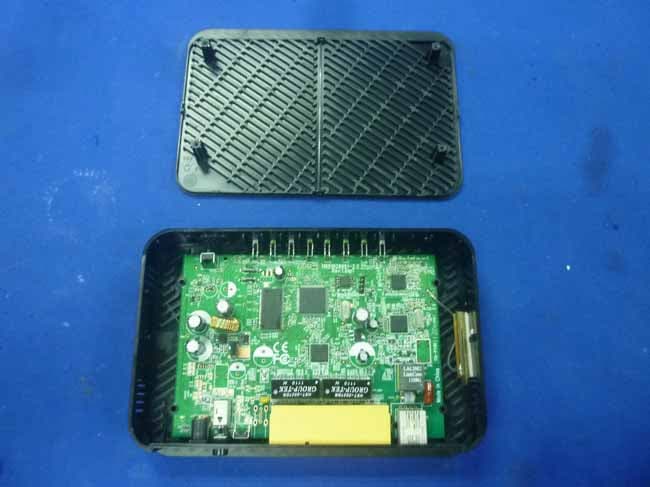
Click to zoom
Application Details
- Equipment Class
- DTS - Digital Transmission System
- Date of Grant
- Dec 26, 2011
- Application Purpose
- Original Equipment
- Date of Application
- Dec 26, 2011
- Equipment Note
- Wireless N-Lite ADSL2+ 4-port Gateway
- Frequency Range
- 2422.00000000 - 2452.00000000
- Country
- Taiwan
Documents & Files
Document Text
Text extracted from the exhibit documents filed with the FCC. Open a document above to read the original.
Users Manual
www.zyxel.com www.zyxel.com AMG1202-T10A Wireless N-lite ADSL2+ 4-port Ethernet Gateway Copyright © 2011 ZyXEL Communications Corporation Firmware Version 1.00 Edition 1, 6/2011 Default Login Details IP Addresshttp://192.168.1.1 Password1234 About This User's Guide AMG1202-T10A User’s Guide 3 About This User's Guide Intended Audience This manual is intended for people who want to configure the ZyXEL Device using the web configurator. You should have at least a basic knowledge of TCP/IP networking concepts and topology. Related Documentation •Quick Start Guide The Quick Start Guide is designed to help you get up and running right away. It contains information on setting up your network and configuring for Internet access. •Support Disc Refer to the included CD for support documents. •ZyXEL Web Site Please refer to www.zyxel.com for additional support documentation and product certifications. Documentation Feedback Send your comments, questions or suggestions to: [email protected] Thank you! The Technical Writing Team, ZyXEL Communications Corp. Need More Help? More help is available at www.zyxel.com. • Download Library Search for the latest product updates and documentation from this link. Read the Tech Doc Overview to find out how to efficiently use the User Guide, Quick Start Guide and Command Line Interface Reference Guide in order to better understand how to use your product. About This User's Guide AMG1202-T10A User’s Guide 4 •Knowledge Base If you have a specific question about your product, the answer may be here. This is a collection of answers to previously asked questions about ZyXEL products. •Forum This contains discussions on ZyXEL products. Learn from others who use ZyXEL products and share your experiences as well. Customer Support In the event of problems that cannot be solved by using this manual, you should contact your vendor. If you cannot contact your vendor, then contact a ZyXEL office for the region in which you bought the device. See http://www.zyxel.com/web/contact_us.php for contact information. Please have the following information ready when you contact an office. • Product model and serial number. • Warranty Information. • Date that you received your device. • Brief description of the problem and the steps you took to solve it. Disclaimer Graphics in this book may differ slightly from the product due to differences in operating systems, operating system versions, or if you installed updated firmware/software for your device. Every effort has been made to ensure that the information in this manual is accurate. Document Conventions AMG1202-T10A User’s Guide 5 Document Conventions Warnings and Notes These are how warnings and notes are shown in this User’s Guide. Warnings tell you about things that could harm you or your device. Note: Notes tell you other important information (for example, other things you may need to configure or helpful tips) or recommendations. Syntax Conventions • The AMG1202-T10A may be referred to as the “ZyXEL Device”, the “device”, the “system” or the “product” in this User’s Guide. • Product labels, screen names, field labels and field choices are all in bold font. • A key stroke is denoted by square brackets and uppercase text, for example, [ENTER] means the “enter” or “return” key on your keyboard. • “Enter” means for you to type one or more characters and then press the [ENTER] key. “Select” or “choose” means for you to use one of the predefined choices. • A right angle bracket ( > ) within a screen name denotes a mouse click. For example, Maintenance > Log > Log Setting means you first click Maintenance in the navigation panel, then the Log sub menu and finally the Log Setting tab to get to that screen. • Units of measurement may denote the “metric” value or the “scientific” value. For example, “k” for kilo may denote “1000” or “1024”, “M” for mega may denote “1000000” or “1048576” and so on. • “e.g.,” is a shorthand for “for instance”, and “i.e.,” means “that is” or “in other words”. Icons Used in Figures Figures in this User’s Guide may use the following generic icons. The ZyXEL Device icon is not an exact representation of your device. ZyXEL DeviceComputerNotebook computer Document Conventions AMG1202-T10A User’s Guide 6 ServerFirewallTe le p ho ne RouterSwitch Safety Warnings AMG1202-T10A User’s Guide 7 Safety Warnings • Do NOT use this product near water, for example, in a wet basement or near a swimming pool. • Do NOT expose your device to dampness, dust or corrosive liquids. • Do NOT store things on the device. • Do NOT install, use, or service this device during a thunderstorm. There is a remote risk of electric shock from lightning. • Connect ONLY suitable accessories to the device. • Do NOT open the device or unit. Opening or removing covers can expose you to dangerous high voltage points or other risks. ONLY qualified service personnel should service or disassemble this device. Please contact your vendor for further information. • Make sure to connect the cables to the correct ports. • Place connecting cables carefully so that no one will step on them or stumble over them. • Always disconnect all cables from this device before servicing or disassembling. • Use ONLY an appropriate power adaptor or cord for your device. • Connect the power adaptor or cord to the right supply voltage (for example, 110V AC in North America or 230V AC in Europe). • Do NOT allow anything to rest on the power adaptor or cord and do NOT place the product where anyone can walk on the power adaptor or cord. • Do NOT use the device if the power adaptor or cord is damaged as it might cause electrocution. • If the power adaptor or cord is damaged, remove it from the device and the power source. • Do NOT attempt to repair the power adaptor or cord. Contact your local vendor to order a new one. • Do not use the device outside, and make sure all the connections are indoors. There is a remote risk of electric shock from lightning. • Do NOT obstruct…
Text truncated - open the document above for the full version.
Users Manual
Chapter 18 System Settings AMG1202-T10A User’s Guide 191 ManualSelect this radio button to enter the time and date manually. If you configure a new time and date, Time Zone and Daylight Saving at the same time, the new time and date you entered has priority and the Time Zone and Daylight Saving settings do not affect it. New Time (hh:mm:ss) This field displays the last updated time from the time server or the last time configured manually. When you set Time and Date Setup to Manual, enter the new time in this field and then click Apply. New Date (yyyy/mm/dd) This field displays the last updated date from the time server or the last date configured manually. When you set Time and Date Setup to Manual, enter the new date in this field and then click Apply. Get from Time Server Select this radio button to have the ZyXEL Device get the time and date from the time server you specified below. Time Server Address Enter the IP address or URL (up to 20 extended ASCII characters in length) of your time server. Check with your ISP/network administrator if you are unsure of this information. Time Zone Setup Time ZoneChoose the time zone of your location. This will set the time difference between your time zone and Greenwich Mean Time (GMT). Daylight SavingsDaylight saving is a period from late spring to early fall when many countries set their clocks ahead of normal local time by one hour to give more daytime light in the evening. Select this option if you use Daylight Saving Time. Start DateConfigure the day and time when Daylight Saving Time starts if you selected Enable Daylight Saving. The o'clock field uses the 24 hour format. Here are a couple of examples: Daylight Saving Time starts in most parts of the United States on the second Sunday of March. Each time zone in the United States starts using Daylight Saving Time at 2 A.M. local time. So in the United States you would select Second, Sunday, March and type 2 in the o'clock field. Daylight Saving Time starts in the European Union on the last Sunday of March. All of the time zones in the European Union start using Daylight Saving Time at the same moment (1 A.M. GMT or UTC). So in the European Union you would select Last, Sunday, March. The time you type in the o'clock field depends on your time zone. In Germany for instance, you would type 2 because Germany's time zone is one hour ahead of GMT or UTC (GMT+1). End DateConfigure the day and time when Daylight Saving Time ends if you selected Enable Daylight Saving. The o'clock field uses the 24 hour format. Here are a couple of examples: Daylight Saving Time ends in the United States on the first Sunday of November. Each time zone in the United States stops using Daylight Saving Time at 2 A.M. local time. So in the United States you would select First, Sunday, November and type 2 in the o'clock field. Daylight Saving Time ends in the European Union on the last Sunday of October. All of the time zones in the European Union stop using Daylight Saving Time at the same moment (1 A.M. GMT or UTC). So in the European Union you would select Last, Sunday, October. The time you type in the o'clock field depends on your time zone. In Germany for instance, you would type 2 because Germany's time zone is one hour ahead of GMT or UTC (GMT+1). Table 71 Maintenance > System > Time and Date (continued) LABELDESCRIPTION Chapter 18 System Settings AMG1202-T10A User’s Guide 192 ApplyClick this to save your changes. CancelClick this to restore your previously saved settings. Table 71 Maintenance > System > Time and Date (continued) LABELDESCRIPTION AMG1202-T10A User’s Guide193 CHAPTER 19 Logs 19.1 Overview This chapter contains information about viewing the ZyXEL Device’s logs. The web configurator allows you to choose which types of events and/or alerts to have the ZyXEL Device log and then display the logs. 19.1.1 What You Need To Know About Logs Alerts An alert is a message that is enabled as soon as the event occurs. They include system errors, attacks (access control) and attempted access to blocked web sites. Some categories such as System Errors consist of both logs and alerts. You may differentiate them by their color in the View Log screen. Alerts display in red and logs display in black. Logs A log is a message about an event that occurred on your ZyXEL Device. For example, when someone logs in to the ZyXEL Device, you can set a schedule for how often logs should be enabled, or sent to a syslog server. 19.2 The System Log Screen Use the System Log screen to configure and view the logs you wish to display. To change your ZyXEL Device’s log settings, click Maintenance > Logs > Log Settings. The screen appears as shown. Chapter 19 Logs AMG1202-T10A User’s Guide 194 Alerts are e-mailed as soon as they happen. Logs may be e-mailed as soon as the log is full. Selecting many alert and/or log categories (especially Access Control) may result in many e-mails being sent. Figure 99 Maintenance > System Logs The following table describes the fields in this screen. 19.3 Log Descriptions This section provides descriptions of example log messages. Table 72 Maintenance > Logs > Log Settings LABELDESCRIPTION System Log Log TypeSelect the types of logs that you want to display and record. Then click Submit to display the details. Clear LogClick this to delete all the logs. Save LogClick this to save the logs in a text file. Table 73 System Maintenance Logs LOG MESSAGEDESCRIPTION Time calibration is successful The router has adjusted its time based on information from the time server. Time calibration failed The router failed to get information from the time server. WAN interface gets IP: %s A WAN interface got a new IP address from the DHCP, PPPoE, or dial-up server. Chapter 19 Logs AMG1202-T10A User’s Guide 195 DHCP client IP expired A DHCP client's IP address has expired. DHCP server assigns %s The DHCP server assigned an IP address to a client. Successful WEB login Someone has logged on to the router's web configurator…
Text truncated - open the document above for the full version.
Cover Letter(s)
AGENCY AUTHORIZATION LETTER FCC ID:I88AMG1202T10A Date: Dec.9,2011 To whom it may concern: We, the undersigned, hereby authorize Audix Technology (Shenzhen) Co., Ltd (No. 6, Ke Feng Rd., 52 Block, Shenzhen Science & Industrial Park,Nantou,Shenzhen, Guangdong, China) to act on our behalf, as our agent, in the following matters related to the FCC approval of our products: report submittal, related correspondence, the signing of all documents relating to these matters, and any other lawful activity necessary to obtain such certification. Any act carried out by Audix within the scope of this authorization shall have the same effects as our own. This authorization shall expire 6 months form original date. If you have any Questions regarding the authorization, please don’t hesitate to contact us. Thank you. Sincerely, Name of authorized signer: Thomas Wei Title of authorized signer: Senior Manager Company Name: ZyXEL Communications Corporation Tel: +886-3-578-3942 Fax: +886-3-578-2439 E-mail: [email protected]
Cover Letter(s)
Date:Dec.9,2011 Federal Communications Commission Authorization and Evaluation Division FCC ID: I88AMG1202T10A Confidentiality Request Pursuant to Sections 0.457 and 0.459 of the Commission’s Rules, the Applicant hereby requests confidential treatment of information accompanying this application as outlined below: 1. Block diagram 2. Schematics 3. Operation Description The above materials contain trade secrets and proprietary information not customarily released to the public. The public disclosure of these matters might to harmful to the applicant and provide unjustified benefits to its competitors. The applicant understands that pursuant to Rule 0.457, disclosure of this application and all accompanying documentation will not be made before the date of the grant for this application. Sincerely, Name of authorized signer: Thomas Wei Title of authorized signer: Senior Manager Company Name: ZyXEL Communications Corporation Tel: +886-3-578-3942 Fax: +886-3-578-2439 E-mail: [email protected]
Cover Letter(s)
Attestation for FCC Declaration of Conformity FCC ID: I88AMG1202T10A Date:Dec.9, 2011 Please be notified that we, the undersigned, ZyXEL Communications Corporation declare that the product bears the above FCC ID is also complying with the requirements of FCC DoC. The test report number for FCC DoC is EM-F1000984, with is issued by an accredited lab, Audix Technology Corporation, EMC Department located at No. 53-11, Tin-Fu Tsun, Lin-Kou , Taipei Hsien , Taiwan. Which has been accredited in accordance to all of the requirements of 47CFR 2.948(d) and (e) of the FCC rules and KDB349827. Sincerely, Name of authorized signer: Thomas Wei Title of authorized signer: Senior Manager Company Name: ZyXEL Communications Corporation Tel: +886-3-578-3942 Fax: +886-3-578-2439 E-mail: [email protected]
External Photos
R AUDIX Technology (Shenzhen) Co., Ltd. FCC ID:I88AMG1202T10A page Audix Technology (Shenzhen) Co., Ltd. Report No. ACS-F11240 14-1 14. PHOTOS OF THE EUT Figure 1 General Appearance of the EUT Figure 2 General Appearance of the EUT R AUDIX Technology (Shenzhen) Co., Ltd. FCC ID:I88AMG1202T10A page Audix Technology (Shenzhen) Co., Ltd. Report No. ACS-F11240 14-2 Figure 3 General Appearance of the EUT Figure 4 Inside of the EUT
ID Label/Location Info
12 E D C B A 12 3456789 E D C 345678 B A 9 料号: 35*16 This device complies with part 15 of the FCC Rules. Operation is subject to the following two conditions:(1) This device may not cause harmful interference, and (2) this device must accept any interference received, including interference that may cause undesired operation. 5 8 FCC ID: I88AMG1202T10A 0.85A 9V R AUDIX Technology (Shenzhen) Co., Ltd. FCC ID:188AMG1202T10A page Audix Technology (Shenzhen) Co., Ltd. Report No. ACS-F11240 14-1 14. PHOTOS OF THE EUT Figure 1 General Appearance of the EUT Figure 2 General Appearance of the EUT
Internal Photos
R AUDIX Technology (Shenzhen) Co., Ltd. FCC ID:I88AMG1202T10A page Audix Technology (Shenzhen) Co., Ltd. Report No. ACS-F11240 14-3 Figure 5 Inside of the EUT Figure 6 Inside of the EUT R AUDIX Technology (Shenzhen) Co., Ltd. FCC ID:I88AMG1202T10A page Audix Technology (Shenzhen) Co., Ltd. Report No. ACS-F11240 14-4 Figure 7 Inside of the EUT Figure 8 Components Side of the PCB R AUDIX Technology (Shenzhen) Co., Ltd. FCC ID:I88AMG1202T10A page Audix Technology (Shenzhen) Co., Ltd. Report No. ACS-F11240 14-5 Figure 9 Components Side of the PCB Figure 10 Power Adapter #1 R AUDIX Technology (Shenzhen) Co., Ltd. FCC ID:I88AMG1202T10A page Audix Technology (Shenzhen) Co., Ltd. Report No. ACS-F11240 14-6 Figure 11 Power Adapter #1 Figure 12 Power Adapter #2
RF Exposure Info
R AUDIX Technology (Shenzhen) Co., Ltd. FCC ID:I88AMG1202T10A page Audix Technology (Shenzhen) Co., Ltd. Report No. ACS-F11240 11-1 11. MPE ESTIMATION 11.1.Limit for General Population/ Uncontrolled Exposures Frequency Power density (mW/ cm 2 ) Averaging time(minutes) 300MHz----1.5GHz F/1500 30 1.5GHz---100GHz 1.0 30 Frequency(MHz) Power density (mW/ cm 2 ) Averaging time(minutes) 2412 1 30 2437 1 30 2462 1 30 Note: F= Frequency in MHz 11.2. Estimation Result EUT: Wireless N-Lite ADSL2+ 4-port Gateway M/N:AMG1202-T10A Test date: 2011-10-09 Pressure: 101.2 kpa Humidity: 52.8% Tested by: Leo-Li Test site: RF Site Temperature:25°C Cable loss: 1 dB Attenuator loss: 20 dB Antenna Gain 4.5 dBi Test Mode CH Frequency (MHz) Peak Output Power (dBm) Output Power (mW) Antenna Gain (dBi) Antenna Gain (Linear) MPE CH1 2412 10.08 10.19 4.5 2.82 0.0057 CH6 2437 9.94 9.86 4.5 2.82 0.0055 11b CH11 2462 10.64 11.59 4.5 2.82 0.0065 CH1 2412 19.78 95.06 4.5 2.82 0.0533 CH6 2437 22.26 168.27 4.5 2.82 0.0944 11g CH11 2462 22.87 193.64 4.5 2.82 0.1086 CH1 2412 21.59 144.21 4.5 2.82 0.0809 CH6 2437 22.66 184.50 4.5 2.82 0.1035 11n HT20 CH11 2462 22.05 160.32 4.5 2.82 0.0899 CH1 2422 19.68 92.90 4.5 2.82 0.0521 CH4 2437 21.84 152.76 4.5 2.82 0.0857 11n HT40 CH7 2452 20.03 100.69 4.5 2.82 0.0565 Note: The estimation distance is 20cm
Test Report
R AUDIX Technology (Shenzhen) Co., Ltd. FCC ID:I88AMG1202T10A Audix Technology (Shenzhen) Co., Ltd. Report No. ACS-F11240 FCC PART 15C TEST REPORT FOR CERTIFICATION On Behalf of ZyXEL Communications Corporation Wireless N-Lite ADSL2+ 4-port Gateway Model No.: AMG1202-T10A; P660HN Lite EE; P-660HN-T1S FCC ID: I88AMG1202T10A Prepared for : ZyXEL Communications Corporation No.6, Innovation RD II, Science-Based Industrial Park, Hsin-Chu, Taiwan R.O.C Prepared By : Audix Technology (Shenzhen) Co., Ltd. No. 6, Ke Feng Rd., 52 Block, Shenzhen Science & Industrial Park, Nantou, Shenzhen, Guangdong, China Tel: (0755) 26639496 Report Number : ACS-F11240 Date of Test : Sep.23~Oct.27, 2011 Date of Report : Nov.01, 2011 R AUDIX Technology (Shenzhen) Co., Ltd. FCC ID:I88AMG1202T10A Audix Technology (Shenzhen) Co., Ltd. Report No. ACS-F11240 TABLE OF CONTENTS Description Page 1. SUMMARY OF STANDARDS AND RESULTS ......................................................... 1-1 1.1. Description of Standards and Results ................................................................................... 1-1 2. GENERAL INFORMATION ......................................................................................... 2-1 2.1. Description of Device (EUT) ............................................................................................... 2-1 2.2. Test Information ................................................................................................................... 2-2 2.3. Tested Supporting System Details ....................................................................................... 2-3 2.4. Block Diagram of Test Setup ............................................................................................... 2-3 2.5. Test Facility .......................................................................................................................... 2-4 2.6. Measurement Uncertainty (95% confidence levels, k=2) .................................................... 2-4 3. POWER LINE CONDUCTED EMISSION TEST ...................................................... 3-1 3.1. Test Equipments ................................................................................................................... 3-1 3.2. Block Diagram of Test Setup ............................................................................................... 3-1 3.3. Power Line Conducted Emission Test Limits ...................................................................... 3-1 3.4. Configuration of EUT on Test ............................................................................................. 3-2 3.5. Operating Condition of EUT ................................................................................................ 3-2 3.6. Test Procedure ...................................................................................................................... 3-2 3.7. Power Line Conducted Emission Test Results ..................................................................... 3-2 4. RADIATED EMISSION TEST ...................................................................................... 4-1 4.1. Test Equipment .................................................................................................................... 4-1 4.2. Block Diagram of Test Setup ............................................................................................... 4-1 4.3. Radiated Emission Limit ...................................................................................................... 4-2 4.4. EUT Configuration on Test .................................................................................................. 4-3 4.5. Operating Condition of EUT ................................................................................................ 4-3 4.6. Test Procedure ...................................................................................................................... 4-3 4.7. Radiated Emission Test Results ........................................................................................... 4-4 5. CONDUCTED SPURIOUS EMISSIONS ..................................................................... 5-1 5.1. Test Equipment .................................................................................................................... 5-1 5.2. Limit ..................................................................................................................................... 5-1 5.3. Test Procedure ...................................................................................................................... 5-1 5.4. Test result ............................................................................................................................. 5-1 6. BAND EDGE COMPLIANCE TEST ............................................................................ 6-1 6.1. Test Equipment .................................................................................................................... 6-1 6.2. Limit ..................................................................................................................................... 6-1 6.3. Test Produce ......................................................................................................................... 6-1 6.4. Test Results .......................................................................................................................... 6-1 7. 6dB Bandwidth Test ........................................................................................................ 7-1 7.1. Test Equipment .................................................................................................................... 7-1 7.2. Limit ..................................................................................................................................... 7-1 7.3. Test Procedure ..........................................................................…
Text truncated - open the document above for the full version.
Test Setup Photos
R AUDIX Technology (Shenzhen) Co., Ltd. FCC ID:I88AMG1202T10A page Audix Technology (Shenzhen) Co., Ltd. Report No. ACS-F11240 13-1 13. PHOTOGRAPH OF TEST 13.1.Photos of Power Line Conducted Emission Test R AUDIX Technology (Shenzhen) Co., Ltd. FCC ID:I88AMG1202T10A page Audix Technology (Shenzhen) Co., Ltd. Report No. ACS-F11240 13-2 13.2.Photos of Radiated Emission Test R AUDIX Technology (Shenzhen) Co., Ltd. FCC ID:I88AMG1202T10A page Audix Technology (Shenzhen) Co., Ltd. Report No. ACS-F11240 13-3 (Above 1000MHz)
Contact Information
Applicant
Emma Bao(Section Manager)
Technical Contact
AUDIX Technology (Shenzhen) Co., Ltd.
[email protected]86-755-26639497
52 Block Shenzhen Science&Industry · Shenzhen · China
Non-Technical Contact
AUDIX Technology (Shenzhen) Co., Ltd.
[email protected]86-755-26639497
Test Firm
Audix Technology (Shenzhen) Co.Smart Tsai
Technical Specifications
| # | Rule Parts | Frequency Range | Power Output |
|---|---|---|---|
| 2 | 15C | 2.42 GHz - 2.45 GHz | 153.00 mW |
Other Applications from ZyXEL Communications Corporation
I88EE6601-00
Jul 18, 2024Tri-Band Wireless BE19000 10G Ethernet VoIP Gateway with SFP+ / Tri-Band Wireless BE19000 10G Ethernet VoIP Gateway / Tri-Band Wireless BE19000 10G Ethernet Gateway with SFP+ / Tri-Band Wireless BE19000 10G Ethernet Gateway
Equipment Class
6ID - 15E 6 GHz Low Power Indoor Access Point
I8803935
Oct 17, 2023802.11be (WiFi 7) Triple-Radio Unified Pro Access Point
Equipment Class
DTS - Digital Transmission System
I8803973
Aug 01, 2023802.11ax (WiFi 6) Dual-Radio Wall-Plate Unified Access Point
Equipment Class
NII - Unlicensed National Information Infrastructure TX
I88WX5610-B0
Apr 25, 2023AX7800 WiFi 6E Tri-Band Gigabit Wireless Extender
Equipment Class
DTS - Digital Transmission System
I88EX7710-B0
Apr 16, 2023AX11000 WiFi 6E 10G Ethernet Gateway
Equipment Class
NII - Unlicensed National Information Infrastructure TX