I88IPC2605NIP Camera
ZyXEL Communications Corporation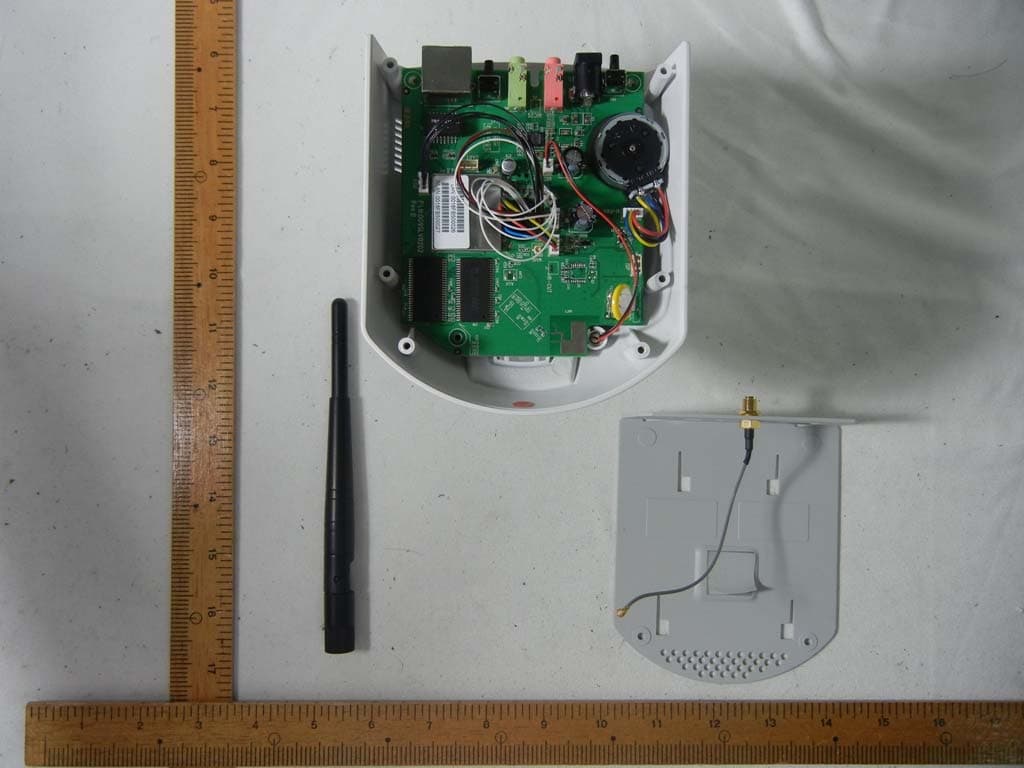
Click to zoom
Application Details
- Equipment Class
- DTS - Digital Transmission System
- Date of Grant
- Jul 18, 2012
- Application Purpose
- Original Equipment
- Date of Application
- Jul 09, 2012
- Equipment Note
- IP Camera
- Frequency Range
- 2422.00000000 - 2462.00000000
- Country
- Taiwan
Documents & Files
Document Text
Text extracted from the exhibit documents filed with the FCC. Open a document above to read the original.
Users Manual
IPC-2605N The First Consumer-Friendly Network Camera Edition 0.1, 6/2012 www.zyxel.com Copyright © 2012 ZyXEL Communications Corporation 1 Contents 2 Getting to know your IPC-2605N ............................................................................... 6 2.1 Package Contents ............................................................................................ 6 2.2 Features ........................................................................................................... 7 2.3 Camera Layout ................................................................................................ 8 2.4 LED Status Indicator....................................................................................... 9 3 Installation................................................................................................................. 10 3.1 Connecting Your IPC-2605N ....................................................................... 10 3.2 Wireless......................................................................................................... 11 3.3 Wall and Ceiling Mounting .......................................................................... 12 4 Initial Setup ............................................................................................................... 13 5 Accessing your camera ............................................................................................. 14 5.1 CloudEnabled™ Viewing ............................................................................. 15 5.2 Direct Viewing of your Camera (For Advanced Users) ............................... 17 6 Configuration ............................................................................................................ 23 6.1 Video Settings ............................................................................................... 23 6.2 Camera Settings ............................................................................................ 24 6.3 Audio Settings ............................................................................................... 26 6.4 User Settings ................................................................................................. 26 6.5 Network Settings ........................................................................................... 27 6.6 PTZ Control .................................................................................................. 33 6.7 Event Setup ................................................................................................... 36 6.8 Recording Setup ............................................................................................ 42 6.9 Recording History ......................................................................................... 43 6.10 Date ............................................................................................................... 43 7 Event Viewer ............................................................................................................ 44 8 Maintenance .............................................................................................................. 45 8.1 Information ................................................................................................... 45 8.2 Log ................................................................................................................ 45 8.3 Maintenance .................................................................................................. 45 9 Troubleshooting ........................................................................................................ 48 9.1 Reconfiguring Your Device .......................................................................... 48 9.2 Cabling Check ............................................................................................... 48 9.3 Resetting to Factory Defaults........................................................................ 49 9.4 Trouble with Active X .................................................................................. 50 9.5 Trouble with Remote Viewing on Browser .................................................. 52 9.6 Symptoms, Causes, and Solutions ................................................................ 54 10 Technical Specifications ....................................................................................... 59 11 Open-Sourced Components .................................................................................. 61 Important Notices Regulatory Notice This device complies with Part 15 of the FCC Rules. Operation is subject to the following two conditions: (1) This device may not cause harmful interference, and (2) This device must accept any interference received, including interference that may cause undesired operation. FCC Interference Statement This equipment has been tested and found to comply with the limits for a Class B digital device, pursuant to Part 15 of the FCC Rules. These limits are designed to provide reasonable protection against harmful interference in a residential installation. This equipment generates, uses, and can radiate radio frequency energy and, if not installed and used in accordance with the instructions, may cause harmful interference to radio communications. However, there is no guarantee that interference will not occur in a particular installation. If this equipment does cause harmful interference to radio or television reception, which can be determined by turning the equipment off and on, the user is encouraged to try to correct the interference by one of the following measures: Reorient or relocate the receiving antenna Increase the separation between the equipment and the receiver Connect the equipment to an outlet on a different circuit than the receiver is connected. Consult the dealer or an experienced TV/radio technician for help. To assure continued compliance, an…
Text truncated - open the document above for the full version.
External Photos
CERPASS TECHNOLOGY CORP. Report No.: TEFI1205203 Cerpass Technology Corp. Issued Date : Jul. 04, 2012 Tel:886-2-2655-8100 Fax:886-2-2655-8200 Page No. : A1 of A8 Appendix A. Photographs of EUT CERPASS TECHNOLOGY CORP. Report No.: TEFI1205203 Cerpass Technology Corp. Issued Date : Jul. 04, 2012 Tel:886-2-2655-8100 Fax:886-2-2655-8200 Page No. : A2 of A8
ID Label/Location Info
Label & Location
Internal Photos
CERPASS TECHNOLOGY CORP. Report No.: TEFI1205203 Cerpass Technology Corp. Issued Date : Jul. 04, 2012 Tel:886-2-2655-8100 Fax:886-2-2655-8200 Page No. : A3 of A8 CERPASS TECHNOLOGY CORP. Report No.: TEFI1205203 Cerpass Technology Corp. Issued Date : Jul. 04, 2012 Tel:886-2-2655-8100 Fax:886-2-2655-8200 Page No. : A4 of A8 CERPASS TECHNOLOGY CORP. Report No.: TEFI1205203 Cerpass Technology Corp. Issued Date : Jul. 04, 2012 Tel:886-2-2655-8100 Fax:886-2-2655-8200 Page No. : A5 of A8 CERPASS TECHNOLOGY CORP. Report No.: TEFI1205203 Cerpass Technology Corp. Issued Date : Jul. 04, 2012 Tel:886-2-2655-8100 Fax:886-2-2655-8200 Page No. : A6 of A8 CERPASS TECHNOLOGY CORP. Report No.: TEFI1205203 Cerpass Technology Corp. Issued Date : Jul. 04, 2012 Tel:886-2-2655-8100 Fax:886-2-2655-8200 Page No. : A7 of A8 CERPASS TECHNOLOGY CORP. Report No.: TEFI1205203 Cerpass Technology Corp. Issued Date : Jul. 04, 2012 Tel:886-2-2655-8100 Fax:886-2-2655-8200 Page No. : A8 of A8
Operational Description
亞 驪 企 業 股 份 有 限 公 司 ARISTOTLE ENTERPRISES 承 認 申 請 書 客戶名稱: Customer 康博科技股份有限公司 廠商料號: Part No. RFA-02-3-C52M3-B70 品名: Description 2.4GHz,3dBi,大黑銀頭 圖號: Drawing No. RFA-02-3-C52M3-B70.DWG 客戶料號: Drawing No. 出廠簽章: 檢 查 TEST BY 核 對 CHECK BY 承 認 APPROVE BY 周沂珮 黃秋芳 廖煥文 承認簽章: 檢 查 TEST BY 核 對 CHECK BY 承 認 APPROVE BY 地址:台北縣中和市莒光路63號8樓 電話:02-2225-8209 傳真:02-2225-7523 表單編號:QP-0603-F02 版本:A ROHS COMPLIANCE RFA-02-3-C52M3-B70 Specifications Frequency range 2400 MHz – 2500 MHz Gain 3 dBi VSWR 2.0 : 1 Max. Polarization Linear, vertical HPBW / Horizontal 360∘ HPBW / Vertical 55∘ Impedance 50 Ω Power handling 2 W (cw) Connector RP SMA PLUG Environment & Mechanical Characteristics Temperature - 10°C to +55°C Humidity 95% @ 25°C Radome color Black Radome material PU, ABS, UV resistant Dimension Ø 13.5 × 158 mm
RF Exposure Info
MPE Calculation (for Mobile Device) FCC ID: I88IPC2605N Typical use distance: d ≥ 20 cm Power density limit for mobile devices at 2.4 and 5 GHz: S ≤ 1 mW/cm 2 Remark: Average ≤ Peak, which means that calculating the power density applying Peak power is worst case. The worst case operation mode generating the highest power in each frequency range is taken for calculation. Frequency range: 2412-2462MHz; 2422-2452MHz; Maximum measured conducted power (Average): P conducted = 10.68 dBm Antenna Gain: G = 3 dBi Calculation: P radiated = P conducted + G linear = 10.68 dBm + 3 dBi = 13.68 dBm = 23.33 mW Power density S = (P radiated ) / (4π x d 2 ) = 23.33 / 5026 = 0.0047 mW/cm 2 which is far below the limit, so pass.
Test Report
the wireless lab APPLICATION FOR FCC EQUIPMENT AUTHORIZATION (Form 731) Section: One Applicant’s complete, legal business name ZyXEL Communications Corporation Applicant’s FCC Registration Number (FRN) 0021059092 Need FRN? (y/n) Request for Grantee Code * FCC ID: (Grantee + Applicant Code) I88IPC2605N17 characters maximum Address line 1No. 6, Innovation Rd. II, Science Based Industrial Park Address line 2 CityHsin-ChuZip/ Postal Code231 State P.O. Box CountryTaiwanPhone+886-3-578-3942 First NameThomasFax+886-3-578-2439 Middle Name [email protected] Last NameWeiMail Stop TitleSenior Manager * Request for Grantee Code requires completion of Section One. If Applicant does not have FCC Grantee Code, additional costs may apply. Section: Two Instead of Applicant, the original Grant is authorized to be mailed to (All questions regarding the application will be directed to this contact. The original grant and invoice will be sent to this contact.) Technical Contact Company NameTeleconformity Address Rietven 31 CityEnschedeZip/ Postal Code7534NH StateOverysselP.O. Box CountryThe NetherlandsPhone+31 84 8395876 Contact PersonMark KoopFax+31 84 8362566 TitleManagerEmail mark.koop@ teleconformity.com Non - Technical Contact Company Namethe same as Technical Contact Address City Zip/ Postal Code State P.O. Box Country Phone Contact Person Fax Title Email Section: Three Does this application include a request for confidentiality for any portion(s) of the data contained in this application pursuant to 47 CFR § 0.459 of the Commission Rules? Yes No Does this application include a request for Short Term Confidentiality (STC)? Yes No Is this application for Software Defined Radio (SDR) authorization? Yes No Is there a PBA associated with this Application? Please specify KDB number: Yes No Does the applicant request a defered Grant Date? If so, specify date when Grant should be issued (MM/DD/YYYY): Yes No MiCOM Labs, 440 Boulder Court, Suite 200, Pleasanton, CA 94566 Tel: +1 (925) 462-0304, Fax: +1 (925) 462-0306, Web: www.micomlabs.com Page 1 of 2Doc#: MC_F_731 (Rev 3.3) the wireless lab Is this a Modular or Limited Modular Certification? Yes No Modular Type: (please complete if you answered “Yes“ above) Single Modular Approval Limited Single Modular Approval Split Modular Approval Split Limited Modular Approval Description of product as it is marketed (note: this text will appear below the equipment class on the grant) IP Camera Application for Original equipment Change in identification of presently authorized equipment: Original FCC ID: Original Grant Date (MM/DD/YYYY): Class II permissive change or modification of presently authorized equipment Class III permissive change to software defined radio Note: this may only be filed for applications pertaining to Software Defined Radio Equipment Specifications The equipment will be operated under FCC Rule Part(s)15.247 Frequency range in MHzRated RF power output IN WATTS Frequency tolerance (%, Hz, ppm) Emission Designator (NOT applicable to any Part 15 devices) FCC Equipment Code (example: DTS, DSS, PCE, JBP, etc) 241224620.0117 DTS 242224520.0071 DTS NOTE: If additional Equipment Specifications required, please use separate page Is the equipment in this application? (a) a composite device subject to an additional equipment authorization? Yes No (b) part of a system that operates with, or is marketed with, another device that requires an equipment authorization? Yes No If either of the above questions is answered “Yes” please complete the following statement (c) The related application checked above is (Check one box only) has been granted under the FCC ID listed to the right is in the process of being filed under the FCC ID listed to the right is pending with the FCC under the FCC ID listed to the right FCC ID: MiCOM Labs, 440 Boulder Court, Suite 200, Pleasanton, CA 94566 Tel: +1 (925) 462-0304, Fax: +1 (925) 462-0306, Web: www.micomlabs.com Page 2 of 2Doc#: MC_F_731 (Rev 3.3) the wireless lab Section: Four Name of Test Firm and contact person on file with the FCC, if different from applicant or contact person Company nameCerpass Technology Corporation Address No.3, 2F-11, YuanQu St. CityTaipei CityZip Postal Code115 StateP.O. Box CountryTaiwanPhone+886 226558100 5205 Contact PersonSophia LinFax+886 226558200 [email protected] FCC Registered Test Site Number (required for part 15 and 18 applications)488071 Read each certification carefully before answering and signing this application WILLFUL FALSE STATEMENTS MADE ON THIS FORM ARE PUNISHABLE BY FINE AND/OR IMPRISONMENT (U.S. CODE, TITLE 18, SECTION 1001), AND/OR REVOCATION OF ANY STATION LICENSE OR CONSTRUCTION PERMIT (U.S. CODE, TITLE 47, SECTION 312(a)(1)), AND/OR FORFEITURE (U.S. CODE, TITLE 47, SECTION 503). SECTION 5301 (ANTI-DRUG ABUSE) CERTIFICATION: The applicant must certify that neither the applicant nor any party to the application is subject to a denial of Federal benefits, that include FCC benefits, pursuant to Section 5301 of the Anti-Drug Abuse Act of 1988, 21 U.S.C. §862 because of a conviction for possession or distribution of a controlled substance. See 47 CFR 1.2002(b) for the definition of a “party” for these purposes Does the applicant or authorized agent so certify? Yes No APPLICANT/AGENT CERTIFICATION: I certify that I am authorized to sign this application. All of the statements herein and the exhibits attached hereto, are true and correct to the best of my knowledge and belief. In accepting a Grant of Equipment Authorization issued by MiCOM Labs Certification as a result of the representations made in this application, the applicant is responsible for (1) labeling the equipment with the exact FCC ID specified in this application, (2) compliance statement labeling pursuant to the applicable rules, and (3) compliance of the equipment with the applicable technical rules. If the applicant is not the actual manufacturer of the equipment, appropriate arrangements have been m…
Text truncated - open the document above for the full version.
Test Setup Photos
CERPASS TECHNOLOGY CORP. Report No.: TEFI1205203 Cerpass Technology Corp. Issued date : Jul. 04, 2012 Tel:886-2-2655-8100 Fax:886-2-2655-8200 Page No. : 20 of 100 FCC ID : I88IPC2605N 4.6 Test Photographs Front View Rear View CERPASS TECHNOLOGY CORP. Report No.: TEFI1205203 Cerpass Technology Corp. Issued date : Jul. 04, 2012 Tel:886-2-2655-8100 Fax:886-2-2655-8200 Page No. : 59 of 100 FCC ID : I88IPC2605N 5.6 Test Photographs (30MHz~1000MHz) Front View Rear View CERPASS TECHNOLOGY CORP. Report No.: TEFI1205203 Cerpass Technology Corp. Issued date : Jul. 04, 2012 Tel:886-2-2655-8100 Fax:886-2-2655-8200 Page No. : 60 of 100 FCC ID : I88IPC2605N 5.7 Test Photographs (1000MHz~25000MHz) Front View Rear View
Contact Information
Applicant
Emma Bao(Section Manager)
Technical Contact
TeleconformityMark Koop
[email protected]+31 84 839 5876
Rietven 31 · Enschede, Overyssel · Netherlands
Test Firm
Cerpass Technology CorporationEric Chen
Technical Specifications
| # | Rule Parts | Frequency Range | Power Output |
|---|---|---|---|
| 2 | 15C | 2.42 GHz - 2.46 GHz | 7.10 mW |
Other Applications from ZyXEL Communications Corporation
I88EE6601-00
Jul 18, 2024Tri-Band Wireless BE19000 10G Ethernet VoIP Gateway with SFP+ / Tri-Band Wireless BE19000 10G Ethernet VoIP Gateway / Tri-Band Wireless BE19000 10G Ethernet Gateway with SFP+ / Tri-Band Wireless BE19000 10G Ethernet Gateway
Equipment Class
6ID - 15E 6 GHz Low Power Indoor Access Point
I8803935
Oct 17, 2023802.11be (WiFi 7) Triple-Radio Unified Pro Access Point
Equipment Class
DTS - Digital Transmission System
I8803973
Aug 01, 2023802.11ax (WiFi 6) Dual-Radio Wall-Plate Unified Access Point
Equipment Class
NII - Unlicensed National Information Infrastructure TX
I88WX5610-B0
Apr 25, 2023AX7800 WiFi 6E Tri-Band Gigabit Wireless Extender
Equipment Class
DTS - Digital Transmission System
I88EX7710-B0
Apr 16, 2023AX11000 WiFi 6E 10G Ethernet Gateway
Equipment Class
NII - Unlicensed National Information Infrastructure TX