I88P8802TWireless N VDSL2 VoIP IAD With USB
ZyXEL Communications Corporation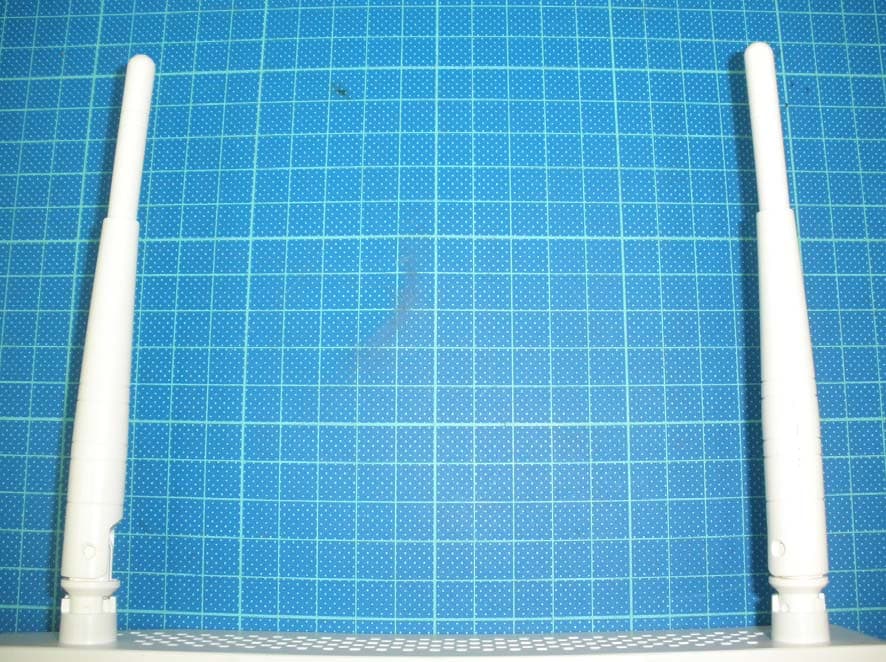
Click to zoom
Application Details
- Equipment Class
- DTS - Digital Transmission System
- Date of Grant
- Sep 02, 2012
- Application Purpose
- Original Equipment
- Date of Application
- Sep 02, 2012
- Equipment Note
- Wireless N VDSL2 VoIP IAD With USB
- Frequency Range
- 2412.00000000 - 2462.00000000
- Country
- Taiwan
Documents & Files
Document Text
Text extracted from the exhibit documents filed with the FCC. Open a document above to read the original.
Users Manual
www.zyxel.com www.zyxel.com Basic Home Station VDSL2 P8802T Wireless N VDSL2 GW with USB Copyright © 2012 ZyXEL Communications Corporation Version 1.00 Edition 1, 7/2012 Default Login Details LAN IP Addresshttp://192.168.1.1:8000 Trusted IP Address for the Device Access 192.168.1.252 User NameAdministrator PasswordTe1ef6n1c4 Basic Home Station VDSL2 P8802T User’s Guide2 IMPORTANT! READ CAREFULLY BEFORE USE. KEEP THIS GUIDE FOR FUTURE REFERENCE. Note: This guide is a reference for a series of products. Therefore some features or options in this guide may not be available in your product. Graphics in this book may differ slightly from the product due to differences in operating systems, operating system versions, or if you installed updated software for your device. Every effort has been made to ensure that the information in this manual is accurate. Related Documentation •Quick Start Guide The Quick Start Guide helps you get up and running right away. It contains information on setting up your network and configuring for Internet access. Table of Contents Basic Home Station VDSL2 P8802T User’s Guide 3 Table of Contents Part I: User’s Guide ......................................................................................... 11 Chapter 1 Introducing the VDSL Router ............................................................................................................ 13 1.1 Overview ...........................................................................................................................................13 1.2 How to Manage the VDSL Router .....................................................................................................13 1.3 Good Habits for Managing the VDSL Router ....................................................................................13 1.4 Power On/Off the VDSL Router ........................................................................................................14 1.5 LEDs (Lights) ....................................................................................................................................14 1.6 3G WAN ............................................................................................................................................16 1.7 The RESET Button ............................................................................................................................16 1.8 Wireless Access ................................................................................................................................17 1.8.1 Using the Wifi Button ...............................................................................................................17 Chapter 2 User Setup Guide................................................................................................................................ 19 2.1 Access the VDSL Router Configuration ............................................................................................19 2.2 Setting Up a Secure Wireless Network .............................................................................................20 2.2.1 Configuring the Wireless Network Settings .............................................................................20 2.2.2 Using WPS ..............................................................................................................................22 2.2.3 Without WPS ...........................................................................................................................26 2.3 Using Wireless MAC Authentication to Block a Computer’s Access to the Wireless Network ..........28 2.4 Setting Up a NAT Virtual Server for a Game Server .........................................................................29 2.5 Access Your Home Computer from the Internet Using DDNS ..........................................................30 2.5.1 Registering a DDNS Account on www.dyndns.org ..................................................................31 2.5.2 Configuring DDNS on Your VDSL Router ................................................................................31 2.5.3 Configuring Port Forwarding on your VDSL Router ................................................................32 2.5.4 Testing the DDNS Setting ........................................................................................................33 2.6 Configuring the Firewall ....................................................................................................................34 2.6.1 Interface Default Policy ............................................................................................................34 2.6.2 Firewall Rules ..........................................................................................................................34 2.7 LAN DHCP for IP Addressing Assignment ........................................................................................36 2.7.1 Configuring Static DHCP .........................................................................................................37 2.8 Checking the Software Version .........................................................................................................38 2.9 Restoring to Factory Default .............................................................................................................39 2.10 How to Use File Sharing on the VDSL Router ................................................................................40 2.10.1 Set Up File Sharing ...............................................................................................................40 2.10.2 Access Your Shared Files From a Computer ........................................................................42 Table of Contents Basic Home Station VDSL2 P8802T User’s Guide 4 2.11 Using the Media Server Feature ..........................................................................................…
Text truncated - open the document above for the full version.
External Photos
External photo of EUT Chain 1 (22cm) Chain 0 (18cm) External photo of EUT Antenna External photo of EUT Model: UP0181A-12PA Model: UP0181A-12PA External photo of EUT Model: UP0181A-12PE Model: UP0181A-12PE
ID Label/Location Info
Label FCC ID Label Location
Internal Photos
Internal photo of EUT Internal photo of EUT Chain 0 Chain 1 Internal photo of EUT Antenna Port
RF Exposure Info
FCC ID.: I88P8802T Report No.: TS12070053-EME Page 1 of 8 0597 Maximum Permissible Exposure (MPE) Evaluation Report Report No. : TS12070053-EME Model No. : DSL-2402HNU-B1B v2, P8802T, Basic Home Station VDSL2 P8802T Issued Date : Aug. 03, 2012 Applicant: ZyXEL Communications Corporation 6, Innovation Rd II, Science-Based Industrial Park, Hsin-Chu, Taiwan Test Method/ Standard: FCC 1.1310 Test By: Intertek Testing Services Taiwan Ltd. No. 11, Lane 275, Ko-Nan 1 Street, Chia-Tung Li, Shiang-Shan District, Hsinchu City, Taiwan It may be duplicated completely for legal use with the allowance of the applicant. It shall not be reproduced except in full, without the written approval of Intertek Laboratory. The test result(s) in this report only applies to the tested sample(s). The test report was prepared by: Sign on File Jill Chen / Assistant These measurements were taken by: Sign on File Terry Hsu / Engineer The test report was reviewed by: Name Jimmy Yang Title Engineer FCC ID.: I88P8802T Report No.: TS12070053-EME Page 2 of 8 Table of Contents Summary of Tests ..............................................................................................................3 1. Introduction ...................................................................................................................4 2. RF Exposure Limit ........................................................................................................4 3. RF Exposure calculations..............................................................................................5 4. Description of EUT .......................................................................................................5 5. Test results .....................................................................................................................7 6. Set-up Photo ..................................................................................................................8 FCC ID.: I88P8802T Report No.: TS12070053-EME Page 3 of 8 Summary of Tests MPE Evaluation meet FCC OET No. 65: 1997, IEEE C95.1-2005 Wireless N VDSL2 VoIP IAD With USB -Model: DSL-2402HNU-B1B v2 FCC ID: I88P8802T Test Reference Results MPE Evaluation FCC Guidelines for Human Exposure IEEE C95.1Complies FCC ID.: I88P8802T Report No.: TS12070053-EME Page 4 of 8 1. Introduction The EUT operates in the 2.4 GHz ISM band. Due to the EUT (include antenna) at its normal operation distance is at least 20 cm from the human body, the EUT was defined as a Mobile Device. The reason to do the MPE Evaluation is to avoid the RF hazard to human body. The maximum output power and gain of the antenna were used to calculate the limited Power density (S) at 20 cm distance away from the product. The limit for Maximum Permissible Exposure (MPE) specified in FCC 1.1310 and Safety Code 6 are followed. According to 1.1307 (b)(1), systems operating under the provisions of this section shall be operated in a manner that ensure that the public is not exposed to radio frequency energy level in excess of the Commission’s guideline. 2. RF Exposure Limit According to FCC 1.1310: The criteria listed in the following table shall be used to evaluate the environmental impact of human exposure to radio-frequency (RF) radiation as specified in 1.1307(b). Limits for Maximum Permissible Exposure (MPE) Frequency Range (MHz) Electric Field Strength (V/m) Magnetic Field Strength (A/m) Power Density (mW/cm 2 ) Average Time (minutes) (A) Limits for Occupational / Control Exposures 30-300 61.4 0.163 1.0 6 300-1500 - - F/300 6 1500-100,000 - - 5 6 (B) Limits for General Population / Uncontrolled Exposure 30-300 27.5 0.073 0.2 30 300-1500 - - F/1500 30 1500-100,000 - - 1.0 30 F= Frequency in MHz FCC ID.: I88P8802T Report No.: TS12070053-EME Page 5 of 8 3. RF Exposure calculations From §FCC 1.1310 table 1, the maximum permissible RF exposure for an uncontrolled environment is 1 mW/(cm 2 ) (or 10 W/m 2 )* Power density (S) is calculated by the following formula: S = (P * G)/4πR 2 where, S = Power density (mW/cm 2 ) P = Output power to antenna (mW) R = Distance between radiating structure and observation point (cm) G = Gain of antenna in numeric π = 3.1416 Example: Assume a mobile device operates at 2412MHz and its maximum output power is 50mW, and the maximum gain of antenna is 1 (numeric) /0dBi. Then the power density (S) = (50 * 1)/4*π*20 2 = 0.00995 (mW/cm 2 ) (or = 0.0995 W/m 2 ) 4. Description of EUT The EUT is Wireless N VDSL2 VoIP IAD With USB, and was defined as information technology equipment. The customer confirmed the models listed below were identical to model DSL-2402HNU-B1B v2 (EUT). Different brands served as marketing strategy. Trade Name Model Number MitraStar DSL-2402HNU-B1B v2 ZyXEL P8802T ZyXEL Basic Home Station VDSL2 P8802T For more detail features, please refer to User's manual as file name “Installation guide.pdf” FCC ID.: I88P8802T Report No.: TS12070053-EME Page 6 of 8 4.1 Antenna description 1. Chain 0 (18cm) The EUT uses a permanently connected antenna. Antenna Model : RFA-02-3C52H070180CW Antenna Gain : 3 dBi Antenna Type : Dipole antenna Connector Type : Fixed type 2. Chain 1 (22cm) The EUT uses a permanently connected antenna. Antenna Model : RFA-02-3C52H070220CW Antenna Gain : 3 dBi Antenna Type : Dipole antenna Connector Type : Fixed type 4.2 Adapter information The EUT will be supplied with a power supply from below list: No. Brand Model no. Specification Adapter 1 UMEC UP0181A-12PA I/P: 100-240Vac, 50/60Hz, 0.4A MAX. O/P: +12Vdc, 1.5A, 18W MAX. Adapter 2 UMEC UP0181A-12PE I/P: 100-240Vac, 50/60Hz, 0.4A MAX. O/P: +12Vdc, 1.5A, 18W MAX. FCC ID.: I88P8802T Report No.: TS12070053-EME Page 7 of 8 5. Test results Antenna No. Total 1 2 3 4 5 6 Tx Status On On On Off Off Off Frequency MHz 850 2450 2450 2450 2450 5800 MPE Limit mW/cm 2 0.57 1.00 1.00 0.00 0.00 0.00 Max % MPE % 90.5 77.8 8.4 6.5 0.0 0.0 0.0 Power (W) 2.136 1.760 0.211 0.165 0.000 0.000 0.000 Antenna Gain dBi 1.00 3.00 3.…
Text truncated - open the document above for the full version.
Test Report
FCC ID.: I88P8802T Report No.: TS12070052-EME Page 1 of 120 0597 EMC TEST REPORT Report No. : TS12070052-EME Model No. : DSL-2402HNU-B1B v2, P8802T, Basic Home Station VDSL2 P8802T Issued Date : Aug. 03, 2012 Applicant: ZyXEL Communications Corporation 6, Innovation Rd II, Science-Based Industrial Park, Hsin-Chu, Taiwan Test Method / Standard: CFR 47 FCC Part 15.247 & ANSI C63.4 2003 Test By: Intertek Testing Services Taiwan Ltd. No. 11, Lane 275, Ko-Nan 1 Street, Chia-Tung Li, Shiang-Shan District, Hsinchu City, Taiwan It may be duplicated completely for legal use with the allowance of the applicant. It shall not be reproduced except in full, without the written approval of Intertek Laboratory. The test result(s) in this report only applies to the tested sample(s). The test report was prepared by: Sign on File Jill Chen / Assistant These measurements were taken by: Sign on File Terry Hsu / Engineer The test report was reviewed by: Name Jimmy Yang Title Engineer FCC ID.: I88P8802T Report No.: TS12070052-EME Page 2 of 120 Table of Contents 1. Summary of Test Data ............................................................................................ 3 2. General Information ................................................................................................ 4 3. Maximum 6 dB Bandwidth ...................................................................................... 8 4. 99 % Occupied Bandwidth.................................................................................... 21 5. Maximum Output Power ....................................................................................... 34 6. Power Spectral Density ........................................................................................ 47 7. RF Antenna Conducted Spurious ......................................................................... 60 8. Radiated Spurious Emission................................................................................. 93 9. Emission on Band Edge..................................................................................... 104 10. AC power line conducted emission ....................................................................116 Appendix: Test Equipment List ............................................................................... 120 FCC ID.: I88P8802T Report No.: TS12070052-EME Page 3 of 120 1. Summary of Test Data Test/Requirement Description Applicable Rule Result Minimum 6 dB Bandwidth 15.247(a)(2) Pass Maximum Output Power 15.247(b) Pass Power Spectral Density 15.247(e) Pass RF Antenna Conducted Spurious 15.247(d) Pass Radiated Spurious Emission 15.247(d), 15.205, 15.209 Pass Emission on the Band Edge 15.247(d) Pass AC Power Line Conducted Emission 15.207 Pass FCC ID.: I88P8802T Report No.: TS12070052-EME Page 4 of 120 2. General Information Identification of the EUT Product: Wireless N VDSL2 VoIP IAD With USB Model No.: DSL-2402HNU-B1B v2 FCC ID.: I88P8802T Frequency Range: 1. 2412 MHz ~ 2462 MHz for 802.11b, 802.11g, 802.11n HT20 2. 2422 MHz ~ 2452 MHz for 802.11n HT40 Channel Number: 1. 11 channels for 2412 MHz ~ 2462 MHz 2. 7 channels for 2422 MHz ~ 2452 MHz Rated Power: DC 12 V from Adapter Power Cord: N/A Data Cable: 1. RJ-45 UTP Cat.5 6 meter × 4 2. RJ-11 unshieled cable 1.8 meter × 3 Sample Received: Jul. 11, 2012 Test Date(s): Jul. 12, 2012 ~ Aug. 01, 2012 Note 1: This report is for the exclusive use of Intertek's Client and is provided pursuant to the agreement between Intertek and its Client. Intertek's responsibility and liability are limited to the terms and conditions of the agreement. Intertek assumes no liability to any party, other than to the Client in accordance with the agreement, for any loss, expense or damage occasioned by the use of this report. Only the Client is authorized to permit copying or distribution of this report and then only in its entirety. Any use of the Intertek name or one of its marks for the sale or advertisement of the tested material, product or service must first be approved in writing by Intertek. The observations and test results in this report are relevant only to the sample tested. This report by itself does not imply that the material, product, or service is or has ever been under an Intertek certification program. Note 2: When determining the test conclusion, the Measurement Uncertainty of test has been considered. FCC ID.: I88P8802T Report No.: TS12070052-EME Page 5 of 120 Description of EUT The EUT is Wireless N VDSL2 VoIP IAD With USB, and was defined as information technology equipment. The customer confirmed the models listed below were identical to model DSL-2402HNU-B1B v2 (EUT). Different brands served as marketing strategy. Trade Name Model Number MitraStar DSL-2402HNU-B1B v2 ZyXEL P8802T ZyXEL Basic Home Station VDSL2 P8802T For more detail features, please refer to User's manual as file name “Installation guide.pdf” Antenna description 1. Chain 0 (18cm) The EUT uses a permanently connected antenna. Antenna Model : RFA-02-3C52H070180CW Antenna Gain : 3 dBi Antenna Type : Dipole antenna Connector Type : Fixed type 2. Chain 1 (22cm) The EUT uses a permanently connected antenna. Antenna Model : RFA-02-3C52H070220CW Antenna Gain : 3 dBi Antenna Type : Dipole antenna Connector Type : Fixed type FCC ID.: I88P8802T Report No.: TS12070052-EME Page 6 of 120 Adapter information The EUT will be supplied with a power supply from below list: No. Brand Model no. Specification Adapter 1 UMEC UP0181A-12PA I/P: 100-240Vac, 50/60Hz, 0.4A MAX. O/P: +12Vdc, 1.5A, 18W MAX. Adapter 2 UMEC UP0181A-12PE I/P: 100-240Vac, 50/60Hz, 0.4A MAX. O/P: +12Vdc, 1.5A, 18W MAX. Peripherals equipment Peripherals Brand Model No.Serial No. Data Cable Notebook PC DELL Latitude D610 2YWZK1S RJ-45 UTP Cat.5 6 meter × 1 Dummy Load N/A N/A N/A RJ-45 UTP Cat.5 6 meter × 3 Telephone TENTEL K-903S 0514000940 RJ-11 unshieled cable 1.8 meter × 1 Telephone TENTEL K-903S 0514000477 RJ-11 unshieled cable 1.8 meter × 1 C.O. ZyXEL V…
Text truncated - open the document above for the full version.
Test Report
FCC ID.: I88P8802T Report No.: TS12070052-EME Page 60 of 120 7. RF Antenna Conducted Spurious Name of Test RF Antenna Conducted Spurious Base Standard FCC 15.247(d) Test Result: Complies Measurement Data: See plots below Method of Measurement: Reference FCC document: KDB558074 D01 The measurements were performed from 30 MHz to 25 GHz RF antenna conducted per FCC 15.247 (d) was measured from the EUT antenna port using a 50 ohm spectrum analyzer with the resolution bandwidth set at 100 kHz, and the video bandwidth set at 300 kHz. Harmonics and spurious noise must be at least 20 dB down from the highest emission level within the authorized band as measured with a 100 kHz RBW. The table below is the results from the highest emission for each channel within the authorized band. This table was used to determine the spurious limits for each channel. Test Diagram: Spectrum Analyzer Attenuator, DC block and high pass filter if necessary EUT FCC ID.: I88P8802T Report No.: TS12070052-EME Page 61 of 120 Conducted spurious @ 802.11b mode channel 1 (Part 1) Conducted spurious @ 802.11b mode channel 1 (Part 2) FCC ID.: I88P8802T Report No.: TS12070052-EME Page 62 of 120 Conducted spurious @ 802.11b mode channel 1 (Part 3) Conducted spurious @ 802.11b mode channel 6 (Part 1) FCC ID.: I88P8802T Report No.: TS12070052-EME Page 63 of 120 Conducted spurious @ 802.11b mode channel 6 (Part 2) Conducted spurious @ 802.11b mode channel 6 (Part 3) FCC ID.: I88P8802T Report No.: TS12070052-EME Page 64 of 120 Conducted spurious @ 802.11b mode channel 11 (Part 1) Conducted spurious @ 802.11b mode channel 11 (Part 2) FCC ID.: I88P8802T Report No.: TS12070052-EME Page 65 of 120 Conducted spurious @ 802.11b mode channel 11 (Part 3) Chain 0: Conducted spurious @ 802.11g mode channel 1 (Part 1) FCC ID.: I88P8802T Report No.: TS12070052-EME Page 66 of 120 Chain 0: Conducted spurious @ 802.11g mode channel 1 (Part 2) Chain 0: Conducted spurious @ 802.11g mode channel 1 (Part 3) FCC ID.: I88P8802T Report No.: TS12070052-EME Page 67 of 120 Chain 0: Conducted spurious @ 802.11g mode channel 6 (Part 1) Chain 0: Conducted spurious @ 802.11g mode channel 6 (Part 2) FCC ID.: I88P8802T Report No.: TS12070052-EME Page 68 of 120 Chain 0: Conducted spurious @ 802.11g mode channel 6 (Part 3) Chain 0: Conducted spurious @ 802.11g mode channel 11 (Part 1) FCC ID.: I88P8802T Report No.: TS12070052-EME Page 69 of 120 Chain 0: Conducted spurious @ 802.11g mode channel 11 (Part 2) Chain 0: Conducted spurious @ 802.11g mode channel 11 (Part 3) FCC ID.: I88P8802T Report No.: TS12070052-EME Page 70 of 120 Chain 1: Conducted spurious @ 802.11g mode channel 1 (Part 1) Chain 1: Conducted spurious @ 802.11g mode channel 1 (Part 2) FCC ID.: I88P8802T Report No.: TS12070052-EME Page 71 of 120 Chain 1: Conducted spurious @ 802.11g mode channel 1 (Part 3) Chain 1: Conducted spurious @ 802.11g mode channel 6 (Part 1) FCC ID.: I88P8802T Report No.: TS12070052-EME Page 72 of 120 Chain 1: Conducted spurious @ 802.11g mode channel 6 (Part 2) Chain 1: Conducted spurious @ 802.11g mode channel 6 (Part 3) FCC ID.: I88P8802T Report No.: TS12070052-EME Page 73 of 120 Chain 1: Conducted spurious @ 802.11g mode channel 11 (Part 1) Chain 1: Conducted spurious @ 802.11g mode channel 11 (Part 2) FCC ID.: I88P8802T Report No.: TS12070052-EME Page 74 of 120 Chain 1: Conducted spurious @ 802.11g mode channel 11 (Part 3) Chain 0: Conducted spurious @ 802.11n HT20 mode channel 1 (Part 1) FCC ID.: I88P8802T Report No.: TS12070052-EME Page 75 of 120 Chain 0: Conducted spurious @ 802.11n HT20 mode channel 1 (Part 2) Chain 0: Conducted spurious @ 802.11n HT20 mode channel 1 (Part 3) FCC ID.: I88P8802T Report No.: TS12070052-EME Page 76 of 120 Chain 0: Conducted spurious @ 802.11n HT20 mode channel 6 (Part 1) Chain 0: Conducted spurious @ 802.11n HT20 mode channel 6 (Part 2) FCC ID.: I88P8802T Report No.: TS12070052-EME Page 77 of 120 Chain 0: Conducted spurious @ 802.11n HT20 mode channel 6 (Part 3) Chain 0: Conducted spurious @ 802.11n HT20 mode channel 11 (Part 1) FCC ID.: I88P8802T Report No.: TS12070052-EME Page 78 of 120 Chain 0: Conducted spurious @ 802.11n HT20 mode channel 11 (Part 2) Chain 0: Conducted spurious @ 802.11n HT20 mode channel 11 (Part 3) FCC ID.: I88P8802T Report No.: TS12070052-EME Page 79 of 120 Chain 1: Conducted spurious @ 802.11n HT20 mode channel 1 (Part 1) Chain 1: Conducted spurious @ 802.11n HT20 mode channel 1 (Part 2) FCC ID.: I88P8802T Report No.: TS12070052-EME Page 80 of 120 Chain 1: Conducted spurious @ 802.11n HT20 mode channel 1 (Part 3) Chain 1: Conducted spurious @ 802.11n HT20 mode channel 6 (Part 1) FCC ID.: I88P8802T Report No.: TS12070052-EME Page 81 of 120 Chain 1: Conducted spurious @ 802.11n HT20 mode channel 6 (Part 2) Chain 1: Conducted spurious @ 802.11n HT20 mode channel 6 (Part 3) FCC ID.: I88P8802T Report No.: TS12070052-EME Page 82 of 120 Chain 1: Conducted spurious @ 802.11n HT20 mode channel 11 (Part 1) Chain 1: Conducted spurious @ 802.11n HT20 mode channel 11 (Part 2) FCC ID.: I88P8802T Report No.: TS12070052-EME Page 83 of 120 Chain 1: Conducted spurious @ 802.11n HT20 mode channel 11 (Part 3) Chain 0: Conducted spurious @ 802.11n HT40 mode channel 3 (Part 1) FCC ID.: I88P8802T Report No.: TS12070052-EME Page 84 of 120 Chain 0: Conducted spurious @ 802.11n HT40 mode channel 3 (Part 2) Chain 0: Conducted spurious @ 802.11n HT40 mode channel 3 (Part 3) FCC ID.: I88P8802T Report No.: TS12070052-EME Page 85 of 120 Chain 0: Conducted spurious @ 802.11n HT40 mode channel 6 (Part 1) Chain 0: Conducted spurious @ 802.11n HT40 mode channel 6 (Part 2) FCC ID.: I88P8802T Report No.: TS12070052-EME Page 86 of 120 Chain 0: Conducted spurious @ 802.11n HT40 mode channel 6 (Part 3) Chain 0: Conducted spurious @ 802.11n HT40 mode channel 9 (Part 1) FCC ID.: I88P8802T Report No.: TS12070052-EME Page 87 of 120 Chain 0: Conducted spurious @ 802.11n HT40 mode channel 9 (Part 2) Chain 0: Conducted spurious @ 802.11n HT40 mode channel 9…
Text truncated - open the document above for the full version.
Test Setup Photos
Conducted Set-up photo of EUT
Test Setup Photos
Radiated Set-up photo of EUT
Contact Information
Applicant
Emma Bao(Section Manager)
Technical Contact
Intertek Testing Services Taiwan Ltd.Jill Chen
[email protected]886-3-5191411
No. 11, Lane 275, Ko-Nan 1 Street, Chia-Tung Li, · Hsinchu City · Taiwan
Non-Technical Contact
Intertek Testing Services Taiwan Ltd.Jill Chen
[email protected]886-3-5191411
Test Firm
Intertek Testing Services Taiwan Ltd.Lily Shih
Technical Specifications
| # | Rule Parts | Frequency Range | Power Output |
|---|---|---|---|
| 1 | 15C | 2.41 GHz - 2.46 GHz | 221.00 mW |
Other Applications from ZyXEL Communications Corporation
I88EE6601-00
Jul 18, 2024Tri-Band Wireless BE19000 10G Ethernet VoIP Gateway with SFP+ / Tri-Band Wireless BE19000 10G Ethernet VoIP Gateway / Tri-Band Wireless BE19000 10G Ethernet Gateway with SFP+ / Tri-Band Wireless BE19000 10G Ethernet Gateway
Equipment Class
6ID - 15E 6 GHz Low Power Indoor Access Point
I8803935
Oct 17, 2023802.11be (WiFi 7) Triple-Radio Unified Pro Access Point
Equipment Class
DTS - Digital Transmission System
I8803973
Aug 01, 2023802.11ax (WiFi 6) Dual-Radio Wall-Plate Unified Access Point
Equipment Class
NII - Unlicensed National Information Infrastructure TX
I88WX5610-B0
Apr 25, 2023AX7800 WiFi 6E Tri-Band Gigabit Wireless Extender
Equipment Class
DTS - Digital Transmission System
I88EX7710-B0
Apr 16, 2023AX11000 WiFi 6E 10G Ethernet Gateway
Equipment Class
NII - Unlicensed National Information Infrastructure TX