I88WAC6502D-E802.11 ac Unified Pro Access Point
ZyXEL Communications Corporation
Click to zoom
Application Details
- Equipment Class
- NII - Unlicensed National Information Infrastructure TX
- Date of Grant
- Dec 02, 2014
- Application Purpose
- Original Equipment
- Date of Application
- Dec 01, 2014
- Equipment Note
- 802.11 ac Unified Pro Access Point
- Frequency Range
- 5180.00000000 - 5240.00000000
- Country
- Taiwan
Documents & Files
Document Text
Text extracted from the exhibit documents filed with the FCC. Open a document above to read the original.
Users Manual
Quick Start Guide WAC6500 Indoor Series Unified Pro Access Point For more information, please refer to the User's Guide at www.zyxel.com. Initial Configuration Erstkonfiguration | Первоначальная настройка Configuración inicial | Initial konfiguration Configuration initiale | 初始配置 Configurazione iniziale | 初始設定 Standard-Anmeldedaten | Данные для входа по умолчанию Detalles de inicio de sesión predeterminados | Standarduppgifter för inloggning Informations de connexion par défaut | 默认登录详细信息 Dettagli sull'accesso predefinito | 預設的登入詳細資訊 IP Address: 192.168.1.2 User Name: admin Password: 1234 SSID: ZyXEL Wireless Security: Disabled Default Login Details By default, the WAC AP can be managed by an AP Controller (AC) in the same IP subnet (Auto). To allow the WAC AP to be managed by an AC in a different network, go to Configuration > Network > AC Discovery, select Manual and enter the AC’s IP address. Disconnect the WAC AP from your computer and connect its Ethernet port to the AP controller network. To go back to standalone AP mode, reset the WAC AP. Standardmäßig kann der WAC AP über einen AP Controller (AC) im selben Subnetz (Auto) verwaltet werden. Um den WAC AP durch einen AC in einem anderen Netzwerk zu verwalten, rufen Sie Configuration (Konfiguration) > Network (Netzwerk) > AC Discovery (AC Erkennung) auf und wählen Sie Manual (Manuell) und geben Sie die IP-Adresse des AC ein. Trennen Sie den WAC AP von Ihrem Computer und verbinden Sie den Ethernetanschluss mit dem AP Controller Netzwerk. Setzen Sie den WAC AP, um zum Einzel-AP-Modus zurückzukehren. Por defecto, el WAC AP puede ser administrado por un controlador AP (AC) en la misma subred (Auto). Para permitir que el WAC AP sea administrado por un AC en una red diferente, vaya a Configuration (Configuración) > Network (Red) > AC Discovery (Descubrir AC), seleccione Manual (Manual) y escriba la dirección IP del AC. Desconecte el WAC AP de su ordenador y conecte su puerto Ethernet a la red del controlador AP. Vuelva al modo AP independiente, reinicie el WAC AP. Par défaut, le WAC AP peut être géré par un contrôleur d'AP (AC) dans le même sous-réseau (Auto). Pour permettre au WAC AP d'être géré par un AC (Contrôleur de point d'accès) dans un autre réseau, accédez à Configuration (Configuration) > Network (Réseau) > AC Discovery (Découverte AC), sélectionnez Manual (Manuel) et entrez l'adresse IP de l'AC. Débranchez le WAC AP de votre ordinateur et connectez son port Ethernet au réseau du contrôleur de l'AP. Pour revenir en mode AP autonome, réinitialisez le WAC AP. Come impostazione predefinita, l'unità WAC AP può essere gestita da controller AP (AC) nella stessa sottorete (Auto). Per consentire all'unità WAC AP di essere gestita da AC in una rete diversa andare a Configuration (Configurazione) > Network (Rete) > AC Discovery (Ricerca AC), selezionare Manual (Manuale) e immettere l'indirizzo IP dell'AC. Staccare l'unità WAC AP dal computer e connettere la sua porta Ethernet alla rete dell'unità di controllo AP. Per tornare alla modalità AP standalone, resettare l'unità WAC AP. По умолчанию устройство WAC AP может управляться контроллером AP (AC) в той же подсети (Auto [Авто]). Чтобы можно было управлять устройством WAC AP с помощью AC в другой сети, перейдите в меню Configuration (Конфигурация) > Network (Сеть) > AC Discovery (Обнаружение AC), выберите Manual (Вручную) и введите IP-адрес AC. Отсоедините устройство WAC AP от компьютера и подсоедините его порт Ethernet к сети контроллера AP. Чтобы вернуться в автономный режим работы AP, перезапустите устройство WAC AP. Enligt standard kan WAC AP hanteras av en AP Controller (AC) i samma delnät (Auto). För att tillåta WAC AP att hanteras av en AC i ett annat nätverk, går du till Configuration (Konfiguration) > Network (Nätverk) > AC Discovery (AC Discovery), väljer Manual (Manuell) och anger IP-adressen för AC. Koppla från WAC AP från datorn och anslut dess Ethernet-port till AP:ns styrenhetsnätverk. För att gå tillbaka till fristående AP-läge återställer du WAC A P. 默认情况下,AP 控制器 (AC) 可在相同子网中管理 WAC AP(“Auto“- 自动)。 如要使 AC 在其他网络中管理 WAC AP,请 转到 Configuration (配置)> Network (网络)> AC Discovery (AC 发现),然后选择 Manual (手动)并输入 AC 的 IP 地址 。 断开 WAC AP 与电脑的连接,然后将其以太网端口连接到 AP 控制器网络。 如要返回到独立 AP 模式,请重置 WAC AP。 依據預設,AP 控制器 (AC) 可在同一子網路中管理 WAC AP (自動)。 若要讓 WAC AP 由 AC 管理,請至 Configuration (設 定) > Network (網路) > AC Discovery (AC 尋找),選擇 Manual (手動) 然後輸入 AC 的 IP 位址。 中斷 WAC AP 與電腦的 連接,然後將其乙太網路埠連接至 AP 控制器網路。 如要返回獨立的 AP 模式,請重設 WAC AP。 3 1 Log in and configure the wireless and wireless security settings. Führen Sie ein Login durch, und konfigurieren Sie die Einstellungen für die Wireless-Funktion und die Wireless-Sicherheit. Inicie sesión y ajuste la configuración de seguridad con cable e inalámbrica. Connectez-vous et configurez les paramètres sans fil et de sécurité sans fil. Eseguire il login e configurare le impostazioni della rete wireless e le impostazioni di sicurezza della rete wireless. Войдите в систему и настройте параметры беспроводной связи и безопасности. Logga in och konfigurera inställningarna för trådlöst och för trådlösa säkerhetsinställningar. 登录并配置无线设置及无线安全设置。 登入並進行無線及無線安全措施設定。 2 Make sure the IP address of your computer is in the range between "192.168.1.3" and "192.168.1.254". Open your web browser. Stellen Sie sicher, dass die IP-Adresse Ihres Computers im Bereich zwischen"192.168.1.3" und "192.168.1.254" liegt. Starten Sie Ihren Webbrowser. Asegúrese de que la dirección IP de su ordenador esté entre los valores "192.168.1.3" y "192.168.1.254". Abra su explorador de web. Assurez-vous que l'adresse IP de votre ordinateur se situe dans la plage entre "192.168.1.3" et "192.168.1.254". Ouvrez votre navigateur web. Assicurarsi che l'indirizzo IP del computer rientri nella gamma tra "192.168.1.3" e "192.168.1.254". Aprire il browser. Убедитесь, что IP-адрес компьютера находится в диапазоне от "192.168.1.3" до "192.168.1.254". Откройте ваш веб-браузер. Se till att IP-adressen på datorn ligger inom områ…
Text truncated - open the document above for the full version.
Users Manual
Quick Start Guide www.zyxel.com NWA5000/WAC6500 Series NWA5121-N / NWA5121-NI / NWA5123-NI / NWA5301-NJ / WAC6502D-E / WAC6502D-S / WAC6503D-S / WAC6553D-E 802.11 a/b/g/n/ac Unified Access Point Version 4.20 Edition 1, 11/2014 Copyright © 2014 ZyXEL Communications Corporation User’s Guide Default Login Details LAN IP Addresshttp://192.168.1.2 User Nameadmin Password1234 NWA5000 / WAC6500 Series User’s Guide 2 IMPORTANT! READ CAREFULLY BEFORE USE. KEEP THIS GUIDE FOR FUTURE REFERENCE. This is a User’s Guide for a series of products. Not all products support all firmware features. Screenshots and graphics in this book may differ slightly from your product due to differences in your product firmware or your computer operating system. Every effort has been made to ensure that the information in this manual is accurate. Related Documentation •Quick Start Guide The Quick Start Guide shows how to connect the NWA/WAC and access the Web Configurator. • CLI Reference Guide The CLI Reference Guide explains how to use the Command-Line Interface (CLI) and CLI commands to configure the NWA/WAC. Note: It is recommended you use the Web Configurator to configure the NWA/WAC. • Web Configurator Online Help Click the help icon in any screen for help in configuring that screen and supplementary information. Contents Overview NWA5000 / WAC6500 Series User’s Guide 3 Contents Overview User’s Guide ....................................................................................................................................... 10 Introduction ............................................................................................................................................. 11 The Web Configurator .............................................................................................................................27 Technical Reference .......................................................................................................................... 38 Dashboard ...............................................................................................................................................39 Monitor ....................................................................................................................................................44 Network ...................................................................................................................................................57 Wireless ..................................................................................................................................................65 User .........................................................................................................................................................77 AP Profile ................................................................................................................................................84 MON Profile ...........................................................................................................................................102 WDS Profile ...........................................................................................................................................106 Certificates ............................................................................................................................................108 System ..................................................................................................................................................125 Log and Report .....................................................................................................................................150 File Manager .........................................................................................................................................162 Diagnostics ............................................................................................................................................173 LEDs .....................................................................................................................................................175 Reboot ...................................................................................................................................................178 Shutdown ..............................................................................................................................................179 Troubleshooting ....................................................................................................................................180 Table of Contents NWA5000 / WAC6500 Series User’s Guide 4 Table of Contents Contents Overview .............................................................................................................................. 3 Table of Contents ................................................................................................................................. 4 Part I: User’s Guide ......................................................................................... 10 Chapter 1 Introduction ......................................................................................................................................... 11 1.1 Overview .......................................................................................................................................... 11 1.1.1 Management Mode ..................................................................................................................12 1.1.2 MBSSID ...................................................................................................................................13 1.1.3 Dual-Radio ...............................................................................................................................14 1.1.4 Root AP ..................................................................................................…
Text truncated - open the document above for the full version.
Cover Letter(s)
ZyXEL Communications Corporation No. 2, Gongye E. 9th Road, Hsinchu Science Park, Hsinchu, Taiwan, R.O.C Date: 2014/11/20 Federal Communications Commission 7435 Oakland Mills Rd, Columbia MD 21046-1609 Subject: Product Certification Representative Authorization Letter FCC ID: I88WAC6502D-E To whom it may concern: We the undersigned, hereby authorize following person to act as our agent in the preparation of an application for equipment authorization of model WAC6502D-S, WAC6502D-E to the FCC Rules and Regulations. International Certification Corp. Address : No.3-1, Lane 6, Wen San 3rd St. Kwei Shan Hsiang, Tao Yuan Hsein 333, Taiwan (R.O.C.) Name : Gary Chang Job Title : Manager e-mail : [email protected] Webs We further certifies that neither the applicant nor any party to this application, as defined in 47 CFR Ch. 1.2002(b), is subject to a denial to Federal benefits, that include FCC benefits, pursuant to section 5301 of the Anti-Drug Abuse Act of 1998, 21 U.S.C. 835(a). This appointment also includes the authority to complete FCC Form 731 on our behalf and sign the application as an authorized agent. Emma Bao / Section Manager ZyXEL Communications Corporation Te l : 886 3 578-3942 # 88582 E-mail: [email protected]
Cover Letter(s)
ZyXEL Communications Corporation No. 2, Gongye E. 9th Road, Hsinchu Science Park, Hsinchu, Taiwan, R.O.C Confidentiality Request Letter Date: 2014/11/20 Federal Communications Commission Authorization and Evaluation Division FCC ID:I88WAC6502D-E Permanent Confidentiality Request Pursuant to Sections 0.457 and 0.459 of the Commission’s Rules, the Applicant Hereby requests confidential treatment of information accompanying this Application As outlined below: 1. Block Diagram 2. Circuit Diagram 3. Operational Description The above materials contain trade secrets and proprietary information not customarily released to the public. The public disclosure of these matters might be harmful to the Applicant and provide unjustified benefits to its competitors. The Applicant understands that pursuant to Rule 0.457, disclosure of this Application and all accompanying documentation will not be made before the date of the Grant for this application Sincerely, Emma Bao / Section Manager ZyXEL Communications Corporation Te l : 886 3 578-3942 # 88582 E-mail: [email protected]
Cover Letter(s)
ZyXEL Communications Corporation No. 2, Gongye E. 9th Road, Hsinchu Science Park, Hsinchu, Taiwan, R.O.C Date: November 20, 2014 Subject: Ad Hoc Mode Function Declaration To Whom it may concern, We, ZyXEL Communications Corporation declare that the device does not support any non-US channels and country code selection in all the operational mode(s) for the following product. FCC ID: I88WAC6502D-E Regards, Emma Bao / Section Manager ZyXEL Communications Corporation Te l : 886 3 578-3942 # 88582 E-mail: [email protected]
Cover Letter(s)
ZyXEL Communications Corporation No. 2, Gongye E. 9th Road, Hsinchu Science Park, Hsinchu, Taiwan, R.O.C Federal Communications Commission Authorization and Evaluation Division 7435 Oakland Mills Rd Columbia MD 21046-1609 Date: November 20, 2014 Subject: FCC Application for FCC ID: I88WAC6502D-E To Whom it may concern, We, the undersigned, would like to declare that the composite portion catagorized as computer peripheral has been authorized under the Declaration of Conformity procedures, which the report issued from International Certification Corp..(report number: FD491801) Emma Bao / Section Manager ZyXEL Communications Corporation Te l : 886 3 578-3942 # 88582 E-mail: [email protected]
External Photos
Project No.: 491801 Page No. : 1 of 37 Photographs of EUT Model WAC6520D-S Project No.: 491801 Page No. : 2 of 37 Model WAC6520D-E Project No.: 491801 Page No. : 3 of 37 Project No.: 491801 Page No. : 4 of 37 Project No.: 491801 Page No. : 5 of 37 Project No.: 491801 Page No. : 6 of 37
ID Label/Location Info
Models Name/Part Name/ Artwork Number/ Artwork Rev./ Unit:mm SPEC LABEL 07 Designed/Date/ 06 Nov.‘14amy 3264220200 ZyXEL NWA6502-AC-R DELTA NETWORKS, INC. THESE DRAWINGS AND SPECIFICATIONS ARE THE PROPERTY OF DELTA NETWORKS. AND SHALL NOT BE REPRODUCED OR USED AS THE BASIS FOR THE MANUFACTURE OR SELL OF APPARATUSES OR DEVICES WITHOUT PERMISSION . Graphic Layout Scale/ 1:1 Comment/ PANTONE BLACK Diecut display only Colors Printed/Dimensions/ LENGTH WIDTH 44.2 mm x 24.2 mm UA.TR.008 ICONDIMENSION 11.0x2.0mm 4.7x7mm 4.6x6.3mm 5.0x6.0mm 6.9x6.6mm 5.0x5.0mm 5.0x5.9mm 5mm 7mm 13.57x5.0mm 7.1x5.0mm Model Number: WAC6502D-E 802.11 ac Uni ed Pro Access Point / 802.11 ac Power Rating: Input 12V , 2A Power Consumption: 15.12 Watt Max. FCC ID: I88WAC6502D-E IC: 2468C-WAC6502D-E xxxxx This device complies with Part 15 of the FCC Rules/Industry Canada licence-exempt RSS standard(s). Operation is subject to the following two conditions: (1) this device may not cause harmful interference, and (2) this device must accept any interference received, including interference that may cause undesired operation. CAN ICES-3(B)/NMG-3(B) UA.TR.008 Models Name/Part Name/ Artwork Number/ Artwork Rev./ Unit:mm SPEC LABEL 08 Designed/Date/ 06 Nov.‘14amy 3264220300 ZyXEL NWA6503-AC-R DELTA NETWORKS, INC. THESE DRAWINGS AND SPECIFICATIONS ARE THE PROPERTY OF DELTA NETWORKS. AND SHALL NOT BE REPRODUCED OR USED AS THE BASIS FOR THE MANUFACTURE OR SELL OF APPARATUSES OR DEVICES WITHOUT PERMISSION . Graphic Layout Scale/ 1:1 Comment/ PANTONE BLACK Diecut display only Colors Printed/Dimensions/ LENGTH WIDTH 44.2 mm x 24.2 mm UA.TR.008 ICONDIMENSION 11.0x2.0mm 4.7x7mm 4.6x6.3mm 5.0x6.0mm 6.9x6.6mm 5.0x5.0mm 5.0x5.9mm 7.1x5.0mm 5mm 7mm 13.57x5.0mm Model Number: WAC6502D-S 802.11 ac Uni ed Pro Access Point / 802.11 ac Power Rating: Input 12V , 2A Power Consumption: 15.12 Watt Max. FCC ID: I88WAC6502D-E IC: 2468C-WAC6502D-E xxxxx This device complies with Part 15 of the FCC Rules/Industry Canada licence-exempt RSS standard(s). Operation is subject to the following two conditions: (1) this device may not cause harmful interference, and (2) this device must accept any interference received, including interference that may cause undesired operation. CAN ICES-3(B)/NMG-3(B) UA.TR.008 Label Location
Internal Photos
Project No.: 491801 Page No. : 7 of 37 Model WAC6520D-S Project No.: 491801 Page No. : 8 of 37 Project No.: 491801 Page No. : 9 of 37 Project No.: 491801 Page No. : 10 of 37 Project No.: 491801 Page No. : 11 of 37 Project No.: 491801 Page No. : 12 of 37 Project No.: 491801 Page No. : 13 of 37 Project No.: 491801 Page No. : 14 of 37 Project No.: 491801 Page No. : 15 of 37 Project No.: 491801 Page No. : 16 of 37 Project No.: 491801 Page No. : 17 of 37 Project No.: 491801 Page No. : 18 of 37 Project No.: 491801 Page No. : 19 of 37 Project No.: 491801 Page No. : 20 of 37 Project No.: 491801 Page No. : 21 of 37 Project No.: 491801 Page No. : 22 of 37 Project No.: 491801 Page No. : 23 of 37 Project No.: 491801 Page No. : 24 of 37
Internal Photos
Project No.: 491801 Page No. : 25 of 37 Model WAC6520D-E Project No.: 491801 Page No. : 26 of 37 Project No.: 491801 Page No. : 27 of 37 Project No.: 491801 Page No. : 28 of 37 Project No.: 491801 Page No. : 29 of 37 Project No.: 491801 Page No. : 30 of 37 Project No.: 491801 Page No. : 31 of 37 Project No.: 491801 Page No. : 32 of 37 Project No.: 491801 Page No. : 33 of 37 Project No.: 491801 Page No. : 34 of 37 Project No.: 491801 Page No. : 35 of 37 Project No.: 491801 Page No. : 36 of 37 Project No.: 491801 Page No. : 37 of 37
RF Exposure Info
Report No.: FA491801 Page : 1 of 6 Report Version: Rev. 01 FCC RF Exposure Report FCC ID : I88WAC6502D-E Equipment : 802.11 ac Unified Pro Access Point Model No. : WAC6502D-S, WAC6502D-E Brand Name : ZyXEL Applicant : ZyXEL Communications Corporation Address : No. 2, Gongye E. 9th Road, Hsinchu Science Park, Hsinchu, Taiwan Standard : 47 CFR FCC Part 2.1091 Received Date : Sep. 18, 2014 Tested Date : Sep. 23 ~ Oct. 31, 2014 We, International Certification Corp., would like to declare that the tested sample has been evaluated and in compliance with the requirement of the above standards. The test results contained in this report refer exclusively to the product. It may be duplicated completely for legal use with the approval of the applicant. It shall not be reproduced except in full without the written approval of our laboratory. Approved & Reviewed by: Gary Chang / Manager Ty: XXX Report No.: FA491801 Page : 2 of 6 Report Version: Rev. 01 Table of Contents 1 MPE EVALUATION OF MOBILE DEVICES ......................................................................................... 4 1.1 LIMITS FOR GENERAL POPULATION/UNCONTROLLED EXPOSURE............................................. 4 1.2 MPE EVALUATION FORMULA ............................................................................................................. 4 1.3 MPE EVALUATION RESULTS .............................................................................................................. 5 2 TEST LABORATORY INFORMATION ................................................................................................. 6 Report No.: FA491801 Page : 3 of 6 Report Version: Rev. 01 Release Record Report No. Version Description Issued Date FA491801 Rev. 01 Initial issue Dec. 01, 2014 Report No.: FA491801 Page : 4 of 6 Report Version: Rev. 01 1 MPE EVALUATION OF MOBILE DEVICES Human exposure to RF emissions from mobile devices (47 CFR §2.1091) may be evaluated based on the MPE limits adopted by the FCC for electric and magnetic field strength and/or power density, as appropriate, since exposures are assumed to occur at distances of 20 cm or more from persons. 1.1 LIMITS FOR GENERAL POPULATION/UNCONTROLLED EXPOSURE Frequency Range (MHz) Power Density (mW /cm 2 ) Averaging Time (minutes) 300~1500 F/1500 30 1500~100000 1.0 30 1.2 MPE EVALUATION FORMULA Pd = 2 **4RPi Pt Where Pd= Power density in mW/cm 2 Pt= EIRP in Mw Pi= 3.1416 R= Measurement distance Report No.: FA491801 Page : 5 of 6 Report Version: Rev. 01 1.3 MPE EVALUATION RESULTS MPE Evaluation of Single Transmission Frequency Range (MHz) Maximum Conducted Power (dBm) Antenna Gain (dBi) Distance (cm) Power Density (mW/cm 2 ) Limit (mW/cm 2 ) 2412~2462 27.31 5 20 0.339 1 5180~5240 15.87 7 20 0.039 1 5745~5825 26.07 7 20 0.403 1 MPE Evaluation of Simultaneous Transmission 2.4 and 5GHz can transmit at the same time, MPE evaluation is as below formula PD1 / Limit1 + PD2 / Limit 2 + ..... < 1, PD = Power density MPE Evaluation = Maximum MPE of 2.4GHz + Maximum MPE of 5 GHz = 0.339 / 1 + 0.403 / 1 = 0.742 < 1 Conclusion MPE evaluations of single and simultaneous transmission meet the requirement of standard. Report No.: FA491801 Page : 6 of 6 Report Version: Rev. 01 2 Test laboratory information Established in 2012, ICC provides foremost EMC & RF Testing and advisory consultation services by our skilled engineers and technicians. Our services employ a wide variety of advanced edge test equipment and one of the widest certification extents in the business. International Certification Corp, it is our definitive objective is to institute long term, trust-based associations with our clients. The expectation we set up with our clients is based on outstanding service, practical expertise and devotion to a certified value structure. Our passion is to grant our clients with best EMC / RF services by oriented knowledgeable and accommodating staff. Our Test sites are located at Linkou District and Kwei Shan Hsiang. Location map can be found on our website http://www.icertifi.com.tw. Linkou Kwei Shan Kwei Shan Site II Tel: 886-2-2601-1640 Tel: 886-3-271-8666 Tel: 886-3-271-8640 No. 30-2, Ding Fwu Tsuen, Lin Kou District, New Taipei City, Taiwan, R.O.C. No. 3-1, Lane 6, Wen San 3rd St., Kwei Shan Hsiang, Tao Yuan Hsien 333, Taiwan, R.O.C. No. 14-1, Lane 19, Wen San 3rd St., Kwei Shan Hsiang, Tao Yuan Hsien 333, Taiwan, R.O.C. If you have any suggestion, please feel free to contact us as below information Tel: 886-3-271-8666 Fax: 886-3-318-0155 Email: [email protected] ══END══
Test Report
Report No.: FR491801AN Page : 1 of 81 Report Version: Rev. 01 FCC Test Report FCC ID : I88WAC6502D-E Equipment : 802.11 ac Unified Pro Access Point Model No. : WAC6502D-S, WAC6502D-E Brand Name : ZyXEL Applicant : ZyXEL Communications Corporation Address : No. 2, Gongye E. 9th Road, Hsinchu Science Park, Hsinchu, Taiwan Standard : 47 CFR FCC Part 15.407 Received Date : Sep. 18, 2014 Tested Date : Sep. 23 ~ Oct. 31, 2014 We, International Certification Corp., would like to declare that the tested sample has been evaluated and in compliance with the requirement of the above standards. The test results contained in this report refer exclusively to the product. It may be duplicated completely for legal use with the approval of the applicant. It shall not be reproduced except in full without the written approval of our laboratory. Approved & Reviewed by: Gary Chang / Manager Ty: XXX Report No.: FR491801AN Page : 2 of 81 Report Version: Rev. 01 Table of Contents 1 GENERAL DESCRIPTION .................................................................................................................... 5 1.1 Information .............................................................................................................................................. 5 1.2 Local Support Equipment List ................................................................................................................ 8 1.3 Test Setup Chart .................................................................................................................................... 9 1.4 The Equipment List .............................................................................................................................. 10 1.5 Testing Applied Standards ................................................................................................................... 11 1.6 Measurement Uncertainty .................................................................................................................... 11 2 TEST CONFIGURATION ..................................................................................................................... 12 2.1 Testing Condition ................................................................................................................................. 12 2.2 The Worst Test Modes and Channel Details ....................................................................................... 13 3 TRANSMITTER TEST RESULTS ........................................................................................................ 14 3.1 Conducted Emissions ........................................................................................................................... 14 3.2 Emission Bandwidth ............................................................................................................................. 23 3.3 RF Output Power .................................................................................................................................. 25 3.4 Peak Power Spectral Density ............................................................................................................... 27 3.5 Peak Excursion..................................................................................................................................... 29 3.6 Transmitter Radiated and Band Edge Emissions ................................................................................ 32 3.7 Frequency Stability ............................................................................................................................... 79 4 TEST LABORATORY INFORMATION ............................................................................................... 81 Report No.: FR491801AN Page : 3 of 81 Report Version: Rev. 01 Release Record Report No. Version Description Issued Date FR491801AN Rev. 01 Initial issue Dec. 01, 2014 Report No.: FR491801AN Page : 4 of 81 Report Version: Rev. 01 Summary of Test Results FCC Rules Test Items Measured Result 15.207 Conducted Emissions [dBuV]: 0.223MHz 40.50 (Margin -12.20dB) - AV Pass 15.407(b)(1)(2)(3) 15.209 Radiated Emissions [dBuV/m at 3m]: 5150.00MHz 53.27 (Margin -0.73dB) - AV Pass 15.407(a)(1)(2)(3) Emission Bandwidth Meet the requirement of limit Pass 15.407(a)(1)(2)(3) RF Output Power Max Power [dBm]: 15.87 Pass 15.407(a)(1)(2)(3) Peak Power Spectral Density Meet the requirement of limit Pass 15.407(a)(6) Peak Excursion Meet the requirement of limit Pass 15.407(g) Frequency Stability Meet the requirement of limit Pass 15.203 Antenna Requirement Meet the requirement of limit Pass Report No.: FR491801AN Page : 5 of 81 Report Version: Rev. 01 1 General Description 1.1 Information 1.1.1 Product Details The following models are provided to this EUT. Brand Name Model Name Product Name Description ZyXEL WAC6502D-S 802.11 ac Unified Pro Access Point With internal antenna WAC6502D-E With external antenna 1.1.2 Specification of the Equipment under Test (EUT) RF General Information Frequency Range (MHz) IEEE Std. 802.11 Ch. Freq. (MHz) Channel Number Transmit Chains (N TX ) Data Rate / MCS 5150-5250 a 5180-5240 36-48 [4] 2 6-54 Mbps 5150-5250 n (HT20) 5180-5240 36-48 [4] 2 MCS 0-15 5150-5250 n (HT40) 5190-5230 38-46 [2] 2 MCS 0-15 5150-5250 ac (VHT20) 5180-5240 36-48 [4] 2 MCS 0-9 5150-5250 ac (VHT40) 5190-5230 38-46 [2] 2 MCS 0-9 5150-5250 ac (VHT80) 5210 42 [1] 2 MCS 0-9 Note 1: RF output power specifies that Maximum Conducted Output Power. Note 2: 802.11a/n/ac uses a combination of OFDM-BPSK, QPSK, 16QAM, 64QAM, 256QAM modulation. 1.1.3 Antenna Details Ant. No. Type Antenna Connector Operating Frequencies (MHz) / Antenna Gain (dBi) Remark 2400~2483.5 5150~5250 5250~5350 5470~5725 5725~5850 1 Dipole RSMA 5 7 7 7 7 For WAC6502D-E 2 Dipole IPEX 4 6 6 6 6 For WAC6502D-S Note: 1. The antenna connector of PCB board of EUT is IPEX. 2. WAC6502D-E has a RSMA connector jack to connect antenna and PCB board of EUT. Repo…
Text truncated - open the document above for the full version.
Test Report
Report No.: FR491801 Page : 1 of…
Text truncated - open the document above for the full version.
Contact Information
Applicant
Emma Bao(Section Manager)
Technical Contact
International Certification Corp.Gary Chang
[email protected]886-3-271-8628
No.3-1, Lane 6, Wen San 3rd St. Kwei Shan Hsiang, · Taiwan
Non-Technical Contact
International Certification Corp.Wendy Liao
[email protected]886-3-271-8629
Test Firm
International Certification Corp.Fu-Cheng Chuang
Technical Specifications
| # | Rule Parts | Frequency Range | Power Output |
|---|---|---|---|
| 1 | 15E | 5.18 GHz - 5.24 GHz | 39.00 mW |
Other Applications from ZyXEL Communications Corporation
I88EE6601-00
Jul 18, 2024Tri-Band Wireless BE19000 10G Ethernet VoIP Gateway with SFP+ / Tri-Band Wireless BE19000 10G Ethernet VoIP Gateway / Tri-Band Wireless BE19000 10G Ethernet Gateway with SFP+ / Tri-Band Wireless BE19000 10G Ethernet Gateway
Equipment Class
6ID - 15E 6 GHz Low Power Indoor Access Point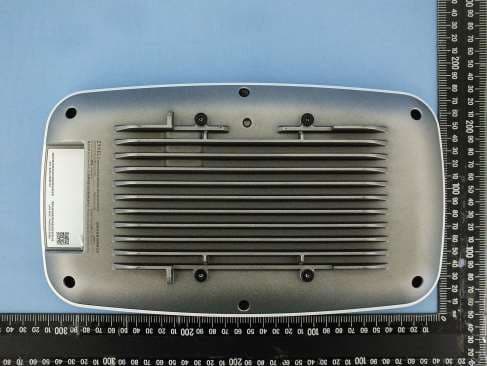
I8803935
Oct 17, 2023802.11be (WiFi 7) Triple-Radio Unified Pro Access Point
Equipment Class
DTS - Digital Transmission System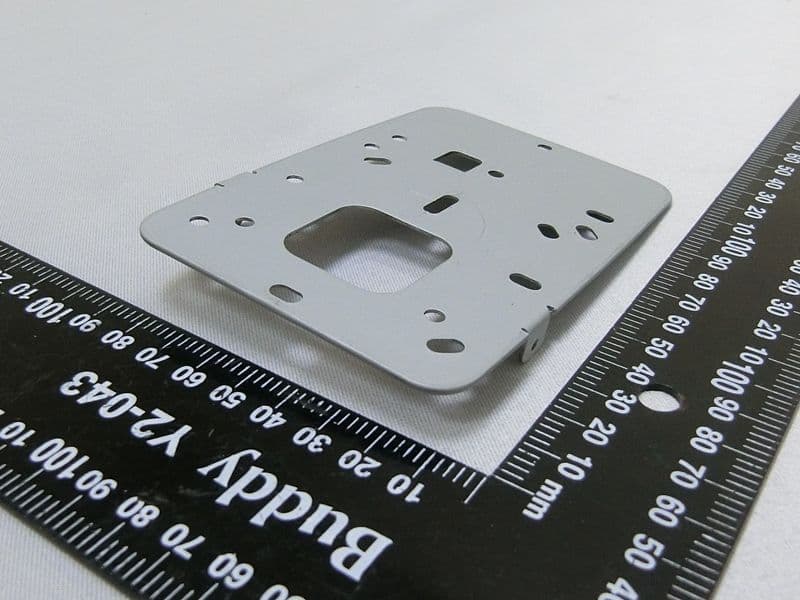
I8803973
Aug 01, 2023802.11ax (WiFi 6) Dual-Radio Wall-Plate Unified Access Point
Equipment Class
NII - Unlicensed National Information Infrastructure TX
I88WX5610-B0
Apr 25, 2023AX7800 WiFi 6E Tri-Band Gigabit Wireless Extender
Equipment Class
DTS - Digital Transmission System
I88EX7710-B0
Apr 16, 2023AX11000 WiFi 6E 10G Ethernet Gateway
Equipment Class
NII - Unlicensed National Information Infrastructure TX