IHDT56NQ2MODEL XT626 UMTS/IDEN TRANSCEIVER WITH BT & WLAN
Motorola Mobility LLC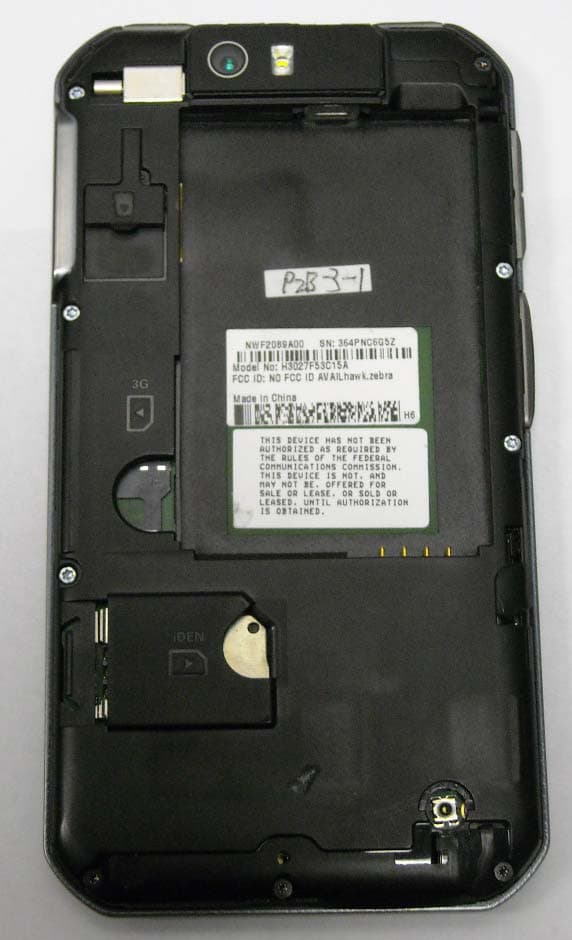
Click to zoom
Application Details
- Equipment Class
- PCE - PCS Licensed Transmitter held to ear
- Date of Grant
- Jun 13, 2012
- Application Purpose
- Original Equipment
- Date of Application
- May 29, 2012
- Equipment Note
- MODEL XT626 UMTS/IDEN TRANSCEIVER WITH BT & WLAN
- Frequency Range
- 806.00000000 - 825.00000000
- Company
- Motorola Mobility LLC
- Country
- United States
Documents & Files
Document Text
Text extracted from the exhibit documents filed with the FCC. Open a document above to read the original.
Users Manual
MOTOROLA XT626 EN 05/21/2012 FCC 05/21/2012 FCC 1 Congratulations CongratulationsMOTOROLA XT626Stay connected, organize your life, and absolutely own the web with the MOTOROLA XT626.• Dual mode. Never worry about network coverage. With GSM/UMTS and iDEN network support, you’ll always be connected in your carrier’s service area. • Push-to-talk calls. Keep in touch with your family, friends, and colleagues with the touch of a button. • Organization. Check your email, calendar, and contacts wherever you are. •Browsing. Get more from the web with a huge screen. Search, browse, everything you want to do, all made easier. • Maps, entertainment, and more. The latest technology and apps. Google Maps™ to find your way. YouTube™ to stay entertained. Easy access to Google™ and thousands of Android™ apps. Note: Certain apps and features may not be available in all countries. Caution: Before assembling, charging, or using your phone for the first time, please read the important legal and safety information packaged with your product. This product meets the applicable SAR limits of 1.6 W/kg (FCC & IC) and 2.0 W/kg (ICNIRP). The limits and guidelines include a substantial safety margin designed to assure the safety of all persons, regardless of age and health. The highest SAR values measured for this device are listed in the regulatory information packaged with your product. More•Answers: To u ch > Help Center . • Updates: Smartphone updates, computer software, user guides, online help, and more at www.motorola.com/myxt626 . • Accessories: Find accessories for your smartphone at www.motorola.com/products . 05/21/2012 FCC 2 Your phone Your phonethe important keys & connectorsNote: Your phone might look a little different. Press=Sleep/Wake. Hold=Turn on/off. Speaker Key Home Key Back Key Menu Key Micro USB ConnectorCharge or connect to PC. Volume Keys Search Key Direct Connect Button Power/Screen LockKey 3.5mm Headset Jack HDMI Connector Front Camera ContentsLet’s go . . . . . . . . . . . . . . . . . . . . . . . . . . . . . . . . . . . . . . . . . . . . . . . . . . 3Touchscreen & keys . . . . . . . . . . . . . . . . . . . . . . . . . . . . . . . . . . . . . . 4Home screen & apps . . . . . . . . . . . . . . . . . . . . . . . . . . . . . . . . . . . . . . 6Calls . . . . . . . . . . . . . . . . . . . . . . . . . . . . . . . . . . . . . . . . . . . . . . . . . . . . . 9Push-to-talk (PTT). . . . . . . . . . . . . . . . . . . . . . . . . . . . . . . . . . . . . . . 12Contacts . . . . . . . . . . . . . . . . . . . . . . . . . . . . . . . . . . . . . . . . . . . . . . . . 16Messaging. . . . . . . . . . . . . . . . . . . . . . . . . . . . . . . . . . . . . . . . . . . . . . . 20Text entry . . . . . . . . . . . . . . . . . . . . . . . . . . . . . . . . . . . . . . . . . . . . . . 22Tips & tricks. . . . . . . . . . . . . . . . . . . . . . . . . . . . . . . . . . . . . . . . . . . . . 24Photos & videos . . . . . . . . . . . . . . . . . . . . . . . . . . . . . . . . . . . . . . . . . 25Music . . . . . . . . . . . . . . . . . . . . . . . . . . . . . . . . . . . . . . . . . . . . . . . . . . . 30Social networking . . . . . . . . . . . . . . . . . . . . . . . . . . . . . . . . . . . . . . 36Web . . . . . . . . . . . . . . . . . . . . . . . . . . . . . . . . . . . . . . . . . . . . . . . . . . . . . 37Personalize. . . . . . . . . . . . . . . . . . . . . . . . . . . . . . . . . . . . . . . . . . . . . 39Location . . . . . . . . . . . . . . . . . . . . . . . . . . . . . . . . . . . . . . . . . . . . . . . . 41Apps for all. . . . . . . . . . . . . . . . . . . . . . . . . . . . . . . . . . . . . . . . . . . . . 43Bluetooth™ wireless. . . . . . . . . . . . . . . . . . . . . . . . . . . . . . . . . . . . 44Wi-Fi . . . . . . . . . . . . . . . . . . . . . . . . . . . . . . . . . . . . . . . . . . . . . . . . . . . . 46Memory card & file management . . . . . . . . . . . . . . . . . . . . . . . . 48Tools . . . . . . . . . . . . . . . . . . . . . . . . . . . . . . . . . . . . . . . . . . . . . . . . . . . 51Management . . . . . . . . . . . . . . . . . . . . . . . . . . . . . . . . . . . . . . . . . . . . 56Security . . . . . . . . . . . . . . . . . . . . . . . . . . . . . . . . . . . . . . . . . . . . . . . . 57Troubleshooting . . . . . . . . . . . . . . . . . . . . . . . . . . . . . . . . . . . . . . . 60Safety, Regulatory & Legal. . . . . . . . . . . . . . . . . . . . . . . . . . . . . . 61 05/21/2012 FCC 3 Let’s go Let’s golet’s get you up and runningAssemble & chargeCaution: Please read “ Battery Use & Safety ” on page 61. 6 Charge 1 Cover off 2 m icroSD in 3 SIM in 5 Cover on Battery inB 4 3H SIM m icroSIM m icroSIM + Adapter i DEN SIM 3G SIM Tip: To save battery life, see “ Battery tips ” on page 25. Set up & goNote: This phone supports apps and services that use a lot of data, so make sure your data plan meets your needs. Contact your service provider for details.Note: If you have a Gmail™ account, your contacts from that account are synced to your phone. 1 Turn on. 2 Select a language. 3 Create account,or log in. Kim Vonesh Welcome Touch the android to begin. Emergency dial Change language Set up your Google Account 4 Add accounts. Don’t have a Google Account?Already have a Google Account? Want to set up an account later? Create Sign in Skip If you use any of the services below, tap the icon to set it up. Visual Voice Mail Email Accounts Google Backup Assistant+ Contacts MotoCast ID Corporate Sync Set Up Accounts 05/21/2012 FCC 4 Touchscreen & keys Wi-Fi connectIf you want to use a Wi-Fi network for even faster Internet access, touch Apps > Settings > Wireless & networks > Wi-Fi settings . Touch Wi-Fi to search for and connect to wireless networks. There’s more in “ Wi-Fi ” on page 46. Cool content & moreBrowse and download thousands of the coolest apps on the planet from Google Play™ Store. See “ Browse & install apps ” on page 43. Your phone can use a microSD memory card (sold separately)—you can load it up with photos, v…
Text truncated - open the document above for the full version.
Users Manual
3 4 Music Hide, wake, turn offTouch Home to use another app. Your music continues to play.When you see in the status bar, a song is playing. Flick down to see details. Touch the song to return to the music controls.To turn off your music, touch . PlaylistsTo add a song from the music library to a playlist, touch and hold the song then touch Add to playlist . Choose an existing playlist, or touch Create playlist to create one. To edit, delete and rename playlists, touch and hold the playlist in the music library. PodcastsFind it: Apps > Music > Podcasts Listen to podcasts 1 Select a category, and select a podcast or search through subcategories to find the podcast you want. 2 To play a podcast episode, touch it. Subscribe to a PodcastTo subscribe to a podcast, touch it to open it, and touch the star in the upper right corner. Download a podcast episodeTo download a podcast episode, open it, and touch Menu > Download . Internet RadioFind it: Apps > Music > Internet radio Pl a y/P a use F a vor i tes Cre a te Pl a yl i st Art i st Inform a t i on Add to F a vor i tes 05/21/2012 FCC 35 Music Listen to a Station 1 Select a category, and select a station or search through subcategories to find the station you want. 2 To begin listening to a station, touch it. Favorite stationsTo add a station to Favorite stations , touch a station to open it, then touch the star in the upper right screen corner. FM RadioFind it: Apps > Music > FM radio Note: You need to connect a wired headset to your phone to use the FM radio. The wires in your headset act as the antenna. For best performance, use a Motorola Original headset. Indoor reception may vary.Find a stationTo tune into a station, drag your finger across the dial. Favorites 1 .5 103.5 KCZU K 0 Favorites Favorites FavoritesFavorites 1.5 KCZU K 0 103.5 1 0 8 .0 103.5 KCZU K 0 Touch start to add station to favorites.Drag finger across dial to tune station.Pl a y/Sto p R a d i o Seek Prev i ous/Next 05/21/2012 FCC 36 Social networking Station PresetsThe first time you use the FM radio, your phone will prompt you to scan for radio stations. All stations found are added to your presets.To add a station to your presets, touch the star in the upper right corner of the station listing.set FM radio regionTo set your phone’s FM tuner to your region, touch Apps > Music > Menu > Settings > FM radio region . Social networkingmy life, your lifeYour social networking accountIntegrate and sync all your contacts, emails, and social networking sites. No opening and closing apps and menus. Just touch the Social Networking and Social Status widgets on your home screen. Tip: Use the gallery to view all of your and your friends’ online albums. Touch Apps > Gallery . Add accountsYou can add your Facebook and Twitter , or other accounts. If you don’t have accounts on these sites, visit their web sites to set them up.To set up email accounts, see “ Set up messaging ” on page 21.Find it: Apps > Accounts > Add account Add an account by touching it. Then enter your user name and password for that account.When you sign into social networking accounts, you’ll see your friends and contacts in your Contacts list, and your status and updates can appear in your Social Networking widget. Account Manager 05/21/2012 FCC 37 Web Twitter messages will appear as “read” on your phone, but your phone notifies you when you receive a new message. MySpace marks your messages as “read” online.Tip: To download updates faster, use “ Wi-Fi ” on page 46.Edit & delete accountsFind it: Apps > Accounts Touch and hold an account, then touch Open account to edit it, or touch Remove account to remove it (along with its contacts and messages).Note: You can’t delete the Google™ account you used or created when you set up your phone. Account Manager Websurf the web with your phoneQuick start: BrowserFind it: Apps > Browser Tip: To zoom, touch the display with two fingers, then move them apart. h tt p :// w ww . Sign in Settings iGoogle Help Turn on Instant (beta) is off: Restaurants Coffee Bars More http://www.google.com/... Web Images Places News more Forward Refresh Windows New window Bookmarks More Touch a link to select it. Touch & hold for m ore options. Touch Menu forbrowser options. 05/21/2012 FCC 38 Web ConnectYour phone uses the mobile phone network (over the air) or a Wi-Fi connection to automatically access the web.Note: Your service provider may charge to surf the Web or download data.To use a wireless network, touch Apps > Settings > Wireless & networks . Touch Wi-Fi to turn it on and touch Wi-Fi settings to search for nearby wireless networks. Touch a network to connect. Note: If you can’t connect, contact your service provider. Play web videosThe browser features the Adobe™ Flash™ Player, which adds animation, video, and interactivity to web pages. Touch to begin video playback. Double-tap the video during playback to enlarge it for better viewing. Browser optionsTouch Menu to see browser options: Options New Window Open a new browser window. Bookmarks See your bookmarks. YouTube™Share videos with YouTube users everywhere. You don’t need a YouTube account to browse and view videos.Find it: Apps > YouTube Note: If you want a YouTube account, go to www.youtube.com . To create an account or sign in, touch Menu > My account . To Browse or Upload videos, touch Menu . Windows View the browser windows that are currently open. Refresh Reload the current page. Back/Forward Go to previously viewed pages. More View additional browser options. Options 05/21/2012 FCC 39 Personalize Personalizeadd your personal touchWidgetsAdd widgets 1 Touch and hold an empty spot on your home screen.Tip: Flick left or right to open other panels. 2 Touch Widgets and choose a widget. Set up widgetsYou can customize some widgets. Touch a widget to open it, then touch Menu . Your home screen may already have these widgets:• Messages : Change the widget name or choose how long it shows new messages. To add email accounts, “ Set u…
Text truncated - open the document above for the full version.
Attestation Statements
APPLICANT: MOTOROLA MOBILITY, INC. FCC ID: IHDT56NQ2 Motorola Mobility, Inc.; 8000 W. Sunrise Blvd, Suite A; Plantation, FL 33322, USA www.motorola.com Page 2 - 1 Exhibit 2. Statements of Certification -- Pursuant to 47 CFR 2.907 2.1. Specification Compliance Transceiver type described herein (IHDT56NQ2) has been tested in accordance with the requirements contained in the appropriate Commission regulations. To the best of my knowledge, these tests were performed using measurement procedures consistent with industry or Commission standards, and demonstrate that this equipment complies with the appropriate standards. Each unit manufactured, imported, or marketed will conform to the samples tested herein, within the statistical variations that can be expected due to high volume production and test measurement error. NAME: Ray Ponce SIGNATURE: /s/ Ray Ponce DATE: 21 May 2012 TITLE: Principle Staff Engineer 2.2. Statement of Certification I hereby certify that the above application was prepared under my direction and that to the best of my knowledge and belief, the facts set forth in this application and accompanying technical data are true and correct. The technical data supplied with this application was taken under my supervision and is hereby duly certified. I also certify that this transmit equipment (IHDT56NQ2) is in compliance with all applicable parts of the FCC Rules. NAME: John Lewczak SIGNATURE: DATE: 21 May 2012 TITLE: Engineering Manager, Product Safety and Compliance APPLICANT: MOTOROLA MOBILITY, INC. FCC ID: IHDT56NQ2 Motorola Mobility, Inc.; 8000 W. Sunrise Blvd, Suite A; Plantation, FL 33322, USA www.motorola.com Page 2 - 2 2.3. Attestation Statement (Equipment Class DTS and DSS - Bluetooth/Wi-Fi) This device contains an embedded Bluetooth device, Wi-Fi device, and MOTOtalk capabilities that Motorola Mobility confirms are compliant with the applicable Part 15C regulations. Personal Hotspot operation is only supported in the 2.4 GHz band. 15.247(a)(1) • The hopping sequence must be pseudorandom. • All Channels are used equally on average. • The receiver input bandwidth is approximately equal to the transmit bandwidth. • The receiver hops in sequence with the transmitted signal. 15.247(g) The system is designed to comply with all of the regulations in Section 15.247 when the transmitter is presented with a continuous data (or information). 15.247(h) The system does not coordinate its channel selection/hopping sequence with other frequency hopping systems for the express purpose of avoiding the simultaneous occupancy of individual hopping frequencies by multiple transmitters. NAME: Ray Ponce SIGNATURE: /s/ Ray Ponce DATE: 21 May 2012 TITLE: Principle Staff Engineer APPLICANT: MOTOROLA MOBILITY, INC. FCC ID: IHDT56NQ2 Motorola Mobility, Inc.; 8000 W. Sunrise Blvd, Suite A; Plantation, FL 33322, USA www.motorola.com Page 2 - 3 2.4. Attestation Statement (Equipment Class PCE – GSM 1900 MHz, WCDMA 1700/1900 MHz, iDEN 800 MHz - Hearing Aid Compatibility) Motorola Mobility hereby declares that typical production units were evaluated for Hearing Aid Compatibility (HAC) compliance. Features List: Model – Motorola XT626 GSM WCDMA iDEN Wi-Fi (b/g) Bluetooth (Stereo) Location-Based Services Voice Commands Talking Phone Photo Camera Video Camera Video Player Hands Free Speaker Phone Music Player HTML Browser Text Messaging NAME: Ray Ponce SIGNATURE: /s/ Ray Ponce DATE: 21 May 2012 TITLE: Principle Staff Engineer 2.5. Attestation Statement Regarding Power Reductions for SAR Compliance. Motorola Mobility hereby declares that the subject device of this application implements the following power reductions for the purposes of maintaining SAR compliance when operating in the mobile hot spot mode: Operating Mode Power Reduction (dB) GSM UMTS Mobile Hotspot – Part 27C (1700 MHz) 0.0 3.0 Mobile Hotspot – Part 24E (1900 MHz) 0.0 3.0 Mobile Hotspot – GSM/WCDMA + Wi-Fi 6.0 NAME: Ray Ponce SIGNATURE: /s/ Ray Ponce DATE: 8 June 2012 TITLE: Principle Staff Engineer
Cover Letter(s)
APPLICANT: MOTOROLA MOBILITY, INC. FCC ID: IHDT56NQ2 Motorola Mobility, Inc.; 8000 W. Sunrise Blvd, Suite A; Plantation, FL 33322, USA www.motorola.com Page 7A - 1 Exhibit 12A. KDB Publication and Inquiry Registry Applicable to this Application. 12.1 Registry of KDB Publications Applied to this Application. APPLICANT: MOTOROLA MOBILITY, INC. FCC ID: IHDT56NQ2 Motorola Mobility, Inc.; 8000 W. Sunrise Blvd, Suite A; Plantation, FL 33322, USA www.motorola.com Page 7A - 2 12A.1 Registry of KDB Publications Applied to this Application 12A.1.1 Applicable KDB Publications The following KDB Publications were applied in the collection of test data, and the generation of test reports and other exhibits comprising this application: KDB Publication Title KDB 248227 D01, v 01r02 SAR Measurement Procedures for 802.11 a/b/g Transmitters KDB 388624 D01, v09r01 Permit But Ask Procedure. KDB 388624 D02, v10 Permit But Ask List. KDB 450824 D01, v01r01 SAR Probe Calibration and System Verification Considerations for Measurements at 150 MHz – 3 GHz. KDB 450824 D02, v01 Dipole Requirements for SAR System Validation and Verification. KDB 558074 D01, v01 Guidance for Performing Compliance Measurements on Digital Transmission Systems (DTS) Operating Under §15.247. KDB 594280 D01, v01r01 Restrictions on Software Configuration for devices not approved as Software Defined Radios. KDB 628591 D01, v12r02 TCB Exclusion List. KDB 648474 D01, v01r05 SAR Evaluation Considerations for Handsets with Multiple Transmitters and Antennas. KDB 648474 D02, v01r01 Review and Approval Policies for SAR Evaluation of Handsets with Multiple Transmitters and Antennas. KDB 784748 D01, v07 Guidelines for Labeling and User Information for Devices Subject to Part 15 and Part 18. KDB 865664, Rev 1.1 SAR Measurement Requirements for 3 – 6 GHz. KDB 941225 D01, v02 SAR Tests for 3G Devices. KDB 941225 D02, v02v01 3GPP R6 HSPA and R7 HSPA+ SAR Guidance. KDB 941225 D03, v01 Recommended SAR Test Reduction Procedures for GSM/GPRS/EDGE. KDB 941225 D04, v01 Evaluating SAR for GSM/(E)GPRS Dual Transfer Mode. APPLICANT: MOTOROLA MOBILITY, INC. FCC ID: IHDT56NQ2 Motorola Mobility, Inc.; 8000 W. Sunrise Blvd, Suite A; Plantation, FL 33322, USA www.motorola.com Page 7A - 3 KDB Publication Title KDB 941225 D06, v01 SAR Evaluation Procedures for Portable Devices with Wireless Router Capabilities. KDB 971168 D01, v01 Procedures for Compliance Measurement of the Fundamental Emission Power of Licensed Wideband (> 1 MHz) Digital Transmission Systems. 12A.1.2 Variations and/or Exceptions to the Procedures in the Published KDBs. Motorola Mobility has taken no liberties with respect to the procedures published in the above KDB documents. We claim full compliance with these procedures.
Cover Letter(s)
APPLICANT: MOTOROLA MOBILITY, INC. FCC ID: IHDT56NQ2 Motorola Mobility, Inc.; 8000 W. Sunrise Blvd, Suite A; Plantation, FL 33322, USA www.motorola.com 11 April 2012 Authorization & Evaluation Division Federal Communications Commission Laboratory 7435 Oakland Mills Road Columbia, MD 21046 Subject: Application for Certification of transmitter with FCC ID: IHDT56NQ2, XT626-Series PCS Handsets, with Wi-Fi and Bluetooth. Gentlemen; Motorola Mobility, Inc.; 8000 W. Sunrise Blvd.; Plantation, FL 33322 herein submits its application for certification of the multi-mode handset with FCC ID: IHDT56NQ2. The primary transceiver in this composite device operates in the 1700 MHz Advanced Wireless Service, and the 1900 MHz Personal Communications Service (PCS). It supports GSM signaling, and employs GPRS Class 12 and EDGE Class 12 capabilities. This transceiver also operates in the WCDMA mode in these bands. Note: This device also contains functions, and operates within frequency bands, that are not authorized within the United States or its territories. This filing is only applicable to supported US operations. This device also incorporates iDEN signaling capabilities, featuring a variable output power (0.22 to 640 milliwatts) transmitter that is part of a handheld transceiver used in SMR and EA SMR trunking systems operating within the United States 806-821/851-866 MHz frequency band. To facilitate global roaming it is kindly requested that the grant for Part 90 800 MHz SMR operation reflects an extended frequency range (806 – 825 MHz) beyond that permitted under that part. Pursuant the guidance provide in KDB 634817 D01 (Freq Range Listing for Grants, v02r01), this application qualifies under the requirements of paragraph (d)(iii): use in other countries. This product will be distributed to operators in ITU Region 1 (Middle East), Region 2 (South America), and Region 3 (Asia) in countries that accept a United States FCC Grant for Equipment Authorization. This product is of the ‘receive first’ type of equipment, which can only transmit on frequencies assigned to it by a compatible Authorized Base Station. Therefore, no unauthorized transmission can occur within the United States or its territories, thus the product will not jeopardize United States public safety or other services licensed to operate in the 821-825 MHz frequency band, as no compatible base station may be authorized for those frequencies in the United States. Page 13a - 1 APPLICANT: MOTOROLA MOBILITY, INC. FCC ID: IHDT56NQ2 Motorola Mobility, Inc.; 8000 W. Sunrise Blvd, Suite A; Plantation, FL 33322, USA www.motorola.com This radio product is also equipped with a Wi-Fi (802.11b/g/n) transceiver. Wi-Fi supports both voice and data for short range wireless communications. The Wi-Fi Band of Operation is 2.412 - 2.462 GHz. The Wi-Fi device complies 15.247 (c), 15.205 and 15.209 (b). This radio product is equipped with a Bluetooth (BT) transceiver. BT supports both voice and data for short range wireless communications. The Bluetooth Band of Operation is 2.4 - 2.4835 GHz (1 MHz channel bandwidth). The BT device complies with the requirements of FCC Rule Parts 15.247 (c), 15.205 and 15.209 (b). All transmitters contained in this radio product have been subjected to routine environmental evaluation (as applicable) according to 47 CFR Part 2.1093 (c) for RF exposure and found to be compliant with the limits specified in 47 CFR 2.1093(d)(2). This radio product features integrated GPS and FM broadcast receivers, and is designed to function as a computer peripheral device when functioning as an RF modem, while connected to a computer via a data cable, as described in 47 CFR Part 15.3(r). A Part 15B test report is included for certification. Enclosed is a complete Certification Application. Contact me at (954) 723-6272 if you require any additional information. Regards, FCC Liaison Motorola Mobility, Inc. 8000 W. Sunrise Blvd.; Suite A Mail Stop 52-5JJ Plantation, FL 33322 E-mail: [email protected] Page 13a - 2
Cover Letter(s)
FCC ID: IHDT56NQ2 Motorola Mobility, Inc.; 8000 W. Sunrise Blvd, Suite A; Plantation, FL 33322, USA www.motorola.com Page 13b - 1 CONFIDENTIALITY REQUEST 16 April 2012 Federal Communications Commission Laboratory Authorization & Evaluation Division 7435 Oakland Mills Road Columbia, MD 21046 Subject: Confidentiality Request Regarding Application for Certification of FCC ID: IHDT56NQ2. Dear Sir or Madam: Pursuant to Sections 0.457 and 0.459 of the Commission’s Rules, we hereby respectfully request confidential treatment of information accompanying this application as outlined below: Exhibit Type File Name Block Diagrams. IHDT56NQ2_Ex_04 (Block Diagrams).pdf Schematic Diagrams. IHDT56NQ2_Ex_05 (Schematic Diagrams).pdf Parts List and Tune Up Procedures. IHDT56NQ2_Ex_10 (Active Components).pdf Transmitter Characteristics. IHDT56NQ2_Ex_12 (TX Characteristics).pdf Motorola Mobility, Inc. requests that these exhibits be held as Permanently Confidential, and not be made routinely available for public inspection. Motorola considers that the information in these exhibits should be classified as trade secrets, pursuant to 47 CFR Section 0.457(d) and Section 552(b)(4) of the Freedom of Information Act. The public disclosure of these materials may be harmful to the applicant and provide unjustified benefits to its competitors. Motorola Mobility, Inc. understands that, pursuant to Section 0.457 of the Rules, disclosure of this application and all accompanying documentation will not be made before the date of the Grant for this application. FCC ID: IHDT56NQ2 Motorola Mobility, Inc.; 8000 W. Sunrise Blvd, Suite A; Plantation, FL 33322, USA www.motorola.com SHORT TERM ONFIDENTIALITY REQUEST – 180 DAYS Pursuant to the Commission’s public notice DA 04-1705 (June 15, 2004), Motorola Mobility, Inc. is also requesting Temporary Confidentiality treatment of information accompanying this application as outlined below. This provision will give Motorola Mobility, Inc. temporary confidentiality prior to product launch. Exhibit Type File Name External product photographs. IHDT56NQ2_Ex_03 (External_Photos).pdf Test set-up photographs. IHDT56NQ2_Ex_07b (SAR Test Set- up_Details).pdf IHDT56NQ2_Ex_07d (HAC Test Set- up_Details).pdf IHDT56NQ2_Ex_07c (Part 15 Test Set- up_Details).pdf User’s Manual. IHDT56NQ2_Ex_08 (User Guide).pdf Internal product photographs. IHDT56NQ2_Ex_09 (Internal Photos).pdf Please contact me if you require any additional information. Regards, FCC Liaison Motorola Mobility, Inc. 8000 W. Sunrise Blvd.; Suite A Mail Stop 52-5JJ Plantation, FL 33322 E-mail: [email protected] Page 13b - 2
External Photos
APPLICANT: MOTOROLA MOBILITY, INC. FCC ID: IHDT56NQ2 Temporary Confidentiality Requested Motorola Mobility, Inc.; 8000 W. Sunrise Blvd, Suite A; Plantation, FL 33322, USA www.motorola.com Exhibit 3. External Photographs -- Pursuant to 47 CFR 2.1033(c)(12) The radio product shapes, colors and housings/bezels may vary. Figure 3-1. Front of device Figure 3-2. Back of device Page 3 - 1 APPLICANT: MOTOROLA MOBILITY, INC. FCC ID: IHDT56NQ2 Temporary Confidentiality Requested Motorola Mobility, Inc.; 8000 W. Sunrise Blvd, Suite A; Plantation, FL 33322, USA www.motorola.com Figure 3-2. Button Side of device Figure 3-3. Opposite Side of device Page 3 - 2 APPLICANT: MOTOROLA MOBILITY, INC. FCC ID: IHDT56NQ2 Temporary Confidentiality Requested Motorola Mobility, Inc.; 8000 W. Sunrise Blvd, Suite A; Plantation, FL 33322, USA www.motorola.com Figure 3-4. Top of radio Figure 3-5. Bottom of radio Page 3 - 3 APPLICANT: MOTOROLA MOBILITY, INC. FCC ID: IHDT56NQ2 Temporary Confidentiality Requested Motorola Mobility, Inc.; 8000 W. Sunrise Blvd, Suite A; Plantation, FL 33322, USA www.motorola.com Figure 3-6. Interior Compartment of radio FCC Label Location. See Exhibit 1 for details. Page 3 - 4
ID Label/Location Info
APPLICANT: MOTOROLA MOBILITY LLC FCC ID: IHDT56NQ2 Motorola Mobility LLC; 222 W. Merchandise Mart Plaza; Chicago, IL 60654, USA www.motorola.com Pag e 1 - 1 Exhibit 1: Identification Label -- Pursuant to 47 CFR 2.925 and 2.1033(c)(11) 1.1 Location On the rear (back) side of the radio product chassis, beneath the battery (see also Exhibit 3). 1.2 Type The label is of a white polyester film laminate with a pressure sensitive adhesive backing. The adhesive is a permanent type acrylic with minimum peel strength of 5 lbs/in. 1.3 Markings (Text) The FCC label shown is representative of the label that will appear on the radio when in production. Figure 1.3.1. Representation of FCC Label information. The above label representation is applicable to the following versions/variants of the device that is the subject of this application: Model Number 1 XT626, XT627 1 Depending upon the device version, or market into which it ships, the Model Number shown on the label may vary. All such variants will be electrically identical, consistent with the requirements of FCC Class I Permissive Change rules and guidance (47 CFR 2.1043 and KDB 178919 D01). This label will be placed on the equipment (within the Battery Compartment) as shown below. Other information may also be included on this label, and other labels may also be present. FCC ID IHDT56NQ2 Model No. XT626 APPLICANT: MOTOROLA MOBILITY LLC FCC ID: IHDT56NQ2 Motorola Mobility LLC; 222 W. Merchandise Mart Plaza; Chicago, IL 60654, USA www.motorola.com Pag e 1 - 2 Figure 1.3.2. Location of FCC Label (position, orientation, and other information shown may vary). Please note that this label and its placement complies with the requirement of FCC Rule 47 CFR 2.925(d) that the label be permanently affixed to the product, and be readily visible to the purchaser at the time of purchase. Further, at the time of purchase, batteries are shipped in a separate section or compartment of the radio packaging, and are not attached to the radio. In some instances they may be shipped in separate boxes. So, the end user needs to physically install the battery by removing the battery cover, if any, or attach the battery before using the radio. Further, the placement of the label in the battery compartment is done because space is limited on the exterior of the device. The battery compartment also helps to protect the label from getting obliterated or made unreadable through regular handling and use. The product’s Market or Trade Name is indelibly printed on the face of the product, as shown in Exhibit 3. Interior Battery Compartment FCC Label Back of Device APPLICANT: MOTOROLA MOBILITY LLC FCC ID: IHDT56NQ2 Motorola Mobility LLC; 222 W. Merchandise Mart Plaza; Chicago, IL 60654, USA www.motorola.com Pag e 1 - 3 Exhibit 1A: General Information 1A.1 Production Plans Quantity production is planned. 1A.2 Data Submittal Procedure The information in this application is provided in accordance with requirements for certification as outlined in the FCC Rules and Regulations: 47 CFR Part 2; Subpart J; Part 15, Subparts B and C; Part 24 Subparts B and E; Part 27, Subpart C; and Part 90 Subparts I and S. 1A.3 Similar, currently Certified Transceiver FCC ID: IHDT56MP1 1A.4 Additional Considerations In addition to the radio receivers associated with the services authorized within this application, this …
Text truncated - open the document above for the full version.
Contact Information
Applicant
Jeff Narducci(Director Product Compliance)
Test Firm
Motorola Inc.Albert Patapack
Technical Specifications
| # | Rule Parts | Frequency Range | Power Output | Emission | Tolerance |
|---|---|---|---|---|---|
| 5 | 9 | 806 MHz - 825 MHz | 640.00 mW | 18K3D7W | 1.9 ppm |
Other Applications from Motorola Mobility LLC
IHDT56AW9
May 12, 2026Smart Watch
Equipment Class
NII - Unlicensed National Information Infrastructure TXIHDT56AW5
Apr 08, 2026Mobile Cellular Phone
Equipment Class
DTS - Digital Transmission SystemIHDT56AW6
Mar 18, 2026Smart Watch
Equipment Class
JBP - Part 15 Class B Computing Device PeripheralIHDT56AX4
Mar 17, 2026Mobile Cellular Phone
Equipment Class
PCE - PCS Licensed Transmitter held to earIHDT56AW3
Mar 03, 2026Mobile Cellular Phone
Equipment Class
6XD - 15E 6 GHz Low Power Indoor Client