IHDT56ZF3Mobile Cellular Phone
Motorola Mobility LLC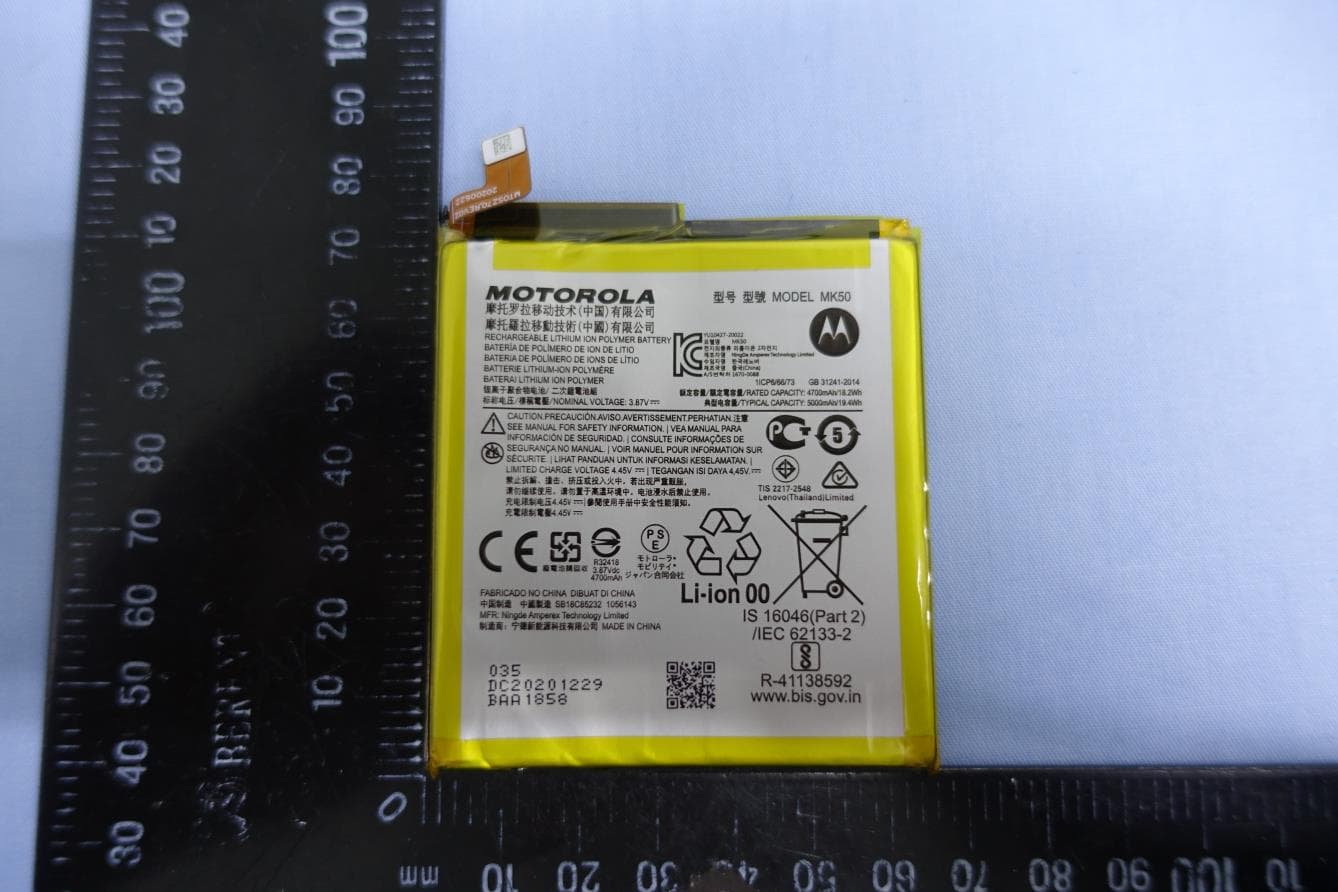
Click to zoom
Application Details
- Equipment Class
- DXX - Part 15 Low Power Communication Device Transmitter
- Date of Grant
- Jun 02, 2021
- Application Purpose
- Original Equipment
- Date of Application
- May 12, 2021
- Equipment Note
- Mobile Cellular Phone
- Frequency Range
- 13.56000000 - 13.56000000
- Company
- Motorola Mobility LLC
- Country
- United States
Documents & Files
Document Text
Text extracted from the exhibit documents filed with the FCC. Open a document above to read the original.
Users Manual
1 en-US Legal, safety, and regulatory Legal information. This guide provides important legal, safety, and regulatory information that you should read before using your product. For the complete legal information, from the home screen swipe up and tap Settings > , then type Legal information, or visit www.motorola.com/device-legal. Water repellent. Your phone is not waterproof. For more about your phone’s water-repellent design and care, see the user guide. Regulatory information (e-label). To view regulatory information for this phone, from the home screen swipe up and tap Settings > , then type Regulatory, or visit www.motorola.com/device-legal. Battery safety. Your phone uses a removable battery. Don’t use tools, sharp objects, or excessive force to insert or remove the battery. This may damage the battery and could cause burning and injury. Battery safety. To prevent possible burning and injury, the battery in your phone should only be removed by a Motorola-approved service center or similar skilled personnel. If your phone becomes unresponsive, press and hold the Power button until the screen goes dark and your phone restarts. Charge your phone using a compatible Motorola charger. Use of other chargers is not recommended. Don’t charge your phone in temperatures below -20°C (-4°F) or above 45°C (113°F). For more, see the “Legal information” section of this guide, or visit www.motorola.com/device-legal. Driving precautions. Responsible and safe driving is your primary responsibility when driving a vehicle. Always obey local laws and regulations. For more, see the “Legal information” section of this guide to find the complete legal information, or visit www.motorola.com/device-legal. Seizures, blackouts, eyestrain & discomfort. This device may display flashing images or loud sounds. For more, see the “Legal information” section of this guide to find the complete legal information, or visit www.motorola.com/device-legal. Medical devices. This device may interfere with pacemakers and other medical devices. For more, see the “Legal information” section of this guide to find the complete legal information, or visit www.motorola.com/device-legal. Class 1 Laser. This device is classified as a Class 1 Laser product, which is safe in normal use per IEC60825-1:2007 and IEC60825-1:2014. This device complies with 21 CFR 1040.10 and 1040.11, except for deviations pursuant to Laser Notice 50, dated June 24, 2007. Do not attempt to modify or disassemble. Extreme heat or cold. Don’t use your phone in temperatures below 2 en-US -20°C (-4°F) or above 45°C (113°F). Don’t store/transport your phone in temperatures below -20°C (-4°F) or above 60°C (140°F). SAR information (on e-label). To view specific absorption rate (SAR) values for t phone, from the home screen swipe up and tap Settings > , then type Regulatory, or visit www.motorola.com/sar. Operational warnings. Obey all local restrictions when using mobile devices in public areas, such as hospitals, airplanes, or schools. • Potentially explosive areas: Potentially explosive areas are often, but not always, posted and can include blasting areas, fueling stations, fueling areas (such as below decks on boats), fuel or chemical transfer or storage facilities, or areas where the air contains chemicals or particles, such as grain dust, or metal powders. Turn off your phone before entering such an area, and do not charge batteries. In such areas, sparks can occur and cause an explosion or fire. • Symbol key: Your charger, phone, battery (if user-removable), phone display, user’s guide, or packaging may contain symbols, defined as follows: Important safety information follows. The package and paper products that came with your phone can be recycled. Don’t dispose of your battery or phone with your household waste. See “Disposal & recycling” for more information. Don’t dispose of your battery or phone in a fire. For indoor use only. Listening at high volume to music or voice through a headset or headphone may damage your hearing. Warning about high volume usage. To prevent possible hearing damage, do not listen at high volume levels for long 3 en-US periods. Disposal & recycling. For help recycling products and packaging responsibly, go to www.motorola.com/recycling. Usage. This phone supports apps and services that could use a lot of data, so make sure your data plan meets your needs. Contact your service provider for details. Certain apps and features may not be available in all countries. Warranty. This product is covered by Motorola’s limited warranty. o review the warranty on your phone, swipe up and tap Settings > , then type Legal information, or visit www.motorola.com/device-legal. You may also obtain a copy of the warranty by contacting Motorola at: Motorola Mobility LLC, Attention Customer Service—Warranty Request, 222 West Merchandise Mart Plaza, Suite 1800, Chicago, IL 60654. Arbitration & opt-out. Except where prohibited by law, any controversy or claim arising out of or relating to any Motorola product will be resolved by binding arbitration, instead of in court, unless you opt-out. To opt-out, send a written rejection notice within 30 days of purchase that includes your name, address, phone number, phone, and phone serial number, and tells Motorola that you are rejecting this Arbitration provision to: Motorola Mobility LLC, 222 West Merchandise Mart Plaza, Suite 1800, Attn: Arbitration Provision Opt-Out, Chicago, IL 60654 or [email protected]. To locate your phone’s serial (IMEI) number, from the home screen swipe up and tap Settings > , then type IMEI. For more information on this arbitration provision, on your phone, swipe up and tap Settings > , then type Legal information, or visit www.motorola.com/device-legal. Legal disclaimers. Features, services and applications are network dependent and may not be available in all areas; additional terms/ charges may apply. Features, functionality, and other product specifications, as well as the i…
Text truncated - open the document above for the full version.
Users Manual
FlashMacro Camera Main Camera Ultra-wide Camera SIM & microSD Card Tray Volume Buttons Front Camera Headset Jack Power/ Lock Button Fingerprint Sensor About your phone Have questions about your Prepaid phone? You’re in the right place. Find out how to set up and use your phone, access special features, get help and lots more. We’re here to help. NOTE: Devices and software are constantly evolving—the screen images and icon you see here are for reference only. About your phone Your phone already has a SIM card installed. For an optimal wireless experience, use the SIM installed in your new phone. 1. Optional: Insert a SIM card and microSD card. Insert the SIM tool into the tray hole to pop out the tray. Make sure you use the correct size SIM card and don’t cut the SIM card. Nano SIM Insert the SIM card with the gold contacts down, then gently push the tray into the slot. Add a microSD card for additional storage. SIM NOTE: microSD card is optional, sold separately. 2. Charge the phone Before turning on your phone, charge it fully. USB-C Setting up your phone Insert the small end of the USB cable into the phone. Insert the larger end into the charger and plug it into an outlet. WARNING: Only use approved chargers with your device. Incompatible chargers or tampering with the charger port could damage your device and void the warranty. 3. Turn your phone on/off To turn your phone on, press and hold the Power/Lock button. NOTE: The first time you turn on your phone, you will need to activate it. See the Welcome Guide included with your phone. To turn your phone off, press and hold the Power/Lock button. Locking/unlocking the screen To turn on your screen, press the Power/Lock button. Then swipe up on the screen to unlock it. You can also use the Fingerprint Sensor to unlock the screen. To set up the Fingerprint Sensor, swipe up from the home screen and tap Settings > Security > Fingerprint. To turn off your screen and prevent accidental key presses, press the Power/Lock button. Setting up your phone Setting up your phone Using your phone Touch screen tips Use touch gestures to move around the screen, open menus, select items, zoom in and out of web pages and more. There are several touch gestures recognized by your phone: • Swipe—Swipe by quickly sliding your finger in any direction. • Drag—Drag by touching an item and moving it to a new position. • Double t ap—Double tap to zoom in/out on a web page or picture. • Multi-touch—Pinch or spread your thumb and index finger to zoom in or out. Making a call 1. From the Home Screen, tap Phone . 2. Tap Keypad . 3. Enter the number you want to call or the first letters of the contact’s name and select the contact. 4. Tap Call to place the call. Receiving a call Tap Answer to answer an incoming call. Using your phone Setting up voice mail 1. Dial *86 and tap Call . 2. When you hear a greeting, tap # to interrupt. 3. Follow the setup instructions. Checking voice mail From your phone: 1. Dial *86 and tap Call . 2. Follow the instructions. From other phones: 1. Dial your wireless number. 2. When you hear the greeting, tap # to interrupt. 3. Follow the instructions. NOTE: Voice mailboxes not set up within 45 days will be cancelled. Your voice mailbox is not password protected until you create a password by following the setup tutorial. Voice mail may not be available in some areas. Follow the setup instructions to password-protect your Verizon voice mailbox. Verizon is not responsible for missed messages or deletions of messages from your voice mailbox, even if you have saved them. Services and features Calling features • Domestic Long Distance • Caller ID • Call W aiting • 3-Way Calling • Call F orwarding Text messaging 1. From the Home Screen, tap Messages+ . 2. Compose text message and enter the recipient’s information. 3. Tap . Picture and video messaging Take pictures or videos and send them to almost any email address, or to other phones. 1. From the Home creen, tap Camera to start the camera or video recorder. 2. Capture the picture or video. 3. Tap to share the picture or video. Web browsing From the Home Screen, tap Chrome . Apps and more Play it up with music, ringtones, wallpapers, apps and games. Keep up with Twitter™ and Facebook. We’ve got apps that help you do it all. Data charges may apply. Installing apps From the Home Screen, tap Play Store . Tap the app you want, then tap Install and follow the instructions. Personalize your phone Explore special features designed to save you time and make your day easier. Tap Moto . Verizon Cloud Verizon Cloud offers secure online storage to back up your contacts and sync them with your other cloud-connected devices. To learn more, go to vzw.com/cloud. Services and features International services Keep in touch with family or friends while at home and abroad with our Prepaid International plans. TravelPass Take your domestic talk, text and data allowances with you for a low daily rate. You’re only charged on the days you use your wireless plan abroad. For additional details, including rates, visit vzw.com/prepaidglobal. Location-based services This phone can determine its location, which is useful for services such as navigation, shopping and weather. For your safety, it’s defaulted to acquire your location only when you dial 911. To use location-based services, from the Home Screen, swipe up > Settings > Location. International services Support and more The Help app gives you tips, videos and other information on how to use your phone, including: Making calls Voice mail Sending texts Getting apps Taking photos Accessibility settings: From the Home Screen, swipe up > Settings > Accessibility. From your computer, visit verizon.com/support. Customer service Call 800.922.0204 Twitter @VZWSupport Download a User Guide from verizon.com/support. Support and more Important customer information The services described in this brochure are only for your personal use. They are subject to the Customer Agreement, your…
Text truncated - open the document above for the full version.
Users Manual
motorola.com Protect your phone with MotoCare Protection. To learn more, visit motorola.com/motocare care read me en-US Let’s get started Before using your phone, please read the legal, safety, and regulatory information provided with your product. USB-C®/Charger Volume Buttons Power Button Microphone SIM & microSD Card Tray Speaker Earpiece Front Camera Headset Jack Flash Main Camera Ultra-wide Camera Macro Camera Fingerprint Sensor Put in the cards & power on Your phone already has a SIM card installed. For optimal functionality of your new device, please use the pre-installed SIM card. To insert a microSD card or replace the SIM card, follow these steps: Nano SIM 1 Insert the SIM tool into the hole next to the tray to pop out the tray. Make sure you use the correct size SIM card and don’t cut the SIM card. SIM 2 Insert the SIM card with the gold contacts down, then gently push the tray into the slot. Add a microSD card for additional storage.* 3 Press and hold the Power button, then follow the prompts to get started. *microSD card is optional, sold separately. Your wireless device and third-party services Verizon Wireless is the mobile carrier associated with this wireless device, but many services and features offered through this device are provided by or in conjunction with third parties. Verizon Wireless is not responsible for your use of this device or any non- Verizon Wireless applications, services and products, including any personal information you choose to use, submit or share with others. Specific third-party terms and conditions, terms of use and privacy policies apply. Please review carefully all applicable terms, conditions and policies prior to using this wireless device and any associated application, product or service. Hearing aid compatibility information This phone has been tested and rated for use with hearing aids for some of the wireless technologies that it uses. However, there may be some newer technologies that have not been tested yet for use with hearing aids. It is important to try the different features of this phone thoroughly and in different locations, using your hearing aid or cochlear implant, to determine if you hear any interfering noise. Ask your service provider or the manufacturer of this phone for information on hearing aid compatibility. If you have questions about return or exchange policies, ask your service provider or phone retailer. Learn more The Help app gives you tips, videos and other information on how to use your phone. From your computer, visit verizon.com/support. Download a User Guide from verizon.com/support. Or, call Motorola at 800.734.5870 to order a copy. Manage your account My Verizon Mobile app Manage your account, track your usage, edit account information, pay your bill and more. International travel For features and rates when outside the US, visit verizonwireless.com/international. Customer service Call 800.922.0204 Twitter @VZWSupport Help & more Get answers, updates, and info: • Help is here: From the home screen, swipe up and tap Settings > Help to learn how to use your phone and get support. • Get more: Get software, user guides, and more at www.motorola.com/mymotoone. • Get apps: Tap Play Store to browse and download apps. Legal information. This guide provides important legal, safety, and regulatory information that you should read before using your product. For the complete legal information, from the home screen swipe up and tap Settings > , then type Legal information, or visit www.motorola.com/device-legal. Water repellent. Your phone is not waterproof. For more about your phone’s water-repellent design and care, swipe up and tap Settings > Help. Battery safety. To prevent possible burning and injury, the battery in your phone should only be removed by a Motorola-approved service center or similar skilled personnel. If your phone becomes unresponsive, press and hold the Power button until the screen goes dark and your phone restarts. Charge your phone using a compatible Motorola charger. Use of other chargers is not recommended. Don’t charge your phone in temperatures below -20°C (-4°F) or above 45°C (113°F). For more, see the “Legal information” section of this guide, or visit www.motorola.com/device-legal. Warning about high volume usage. To prevent possible hearing damage, do not listen at high volume levels for long periods. When your headset volume reaches the high volume threshold, a warning shows. Tap OK to dismiss it, or wait one to five seconds, then press the Volume Up button to dismiss the alert and enable the volume to continue to be adjusted. Disposal & recycling. For help recycling products and packaging responsibly, visit www.motorola.com/recycling. Class 1 Laser. This device is classified as a Class 1 Laser product, which is safe in normal use per IEC60825-1:2007 and IEC60825-1:2014. This device complies with 21 CFR 1040.10 and 1040.11, except for deviations pursuant to Laser Notice 50, dated June 24, 2007. Do not attempt to modify or disassemble. Extreme heat or cold. Don’t use your phone in temperatures below -20°C (-4°F) or above 45°C (113°F). Don’t store/transport your phone in temperatures below -20°C (-4°F) or above 60°C (140°F). Legal disclaimers. Features, services and applications are network dependent and may not be available in all areas; additional terms/charges may apply. Product specifications and other information contained in this guide are believed to be accurate at the time of printing. Motorola reserves the right to correct or change any information without notice. Arbitration. Your purchase is governed by a binding arbitration clause. For more information and how to opt-out, see the legal guide that came with your phone. CLASS 1 LASER PRODUCT Copyright & trademarks. MOTOROLA, the stylized M logo, MOTO, and the MOTO family of marks are trademarks or registered trademarks of Motorola Trademark Holdings, LLC. Google, Android, Google Play and other related marks and logos are …
Text truncated - open the document above for the full version.
Cover Letter(s)
Motorola Mobility LLC 222 W. Merchandize Mart Plaza, Chicago Il US www.motorola.com Date: April 30, 2021 Federal Communications Commission Office of Engineering and Technology Laboratory Division 7435 Oakland Mills Rd Columbia MD 21046-1609 Subject: Request for Confidentiality FCC ID: IHDT56ZF3 To Whom It May Concern, Pursuant to the provisions of Sections 0.457 and 0.459 of Commission’s rules (47 CFR §§ 0.457, 0.459), we are requesting confidentiality for exhibits filed with the commission supporting the application of equipment authorization for those items referenced above. Motorola Mobility respectfully requests the Commission to withhold indefinitely from public disclosure the following attachments under Long-Term Confidentiality. ⚫ Schematic Diagrams ⚫ Block Diagrams ⚫ Part List ⚫ Operational Description ⚫ Tune-up Procedure The above listed documents contain detailed system and equipment descriptions that are proprietary and confidential information under Motorola trade secret protection. Public disclosure of above documents would be harmful to our company and would provide competitors an unfair advantage. This information is not made publicly available even after commercial release of the device. In additional to the above mentioned documents, pursuant to Public Notice DA 04-1705 of the Commission’ s policy, in order to comply with the marketing regulations in 47 CFR §2.803 and the importation rules in 47 CFR §2.1204, while ensuring that business sensitive information remains confidential until the actual marketing of newly authorized devices. We request the commission to grant short-term confidentiality request on the following attachments for 180 days after the grant as outlined in Public Notice DA 04-1705. ⚫ External Photos ⚫ Internal Photos ⚫ Test Setup Photos ⚫ User Manual It is our understanding that all measurement test reports, FCC ID label format and correspondence during certification review process cannot be granted as confidential documents and that information will be available for public review once the grant of equipment authorization is issued. Sincerely, Jeff Narducci Director, Global Regulatory Compliance [email protected]
Cover Letter(s)
Motorola Mobility LLC 222 W. Merchandize Mart Plaza, Chicago Il US www.motorola.com Date: April 30, 2021 To whom it may concern, Please be notified that I, Jeff Narducci, have designated Jones Tsai of Sporton International Inc. as the persons being responsible for this project and to sign the form 731 and other documentation. Any and all acts carried out in their professional capacity by Jones Tsai of Sporton International Inc. in connection with all processes required for FCC approval and any communication needed with the national authority, shall have the same legal authority as acts on our own behalf. We further certify that neither the applicant nor any party to this application, as defined in 47 CFR Ch. 1.2002 (b), is subject to a denial to Federal benefits, that include FCC benefits, pursuant to section 5301 of the Anti-Drug Abuse Act of 1998, 21 U.S.C. 862. This authorization is limited to the following product, and shall remain in place until completion of the certification, or until revoked, whichever is earlier: FCC ID: IHDT56ZF3 If you have any acknowledgement and response, please send it to Sporton International Inc. directly. Should you have any questions or comments regarding this matter, please don’t hesitate to contact me. Sincerely yours, Jeff Narducci Director, Global Regulatory Compliance [email protected]
External Photos
Photographs of EUT Report No.: EP082402-06B Brand Name: Motorola / Model Name: XT2113-1, XT2113-1PP Sporton International (KunShan) Inc. Page Number : 1 of 68 TEL : 86-0512-5790-0158 Report Issued Date : May 11, 2021 FAX : 86-0512-5790-0958 Report Version : Rev. 02 FCC ID : IHDT56ZF3 1. External Photograph of EUT Photographs of EUT Report No.: EP082402-06B Brand Name: Motorola / Model Name: XT2113-1, XT2113-1PP Sporton International (KunShan) Inc. Page Number : 2 of 68 TEL : 86-0512-5790-0158 Report Issued Date : May 11, 2021 FAX : 86-0512-5790-0958 Report Version : Rev. 02 FCC ID : IHDT56ZF3 Photographs of EUT Report No.: EP082402-06B Brand Name: Motorola / Model Name: XT2113-1, XT2113-1PP Sporton International (KunShan) Inc. Page Number : 3 of 68 TEL : 86-0512-5790-0158 Report Issued Date : May 11, 2021 FAX : 86-0512-5790-0958 Report Version : Rev. 02 FCC ID : IHDT56ZF3 Photographs of EUT Report No.: EP082402-06B Brand Name: Motorola / Model Name: XT2113-1, XT2113-1PP Sporton International (KunShan) Inc. Page Number : 4 of 68 TEL : 86-0512-5790-0158 Report Issued Date : May 11, 2021 FAX : 86-0512-5790-0958 Report Version : Rev. 02 FCC ID : IHDT56ZF3 Photographs of EUT Report No.: EP082402-06B Brand Name: Motorola / Model Name: XT2113-1, XT2113-1PP Sporton International (KunShan) Inc. Page Number : 5 of 68 TEL : 86-0512-5790-0158 Report Issued Date : May 11, 2021 FAX : 86-0512-5790-0958 Report Version : Rev. 02 FCC ID : IHDT56ZF3 Photographs of EUT Report No.: EP082402-06B Brand Name: Motorola / Model Name: XT2113-1, XT2113-1PP Sporton International (KunShan) Inc. Page Number : 6 of 68 TEL : 86-0512-5790-0158 Report Issued Date : May 11, 2021 FAX : 86-0512-5790-0958 Report Version : Rev. 02 FCC ID : IHDT56ZF3 Photographs of EUT Report No.: EP082402-06B Brand Name: Motorola / Model Name: XT2113-1, XT2113-1PP Sporton International (KunShan) Inc. Page Number : 7 of 68 TEL : 86-0512-5790-0158 Report Issued Date : May 11, 2021 FAX : 86-0512-5790-0958 Report Version : Rev. 02 FCC ID : IHDT56ZF3 List of Accessory: Specification of Accessory AC Adapter Brand Name Motorola (Chenyang) Model Name MC-201 Battery Brand Name Motorola (Amperex) Model Name MK50 USB Cable 1 Brand Name Motorola (Saibao) Model Name SC18C24367 USB Cable 2 Brand Name Motorola (Luxshare) Model Name SC18C24368 USB Cable 3 Brand Name Motorola (I SHENG) Model Name SC18C28955 Remark: For accessories equipped with this EUT, please refer to the following photos. 2. Photograph of Accessory Photographs of EUT Report No.: EP082402-06B Brand Name: Motorola / Model Name: XT2113-1, XT2113-1PP Sporton International (KunShan) Inc. Page Number : 8 of 68 TEL : 86-0512-5790-0158 Report Issued Date : May 11, 2021 FAX : 86-0512-5790-0958 Report Version : Rev. 02 FCC ID : IHDT56ZF3 Photographs of EUT Report No.: EP082402-06B Brand Name: Motorola / Model Name: XT2113-1, XT2113-1PP Sporton International (KunShan) Inc. Page Number : 9 of 68 TEL : 86-0512-5790-0158 Report Issued Date : May 11, 2021 FAX : 86-0512-5790-0958 Report Version : Rev. 02 FCC ID : IHDT56ZF3 AC Adapter Photographs of EUT Report No.: EP082402-06B Brand Name: Motorola / Model Name: XT2113-1, XT2113-1PP Sporton International (KunShan) Inc. Page Number : 10 of 68 TEL : 86-0512-5790-0158 Report Issued Date : May 11, 2021 FAX : 86-0512-5790-0958 Report Version : Rev. 02 FCC ID : IHDT56ZF3 Battery Photographs of EUT Report No.: EP082402-06B Brand Name: Motorola / Model Name: XT2113-1, XT2113-1PP Sporton International (KunShan) Inc. Page Number : 11 of 68 TEL : 86-0512-5790-0158 Report Issued Date : May 11, 2021 FAX : 86-0512-5790-0958 Report Version : Rev. 02 FCC ID : IHDT56ZF3 Photographs of EUT Report No.: EP082402-06B Brand Name: Motorola / Model Name: XT2113-1, XT2113-1PP Sporton International (KunShan) Inc. Page Number : 12 of 68 TEL : 86-0512-5790-0158 Report Issued Date : May 11, 2021 FAX : 86-0512-5790-0958 Report Version : Rev. 02 FCC ID : IHDT56ZF3 USB Cable 1 Photographs of EUT Report No.: EP082402-06B Brand Name: Motorola / Model Name: XT2113-1, XT2113-1PP Sporton International (KunShan) Inc. Page Number : 13 of 68 TEL : 86-0512-5790-0158 Report Issued Date : May 11, 2021 FAX : 86-0512-5790-0958 Report Version : Rev. 02 FCC ID : IHDT56ZF3 USB Cable 2 Photographs of EUT Report No.: EP082402-06B Brand Name: Motorola / Model Name: XT2113-1, XT2113-1PP Sporton International (KunShan) Inc. Page Number : 14 of 68 TEL : 86-0512-5790-0158 Report Issued Date : May 11, 2021 FAX : 86-0512-5790-0958 Report Version : Rev. 02 FCC ID : IHDT56ZF3 USB Cable 3
ID Label/Location Info
FCC E-Label Information A. Images of the e-label screen are provided below: B. Access to the required information on the e-label Users are able to access the information in no more than three steps in a device’s menu. The actual steps are: Settings> , then type Regulatory No any special accessories, access codes, or SIM card are required to go through the above steps. C. Devices have physical labels at point of marketing/sale visible to the purchaser (or in the alternative, on the packaging), and at time of importation? At the time of importation, marketing, and sale, the device will have the required physical label on the packaging, which will include the device’s FCC ID. D. Electronic labeling information is programmed into the device by the manufacturer at the time of manufacture. Yes. E. Electronic labeling information not modifiable by any third party. The e-label of the device is programmed by the grantee and secured in such a manner that it cannot be modified by third parties. F. All the applicable regulatory information required on the packaging or user instructions is provided according to the rules. Applicable regulatory information not found in the e-label is contained in the user manual.
ID Label/Location Info
FCC E-Label Information A. Images of the e-label screen are provided below: B. Access to the required information on the e-label Users are able to access the information in no more than three steps in a device’s menu. The actual steps are: Settings> , then type Regulatory No any special accessories, access codes, or SIM card are required to go through the above steps. C. Devices have physical labels at point of marketing/sale visible to the purchaser (or in the alternative, on the packaging), and at time of importation? At the time of importation, marketing, and sale, the device will have the required physical label on the packaging, which will include the device’s FCC ID. D. Electronic labeling information is programmed into the device by the manufacturer at the time of manufacture. Yes. E. Electronic labeling information not modifiable by any third party. The e-label of the device is programmed by the grantee and secured in such a manner that it cannot be modified by third parties. F. All the applicable regulatory information required on the packaging or user instructions is provided according to the rules. Applicable regulatory information not found in the e-label is contained in the user manual.
Internal Photos
Photographs of EUT Report No.: EP082402-06B Brand Name: Motorola / Model Name: XT2113-1, XT2113-1PP Sporton International (KunShan) Inc. Page Number : 15 of 68 TEL : 86-0512-5790-0158 Report Issued Date : May 11, 2021 FAX : 86-0512-5790-0958 Report Version : Rev. 02 FCC ID : IHDT56ZF3 3. Internal Photograph of EUT mmWave Module 0 mmWave Module 1 NFC Antenna Antenna 1 Antenna 2 Antenna 3 Antenna 4 Antenna 5 Antenna 7 Antenna 8 Antenna 6 Photographs of EUT Report No.: EP082402-06B Brand Name: Motorola / Model Name: XT2113-1, XT2113-1PP Sporton International (KunShan) Inc. Page Number : 16 of 68 TEL : 86-0512-5790-0158 Report Issued Date : May 11, 2021 FAX : 86-0512-5790-0958 Report Version : Rev. 02 FCC ID : IHDT56ZF3 Photographs of EUT Report No.: EP082402-06B Brand Name: Motorola / Model Name: XT2113-1, XT2113-1PP Sporton International (KunShan) Inc. Page Number : 17 of 68 TEL : 86-0512-5790-0158 Report Issued Date : May 11, 2021 FAX : 86-0512-5790-0958 Report Version : Rev. 02 FCC ID : IHDT56ZF3 Photographs of EUT Report No.: EP082402-06B Brand Name: Motorola / Model Name: XT2113-1, XT2113-1PP Sporton International (KunShan) Inc. Page Number : 18 of 68 TEL : 86-0512-5790-0158 Report Issued Date : May 11, 2021 FAX : 86-0512-5790-0958 Report Version : Rev. 02 FCC ID : IHDT56ZF3 Photographs of EUT Report No.: EP082402-06B Brand Name: Motorola / Model Name: XT2113-1, XT2113-1PP Sporton International (KunShan) Inc. Page Number : 19 of 68 TEL : 86-0512-5790-01…
Text truncated - open the document above for the full version.
Contact Information
Applicant
Jeff Narducci(Director Product Compliance)
Test Firm
Sporton International Inc. (Kunshan)Jim Tsai
[email protected]+86 0512 57900158
Technical Specifications
| # | Rule Parts | Frequency Range | Power Output |
|---|---|---|---|
| 1 | 15C | 13.56 MHz - 13.56 MHz | - |
Other Applications from Motorola Mobility LLC
IHDT6AC6
Sep 14, 2026Wireless Earphones
Equipment Class
JAB - Part 15 Class B Digital DeviceIHDT6AC7
Sep 11, 2026Smart Watch
Equipment Class
JAB - Part 15 Class B Digital DeviceIHDT56AX5
Aug 28, 2026Mobile Cellular Phone
Equipment Class
JBP - Part 15 Class B Computing Device PeripheralIHDT56AW9
May 12, 2026Smart Watch
Equipment Class
NII - Unlicensed National Information Infrastructure TXIHDT56AW5
Apr 08, 2026Mobile Cellular Phone
Equipment Class
DTS - Digital Transmission System