IHDT6BA1PCS portable transceiver
Motorola Mobility LLC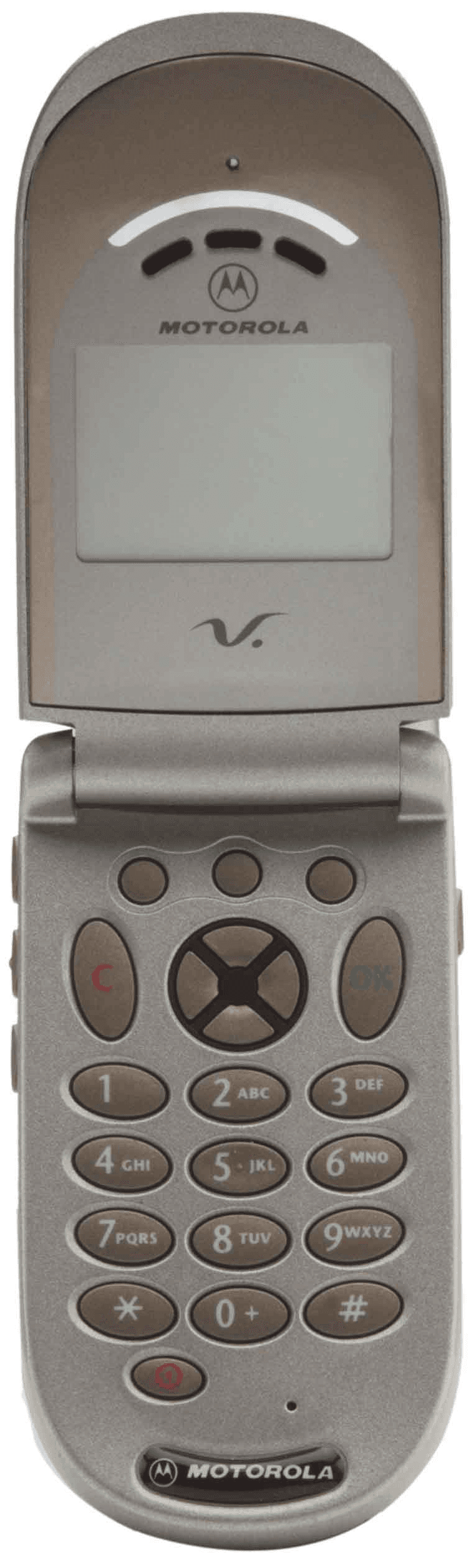
Click to zoom
Application Details
- Equipment Class
- PCE - PCS Licensed Transmitter held to ear
- Date of Grant
- May 03, 2001
- Application Purpose
- Original Equipment
- Date of Application
- Mar 04, 2001
- Equipment Note
- PCS portable transceiver
- Frequency Range
- 1850.20000000 - 1909.80000000
- Company
- Motorola Mobility LLC
- Country
- United States
Documents & Files
Document Text
Text extracted from the exhibit documents filed with the FCC. Open a document above to read the original.
Users Manual
APPLICANT: MOTOROLA, INC.FCC ID: IHDT6BA1 EXHIBIT 8 INSTRUCTION MANUAL A preliminary draft copy of the Users Manual follows: Note: Correspondence Reference Number: 17917 requested a change in user manual text. (FYI - For future filings, please indicate in the users manual "the phone and its antenna" instead of "the antenna" for instructions that require users to maintain a separation distance.) The next two pages contains the text which will be incorporated into the final version of the manual. 15 Safety and General Information Portable Phone Operation and EME Exposure Antenna Care Use only the supplied or an approved replacement antenna. Unauthorized antennas, modifications, or attachments could damage the phone and may violate FCC regulations. Do NOT hold the antenna when the phone is in use. Holding the antenna affects call quality and may cause the phone to operate at a higher power level than needed. Phone Operation When placing or receiving a phone call, hold your phone as you would a wireline telephone. Speak directly into the microphone. Body-Worn Operation To maintain compliance with FCC RF exposure guidelines, if you wear a phone on your body when transmitting, always place the phone in a Motorola-supplied or approved clip, holder, holster, case, or body harness. Use of non-Motorola-approved accessories may exceed FCC RF exposure guidelines. If you do not use a body-worn accessory, and are not holding the phone in the normal use position at the ear, ensure the phone and its antenna are at least one inch (2.5 centimeters) from your body when transmitting. Safety and General Information 16 Data Operation When using any data feature of the phone, with or without an accessory cable, position the phone and its antenna at least one inch (2.5 centimeters) from your body. Approved Accessories For a list of approved Motorola accessories, visit our website at www.motorola.com. Electromagnetic Interference/ Compatibility Note: Nearly every electronic device is susceptible to electromagnetic interference (EMI) if inadequately shielded, designed, or otherwise configured for electromagnetic compatibility. Facilities To avoid electromagnetic interference and/or compatibility conflicts, turn off your phone in any facility where posted notices instruct you to do so. Hospitals or health care facilities may be using equipment that is sensitive to external RF energy. Aircraft When instructed to do so, turn off your phone when on board an aircraft. Any use of a phone must be in accordance with applicable regulations per airline crew instructions. Sapphire GSM Wireless Telephone Basic User’s Guide Draft for GSM Type Approval and Field Test January 31, 2001 1 Welcome Welcome to the world of Motorola digital wireless communications! Motorola is a global leader in communications technology. We are pleased that you have chosen the Motorola V ____g wireless phone to keep you connected with ease. All Motorola phones are designed and manufactured to meet Motorola’s rigorous specifications and world-class quality standards. During development, our testing team took the Motorola V phone through rigorous durability tests including temperature, humidity, shock, dust, vibration, and drop tests. We are confident that you and your callers will find your wireless phone to be a convenient and reliable way to stay in touch. Thank you for choosing Motorola V , and enjoy your new phone! 2 Personal Communications Sector 600 North U.S. Highway 45 Libertyville, Illinois 60048 1-800-331-6456 (United States) 1-888-390-6456 (TTY/TDD United States) 1-800-461-4575 (Canada) www.motorola.com MOTOROLA, the Stylized M Logo and all other trademarks indicated as such herein are trademarks of Motorola, Inc. ® Reg. U.S. Pat. & Tm. Off. TrueSync is a trademark of Starfish, Inc., a wholly owned independent subsidiary of Motorola, Inc. All other product or service names are the property of their respective owners. © 2001 Motorola, Inc. All rights reserved. Printed in the U.S.A. Manual number: 68________-O Cover number: 8988485L07 3 " Menu Map Main Menu • Recent Calls • Received Calls • Dialed Calls • Notepad • Call Times • Phonebook • Datebook • Quick Dial • Radio • Messages • Voicemail • Text Msgs • Browser Alerts • Quick Notes • Outbox • Drafts • Shortcuts • Voice Notes • Browser • Settings (see next page) Note: This is the standard menu layout. You or your service provider may have modified the menu structure or changed some feature names. Not all features may be available for all users. For example, the Radio feature is displayed only when the FM radio headset accessory is plugged into the accessory connector port on your phone. Shortcuts Change display zoom: Press M, then press and hold M Lock/unlock keypad: Press M * Display my phone number: Press M # Go to dialed calls list: Press N 4 " Settings Menu •Ring/Vibrate • Alert • Alert Detail • Call Forward • Voice Calls • Fax Calls • Data Calls • Cancel All • Forward Status • Phone Status • My Tel. Number • Credit Available • Credit Info • Battery Meter • Phone: Line 1/2 • Other Information • Connection • Incoming Call • In-Call Setup • In-Call Timer • Call Cost Setup • My Caller ID • Talk and Fax • Answer Options • Call Waiting • Security • Phone Lock • Lock Keypad • Lock Application • Fixed Dial • Call Barring • SIM Pin • New Passwords • Other Settings • Personalize • Main Menu • Keys • Greeting • Banner • Quick Dial • Initial Setup • Time and Date • One-Touch Dial • Auto Redial • Backlight • Status Light • Zoom • Scroll • Animation • Language • Preferred Card • Battery Save • Contrast Setting • Master Reset • Master Clear • Network • Car Settings • Headset 5 Phone Diagram EarpieceHeadset Jack Insert headset accessory for hands-free use. Status Light See incoming call and service status. Volume Keys Adjust earpiece and ringer volume. Smart Key Select menu items, send and end calls. Voice Key Record voice notes, phonebook and shortcut names. Display Microphone Accessory Connector Por…
Text truncated - open the document above for the full version.
Users Manual
63 Menu Feature Descriptions This chapter describes all of your phone’s features in alphabetical order. Some descriptions also include page numbers where you can find more detailed information. If you would like to learn more about a specific feature, a reference guide for your phone is also available. To obtain a copy of the reference guide or another copy of this user guide, see the Motorola Web site at: http://motorola.com/consumer/manuals or contact the Motorola Customer Call Center at 1-800-331-6456. BROWSER M> Browser Access Web pages and run Web-based applications. The micro-browser delivers WAP (Wireless Application Protocol) pages from your service provider directly to your phone. See “Micro-Browser” on page 129. CALL FORWARD M> Settings > Call Forward Set options for forwarding incoming voice, fax, and/or data calls to another phone number. See “Call Forwarding” on page 133. CONNECTION Connect your phone to a computer or hand-held device to send and receive data and fax calls on the connected device. Connect your phone using a serial cable or USB cable. See “Connecting Your Phone to an External Device” on page 141. Menu Feature Descriptions 64 Incoming Call M> Settings > Connection > Incoming Call Specify the format for the next incoming call. You can select Fax In Only, Data In Only, or Normal. DATEBOOK M> Datebook Use the datebook calendar to schedule and review your appointments. See “Datebook” on page 100. FIXED DIAL M> Fixed Dial Dial or edit numbers in the fixed dial list. When you activate the fixed dial feature, users can only call the numbers in the fixed dial list. Fixed dial list entries can be any length. If there is a fixed dial entry for the digits 555, users can call any number that starts with 555. You must enter your PIN2 code to edit fixed dial entries. (If necessary, see “If You Forget a Code or Password” on page 149.) In the fixed dial list, you can create, edit, delete, and sort entries just like with the phonebook list. List entries are stored on your SIM card and do not have Type or Voice Name fields. Note: Employers can use fixed dial to limit employees’ phones to a predefined list of numbers, country codes, or other prefixes. IN-CALL SETUP Use the in-call setup menu to set the features that are active during a call, such as the in-call timer, cost trackers, call waiting, and call answering options. 65 Menu Feature Descriptions Answer Options M> Settings > In-Call Setup > Answer Options Turn call answering options on or off: Call Cost Setup M> Settings > In-Call Setup > Call Cost Setup Adjust call cost settings. You can assign a credit limit so that your phone displays your remaining credit during calls. Your phone notifies you when you approach your limit, and ends the call when you reach it. Your phone network expresses cost in the amount of units used, but this feature lets you tell your phone how to translate the units to a currency. Call Waiting M> Settings > In-Call Setup > Call Waiting Activate and deactivate call waiting. When call waiting is activated and another call arrives while you are on a call, call waiting can play a tone to notify you of the new call. For information on using call waiting, see “Using Call Waiting” on page 46. Multi-Key Answer by pressing any key Open to Answer Answer by opening the flip Menu Feature Descriptions 66 In-Call Timer M> Settings > In-Call Setup > In-Call Timer Adjust call timer display and beep settings. You can set your timer to beep at a selected interval during your calls. (60 seconds is the default.) You can also turn on or off a display timer during calls as follows: My Caller ID M> Settings > In-Call Setup > My Caller ID Activate and deactivate the display of your phone number as an ID when you call someone. Time Display the elapsed time for the current call Cost Display the cost of the current call (if you subscribe to call cost features or advice-of-charge) Total Cost Display the cost of all calls since the last time you reset the timer (if you subscribe to call cost features or advice-of-charge) Credit Available Display how much credit you have left (if you subscribe to call cost features or advice-of-charge) Off No in-call timer display 67 Menu Feature Descriptions Talk and Fax M> Settings > In-Call Setup > Talk and Fax Activate and deactivate the talk/fax service. Use this feature to talk to someone and then send a fax— all to the same phone number and within the same call. See “Sending a Talk then Data or Talk then Fax Call” on page 147. MESSAGES M> Messages Adjust message settings, view and manage the various types of messages your phone can receive and/or send: Browser Alerts Read alert messages received by your micro-browser Drafts Store and edit text messages that you have written but not sent Outbox View all outgoing text messages, delivered and undelivered Quick Notes Select and send pre-written messages from the quick notes list Text Msgs Send and receive text messages. See “Messages—Text” on page 110 Voicemail Listen to your recorded voice messages. See “Messages— Voicemail” on page 108 Menu Feature Descriptions 68 OTHER SETTINGS Car Settings M> Settings > Other Settings > Car Settings Adjust hands-free car kit settings. You can set your phone to route calls directly to the car kit when it detects a connection, and automatically answer calls after two rings. See “Hands-Free Use” on page 137. Headset M> Settings > Other Settings > Headset Set your phone to automatically answer calls after two rings when connected to a headset. See “Hands-Free Use” on page 137. Initial Setup M> Settings > Other Settings > Initial Setup Set many basic phone options: Animation Turn animation off (to conserve the battery) or on. Animation makes your phone’s menus move smoothly as you scroll up and down. Auto Redial Automatically redial calls that fail due to busy network conditions. (See “Using Automatic Redial” on page 37.) Battery Save Adjust the phone’s power usage characteristics to conserve power 69 Menu F…
Text truncated - open the document above for the full version.
Attestation Statements
APPLICANT: MOTOROLA, INC.FCC ID: IHDT6BA1 EXHIBIT 2A SPECIFICATION COMPLIANCE STATEMENT The transceiver of type IHDT6BA1 has been tested in accordance with the requirements contained in the appropriate Commission regulations. To the best of my knowledge, these tests were performed using measurement procedures consistent with industry or Commission standards and demonstrate that this equipment complies with the appropriate standards. Each unit manufactured imported or marketed, will conform to the sample tested within the variations that can be expected due to quantity production and testing on a statistical basis. I further certify that the necessary measurements were made at Motorola sites located at: 600 North U.S. Highway 45, Libertyville, Illinois; 1500 Gateway Boulevard, Boynton Beach, Florida; and at 2001 North Division Street, Harvard, Illinois. Name:Tom Neckopulos Title:Engineering Manager, TPRG Date:February 21, 2001 APPLICANT: MOTOROLA, INC.FCC ID: IHDT6BA1 EXHIBIT 2B STATEMENT OF CERTIFICATION I hereby certify that the above application was prepared under my direction and that to the best of my knowledge and belief, the facts set forth in this application and accompanying technical data are true and correct. Name:Gregory Lynch Title:Group Leader PCS Development Date:February 21, 2001 The technical data supplied with this application was taken under my supervision, and is, hereby, duly certified. I also certify that this transmit equipment (FCC ID: IHDT6BA1) is in compliance with all applicable parts of the FCC Rules. The following is a statement of my qualifications: Name:Son Tran Cao Title:RF Staff Engineer PCS Development Date:February 21, 2001
Cover Letter(s)
APPLICANT: MOTOROLAFCC ID: IHDT6BA1 Exhibit 13 March 5, 2001 CONFIDENTIALITY REQUEST CONTAINED WITHIN Federal Communications Commission Authorization and Evaluation Division 7435 Oakland Mills Road Columbia, Maryland 21046 Re: Application for Cellular/PCS Transceiver Certification Gentlemen: Application: Motorola, Inc., Personal Communications Sector, 600 N. U.S. Highway 45, Libertyville, Illinois 60048-1286 herein submits: Application for Equipment Authorization (FCC Form 731-October 1992 with integrated Fee Processing Form, Fee Codes EFT and EBC), application fee in the amount of $640, and Exhibits; for Certification of a PCS Transceiver, FCC ID: IHDT6BA1. Motorola is also the manufacturer of this equipment. Confidentiality: Pursuant to Section 0.459 of the Commission's rules (CFR 47), Motorola requests confidentiality for portions of the material contained in this application and that the identified material be withheld from public inspection following the grant of this authorization. This material contains Motorola's trade secrets and confidential information that Motorola does not customarily release to the public and which is otherwise not generally available to the public. Confidentiality is requested for the following exhibits: • Exhibit 4 Block Diagrams • Exhibit 5 Schematics • Exhibit 12 Operational Description Description: This equipment is a GSM portable transceiver, which operates in the 1900 MHz PCS band Contact Information: Please contact me by telephone at (847) 523-6167, or by e-mail ([email protected]), if there are questions or additional information needed concerning this filing. Regards, Andrew J. Bachler FCC Liaison Cellular Subscriber Sector 600 N. U.S. Highway 45 Libertyville, IL 60048-5343
External Photos
APPLICANT: MOTOROLA, INC. FCC ID: IHDT6BA1 EXHIBIT 3 Front View Rear View, with Battery Removed to Show Equipment ID Label
ID Label/Location Info
APPLICANT: MOTOROLA, INC.FCC ID : IHDT6BA1 EXHIBIT 1 FCC IDENTIFICATION (NAMEPLATE) INFORMATION The FCC label shown is representative of the label that will appear on the radio when in production. It will be placed on the radio telephone as shown in Exhibit 3. Other information may also be included on this label. FCC ID: IHDT6BA1
Internal Photos
APPLICANT: MOTOROLA, INC. FCC ID: IHDT6BA1 EXHIBIT 9 Front View (Shields Removed) Rear View (Shields Removed)
Parts List/Tune Up Info
APPLICANT: MOTOROLA, INC.FCC ID: IHDT6BA1 EXHIBIT 10 TRANSCEIVER ADJUSTMENTS/TUNE-UP PROCEDURE There are no user accessible adjustments or tuning in this portable cellular transceiver. All necessary adjustments and tuning are performed during manufacture of the product. Any adjustments or tuning after service or repair are done as part of that process as special equipment is required to perform such adjustments.
RF Exposure Info
APPLICANT: MOTOROLA, INC. FCC ID: IHDT6BA1 E E x x h h i i b b i i t t 1 1 1 1 P P a a g g e e 1 1 Exhibit 11: SAR Test Report: IHDT6BA1 Date of test: 2/20/2001 – 3/01/2001 Laboratory: Motorola Personal Communications Sector Product Safety Laboratory 2001 N. Division Room: AS228 Harvard, Illinois 60033 Test Responsible: Steven Hauswirth Staff Engineer Accreditation: ISO 17025 Accredited Lab, A2LA certificate #1651-01 Statement of Compliance: Motorola declares under its sole responsibility that portable cellular telephone FCC ID IHDT6BA1 to which this declaration relates, is in conformity with the appropriate RF exposure standards, recommendations and guidelines. It also declares that the product was tested in accordance with the appropriate measurement standards, guidelines and recommended practices. Any deviations from these standards, guidelines and recommended practices are noted below: ©Motorola This test report shall not be reproduced in full, without written approval of the laboratory. The results and statements contained herein relate only to the items tested. The names of individuals involved may be mentioned only in connection with the statements or results from this report. Motorola encourages all feedback, both positive and negative, on this test report. APPLICANT: MOTOROLA, INC. FCC ID: IHDT6BA1 E E x x h h i i b b i i t t 1 1 1 1 P P a a g g e e 2 2 Table of Contents 1) Introduction 3 2) Description of the Device Under Test 3 Antenna description 3 Device description 3 3) Test Results 3 4) Test Equipment 4 4.1 Dosimetric system 4 4.2 Additional equipment used 5 5) Electrical parameters of the tissue simulating liquid 5 6) System Accuracy Verification 5 Reference Notes Appendix 1: SAR distribution comparison for the system accuracy verification 6 Appendix 2: SAR distribution plots for Phantom Head Adjacent Use 7 Appendix 3: SAR distribution plots for Body Worn Configuration 8 Appendix 4: Photographs of the device under test 9 APPLICANT: MOTOROLA, INC. FCC ID: IHDT6BA1 E E x x h h i i b b i i t t 1 1 1 1 P P a a g g e e 3 3 1. Introduction The Motorola Personal Communications Sector Product Safety Laboratory has performed measurements of the maximum potential exposure to the user of portable cellular phone FCC ID IHDT6BA1. The Specific Absorption Rate (SAR) of this product was measured. The portable cellular phone was tested in accordance with the latest available test guidelines. The SAR values found for the portable cellular phone (FCC ID IHDT6BA1) are below the maximum recommended levels of 1.6 W/kg. Detailed procedures of the test are described in the Motorola Exhibit 11 Reference SAR Test Report. 2. Description of the Device Under Test Antenna description Type Fixed Tri-band Location Top and Right Side Length 31mm Dimensions Width at base 9mm Configuration Stub Device description FCC ID Number IHDT6BA1 Serial number G030519 Mode(s) of Operation GSM1900 Modulation Mode(s) GSM Maximum Output Power Setting 29.5dBm Duty Cycle 1:8 Transmitting Frequency Rang(s) 1850-1910MHz 3. Test Results The SAR results shown in tables 1 and 2 are maximum SAR values averaged over 1 gram of phantom tissue. Also shown are the measured conducted output powers and the temperature of the test facility during the test. The test sample was operated in a test mode that allows control of the transmitter without the need to place actual phone calls. For the purposes of this test the unit is commanded to test mode and manually set to the proper channel, transmitter power level and transmit mode of operation. The phone was then placed in the SAR measurement system with a fully charged battery. A full data set output of two test conditions with the highest SAR values from the Dasy measurement system is included as appendix 2 and 3. The test conditions included are indicated as bold numbers in the following table. All other test conditions measured lower SAR values than those included. This portable cellular phone has to optional body-worn accessories. Both body-worn accessories were evaluated for SAR. The primary difference between these body-worn accessories is the front cover or “flap”. The one depicted has a “V” shaped cutout from the front cover. The other one is not depicted but lacks this cutout. APPLICANT: MOTOROLA, INC. FCC ID: IHDT6BA1 E E x x h h i i b b i i t t 1 1 1 1 P P a a g g e e 4 4 SAR, 1g (W/kg) Left Head Right Head f (MHz) Description Conducted Output Power (dBm) Ant Fixed Ant Fixed Channel 512 29.45 0.72 0.76 Channel 661 29.47 0.83 0.86 Digital 1900MHz Channel 810 29.46 0.75 0.88 Table 1: SAR measurement results for the portable cellular telephone FCC ID IHDT6BA1 at highest possible output power. Measured against the head. SAR, 1g (W/kg) Leather Holster Leather Carry Case f (MHz) Description Conducted Output Power (dBm) Ant Fixed Ant Fixed Channel 512 29.45 0.89 0.64 Channel 661 29.47 0.69 0.59 Digital 1900MHz Channel 810 29.46 0.58 0.50 Table 2: SAR measurement results for the portable cellular telephone FCC ID IHDT6BA1 at highest possible output power. Measured against the body. 4. Test Equipment Used 4.1 Dosimetric System The Motorola Personal Communications Sector Product Safety Laboratory utilizes a Dosimetric Assessment System (Dasy3™) SAR measurement system manufactured by Schmid & Partner Engineering AG (SPEAG™), of Zurich Switzerland. The overall RSS uncertainty of the measurement system is ±12.0% (K=1). Description Serial Number Cal Due Date DASY3 DAE V1 SN316 12/14/01 E-Field Probe ETDV6 SN1523 4/7/01 Dipole Validation Kit, DV1900V2 SN250 9/29/01 Table 3. SAR measurement equipment used for Head Adjacent measurements Description Serial Number Cal Due Date DASY3 DAE V1 SN367 8/23/01 E-Field Probe ETDV6 SN1502 10/6/01 Dipole Validation Kit, DV1900V2 SN259 1/2002 Table 4. SAR measurement equipment used for Body-worn measurements APPLICANT: MOTOROLA, INC. FCC ID: IHDT6BA1 E E x x h h i i b b i i t t 1 1 1 1 P P a a g g e e 5 5 4.2 Additional Equipment Description Serial Number …
Text truncated - open the document above for the full version.
Test Report
APPLICANT: MOTOROLA INCFCC ID: IHDT6BA1 EXHIBIT 6 Exhibit 6 TEST REPORT SUBMITTED MEASURED DATA INDEX RF Output Power..................................................................6A EIRP......................................................................................6B Final Amplifier Voltages and Currents...............................6C Radiated Spurious Emission..............................................6D Occupied Bandwidth...........................................................6E Conducted Spurious Emissions.........................................6F Frequency Stability..............................................................6G APPLICANT: MOTOROLA INCFCC ID: IHDT6BA1 EXHIBIT 6A EXHIBIT 6A RF Output Power Exhibit Summary: Exhibit 6A contains both average and peak output powers for the mobile station. In all cases, the peak output power is within the required mask (this mask is specified in the JTC standards, TIA PN3389 Vol. 1, Chap. 7, and is not an FCC requirement). Contents: Method of Measurement Measurement Limit Average Output Powers Method of Measurement: 1.Setup the mobile station for maximum output power with pseudo random data modulation. 2.Use HP 8991A Peak Power Analyzer to obtain peak and average output power levels. 3.Repeat measurements for carrier frequencies at 1850.2 MHz, 1880.2 MHz, and 1909.8 MHz. Channels 512, 661, and 810 respectively (bottom, middle, and top of operational frequency range). Measurement Limits: PowerNominal Peak StepOutput PowerTolerance (dBm)(dB) 030+/- 2 Conducted Power Measurements: FrequencyPowerPeakAverage (MHz)StepOutput PowerOutput Power (dBm)(dBm) 1850.2030.0220.48 1880.2030.1120.6 1909.8030.120.7 APPLICANT: MOTOROLA INCFCC ID: IHDT6BA1 EXHIBIT 6B EXHIBIT 6B EIRP Test Maximum radiated power tests for IHDT6BA1 (GSM PCS Band) The phone was tested in a 16' cubical anechoic chamber with a 2-axis position system that permits taking complete spherical scans of the AUT's radiation patterns. For all tests, the phone was supported in a free-space type environment, vertically oriented in the chamber. Tests were done on three PCS frequencies (1850.2, 1880.0 and 1909.8 Mhz) with antenna fixed. GSM measurements were made with the phone placed in a call using the HP8922M mobile station test set. The phone was weakly coupled to the test set and configured to transmit in full data rate mode, with a nominal output power setting of 29.5 dBm for 1900. Radiated power was measured at every 15 degree step from theta=0 to 165 degrees and phi=0 to 360 degrees. The radiated power was measured using a Gigatronics 8542C power meter in "Burst Avg" mode. From these measurements, the software calculates the angle at which maximum radiated power occurs for each case, and the radiated power at this angle was extracted from the data. The max radiated power results for IHDT6BA1 follows, as EIRP in dBm. To get ERP (effective radiated power referenced to a half-wave dipole), subtract 2.1 dB from these numbers. PCS 1900: 1850.2 MHz:31.77 dBm 1880.0 MHz:31.89 dBm 1909.8 MHz 32.09 dBm For all measurement, calibration was performed via gain substitution with a half- wave dipole. Result: max EIRP is 32.09 dBm in PCS 1900 mode (max ERP is 29.99 dBm) APPLICANT: MOTOROLA INCFCC ID: IHDT6BA1 EXHIBIT 6C EXHIBIT 6C Voltages and Currents into Final Amplifying Devices Exhibit Summary: Exhibit 6C contains the voltages and currents applied to the TX Driver and TX Final Power Amplifier for the entire mobile station operating power range. Channel 512 (Frequency 1850.2 MHz) Power StepPhone Current (mA)PA Current (mA)Peak Power (dBm) 0959.36890.1128.55 1824.70755.4527.18 2715.30646.0525.78 3593.20523.9523.79 4496.48427.2322.03 5399.72330.4719.63 6340.82271.5717.82 7298.80229.5516.07 8252.46183.2113.76 9227.21157.9612.09 10201.96132.7110.21 11180.90111.658.23 12164.1094.856.19 13157.7988.5355.37 14151.4882.2254.39 15143.0573.803.29 Channel 670 (Frequency 1880.2 MHz) Power StepPhone Current (mA)PA Current (mA)Peak Power (dBm) 0984.60912.8028.84 1858.36786.5627.41 2740.54668.7425.96 3614.32542.5224.10 4504.80433.0022.10 5412.34340.5419.85 6353.44281.6418.07 7307.16235.3616.27 8267.10195.3014.31 9233.52161.7212.31 10201.96130.1610.04 11183.03111.238.14 12166.2094.406.16 13159.8988.095.27 14152.5380.734.33 15145.1773.373.22 APPLICANT: MOTOROLA INCFCC ID: IHDT6BA1 EXHIBIT 6C Power StepPhone Current (mA)PA Current (mA)Peak Power (dBm) 01026.66953.0428.64 1892.02818.4027.30 2757.38683.7625.65 3631.14557.5223.80 4521.76448.1421.83 5429.18355.5619.76 6370.28296.6618.03 7315.58241.9615.99 8271.39197.7713.95 9241.94168.3212.11 10208.21134.599.84 11188.28114.667.97 12170.4196.796.02 13163.0589.435.17 14156.7483.124.21 15148.3274.703.09 Channel 810 (Frequency 1909.8 MHz) APPLICANT: MOTOROLA INCFCC ID: IHDT6BA1 EXHIBIT 6C PA Current CH 512 0 200 400 600 800 1000 0123456789101112131415 TX Level mA PA Current CH 661 0 200 400 600 800 1000 0123456789101112131415 TX Level mA PA Current CH 810 0 200 400 600 800 1000 0123456789101112131415 TX Level mA APPLICANT: MOTOROLA INCFCC ID: IHDT6BA1 EXHIBIT 6D EXHIBIT 6D RADIATED SPURIOUS EMISSION Radiated Spurious and Harmonic Emissions Frequency (MHz) FCC Maximum Limit (dBm) Horizontal Measured Emission Equiv. Pwr Into Ideal Dipole (dBm) Vertical Measured Emission Equiv Pwr Into Ideal Dipole (dBm) 2nd harmonic-13-30.4-36.2 3rd harmonic-13-45.8-49.5 4th harmonic-13-38.0* 5th harmonic-13** 6th harmonic-13** 7th harmonic-13** 8th harmonic-13** 9th harmonic-13** 10th harmonic-13** Notes: 1. * Indicates the spurious emission could not be detected due to noise limitations or ambients. 2. Each emission reported reflects the highest absolute level at the specific harmonic for the low, mid, and high channels at maximum power. 3. The Spectrum was investigated from 30 kHz to the tenth harmonic of the fundamental. Radiated Spurious Emissions -70 -60 -50 -40 -30 -20 -10 0 2nd harmonic 3rd harmonic 4th harmonic5th harmonic6th harmonic7th harmonic8th harmonic9th har…
Text truncated - open the document above for the full version.
Contact Information
Applicant
Jeff Narducci(Director Product Compliance)
Technical Specifications
| # | Rule Parts | Frequency Range | Power Output | Emission | Tolerance |
|---|---|---|---|---|---|
| 1 | 24E | 1.85 GHz - 1.91 GHz | 1.62 W | 250KDXW | 0.1000000000 ppm |
Other Applications from Motorola Mobility LLC
IHDT6AC8
Sep 15, 2026Qi2 wireless charger
Equipment Class
DCD - Part 15 Low Power Transmitter Below 1705 kHzIHDT6AC6
Sep 14, 2026Wireless Earphones
Equipment Class
JAB - Part 15 Class B Digital DeviceIHDT6AC7
Sep 11, 2026Smart Watch
Equipment Class
JAB - Part 15 Class B Digital DeviceIHDT56AX5
Aug 28, 2026Mobile Cellular Phone
Equipment Class
JBP - Part 15 Class B Computing Device PeripheralIHDT56AW9
May 12, 2026Smart Watch
Equipment Class
NII - Unlicensed National Information Infrastructure TX