IPH-0247908Personal Navigation Device
Garmin International Inc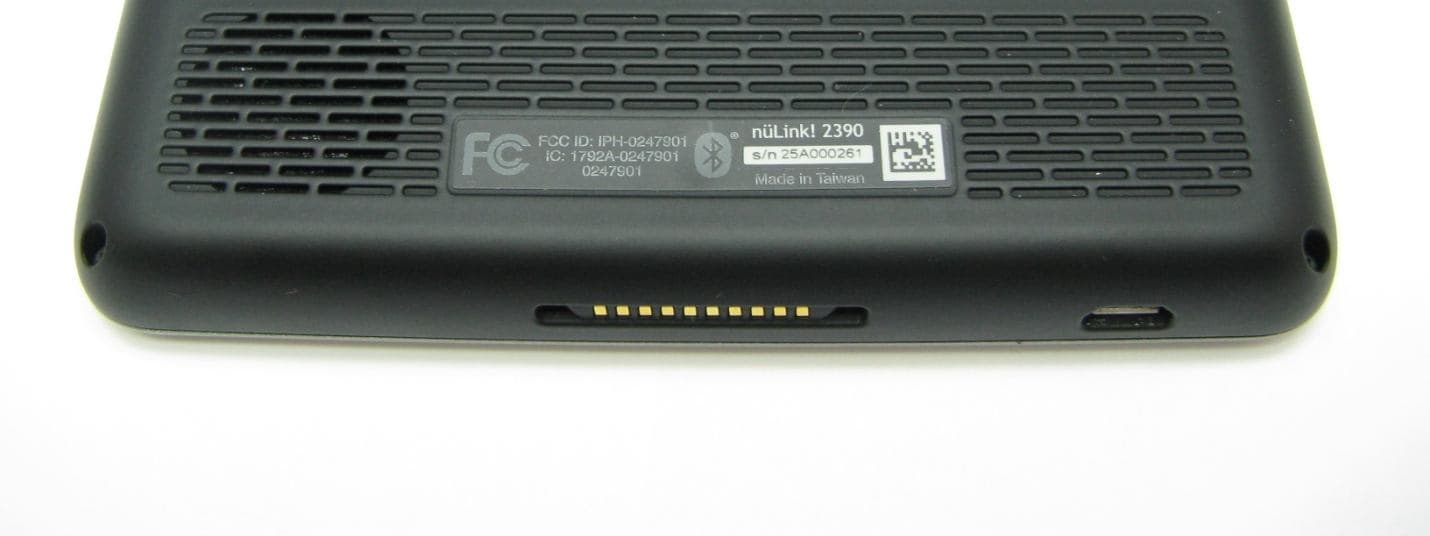
Click to zoom
Application Details
- Equipment Class
- DSS - Part 15 Spread Spectrum Transmitter
- Date of Grant
- May 16, 2011
- Application Purpose
- Original Equipment
- Date of Application
- May 11, 2011
- Equipment Note
- Personal Navigation Device
- Frequency Range
- 2402.00000000 - 2480.00000000
- Company
- Garmin International Inc
- Country
- United States
Documents & Files
Document Text
Text extracted from the exhibit documents filed with the FCC. Open a document above to read the original.
Users Manual
nüLink! ™ quick start manual 190-01287-01_01.indd 112/9/2010 10:27:37 AM 2 nüLink! Quick Start Manual Getting Started ‹ WARNING See the Important Safety and Product Information guide in the product box for product warnings and other important information. When using your device for the first time, complete these tasks. 1. Connect the device to vehicle power (page 2). 2. Mount the device (page 3). 3. Register the device (page 4). 4. Check for updates: • Software updates (page 5). • Free map update (page 5). 5. Download the full owner’s manual (page 5). Connecting the Device to Vehicle Power ‹ WARNING This product contains a lithium-ion battery. To prevent the possibility of personal injury or product damage caused by battery exposure to extreme heat, remove the device from the vehicle when exiting or store it out of direct sunlight. Charge your device before using it on battery power. 1. Fit the bottom of your device into the mount. 2. Tilt your device back until it snaps into place. 190-01287-01_01.indd 212/9/2010 10:27:38 AM nüLink! Quick Start Manual 3 3. Plug the vehicle power cable into the mini-USB connector ➊ on the mount ➋. ➋ ➊ 4. Plug the other end of the vehicle power cable into a power outlet in your vehicle. After the device has been connected to vehicle power, the following actions occur. • The device turns on. • The device acquires satellite signals. When at least one of the bars is green, your device has acquired satellite signals. NOTE: The device may need a clear view of the sky to acquire satellite signals. • The device charges as you drive. in the status bar indicates the status of the internal battery. Mounting Your Device NOTICE Before mounting the device, see the Important Safety and Product Information guide for information about laws pertaining to windshield mounting. 1. Remove the clear plastic from the suction cup. 190-01287-01_01.indd 312/9/2010 10:27:38 AM 4 nüLink! Quick Start Manual 2. Clean and dry your windshield and the suction cup with a lint-free cloth. 3. Press the suction cup to the windshield. 4. While pressing, flip the lever back toward the windshield. 5. Snap the mount ➊ onto the suction cup arm ➋. ➊ ➋ About myDashboard Use myDashboard to register your device, check for software and map updates, access product manuals and support, and more. Setting Up myDashboard 1. Connect the USB cable to the micro-USB connector on the device. 2. Connect the USB cable to the USB port on your computer. 3. Double-click to open the myDashboard Web page. NOTE: If does not appear, or you are using Windows ® 7 or a Mac ® computer, go to www .garmin.com/dashboard. 4. Follow the on-screen instructions. Registering the Device 1. From myDashboard, click Register Now. 190-01287-01_01.indd 412/9/2010 10:27:39 AM nüLink! Quick Start Manual 5 2. Follow the on-screen instructions. 3. Keep the original sales receipt, or a photocopy, in a safe place. Updating the Software 1. Open myDashboard (page 4). 2. Register the device (page 4). 3. Under Software Updates, click Update Now. 4. Follow the on-screen instructions. nüMaps Guarantee ™ Your device is eligible for one free map update within 60 days of acquiring satellites while driving with your device. You are not eligible for the free map update if you register by phone or wait longer than 60 days after the first time you acquire satellites while driving with your device. For more information, go to www.garmin.com/numaps. Updating Maps 1. Open myDashboard (page 4). 2. Register the device (page 4). 3. Under Map Updates, click Update Now. 4. Follow the on-screen instructions. Downloading the Owner’s Manual The owner’s manual for your device is available on the Garmin Web site. 1. Open myDashboard (page 4). 2. Register the device (page 4). 3. Click Manuals. A list of the product manuals in several languages appears. 4. Click Download next to the manual you want. 5. Click to save the file to your computer. 190-01287-01_01.indd 512/9/2010 10:27:39 AM 6 nüLink! Quick Start Manual Device Overview ➊ Power key ➋ microSD ™ card slot Turning the Device On and Off 1. Hold the Power key for four seconds. 2. Touch Off. Resetting the Device You can reset your device if it stops functioning. Press and hold the power key for 10 seconds. Adjusting the Screen Brightness 1. Touch Tools > Settings > Display > Brightness. 2. Touch and move the scroll bar to adjust screen brightness. About Points of Interest The detailed maps loaded in your device contain points of interest, such as restaurants, hotels, and auto services. Finding a Point of Interest by Category 1. From the main menu, select Where To? > Points of Interest. 2. Select a category. 3. If necessary, select a subcategory. 4. Select a destination. 5. Select Go!. ➊ ➋ 190-01287-01_01.indd 612/9/2010 10:27:39 AM nüLink! Quick Start Manual 7 You can select > Save on this page to save the location to a Favorites folder on the device. Use the Favorites folder to save the location of your workplace, home, and other common destinations. 6. If necessary, select an option. • Select Drive to calculate a route you will navigate by driving. • Select Walk to calculate a route you will navigate by walking. • Select Public Transit to calculate a route that combines public transit and walking. NOTE: You must have cityXplorer ™ maps loaded to navigate using public transit. Go to www.garmin.com to purchase cityXplorer maps. 7. If necessary, select a route. Using the Main Menu ➊ ➋➌ ➍➐➑➎➏ ➊ Select to select a transportation mode. Routes are calculated differently based on your transportation mode. ➋ Select to find a destination. ➌ Select to view the map. ➍ Select to stop a route. ➎ Select to detour a route. ➏ On some models, select to make a call when connected to a compatible mobile phone. See www.garmin.com/bluetooth for information. ➐ Select to adjust the volume. ➑ Select to open the menu of tools and settings. 190-01287-01_01.indd 712/9/2010 10:27:40 AM 8 nüLink! Quick Start Manual About the Main Menu Toolbar I…
Text truncated - open the document above for the full version.
ID Label/Location Info
SCALE: 1X MGR. PROJ. RELEASED BY UNLESS NOTED OTHERWISE ANGLES +/- 0 DEG./30 MIN. HOLES +/-.003”, .08 mm .XXX +/-.005”, .13 mm .XX +/-.010”, .25 mm TOLERANCE CHKD. DRAWN DATE OFSHT. REV. DWG. NO. SCALE SIZE TITLE CONFIDENTIAL This drawing and the specifications contained herein are the property of Garmin Ltd. or its subsidiaries and may not be reproduced or used in whole or in part as the basis for manufacture or sale of products without written permission. TAG, S/N, NuLink! 2390, GPS, NA, GPRS 161-02595-06 B A 1 1 1X GMS 2/10/11 REV. DATE DESCRIPTION APPRVD. REVISIONS SPECIFICATION CONTROL DRAWING c/o Garmin International, Inc. Garmin Ltd. or its subsidiaries 1200 E. 151st Street Olathe, Kansas 66062 U.S.A. PRODUCTION RELEASE 2/10/11 A ---- NOTES: 1. MATERIAL: VINYL LAMINATE, SECOND SURFACE PRINTED. BACKGROUND - PANTONE BLACK C. NOMENCLATURE (SEE CHARTS), SERIAL AND MODEL NUMBER TO BE BLACK. ACRYLIC PERMANENT ADHESIVE ON BACK SIDE WITH PEEL OFF RELEASE LINER. TOTAL PACKAGE THICKNESS EXCLUDING RELEASE LINER IS .002-.005 (0.05-0.13). 2. 9 DIGIT SERIAL NUMBER TO BE PRINTED SEQUENTIALLY IN FIELDS AS SHOWN (2D, CODE 39 W/HUMAN READABLE OR HUMAN READABLE ONLY WHEN APPLICABLE). PRINT ADDITIONAL TAGS (30 X 7.5) IN QTY INDICATED (BARCODE 39 WITH HUMAN READABLE ONLY). ALL TAGS PRINTED WITH INDELIBLE BLACK INK. S/N RANGE FOR THIS ITEM: 29D000000-29D999999 AS INDICATED ON GARMIN PURCHASE ORDER. 3. MAIN TAG AND ADDITIONAL TAG ARE SUPPLIED ON ONE ROLL WITH EQUIVALENT SERIAL NO’S ADJACENT TO EACH OTHER. ALL TAGS ARE "KISS CUT" ON ROLL. 4. PARTS TO BE FABRICATED USING DIGITAL CORELDRAW FILE. 5. THIS PART SHALL COMPLY WITH GARMIN BANNED & RESTRICTED SUBSTANCES DOCUMENT GPN 001-00211-00. Pantone 421 C Pantone 425 C 29D000000 R.50, 4x nüLink! 2390 29D000000 s/n Made in Taiwan 44.44 6 . 9 6 FCC ID: IPH-0247908 0247908 Made in Taiwan nüLink! 2390 REMOVE IC NUMBER 2/21/11 B 79083 BEM 2/10/11 DJD 2/11/11 MKD 2/14/11 FCC ID: IPH-0247908 0247908
ID Label/Location Info
Label Area
Test Report
Bluetooth Qualification Test Facility (BQTF) FCC listed A2LA Accredited IC recognized # 3462B CETECOM Inc. 411 Dixon Landing Road Milpitas, CA 95035 U.S.A. Phone: + 1 (408) 586 6200 Fax: + 1 (408) 586 6299 E-mail: [email protected] http://www.cetecom.com CETECOM Inc. is a Delaware Corporation with Corporation number: 2113686 Board of Directors: Dr. Harald Ansorge, Hans Peter May V3.0 2010-10-30 The BLUETOOTH trademarks are owned by Bluetooth SIG, Inc., U.S.A. and licensed to CETECOM Inc. © Copyright by CETECOM FCC Test Report FOR: Model Number: 0247901 Model Name: nuLink! 23xx Personal Navigation Device FCC ID: IPH-0247901 47 CFR Part 15.247 for FHSS Systems TEST REPORT #: EMC_GARMI_033_11001_15.247 DATE: 2011-03-15 Test Report #: EMC_GARMI_033_11001_15.247 Date of Report : 2011-03-15 Page 2 of 55 TABLE OF CONTENTS 1 Assessment ......................................................................................................................................... 4 2 Administrative Data .......................................................................................................................... 5 2.1 Identification of the Testing Laboratory Issuing the EMC Test Report ................................................... 5 2.2 Identification of the Client ........................................................................................................................ 5 2.3 Identification of the Manufacturer ............................................................................................................ 5 3 Equipment under Test (EUT) .......................................................................................................... 6 3.1 Specification of the Equipment under Test .............................................................................................. 6 3.2 Identification of the Equipment Under Test (EUT) .................................................................................. 7 3.3 Identification of Accessory equipment ..................................................................................................... 7 4 Subject of Investigation .................................................................................................................... 8 5 Summary of Measurement Results .................................................................................................. 9 6 Measurements .................................................................................................................................. 10 6.1 Radiated Measurement Procedure .......................................................................................................... 10 6.2 Conducted Measurement Procedure ....................................................................................................... 12 6.3 Maximum Peak Output Power ................................................................................................................ 13 6.3.1 References: ......................................................................................................................................... 13 6.3.2 Measurement requirements: ............................................................................................................... 13 6.3.3 Limits: ................................................................................................................................................. 13 6.3.4 Test Conditions: .................................................................................................................................. 13 6.3.5 Test Result: ......................................................................................................................................... 14 6.4 Restricted Band Edge Compliance ......................................................................................................... 15 6.4.1 References: ......................................................................................................................................... 15 6.4.2 Limits: §15.247/15.205 ....................................................................................................................... 15 6.4.3 Measurement Procedure: ................................................................................................................... 15 6.4.4 Test Data/plots: .................................................................................................................................. 16 6.5 Spectrum Bandwidth/ 20dB Bandwidth ................................................................................................. 22 6.5.1 References: ......................................................................................................................................... 22 6.5.2 Measurement requirements: ............................................................................................................... 22 6.5.3 Limits: ................................................................................................................................................. 22 6.5.4 Test Conditions: .................................................................................................................................. 22 6.5.5 Test Result: ......................................................................................................................................... 23 6.5.6 Test Data/plots: .................................................................................................................................. 24 6.6 Carrier Frequency Separation ................................................................................................................. 29 6.6.1 Limits: ................................................................................................................................................. 29 6.6.2 Test Result: ......................................…
Text truncated - open the document above for the full version.
Test Report
Bluetooth Qualification Test Facility (BQTF) FCC listed A2LA Accredited IC recognized # 3462B CETECOM Inc. 411 Dixon Landing Road Milpitas, CA 95035 U.S.A. Phone: + 1 (408) 586 6200 Fax: + 1 (408) 586 6299 E-mail: [email protected] http://www.cetecom.com CETECOM Inc. is a Delaware Corporation with Corporation number: 2113686 Board of Directors: Dr. Harald Ansorge, Hans Peter May V3.0 2010-10-30 The BLUETOOTH trademarks are owned by Bluetooth SIG, Inc., U.S.A. and licensed to CETECOM Inc. © Copyright by CETECOM FCC Test Report FOR: Model Number: 0247908 Model Name: nuLink! 2390 Personal Navigation Device FCC ID: IPH-0247908 47 CFR Part 15.247 for FHSS Systems TEST REPORT #: EMC_GARMI_036_11002_15.247 DATE: 2011-04-07 Test Report #: EMC_GARMI_036_11002_15.247 FCC ID: IPH-0247908 Date of Report : 2011-04-07 Page 2 of 37 TABLE OF CONTENTS 1 Assessment ......................................................................................................................................... 3 2 Administrative Data .......................................................................................................................... 4 3 Equipment under Test (EUT) .......................................................................................................... 5 3.1 Specification of the Equipment under Test .............................................................................................. 5 3.2 Identification of the Equipment Under Test (EUT) .................................................................................. 6 3.3 Identification of Accessory equipment ..................................................................................................... 6 4 Subject of Investigation .................................................................................................................... 7 5 Summary of Measurement Results .................................................................................................. 8 6 Measurements .................................................................................................................................... 9 6.1 Radiated Measurement Procedure ............................................................................................................ 9 6.2 Restricted Band Edge Compliance ......................................................................................................... 11 6.2.1 References: ......................................................................................................................................... 11 6.2.2 Limits: §15.247/15.205 ....................................................................................................................... 11 6.2.3 Measurement Procedure: ................................................................................................................... 11 6.2.4 Test Data/plots: .................................................................................................................................. 12 6.3 Transmitter Spurious Emissions- Radiated ............................................................................................. 18 6.3.1 References: ......................................................................................................................................... 18 6.3.2 Measurement requirements: ............................................................................................................... 18 6.3.3 Limits: ................................................................................................................................................. 18 6.3.4 Test Result: ......................................................................................................................................... 19 6.3.5 Test data/ plots: .................................................................................................................................. 20 6.4 Receiver Spurious Emissions- Radiated ................................................................................................. 28 6.4.1 Limits: ................................................................................................................................................. 28 6.4.2 Test Conditions: .................................................................................................................................. 28 6.4.3 Test Result: ......................................................................................................................................... 28 6.4.4 Test data/ plots: .................................................................................................................................. 29 6.5 AC Power Line Conducted Emissions .................................................................................................... 32 6.5.1 References: ......................................................................................................................................... 32 6.5.2 Limits: ................................................................................................................................................. 32 6.5.3 Test Conditions: .................................................................................................................................. 32 6.5.4 Results ................................................................................................................................................. 32 6.5.5 Test Results: ........................................................................................................................................ 33 7 Test Equipment and Ancillaries used for tests ............................................................................. 35 8 Test Setup Info: ............................................................................................................................... 36 9 Revi…
Text truncated - open the document above for the full version.
Test Setup Photos
V2.0 2009-10-30 The BLUETOOTH trademarks are owned by Bluetooth SIG, Inc., U.S.A. and licensed to CETECOM Inc. © Copyright by CETECOM Test Setup Pictures TEST REPORT #: EMC_GARMI_036_11001_SetupPics Test Report #: EMC_GARMI_036_11001_SetupPics FCC ID: IPH-0247908 Date: 2011-04-10 Page 2 of 4 ERP/EIRP Test Setup: Radiated Emissions: <30MHz Test Report #: EMC_GARMI_036_11001_SetupPics FCC ID: IPH-0247908 Date: 2011-04-10 Page 3 of 4 Radiated Emissions: >1GHz Radiated Emissions: >18GHz Test Report #: EMC_GARMI_036_11001_SetupPics FCC ID: IPH-0247908 Date: 2011-04-10 Page 4 of 4 Conducted Emissions:
Contact Information
Applicant
Ben Karsak(Manager, Compliance Engineering)
Test Firm
CETECOM Inc.Meinolf Glunz
[email protected]408-586-6301
Technical Specifications
| # | Rule Parts | Frequency Range | Power Output |
|---|---|---|---|
| 1 | 15C | 2.40 GHz - 2.48 GHz | 3.20 mW |
Other Applications from Garmin International Inc
IPH-05126
Sep 09, 2026Portable Digital Transceiver
Equipment Class
NII - Unlicensed National Information Infrastructure TXIPH-A5126
Sep 09, 2026Portable Digital Transceiver
Equipment Class
NII - Unlicensed National Information Infrastructure TXIPH-04812
Sep 01, 2026Mobile Digital Transceiver
Equipment Class
DTS - Digital Transmission SystemIPH-A04825
Sep 01, 2026Marine Stereo
Equipment Class
DSS - Part 15 Spread Spectrum TransmitterIPH-B04825
Sep 01, 2026Marine Stereo
Equipment Class
DSS - Part 15 Spread Spectrum Transmitter