IPH-02806Low Power Transmitter 2402-2480 MHz, 24.0-24.25 GHz
Garmin International Inc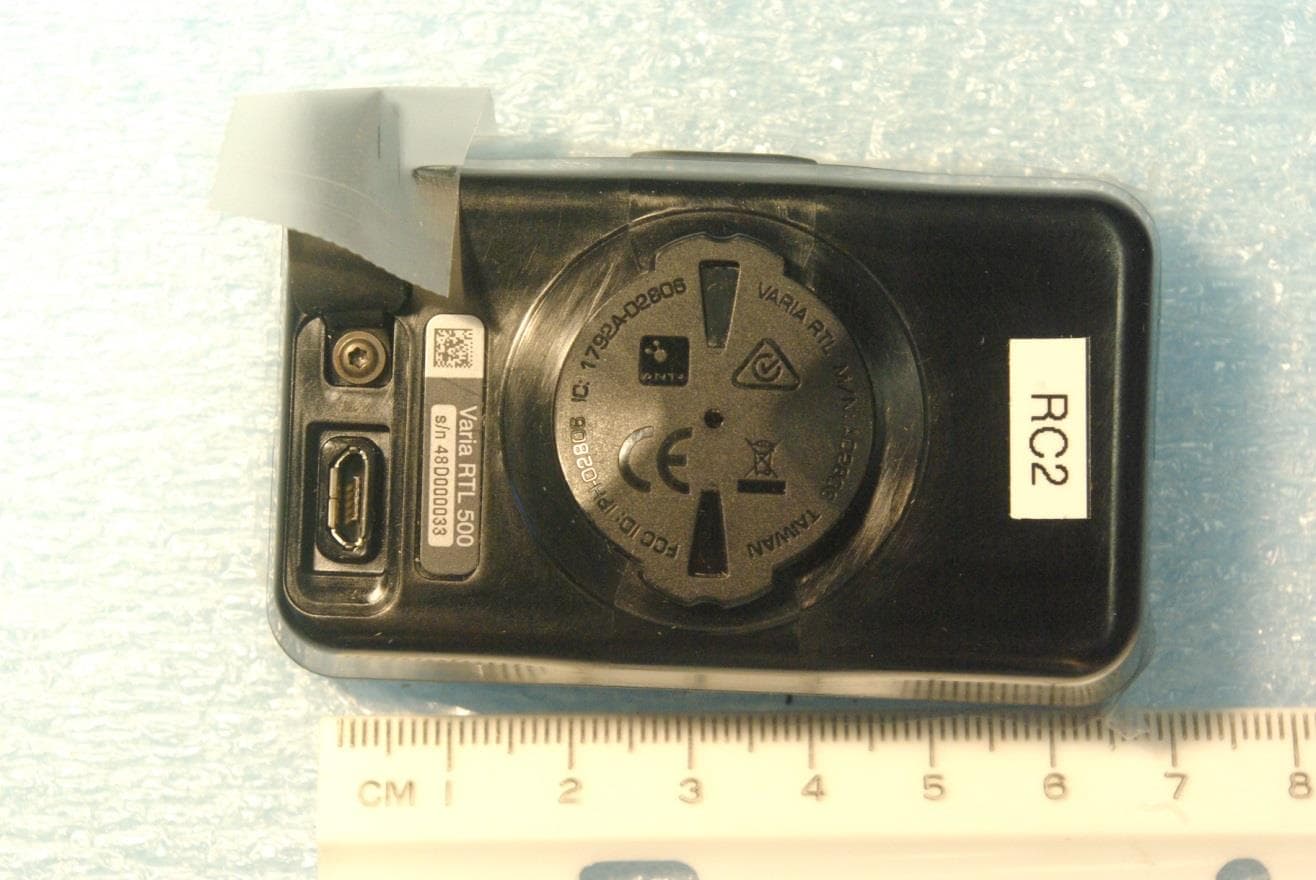
Click to zoom
Application Details
- Equipment Class
- DXX - Part 15 Low Power Communication Device Transmitter
- Date of Grant
- Jun 30, 2015
- Application Purpose
- Original Equipment
- Date of Application
- Jun 30, 2015
- Equipment Note
- Low Power Transmitter 2402-2480 MHz, 24.0-24.25 GHz
- Frequency Range
- 24030.00000000 - 24241.00000000
- Company
- Garmin International Inc
- Country
- United States
Documents & Files
Document Text
Text extracted from the exhibit documents filed with the FCC. Open a document above to read the original.
Users Manual
Important Safety and Product Information................................ 2 Informations importantes sur le produit et la sécurité ............... 8 Informazioni importanti sulla sicurezza e sul prodotto............ 13 Wichtige Sicherheits- und Produktinformationen.................... 17 Información importante sobre el producto y tu seguridad...... 22 Informações importantes de segurança e do produto............ 27 Belangrijke veiligheids- en productinformatie......................... 31 Vigtige produkt- og sikkerhedsinformationer.......................... 35 Tärkeitä turvallisuus- ja tuotetietoja........................................ 38 Viktig sikkerhets- og produktinformasjon................................ 42 Viktig säkerhets- och produktinformation............................... 45 Ważne informacje dotyczące bezpieczeństwa i produktu...... 49 © 2015 Garmin Ltd. or its subsidiaries June 2015 Printed in Taiwan 190-01918-91 _0A DRAFT Important Safety and Product Information WARNING Failure to avoid the following potentially hazardous situations could result in an accident or collision resulting in death or serious injury. Health Warnings • Always consult your physician before beginning or modifying any exercise program. If you have a pacemaker or other implanted electronic device, consult your physician before using a heart rate monitor. • The device, the heart rate monitor, and other Garmin ® accessories are consumer devices, not medical devices, and could suffer from interference from external electrical sources. The heart rate readings are for reference only, and no responsibility is accepted for the consequences of any erroneous readings. Bicycle Warnings • Always use your best judgement, and operate the bicycle in a safe manner. • Make sure your bicycle and hardware are properly maintained and that all parts are correctly installed. Battery Warnings A lithium-ion battery can be used in this device. Coin cell batteries can be used in the accessory. If these guidelines are not followed, batteries may experience a shortened life span or may present a risk of damage to the device, fire, chemical burn, electrolyte leak, and/or injury. • Do not leave the device exposed to a heat source or in a high-temperature location, such as in the sun in an unattended vehicle. To prevent the possibility of damage, remove the device from the vehicle or store it out of direct sunlight, such as in the glove box. • Do not disassemble, modify, remanufacture, puncture or damage the device or batteries. • Do not immerse or expose the device or batteries to water or other liquids, fire, explosion, or other hazard. • Do not use a sharp object to remove the removable batteries. •KEEP BATTERIES AWAY FROM CHILDREN. •NEVER PUT BATTERIES IN MOUTH. Swallowing can lead to chemical burns, perforation of soft tissue, and death. Severe burns can occur within 2 hours of ingestion. Seek medical attention immediately. • Replaceable coin cell batteries may contain perchlorate material. Special handling may apply. See www.dtsc.ca.gov /hazardouswaste/perchlorate. • Do not use a power and/or data cable that is not approved or supplied by Garmin. 2 DRAFT • If using an external battery charger, only use the Garmin accessory approved for your product. • Only replace batteries with correct replacement batteries. Using other batteries presents a risk of fire or explosion. To purchase replacement batteries, see your Garmin dealer or the Garmin website. • Do not operate the device outside of the temperature ranges specified in the printed manual in the product packaging. • When storing the device for an extended time period, store within the temperature ranges specified in the printed manual in the product packaging. • Do not remove or attempt to remove the non-user- replaceable battery. • Contact your local waste disposal department to dispose of the device/batteries in accordance with applicable local laws and regulations. Off-Road Navigation Warning Always be mindful of the effects of the environment and the inherent risks of the activity before embarking on off-road activities, especially the impact that weather and weather- related trail conditions can have on the safety of your activity. Ensure that you have the proper gear and supplies for your activity before navigating along unfamiliar paths and trails. NOTICE Legal Restrictions IT IS THE USER'S RESPONSIBILITY TO MOUNT AND OPERATE THE DEVICE IN COMPLIANCE WITH ALL APPLICABLE LAWS AND ORDINANCES. Garmin does not assume any responsibility for any fines, penalties, or damages that may be incurred as a result of any state or local law or ordinance relating to the use of your Garmin device. Product Environmental Programs Information about the Garmin product recycling program and WEEE, RoHS, REACH, and other compliance programs can be found at www.garmin.com/aboutGarmin/environment. Declaration of Conformity Hereby, Garmin declares that this product is in compliance with the essential requirements and other relevant provisions of Directive 1999/5/EC. To view the full Declaration of Conformity, go to www.garmin.com/compliance. Industry Canada Compliance Category I radiocommunication devices comply with Industry Canada Standard RSS-210. Category II radiocommunication devices comply with Industry Canada Standard RSS-Gen. This device complies with Industry Canada license-exempt RSS standard(s). Operation is subject to the following two conditions: (1) this device may not cause interference, and (2) 3 DRAFT this device must accept any interference, including interference that may cause undesired operation of the device. Radio Frequency Radiation Exposure This device is a mobile transmitter and receiver that uses an internal antenna to send and receive low levels of radio frequency (RF) energy for data communications. The device emits RF energy below the published limits when operating in its maximum output power mode and when used with Garmin authorized accessories. To comply with RF…
Text truncated - open the document above for the full version.
Users Manual
Instructions....................................... 2 Instructions..................................... 12 Istruzioni......................................... 23 Anweisungen..................................33 Instrucciones .................................. 44 Instruções....................................... 54 DRAFT Instructions Introduction WARNING See the Important Safety and Product Information guide in the product box for product warnings and other important information. The device can improve situational awareness. It is not a replacement for attentiveness and good judgement. Always use your best judgment, and operate in a safe manner. Getting Started You can use the rear device with the display unit or with your compatible ® device. This list provides an overview of the installation and setup tasks. • Charge the device (page 11). • Install the rear device using one of the included mounts: ◦ Install the universal mount (page 3). ◦ Install the post mount (page 4). • If you are using the display, install it on your product (page 6). NOTE: When you purchase the rear and display devices together, they are already paired. •If you are using a compatible device, pair the devices (page 9). 2Instructions DRAFT The rear LEDs Á fill horizontally to indicate the battery level. The status LED Â indicates additional device information. Status LED LED ActivityStatus Flashing greenThe device is charging. Solid greenCharging is complete. Flashing redThe battery is low. Solid redAn error occurred while charging. 8 rapid purple flashes The device is uploading a software update from Garmin Express ™ . Installing the display Device NOTE: If you do not have a display device, you can skip this task and use a compatible device (page 9). You can install the device on your product . 1 Select a secure location to mount the device where it does not interfere with the safe operation of your product. 6Instructions DRAFT Display Device Overview À Device key Turns the device on and off. Á Ambient light sensor Detects available light and automatically adjusts the brightness of the display. Â Connection status LED Appears solid blue when the device is paired with the rear unit. Flashes blue when the device is searching for the rear unit. Ã FRONT and REAR device status LEDs Appears solid white when the device battery is charged and the device is operating normally. Flashes white when the battery is low. 8Instructions DRAFT Ä Threat level LED Charging status LED (page 11) Changes color based on the potential level of threat. . . . . . . Å position LEDs Moves up the column as the position gets closer to you. Turning On the display Device Hold the device key for 1 second to turn on the device. The LEDs fill the column to indicate the battery level. Pairing the rear with Your Compatible Device Before you can pair the devices, you must update the software. 1 Bring the compatible device within range (3 m) of the sensor. NOTE: Stay 10 m away from other ® sensors while pairing. 2 Turn on the device. 3 From the home screen, select > Sensors > Add Sensor > . 4 Turn on the rear unit. 5 Select your sensor. Instructions9 DRAFT Device Information Charging the Device NOTICE To prevent corrosion, thoroughly dry the USB port, the weather cap, and the surrounding area before charging or connecting to a computer. The device is powered by a built-in lithium-ion battery that you can charge using a standard wall outlet or a USB port on your computer. NOTE: The device does not charge when outside the approved temperature range (page 11). 1 Pull up the weather cap from the USB port. 2 Plug the small end of the USB cable into the USB port on the device. 3 Plug the large end of the USB cable into an AC adapter or a computer USB port. 4 Plug the AC adapter into a standard wall outlet. 5 Charge the device completely. The status LED flashes green while charging. The status LED is solid green when charging is complete. Specifications Operating temperature range From -20º to 60ºC (from -4º to 140ºF) Charging temperature range From 0º to 45ºC (from 32º to 113ºF) Instructions11 DRAFT Support and Updates Garmin Express provides easy access to these services for Garmin devices. • Product registration • Product manuals • Software updates Getting the Owner's Manual You can get the most recent owner's manual from the web. 1 Go to www.garmin.com/manuals / . 2 View or download the full owner's manual in your preferred format. . Instructions Introduction WARNING Consultez le guide Informations importantes sur le produit et la sécurité inclus dans l'emballage du produit pour prendre connaissance des avertissements et autres informations importantes sur le produit. 12Instructions DRAFT Garmin ® , the Garmin logo, are trademarks of Garmin Ltd. or its subsidiaries, registered in the USA and other countries. Garmin Express ™ are trademarks of Garmin Ltd. or its subsidiaries. These trademarks may not be used without the express permission of Garmin. M/N: A02806 M/N: A02807 El número de registro COFETEL/IFETEL puede ser revisado en el manual a través de la siguiente página de internet. © 2015 Garmin Ltd. or its subsidiaries www.garmin.com/support Printed in Taiwan May 2015190-01906-90_0A DRAFT
Cover Letter(s)
June 20, 2015 Timco Engineering Inc. 849 NW State Road 45 Newberry, FL 32669 Applicant: Garmin International, Inc. 1200 East 151st Street Olathe, KS 66062 Re: Short-term Confidentiality request for submittal information regarding FCC ID: IPH-02806 FCC Rules: Parts 2 and 15C Dear Sirs: Garmin International, Inc. requests that the following information be withheld from public disclosure pursuant to CFR47 paragraphs 0.457 and 0.459, and KDB 726920 until 180 days after the Grant of Equipment Authorization. Disclosure of information would offer competitors additional unwarranted insight into the state of the product development. Short-term confidential files Exhibit File External Photos A02806 Short Term Conf ExtPho.pdf Internal Photos A02806 Short Term Conf IntPho.pdf Test Setup Photos A02806 Short Term Conf TSup.pdf User Manual A02806 Short Term Conf UserMan.pdf User Manual A02806 Short Term Conf UserMan 1.pdf Should you require any further information, please contact the undersigned. Thank you for your consideration in this matter. Sincerely, Scot Rogers ROGERS LABS, INC. 4405 West 259 th Terrace Louisburg, KS 66053 +1 913 837-3214
External Photos
Rogers Labs, Inc. Garmin International, Inc. SN: 48D000033 4405 W. 259th Terrace Model: A02806 FCC ID#: IPH-02806 Louisburg, KS 66053 Test #: 150515 IC: 1792A-02806 Phone/Fax: (913) 837-3214 Test to: CFR47 15C, RSS-210 Date: June 19, 2015 Revision 1 File: A02806 Short Term Conf ExtPho Page 1 of 3 External photographs of equipment under test Rogers Labs, Inc. Garmin International, Inc. SN: 48D000033 4405 W. 259th Terrace Model: A02806 FCC ID#: IPH-02806 Louisburg, KS 66053 Test #: 150515 IC: 1792A-02806 Phone/Fax: (913) 837-3214 Test to: CFR47 15C, RSS-210 Date: June 19, 2015 Revision 1 File: A02806 Short Term Conf ExtPho Page 2 of 3 Rogers Labs, Inc. Garmin International, Inc. SN: 48D000033 4405 W. 259th Terrace Model: A02806 FCC ID#: IPH-02806 Louisburg, KS 66053 Test #: 150515 IC: 1792A-02806 Phone/Fax: (913) 837-3214 Test to: CFR47 15C, RSS-210 Date: June 19, 2015 Revision 1 File: A02806 Short Term Conf ExtPho Page 3 of 3
ID Label/Location Info
Compliance Markings and Placement Back of device
Internal Photos
Rogers Labs, Inc. Garmin International, Inc. SN: 48D000033 4405 W. 259th Terrace Model: A02806 FCC ID#: IPH-02806 Louisburg, KS 66053 Test #: 150515 IC: 1792A-02806 Phone/Fax: (913) 837-3214 Test to: CFR47 15C, RSS-210 Date: June 23, 2015 Revision 1 File: A02806 Short Term Conf IntPho Page 1 of 2 Internal Photographs Rogers Labs, Inc. Garmin International, Inc. SN: 48D000033 4405 W. 259th Terrace Model: A02806 FCC ID#: IPH-02806 Louisburg, KS 66053 Test #: 150515 IC: 1792A-02806 Phone/Fax: (913) 837-3214 Test to: CFR47 15C, RSS-210 Date: June 23, 2015 Revision 1 File: A02806 Short Term Conf IntPho Page 2 of 2 Antenna
Parts List/Tune Up Info
Tune-up Procedure for A02806 Each unit is tested during production for functionality against a pass/fail criteria defined by engineering during design. The unit is then given pass/fail status based on the measured parameters. Compliant samples continue through production and non-compliant units are removed. No tuning of software parameters or hardware is available to end users.
Test Report
NVLAP Lab Code 200087-0 Rogers Labs, Inc. Garmin International, Inc. SN: 48D000033 4405 W. 259th Terrace Model: A02806 FCC ID#: IPH-02806 Louisburg, KS 66053 Test #: 150515 IC: 1792A-02806 Phone/Fax: (913) 837-3214 Test to: CFR47 15C, RSS-210 Date: June 19, 2015 Revision 1 File: Garmin A02806 FCC TstRpt 150515 Page 1 of 42 Application For Grant of Certification FOR FOR Model: A02806 2402-2479 MHz and 24.0-24.25 GHz Low Power Transmitter FCC ID: IPH-02806 IC: 1792A-02806 FOR Garmin International, Inc. 1200 East 151st Street Olathe, KS 66062 Test Report Number: 150515 IC Test Site Registration: 3041A-1 Authorized Signatory: Scot D. Rogers NVLAP Lab Code 200087-0 Rogers Labs, Inc. Garmin International, Inc. SN: 48D000033 4405 W. 259th Terrace Model: A02806 FCC ID#: IPH-02806 Louisburg, KS 66053 Test #: 150515 IC: 1792A-02806 Phone/Fax: (913) 837-3214 Test to: CFR47 15C, RSS-210 Date: June 19, 2015 Revision 1 File: Garmin A02806 FCC TstRpt 150515 Page 2 of 42 Engineering Test Report For Grant of Certification Application FOR 47 CFR, PART 15C - Intentional Radiators 47 CFR Paragraph 15.249 License Exempt Intentional Radiator For Garmin International, Inc. 1200 East 151st Street Olathe, KS 66062 Model: A02806 Low Power Transmitter Frequency Range 2402-2479 MHz and 24.0-24.25 GHz FCC ID#: IPH-02806 IC: 1792A-02806 Test Date: May 15, 2015 Certifying Engineer: Scot D. Rogers Rogers Labs, Inc. 4405 West 259 th Terrace Louisburg, KS 66053 Telephone/Facsimile: (913) 837-3214 This report shall not be reproduced except in full, without the written approval of the laboratory. This report must not be used by the client to claim product certification, approval, or endorsement by NVLAP, NIST, or any agency of the Federal Government. ROGERS LABS, INC. 4405 West 259 th Terrace Louisburg, KS 66053 Phone / Fax (913) 837-3214 NVLAP Lab Code 200087-0 Rogers Labs, Inc. Garmin International, Inc. SN: 48D000033 4405 W. 259th Terrace Model: A02806 FCC ID#: IPH-02806 Louisburg, KS 66053 Test #: 150515 IC: 1792A-02806 Phone/Fax: (913) 837-3214 Test to: CFR47 15C, RSS-210 Date: June 19, 2015 Revision 1 File: Garmin A02806 FCC TstRpt 150515 Page 3 of 42 Table Of Contents TABLE OF CONTENTS ....................................................................................................... 3 REVISIONS .......................................................................................................................... 4 FORWARD .......................................................................................................................... 5 OPINION / INTERPRETATION OF RESULTS .................................................................... 5 EQUIPMENT TESTED ......................................................................................................... 5 EQUIPMENT FUNCTION AND CONFIGURATION............................................................. 6 Equipment Configuration........................................................................................................................................... 7 APPLICATION FOR CERTIFICATION ................................................................................ 8 APPLICABLE STANDARDS & TEST PROCEDURES ....................................................... 9 EQUIPMENT TESTING PROCEDURES ............................................................................. 9 AC Line Conducted Emission Test Procedure ......................................................................................................... 9 Radiated Emission Test Procedure ............................................................................................................................ 9 Diagram 1 Test arrangement for Conducted emissions ............................................................................................ 10 Diagram 2 Test arrangement for radiated emissions of tabletop equipment ............................................................. 11 Diagram 3 Test arrangement for radiated emissions tested on Open Area Test Site (OATS) .................................. 12 TEST SITE LOCATIONS ................................................................................................... 12 LIST OF TEST EQUIPMENT ............................................................................................. 13 UNITS OF MEASUREMENTS ........................................................................................... 14 ENVIRONMENTAL CONDITIONS..................................................................................... 14 INTENTIONAL RADIATORS ............................................................................................. 14 Antenna Requirements ............................................................................................................................................. 14 Restricted Bands of Operation ................................................................................................................................. 14 Table 1 Radiated Emissions in Restricted Frequency Bands Data ........................................................................... 15 Summary of Results for Radiated Emissions in Restricted Bands ....................................................................... 15 AC Line Conducted EMI Procedure ....................................................................................................................... 16 Figure 1 AC Line Conducted emissions of EUT line 1 (EUT AC Adapter, 362-00072-00) .................................... 17 Figure 2 AC Line Conducted emissions of EUT line 2 (EUT AC Adapter, 362-00072-00) .................................... 17 Figure 3 AC Line Conducted emissions of EUT line 1 (EUT AC Adapter, SCB0500600P) ................................... 18 Figure 4 AC Line Conducted emissions of EUT line 2 (EUT AC Adapter, SCB0500600P) ................................... 18 Figure 5 AC Line Conducted emissions of EUT line 1 (EUT A…
Text truncated - open the document above for the full version.
Test Setup Photos
Rogers Labs, Inc. Garmin International, Inc. SN: 48D000033 4405 W. 259th Terrace Model: A02806 FCC ID#: IPH-02806 Louisburg, KS 66053 Test #: 150515 IC: 1792A-02806 Phone/Fax: (913) 837-3214 Test to: CFR47 15C, RSS-210 Date: June 20, 2015 Revision 1 File: A02806 Short Term Conf TSup Page 1 of 3 Test setup photographs Rogers Labs, Inc. Garmin International, Inc. SN: 48D000033 4405 W. 259th Terrace Model: A02806 FCC ID#: IPH-02806 Louisburg, KS 66053 Test #: 150515 IC: 1792A-02806 Phone/Fax: (913) 837-3214 Test to: CFR47 15C, RSS-210 Date: June 20, 2015 Revision 1 File: A02806 Short Term Conf TSup Page 2 of 3 Rogers Labs, Inc. Garmin International, Inc. SN: 48D000033 4405 W. 259th Terrace Model: A02806 FCC ID#: IPH-02806 Louisburg, KS 66053 Test #: 150515 IC: 1792A-02806 Phone/Fax: (913) 837-3214 Test to: CFR47 15C, RSS-210 Date: June 20, 2015 Revision 1 File: A02806 Short Term Conf TSup Page 3 of 3
Contact Information
Applicant
Ben Karsak(Manager, Compliance Engineering)
Test Firm
Rogers Labs, Inc.Scot Rogers
Technical Specifications
| # | Rule Parts | Frequency Range | Power Output |
|---|---|---|---|
| 2 | 15C | 24.03 GHz - 24.24 GHz | - |
Other Applications from Garmin International Inc
IPH-05170
Aug 05, 2026Transceiver
Equipment Class
DTS - Digital Transmission SystemIPH-A5192
Jul 21, 2026Fitness product
Equipment Class
DXX - Part 15 Low Power Communication Device TransmitterIPH-0P3039
Jul 07, 2026Outdoor Product
Equipment Class
DTS - Digital Transmission SystemIPH-04286
Jul 06, 2026Digital Transmission System Transceiver
Equipment Class
DTS - Digital Transmission SystemIPH-04292
Jul 06, 2026Digital Transmission System Transceiver
Equipment Class
TNB - Licensed Non-Broadcast Station Transmitter